

Next-Gen App & Browser Testing Cloud
Trusted by 2 Mn+ QAs & Devs to accelerate their release cycles


On This Page
- Types of Accessibility Testing?
- Difference between Manual and Automated Accessibility Testing
- Why is Accessibility testing necessary?
- Legal Acts Followed in Different Countries
- How To Perform Accessibility Testing Using TestMu AI?
- Test Cases for Accessibility Testing
- Examples of Accessibility Testing
- Best Practices for Accessibility Testing

- Home
- /
- Learning Hub
- /
- What is Accessibility Testing? Types, Example & Tool
What is Accessibility Testing? Types, Example & Tool
Accessibility testing ensures digital products are usable by people with disabilities. Web accessibility testing focuses on inclusive websites and apps.

Supriya Singh
March 19, 2026
Accessibility testing evaluates websites, web apps, and mobile applications to ensure they work for people with disabilities, including users who depend on screen readers, keyboard navigation, and other assistive technologies.
The need is significant. According to the WebAIM Million 2025 report, 94.8% of the top one million homepages have detectable WCAG 2 failures, with an average of 51 errors per page. With over 1 billion people worldwide living with some form of disability, skipping accessibility testing means locking out a massive user base and risking non-compliance with standards like WCAG 2.2, the ADA, and Section 508.
This guide covers the types of accessibility testing, key compliance frameworks, and how to build accessibility into your workflow.
Overview
What is Accessibility Testing?
Accessibility testing is the process of evaluating a website or application to ensure it can be used by people with visual, auditory, motor, or cognitive impairments. It validates compliance with standards like WCAG, ADA, and Section 508 — making digital experiences inclusive for everyone.
What are the Benefits of Accessibility Testing?
Accessibility testing offers several advantages, including:
- Legal Compliance: Ensures your product meets mandated accessibility standards, reducing the risk of lawsuits and regulatory penalties.
- Wider Audience Reach: Makes your app or website usable for the 1+ billion people globally living with some form of disability.
- Better UX for All Users: Accessibility improvements — like clear navigation and readable contrast, enhance the experience for every user, not just those with impairments.
Manual vs. Automated Accessibility Testing
Manual testing involves human testers using screen readers, keyboard navigation, and assistive tools to evaluate real user experiences. Automated testing uses tools like Axe-core to quickly scan for common violations such as missing alt text, poor color contrast, and improper HTML structure. Combining both approaches ensures the most comprehensive coverage.
Types of Accessibility Testing?
Each type of accessibility testing offers unique benefits, and combining them ensures a thorough accessibility evaluation. Utilizing both manual and automated testing methods ensures a holistic and precise assessment of accessibility.
- Manual accessibility testing: Manual accessibility testing involves human testers evaluating a website or application to ensure it meets accessibility standards. This process includes verifying that content is accessible to visually impaired users using screen readers, ensuring all interactive elements are usable via keyboard alone, and checking color contrast ratios for readability by users with visual impairments.
- Automated accessibility testing: Automated accessibility testing involves using software tools to scan websites or applications for accessibility issues. These tools analyze the code and content of digital products, flagging potential accessibility barriers such as missing alt text for images, improper HTML structure, or low color contrast. Automated testing can quickly identify common issues and provide a baseline assessment of accessibility compliance.
Difference between Manual and Automated Accessibility Testing
| Aspect | Manual Accessibility Testing | Automated Accessibility Testing |
|---|---|---|
| Definition | Human testers manually navigate websites or apps, using assistive technologies like screen readers and keyboard-only navigation. They evaluate various aspects of accessibility based on WCAG guidelines. | Software tools automatically scan websites or apps, examining the code and content to identify potential accessibility issues. Tools simulate user interactions but can't replicate all human interactions. |
| Advantages |
|
|
| Limitations | Manual accessibility testing is time-consuming and labor-intensive, requiring skilled testers with expertise in accessibility and assistive technologies. It may not catch all issues, especially those requiring human judgment. | Automated testing can't always catch all accessibility problems because the tools have limits. Sometimes, the tests need to be checked manually to make sure they're right, especially for complex issues. |
| Key Focus Areas |
|
|
| Use Cases | Manual accessibility testing is particularly useful in iterative development processes, offering detailed feedback and insights that can guide improvements at each stage. It excels in assessing complex interactions and dynamic content, where automated tools may struggle to replicate human interaction accurately. | Automated accessibility testing is particularly advantageous for various scenarios. It is ideal for conducting quick assessments and basic accessibility checks, providing a rapid overview of a website or application's accessibility status. Additionally, it is valuable for regression testing, helping to identify any regressions in accessibility compliance that may occur during software updates or changes. |
Why is Accessibility testing necessary?
Ensuring accessibility is about fairness and equal opportunities for people with disabilities to fully participate in society, including the digital world. It's a matter of equal rights.
Focusing on Accessibility Testing is essential for several key reasons:
- Legal Compliance: Ensuring digital accessibility is akin to ensuring physical accessibility, like wheelchair ramps in buildings. Websites and apps must be user-friendly for people with disabilities, as mandated by laws such as the ADA in the U.S. and the EAA in the EU. Compliance with these regulations is crucial to mitigate legal risks and potential litigation.
- Inclusivity and Equal Access: Imagine going to a library but not being able to reach the books on the top shelf. That's what it's like for some people when websites or apps aren't easy to use. Accessibility Testing makes sure that everyone, regardless of their disabilities, can use and enjoy your software. This means everyone gets equal access to information and services online, so they can fully take part in the digital world.
- Improved User Experience: When software is easy to use for people with disabilities, it usually becomes easier for everyone to use. Simple things like clear buttons, easy-to-read text, and helpful images make the experience better for everyone. This leads to happier users who are more likely to come back.
- Broader Audience Reach: Around estimated 1.3 billion people worldwide experience significant disability. By making your software accessible, you're opening it up to a lot more people. That means more potential users, which can be good for your business.
- Positive Brand Image: Showing that you care about everyone being able to use your software is like being known as the friend who always makes sure everyone feels included. It builds trust and makes people want to stick around.
- Future-Proofing: Think of it as making sure your software is ready for whatever comes next – like having the latest smartphone that can do everything. By making it accessible now, you're making sure it stays useful and awesome for years to come.
Understanding Digital Accessibility Testing Standards
Digital accessibility testing standards are super important for making sure websites and apps are easy for everyone to use, including folks with disabilities. Let's break down some key standards:
- Web Content Accessibility Guidelines (WCAG):
- What it is: These are guidelines made by the World Wide Web Consortium (W3C) to make sure websites are easy to use for people with disabilities.
- Levels: They're split into three levels: A (basic), AA (mid-range), and AAA (highest).
- Section 508:
- What it's about: This is a U.S. law that says all electronic and information technology used by the federal government must be accessible to people with disabilities.
- How it's related to WCAG: It's pretty similar to WCAG guidelines.
- Americans with Disabilities Act (ADA):
- What it does: This is a law that stops discrimination against people with disabilities in all parts of life, including websites and online services.
- How it works with WCAG: It makes sure digital stuff is accessible, often using WCAG as a guide.
- European Accessibility Act (EAA):
- What it's for: This is a rule from the European Union that sets out what products and services need to do to be accessible, including websites and apps.
- What it covers: It includes websites, mobile apps, and electronic communications.
- EN 301 549:
- What it is: This is a European standard for making sure tech products and services can be used by people with disabilities.
- How it's linked to WCAG: It's pretty much in line with WCAG and Section 508.
- Accessible Rich Internet Applications (ARIA):
- What it's for: ARIA is a set of rules to make web content and apps easier to use for everyone, especially for people using tools like screen readers.
- How it helps: It improves how people can interact with websites, making things like buttons and menus easier to use.
Legal Acts Followed in Different Countries
| Region | Compliance Standard | Description |
|---|---|---|
| United Kingdom | Equality Act 2010 | Requires organizations to make reasonable adjustments to ensure that disabled people can access their services, including online services. |
| United States | Ensures accessibility of electronic and information technology used by federal agencies, closely aligning with WCAG guidelines. | |
| Europe | Sets common accessibility requirements for certain products and services, including websites and mobile apps, across EU member states. | |
| Canada | Canadian Human Rights Act | Prohibits discrimination based on disability and requires that federal government departments and agencies ensure their electronic content is accessible. |
| India | Rights of Persons with Disabilities Act | Mandates that websites and online content be accessible to persons with disabilities, though specific standards may vary. |
| Australia | Disability Discrimination Act 1992 | Prohibits discrimination against people with disabilities and requires that public services, including websites, be accessible. |
How To Perform Accessibility Testing Using TestMu AI?
TestMu AI lets you test the accessibility of websites and web apps using Screen Reader and Speech Viewer using NVDA (Non-Visual Desktop Access) for Windows and macOS platforms. In this section, let’s look at how to test the accessibility of your website on the TestMu AI platform.
- Sign up on TestMu AI and login to your TestMu AI account
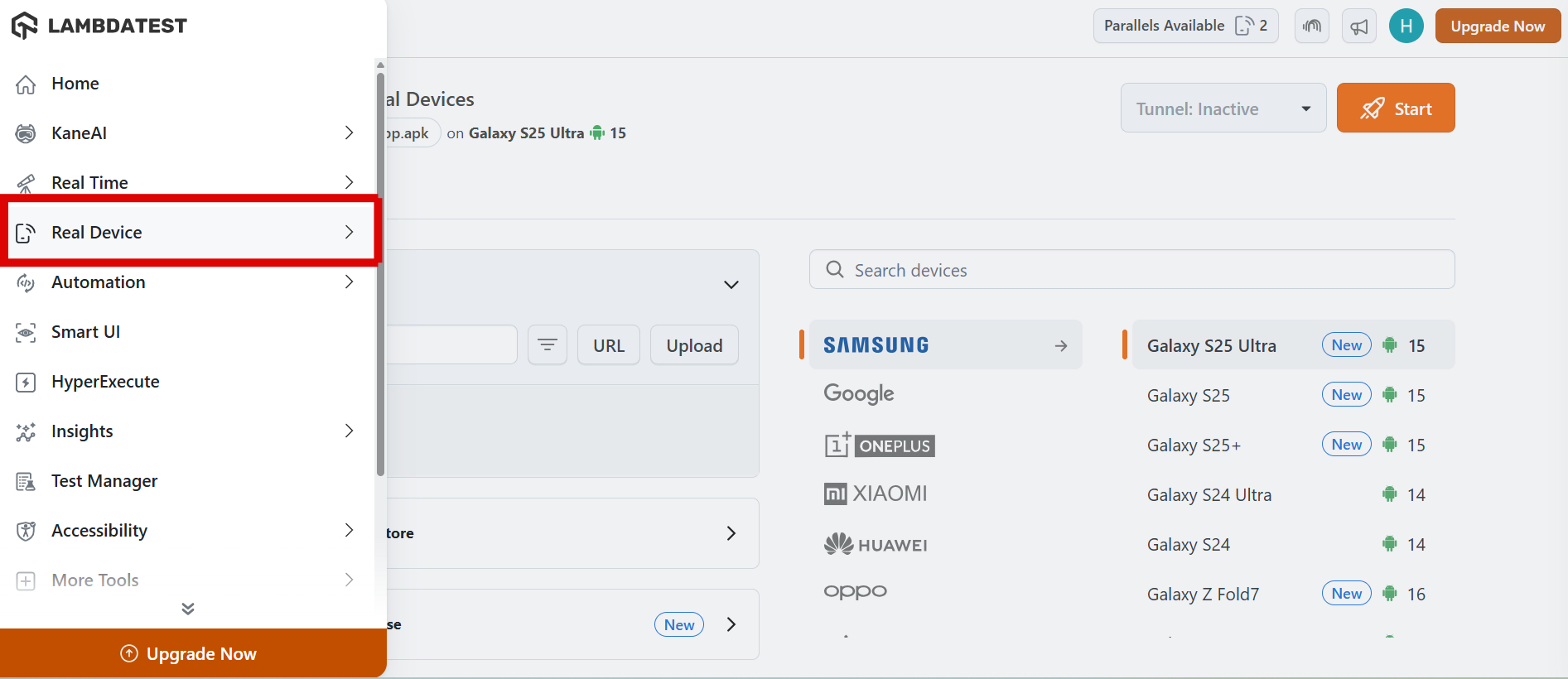
- From the left sidebar, choose Real Device > Browser Testing.
- Enter a test URL of your choice, and choose VERSION, OS, and RESOLUTION. After that, click on START.
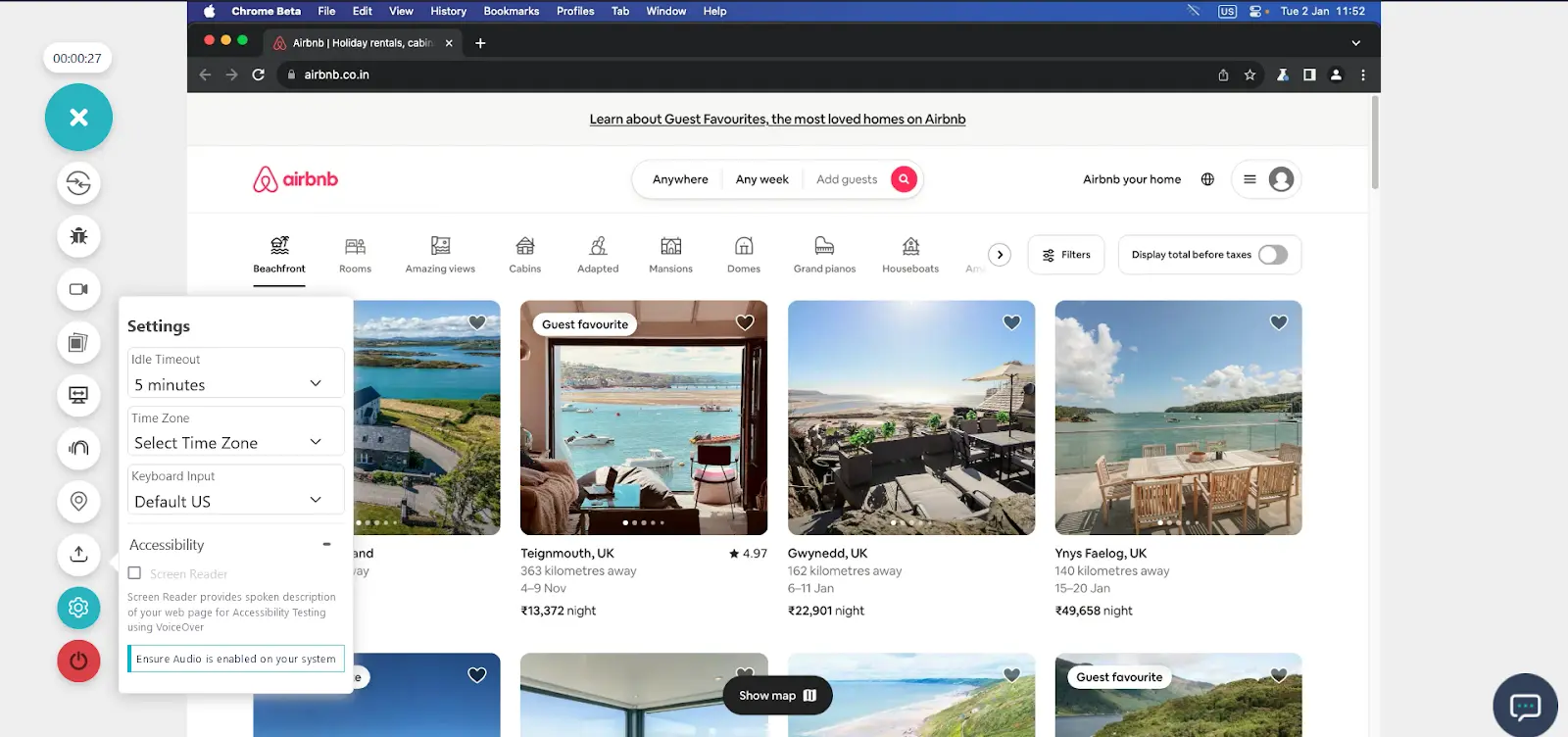
- After a cloud-based machine launches, click on the Settings icon and choose Accessibility.
- Select the checkbox that says Screen Reader, and you’ll get a verbal description of your web page using VoiceOver.
Utilize the Accessibility DevTools Chrome Extension for Manual Testing
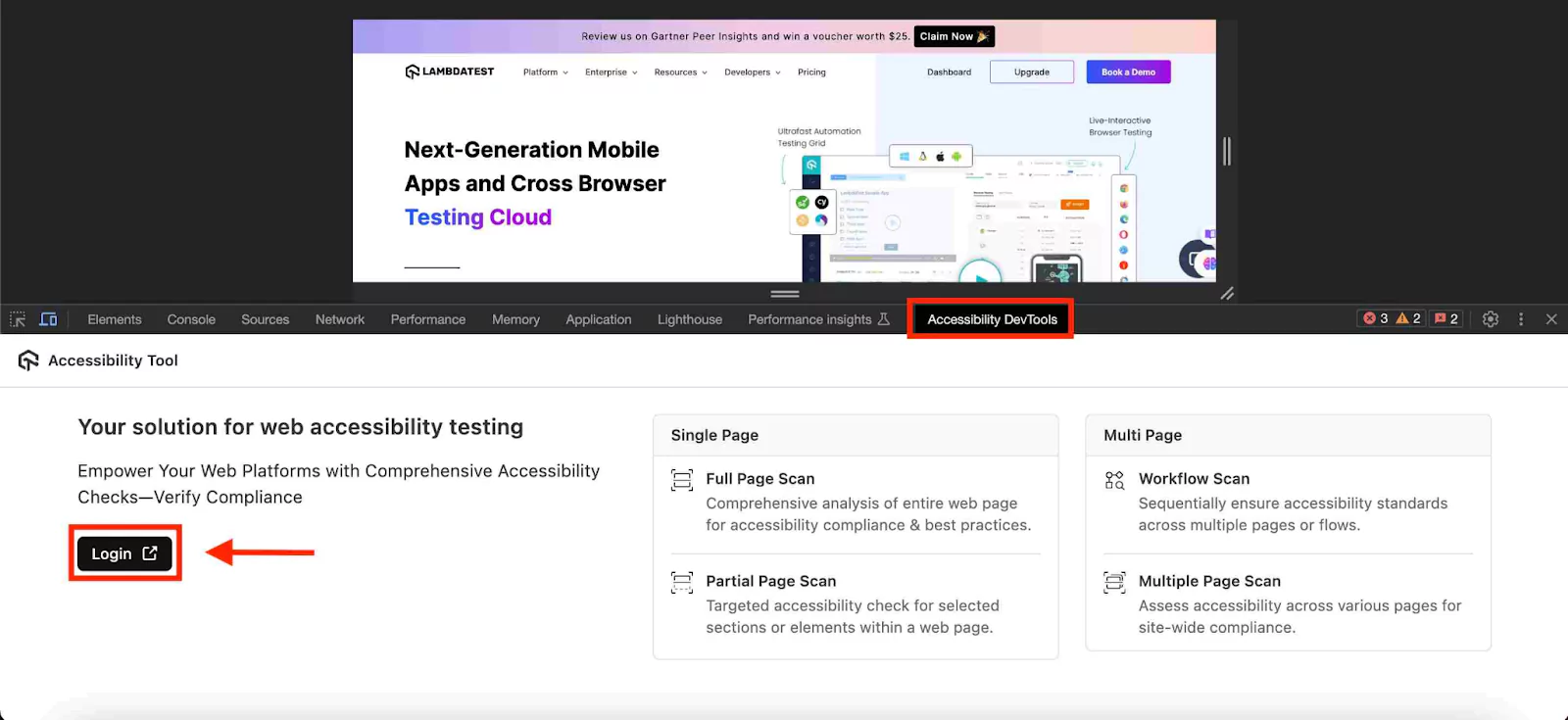
TestMu AI Accessibility DevTools (LT DevTools) are robust tools designed to assist developers and testers in identifying and rectifying accessibility issues on websites. These tools seamlessly integrate with the Chrome browser, enabling comprehensive scans and assessments to ensure adherence to accessibility standards. Here are the steps to effectively use Accessibility DevTools:
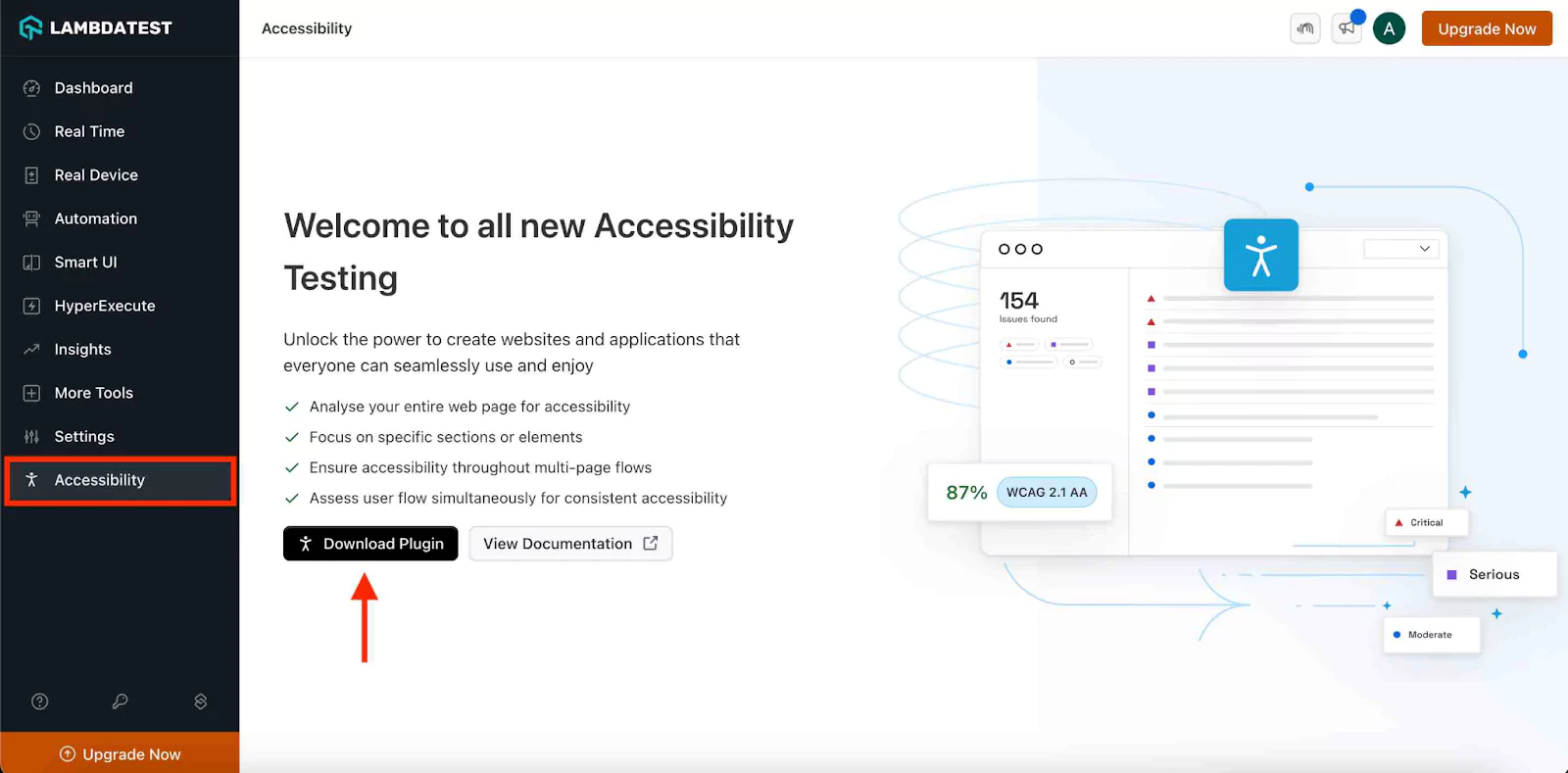
- Install the Extension: Go to the Accessibility Dashboard and click the "Download Plugin " button.
- Access DevTools: Open the website you wish to test. Navigate to the browser's inspect section and select the Accessibility DevTools option. This will reveal the extension’s features and tools.
- Select and run your scan:From the main accessibility dev tools menu, select the preferred type of accessibility scan and execute.. Accessibility DevTools offers several scanning options:
- Single Page Scan: Conduct a comprehensive analysis of an individual page to assess its accessibility compliance and adherence to best practices.
- Partial Page Scan: Focus on specific sections or elements within a page for a targeted accessibility check.
- Multi-Page Workflow Scan: Sequentially review multiple pages or workflows to ensure consistent accessibility standards across different user flows.
- Multiple Page Scan: Evaluate the accessibility of various pages to ensure site-wide compliance.
- Review the scan: Execute the selected scan option to identify any accessibility issues. The scan will provide detailed feedback, highlighting areas that require improvement and ensuring that your site or app meets accessibility standards.
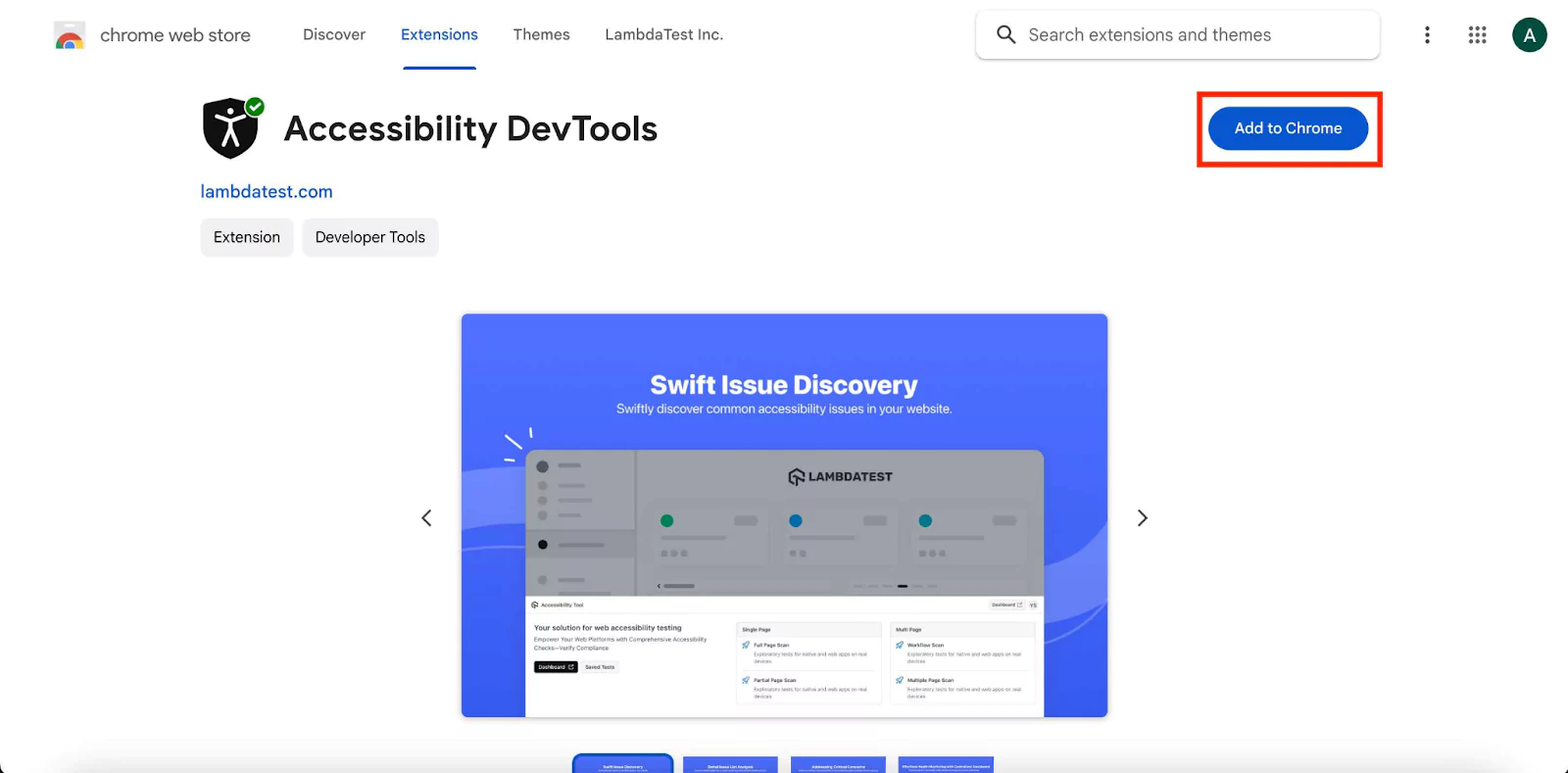
You will be redirected to the Chrome Web Store, where you can install the TestMu AI Accessibility DevTools extension. This tool will help you evaluate the accessibility of your website.
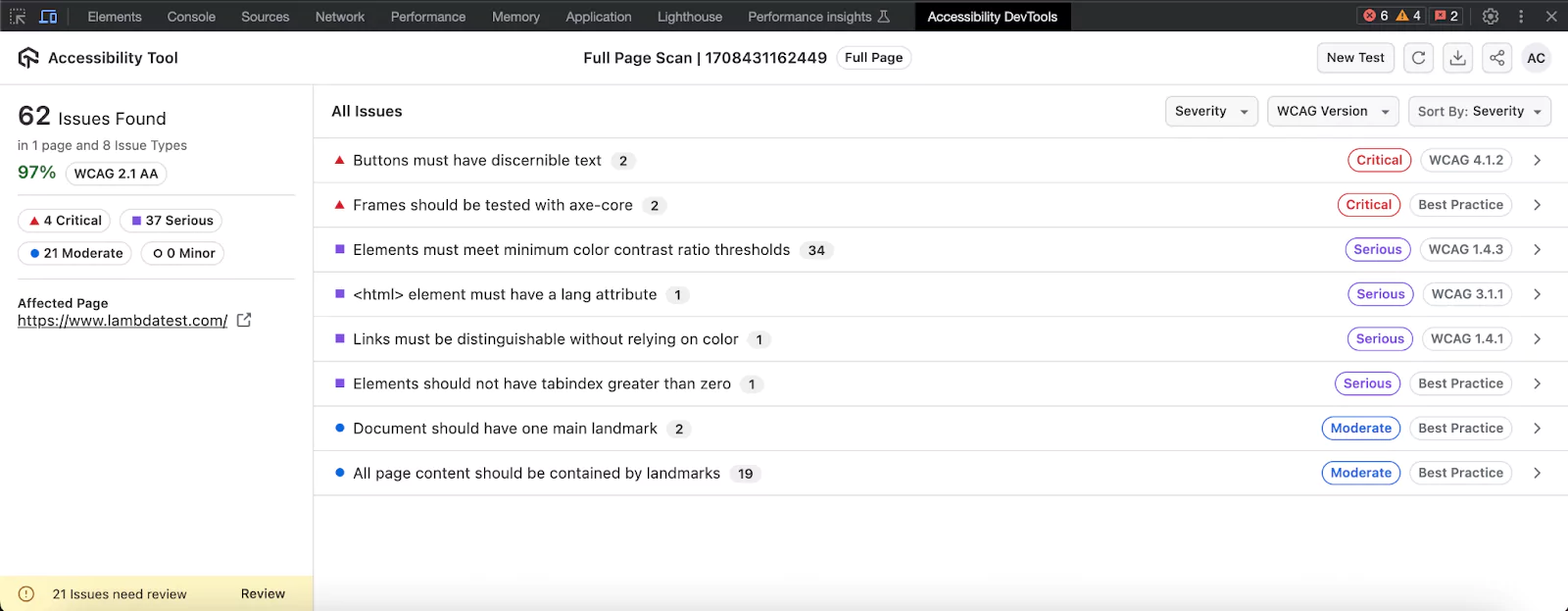
To get a detailed analysis of your accessibility scan, click on the “Dashboard” button on the accessibility devtools menu. You can also access the report directly through your TestMu AI dashboard.
Perform Accessibility in Automation Testing
Imagine a world where all users can access your content seamlessly. TestMu AI Accessibility Automation makes this possible by automating accessibility checks in your web applications, ensuring compliance with standards like the Web Content Accessibility Guidelines (WCAG).
You can easily integrate accessibility testing to your development process and automate it with Selenium, Playwright, and Cypress. With automatic DOM monitoring, you can keep your web apps compliant without the extra effort, boosting your testing efficiency.
To kick off automated accessibility testing, check out the guide on Accessibility Automation.
Why It Matters:
- Efficiency: Save time and resources by automating repetitive testing tasks.
- Consistency: Identify accessibility issues across all pages and applications.
- Scalability: Handle large websites with ease, maintaining inclusivity as you grow.
- Compliance: Meet legal standards like WCAG, ADA, and Section 508 confidently.
How It Works:
- Seamless Integration: Works with testing frameworks such as Selenium.
- Detailed Reporting: Provides reports on accessibility issues, their severity, and recommended fixes.
- Automated Scanning: Thoroughly checks web pages for accessibility best practices, including alt text for images, color contrast, and ARIA attributes.
Execute Your Automation Test with Accessibility Tool
Step 1: Set Up Your Test Suite
You can configure and test using your own project or a sample repository. If using your own project, update the Hub endpoint in your test file to establish communication between your tests and browser nodes. Configure the desired capabilities as needed:
DesiredCapabilities capabilities = new DesiredCapabilities();
capabilities.setCapability("browserName", "chrome");
capabilities.setCapability("version", "70.0");
capabilities.setCapability("platform", "win10"); // Default to available platform if not specified
capabilities.setCapability("build", "LambdaTestSampleApp");
capabilities.setCapability("name", "LambdaTestJavaSample");
Step 2: Establish User Authentication
Export your TestMu AI credentials from the TestMu AI Profile page using the commands below:
Linux / MacOS:
export LT_USERNAME="YOUR_LAMBDATEST_USERNAME"
export LT_ACCESS_KEY="YOUR_LAMBDATEST_ACCESS_KEY"
Windows:
set LT_USERNAME="YOUR_LAMBDATEST_USERNAME"
set LT_ACCESS_KEY="YOUR_LAMBDATEST_ACCESS_KEY"
Step 3: Configure Accessibility Capabilities
Enable accessibility testing by setting `accessibility: true` in your configuration file. Adjust additional settings as needed:
capabilities: [{
  accessibility : true,                 // Enable accessibility testing
  accessibility.wcagVersion: 'wcag21a', // Specify WCAG version (e.g., WCAG 2.1 Level A)
  accessibility.bestPractice: false,    // Exclude best practice issues from results
  accessibility.needsReview: true       // Include issues that need review
}]
Step 4: Execute and Monitor Your Test
Run your tests and access the Automation Dashboard. Click on the Accessibility tab to view the generated report.
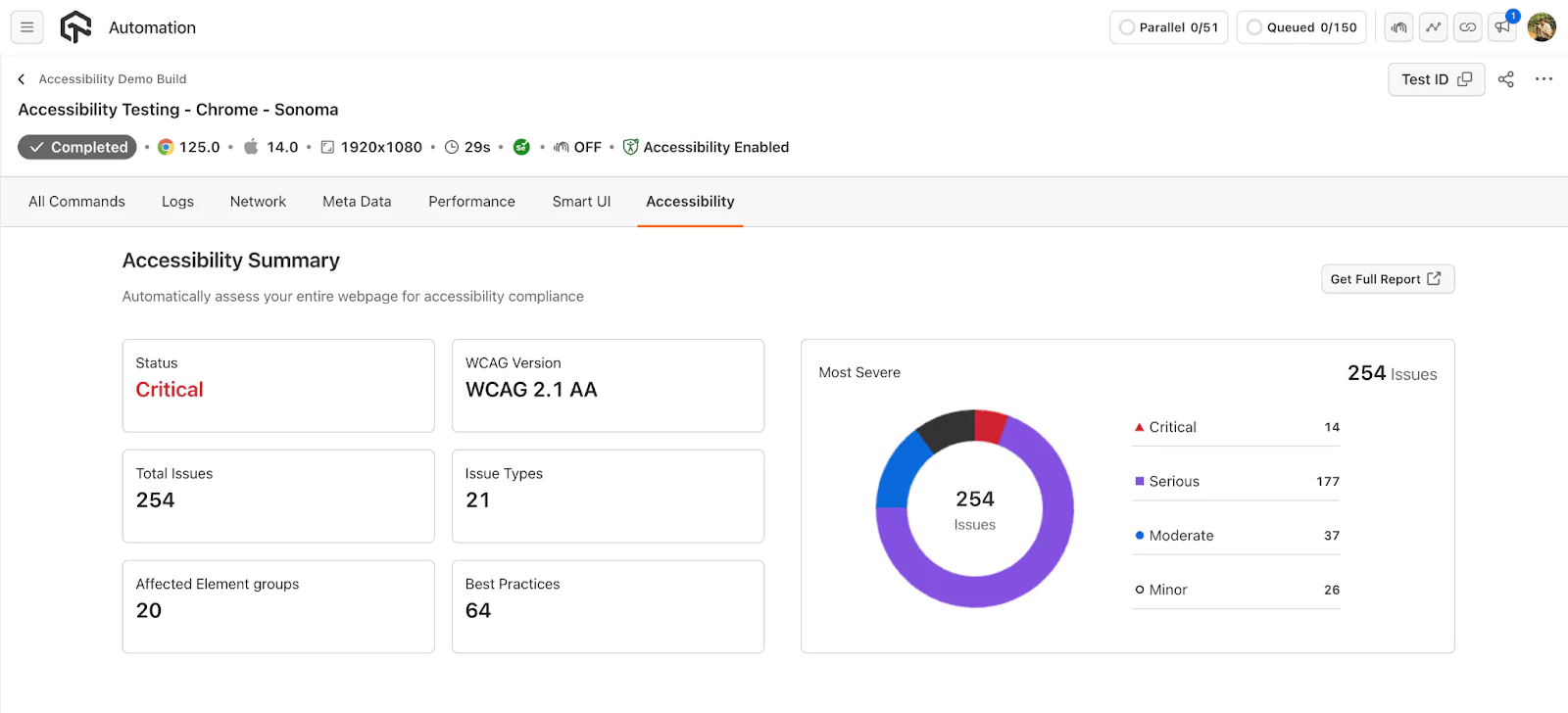
By following these steps, you can effectively utilize TestMu AI to ensure your website is accessible to all users.
Test Cases for Accessibility Testing
Now that we have established the importance of accessibility testing for mobile apps, it is important to note some specific accessibility testing test cases to illustrate how far-reaching it is when implemented. An accessible app should work with screen readers, speech recognition software, and magnification. Here are some standard test cases for usability testing:
- Alternative texts:- Verifies that all images and decorators on the website must have appropriate alternative text for screen reader users.
- Keyboard navigation:- Evaluate keyboard navigation accessibility by navigating through the website or application using only the keyboard shortcuts.
- Color contrast:- Verify that the color contrast between the background, images, and text is sufficient for visually impaired users, such as those with color blindness or low vision.
- Form labels:- Check that all input form elements have appropriate labels to assist screen reader users instead of only having color codes. If an input is invalid, the form must show a label of “incorrect value” instead of only changing its color to red.
- Multimedia captions:- Verify that all multimedia content on the website, including video and audio, has transcripts or captions for users with hearing disabilities.
- Legal compliance:- Verify that the website or application developed meets general and country-specific accessibility standards and guidelines, such as WCAG 2.1 and the Americans with Disabilities Act (ADA).
- Website’s content resizability:- Ensure that the website developed can support magnification tools or internally have a zoom-in or zoom-out functionality to maintain readability and usability at different zoom levels.
Examples of Accessibility Testing
To understand the concept of accessibility testing better, let’s see examples of some apps developed by renowned organizations that use accessibility testing and ensure that their app makes life easier for persons with impairment.
Example 1 - Google Assistant (Developed by Google LLC)
Google Assistant is a commonly used app worldwide. This app integrated accessibility testing and ensured it was accessible to almost everyone, irrespective of disabilities. It provides a personal user experience to all its users. It has the following features that make it accessible to people with disabilities:-
- It is integrated with text-to-speech and speech-to-text features, making the app accessible to persons with vision or physical impairment.
- Google Assistant can run the smartphone's core functionalities via voice commands–for example, making a call, navigating to a place, opening any app, or setting reminders.
- It can answer various queries by fetching and summarizing data from the internet.
Example 2 - Color Contrast
Color contrast is a critical accessibility feature used to make websites readable for everyone. Websites that implement proper color contrast ensure that text is clear against its background, which is essential for users with visual impairments. Key aspects include:
- Adequate Color Contrast: Websites check that text color contrasts sufficiently with the background color. This helps users with low vision or color blindness read the content more easily.
- Compliance with Standards: Websites meet specific guidelines, like the Web Content Accessibility Guidelines (WCAG), which set minimum contrast ratios for normal and large text to ensure readability.
Example 3 - Text Alternatives
Text alternatives are important for users who cannot see images. By providing descriptive text, websites ensure that everyone can understand what is being displayed. Key features include:
- Descriptive Alt Text: Each image on a website includes a descriptive alt text that conveys what the image represents.
- Screen Reader Support: This text helps users who rely on screen readers understand the content of images, enhancing the overall accessibility of the website.
Example 4 - ARIA Testing
ARIA (Accessible Rich Internet Applications) roles and attributes are used to improve the experience for users with disabilities. Websites that incorporate ARIA roles ensure that interactive elements are accessible. Key features include:
- Correct ARIA Roles: Websites apply ARIA roles to elements like buttons and form controls to describe their function. For example, a button might have an ARIA role that identifies it as a “submit” button.
- Enhanced Screen Reader Experience: Proper use of ARIA roles helps screen readers convey the purpose of interactive elements, making it easier for users with visual impairments to navigate and interact with the site.
Example 5 - Keyboard Navigation
Keyboard navigation is crucial for users who cannot use a mouse. Ensuring that a website or app is navigable via keyboard helps make it accessible. Key features include:
- Keyboard Accessibility: Users can navigate through all interactive elements, such as links and buttons, using only keyboard shortcuts like the “Tab” key.
- Functional Shortcuts: Websites test that all interactive elements are reachable and usable with keyboard commands, ensuring users can interact with content without relying on a mouse.
Best Practices for Accessibility Testing
It's impossible to amount to something significant without following a pragmatic approach. In short, do everything right to make the most out of accessibility tests for your offering. Let's check out some of its best practices.
- Test early and often:- Testing accessibility should be a part of the development process, and testers should perform it at multiple stages, such as during design, development, and QA.
- Use manual and automated testing:- Both manual and automated testing methods have their strengths and weaknesses. Automated testing can quickly identify common issues, while manual testing can reveal more complex problems.
- Test with real users:- User testing is the best way to discover and address accessibility issues. Test with a diverse group of users, including those with different disabilities.
- Test across devices and browsers:- Accessibility issues can be different depending on the device and browser being used. Test on different platforms, browsers, and devices.
- Check for compatibility with assistive technologies:- It is important to test the website or application with different assistive technologies, like screen readers, to ensure that it is compatible with them.
- Document and track issues:- Keep a record of all accessibility issues found during testing and track them to resolution.
- Regularly update and maintain your site:- Websites are dynamic and frequently change, so accessibility testing should be a regular practice to maintain the accessibility of a website.
- Use Web Accessibility Guidelines (WCAG):- WCAG provides a set of guidelines and success criteria for accessible web design.
- Select the right tools:- Choose from a wide array of tools like TestMu AI, which streamlines accessibility testing by automating processes and swiftly identifying common issues.
- Integrate accessibility tests into the development process:- Making accessibility tests a part of the development process rather than an afterthought ensures that accessibility is considered from the start and can help prevent issues from arising in the first place.
Conclusion
Businesses must ensure their website and app content is accessible to all individuals, including those with impairments. This includes accommodating the unique needs of individuals with disabilities such as hearing loss, partial blindness, and motor limitations. Implementing best practices such as proper color contrast, appropriate multimedia placement, and using captions and alt text are key to achieving accessibility.
To ensure compliance with regulations like WCAG, Section 508 and the ADA Act, businesses should seek accessibility testing from a reputable QA and independent software testing services provider to ensure their apps and websites are fully accessible to all users.


Frequently asked questions
Did you find this page helpful?
More Related Hubs
TestMu AI forEnterprise
Get access to solutions built on Enterprise
grade security, privacy, & compliance
- Advanced access controls
- Advanced data retention rules
- Advanced Local Testing
- Premium Support options
- Early access to beta features
- Private Slack Channel
- Unlimited Manual Accessibility DevTools Tests