

Next-Gen App & Browser Testing Cloud
Trusted by 2 Mn+ QAs & Devs to accelerate their release cycles


How to Update ChromeOS: A Step-by-Step Guide
Learn how to update ChromeOS with easy steps. Keep your device secure and up to date with the latest features and fixes.

Bhavya Hada
January 12, 2026
Maintaining your device with the latest OS updates is crucial to taking advantage of new features, security fixes, and performance enhancements. Updating any OS on a device, including ChromeOS, is easy and can be done with just a few clicks.
Here’s everything you need to know about how to update ChromeOS.
Steps to Update ChromeOS Manually
Below are the steps to update ChromeOS:
- Click on the clock in the bottom-right corner of your screen to open Quick Settings.
- In the Quick Settings menu, click the gear icon to open the Settings menu.
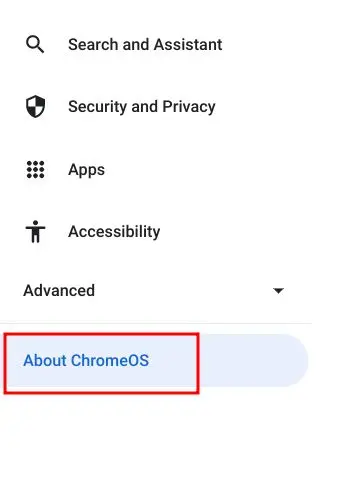
- In the left-hand panel of the Settings menu, scroll down and select “About ChromeOS“.
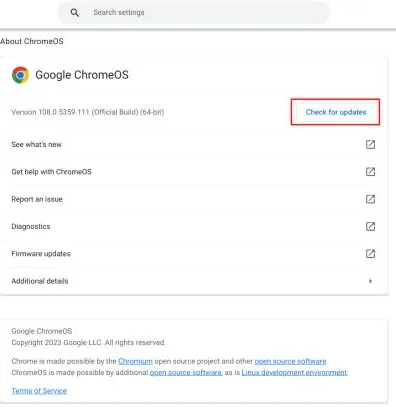
- Next, click Check for updates in the right pane, and your ChromeOS will search for any available updates.
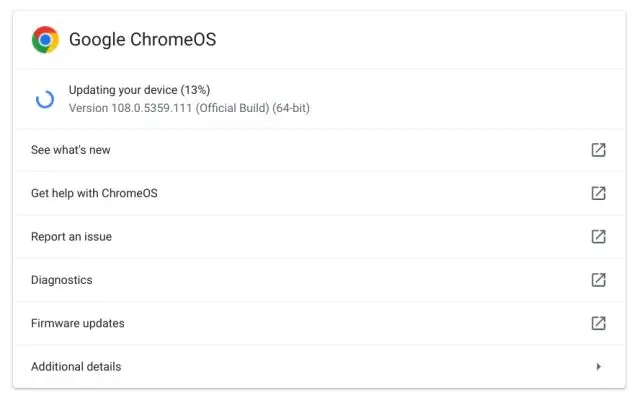
- If an update is available, will automatically begin downloading the ChromeOS latest version.
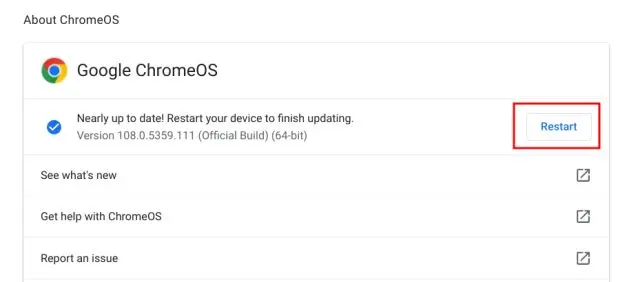
- After a few seconds, click Restart to install the update. Your ChromeOS will be updated to the latest version once it restarts.
Steps to Update ChromeOS Automatically
By default, ChromeOS devices automatically update to the latest version. It’s recommended to keep this setting for security fixes and new features.
Follow the below steps to enable ChromeOS updates automatically.
- Sign in to the Admin console with an admin account.
- Go to Menu > Devices > Chrome > Settings > Device settings.
- Select the organizational unit (or leave the top unit for all devices).
- Under Device update settings, click Auto-update settings and choose Allow updates.
- Click Save.
This ensures devices receive the latest updates automatically.
Steps to Troubleshoot ChromeOS Update Issues
Sometimes, you might encounter issues while updating ChromeOS.
Here’s how to address common problems:
- No Updates Available: Ensure your ChromeOS is connected to the Internet and wait a few minutes before trying again.
- Low Storage Space: Free up storage by deleting unnecessary files or uninstalling unused apps.
- Update Fails: Restart your ChromeOS and try updating again. If the issue persists, perform a factory reset.
- Unsupported Device: Older Chromebooks may no longer receive updates. Check the End of Life (EOL) date for your device on Google’s official support page.

Conclusion
Regular updates ensure your ChromeOS runs smoothly, securely, and efficiently. By staying up to date, you’ll enjoy the latest features, improved performance, and peace of mind knowing your device is secure. Updating ChromeOS is quick, easy, and beneficial—so don’t wait. Make sure to update ChromeOS today and keep your Chrome performing at its best!


Frequently asked questions
Did you find this page helpful?
More Related Hubs
TestMu AI forEnterprise
Get access to solutions built on Enterprise
grade security, privacy, & compliance
- Advanced access controls
- Advanced data retention rules
- Advanced Local Testing
- Premium Support options
- Early access to beta features
- Private Slack Channel
- Unlimited Manual Accessibility DevTools Tests