

Next-Gen App & Browser Testing Cloud
Trusted by 2 Mn+ QAs & Devs to accelerate their release cycles


On This Page
- Snowflake Test Case Template
- CI CD Test Case Template
- Jenkins Test Case Template
- Salesforce Test Case Template
- ServiceNow Test Case Template
- Shopify Test Case Template
- Ecommerce Test Case Template
- Xamarin Test Case Template
- React Test Case Template
- Angular Test Case Template
- Gaming Platform Test Case Template
- Vercel Test Case Template
- Wix Test Case Template
- CMS Test Case Template
- Flutter Test Case Template
- Site Generator Test Case Template
- Website Builder Test Case Template
- Mobile Development Test Case Template
- Healthcare Domain Test Case Template
- Insurance Domain Test Case Template
- Retail Testing Test Case Template
- Media and Entertainment App Testing Test Case Template
- Telecom Domain Test Case Template
- Travel and Hospitality App Testing Test Case Template

Comprehensive Sign Up Test Cases for Improve User Experience
Maximize user sign ups with our comprehensive sign up test cases. Ensure seamless user experience and address cross-browser compatibility issues.

Deeksha Agarwal
January 30, 2026
Every user journey on a website starts from a signup page. Signup page is one of the simplest yet one of the most important page of the website. People do everything in their control to increase the conversions on their website by changing signup pages, modifying them, performing A/B testing to find out the best pages and what not. But the major problem that went unnoticed or is usually underrated is testing the signup page. If you try all the possible hacks but fail to test it properly you’re missing on a big thing. Because if users are facing problem while signing up they leave your website and will never come back.
For your convenience, we have also compiled different types of test case templates.
Testers and QA have a huge challenge while testing a signup page because of the varied possibilities around testing it. Many times, the process works fine on one browser but fails on the other. Cross browser compatibility plays a major role here. So, there needs to be followed a proper testing template to make sure you cover all the aspects of testing a signup page.
We have decided to make the task easier for everyone out there. If you follow all the testing instructions, you can be sure that your signup page is working fine across all browser, operating systems, and devices. We have also added a template at the bottom of the blog page. You can download that free and use it for testing your signup page.

Before We Start Testing The Signup Pages
So before moving with the test cases, we need to gather some requirements like:
- First Name
- Last Name
- User Name
- Email ID
- Phone Number
- Password
- Confirm Password
- Address
- Gender
The fields may also vary according to your registration process. I have tried to cover the maximum possibilities for a sign up page.
WorkFlow of Testing a SignUp Page
- Enter the necessary fields: Name, Email ID, Password, Confirm Password
- Validate the fields:
- Password: Should have 8 to 16 characters, must contain one special character, at least one uppercase character, and have a numerical.
- Phone number: Country code is required, only numbers are allowed.
- Verify the email ID: Send a verification to the entered Email ID after a successful validation
- should be there on the mandatory fields.
APIs issues in a Signup Page
The major challenge you’ll face here is to test all possible scenarios for all the possible combinations of browsers, devices, and OSes. Because as we know that the sign up process makes use of APIsand API compatibility in browsers needs to be taken care of. So many times, you’ll find that your sign up is working on a browser but when a user tries to do the same from any other browser or device it will fail.
Browser Incompatibility: Authentication Problems in a Signup Page
If a signup page uses strong authentication techniques like second-factor authentication utilizing text SMS verification(or without that), password-less authentication, or encrypted public key then there might be a possibility of cross browser compatibility issues in authentication. Because these techniques make use APIs like web authentication API . The problem that occurs here is that these APIs are unsupported in various browsers.
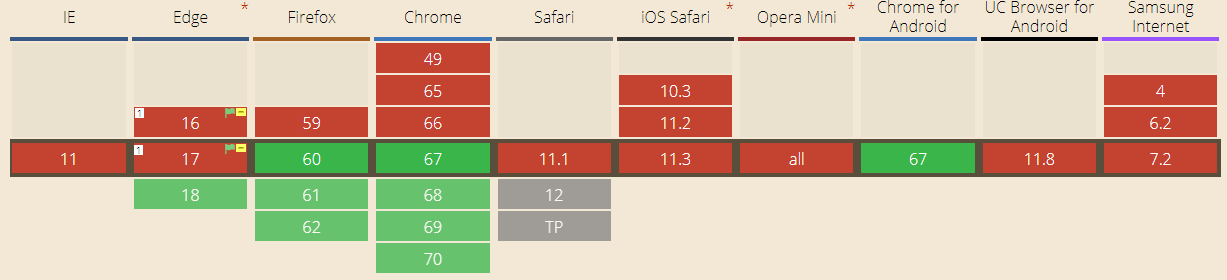
So authentication will fail on browsers like: IE, older edge versions, older chrome and firefox versions, Safari, iOS Safari, Opera Mini, UC Browser, and Samsung internet. So, if a user tries to signup using these browser, he’ll not be able to finish it off. So, you need to test for these browsers and make sure that the authentication works on all browsers.
Payment APIs in A SignUp Page
There are many websites that ask for payment details or card validation details on signup. So, the registration or sign up may fail if the payment is not processed successfully or the card is not validated.
Developers make use of APIs like Payment Request API for allowing web pages to switch information from the user agent. This is basically done when the user agent provides input before it approves or denies a payment request. This API again comes with some incompatibility issues.
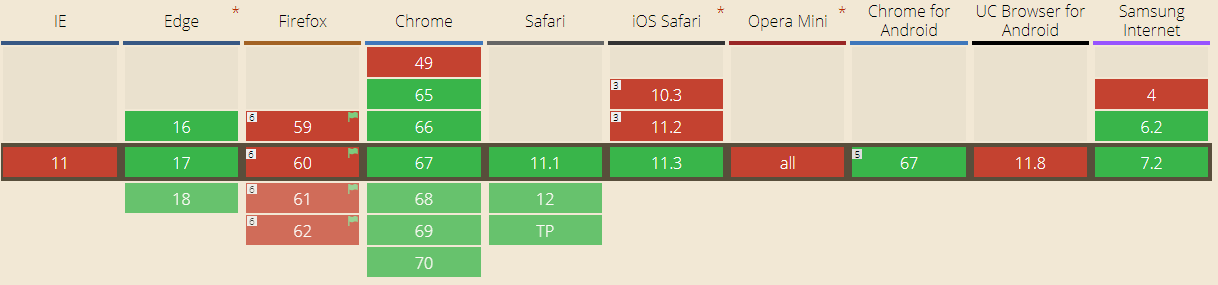
So, you need to test the payment process for all browsers.
Animations API for a Signup Page
While designing a signup page, we make sure of creating a beautiful design by adding some beautiful animations on the buttons for signup. However sometimes this might cause a huge problem.
APIs like Web Animations API that allow you to synchronize and change timings of a web page (animations of DOM elements), sometimes cause compatibility issues in browsers.
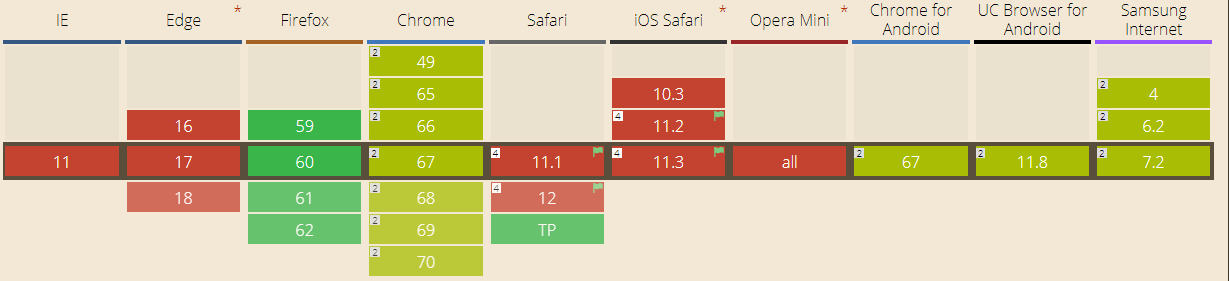
As you can see, APIs holds a major portion of compatibility issues in a signup process. So it’s important to test APIs and overall page functionalities as well for a signup page along with the mentioned test cases for a signup process on all browsers and browser versions. TestMu AI platform can help you in making sure that your page is compatible across all browsers.
Read more on various APIs and Browser Compatibility.

Test Cases For a Signup Page
Buttons
- Check all buttons, radio buttons, checkboxes by clicking on all buttons and see if they are working or not.
Required Fields
- Check all required fields by not entering the data and (*) should be shown asking for mandatory field.
- Check all required fields by entering the data and validating. Upon entering the all required fields User should be signed up, A successful registration message should be sent along with a mail.
Optional Fields
- Check all optional fields by entering the data and a successful registration should happen.
- Check all optional fields by not entering the data and again the user should be successfully register without asking for the optional fields.
- Check by filling some optional fields and leaving some and the user should be successfully register without asking for the optional fields.
Email Validation
- Test for some invalid emails with cases like: without @, without(.), without domain, without alphabets before @. In such cases the user should be prompted to enter a valid email address and the user shouldn’t be signed up.
- Test for valid email addresses by entering valid email addresses and then click on signup. User should be registered successfully.
- Test for valid but already existing email address. User should not be signed up and prompted to login instead.
Phone number Validation
- Test for non-numeric inputs by entering some alphabets or special characters. Since, it’s a number field so it should show an error and ask user again to enter the correct phone number.
- Test for numeric inputs by entering a valid number and clicking on signup. The user should be registered successfully.
- Test for input with country code applied by entering a number starting from + followed by dial code. User must not get any error message on that.
Password Validation
- Check the password for less value than the minimum characters specified. Enter a password of less than 8 characters and then click on signup. The user should see a message to enter a value between 8 to 16 characters and shouldn’t be signed up.
- Check the password for more value than the maximum characters specified. Enter a password of more than 16 characters and then click on signup. The user should see a message to enter a value between 8 to 16 characters and shouldn’t be signed up.
- Enter a password without alphanumeric characters and click on signup. It should prompt the user to enter a password having alphanumeric characters.
- Check by entering an alphanumeric password between 8-16 characters and a special character. It should not give any error and signup should be successful.
User Interface
- Tab functionality should work fine. Check by pressing tab button. It should navigate between the fields.
- Enter button should act as a substitute for click on signup button and the user should be successfully signed up on pressing enter.
- Verify that the cursor should change according to the fields. On text fields, it should be a ⌶, on buttons it should be a hand pointer.
Watch this video to learn how to automate the signup form page using Selenium 4 and Java.
Template of Test Cases for a Sign Up Page
You can also use this test case template for maintaining your test results for a signup page. Download it free and use this as a standard template.
When it comes to , you can verify all the above test results across all browsers one by one.
For more information on how to perform cross browser testing using TestMu AI read our blog by formulating a perfect cross browser testing strategy and make sure your users don’t bounce back because of some silly bugs.
Happy testing and happy conversions!


Did you find this page helpful?
More Related Hubs
TestMu AI forEnterprise
Get access to solutions built on Enterprise
grade security, privacy, & compliance
- Advanced access controls
- Advanced data retention rules
- Advanced Local Testing
- Premium Support options
- Early access to beta features
- Private Slack Channel
- Unlimited Manual Accessibility DevTools Tests