

Next-Gen App & Browser Testing Cloud
Trusted by 2 Mn+ QAs & Devs to accelerate their release cycles


Ensure Mobile App Design Accuracy: Introducing SmartUI Figma App CLI
Ensure design accuracy in mobile apps with SmartUI Figma App CLI. Auto-compare real device screenshots with Figma designs for faster, error-free releases.

Mythili Raju
January 29, 2026
In mobile app development, a common challenge is making sure the user interface of an app matches the original Figma designs exactly. Even small visual differences can impact the user experience, slow down feedback, and delay the final release.
Traditionally, teams check designs by manually taking app screenshots and comparing them side by side with Figma files. This approach is slow, prone to mistakes, and difficult to manage across different screen sizes and layouts.
To solve this, TestMu AI offers the SmartUI Figma App CLI. It automatically compares real device screenshots with Figma designs, quickly spotting visual issues early in development. It helps teams keep the design accurate and speeds up the release process.
To get started, check out the documentation on the SmartUI Figma App CLI.
What Is SmartUI Figma App CLI?
The SmartUI Figma App CLI helps ensure that mobile app screens match the original Figma designs by automatically comparing screenshots with design files. It closes the gap between design and development by directly linking app builds to Figma designs.
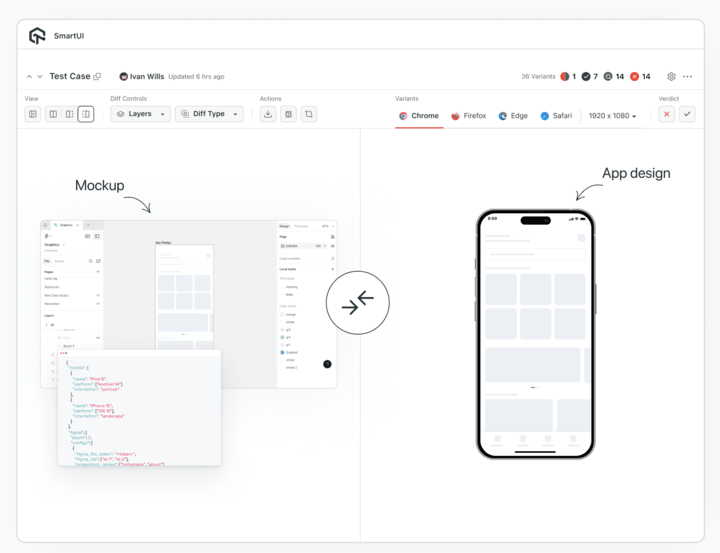
The CLI captures screenshots from actual devices and highlights any visual differences, removing the need for manual checks and subjective reviews. This ensures that the final app closely follows the intended design across all devices and platforms, leading to a more consistent look and smoother development process.
Why Use SmartUI Figma App CLI?
The SmartUI Figma App CLI delivers several key benefits that streamline how teams ensure design accuracy:
- Eliminate Manual Validation: Captures screenshots from real devices and compares them against Figma designs, identifying visual differences with precision.
- Cross-Platform Consistency: Supports both Android and iOS platforms. Test multiple devices simultaneously across various screen sizes and platform-specific UI patterns.
- Accelerate Release Cycles: Early detection of design issues reduces revision rounds and speeds up development.
- CI/CD Pipeline Integration: Integrates into existing development workflows. Automated checks ensure every build maintains design integrity.
Conclusion
The introduction of SmartUI Figma App CLI marks a significant advancement for mobile app development teams seeking to maintain design accuracy and streamline their workflows.
TestMu AI remains committed to providing comprehensive testing solutions that address real-world development challenges, helping teams deliver mobile applications that meet both functional requirements and visual design standards.
For questions or implementation support, reach out through our in-app chat or email [email protected]. Our support team is available to guide you through every aspect of your testing workflow.
Happy testing!


Did you find this page helpful?
More Related Hubs
TestMu AI forEnterprise
Get access to solutions built on Enterprise
grade security, privacy, & compliance
- Advanced access controls
- Advanced data retention rules
- Advanced Local Testing
- Premium Support options
- Early access to beta features
- Private Slack Channel
- Unlimited Manual Accessibility DevTools Tests