

Next-Gen App & Browser Testing Cloud
Trusted by 2 Mn+ QAs & Devs to accelerate their release cycles


NUnit Tutorial: Setting Up NUnit Environment With Visual Studio
Want to setup NUnit environment for your first test? In this NUnit tutorial, you will learn to setup a test runner and Selenium WebDriver with Visual Studio for NUnit test case development.

Himanshu Sheth
December 24, 2025
NUnit is a popular open-source unit testing framework for C#. It is ported from the JUnit framework. It is one of the most popular test frameworks used for the development and execution of tests with the .NET language. In this NUnit Testing Tutorial, we look at NUnit setup example of the environment for developing and executing NUnit tests.
Overview
NUnit is a popular open-source testing framework for .NET that helps developers write and organize automated tests easily. You can use it for both unit and Selenium-based automation testing in C#.
Setting Up NUnit in Visual Studio
- Create a Test Project: Open Visual Studio → Create a new NUnit Test Project (.NET Core).
- Install Packages: From NuGet, install NUnit, NUnit3TestAdapter, and Microsoft.NET.Test.Sdk.
- Add Reference: If testing another project, add a reference to it.
- Run Tests: Open Test Explorer → Click Run All Tests, or use the CLI:
dotnet test
Writing Your First NUnit Test
using NUnit.Framework;

[TestFixture]
public class CalculatorTests {
    private Calculator calc;

    [SetUp]
    public void Setup() => calc = new Calculator();

    [Test]
    public void Add_TwoNumbers_ReturnsSum() {
        int result = calc.Add(5, 3);
        Assert.AreEqual(8, result);
    }
}
This follows the Arrange–Act–Assert pattern, set up data, perform the action, and verify results.
Key NUnit Attributes
- [TestFixture]: Marks a test class
- [Test]: Identifies a test method
- [SetUp] / [TearDown]: Run before or after each test
- [OneTimeSetUp] / [OneTimeTearDown]: Run once per test class
- [TestCase]: Runs the same test with multiple inputs
NUnit eases automation testing with C# as it is compatible with automation test suites such as Selenium, there are also many other uses of using Selenium check out What Is Selenium? Availability of annotations (or attributes) helps in speeding up the development of test cases. You can also use the NUnit framework for TDD (Test Driven Development). If you are preparing for an interview you can learn more through NUnit interview questions.

In this NUnit testing tutorial, NUnit setup example is demonstrated using Visual Studio 2019. Most of the .NET developers use Visual Studio for writing code as it eases the process of test case development, debugging, testing, and maintenance. NUnit Visual Studio Adapter is used to execute NUnit tests as it works with all the current editions of Visual Studio.
Setting up Visual Studio For NUnit Test Case Development
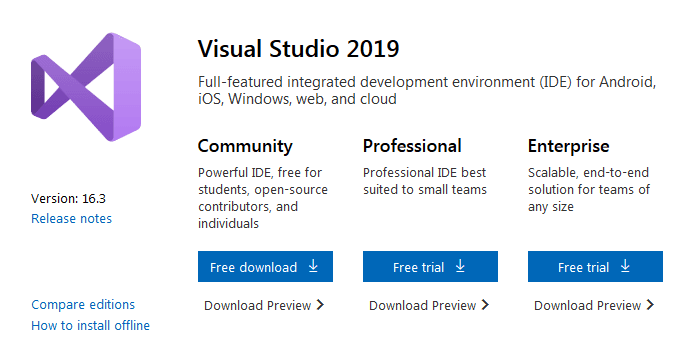
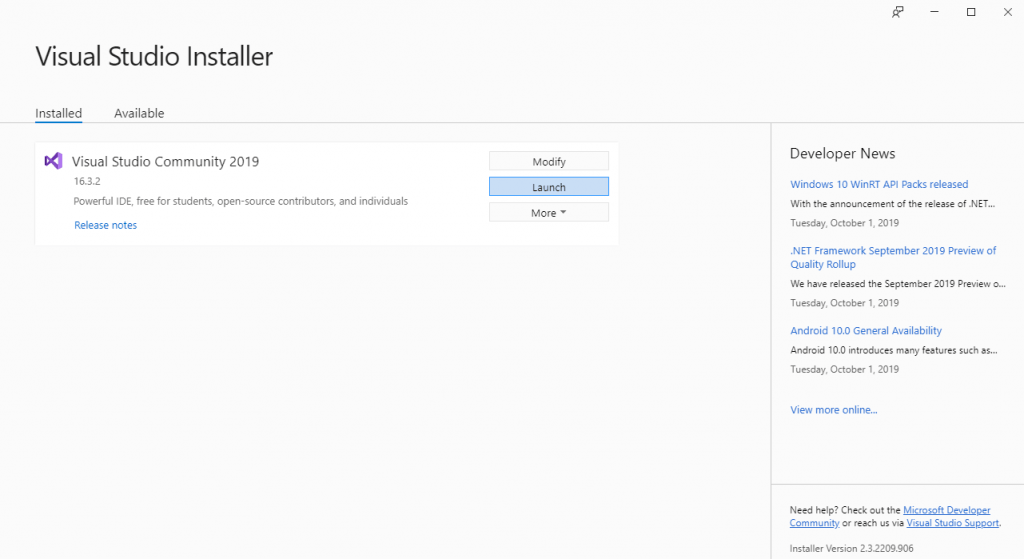
Before we look at the NUnit setup example, we need to setup the development environment (or IDE) for NUnit test case development. You need to follow the below steps for installing Visual Studio 2019 (VS 2019):
- Download the latest version of Visual Studio. Depending on the requirement, you can download the Community, Professional, or Enterprise edition of Visual Studio 2019. In this NUnit testing tutorial, we make use of the Community Edition of VS 2019.
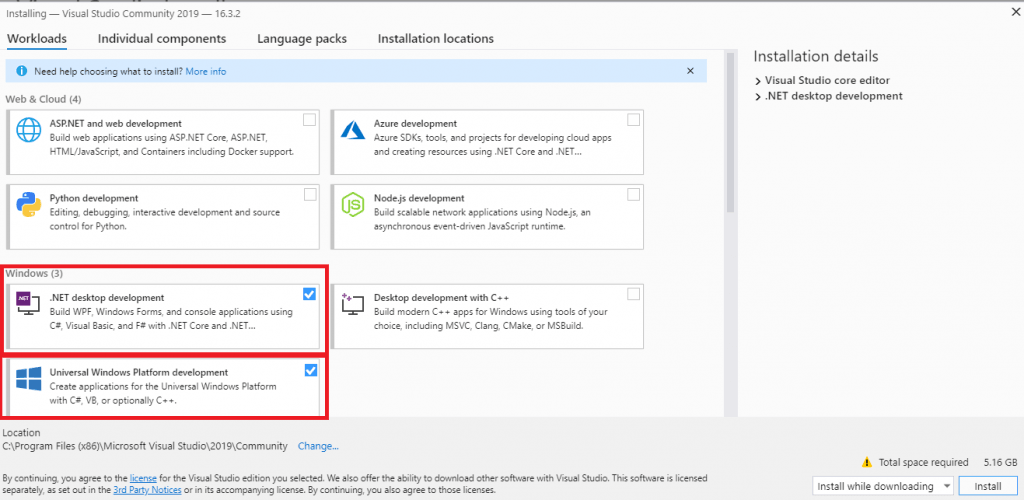
- As the NUnit framework will be used for Selenium automation, we install the necessary packages for development on the Windows platform.
- Restart the machine if required. Sign-in to the IDE in order to use the features such as pushing code to private Git repository, syncing settings, and more.
The next step is to install the NUnit framework along with setting up the NUnit Visual Studio Adapter.

Austin Siewert
CEO, Vercel
Discovered @TestMu AI yesterday. Best browser testing tool I've found for my use case. Great pricing model for the limited testing I do 👏
2M+ Devs and QAs rely on TestMu AI
Deliver immersive digital experiences with Next-Generation Mobile Apps and Cross Browser Testing Cloud

Take this certification to master the fundamentals of Selenium automation testing with C# and prove your credibility as a tester.
Here’s a short glimpse of the Selenium C# 101 certification from TestMu AI:
Installing The Test Runner (NUnit Visual Studio Adapter)
Automation testing with C# and NUnit framework can be performed by installing the NUnit framework and NUnit test adapter. There are two options for installing the NUnit adapter – using Visual Studio extension or using NuGet Package Manager. In this NUnit testing tutorial, we show you setup using both the options.
1. NuGet Package
For installing the required NUnit packages, you can either use the IDE or use the NuGet Package Manager commands. If you are just getting started with NUnit, we would recommend that you use the IDE option.
1.1 Using Visual Studio IDE
To install the NUnit framework and NUnit Test Adapter, perform the following steps using the Visual Studio IDE:
- Create a new project by going to Visual Studio -> New -> Project
- Add Console.WriteLine(“Selenium C#”) to the newly created .cs file.
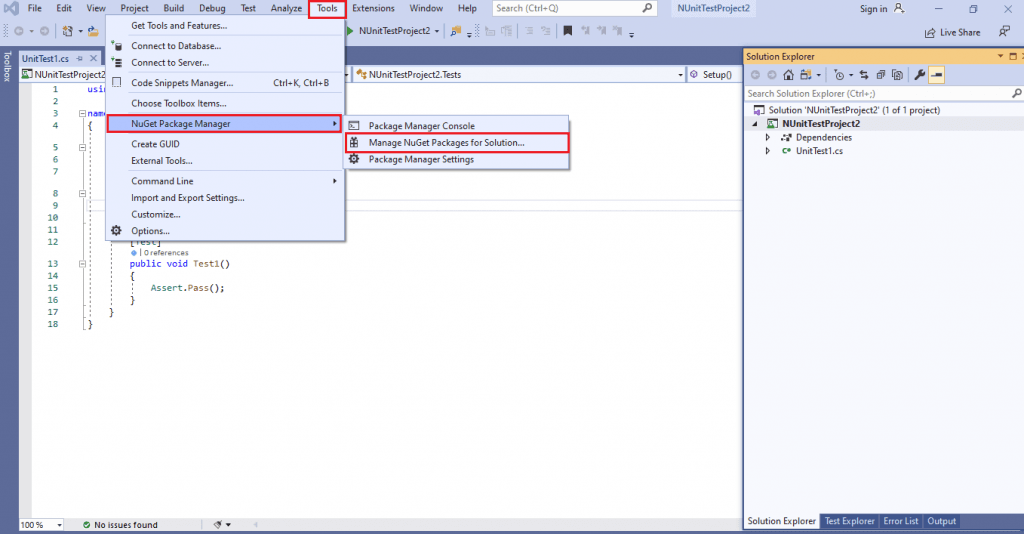
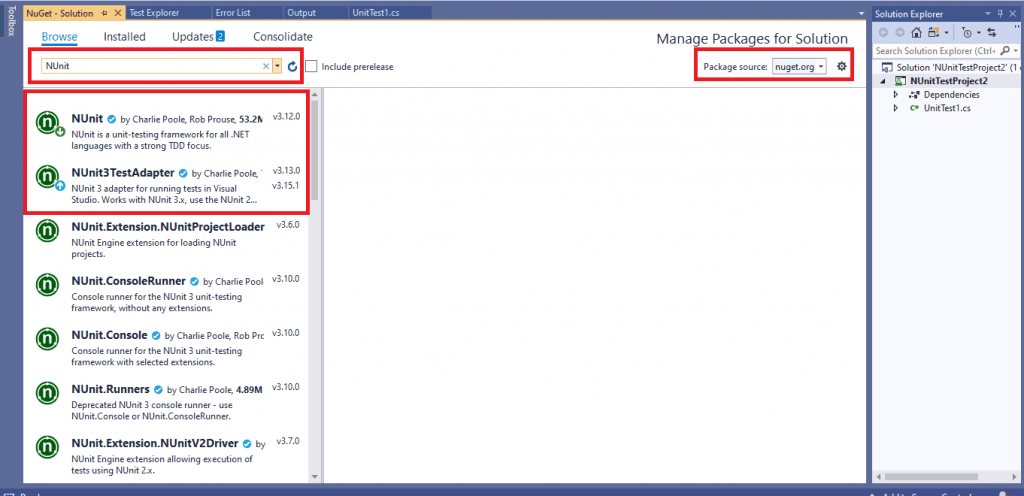
- Navigate to Tools -> NuGet Package Manager -> Manager NuGet Packages for Solution.
- Search for NUnit & NUnit Test Adapter in the Browse tab.
- Click on Install and press OK to confirm the installation. With this installation, the NUnit framework can be used with C#.
1.2 Using Package Manager (PM) Commands
Instead of using the IDE, you can use the Package Manager (PM) commands for installing the required NUnit packages.
- For executing commands from the PM console, navigate to the Tools -> NuGet Package Manager -> Package Manager Console.
- Execute the following commands on the PM Console:
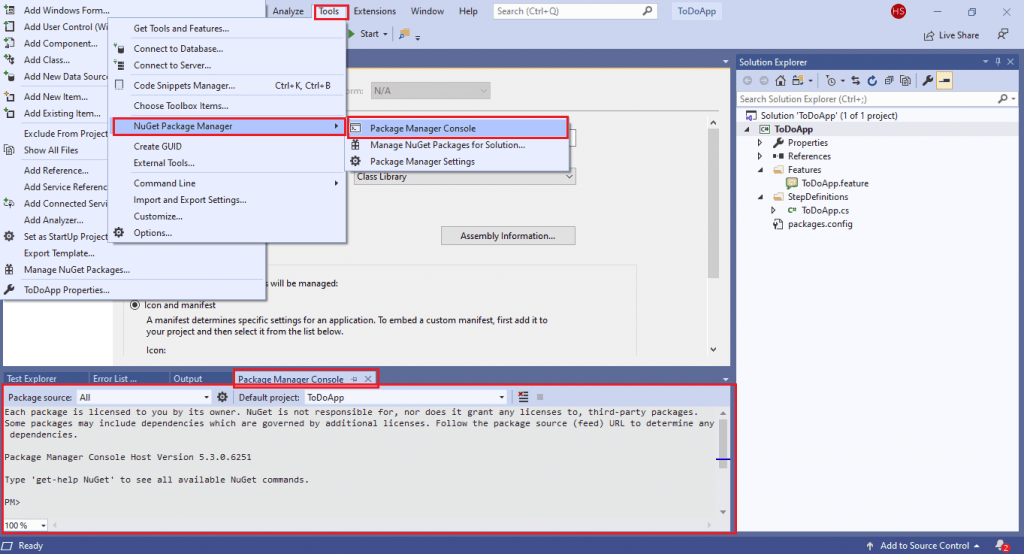
Install-Package NUnit
Install-Package NUnit3TestAdapter
PM> Get-Package

Id                                  Versions
--                                  --------
NUnit                      	     	{3.12}
NUnit3TestAdapter   			{3.16.1}
2. Visual Studio Extension
The advantage of installing the NUnit Adapter using Visual Studio Extension (VSIX) is that extension will be automatically updated to the latest versions. Download the extension of NUnit Test Adapter from the Visual Studio gallery and double click on the same to install the extension.
A better option is to navigate to Tools -> Manage Extensions menu in Visual Studio. Click on Online and enter the search term as NUnit Test Adapter. Click on the search item labeled as NUnit 3 Test Adapter and install it.
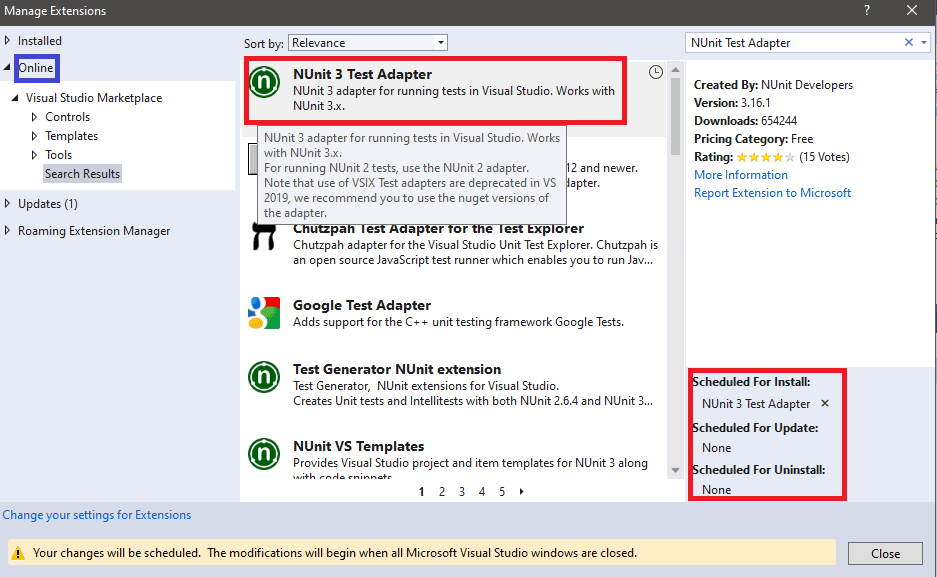
With this NUnit setup example, we demonstrated how to setup the NUnit framework for Visual Studio. The steps listed in this NUnit testing tutorial can be used for getting started with Automation testing with C#.

This NUnit Tutorial for beginners and professionals will help you learn how to use NUnit framework with Selenium C# for performing Selenium automation testing.
Setting up Selenium WebDriver with Visual Studio
With the NUnit framework setup, you can now create NUnit Test Project in Visual Studio. In this NUnit testing tutorial, we will also cover the steps to setup Selenium WebDriver with Visual Studio in C#. Prior to installing the Selenium WebDriver framework, we create a new project in Visual Studio:
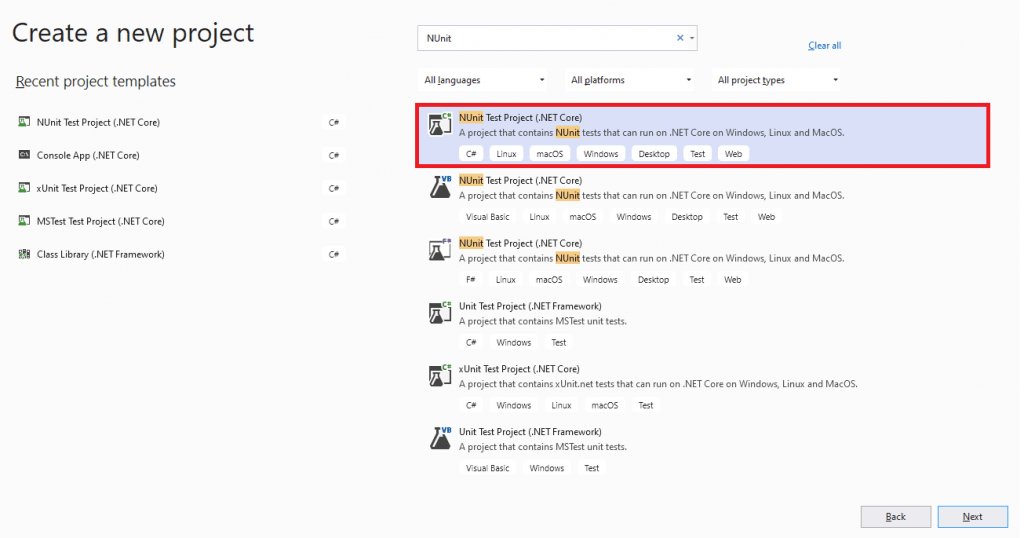
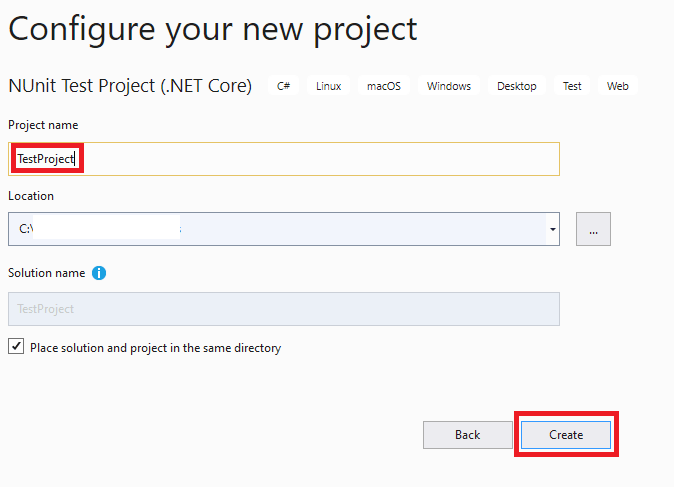
- Open Visual Studio and create a new project of the type ‘NUnit Test Project (.Net Core)’.
- Give an appropriate name to the project and click Create.
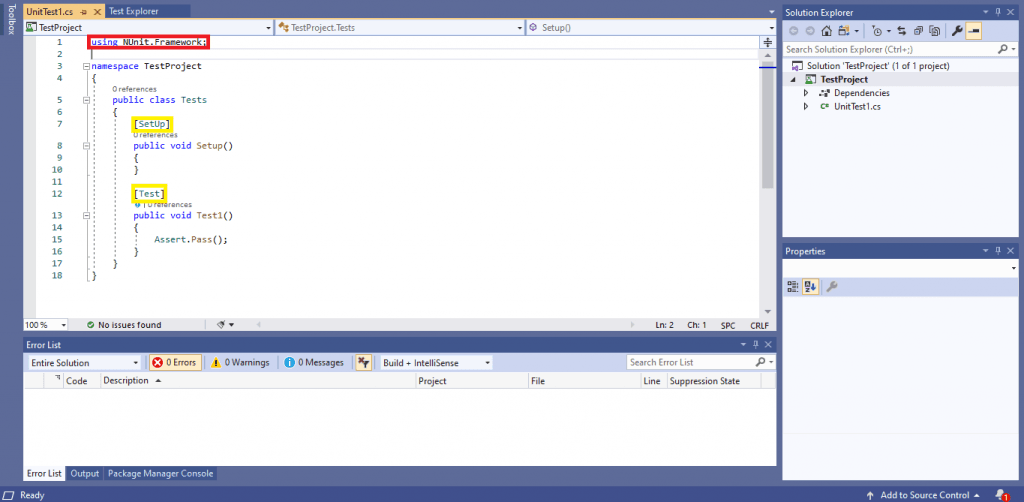
- As the created project is of type NUnit (.NET Core), the name for using the functionalities of the NUnit framework will be automatically included in the .cs file.
Steps to Download Selenium WebDriver
As the NUnit project is ready, the next step is to setup the Selenium WebDriver for Visual Studio. For downloading the Selenium WebDriver on Visual Studio, we use NuGet, a free & open-source package manager specifically designed for the Microsoft platform.
You can install the Selenium WebDriver using the NuGet Package Manager (PM) Commands, i.e., Command Line option or Visual Studio IDE.
1. Using Visual Studio IDE
Perform the following steps to download Selenium WebDriver for Visual Studio using the GUI:
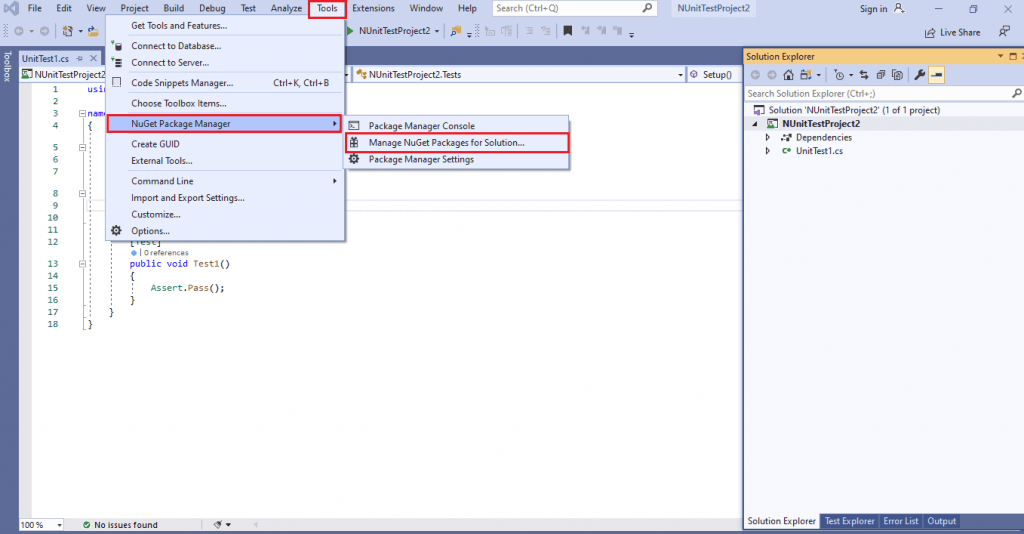
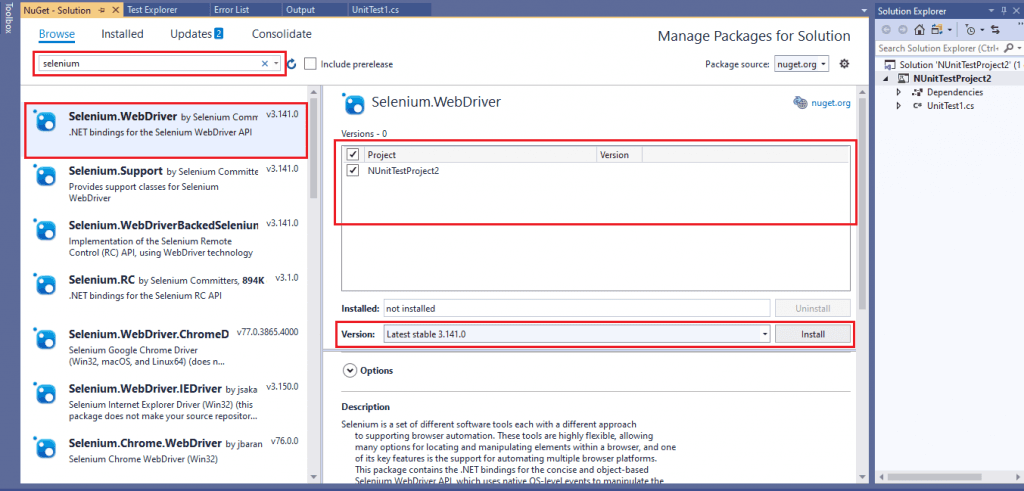
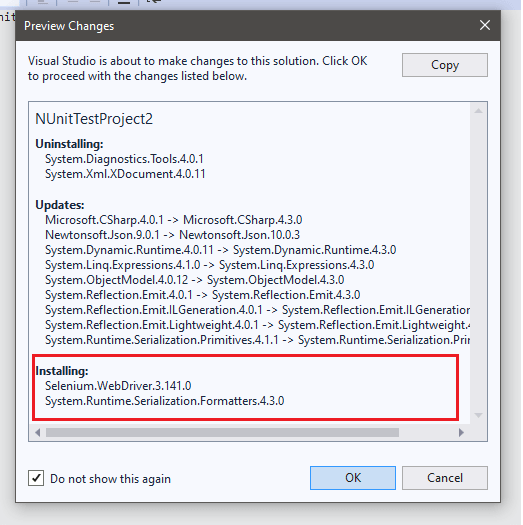
- Navigate to Tools -> NuGet Package Manager -> Manager NuGet Packages for Solution and search for ‘Selenium.’
- Click on the Install button to install the Selenium.WebDriver package for the newly created project. At the time of writing this article, the latest version of Selenium WebDriver was 3.141.0
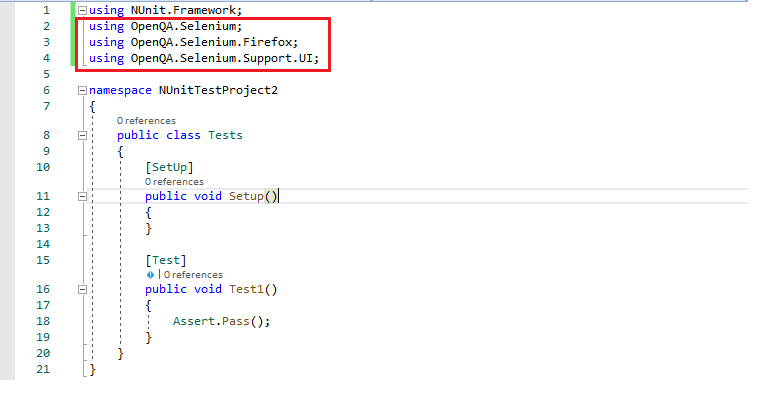
- On successful installation of Selenium.WebDriver package, you can use the Selenium framework in the C# code. Learn more about how you can use it & What is Selenium?
2. Using Package Manager (PM) Commands
Instead of using the IDE, you can make use of the Package Manager (PM) commands for installing the required Selenium WebDriver package.
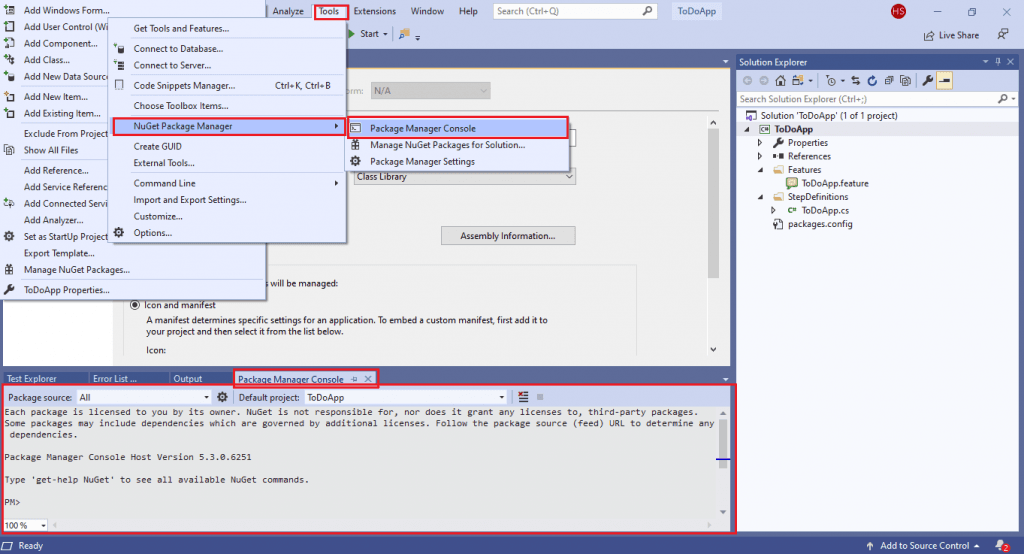
- For executing commands from the PM console, navigate to Tools -> NuGet Package Manager -> Package Manager Console.
- Execute the following command on the PM Console:
Install-Package Selenium.WebDriver
Install-Package Selenium.Chrome.WebDriver
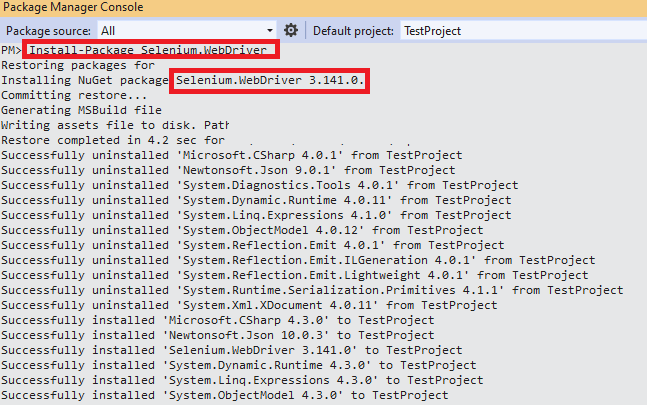
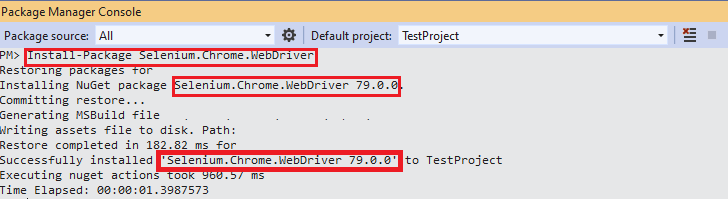
PM> Get-Package

Id                                  Versions
--                                  --------
Selenium.WebDriver                  {3.141.0}
Selenium.Chrome.WebDriver           {79.0.0}
...... ......
...... ......
Give it a read: Top Selenium WebDriver Commands in NUnit

Conclusion
With this NUnit setup example, we demonstrated how to setup the NUnit framework & Selenium WebDriver with Visual Studio in C#. The steps listed in this NUnit testing tutorial can be used for getting started with automation testing with Selenium and C#. With the completion of NUnit & Selenium installation, you are all set to experience cross browser testing with Selenium C#.
Austin Siewert
CEO, Vercel
Discovered @TestMu AI yesterday. Best browser testing tool I've found for my use case. Great pricing model for the limited testing I do 👏
2M+ Devs and QAs rely on TestMu AI
Deliver immersive digital experiences with Next-Generation Mobile Apps and Cross Browser Testing Cloud


Frequently asked questions
Did you find this page helpful?
More Related Hubs
TestMu AI forEnterprise
Get access to solutions built on Enterprise
grade security, privacy, & compliance
- Advanced access controls
- Advanced data retention rules
- Advanced Local Testing
- Premium Support options
- Early access to beta features
- Private Slack Channel
- Unlimited Manual Accessibility DevTools Tests