

Next-Gen App & Browser Testing Cloud
Trusted by 2 Mn+ QAs & Devs to accelerate their release cycles


Now Test With Selenium 4 Capabilities, Shared Tunnel, & More!
Today, we introduced Selenium 4 capabilities in our Desired Capabilities Generator, along with capabilities for Geolocation testing. Also, you can now work with a shared SSH tunnel to test your locally hosted pages.

Harshit Paul
February 2, 2026
Hi there! We are up with another round of exciting updates to help you expand your cross browser testing coverage. Today, we introduced Selenium 4 capabilities in our Desired Capabilities Generator, along with capabilities for Geolocation testing. Also, you can now share your TestMu AI Tunnel along with teammates belonging to your organization in TestMu AI. Let’s see how you can leverage these abilities to make your experience faster and better.
Selenium 4 Capabilities
Selenium has empowered automation testers with a way to reduce their test execution time by many folds. Every Selenium release brings a sense of thrill that every web tester looks forward to! The launch of Selenium 4 was announced by Simon Stewart in August 2018, However the release was postponed and we are still waiting for it go live. Meanwhile, though we do have our hands-on Selenium 4 alpha. You can check out our article on Selenium 4 Alpha to have an idea of what you can expect from the new Selenium release version.
As soon as Selenium 4 alpha was made public, we kickstarted our releases to bring the functionality on TestMu AI for you to give it a go and see how your existing automation scripts will fare against the new Selenium version?
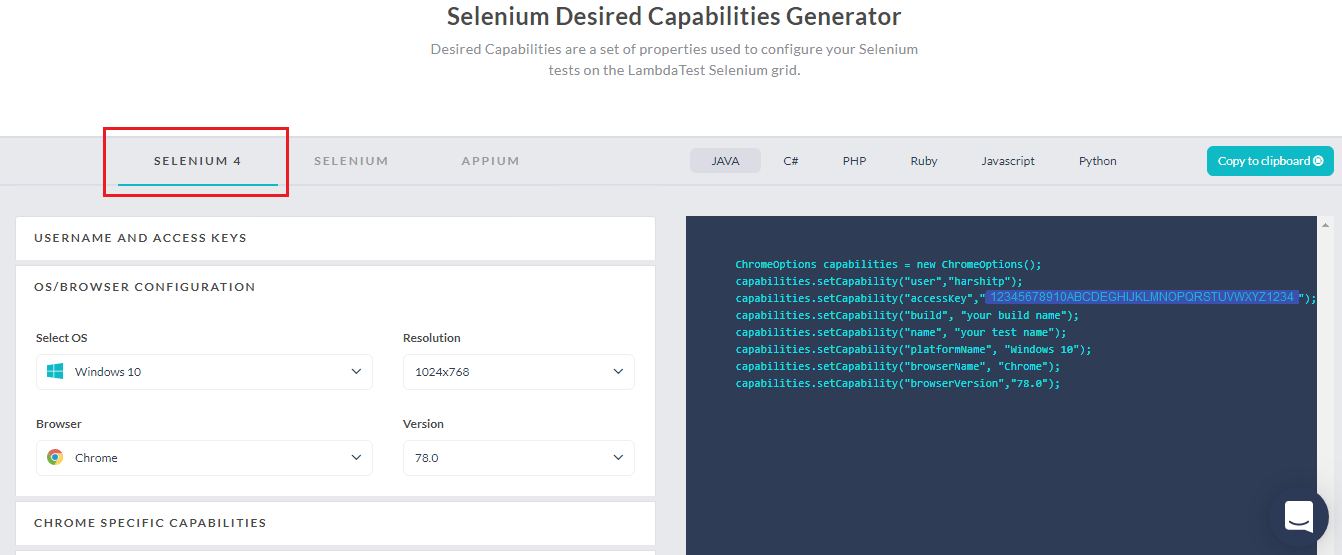
Today, we have it live on our Desired Capabilities Generator. You can find a new tab for Selenium 4 which will provide you with the Desired Capabilities class in different programming languages based on your click-based selections.
Check our Support Document for the New Capabilities in Selenium 4
This Selenium WebDriver Tutorial for beginners and professionals will help you learn what’s new in Selenium 4 (Features and Improvements).
Geolocation Testing Using Selenium Automation Scripts
Earlier we introduced the ability to perform Geolocation testing from our real time testing. This time we have made it available in our Desired Capabilities Generator to help you automate your browser compatibility testing experience from different countries around the world.
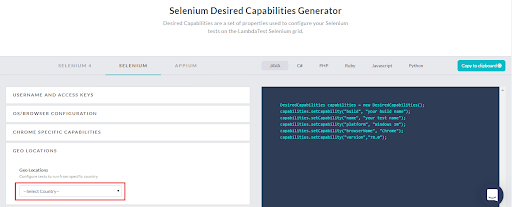
You can find the drop-down for Geolocation under both the tabs i.e. Selenium and Selenium 4. All you need to do is select the country from the drop-down list and you will notice an added capability on the right side inside the Desired Capabilities class provided by our Capabilities Generator.
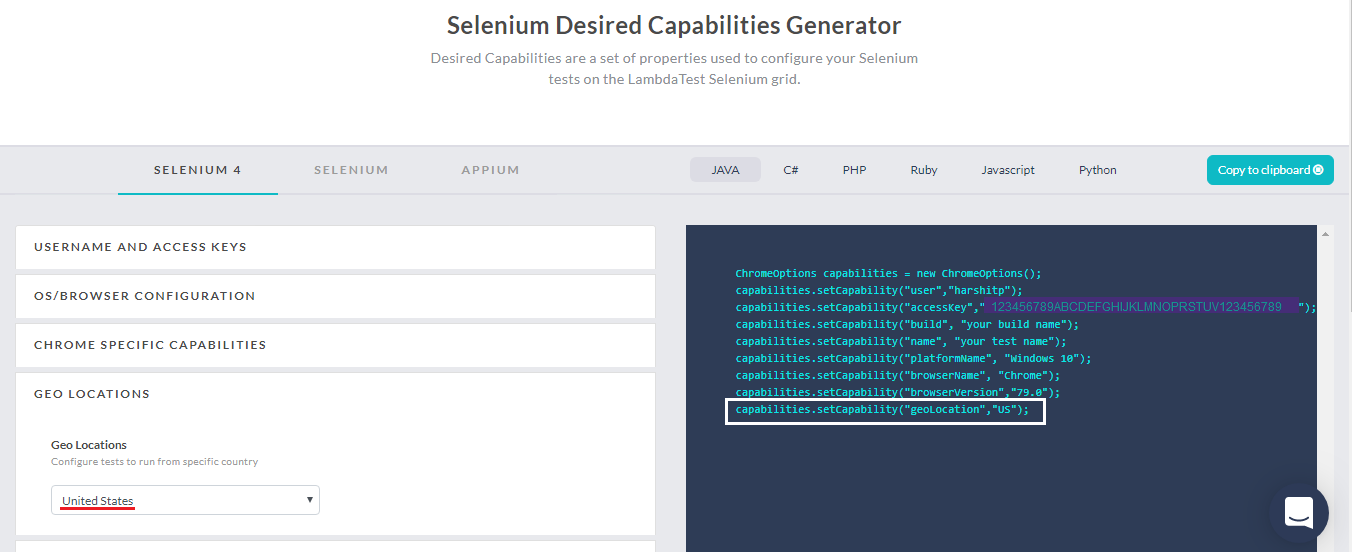
Desired Capability To Incorporate Geolocation Testing In Selenium Scripts
You can easily get the desired capabilities class for geolocation using TestMu AI Desired Capabilities Generator. Let us have a quick look at the line of code you may need to add in your Selenium automation scripts to execute Geolocation testing for different programming languages.
Java
DesiredCapabilities capabilities = new DesiredCapabilities();
				capabilities.setCapability("geoLocation","US");
C#
DesiredCapabilities capabilities = new DesiredCapabilities();
				capabilities.SetCapability("geoLocation","US");
PHP
$capabilities = array(
"geoLocation" => "US"
		         )
Ruby
capabilities = Selenium::WebDriver::Remote::Capabilities.new
				capabilities["geoLocation"] = "US"
JavaScript
var capabilities = {
      "geoLocation" : "US"
		      }
Python
capabilities = {
"geoLocation" : "US"
		}
You can perform Selenium automation testing using the TestMu AI online Selenium Grid in 53 different countries. Here is a list of them.
- Argentina
- Australia
- Austria
- Belgium
- Brazil
- Bulgaria
- Canada
- Chile
- China
- Colombia
- Croatia
- Czech Republic
- Denmark
- Egypt
- Finland
- France
- Germany
- Greece
- Hong Kong
- Hungary
- Iceland
- India
- Indonesia
- Ireland
- Israel
- Italy
- Japan
- Jordan
- Malaysia
- Mexico
- Morocco
- Netherlands
- New Zealand
- Nigeria
- Norway
- Philippines
- Poland
- Portugal
- Russia
- Singapore
- South Africa
- South Korea
- Spain
- Sweden
- Switzerland
- Taiwan
- Thailand
- Turkey
- Ukraine
- United Kingdom
- United States
- Venezuela
- Vietnam
Didn’t find the country you were looking for? Don’t worry! Give us a shout to our 24/7 customer chat support or email us to [email protected] specifying the country you would want us to feature for Geolocation testing and we will get it on-board in a jiffy.
Important Note: For a single Selenium automation test case execution, you can either run a test case from different geographies or a test case that includes TestMu AI Tunnel. So you can’t perform geolocation testing along with the ability to test your locally hosted web applications or vice versa, at the same time.
Visit TestMu AI Desired Capabilities Generator And Test On New Capabilities!
What can I do If I wish to do both, Localhost and Geolocation testing simultaneously?
If you wish to execute cross browser testing of your web application using both Localhost and geolocations then you can use the ability to perform parallel testing with TestMu AI. By opting for parallel testing, the two requirements can be executed independently, at the same time.
Introducing A Shared Tunnel For Your Colleagues
TestMu AI as you may know, offer the ability to test your locally hosted web pages on 3000+ real browsers using the SSH(Secure Shell) connection offered by the TestMu AI Tunnel. TestMu AI Tunnel connects your system to our cloud servers so you can leverage the power of cloud-based infrastructure to test on thousands of desktop and mobile browsers, with zero downtime.
So far with TestMu AI Tunnel, there was no mechanism for a dedicated Shared tunnel that was common for all the members of a team. Rather, any tunnel triggered by you could be used by your teammates too. However, that may have created a little ruckus if say all 5 members belonging to your organization are up and running with a unique TestMu AI Tunnel connection of their own, simultaneously.
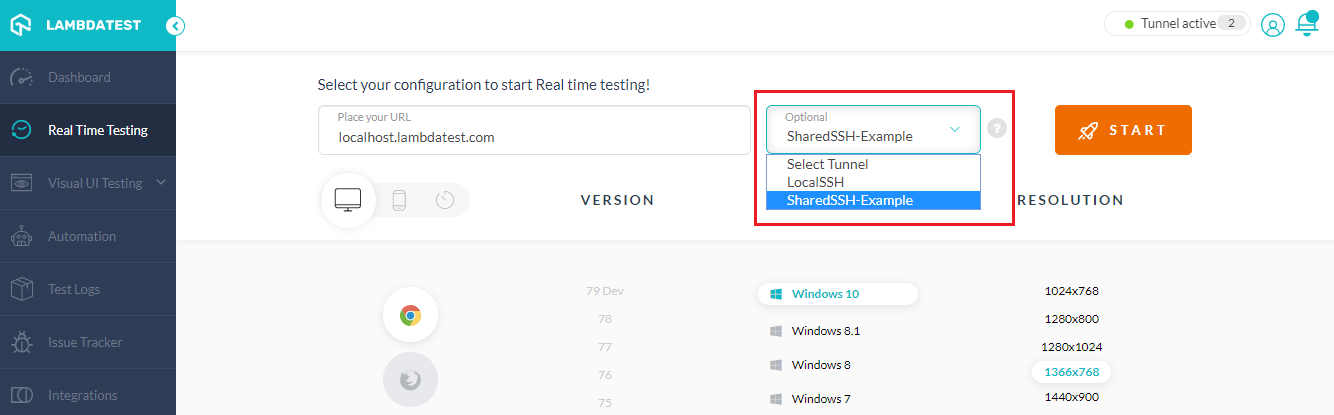
We have made it easier! Now, you can create a dedicated Shared TestMu AI Tunnel and your teammates can access to that if they wish to test on your locally hosted web application. Also, your unique TestMu AI Tunnel connection is not revealed to your colleagues unless you make it shareable.
Visit our Shared Tunnel Document to Get Started Now!
This Selenium 4 complete tutorial covers everything you need to know about Selenium 4.
How Was That?
We hope this product update will help you become ready in advance before the official launch of latest Selenium version and the Geolocation testing would help you expand the test coverage even further. Don’t forget to share your TestMu AI Tunnel with colleagues to have them work over a web page that is locally hosted by your system.
That was all for this product update as we thrive to bring more and more convenient features for you to ease your cross browser testing experience.
Try our new Selenium capabilities and TestMu AI Tunnel and share your opinion and suggestions to help us become a better platform for all of you.
In case you have any questions feel free to let us know in the comment section below. You can also drop an email to [email protected] or simply give us a shout. Our experts are here to help you .


Did you find this page helpful?
More Related Hubs
TestMu AI forEnterprise
Get access to solutions built on Enterprise
grade security, privacy, & compliance
- Advanced access controls
- Advanced data retention rules
- Advanced Local Testing
- Premium Support options
- Early access to beta features
- Private Slack Channel
- Unlimited Manual Accessibility DevTools Tests