

Next-Gen App & Browser Testing Cloud
Trusted by 2 Mn+ QAs & Devs to accelerate their release cycles


Microsoft Edge Cookies: Everything You Need to Know
Learn how Microsoft Edge cookies work and how to manage, delete, or block them for a better and more secure browsing experience.

Bhavya Hada
December 24, 2025
Microsoft Edge cookies are small data files created by websites you visit. They help enhance your browsing experience by remembering site preferences, login status, and relevant content. Whether you want to manage, enable, or delete cookies in Microsoft Edge, understanding how they work is the first step toward better browser privacy and control.
Overview
Microsoft Edge cookies are small files saved by websites to identify your device and remember your preferences. They help sites keep things like your language settings, login status, and personalized content ready for future visits.
Benefits of Microsoft Edge Cookies
Some of the benefits of cookies in Microsoft Edge:
- Limit targeted ads: Reduce the number of personalized ads based on browsing behavior.
- Fix website issues: Help websites function more reliably by storing site-specific data.
- Control preferences: Save user settings like theme, region, and language preferences.
- Enhance security: Enable secure sessions and protect user data on trusted sites.
Steps to Manage Cookies in Microsoft Edge
Here’s how you can manage Microsoft Edge cookies:
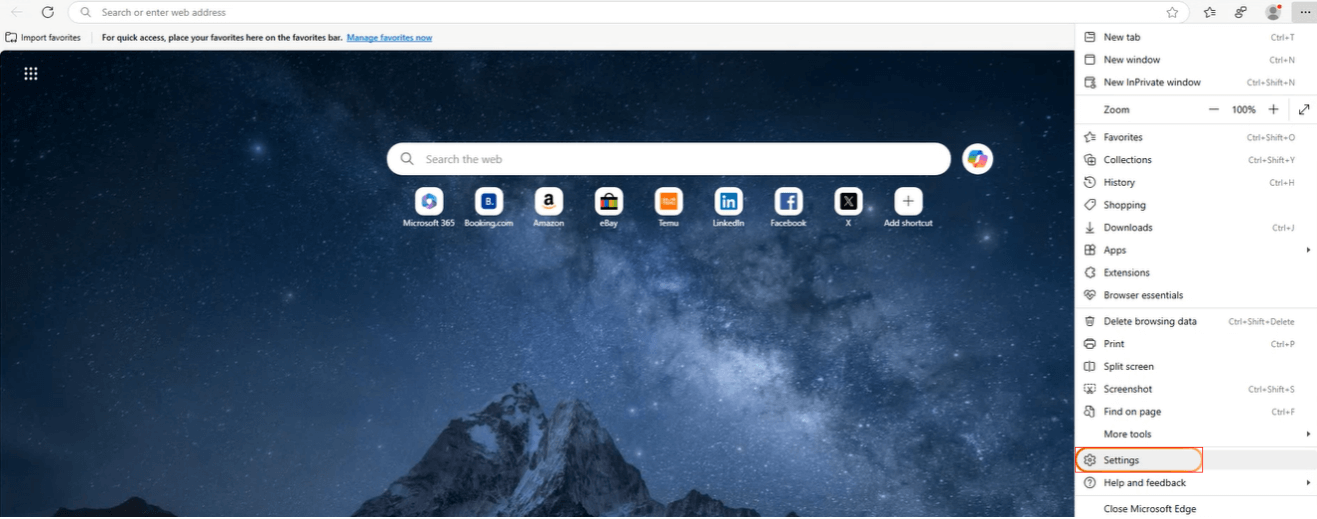
- Open Microsoft Edge.
- Click the three-dot menu (top-right corner).
- Select Settings.
- Go to Cookies and site permissions > Manage cookies, and from here, you can view, manage, and delete cookies for all or specific websites.
Types of Cookies in Microsoft Edge
Microsoft Edge stores two main types of cookies:
- First-party cookies: These are created by the website you are currently visiting. They ensure the website functions correctly and remember your preferences or login status.
- Third-party cookies: These originate from domains other than the one you’re visiting. They are typically used by advertisers or analytics providers to track your activity across websites.
You can allow, block, or remove both types based on your privacy preferences.

Note: Test your cookies on real browsers and operating systems. Try TestMu AI Now!
How to Manage Microsoft Edge Cookies?
Microsoft Edge allows users to control cookie behavior through its built-in settings.
Here’s how to manage cookies:
- Open Microsoft Edge and click the three-dot menu in the upper-right corner.
- Click Settings.
- Click the Cookies and site permissions section, and then Manage cookies.
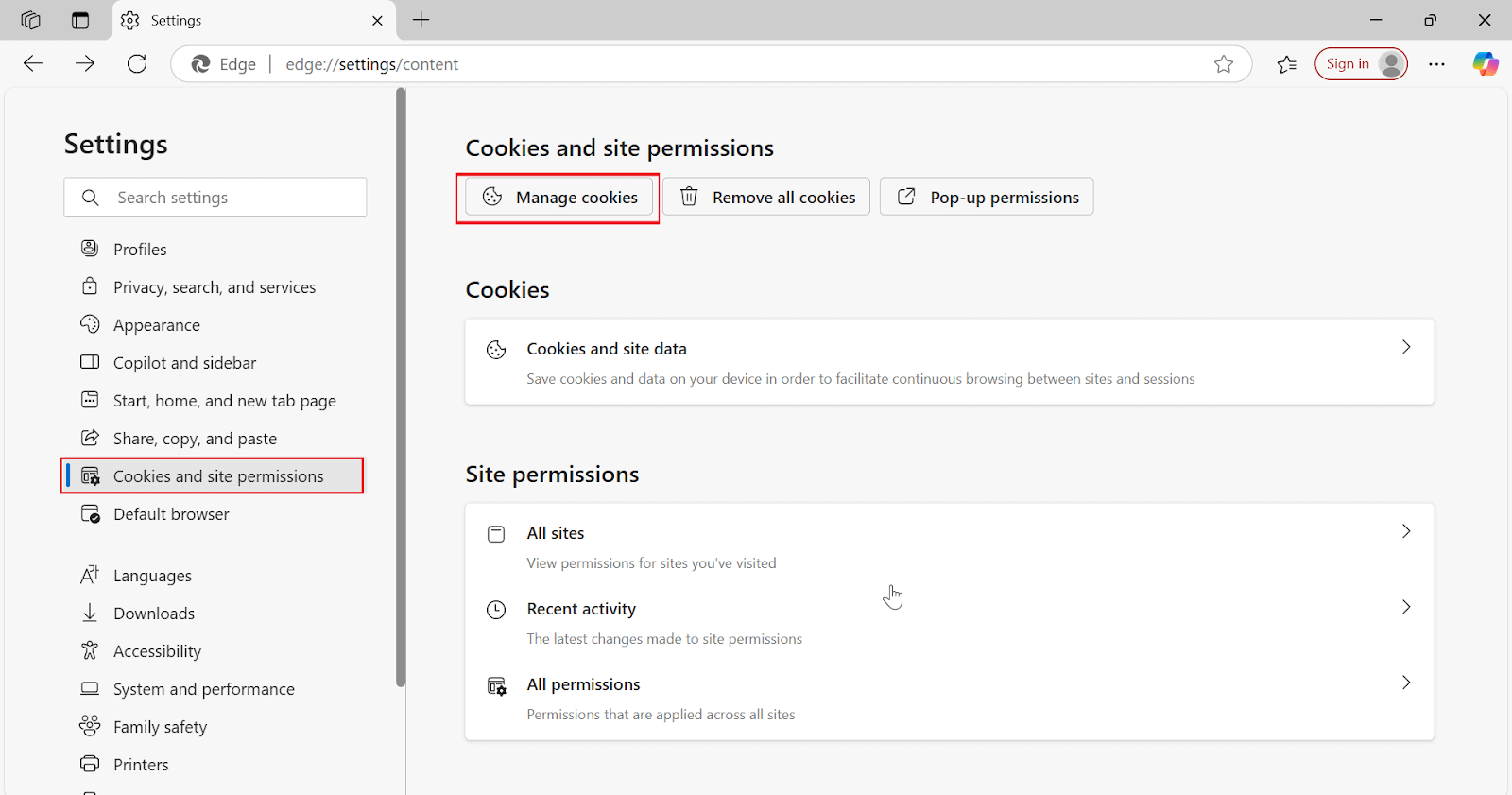
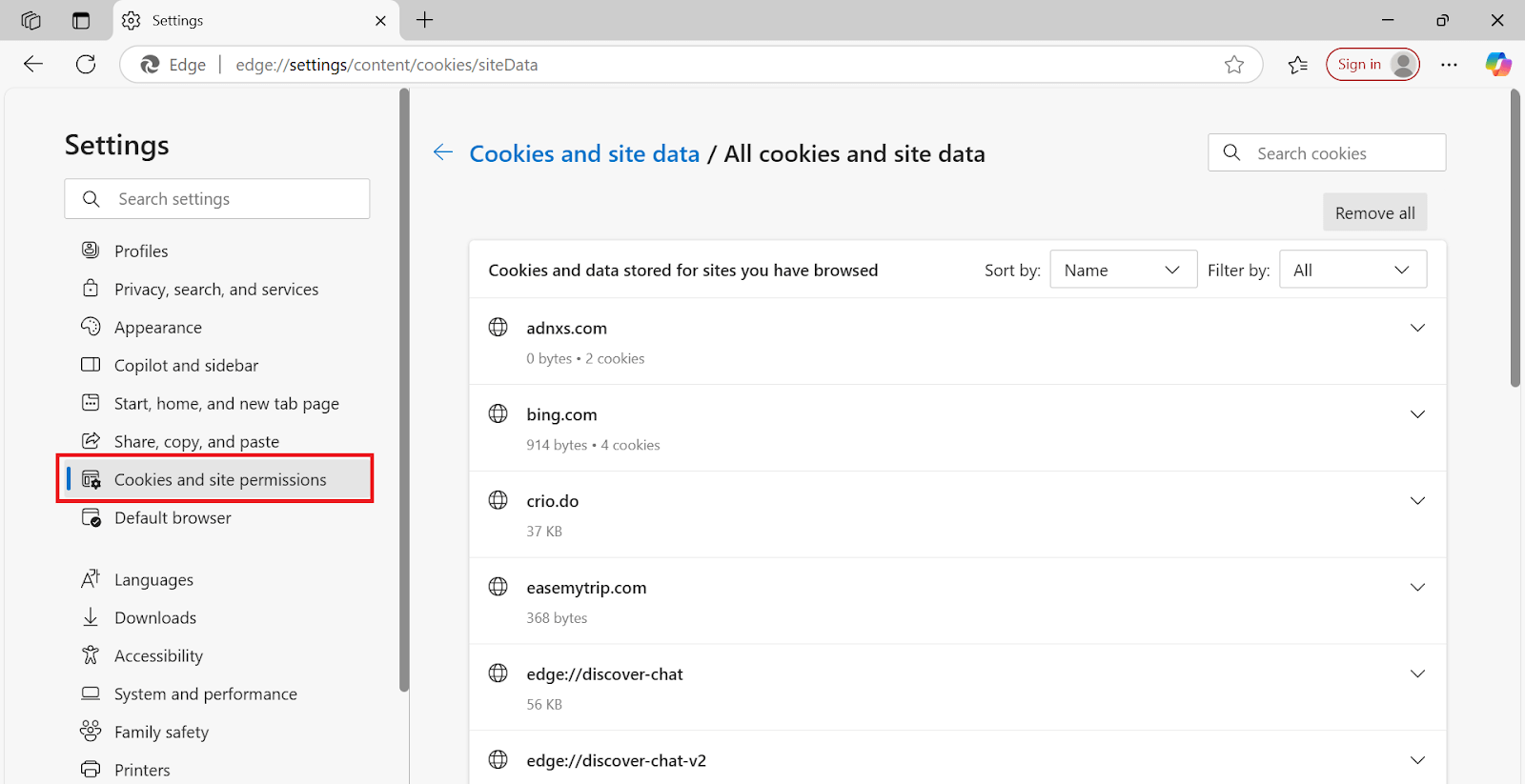
It will take you to the screen below. From here, you can view, sort, search, and manage cookies and site data stored by individual websites. You can also remove all cookies at once or delete them site by site for better privacy control.
Also, it is important to test cookies, as they significantly impact user experience by influencing how user preferences, login sessions and data are maintained and retrieved. You can test cookies using AI-native cloud testing platforms like TestMu AI. It enables teams to test cookie behavior on a remote test lab of different browsers, devices, and operating systems.

Conclusion
Microsoft Edge cookies play an important role in enhancing your online experience, but they also affect your privacy. Whether you want to allow all cookies, block third-party cookies, or remove stored data, Edge provides a user-friendly interface to manage them. Checking your cookie settings regularly can help keep your browsing both smooth and secure.
Conclusion


Frequently asked questions
Did you find this page helpful?
More Related Hubs
TestMu AI forEnterprise
Get access to solutions built on Enterprise
grade security, privacy, & compliance
- Advanced access controls
- Advanced data retention rules
- Advanced Local Testing
- Premium Support options
- Early access to beta features
- Private Slack Channel
- Unlimited Manual Accessibility DevTools Tests