

Next-Gen App & Browser Testing Cloud
Trusted by 2 Mn+ QAs & Devs to accelerate their release cycles


macOS Big Sur Preview & Safari 14 Are Now Live At TestMu AI
Before Apple goes all out with the release of macOS Big Sur & Safari 14, test your website on it with the latest preview on TestMu AI. Stay one step ahead & keep your Mac users happy!

Suhag Vamja
January 11, 2026
Howdy testers, amidst the discomfort of too much ‘virtualization’, one of the best news came from WWDC 2020, it was the announcement of all new macOS called the Big Sur which is the first release of macOS 11 series.
We all can agree that Apple has squeezed every last bit out of its macOS 10 series and the testing community has exploited every last feature of it. We all were waiting for the new playground to show our might and here it is ‘macOS Big Sur’. Apart from being a beautiful but rugged stretch of California’s central coast, Big Sur is now one hell of an update from Apple to keep us on our toes for a long time.
For now, we have a Beta version for macOS Big Sur, however, the stable version is promised to be live in fall/autumn. Considering the pattern at which Apple introduces a new macOS around either September end or mid-October, we are all anticipating that the stable version could be out any day now. And when that happens, we want to keep you prepared.
This is why we have made the macOS Big Sur Preview available on both manual and automation testing over TestMu AI so you could perform browser compatibility testing of your website across the latest macOS beforehand. We also have the latest Safari 14 which would be the native browser version for macOS Big Sur Preview. Let’s find out what this latest update is all about!
Perform Live Interactive Testing On macOS Big Sur Preview & Safari 14
You can now test your website on the latest macOS Big Sur Preview using the TestMu AI real-time testing feature.
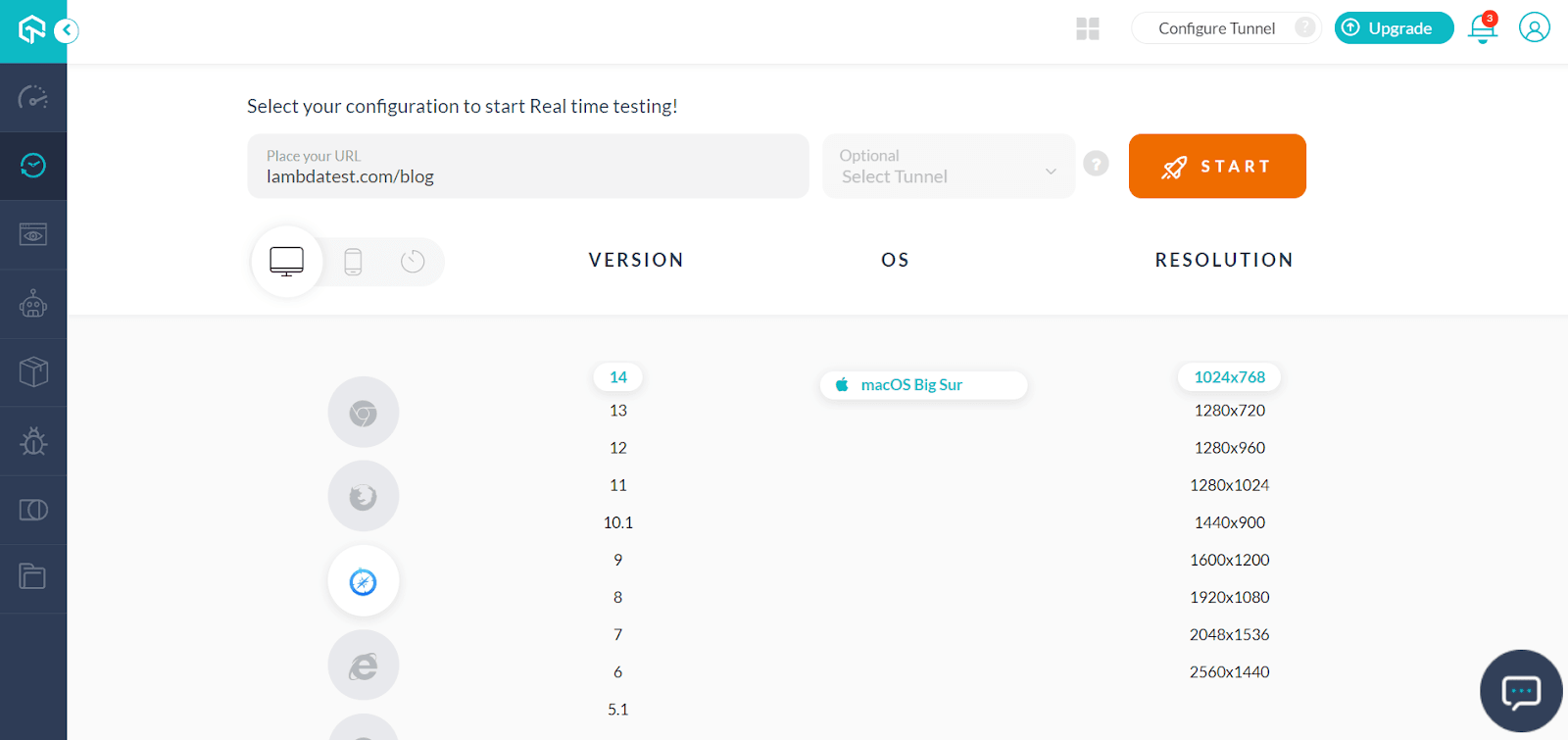
Selenium Testing On macOS Big Sur Preview & Safari 14
We have added capabilities for Safari 14 and macOS Big Sur Preview in our Desired Capabilities Generator to help you run automation testing with Selenium Grid on cloud.
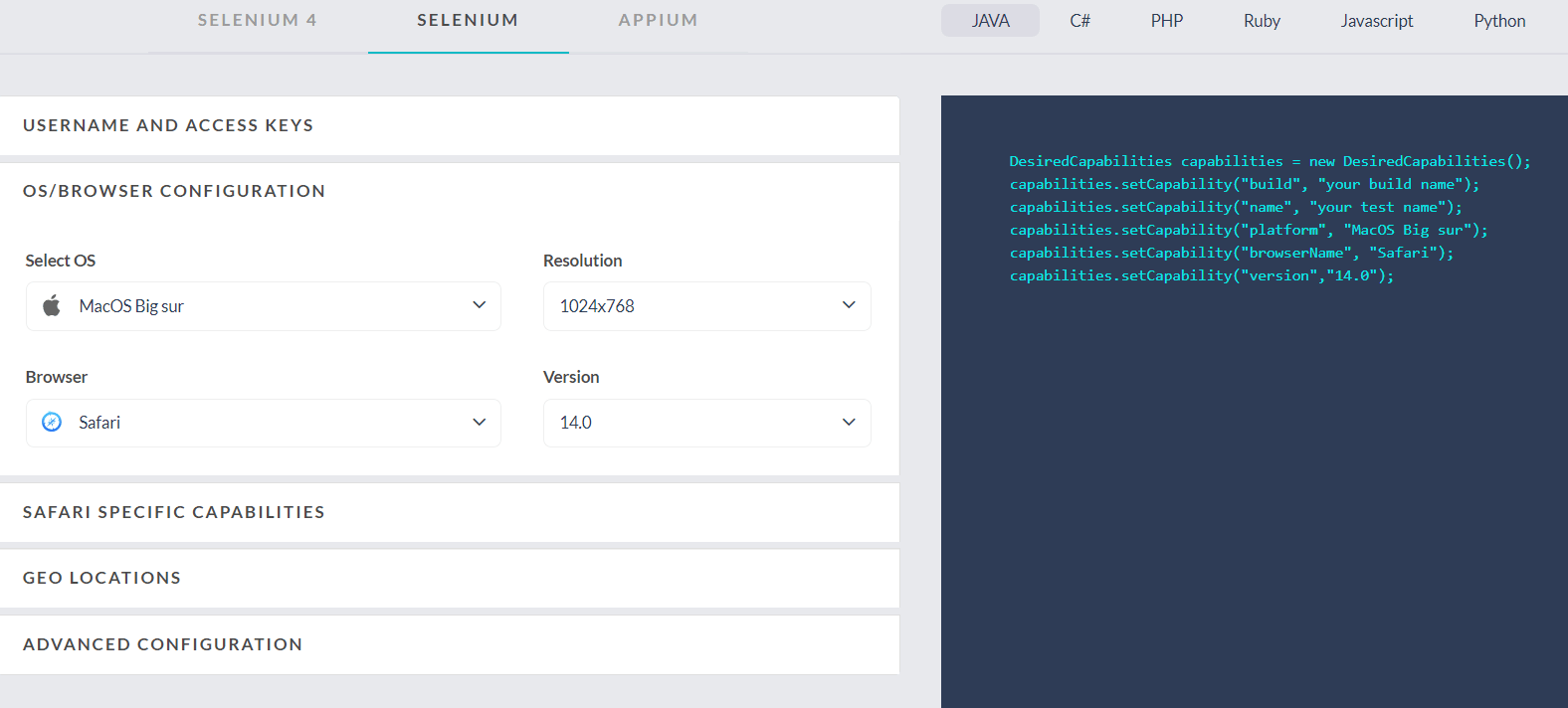
Other than Safari Driver, we’ve also configured the macOS Big Sur Preview for Selenium ChromeDriver and FirefoxDriver.
All you need to do is specify “macOS Big Sur” in your platform capability for testing your website over the TestMu AI Selenium Grid cloud. You can also leverage resolution capability to test your website on macOS Big Sur Preview in different screen resolutions.
Now that you know where to find the macOS Big Sur Preview and Safari 14 on TestMu AI, let us dig deeper. We will quickly analyze the up and coming areas you need to keep in mind for the latest macOS and Safari browser version.
What’s New In macOS Big Sur Preview?
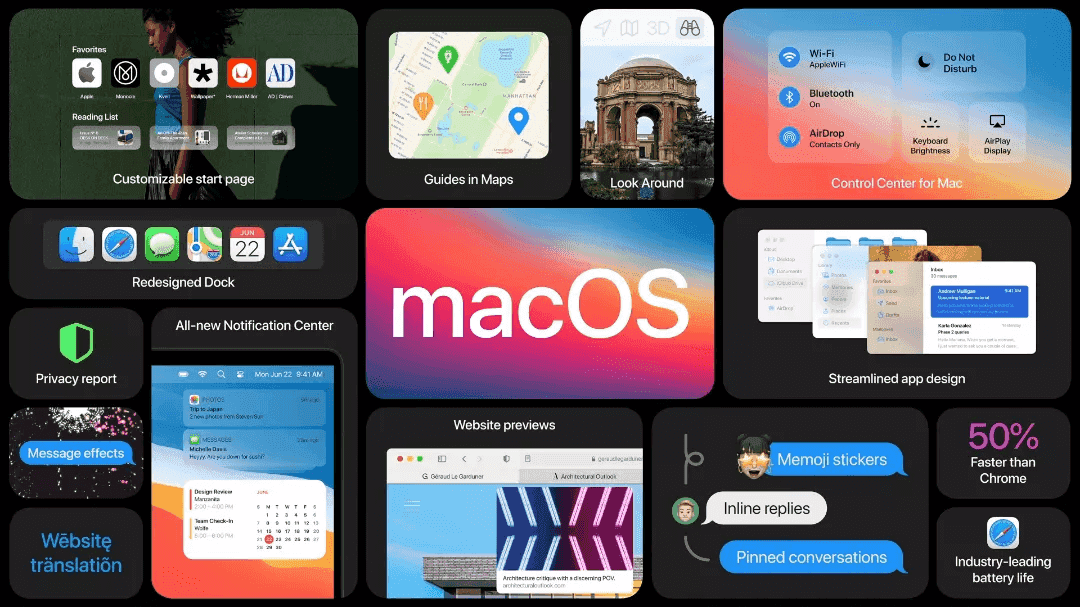
We are expecting a lot from Apple with the latest macOS version and Big Sur is likely to blow off the roof. Apple has been teasing us with the expected features time and again. From a refined design to amazing customization, Big Sur is expected to have it all. Here’s what you can expect-
Fusion Doesn’t Need kext Anymore
Apple has been continuously deprecating third party Kernel Extensions or what we call ‘kext’ which fusion needs to run Virtual Machines and containers. But, on macOS Big Sur Preview, Fusion operates entirely without the need of kext.
Better Security
To cope with the infamous adware installing harmful configuration profiles. As of macOS Big Sur Preview, you will no longer be able to completely install profiles using Terminal. When you attempt to install a profile via the command-line, it would treat it as it was ‘downloaded’ and you will have to complete the install in the profile system preferences pane manually, informed by Kevin Milden, Interface designer at Apple.
Design Changes
Big Sur will have a taller and translucent menu bar, and the pull-down menu will be larger as well. The dock is redesigned to be lifted from the screen’s bottom to shift focus to your wallpaper. App icons have been revamped as well, while we will also get new symbols in the sidebar, toolbar for easier navigation and control.
We can expect a lot more as and when Apple pushes out the official release. Now, let’s move on to Safari 14 and see what Apple has in store for us with the latest browser version.
What’s New In Big Sur/Safari 14?
Safari14 is a total overhaul on macOS Big Sur Preview, not only from the user experience but from the development perspective as well. The standalone update of Safari is available for macOS Catalina and macOS Mojave. Though few of it’s features like inbuilt translation and 4K HDR videos are exclusive for Big Sur version only.
You can download and install Safari 14 on macOS through the Software Update menu in the System Preferences app. So without further delay let’s dive into the latest updates in Safari 14-
1. WebExtensions
Safari was late to the party but finally it is here. This will help to create the addons using JavaScript, CSS and HTML. It is available on macOS 11 and in macOS 10.14.6 or 10.15.6 if Safari 14 is installed in the device.
New support for the WebExtensions API and migration tools allows developers to bring Chrome extensions to Safari — letting you personalize your browsing experience with new Safari extensions from your favorite developers.
According to Apple, developers can also use Xcode 12 to port WebExtensions to native Safari extensions in order to offer them on the App Store. As per the guidelines from Apple, we can build and deploy our Safari WebExtension with the help of Xcode project. Follow these steps to deploy Safari WebExtension-
Step 1: Create a new project in Xcode.
Step 2: Launch Xcode and choose File > New > Project.
Step 3: Select Safari web extension.
Step 4: Choose your project options and specify the name of your web extension.
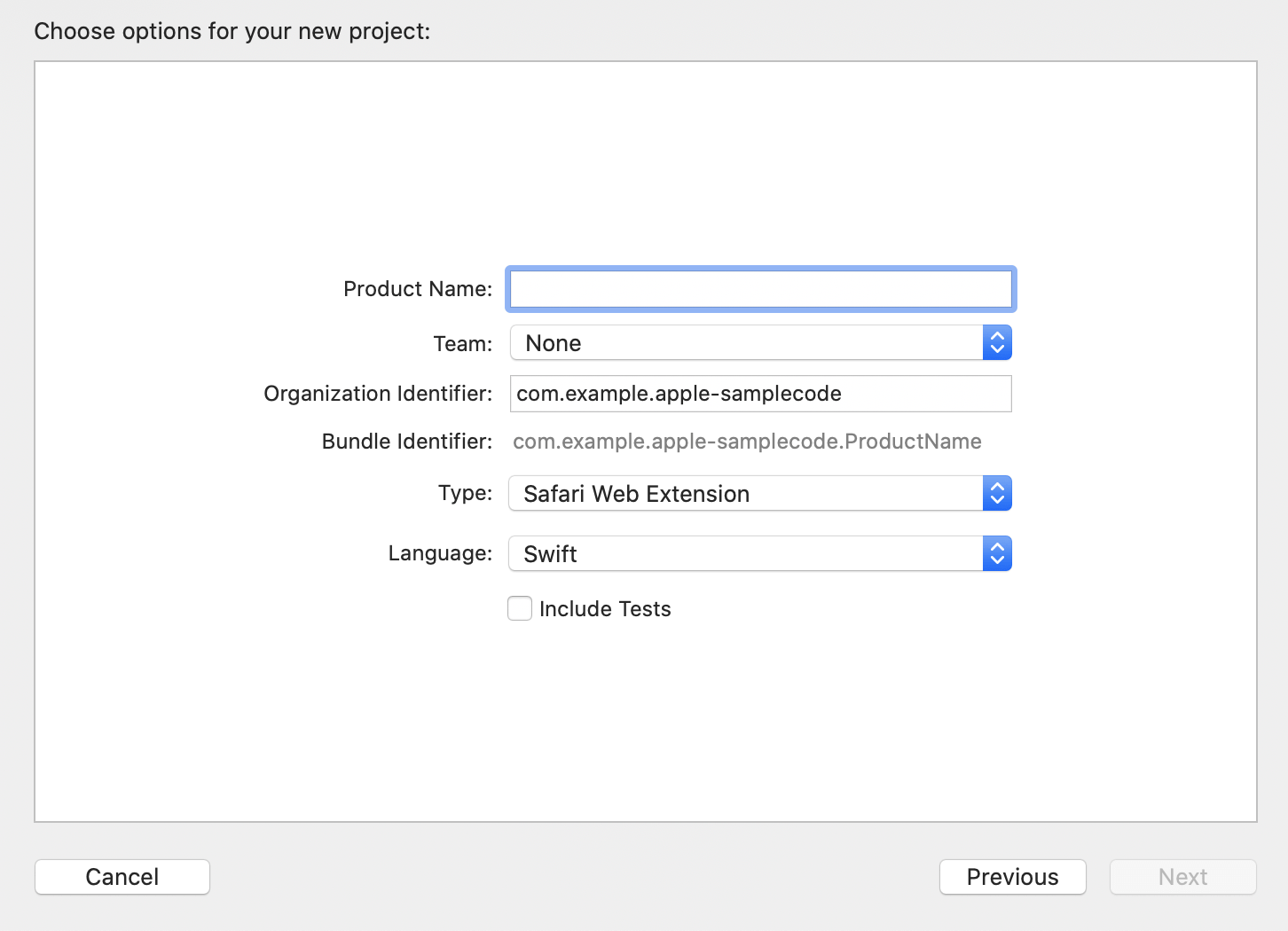
Step 5: If you have an existing Apple Developer account, choose your team. If you are yet to have an account, you’ll be able to update it later in the project settings.
Step 6: Give a reverse DNS identifier for Organization Identifier Ex. com.example-organization.
Step 7: X code will take care of identifying your extension uniquely by information given.
Step 8: Choose “Safari Web Extension” Type. deselect “Include Tests” checkbox.
Step 9: Save the project at desired place.
If you face any issues during the deployment, you can find more information here.
2. HTTP/3 Support
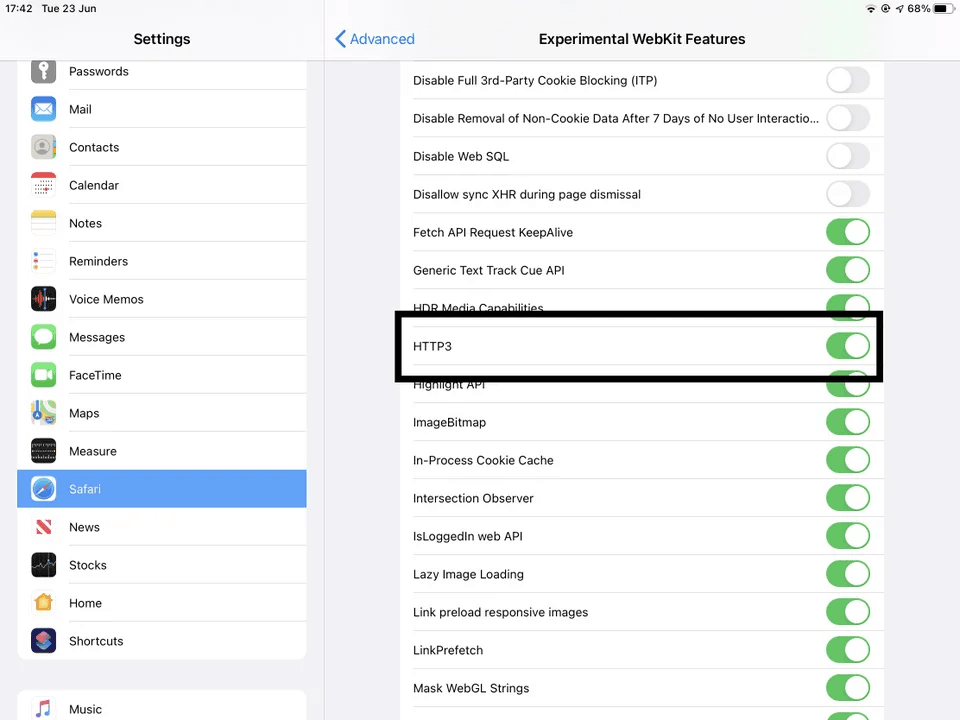
HTTP/3 is significantly faster than its predecessor HTTP/2 web standards and is being adopted slowly by all the major web browsers. On iOS 14, you can find the toggle bar on HTTP 3 at Settings > Advanced > Experimental WebKit Features (as described on Reddit.)
3. WebP & HDR Video Playback Support
While keeping the file size smaller, WebP enables images with lower compression and transparency. This is the format created by Google and Safari14 is the one of the last browsers to adopt it.
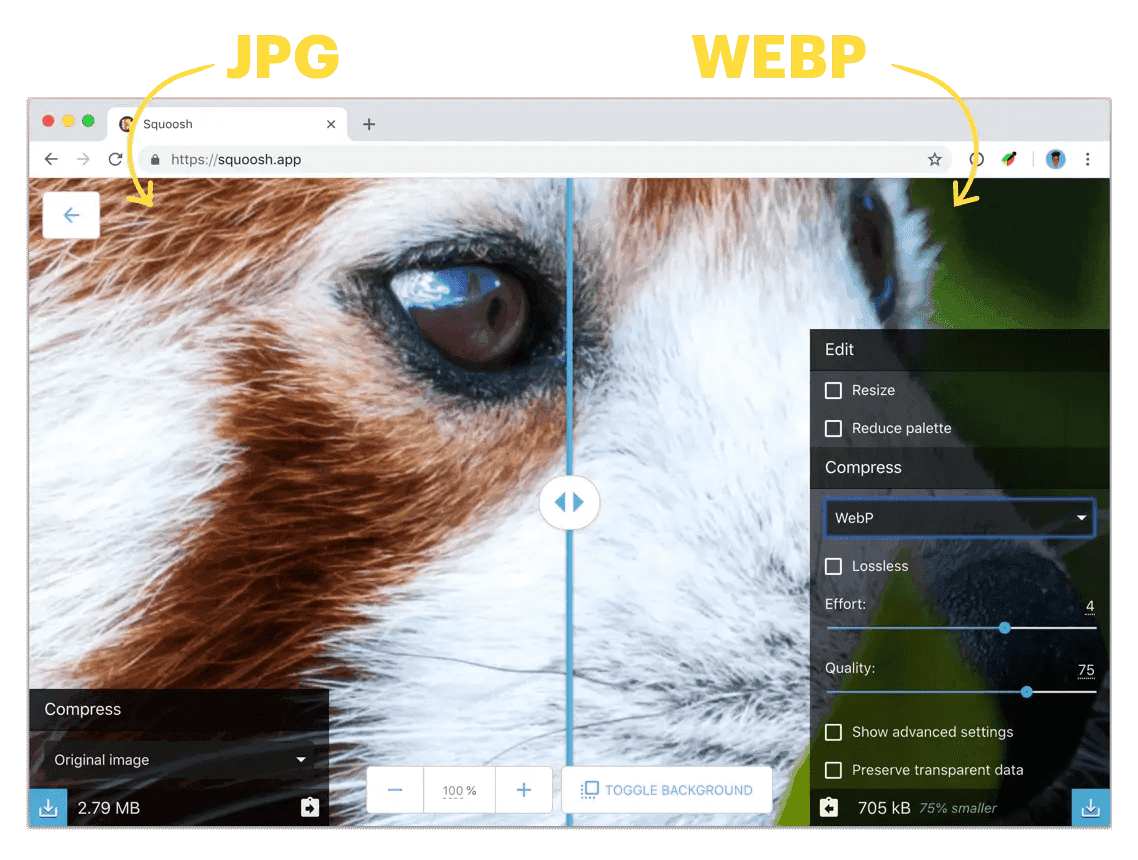
Image source : here
For the first time ever, Safari is able to play HDR videos. Apple enabled the VP9 codec for apps on iOS 14 and tvOS 14. It enables us to watch 4K HDR videos on YouTube, but Safari 14 hasn’t got this codec yet.
4. Safari 14 Doesn’t Support Adobe Flash Player
As per the press release from Adobe, they are planning to end the services related to Flash Player, and 31st December 2020 is marked as ‘end of life’ for all Flash Players. All major browsers will get rid of Flash Player sooner or later.
5. Touch ID & FaceID Authentication Now Possible With Safari 14
Apple announced in WWDC 2020 that this feature will provide “Frictionless Experience” to the user. This piece of tech is built via WebAuthn (web authentication) API. Developers can build authentication via FIDO2 specs. Both macOS and iOS Safari 14 will get these features. Chrome, Firefox, and Microsoft Edge already have these functions.
6. OTP Auto Fill From SMS
This is to make the 2FA (Two factor Authentication) easier. In January 2020, Apple engineers put forward a proposal to standardize the format of the SMS messages containing one-time passcodes (OTP) that users receive during the two-factor authentication (2FA) login process. This was backed by Google at that time.
According to the WebKit explainer, the format for SMS OTP will have two components: one line for human-users and another one for human-users and apps/browsers. It’ll help SMS OTP catchers to pull the right information for associated website/app EX: 747723 is your WEBSITE authentication code. @website.com #747723
7. Webpage Translation (Beta)
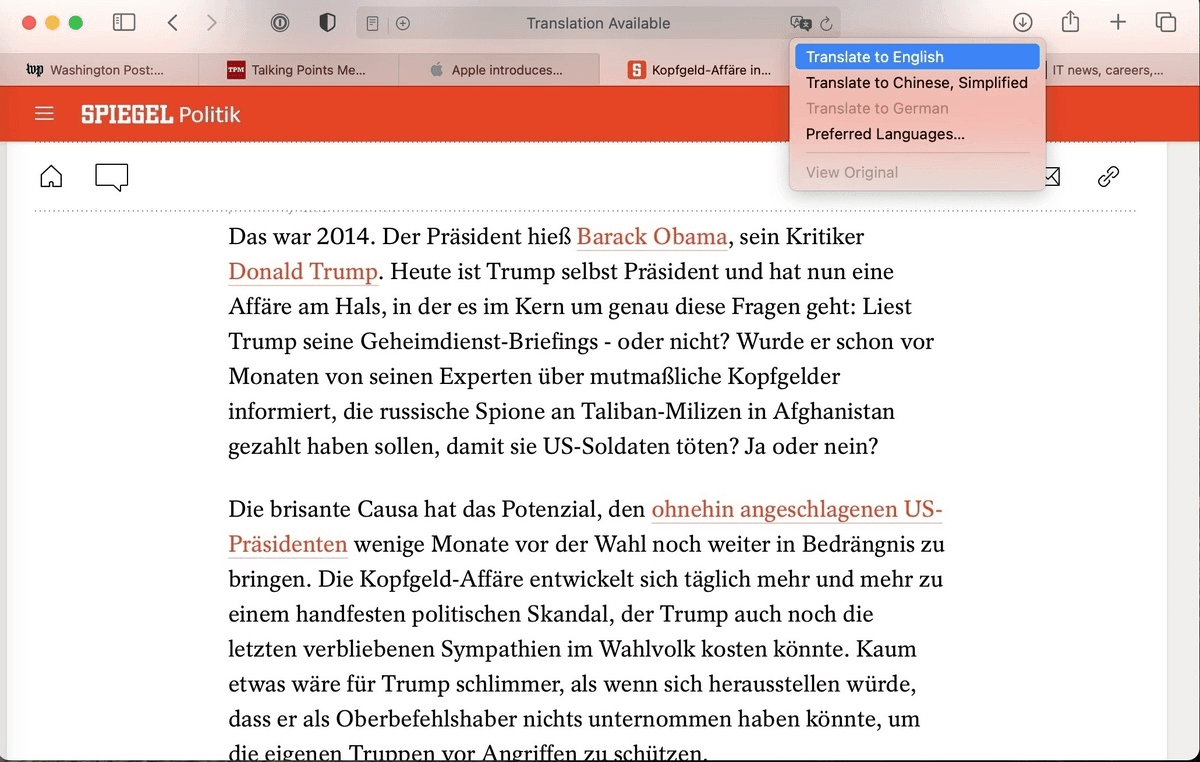
It has an inbuilt translation option for Spanish, English, Simplified Chinese, French, Brazilian Portuguese, German, and Russian. Based on your preferred language, Safari will automatically detect the availability of translation.
If the translation is possible, you’ll see an icon near the far right end of the address field. Click on that, and available translations will show. Languages for translations to (not from) must be listed in the Preferences > Language & Region > General > Preferred Languages.
Apple currently labels this feature as beta.
Source: COMPUTERWORLD
8. Privacy Report Of Your Browsing
Improved Privacy Report lets the user know about the trackers Safari is blocking when the user visits the website. macOS Big Sur Preview is going to include an update to the company’s web browser that gives users an easy-to-access “Privacy Report” right up next to the URL field. In a single click, the report will tell users which website trackers the browser has blocked.
Safari’s privacy report will reveal all the trackers it blocks on the websites you visit.
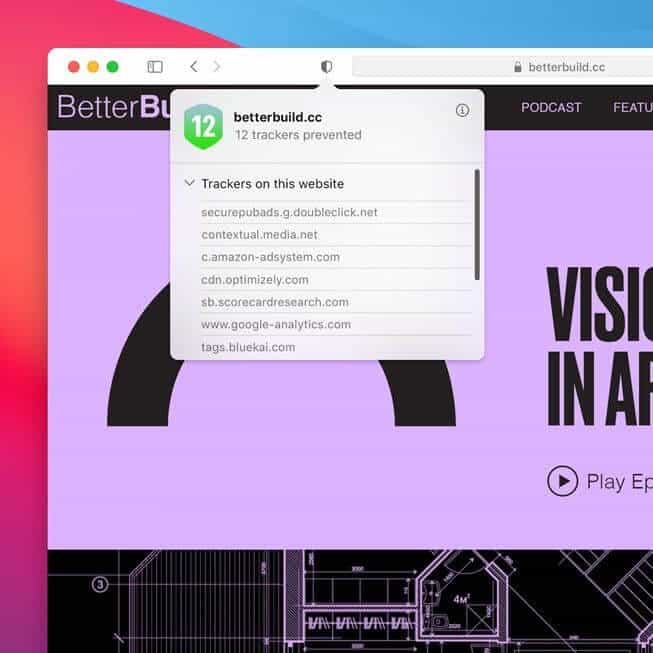
Image source: Apple
If you have tracker blocking extensions or use browsers like DuckDuckGo or Firefox, you’re probably familiar with how these work. If you aren’t, then you’ll probably find the sheer number of trackers on a typical website alarming and appreciate a way to significantly reduce — but probably not completely eliminate — them.
This feature can be in response to content blocking features in Firefox and Chrome. But Apple had Intelligent Tracking Prevention long before both of the rivals.
9. CSS Properties to Note
- Latest
image-set()Supports all other functions related to image which includes,image(),-webkit-canvas(),-webkit-cross-fade(), and-webkit-*-gradient(). - Addition:
is()pseudo-selector support as equal for:matches(). - Addition :
where()pseudo-selector support for specificity adjustment. - Addition of Support for
image-orientation.
10. Web Inspector
Here are the latest additions and improvements to Safari’s Web Inspector:
- Support for a Bootstrap script.
- Sources Tab that combines the Resources tab and Debugger tab.
- HSL color picker with P3 support.
- Information about Web Animations, CSS animations, and CSS transitions to the Timelines tab.
- Improved VoiceOver support.
11. Breach Alerts
This newly added cool feature is already available in Firefox and Chrome. As per the announcements from this fall, Safari 14 will scan locally stored passwords of the user and display a prompt if any number of user credentials are present in publicly available lists of breached accounts.. It will ask users to change the passwords, and a prompt from Safari will take the user to the ‘Change Password’ page of each website – if it is known publicly.
Honorable Mentions & Claims From Apple
Here are some more features which we can expect based on Apple’s Release note.
- Supported incremental loading of PDF files.
- Implemented asynchronous scrolling for
overflow: scroll, and< iframe >on macOS. - Improved tab closing performance.
- Improved
IndexedDBperformance. - Improved JavaScript cookie access performance.
- Improved
for-ofperformance. - Improved Web Platform Tests pass rate for WebDriver, XHR+Fetch, Service Workers, CSS, and SVG are also in the offerings .
- Safari is 50% faster than Chrome for frequently loaded pages.
- In macOS, Safari 14 Streams video for up to three hours longer and adds an extra one hour of browsing compared with Chrome or Firefox.
- New tab bar design displays more tabs on screen at once. It can help you move quickly between tabs.
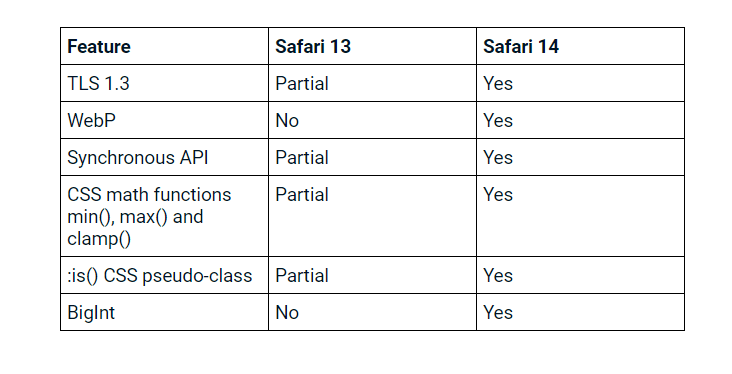
Followings are the new features Safari14 added over Safari 13-
Though not a major deal-breaker, there are a lot of features all the web developers are longing for, but they are yet to make the cut in the combo of macBig Sur and Safari14.
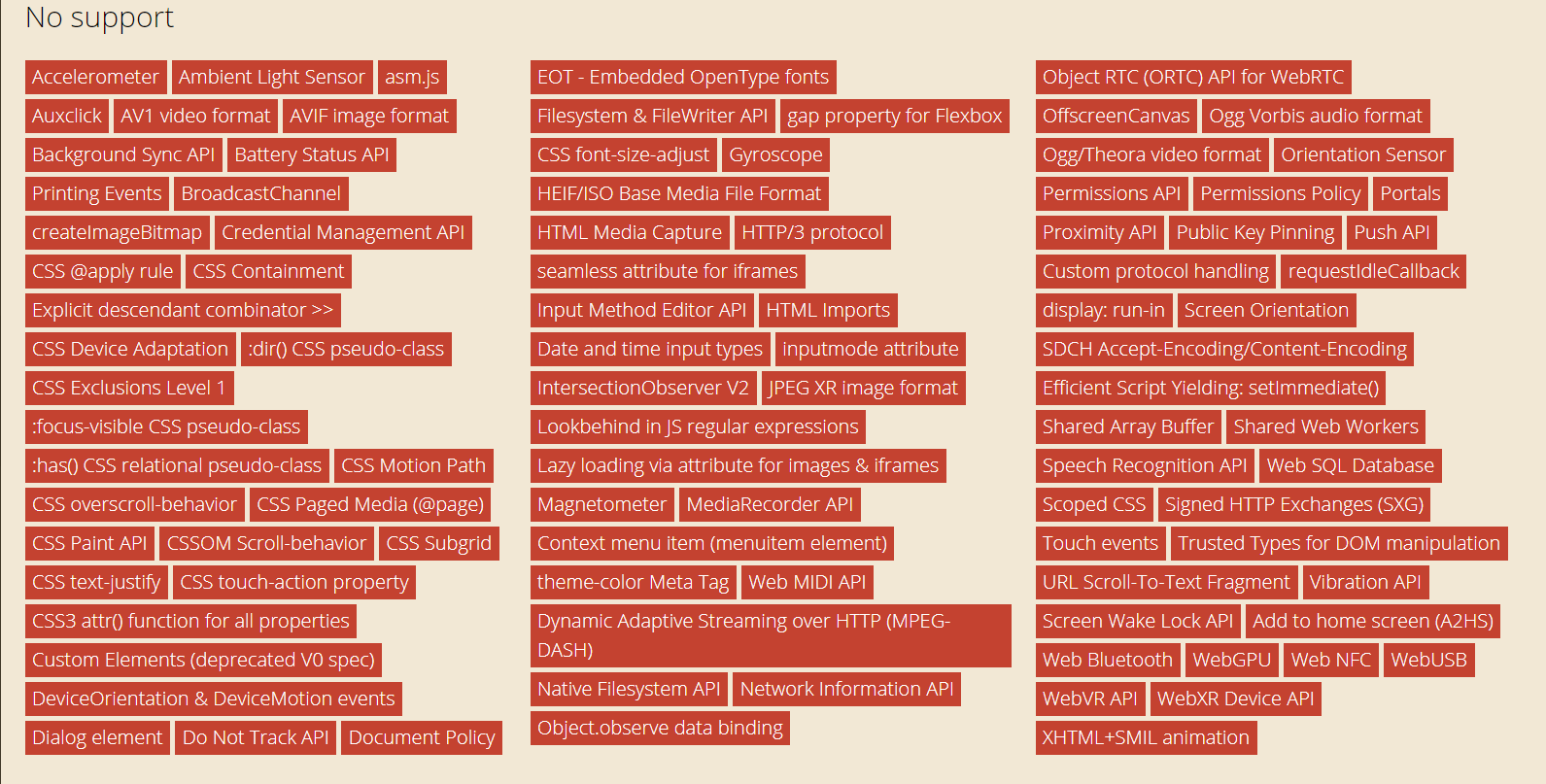
Image Source
Safari 14 vs Google Chrome
We all expect the browser wars to heat up more with the latest updates in Safari 14. A comparison with Google Chrome is long overdue, and we need to take a look at the differences to get a better idea.
Safari 14 has a list of features differences with the rival Google Chrome. Some of them are listed in the table below-
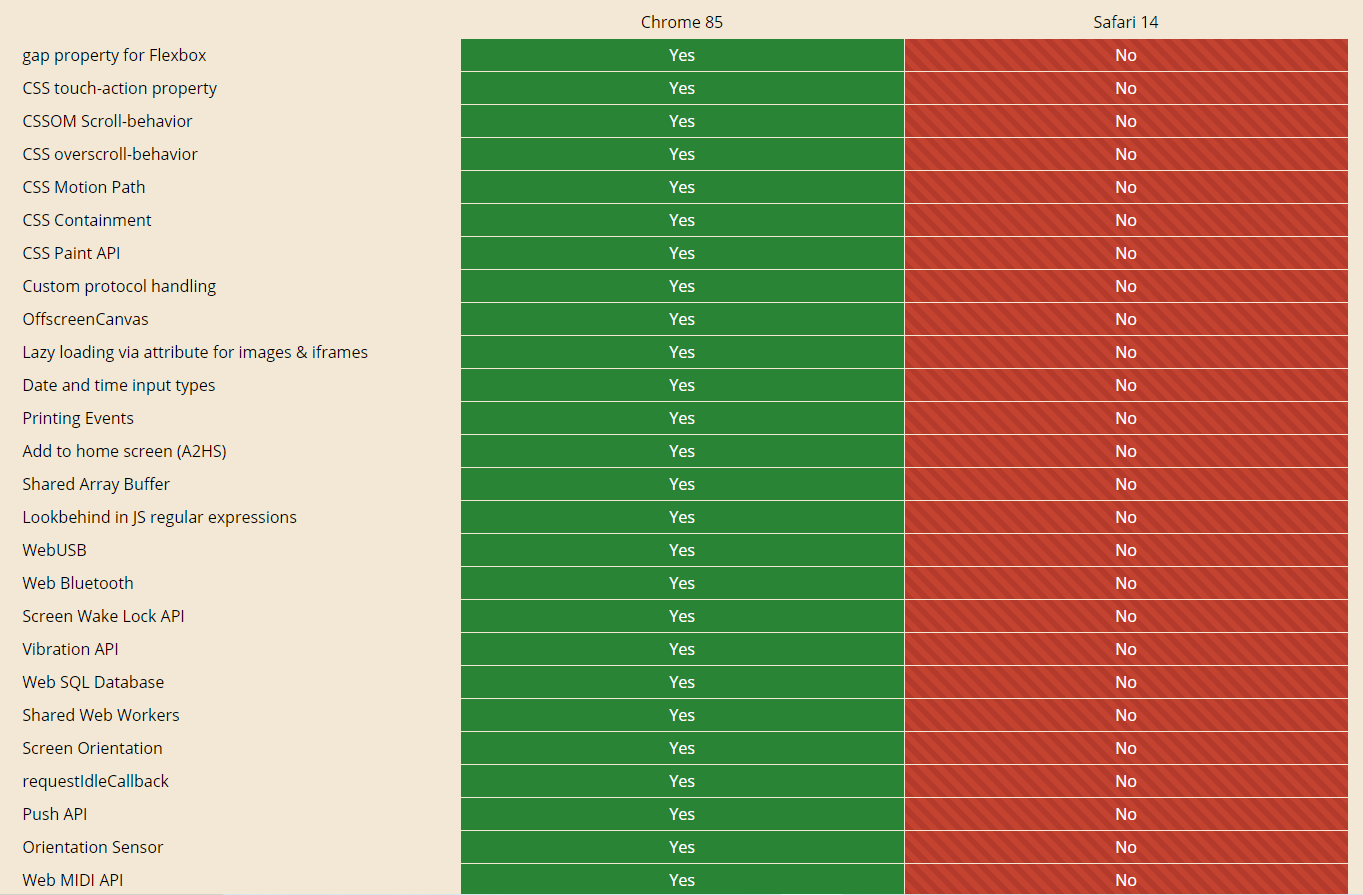
You can find the complete comparison of the features here.
Conclusion
We know this is not the final version, and this all-new preview version will get better and better. Why wait for the official release when you already have a beta version to test on? As they say ‘get your ducks in a row’, we want you to be prepared before Big Sur comes out in style.
We want you to try out Big Sur and Safari 14 first hand as soon as possible. So here we are with this update. By trying this Preview version, you can ensure that your website looks and behaves correctly on Safari 14. Once it is released to the general public, your website runs the risk of a possible break down or some bugs with the interface. Don’t wait anymore and perform cross browser testing of your website on the latest macOS Big Sur/Safari 14 using TestMu AI and make it future-ready. Also, let us know your experience with macOS Big Sur and Safari14 in the comments section below.
Also conduct a Test on Mac Mojave – verify cross browser compatibility online with your website. Test for free on the latest and older Mac Mojave browsers to ensure cross-browser compatibility.
Happy testing!

Austin Siewert
CEO, Vercel
Discovered @TestMu AI yesterday. Best browser testing tool I've found for my use case. Great pricing model for the limited testing I do 👏
2M+ Devs and QAs rely on TestMu AI
Deliver immersive digital experiences with Next-Generation Mobile Apps and Cross Browser Testing Cloud



Did you find this page helpful?
More Related Hubs
TestMu AI forEnterprise
Get access to solutions built on Enterprise
grade security, privacy, & compliance
- Advanced access controls
- Advanced data retention rules
- Advanced Local Testing
- Premium Support options
- Early access to beta features
- Private Slack Channel
- Unlimited Manual Accessibility DevTools Tests