

Next-Gen App & Browser Testing Cloud
Trusted by 2 Mn+ QAs & Devs to accelerate their release cycles


- Home
- /
- Blog
- /
- Mobile Testing with KaneAI Just Got Smarter: JavaScript Snippets, Orientation Control, and More!
Mobile Testing with KaneAI Just Got Smarter: JavaScript Snippets, Orientation Control, and More!
Experience the new KaneAI update! Simplify mobile testing, handle edge cases, optimize orientation behavior, and more!

Devansh Bhardwaj
March 2, 2026
Today is the day that we go live with new features that are going to completely shift how teams approach mobile testing with KaneAI. Whether you’re dealing with edge cases, testing all the behaviors associated with different orientations, or scaling your automation coverage, these new features eliminate the major roadblocks the modern-day QA team encounters.
Available on Android & iOS
You can write JavaScript directly in your test steps. No context switching, no external utilities, just inline logic exactly where you need it.
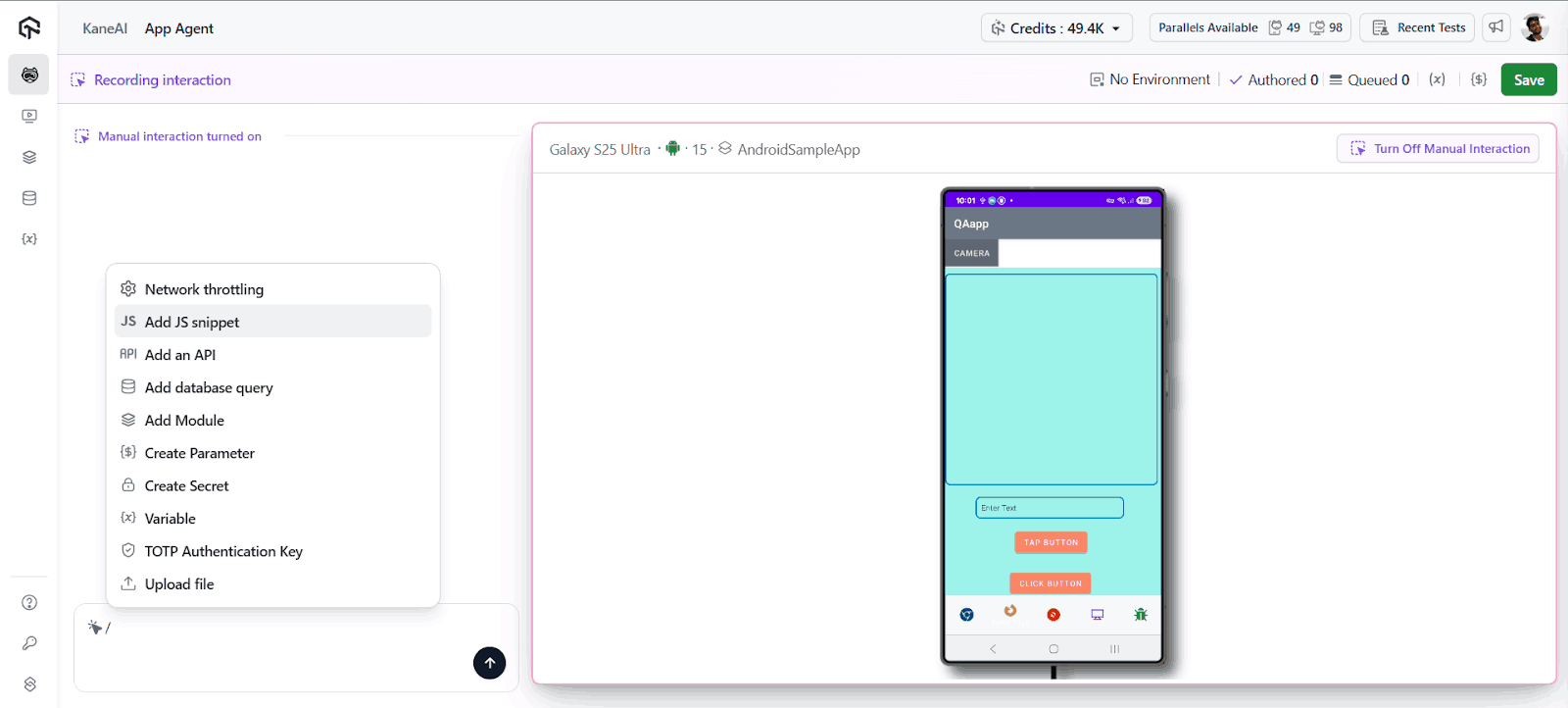
Use cases include:
- Transform data on demand (date formatting, JSON parsing, string manipulation)
- Use clever waits based on dynamic conditions
- Create custom validations beyond the typical assertions
- Handling conditional logic involving edge cases
This brings developer-level flexibility to test authoring without the developer-level effort. Your QA engineers can now write complicated scenarios that would previously have required either custom code or a workaround.

Note: Check out our detailed support documentation to get started with JavaScript Execution.
Device Orientation Control
Available on Android & iOS
Set your device to either Auto (default), Portrait or Landscape mode once before the session to simulate real world usage scenarios.
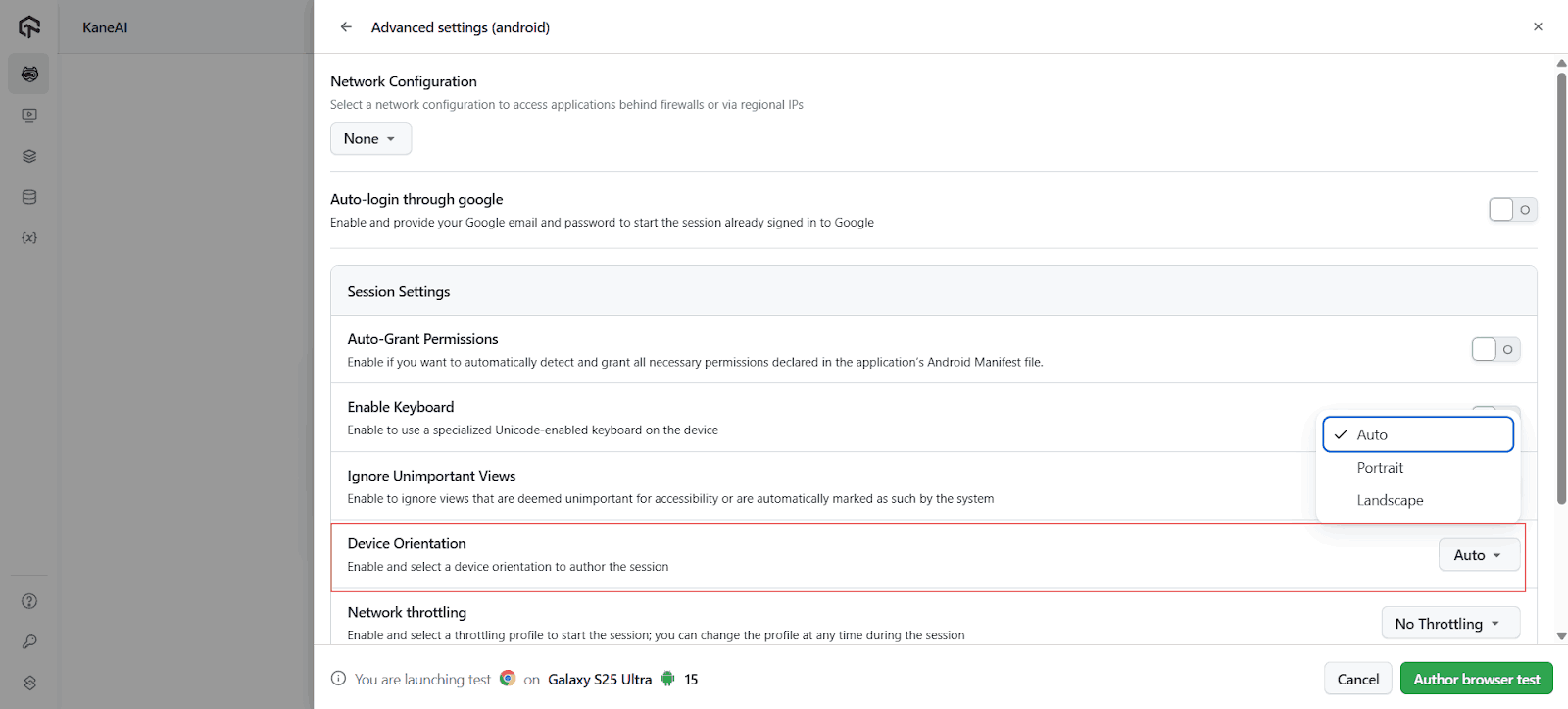
But it’s not just about testing landscape mode, it’s about finding rotation-related bugs early enough for a release. Different screen orientations reveal different layout issues, different UI problems, and different interaction bugs that are context specific.
Perfect for:
- Media applications with landscape-first experiences
- Games and immersive content
- Responsive mobile UIs with orientation-dependent behaviors
- E-commerce apps with different landscape layouts
Note: Scale and Innovate QA today with KaneAI – Your AI Test Agent
Test in the exact orientation your users experience, ensuring comprehensive coverage from day one.
Note: iOS manual Interaction does not currently work in Landscape mode. Full support coming soon.
Bulk Conversion: Manual to Automated Tests
Convert dozens of manual test cases to fully automated KaneAI tests in minutes. Select multiple tests, your platform (Desktop Browser, Mobile App, or Mobile Browser), and KaneAI does the rest.
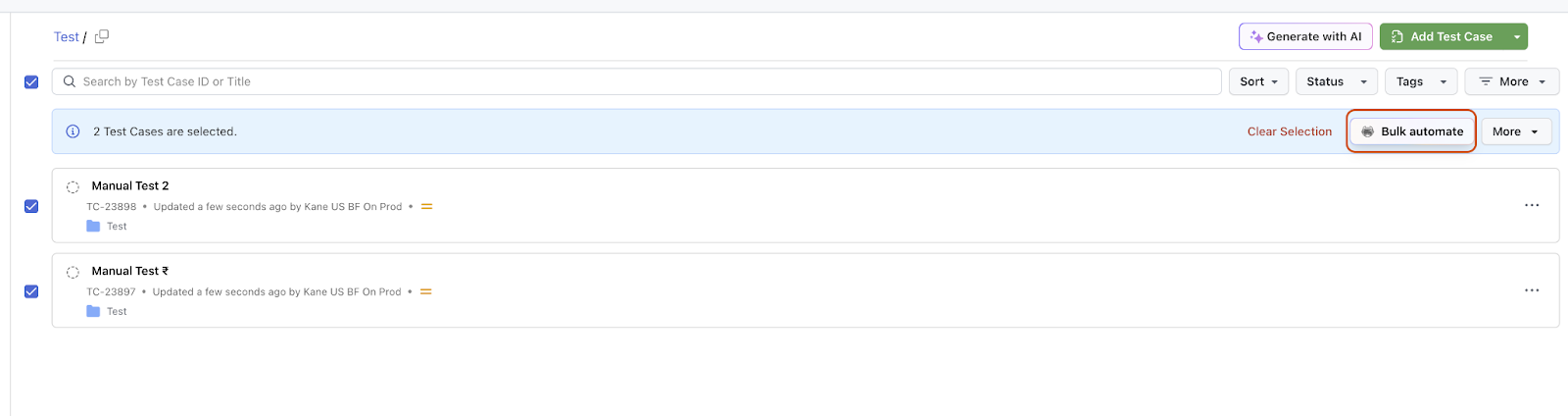
This would allow organizations to move to automation faster, scale their coverage faster, and provide teams with the flexibility to choose the right platform based on the needs of their test suites.
What used to take QA engineers weeks, such as converting test step documentation into test scripts, building automation frameworks and debugging all can now be performed automatically, allowing QA engineers to focus on test strategy.
Service Accounts for CI/CD Integration
Service accounts allow you to securely run KaneAI tests from the API, in a way that with CI/CD pipelines you are not reliant on the changing availability of personal credentials or the turnover of team members.
Why it would make a different:
- Better security: Separate service credentials from user accounts with granular permission controls
- Reliable CI/CD: Test pipelines remain stable regardless of team changes
- Cleaner auditing: Distinguish between human-initiated and automated test runs
- Simplified management: No more shared credentials or credential rotation headaches
Bonus Features!
But wait, there’s more! We’ve also rolled out several enhancements to make your testing experience even more comprehensive:
Language & Locale Selection for Mobile
Before starting a Mobile App or Mobile Browser authoring session, you can now choose the desired language and locale to test localized experiences seamlessly. Perfect for global teams validating region-specific content and user flows.
Timezone Selection Across Platforms
You can now set the timezone prior to authoring sessions across Desktop Browser, Mobile App, and Mobile Browser, ensuring accurate validation for time-based workflows. No more workarounds for testing booking systems, scheduling features, or time-sensitive notifications.
UI & Experience Improvements
We’ve introduced refined layouts in the Playground and Summary Page to highlight all advanced settings configured for each authored test case. Now you can see at a glance exactly how your test environment is configured, making debugging and collaboration faster.
All in All
These updates aren’t feature additions. They’re fundamental shifts in what’s possible. JavaScript snippets put sophisticated test logic in the hands of QA engineers who understand your product best. Orientation control ensures you catch the bugs that only surface when users actually hold their phones. Bulk conversion collapses months of migration drudgery into hours. Service accounts free your CI/CD pipeline from the fragility of personal credentials.
Modern mobile apps demand testing that’s equally sophisticated, adaptive logic for complex flows, real-world device contexts, automation at scale, and seamless integration with deployment pipelines. KaneAI now delivers all of it without the traditional tradeoffs.
Happy Testing!


Did you find this page helpful?
More Related Hubs
TestMu AI forEnterprise
Get access to solutions built on Enterprise
grade security, privacy, & compliance
- Advanced access controls
- Advanced data retention rules
- Advanced Local Testing
- Premium Support options
- Early access to beta features
- Private Slack Channel
- Unlimited Manual Accessibility DevTools Tests