

Next-Gen App & Browser Testing Cloud
Trusted by 2 Mn+ QAs & Devs to accelerate their release cycles


How to Update Windows: Step-by-Step Process
This easy-to-follow guide will help you keep your Windows system up to date. Learn how to install updates for better security and performance.

Bhawana
December 22, 2025
Updating Windows might seem like a small task, but it plays a big role in keeping your computer fast, secure, and reliable. Updates often include bug fixes for your system, performance improvements, and new features in your system from Microsoft. Let’s see why updates are worth your time, and how to make sure your system’s up to date.
There are two ways to update Windows manually and automatically. Let’s explore each of the methods in detail.
Note: This blog uses Windows 11 to demonstrate the update process. If you’re using an older version, the user interface may look different.
Steps to Update Windows Manually
Follow these steps to update Windows manually:
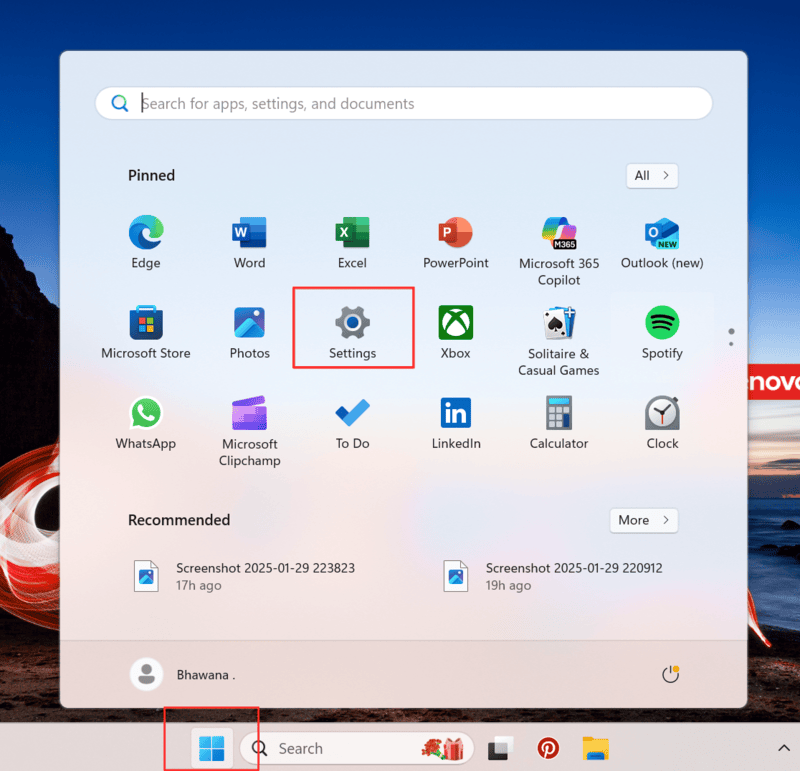
- Click on the Start menu and select “Settings” (or press Win + I).
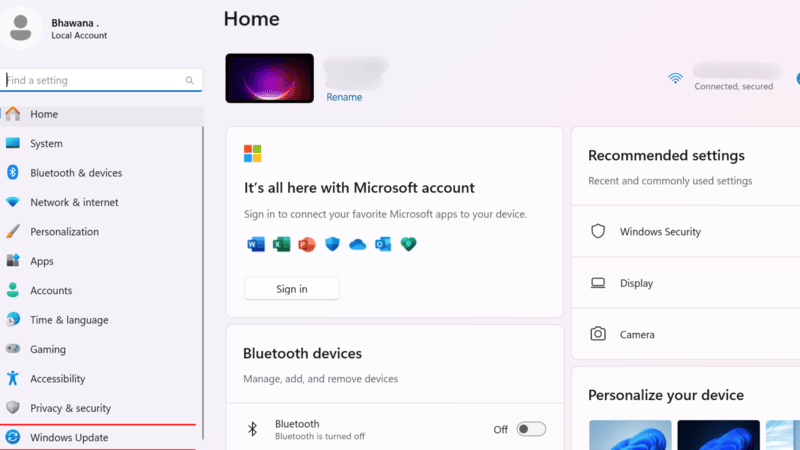
- In the Settings window, find and click on “Windows Update.“
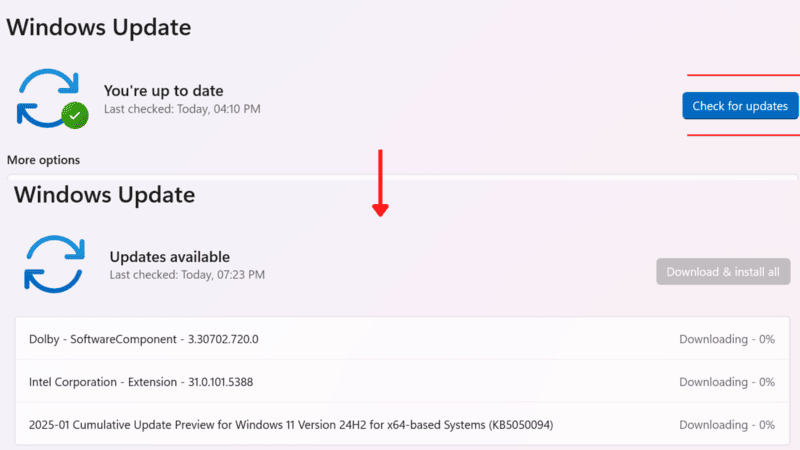
- Under the Windows Update section, click “Check for updates.” Windows will scan for available updates. If no updates are found, you’ll see “You’re up to date.”
- If updates are available, click the “Download & install all” button to begin the update process.
- After installation, Windows prompts you to restart your computer to apply the updates. To do so, click the “Restart now” button or schedule a restart.

Steps to Update Windows Automatically
Enabling automatic updates ensures your system stays up to date without manual intervention. Follow these steps to set up automatic updates:
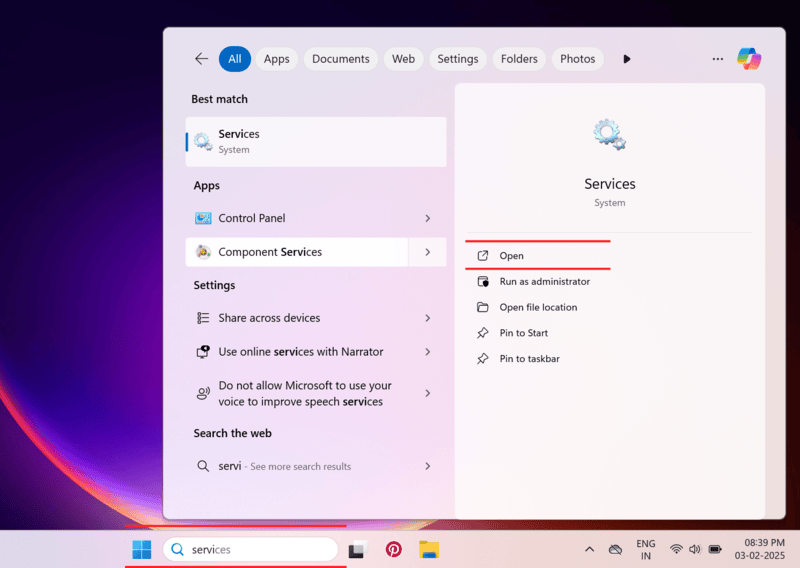
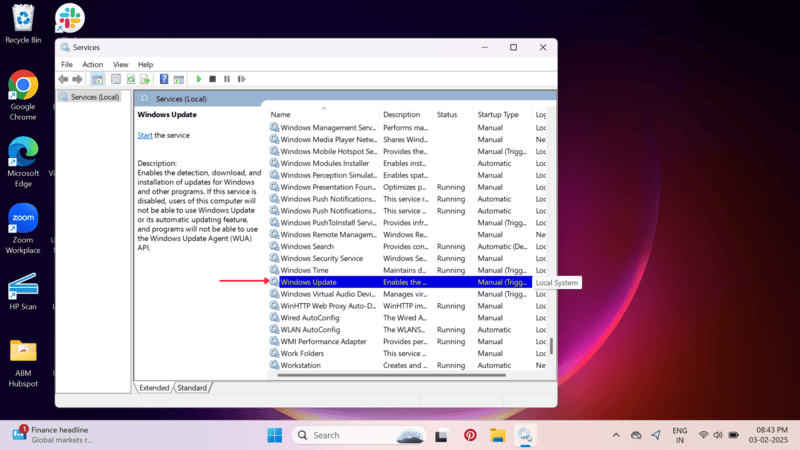
- In the Search bar, type “Services” and open it.
- Now scroll down and click on “Windows Update.”
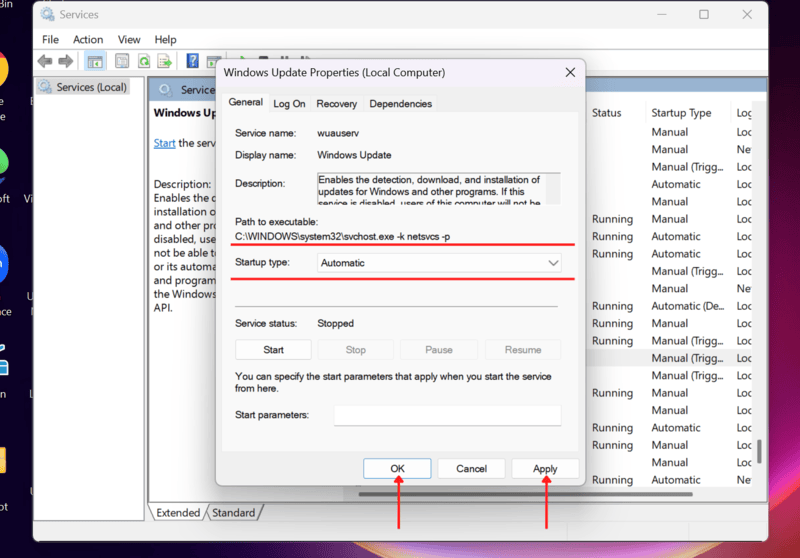
- Under “General,” find “Startup type” and select “Automatic,” then click on “Apply” and “Ok”.
Why Should You Update Windows?
Updating Windows helps keep your OS secure, run smoothly, maintain overall OS health, protect against threats, and improve performance.
Below are some key reasons why updating is important:
- Get Upgraded Security: Updates guarantee that security patches have been implemented to keep malware, viruses, and other cyber threats at bay on your computer.
- Bug Fixes: Updates address system bugs that may cause crashes, slowdowns, or software incompatibilities.
- Improved performance: If your system has performance issues, likely that your Windows has not been updated.
- Find New Features: Microsoft regularly introduces features and enhancements that often improve the user experience.
- Better Software Compatibility: Your OS updates allow all applications and programs to run smoothly.
Conclusion
Update your Windows system regularly to maintain security, stability, and performance. Decide whether to run manual updates or set up automatic updates to keep your OS up-to-date with the latest features and protections. Follow the instructions in this guide to remain secure and efficient on Windows.


Frequently asked questions
Did you find this page helpful?
More Related Hubs
TestMu AI forEnterprise
Get access to solutions built on Enterprise
grade security, privacy, & compliance
- Advanced access controls
- Advanced data retention rules
- Advanced Local Testing
- Premium Support options
- Early access to beta features
- Private Slack Channel
- Unlimited Manual Accessibility DevTools Tests