

Next-Gen App & Browser Testing Cloud
Trusted by 2 Mn+ QAs & Devs to accelerate their release cycles


On This Page
- Geolocation Based Cross Browser Testing Made Easier
- Test On Latest iOS 12.4 and iOS 13 with New Safari 13 Browser
- Mozilla Firefox 69 and 70 Beta Now Live In Real Time Testing
- Google Chrome 77 And 78 Dev Are Also Live In Real Time Testing
- New Devices Added To Automated Screenshot Testing
- Test On A Screen Resolution That Fits Your Entire Screen
- In-App Notifications To Keep You Updated On All Of The Changes
- That Is All For Now! Stay Tuned For More

Product Update: Geolocation Testing, iOS 13, New Browsers, Devices, and More!
Perform cross browser testing from different Geolocations, new iOS 13, new browsers, devices, and a lot more on-board to help you expand your browser test coverage.

Harshit Paul
January 30, 2026
Hello, testers! Off to a lazy Monday morning? I suggest you buckle up because we are about to announce exciting updates related to our platform. This time you get to perform from different geolocations(in-app), new iOS 13, new browsers, devices and a lot more on-board in this product update to help you expand your test coverage for browser compatibility testing. We have added the below on our platform.
- Geolocation-based cross browser testing made easier.
- Latest iOS 13 and iOS 12.4 are now available in live-interactive cross browser testing.
- Perform Cross Browser Testing on Safari 13.
- Test your website on Latest iPhones – iPhone 11, iPhone 11 Pro, iPhone 11 Pro Max.
- Latest browser versions for Mozilla Firefox.
- New devices to Automated Screenshot Testing.
- Test on a Screen Resolution that fits your entire screen.
- In-app notifications.
Let’s get to know more about these updates and how they can impact your way of performing .
Geolocation Based Cross Browser Testing Made Easier
Did you know that your website may appear different when rendered from an IP belonging to different geography than your own? Well, now you do!
By default, TestMu AI uses IP2Location to determine your Geolocation, based on which you are routed to the nearest data center. This way you get the best possible performance every time. However, in case you want to perform Geolocation sensitive testing, you can bypass this nearest data center based routing. With this feature, the TestMu AI machine you get for testing would be proxied through the location you have set and you would get the testing experience as if you are testing from your selected location.
Keeping that in mind, we launched a TestMu AI update on 27 September 2018, where we added the feature to help you perform cross browser testing using TestMu AI and a VPN of your choice.
This product update we have made it a lot easier for you as we have embedded the feature in our application through a drop-down to help you select geolocation of your preference. You can find the option to shuffle the geolocation on the machine consoles while performing live-interactive testing on TestMu AI. Here is how it may look like.
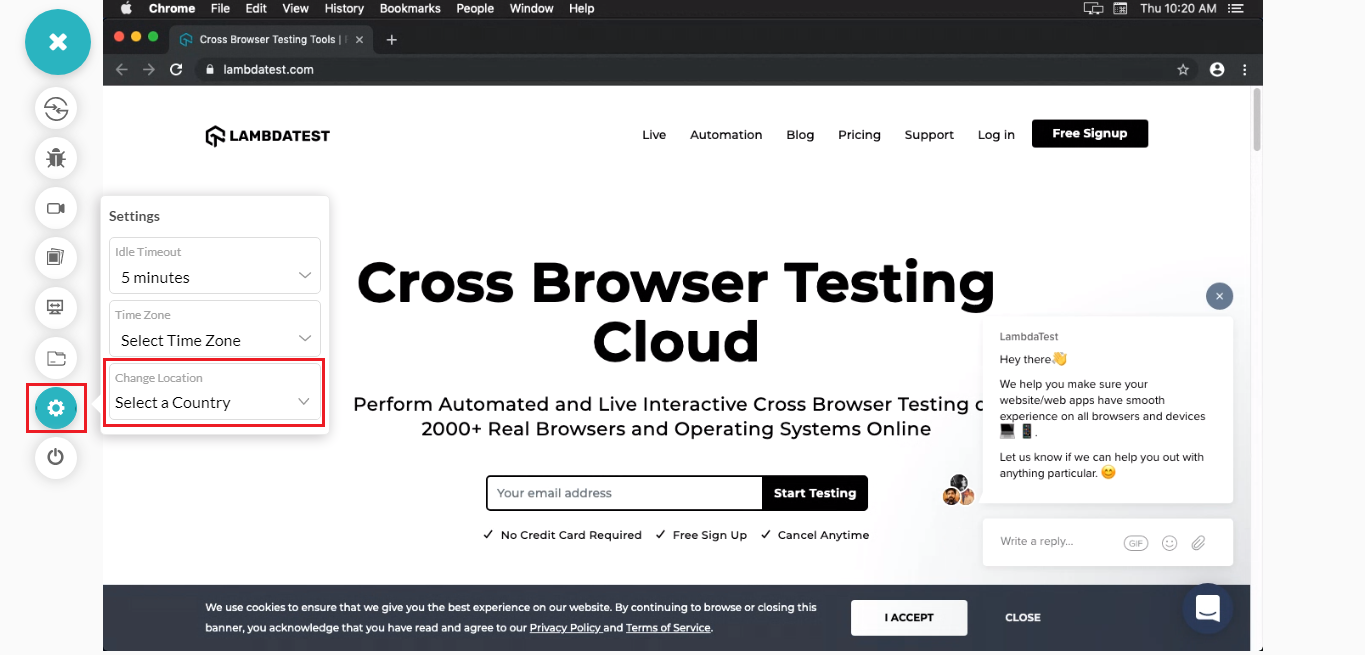
Note:We have not discarded the process of setting up a VPN of your own choice with TestMu AI. So in case you wish to perform Geolocation cross browser testing with a VPN of your preference, then you can still do it.
What Happens If You Wish To Test From Multiple Countries In Single Test Session?
In case you wish to perform cross browser testing with multiple geolocations for a webpage in a single test session, then make sure to reload the browser provided inside the machine hosted by TestMu AI cloud servers.
Wondering about what countries we offer?
Here is a list of geolocations over which you can perform cross browser testing with TestMu AI.
Didn’t find the country you were looking for? Don’t worry! Give us a shout to our 24/7 customer chat support or email us to [email protected] specifying the country you would want us to feature for Geolocation testing and we will get it on-board in a jiffy.
Test On Latest iOS 12.4 and iOS 13 with New Safari 13 Browser
Are you paying equal attention to mobile devices and browsers as you do for desktop? Well if you are, then we are pleased to inform you that we are up with the new iOS 12.4 and iOS 13, introducing a new Safari 13 browser.
Test Website On iOS 13 With New Safari 13 Browser
On 19th September 2019, Apple introduced the new iOS 13 for the new Apple mobile devices i.e. iPhone 11, iPhone 11 Pro, iPhone 11 Pro Max. That is not all, the new iOS 13 also introduced a new Safari browser version i.e. Safari 13, with the vision to provide a desktop-like experience to its users. Interesting, isn’t it?
Safari 13 brings a new download manager that allows you to download files with ease while browsing. You can now work on Google Docs through the Safari browser as well. In layout and rendering, Safari 13 brought the following changes:
- Now, you don’t have to
set-webkit-overflow-scrolling: touchas the new Safari 13 bringsoverflow:scrollelements which promises faster one-finger scrolling to each and every frame. - In iPads, the default behaviour for horizontal scroll over wide web pages has been altered using the responsive meta-tags. To eliminate the horizontal scrolling, text-size will alter and pages will now be scaled.
- From cross browser compatibility perspective, Safari 13 has added support for CSS conic gradient. As quoted in our guide to Cross Browser Compatible CSS Gradients,
“CSS conical gradient function can be used to create a circular gradient pattern similar to radial CSS gradients. However, while radial CSS gradients creates a pattern in which color stops radiates outwards from the center but in the case of conical CSS gradients, color stops are placed around the center point of origin.”
If you are wondering to implement CSS conical gradient in your browser compatible website then make sure to read this guide.

Perform Live-Interactive Cross Browser Testing On Safari 13 and Latest iOS 13 Now!
Test Website On iOS 12.4
Apple released the stable version of iOS 12.4 on August 26 2019, and being a milestone update meant that it was bringing more than just bug fixes. iOS 12.4 is running the same WebKit as the iOS 12.2, meaning you will get the same Safari 12 browser. For those of you who are not aware, WebKit is a rendering browser engine used for Safari browsers which allows the browser to interpret your website and represent it in front of the user.
Read More: Browser Engines: The Crux Of Cross Browser Compatibility
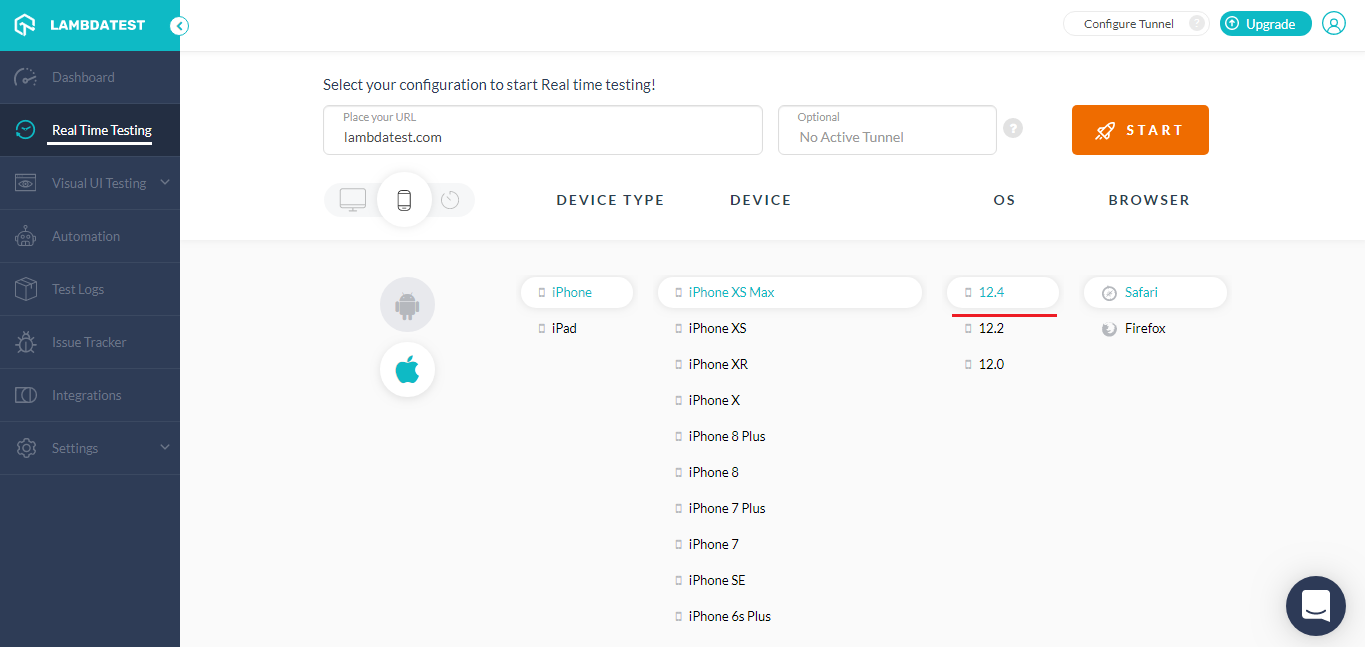
This major update is primarily tasked to enhance the security for iOS users and has worked on fixing around 40 bugs, out of which 19 were around the WebKit. So make sure to add it in your cross browser testing checklist. You can find iOS 12.4 under our Real Time Testing.
Cross Browser Testing On Latest iPhones
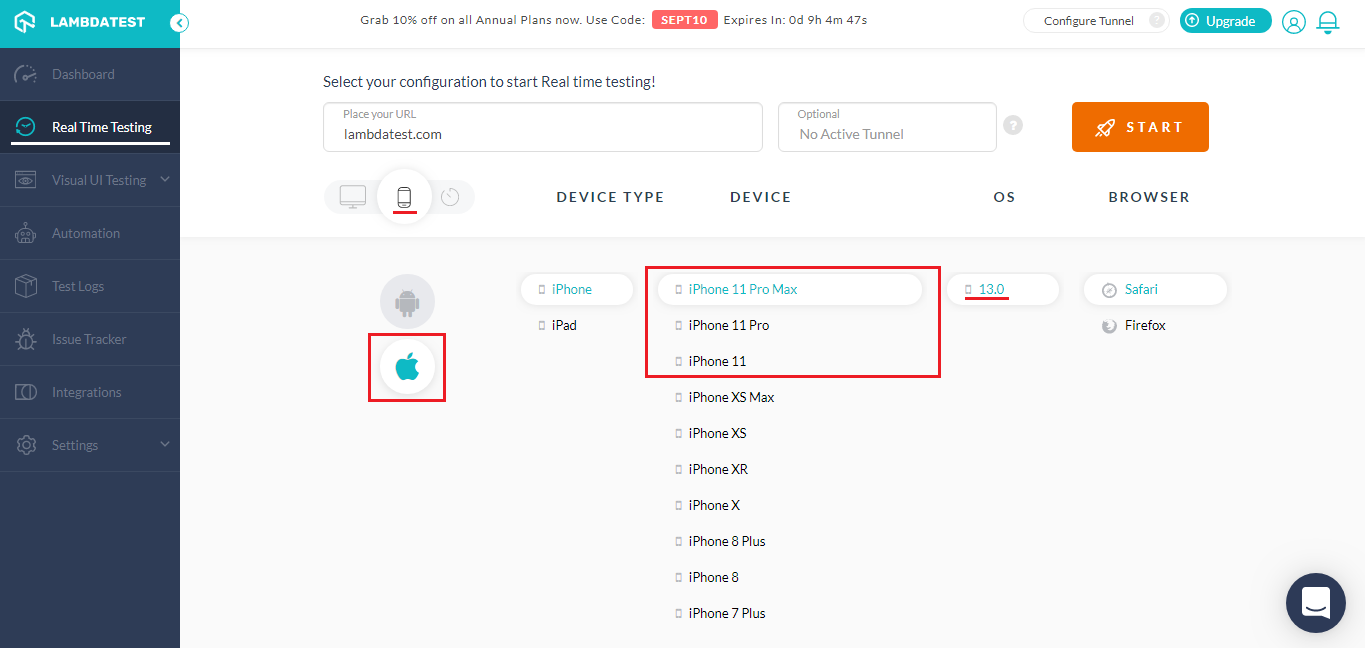
We have added all the newly released iPhones on our platform to help you evaluate your website’s rendering process. Below are the iPhones that are added:
- iPhone 11
- iPhone 11 Pro
- iPhone 11 Pro Max
To start cross browser testing on new iPhones, you would need to go to our real time testing.
Mozilla Firefox 69 and 70 Beta Now Live In Real Time Testing
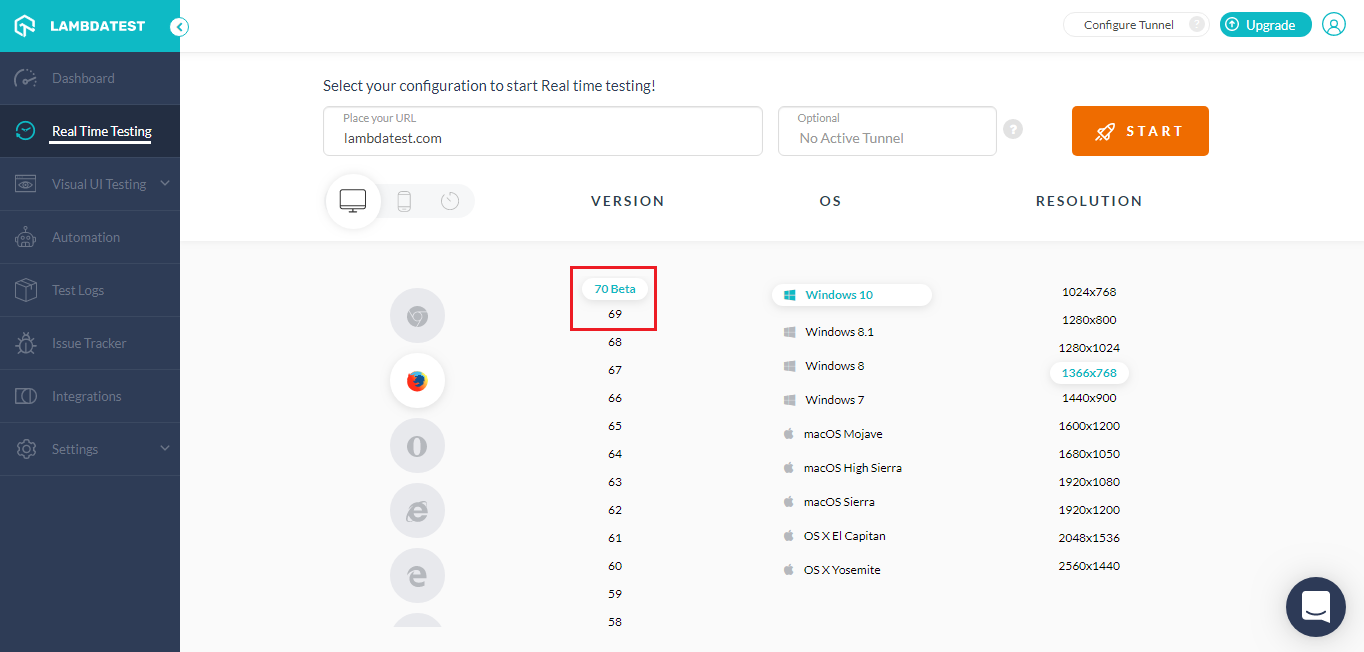
Mozilla Firefox is one of the browsers that would be found in cross browser testing checklist of almost every tester. If Firefox is a part your testing list then don’t forget to test on the latest browser additions. We have added Mozilla Firefox 69 and Mozilla Firefox 70 Beta in our live-interactive testing.
Heads up for the unsupported web elements of Firefox 69 and 70 beta.
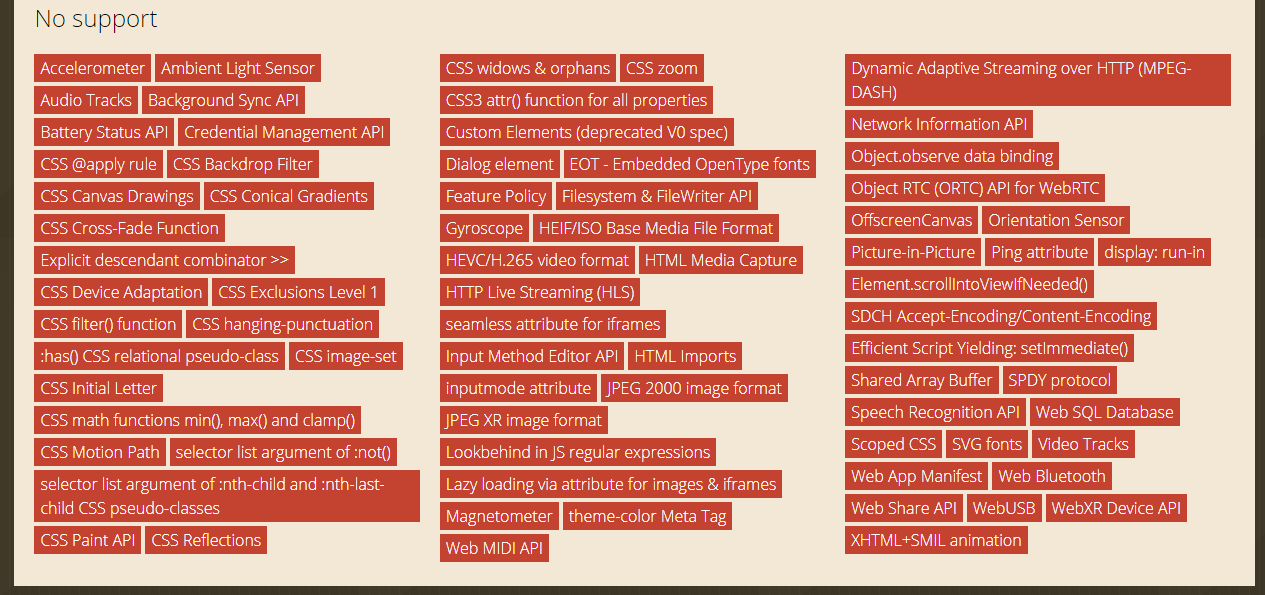
Source: https://caniuse.com/#compare=firefox+69,firefox+70
Google Chrome 77 And 78 Dev Are Also Live In Real Time Testing
Talking about the latest browsers, you can also find Google Chrome latest browser versions i.e. Google Chrome 77, and 78 Dev in our real time testing.
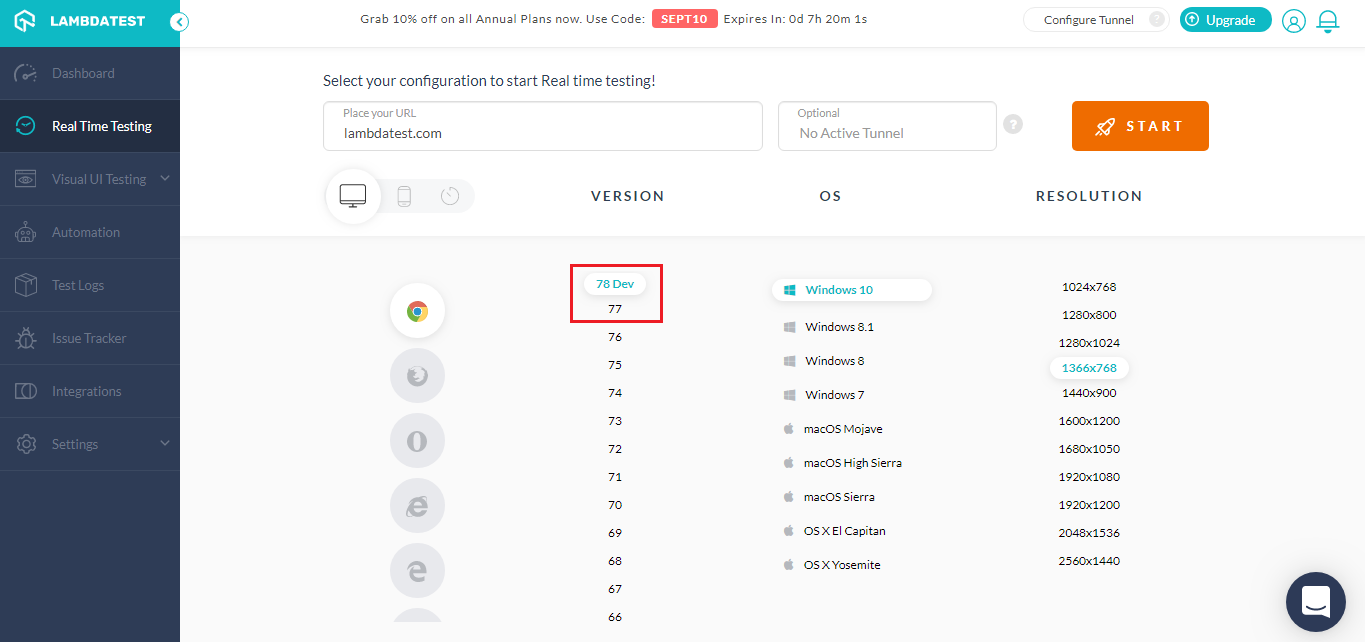
Let us have a look at the browser incompatibility in these two versions.
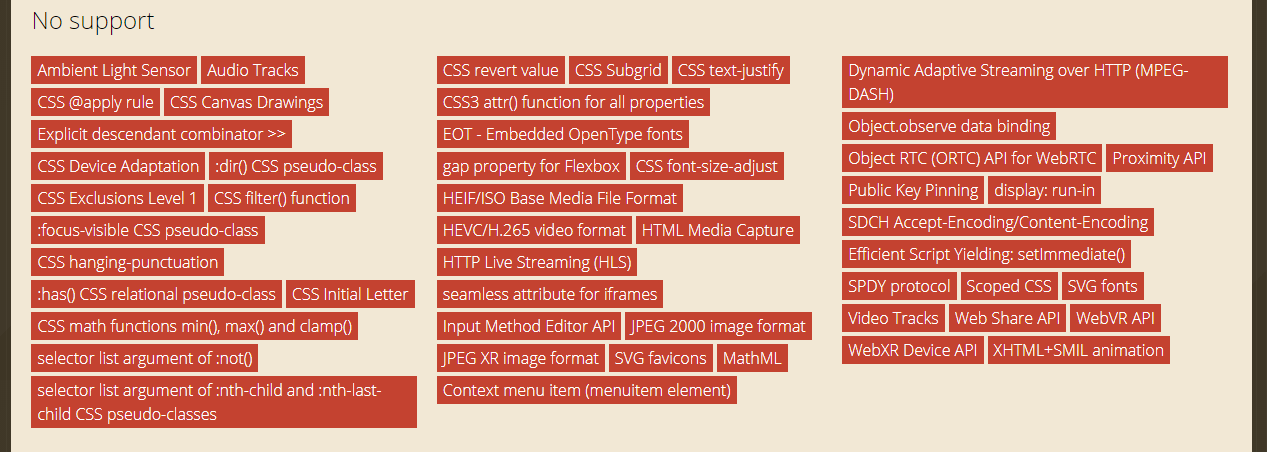
Src: https://caniuse.com/#compare=chrome+77,chrome+78
New Devices Added To Automated Screenshot Testing
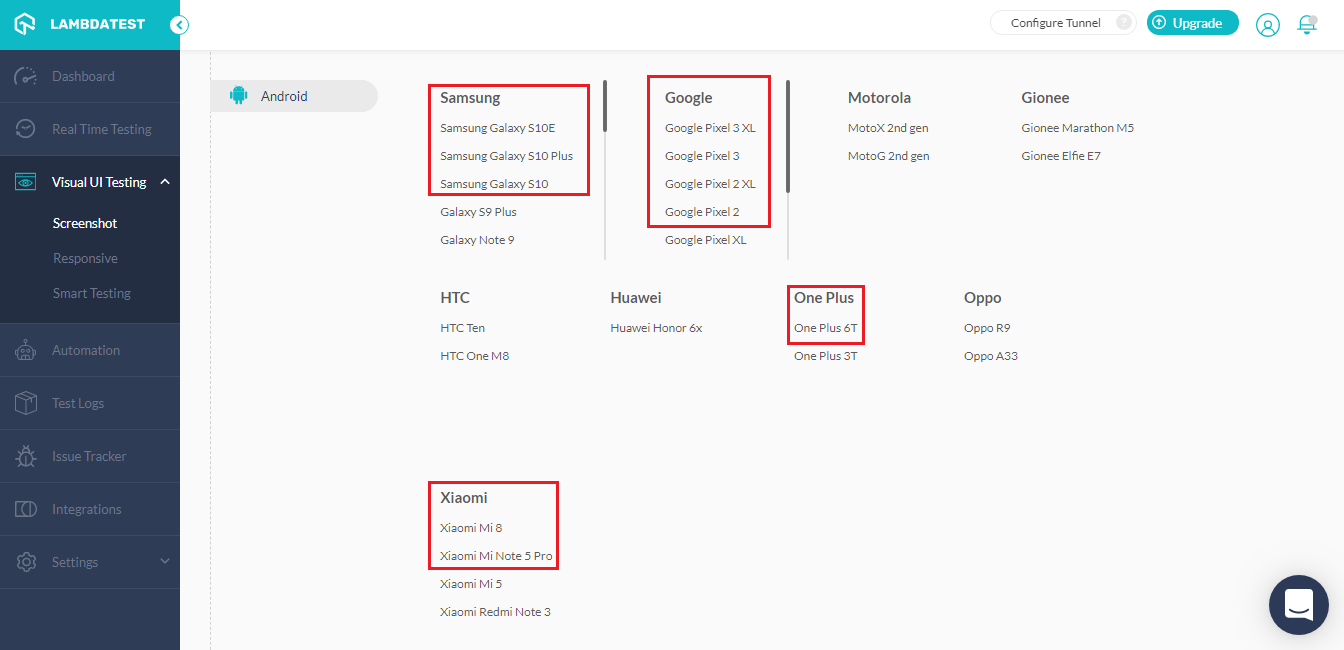
Automated Screenshot Testing as you may already know, is a feature that allows you to generate up to 25 full-page screenshots of your website over different browsers, in a single test session. Well, we have now added the below-mentioned latest devices in our automated screenshot testing.
iOS Devices:
- iPad Pro (12.9 inch) (3rd generation)
- iPad Pro (11 inch)
- iPad (6th Generation)
Android Devices:
- Samsung Galaxy S10E
- Samsung Galaxy S10 Plus
- Samsung Galaxy S10
- Google Pixel 3 XL
- Google Pixel 3
- Google Pixel 2 XL
- Google Pixel 2
- One Plus 6T
- Xiaomi Mi Note 5 Pro
- Xiaomi Mi 8
Read More: 10 Must Try Features Of Automated Screenshot Testing On TestMu AI
Test On A Screen Resolution That Fits Your Entire Screen
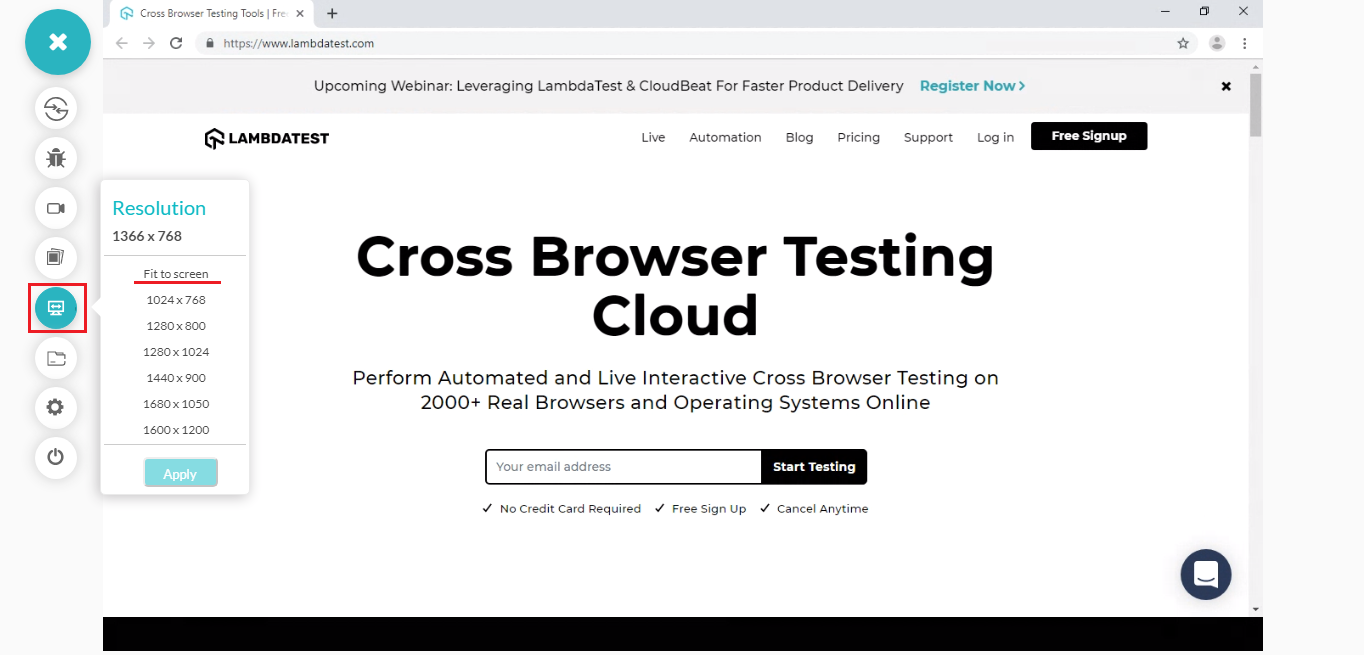
This was another valuable suggestion from one of our thoughtful customer. They wanted us to provide a screen resolution that would fit the entire screen of the user on-board in real-time testing. This not only helped them view their tested websites clearly, but also provided a look and feel as if they are testing on their native browsers. You can find the option to fit to screen by running Real-time testing, going to Screen Resolution button and selecting the option to Fit to Screen. It is going to be fun, we highly recommend you to give it a try right away.
Didn’t find the country you were looking for? Don’t worry! Give us a shout to our 24/7 customer chat support or email us to [email protected] specifying the country you would want us to feature for Geolocation testing and we will get it on-board in a jiffy.

In-App Notifications To Keep You Updated On All Of The Changes
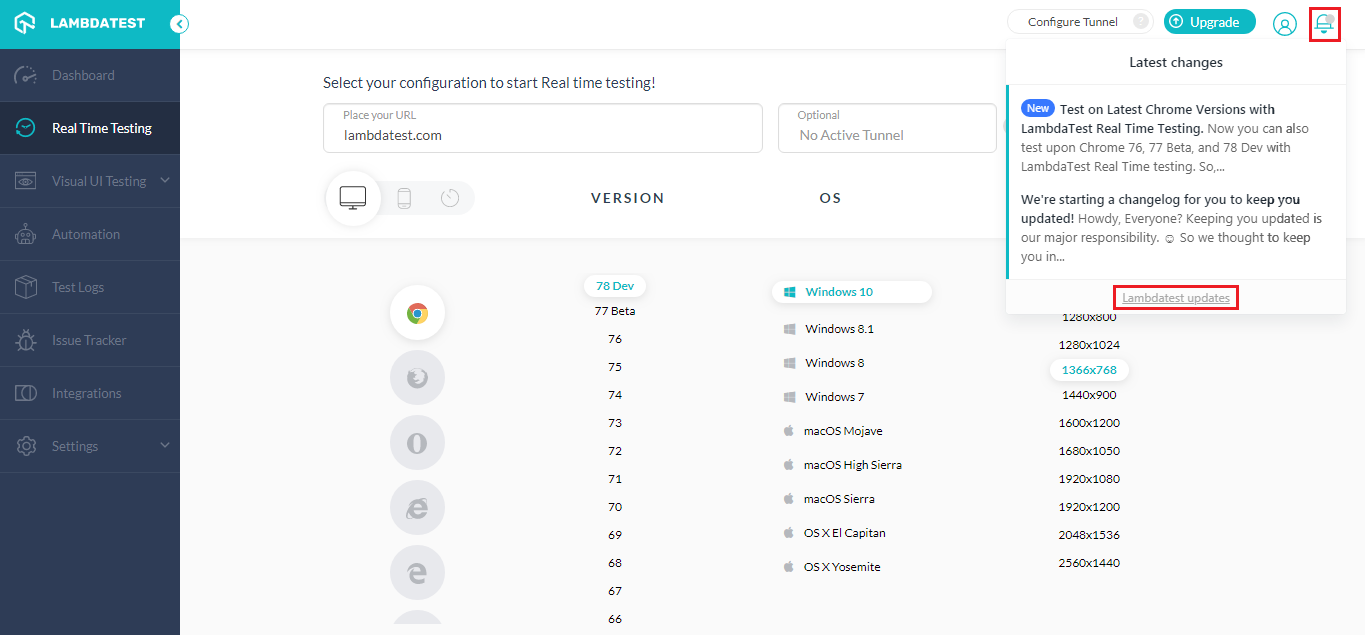
We try our best to bring more and more new functionalities on our platform to help you perform cross browser testing with convenience. We are always aiming to come up with new integrations to third-party tools, new browser versions, new features, and more.! Which is why we have launched in-app notifications to keep you updated with our changelog, so you don’t miss out on anything new.
Click the bell icon on top-right in the application and it would open a prompt where you can see all the latest changes made to the TestMu AI platform. If you wish to see all of the changes then click on the TestMu AI updates and it would take you to the entire changelog, where you can see all the historical changes too!
That Is All For Now! Stay Tuned For More
We hope you like the latest additions to our product. Do give them a spin and let us know your thoughts in the comment section below. In case you have any questions, feel free to throw them at our customer chat support or email us to [email protected]. We are always delighted to help. Last but not least, we are looking forward to bring more thrilling updates in the near future so stay tuned to hear more from our side. Happy testing! 🙂



Did you find this page helpful?
More Related Hubs
TestMu AI forEnterprise
Get access to solutions built on Enterprise
grade security, privacy, & compliance
- Advanced access controls
- Advanced data retention rules
- Advanced Local Testing
- Premium Support options
- Early access to beta features
- Private Slack Channel
- Unlimited Manual Accessibility DevTools Tests