

Next-Gen App & Browser Testing Cloud
Trusted by 2 Mn+ QAs & Devs to accelerate their release cycles


On This Page

Fixing Browser Compatibility Issues With CSS Opacity & RGBA
We will learn how to fix the browser compatibility issues with CSS opacity and RGBA.

Nikhil
January 10, 2026
Very often web designers encounter the need to spice of their websites by playing with CSS opacity for backgrounds, texts and images to build modern subdued styling effects. Opacity is also extensively utilised in creating a subtle shadow effect on text and boxes to make a webpage more attractive for users. This can be achieved either by using the CSS opacity property or by using RGBA colour, each way has its own merit and shortcomings. We will explore some of their most popular practical uses and cross browser compatibility solution to make them work on legacy browsers like IE8 and below versions that offer either partial or no browser support altogether.
CSS Opacity Property
The CSS opacity property is used to set the opacity value for an element. It defines the level of transparency by the use of a number in the range 0 to 1, where 1 corresponds to 100% opaque (or 0% transparent) and 0 corresponds to 0% opaque (or 100% transparent). However, CSS opacity property will add the specified transparency level to the entire element including all its child elements as well. For eg- if opacity property is defined for a div element, then all the elements inside the div which could be some text, image or other divs will also gain the same opacity from the parent div even though opacity isn’t explicitly inherited.
Before we deep dive in this article, you may have a look at the sample code I used to represent CSS Opacity for background on one of our TestMu AI Experiments, here you can visualize the output with respect to the difference in CSS opacity value.
Syntax For Using CSS Opacity
opacity: number|initial|inherit;
- Number : specifies the alpha channel value- the opacity/transparency level. Ranges from 0(zero opacity) to 1(full opacity)
- Initial : Sets to default value which is 1 – full opacity
- Inherit : inherit value from parent element
Sample Code To Represent Cross Browser Compatibility Issue In CSS Opacity For Background Color
<!DOCTYPE html>
<html>
<head>
    <style>
        h1 {
            text-align: center;
        }
        div {
            width: 50%;
            margin: 0 auto;
            background-color: #f1c40f;
            padding: 10px;
        }
        .opacity25 {
            opacity: 0.25;
        }
        .opacity50 {
            opacity: 0.5;
        }
        .opacity75 {
            opacity: 0.75;
        }
    </style>
</head>
<body>
    <h1>CSS OPACITY PROPERTY</h1>
    <div class="opacity25">
        opacity 25%
    </div>
    <div class="opacity50">
        opacity 50%
    </div>
    <div class="opacity75">
        opacity 75%
    </div>
    <div>
        opacity 100%
    </div>
</body>
</html>
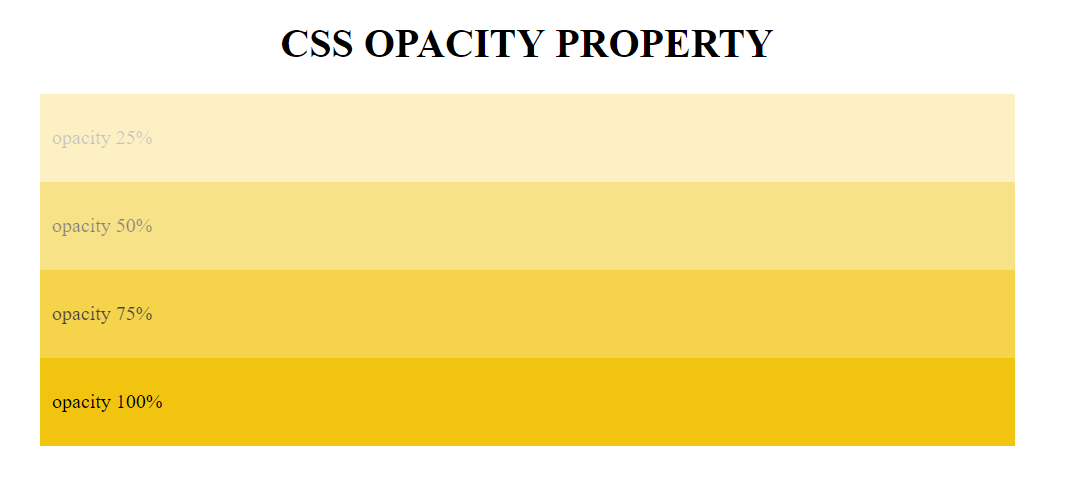
CSS Opacity for Background Color
Note: If CSS opacity number is set to a value that is outside the defined range 0 to 1, it is still a valid syntax. The value is rounded to the nearest limit point. For instance, if CSS opacity is set to -0.5 it will be rounded to 0. Similarly, if CSS opacity is set to 1.25, it will be rounded to 1.
<style>
.opacity-25{
 opacity: -0.25;
 }
.opacity125{
 opacity: 1.25;
 }
</style>
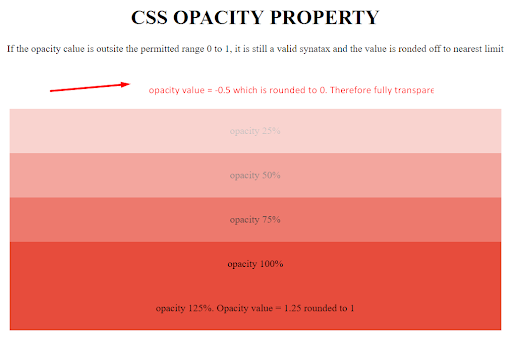
Rounding value of CSS Opacity for Background Color
Browser Support For CSS Opacity Property
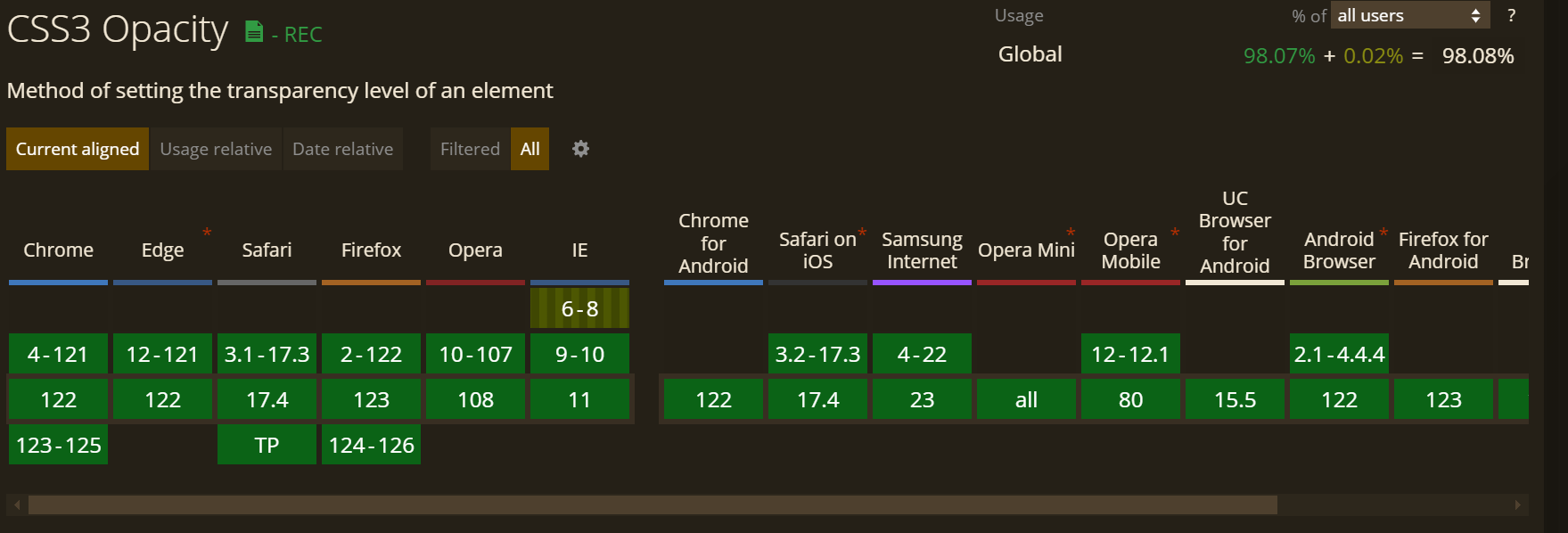
CSS3 provides a short single line style rule to add CSS opacity for background color, which is supported by all modern browsers. However, earlier due to cross browser compatibility and feature support issues, making CSS opacity work was quite cumbersome, and required extensive browser specific rules and fallbacks shown below.
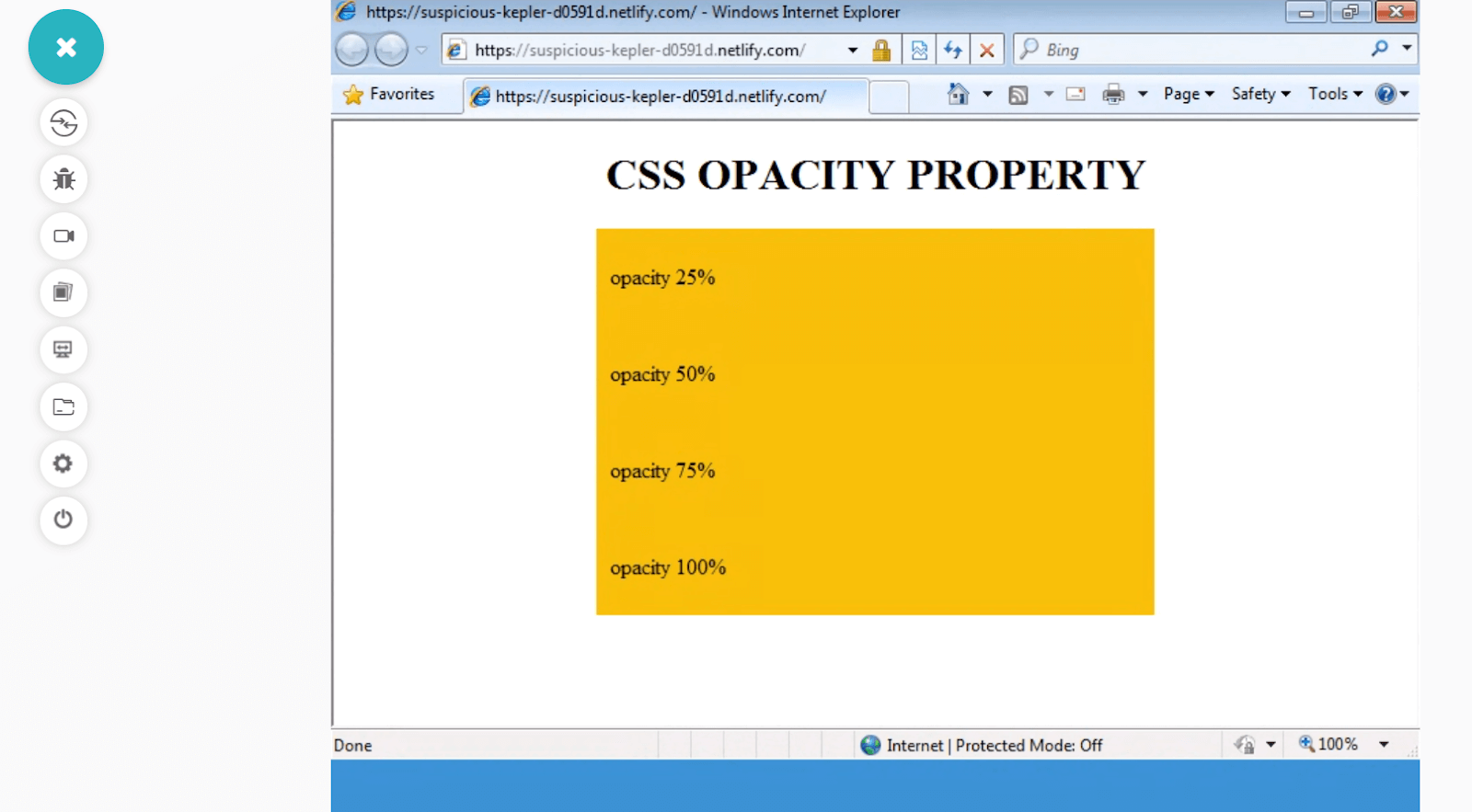
CSS Opacity Background Color is not supported by IE8 and below- TestMu AI Real Time Testing
To access my webpage on legacy browsers I have performed cross browser compatibility using TestMu AI to ensure that my code renders as intended. TestMu AI is an AI-powered test orchestration and execution platform that lets you run manual and automated tests at scale with over 3000+ real devices, browsers and OS combinations.
For this experiment of CSS opacity for background color, I used live-interactive feature of TestMu AI called Real Time Testing. Real time testing helps you to interact with your webapp across thousands of browser and browser versions by running a virtual machine, hosted on TestMu AI cloud servers.
I also made use of Lambda Tunnel, which allowed me to test my locally hosted webpages on TestMu AI platform by establishing an SSH(Secure Shell) connection.
Cross Browser Compatible Solution For CSS Opacity
If you look at the code below, you will get an idea on how cross browser compatibility for CSS Opacity was utilized in earlier days.
div{
/* IE 8 */
-ms-filter: "progid:DXImageTransform.Microsoft.Alpha(Opacity=50)";

 /* IE 5, IE6 and IE7 */
filter: alpha(opacity=50);

/* Netscape */
-moz-opacity: 0.5;

 /* Safari 1.x Pre webkit */
-khtml-opacity: 0.5;

/* Modern browsers */
opacity: 0.5;
}
But it is quite evident that this is not a practical solution for modern use. Today, there is a short modern hack for making CSS opacity work for all browsers including legacy versions of Internet Explorer – IE6-IE8.
div {
  opacity: 1;
  filter: alpha(opacity=100); /* IE8 and lower */
  zoom: 1; /* Triggers "hasLayout" in IE 7 and lower */
}
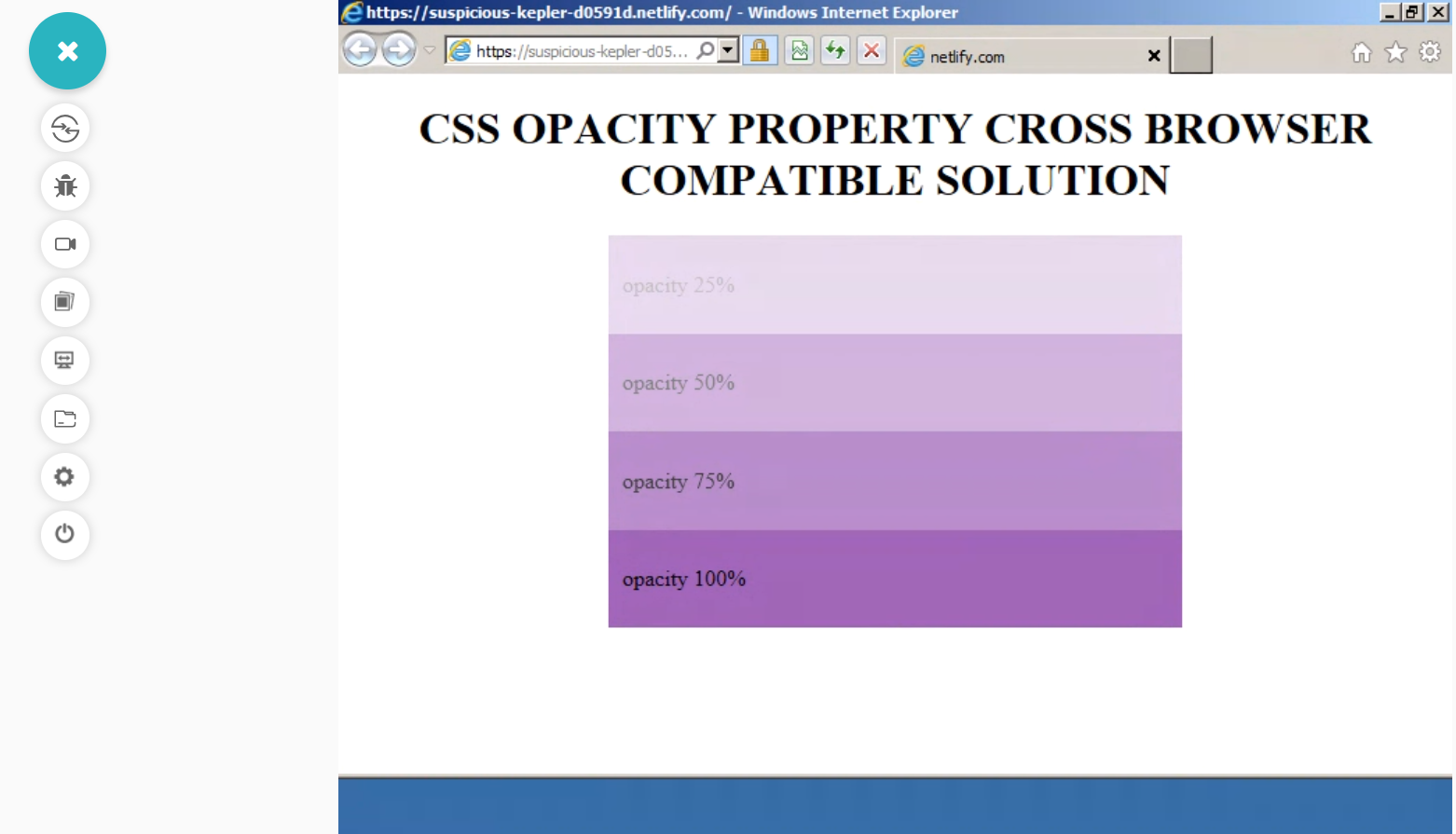
CSS Opacity property is now supported by IE8, IE7 and IE6 – TestMu AI Realtime testing
The code mentioned above will not work in IE, specially in IE8 if ‘zoom :1’ is not specified. IE doesn’t apply several CSS style rules to elements that don’t have layout. ‘zoom:1’ or ‘width :100%’ will trigger – “has layout” for the element and enable CSS opacity for background color or images to be applied.
Before fixing the CSS related issue it is important to locate and identify the CSS locator web element to learn how to locate a CSS web element follow this guide on CSS Selectors this guide will teach you CSS strategies, and how to locate an element.

Opacity Polyfill For Internet Explorer (IE6 – IE8)
The final solution in our quiver for fixing cross browser compatibility issue with CSS opacity for background and images, is a small polyfill which adds support to older IE versions IE6, IE7 and IE8. Using this polyfill eliminates need to worry about vendor prefixes or fallbacks as far as IE legacy browsers are concerned. However, note that this polyfill will not work for inline CSS style rules.
USAGE – Use IE conditional statement to load polyfill JS file in Internet Explorer IE8, IE7 and IE6.
<!--[if lte IE 8]> <script src="jquery.ie-opacity-polyfill.js"></script> <![endif]-->
This will not be interpreted by any modern browsers and will be simply discarded as a comment. If you want to learn more about IE conditional statements and CSS feature queries.
To learn more about feature detection in CSS you can follow this guide onCSS with feature detection for cross browser compatibility.
<!doctype html>
<html>

<head>
    <meta charset="utf-8">
    <title>CSS Opacity Polyfill for IE</title>
    <!--[if lte IE 8]><script src="jquery.ie-opacity-polyfill.js"></script><![endif]-->
    <style type="text/css">
        .square {
            float: left;
            width: 90px;
            height: 90px;
            padding: 5px;
            margin: 25px;
            background: #000;
            color: #fff;
        }
        .opacity75 {
            opacity: .75;
        }
        .opacity50 {
            opacity: .5;
        }
        .opacity25 {
            opacity: .25;
        }
    </style>
</head>
<body>
    <div class="square">Opacity: 100%</div>
    <div class="square opacity75">Opacity: 75%</div>
    <div class="square opacity50">Opacity: 50%</div>
    <div class="square opacity25">Opacity: 25%</div>
</body>
</html>
CSS offers another alternative to CSS opacity to achieve a similar kind of opacity or transparency effect by the use of RGBA color. This is quite popular for creating overlay backgrounds, gradient backgrounds, text and box shadow, gradient text etc.
RGBA Color
One fundamental problem with CSS Opacity property is that if specified for a parent element, it affects all children element as well. If you set background of a div element to transparent, then all children elements (like text and images) of the parent div will also be set to transparent. This is where RGBA color comes to our rescue. The RGBA color value is similar to RGB but with an alpha channel which specifies opacity or conversely transparency value for an element but leaves its children untouched.
Syntax Of Using RGBA For Opacity
rgba(R,B,G,alpha-channel)
- R/B/G: Specifies the value or intensity of Red, Blue and green colors respectively either by an integer value ranging from 0 to 255 or % value ranging from 0-100%.
- Alpha-channel : species the opacity value as a range between 0 and 1. 0 represents 0% opacity(or 100% transparency) and 1 represents 100% opacity(or 0% transparency).
Sample Code To Represent Cross Browser Compatibility Issue In RGBA Opacity For Background Color
You can refer to our TestMu AI Experiment on RGBA Opacity background-color property. Below is the code sample used for the cross browser compatibility experiment on RGBA Opacity.
<!DOCTYPE html>
<html>
<head>
    <style>
        h1 {
            text-align: center;
        }
        div {
            width: 50%;
            margin: 0 auto;
            padding: 10px;
        }
        .opacity0{
            background: rgba(46, 204, 113,0);
        }
        .opacity25{
            background: rgba(46, 204, 113,0.25);
        }
        .opacity50{
            background: rgba(46, 204, 113,0.5);
        }
        .opacity75{
            background: rgba(46, 204, 113,0.75);
        }
        .opacity100{
            background: rgba(46, 204, 113,1.0);
        }

    </style>
</head>
<body>
    <h1>RGBA COLOR</h1>
    <div class="opacity0">
        opacity 0%
    </div>
    <div class="opacity25">
        opacity 25%
    </div>
    <div class="opacity50">
        opacity 50%
    </div>
    <div class="opacity75">
        opacity 75%
    </div>
    <div class="opacity100">
        opacity 75%
    </div>
</body>
</html>
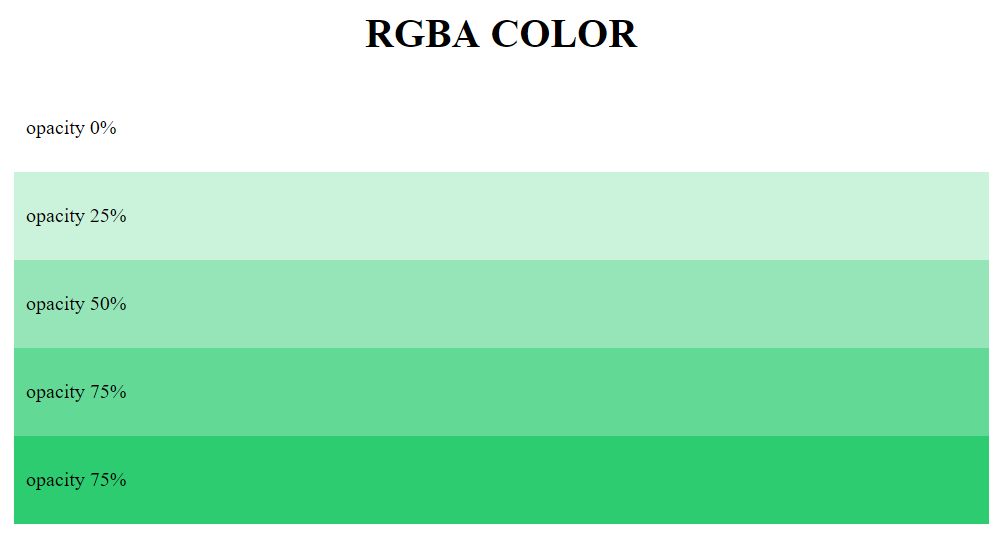
Browser Support Of RGBA Color Type
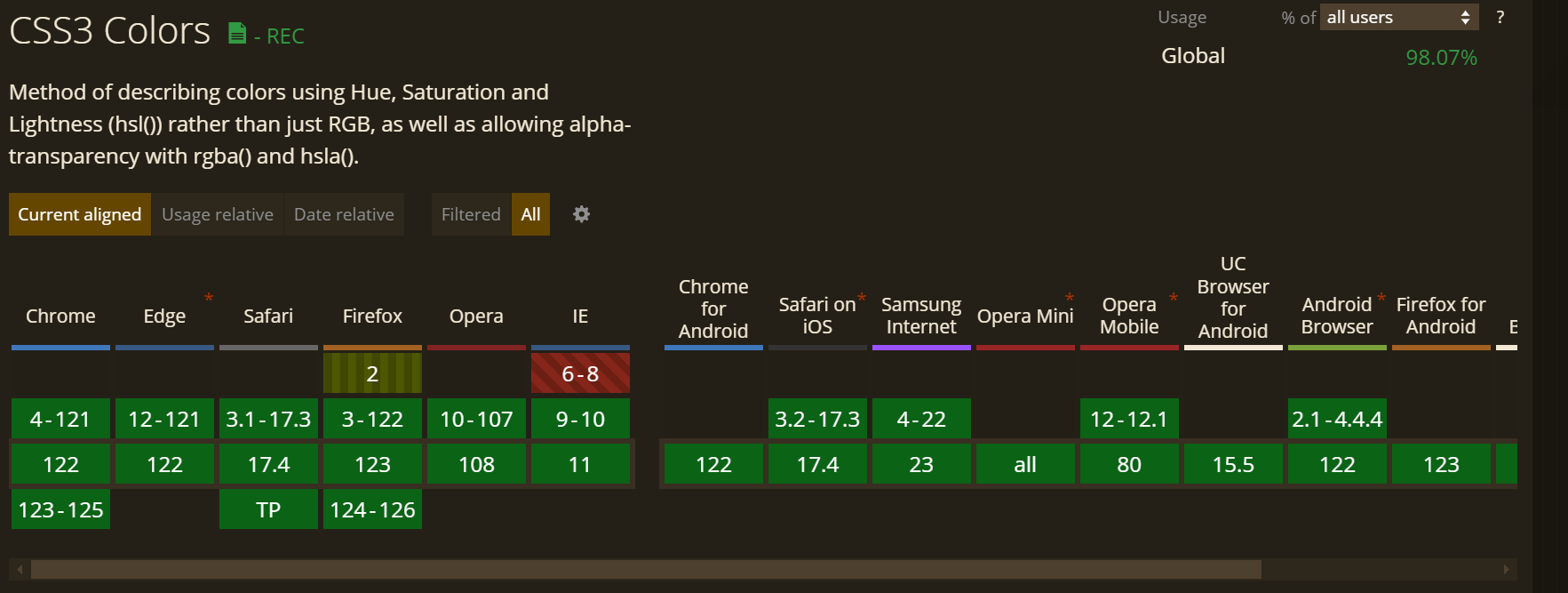
Although RGBA color enjoys excellent support across all major browsers and is largely cross browser compatible. However noticeable exceptions are IE6 – IE8 which do not support this feature. One solution is to use a fallback solid color(100% opacity) without any alpha value, ie without any opacity/transparency value. Browsers which do not comprehend RGBA value will render the fallback color. However we will explore ways to make RGBA cross browser compatible and work in IE6-IE8 versions as well. 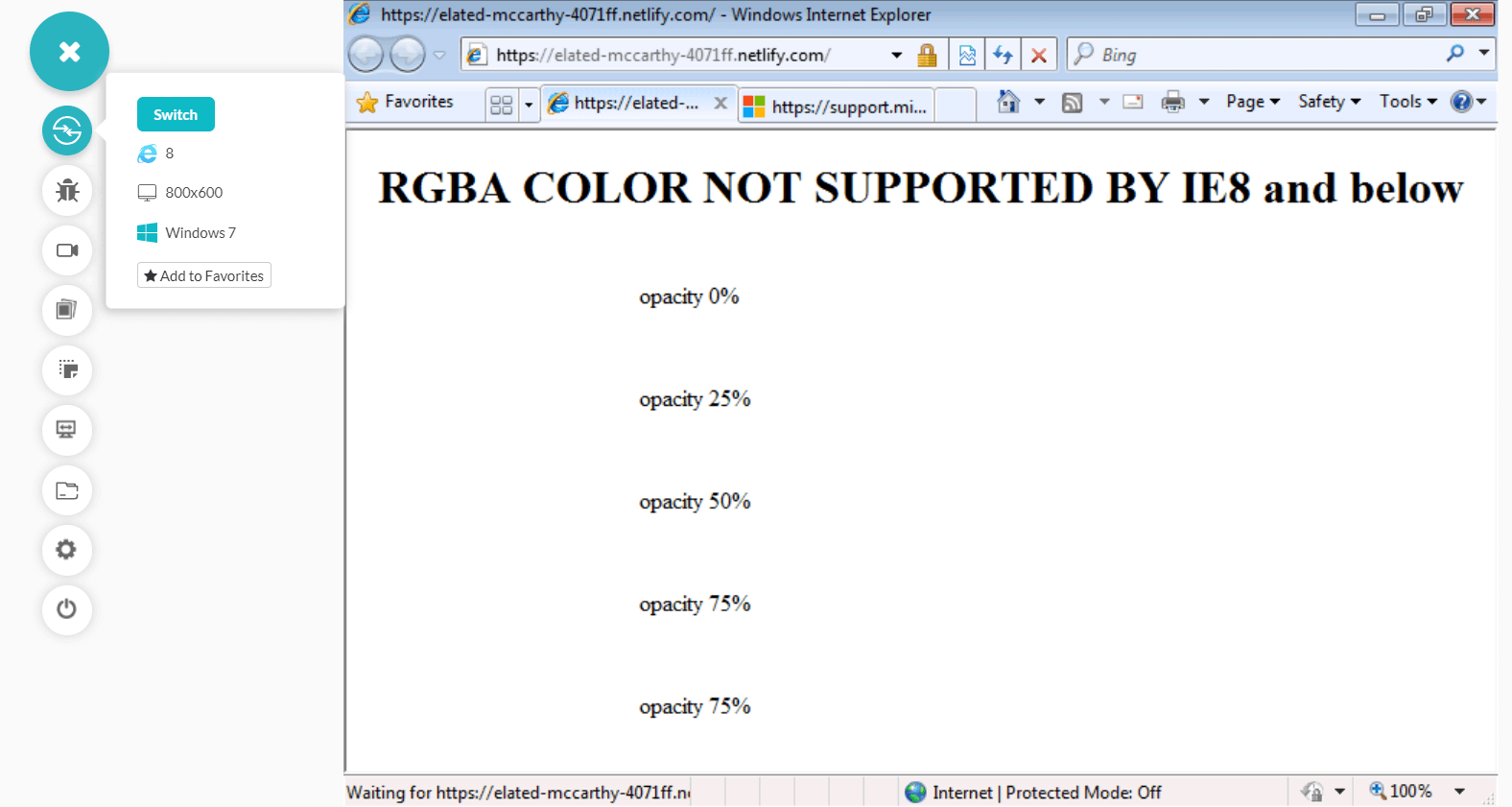
RGBA color is not supported by IE8 and below- Lambdatest Realtime testing
Cross Browser Compatible Solution Of Using RGBA For Opacity
Microsoft Internet explorer (IE6-IE8) had its own own gradient and filter properties which is slightly different to RGBA. It rather uses 8-character HEX value called ‘ARGB’ (alpha RGB) to define colors with a transparency value. Unlike traditional RGBA which is 4 character long, R,G,B values ranges from 0-255 and alpha channel value ranging from 0-1, #ARGB has a hexadecimal format with first 2 – #AARRGGBB. First 2 characters specify the alpha value and control the opacity(00-FF) while last 6 characters specify the red, blue and green color intensity respectively.
Here’s a table showing alpha value in % and its corresponding alpha value in #ARGB format – If you have RGBA value – rgba(F,0,0,0.5), then the corresponding value in #ARGB format will be #80FF0000 where first 2 characters ‘80’ represent 0.5 or 50% opacity.
Add the following code snippets to your code to enable support for RGBA in IE6, IE7 and IE8
- For IE6-IE7
filter: progid:DXImageTransform.Microsoft.Gradient(GradientType=1, StartColorStr='#6523BE38', EndColorStr='#6523BE38');
-ms-filter: "progid:DXImageTransform.Microsoft.gradient(GradientType=1, StartColorStr='#6523BE38', EndColorStr='#6523BE38')";
Add zoom:1; to trigger ‘hasLayout’
Now after combining all the fallbacks, our final code shapes up to be –
<!DOCTYPE html>
<html>

<head>
   <style>
       h1 {
           text-align: center;
       }

       div {
           width: 50%;
           margin: 0 auto;
           padding: 10px;
       }

       .opacity25 {
           /* default fallback for unsupported browsers*/
           background: transparent;
           /*or some solid color background : red; */
           /* for modern browsers  */
           background: rgba(230, 126, 34,0.25);
           /* For IE8 */
           -ms-filter: "progid:DXImageTransform.Microsoft.gradient(GradientType=1, StartColorStr='#40e67e22', EndColorStr='#40e67e22')";
           /* For IE6,IE7 */
           filter: progid:DXImageTransform.Microsoft.Gradient(GradientType=1, StartColorStr='#40e67e22', EndColorStr='#40e67e22');
           /* Trigger hasLayout for IE */
           zoom: 1 !important;
       }
       .opacity50 {
           background: transparent;
           background: rgba(230, 126, 34,0.5);
           -ms-filter: "progid:DXImageTransform.Microsoft.gradient(GradientType=1, StartColorStr='#80e67e22', EndColorStr='#80e67e22')";
           filter: progid:DXImageTransform.Microsoft.Gradient(GradientType=1, StartColorStr='#80e67e22', EndColorStr='#80e67e22');
           zoom: 1 !important;
       }
       .opacity75 {
           background: transparent;
           background: rgba(230, 126, 34,.75);
           -ms-filter: "progid:DXImageTransform.Microsoft.gradient(GradientType=1, StartColorStr='#bfe67e22', EndColorStr='#bfe67e22')";
           filter: progid:DXImageTransform.Microsoft.Gradient(GradientType=1, StartColorStr='#bfe67e22', EndColorStr='#bfe67e22');
           zoom: 1 !important;
       }
   </style>
</head>

<body>
   <h1>RGBA COLOR SUPPORT FOR IE</h1>
   <div class="opacity25">
       <p>opacity 25%
   </div>
   <div class="opacity50">
       opacity 50%
   </div>
   <div class="opacity75">
       opacity 75%
   </div>
</body>

</html>
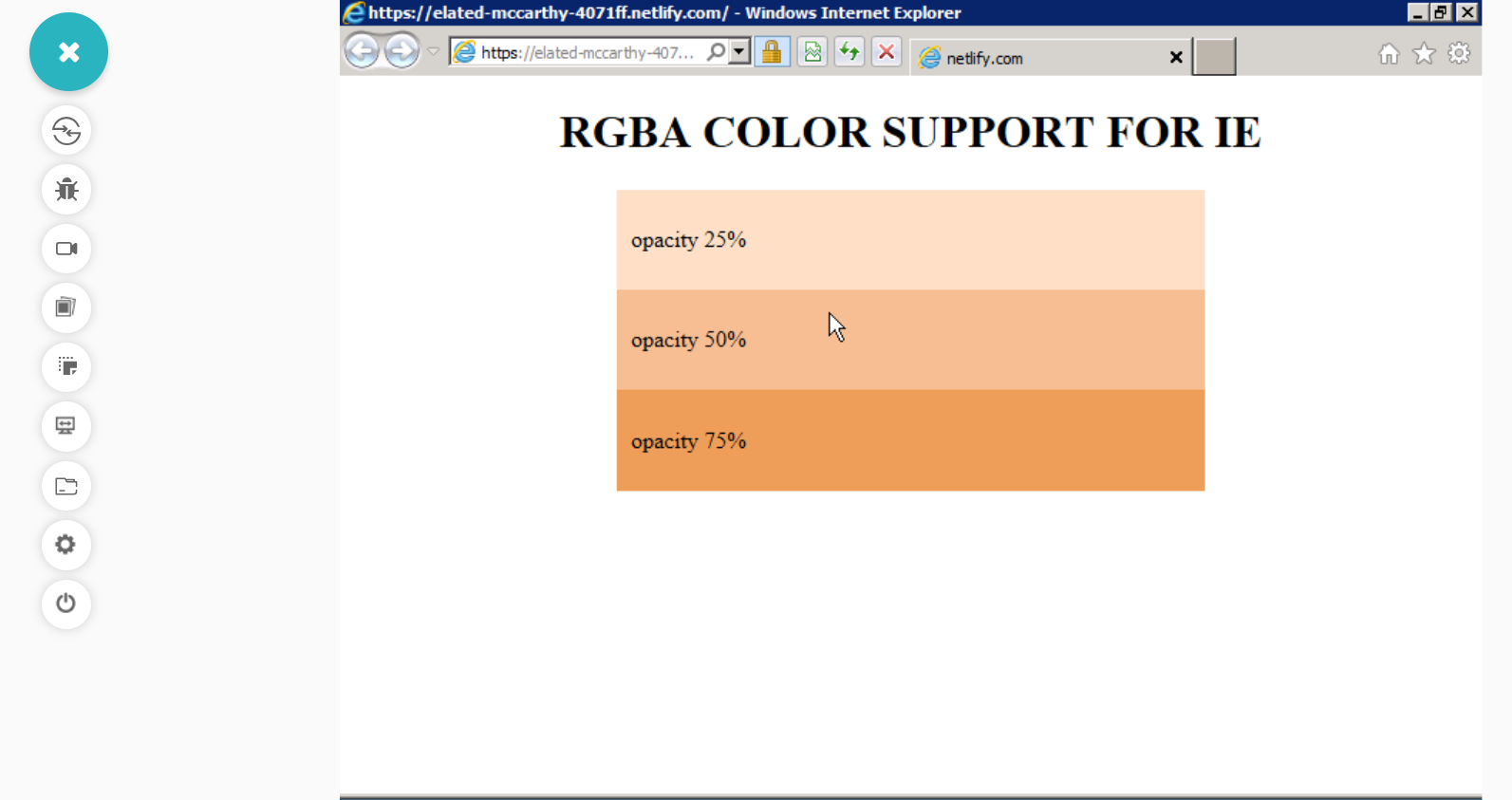
RGBA color is now supported by IE8, IE7 and IE6 – TestMu AI Realtime testing
Conclusion
CSS opacity and RGBA are one of the most widely used properties used extensively across websites for fading animations and transitions to build modern and attractive UI designs. Even though opacity property and RGBA color value enjoys excellent support across all major browsers and versions, there are still small compatibility issues when it comes to Internet Explorer 8 and below. But now you are armed with this flawless cross browser compatible solution for opacity to ensure that your designs work seamlessly across all browsers.


Did you find this page helpful?
More Related Hubs
TestMu AI forEnterprise
Get access to solutions built on Enterprise
grade security, privacy, & compliance
- Advanced access controls
- Advanced data retention rules
- Advanced Local Testing
- Premium Support options
- Early access to beta features
- Private Slack Channel
- Unlimited Manual Accessibility DevTools Tests