

Next-Gen App & Browser Testing Cloud
Trusted by 2 Mn+ QAs & Devs to accelerate their release cycles


February'26 Updates: GitHub App Integration With KaneAI, Android 17 Beta, Galaxy S26 & More
Explore what's new at TestMu AI in February. GitHub App integration with KaneAI, Android 17 Beta on real devices, Samsung Galaxy S26 support, Agent to Agent Testing updates, and Test Manager improvements.

Saniya Gazala
March 19, 2026
Last month, we focused on making testing faster and more connected. Whether it's validating a PR with a single comment, running tests on the newest Android and Samsung devices, or putting your AI agents through production-readiness checks, February brought updates across the board.
Here's everything that shipped.
GitHub App Integration With KaneAI
Testing a pull request no longer requires leaving GitHub. Drop a comment, @KaneAI Validate this PR, and KaneAI handles the rest end to end.
- Reads your code diff, PR context, and repo structure automatically.
- Creates test cases based on actual business logic in the change.
- Finds similar tests already in your test library to avoid duplication.
- Executes tests in parallel across browsers and devices.
- Posts results, root cause analysis, and an approval recommendation right in the PR.
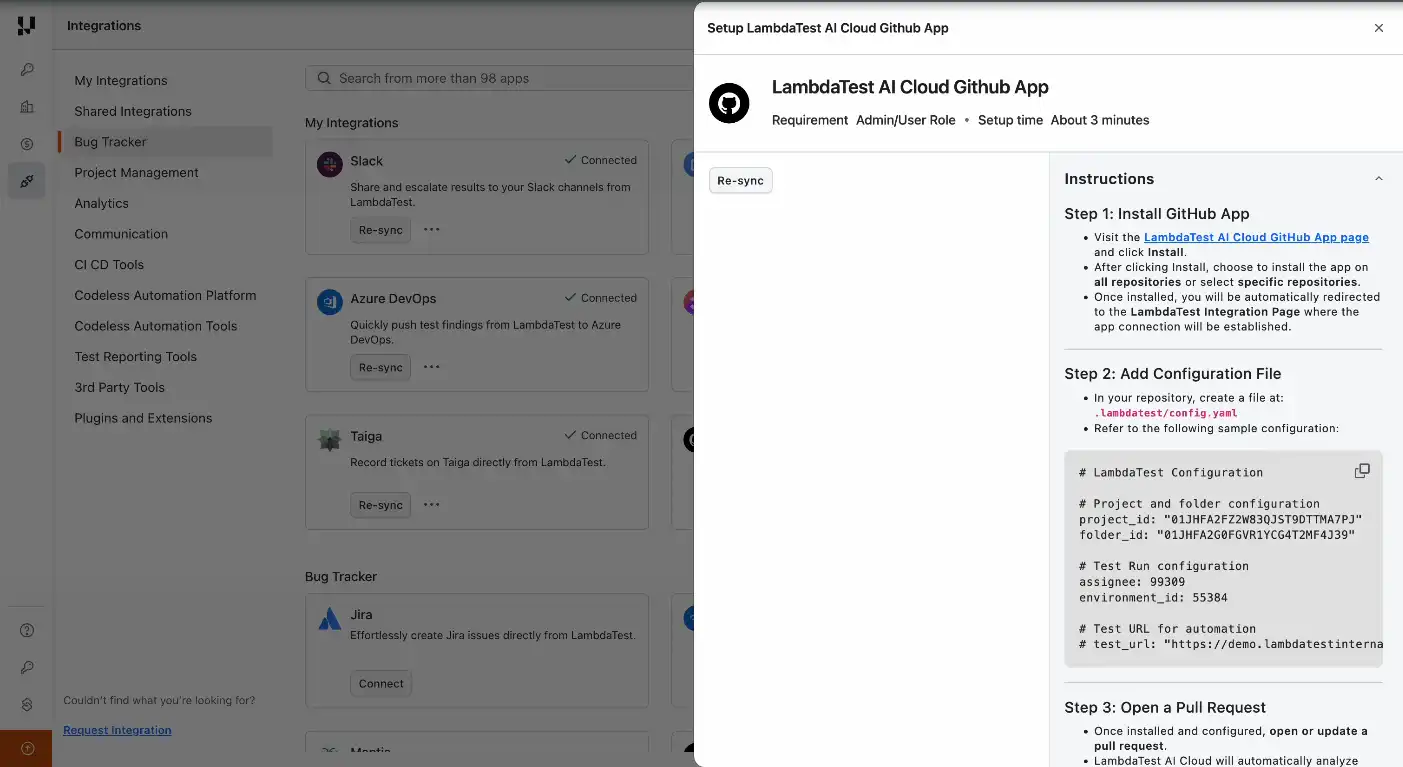
See how to integrate GitHub App With KaneAI.
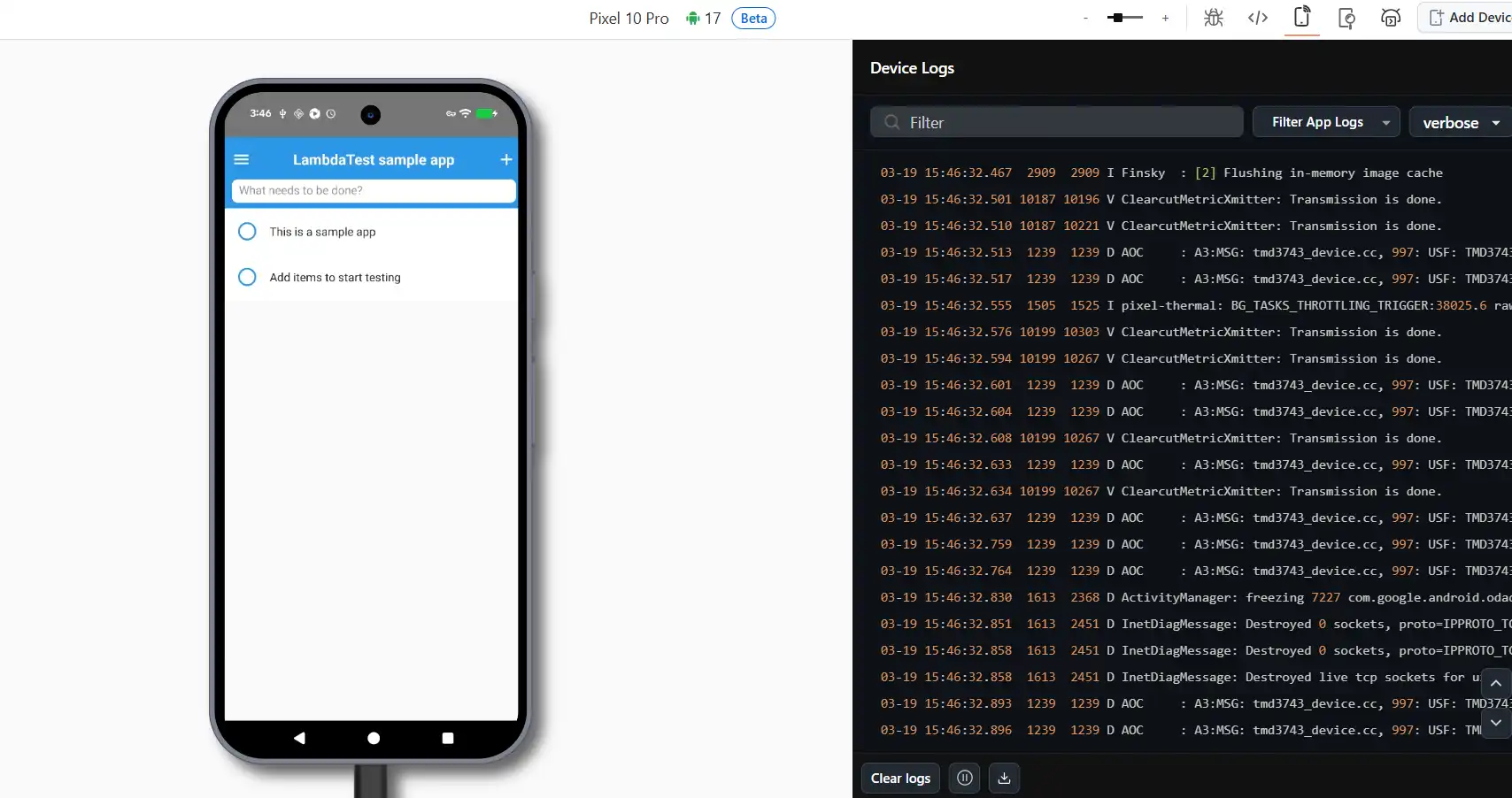
Android 17 Beta Now Available on Real Devices
Android 17 Beta is now live on real devices in TestMu AI. Start testing your apps on the newest Android release before it goes stable.
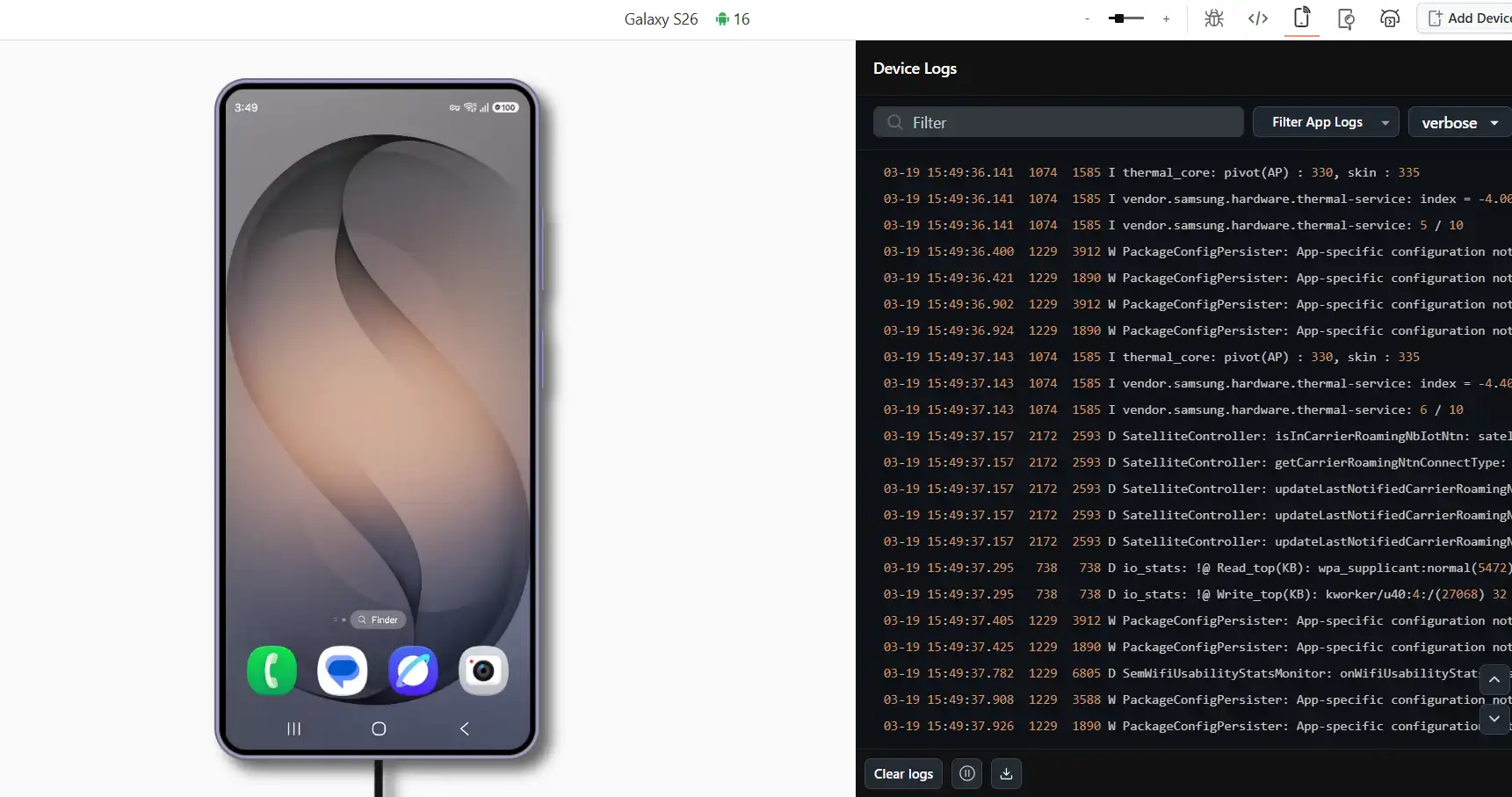
Samsung Galaxy S26 Lineup Now Available on TestMu AI
The Galaxy S26 series, including the S26, S26+, and S26 Ultra, is now available for testing on TestMu AI across both real and virtual devices, making it easy to test on Samsung Galaxy S26 models from day one.
- Full support for Appium, Detox, Playwright, and Maestro.
- Works with your existing CI/CD pipelines out of the box.
- Access the latest devices the moment they become available.
Agent to Agent Testing: New Features & Improvements
This release introduces significant upgrades to Agent to Agent Testing, from production readiness scoring and reusable test profiles to deeper analytics and new testing capabilities for both chat and voice agents.
Go-Live: Production Readiness Assessment
Get an AI-powered verdict on whether your agent is ready to go live. It pulls together all your test results and delivers a clear recommendation with actionable next steps. Works for both Chat and Phone/Voice agents.
- Scoring dimensions: Functional Completeness, Quality Standards, Risk Profile, and Scenario Coverage.
- Traffic-light verdict: RED / YELLOW / GREEN with clear next steps.
- Root cause analysis: Fix recommendations with effort estimates.
- Trend analysis: Track your agent's improvement over time.
Test Profiles
Build reusable test data configurations and plug them into your scenarios for consistent, realistic inputs every time.
- Custom data fields: Define key-value pairs for your test data.
- Three-level override: Project > Suite > Scenario hierarchy.
- Generation instructions: Use prompts like "random 10-digit phone number."
- Data integrity: Your AI agent never invents data; only your provided values are used.
Endpoint Profiles (Chat)
Set up multi-step API authentication flows for agents that need session management or token-based access. Verify your configuration before kicking off evaluations.
- Multi-phase execution: Suite Setup, Scenario Setup, and Chat.
- Variable sources: Static, Generated, Extracted via JSONPath, Secret, and Test Profile.
- Reliability: Configure retry, response caching, and timeout behavior.
Metric Thresholds
Set your own pass/fail boundaries for evaluation metrics. Choose minimum score thresholds (0-100%) per metric, pick which ones to evaluate, and let scheduled runs apply your configuration automatically. Every evaluation result is fully traceable.
Custom Scenario Creation (Chat)
Write your own test scenarios alongside the AI-generated ones. Add a title, description, persona, and instructions. The AI then auto-generates validation criteria from what you've described.
Image Analysis
Check your AI-generated images against the original prompts. Get a quality score (0-100), apply custom criteria like brand guidelines or technical specs, and run evaluations in batch.
Call Summary & Analytics
See aggregated metrics across every call in a suite or evaluation in a workflow. Pass rates, scores, metric breakdowns, and the ability to drill into individual results are all in one place.
Outbound Call Scenario Testing
Create test scenarios where your bot makes the first call. Cover diverse recipient types, etiquette handling, compliance checks, and call termination flows.
Knowledge Base (Chat)
Upload reference documents (PDF, Word, etc.) to serve as ground truth for generating scenarios, driving conversations, and evaluating responses. Every project gets its own isolated knowledge base.
Additional Updates
- Max Call Duration Control: Set per-scenario call limits from 60 seconds to 30 minutes.
- Multi-Language Voice Support: Access Spanish dialects, a multilingual voice library, and language-specific generation.
- Editable Workflow Names: Rename your chat workflows anytime.
- Editable Scenarios: Modify your AI-generated scenarios and validation criteria after generation.
- Scheduled Suite Runs: Set up cron-based scheduling with automatic metric threshold and credit checks.
Improvements
- Real-time progress: See step-by-step updates during phone scenario generation.
- Chat evaluation streaming: Get automatic reconnection on page refresh.
- 50+ voices: Browse the voice library with search and filtering.
- Refreshed UI: Enjoy cleaner workflows, improved analytics, and better navigation.
New to Agent to Agent Testing? Check out this guide to test your first AI agent.
Test Manager: One-Click Migrations & Test Run Improvements
We've shipped several updates across Test Manager to simplify migrations and make day-to-day test execution more efficient.
One-Click Migration from Zephyr Scale (Jira Cloud)
Move your entire Zephyr Scale test repository into Test Manager with a single click. Projects, test cases, folders, custom fields, and linked requirements all come over seamlessly. To get started, check out the TestMu AI Test ManagerZephyr Scale migration guide for details.
One-Click Migration from X-Ray (Jira Cloud)
The same one-click migration is now available for X-Ray on Jira Cloud. Bring over projects, test cases, folders, custom fields, attachments, and linked requirements in one go. To migrate your tests from X-Ray (Jira Cloud), check out the TestMu AI Test Manager X-Ray migration guide for details.
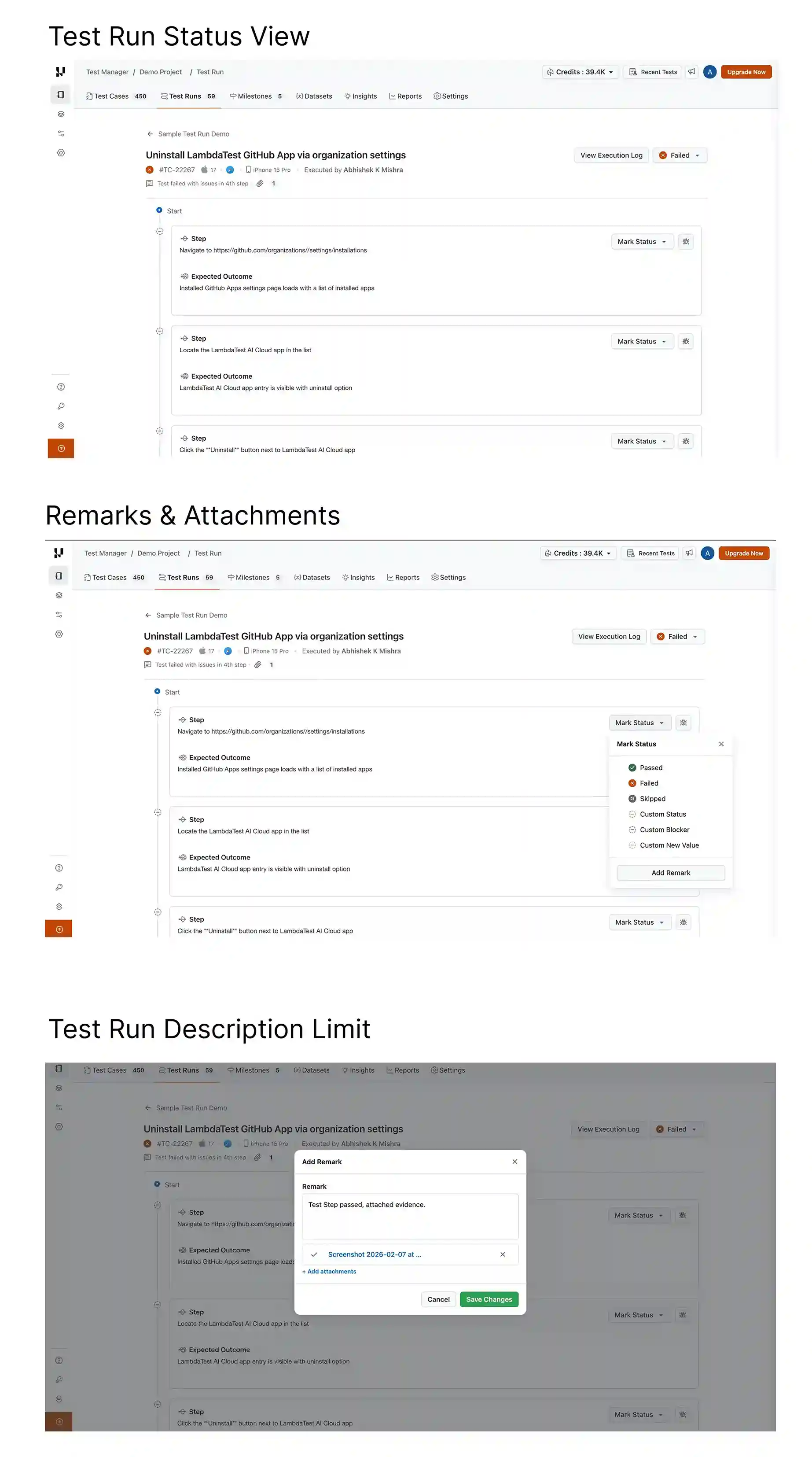
Test Runs: UX Enhancements
Several UX improvements make Test Runs in KaneAI easier to navigate and more productive during execution.
- Improved Test Run Status View: Get better visibility into overall run progress with a cleaner and more intuitive status display.
- Enhanced Remarks & Attachments Visibility: Remarks and attachments are now easier to view and access directly at the test instance level, reducing context switching during manual sessions.
- Increased Test Run Description Limit: You now have more room to add detailed context and documentation in your test run descriptions.
Summing Up!
February brought meaningful updates across the platform. You can now kick off full test cycles from a GitHub comment, test on Android 17 Beta and the Galaxy S26 lineup, and run production readiness checks on your AI agents, all without leaving your existing workflows.
With TestMu AI Test Manager, take advantage of one-click migration for Zephyr Scale and X-Ray, along with a smoother Test Runs experience, and everything you need to move faster and test with confidence.


Did you find this page helpful?
More Related Hubs
TestMu AI forEnterprise
Get access to solutions built on Enterprise
grade security, privacy, & compliance
- Advanced access controls
- Advanced data retention rules
- Advanced Local Testing
- Premium Support options
- Early access to beta features
- Private Slack Channel
- Unlimited Manual Accessibility DevTools Tests