

Next-Gen App & Browser Testing Cloud
Trusted by 2 Mn+ QAs & Devs to accelerate their release cycles


How to Perform Cypress React Native App Testing
Learn how to perform Cypress React Native app testing by rendering them in the browser using Expo Web for reliable end-to-end testing.

Alex Anie
December 24, 2025
Cypress is primarily used for testing web applications. However, if you want to use Cypress for React Native apps, you can leverage tools like React Native Web or Expo’s Web-only mode. This enables you to test React Native apps with Cypress.
Overview
You can perform React Native app testing with Cypress using tools like React Native Web or Expo Web.
How to Run Cypress React Native App Tests
- Set up your React Native project to run in a browser using tools like Expo or React Native Web.
- Clone a sample GitHub repository or use your own React Native app configured for web rendering.
- Install all required dependencies using the npm install command.
- Start the development server using the npm start command. It will open your web application in the browser at a local address.
- Install Cypress using the npm i -D cypress command as a development dependency in your project.
- Launch the Cypress Test Runner using the npx cypress open command to access the testing interface.
- Configure Cypress by setting the baseURL to point to your running web app.
- Write a Cypress test to simulate user actions, such as visiting a page and checking if specific text or elements appear.
- Open the Cypress Test Runner, select your test file, and run the test to see it interact with your web application.
Getting Started With Cypress React Native App Testing
Let’s explore how to run a Cypress React Native app test in a local development server.
Set up a Project
To get started with Cypress React Native app testing, you need to set up your development server to run the app.
Since Cypress requires a DOM environment, we will use Expo to render a React Native app in a browser.
- Clone this GitHub repository for Cypress React Native app testing.
- Install the required dependencies using the following command.
npm install
npm start
This will open the web application at http://localhost:8081. The npm start command internally runs expo start to launch the web application via Expo CLI.

Note: Run Cypress tests across 40+ browser versions on the cloud. Try TestMu AI Today!
Install Cypress
Before writing your Cypress React Native app tests, make sure your web application is running at http://localhost:8081/.
- Install Cypress as a dev dependency using the command below:
npm i -D cypress
npx cypress runner
import { defineConfig } from "cypress";
export default defineConfig({
  e2e: {
     "baseUrl": "http://localhost:8081/",  // This is the base URL
    setupNodeEvents(on, config) {
      // implement node event listeners here
    },
  },
});

Write the Tests
Once Cypress is set up correctly, you’ll find a sample test spec.cy.js file in the default cypress/e2e/ folder.
To organize your tests better, rename this file to hello.cy.js. Then, replace the contents with the test code below:
/// <reference types="cypress" />
describe('select the hero text from the hero overlay image', ()=>{
  it('Select and assert if the hero text exits', () => {
    cy.visit('/')
    cy.contains('24/7 online shopping, delivered anywhere you are!')
      .should('be.visible')
  })
})
In the above test file, the cy.visit(‘/’) command navigates to the root file component in the React Native app.
And then, the cy.contains() method gets the DOM element that contains the text argument. The should() command is used to set an assertion for the element to be visible.
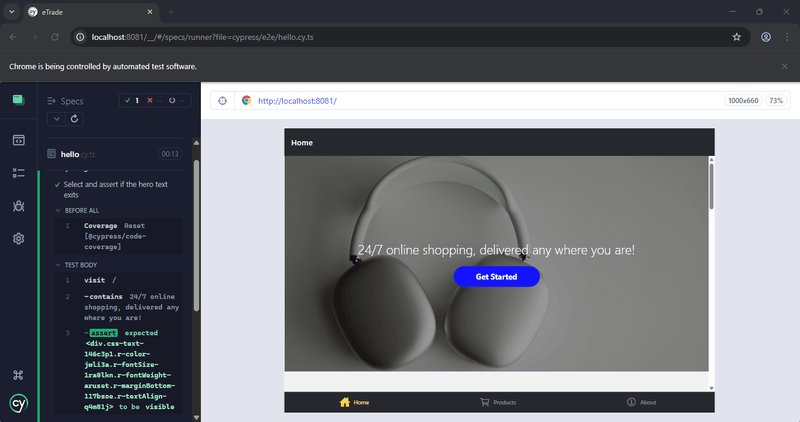
This test ensures that the main banner text “24/7 online shopping, delivered anywhere you are!” is rendered correctly in the browser.
Run the Tests
To launch the Cypress Test Runner, run the following in your terminal:
npx cypress open
Then, select the hello.cy.js file from the test list in the Cypress Test Runner. Click to run the test, and you should see it pass.
How to Test React Native Apps With Cypress on Cloud?
Testing React Native apps with Cypress using cloud-based testing platforms offers several key benefits that enhance both development efficiency and test reliability.
For cross-browser cloud execution, you can use platforms like TestMu AI. It is a GenAI-native test execution platform that allows you to run automated tests on its Cypress cloud. You can run tests across multiple browsers and operating systems without maintaining local infrastructure.

To get started, check out this documentation on Cypress testing with TestMu AI.
To run the Cypress React Native test on TestMu AI, make sure you have set up the TestMu AI Tunnel. You can check this documentation on setting up TestMu AI Tunnel.
Now, run the following command to execute the tests:
lambdatest-cypress run
When you run the above command, it will create the he_conv.yaml file and other TestMu AI configuration files.
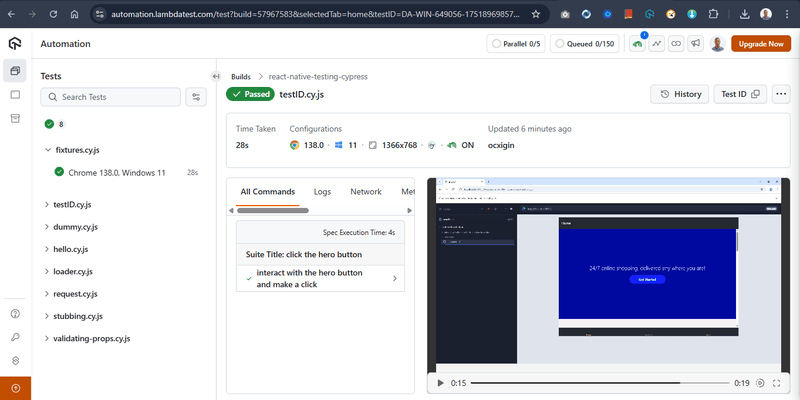
You can now check the test results from your TestMu AI Web Automation dashboard.
Validating Dynamic Content in React Native Using Cypress
It is important to ensure React Native apps function as expected during tests, especially as UI behavior depends heavily on dynamic state changes.
The testID Props in React Native
In React Native, UI components don’t support traditional attributes like id or class. Instead, you use the testID prop to assign a unique identifier to a component for testing. This enables Cypress to target and interact with components during tests.
Example:
<View style={styles.overlayContent}>
  <Text style={styles.overlayText}>{heroText}</Text>
  <TouchableOpacity
    testID="button"
    style={styles.button}
    onPress={() => alert('Button Pressed!')}
  >
    <Text style={styles.buttonText}>Get Started</Text>
  </TouchableOpacity>
</View>
</ImageBackground>
</View>
For Cypress, the test will look like:
describe('click the hero button', ()=>{
    it('interact with the hero button and make a click', ()=>{
        cy.visit('/')
        cy.get('[data-testid=button]').click().should('be.visible')
    })
})
Validate State in React Native
State management in React Native is commonly handled using the useState hook, which tracks and updates values dynamically based on user interactions.
Here’s an example of a Rate component that updates a counter each time a button is clicked. This test verifies that the button click correctly updates the state and UI.
export default function Rate() {
    const [count, setCounter] = useState(0)


  return (
    <View style={styles.rateWrapper}>
        <TouchableOpacity testID="buttonRate" style={styles.button} onPress={() => setCounter(count + 1)}>
            <Text style={styles.buttonText}>Rate</Text>
        </TouchableOpacity>
        <Text testID="rateText">{count}</Text>
    </View>
  )
}
Use Cases for React Native Testing With Cypress
Let’s look at some use cases for React Native app testing, like network responses, loading indicators, and stubbing network requests using Cypress.
Testing Network Response
When data is fetched using useState and useEffect in React Native, it’s often rendered in components like FlatList. You can use Cypress to validate if the data is fetched correctly using the cy.intercept() method.
Example of FlatList data fetching:
useEffect(() => {
    const fetchData = async () => {
      try {
        const response = await fetch("https://fakestoreapi.com/products");
        const result = await response.json();
        setFakeData(result);
        setLoading(false);
      } catch (err) {
        setError("Failed to fetch data. Please try again.");
        setLoading(false);
      }
    };


    fetchData();
  }, []);
Here is the Cypress test to ensure data is fetched:
describe('Product List Network Request', () => {
    it('should make a successful API request and render the data', () => {
      cy.intercept('GET', 'https://fakestoreapi.com/products').as('getProducts');

      cy.visit('/products'); // Assuming this loads the React Native app
      cy.wait('@getProducts').then((interception) => {
        expect(interception.response.statusCode).to.eq(200);
        expect(interception.response.body).to.have.length.above(0); // API returns data

        // Check if data is rendered in the FlatList
        cy.get('[data-testid=fakedata]').should('exist');
        cy.get('[data-testid=fakedata]').should('have.length', interception.response.body.length);
      });
    });
  });
Testing Loader Component
To test if the ActivityIndicator (loading spinner) shows while data is loading:
<View>
  {loading ? (
    <ActivityIndicator size="large" color="#0000ff" testID="loader" />
  ) : error ? (
    <Text style={styles.errorText}>{error}</Text>
  ) : (
    <FlatList
      // add your props here
    />
  )}
</View>
Here is the Cypress test to ensure the loader is visible while fetching data:
describe('Loader Component Test', () => {
  it('should show the loader while fetching data', () => {
    cy.intercept('GET', 'https://fakestoreapi.com/products', (req) => {
      req.on('response', (res) => {
        res.setDelay(3000);
      });
    }).as('getProducts');
    cy.visit('/products');
    cy.get('[data-testid=loader]', { timeout: 10000 }).should('exist');
    cy.wait('@getProducts');
    cy.get('[data-testid=fakedata]', { timeout: 10000 }).should('exist');
    cy.get('[data-testid=loader]').should('not.exist');
  });
});
Stubbing a Network Request
You can stub network requests in Cypress to test your app’s behavior with predefined data without hitting the actual API.
Example of stubbing an API request:
describe('Stubbing Network Request', () => {
  it('should stub network request with a custom response', () => {
    cy.intercept('GET', 'https://fakestoreapi.com/products', {
      statusCode: 200,
      body: [
        {
          id: 1,
          title: 'Stubbed Product',
          price: 20.0,
          description: 'This is a stubbed product.',
          category: 'electronics',
          image: 'https://example.com/product1.jpg',
          rating: { rate: 5, count: 100 }
        }
      ]
    }).as('getProducts');


    cy.visit('/products');
    cy.wait('@getProducts');


    // Check if stubbed data is rendered
    cy.contains('Stubbed Product').should('exist');
    cy.contains('This is a stubbed product.').should('exist');
    cy.get('[data-testid=fakedata]').should('have.length', 1); // Only 1 stubbed product
  });
});
Stubbing Request Data With Fixtures
You can store static mock data in the cypress/fixtures folder and use it in tests.
Example of stubbing request data:
[
    {
      "id": 1,
      "title": "Fjallraven - Foldsack No. 1 Backpack, Fits 15 Laptops",
      "price": 109.95,
      "description": "Your perfect pack for everyday use and walks in the forest. Stash your laptop (up to 15 inches) in the padded sleeve, your everyday",
      "category": "men's clothing",
      "image": "https://fakestoreapi.com/img/81fPKd-2AYL._AC_SL1500_.jpg",
      "rating": {
        "rate": 3.9,
        "count": 120
      }
    },
    {
      "id": 2,
      "title": "Mens Casual Premium Slim Fit T-Shirts ",
      "price": 22.3,
      "description": "Slim-fitting style, contrast raglan long sleeve, three-button henley placket, light weight & soft fabric for breathable and comfortable wearing. And Solid stitched shirts with round neck made for durability and a great fit for casual fashion wear and diehard baseball fans. The Henley-style round neckline includes a three-button placket.",
      "category": "men's clothing",
      "image": "https://fakestoreapi.com/img/71-3HjGNDUL._AC_SY879._SX._UX._SY._UY_.jpg",
      "rating": {
        "rate": 4.1,
        "count": 259
      }
    },
]
Here is the Cypress test to stub data request data with fixtures:
describe('Subbing with Fixtures', () => {
    it('should load data from fixture instead of making an API call', () => {
      cy.fixture('products').then((products) => {
        cy.intercept('GET', 'https://fakestoreapi.com/products', { body: products }).as('getProducts');

        cy.visit('/products');
        cy.wait('@getProducts');

        // Ensure data from the fixture is rendered
        cy.get('[data-testid=fakedata]').should('exist');
        cy.get('[data-testid=fakedata]').should('have.length', products.length);
      });
    });
  });
Conclusion
While Cypress is not for testing native mobile apps directly, it can still be useful in React Native projects, especially when the web application runs in a browser using tools like Expo Web or React Native Web.
In this blog, we explored how to set up a React Native project, install Cypress, write basic Cypress React Native app tests, and handle common scenarios like validating content, checking component states, and stubbing network responses.
To deepen your Cypress automation expertise, don’t miss our comprehensive guide on the top Cypress interview questions packed with insights to help you shine in your next interview.
Citations
- Cypress: https://www.cypress.io/
- Develop websites with Expo: https://docs.expo.dev/workflow/web/


Frequently asked questions
Did you find this page helpful?
More Related Hubs
TestMu AI forEnterprise
Get access to solutions built on Enterprise
grade security, privacy, & compliance
- Advanced access controls
- Advanced data retention rules
- Advanced Local Testing
- Premium Support options
- Early access to beta features
- Private Slack Channel
- Unlimited Manual Accessibility DevTools Tests