

Next-Gen App & Browser Testing Cloud
Trusted by 2 Mn+ QAs & Devs to accelerate their release cycles


How To Use Cypress Intercept For Handling Network Requests
Learn how to use the Cypress intercept (cy.intercept()) method to handle and modify network requests effectively.

Kailash Pathak
December 22, 2025
Intercepting network requests was previously challenging due to limited visibility into network traffic between client and server. This difficulty made debugging and diagnosing network-related issues more complex and time-consuming.
Cypress addresses this by providing the cy.intercept() method, which allows you to intercept and modify network requests. The Cypress intercept feature is crucial for simulating different server responses and network conditions, making it easier to test and troubleshoot application behavior during end-to-end testing.
Overview
Cypress cy.intercept() method allows tests to intercept, modify, and stub HTTP requests and responses, providing precise control over network interactions during end-to-end testing.
How Does the Cypress Intercept Method Work?
The cy.intercept() method captures requests and responses, allowing modification, stubbing, and verification during automated Cypress tests.
- Intercept Requests: Cypress captures HTTP requests before they reach the server, enabling modification, monitoring, or stubbing of requests for reliable end-to-end testing.
- Modify Requests or Responses: You can change headers, delay requests, or replace server responses so the application receives controlled data during tests.
- Stubbed Responses: Tests can provide predefined responses, simulating server behavior without actual backend interaction, allowing consistent and repeatable testing scenarios.
- Assertions: After interception, verify response body, headers, and status codes to ensure the application behaves correctly under the simulated network conditions.
What Are the Ways of Intercepting Network Requests in Cypress?
There are multiple approaches to intercept network requests in Cypress, including URL matching, HTTP method filtering, RouteMatcher usage, pattern matching, and stubbing responses effectively.
- Matching Exact URL: Target a specific request by providing its full URL. Assign an alias using .as() for waiting and validating responses precisely.
- Pattern Matching: Use URL patterns to intercept multiple requests sharing a common structure, supporting dynamic routes and flexible testing across similar endpoints.
- Regex Matching: Apply regular expressions to capture requests matching complex or variable URL patterns, enabling advanced filtering and precise interception.
- Matching HTTP Methods: Intercept requests based on methods like GET, POST, or PATCH to focus testing on relevant requests and avoid unnecessary interceptions.
- RouteMatcher: Define attributes such as URL, method, and headers to intercept specific requests, providing granular control over which network traffic is captured.
- Stubbing Responses: Replace server responses with strings or fixture files to simulate various backend outputs, allowing tests to validate application behavior without real server dependency.
What Is Intercepting Network Requests?
Intercepting network requests involves capturing and analyzing the data exchanged between a client and server during network communication, typically focusing on HTTP requests and responses.
This process is useful in various scenarios:
- Debugging and troubleshooting network issues.
- Inspecting request and response payloads.
- Modifying requests in real-time.
By intercepting network requests, it’s possible to inspect and manipulate aspects of communication, such as headers, parameters, cookies, and response data. Interception usually involves placing a proxy between the client and server, which intercepts all network traffic, allowing for inspection and modification before the traffic reaches its intended destination.
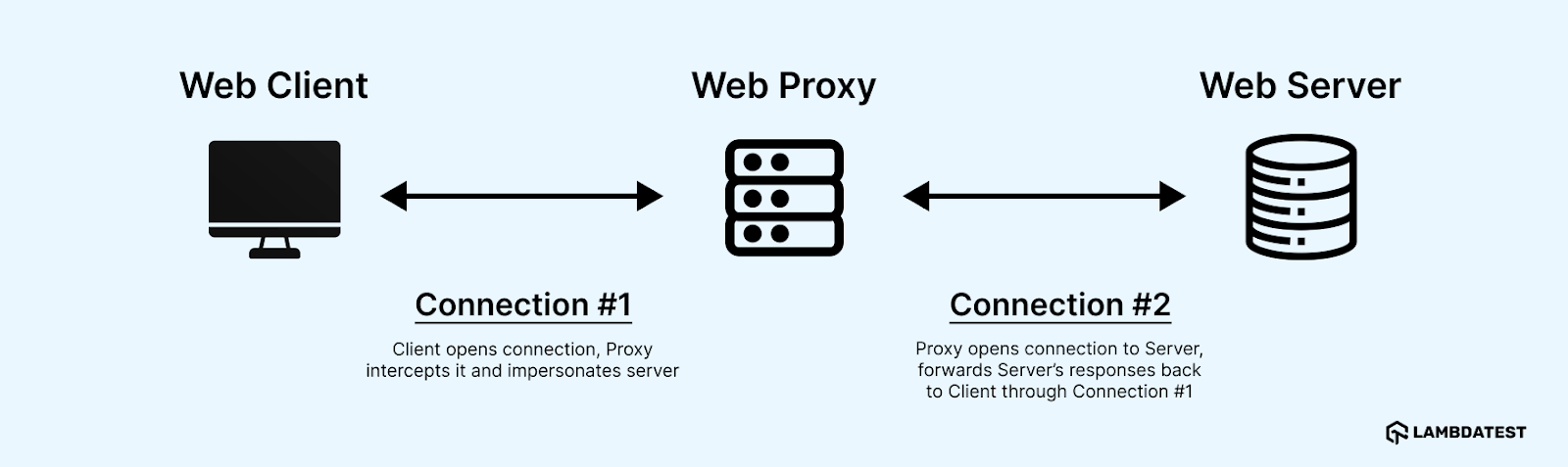
In the diagram above, the client’s request to the server is intercepted by a proxy before reaching the server. The proxy can analyze and modify the request before forwarding it to the server and can also analyze and modify the server’s response before sending it back to the client.
Two commonly used tools for analyzing network traffic are:
- Wireshark: A free and open-source packet analyzer that captures and analyzes network traffic in real-time.
- tcpdump: A tool that captures and filters network traffic for various protocols, including TCP, UDP, and ICMP.
What Is Cypress Intercept?
Cypress intercept (cy.intercept()) is a feature in Cypress that allows testers to intercept and control HTTP requests and responses between an application and external services. It streamlines network testing by giving testers the ability to manipulate, modify, or stub these requests and responses directly within their tests.
Leveraging cy.intercept() can significantly enhance the effectiveness and reliability of your tests.
Here’s why incorporating Cypress intercept into your testing strategy is advantageous:
- Mocking API responses: This helps create custom responses to simulate different scenarios, such as error states, empty responses, or large datasets. By controlling the responses, you ensure that your application behaves correctly under different conditions.
- Stubbing network calls: This helps replace actual network requests with predefined responses, cy.intercept() speeds up test execution and isolates the component under test. This approach eliminates the need for a real backend, reduces test flakiness, and focuses on testing specific functionalities without interference from external services.
- Improve Test Reliability: This helps control network interactions and ensure your tests are not affected by external factors such as network delays or changes in the backend services. This leads to more stable and reliable tests.

Note: Intercept network requests with Cypress on the cloud grid. Try TestMu AI Today!
Using Cypress Intercept for Handling Network Requests
Cypress is a JavaScript-based end-to-end testing framework that simplifies writing, running, and debugging tests for web applications. It supports intercepting and stubbing network requests, allowing you to control server responses and make assertions about network requests during Cypress end-to-end testing.
Subscribe to LambbdaTest YouTube Channel to get more tutorials on Cypress automation and more.
The cy.intercept() command in Cypress lets you intercept network requests by providing a URL pattern and a callback function. This command intercepts all requests matching the pattern, allowing you to modify the request, return a response, or pass the request to the network.
Below are the methods you can use in Cypress to spy on and stub network requests and responses.
cy.intercept(url)
cy.intercept(method, url)
cy.intercept(routeMatcher)
Here’s a simple example of how you could use the Cypress intercept command to return a fake response for a certain request:
cy.intercept('/api/data', {
    method: 'GET'
    }).as('getData')
    .reply(200, {
       data: 'Test Data'
    });


    // ... Perform your test logic ...
    cy.wait('@getData')
    .its('response.body')
    .should('deep.equal', {
       data: 'Test Data'
});
In this example, the cy.intercept() command is used to intercept all GET requests to the /api/data endpoint. The .reply method is then used to return a mock response with a status code of 200 and a JSON body of { data: ‘Test Data’ }. After intercepting the request, the cy.wait() command ensures the request is completed, and the response body is asserted to match the expected value.
Before diving into the details of these methods, let’s first understand how the cy.intercept() method works.
How Does the cy.intercept() Method Work?
The cy.intercept() method in Cypress intercepts and modifies HTTP requests and responses made by the application during testing. This allows you to simulate different network scenarios and test your application’s behavior under various conditions. You can intercept requests to specific URLs or those made by specific methods (e.g., GET, POST).
In the diagram below, the cy.intercept() method intercepts the requests and responses made by the Application Under Test (AUT). This interception can be configured to target specific URLs or HTTP methods, allowing precise control over the network traffic during your tests.
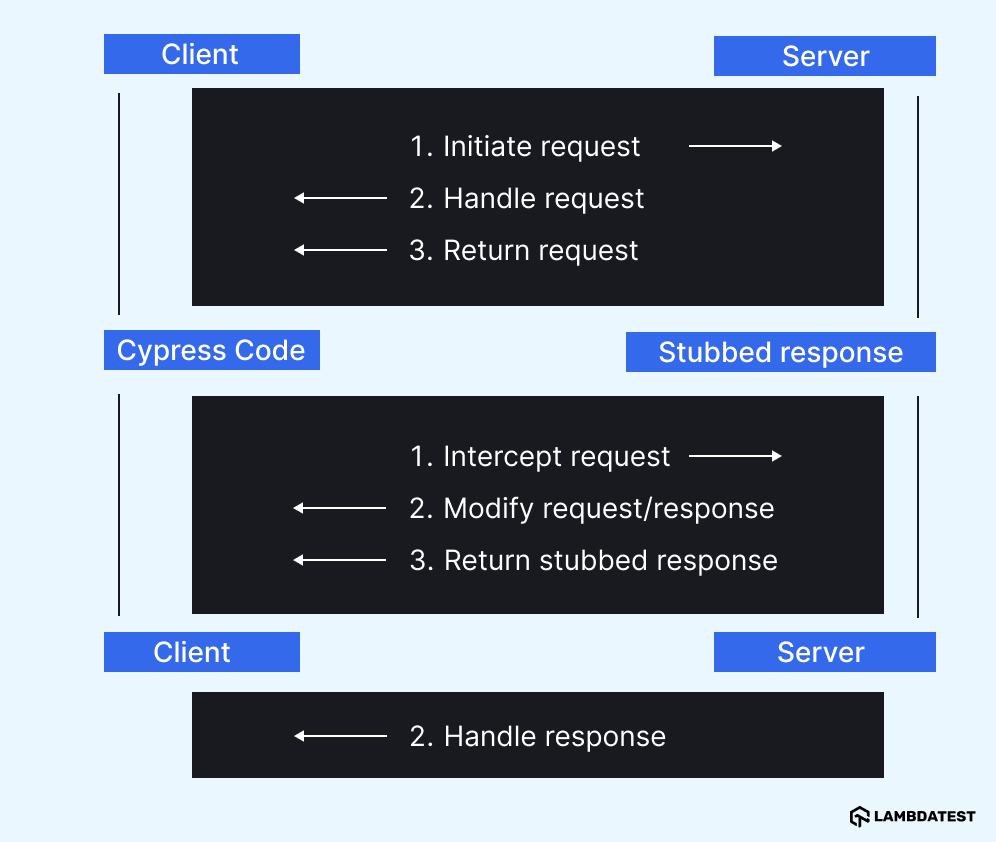
The steps of the diagram are explained below:
- The client (browser) initiates a request to the server.
- The server receives the request and sends back a response.
- The client receives the response and handles it.
With Cypress intercept:
- Cypress intercepts the requests before it reaches the server.
- The test code can modify the request or the response, such as adding headers, delaying the response, or changing the status code.
- The test code returns a stubbed response that replaces the actual response from the server.
- The client receives the stubbed response and handles it as if it came from the server.
Once you receive the response, you can verify the stubbed response through assertions.
Now that you understand how cy.intercept() works, let’s explore the various ways to intercept network requests in Cypress.
Different Ways of Intercepting Network Requests in Cypress
Cypress offers various methods for intercepting network requests, allowing you to handle and manipulate HTTP traffic during tests. You can intercept specific requests based on URL patterns, HTTP methods, or request headers, among other criteria. This enables precise control over how your application interacts with the network, making it easier to simulate different scenarios and test various outcomes.
Some of the various Cypress intercept ways for handling network requests are mentioned below:
Matching URL
There are three ways of matching the URL.
- Interception by Matching the Exact URL: It involves specifying the full URL in the cy.intercept() method. This approach captures requests that precisely match the given URL, allowing for targeted testing and validation of the response.
it('Intercept by Url', () => {
    cy.visit('https://reqres.in/');
    cy.intercept('https://reqres.in/api/users/').as('posts')
    cy.get("[data-id=users]").click()
    cy.wait('@posts').its('response.body.data').should('have.length', 6)
 })
- Interception of Multiple URLs Using Pattern Matching: It involves using pattern matching by specifying a URL pattern in the cy.intercept() method. This approach captures requests that match the pattern, allowing for more flexible testing by accommodating variations in the URL.
it('Intercept by use pattern-matching to match URLs', () => {
    cy.visit('https://reqres.in/');
    cy.intercept('/api/users/').as('posts')
    cy.get("[data-id=users]").click()
    cy.wait('@posts').its('response.body.data').should('have.length', 6)
 })
- Interception of the URL Using a Regex Pattern: It involves using a regex pattern by providing a regular expression to the cy.intercept() method. This approach captures requests that match the regex pattern, allowing for advanced and flexible URL matching.
it('Intercept by regular expression', () => {
    cy.visit('https://reqres.in/');
    cy.intercept('//api/users?page=2').as('posts')
    cy.get("[data-id=users]").click()
    cy.wait('@posts').its('response.body.data').should('have.length', 6)
 })
Matching Method
Another way to use Cypress intercept is by matching HTTP methods for more precise request handling and testing. By default, if no method is specified, cy.intercept() will match all HTTP methods (GET, POST, PUT, PATCH, DELETE, etc.). If you provide a method in the cy.intercept() command, it will intercept only requests with that specific method.
For example, using cy.intercept(‘/api/users/’) will match requests with any HTTP method. However, if you specify cy.intercept(‘GET’, ‘/users?page=2’), it will intercept only GET requests.
it('Intercept by matching GET method', () => {
    cy.visit('https://reqres.in/');
    cy.intercept('GET','api/users?page=2').as('posts')
    cy.get("[data-id=users]").click()
    cy.wait('@posts').its('response.body.data').should('have.length', 6)
 })
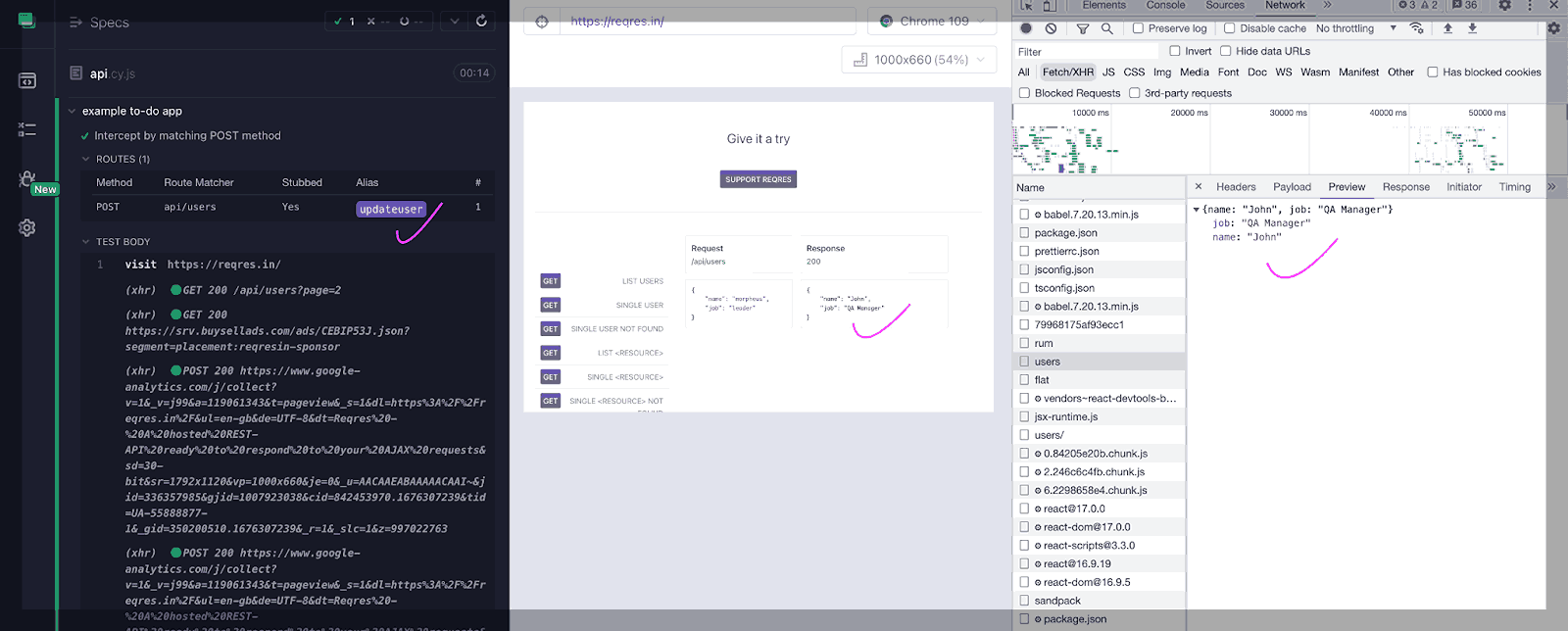
Here’s another example using a POST request where you can manipulate the response by providing data in the body. In this example, you can mock the response with the data specified in the body.
it('Intercept by matching POST method', () => {
    cy.visit('https://reqres.in/');
    cy.intercept('POST', 'api/users', (req) => {
      req.reply({
        status: 200,
        body: {
          "name": "John",
          "job": "QA Manager",
      }
      })
    }).as('updateuser')
    cy.get("[data-id=post]").click()
    cy.wait('@updateuser')
 })
Result:
Matching With RouteMatcher
RouteMatcher is part of the Cypress API that allows you to match specific network requests based on attributes like URL, method, and headers. It provides a flexible way to intercept API requests and test your application’s behavior under different conditions.
it('Intercept by RouteMatcher ', () => {
    cy.visit('https://reqres.in/')
    cy.intercept({
      method: 'GET',
      url: 'https://reqres.in/api/users/**'
    }, (req) => {
      req.reply({
        statusCode: 200,
        body: {
          data: [{
            id: 7,
            email: '[email protected]',
            first_name: 'tim',
            last_name: 'Bluth',
            avatar: 'https://reqres.in/img/faces/1-image.jpg'}, {
              id: 8,
              email: '[email protected]',
              first_name: 'Janet',
              last_name: 'Weaver',
              avatar: 'https://reqres.in/img/faces/2-image.jpg'
            }
          ]
        }
      })
    }).as('postdata')
    cy.wait('@postdata').its('response.body.data').should('have.length', 2)
 })
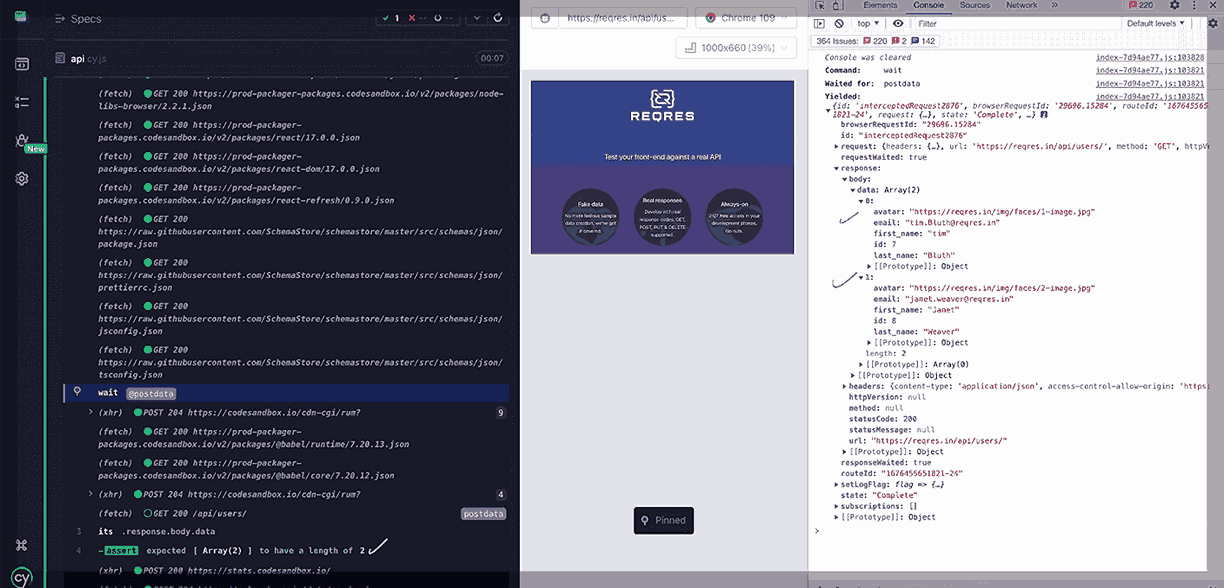
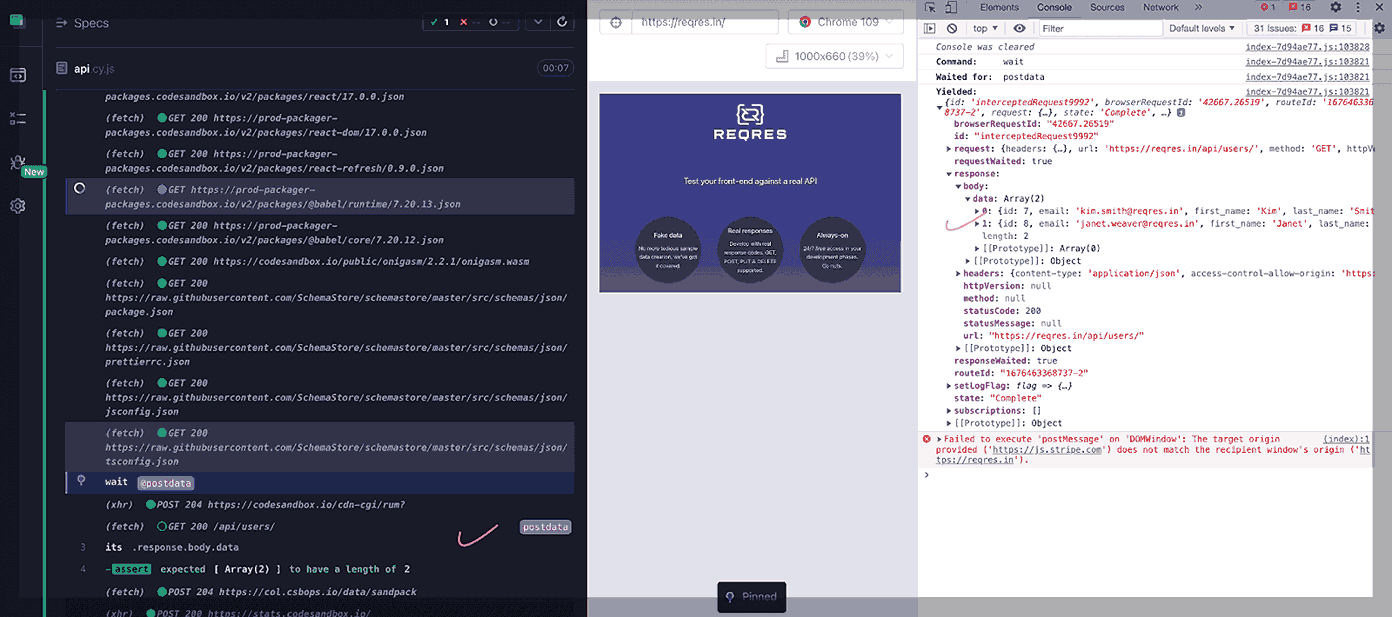
In this example, a RouteMatcher is used to match any GET request to https://reqres.in/api/users/**, where ** matches any path after /api/users/. The req.reply() function is then used to return a custom response for the matching requests. Finally, the test verifies that the response has a length of 2.
Result:
Pattern Matching
In pattern matching, you can provide a matching pattern string. For example, any GET or PATCH requests that match the pattern **/users/** will be intercepted.
it('Intercept by Pattern Matching using glob matching ', () => {
    cy.visit('https://reqres.in/')
    cy.intercept({
      method: '+(GET|PATCH)',
      url: '**/users/**'
    }, (req) => {
      req.reply({
        statusCode: 200,
        body: {
          data: [{
            id: 7,
            email: '[email protected]',
            first_name: 'Kim',
            last_name: 'Smith',
            avatar: 'https://reqres.in/img/faces/1-image.jpg'}, {
              id: 8,
              email: '[email protected]',
              first_name: 'Janet',
              last_name: 'Weaver',
              avatar: 'https://reqres.in/img/faces/2-image.jpg'
            }
          ]
        }
      })
    }).as('postdata')
    cy.wait('@postdata').its('response.body.data').should('have.length', 2)
 })
Result:
Stubbing a Response
It refers to the process of intercepting a network request made by the application being tested and returning a predefined response instead of the actual response from the server.
There are two ways to stub a response for a network request:
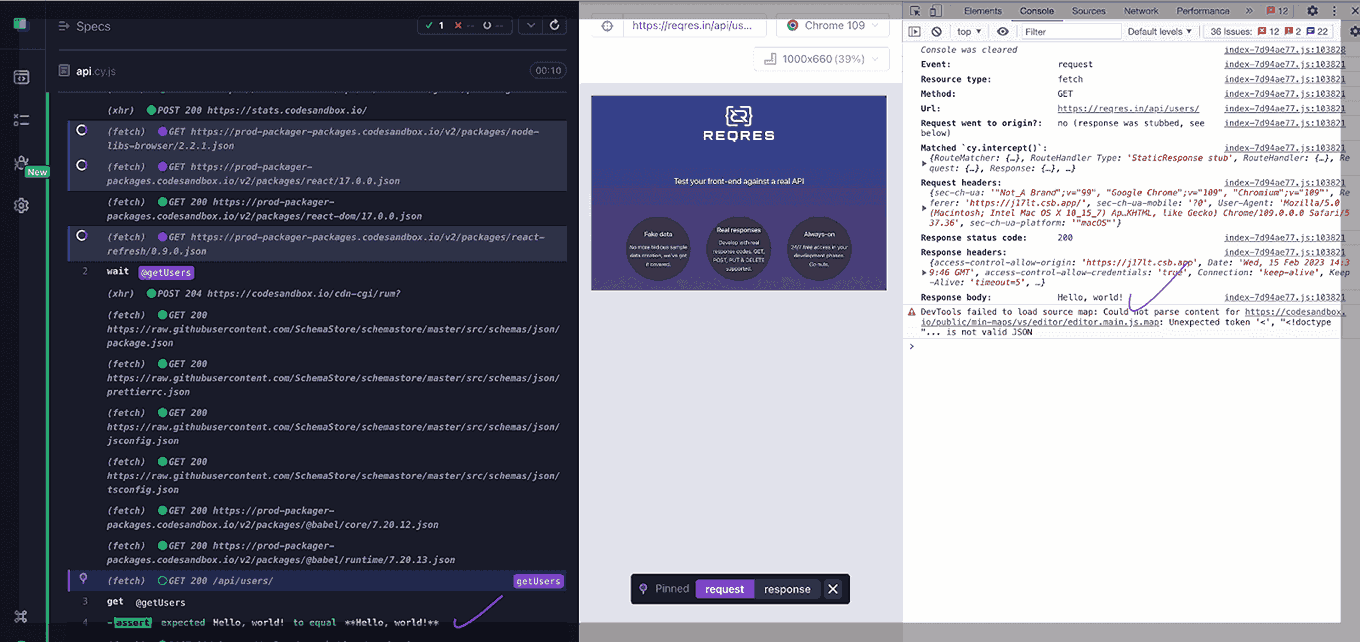
- With a String: In this method, you stub a response by providing a simple string as the response body. This allows you to simulate specific text-based responses for your network requests. Here’s an example of how you can use the Cypress intercept – cy.intercept() method to stub a response for a network request by passing a string in the body.
it('Stubbing a response With a string', () => {
    cy.visit('https://reqres.in/')
    cy.intercept('GET', '**/users/**', {
      statusCode: 200,
      body: 'Hello, world!'
    }).as('getUsers')
    cy.wait('@getUsers')
    cy.get('@getUsers').then((interception) => {
      expect(interception.response.body).to.equal('Hello, world!')
 })
 })
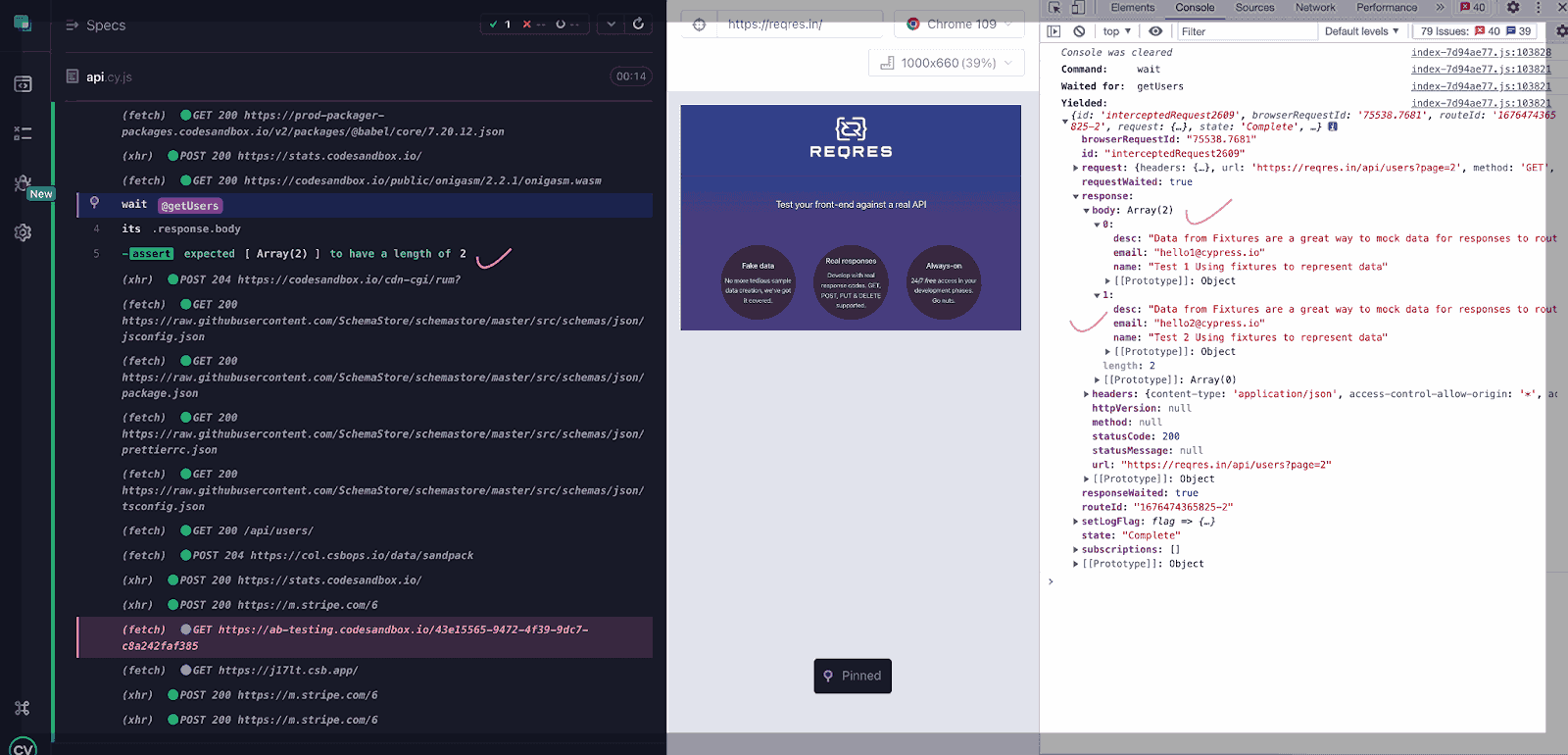
- With Fixture Files: In this method, you use a fixture file to stub a response, allowing you to mock complex data structures and reuse predefined JSON files for consistent and detailed testing scenarios. Here’s an example of how to use the Cypress cy.intercept() method to stub a response by using a fixture file.
it('Stubbing a response With Fixture file', () => {
    cy.visit('https://reqres.in/')
    cy.intercept('GET', 'https://reqres.in/api/users?page=2', { fixture: 'users.json' }).as('getUsers')
 cy.visit('https://reqres.in/')
 cy.wait('@getUsers')
 cy.get('.data').should('have.length', 6)
 })
Changing Headers
Changing headers in Cypress lets you modify request headers before they are sent to the server. Using the cy.intercept() method, you can capture a request, adjust its headers, and then proceed with the test to verify the application’s behavior.
it('Intercept a request and modify headers', () => {
    cy.visit('https://reqres.in');
    cy.intercept('GET', 'https://reqres.in/api/users', (req) => {
      req.headers['Authorization'] = 'Bearer my-token';
    }).as('getUserList');
    //cy.visit('https://reqres.in/api/users');
    cy.wait('@getUserList')
    cy.get('@getUserList').then((interception) => {
      const requestHeaders = interception.request.headers;
      expect(requestHeaders).to.have.property('Authorization', 'Bearer my-token');
    });
 });
In this example, you intercept a GET request to https://reqres.in/api/users and modify the Authorization header by adding a token value. Then, you assign this interception a unique alias using the .as() command to wait for it to complete with cy.wait().
After the interception is complete, you can use cy.get(‘@getUserList’) to retrieve the interception object and assert that the Authorization header was correctly modified.
The above are the various ways to intercept network requests in Cypress. Next, you’ll learn how to override an existing Cypress intercept for network requests.
Overriding an Existing Cypress Intercept
Overriding an existing Cypress intercept allows you to modify or cancel a network request intercept already defined in your test code. This can be useful when you want to change the behavior of an intercept, such as simulating a different server response or altering the request data.
The main difference between intercepting and overriding is that intercepting defines new intercepts, while overriding modifies existing ones.
The example below demonstrates how to use the Cypress intercept method to override an existing intercept and adjust your application’s behavior during testing.
describe.only('Override an existing intercept example', () => {
    beforeEach(() => {
      cy.intercept('GET', 'https://reqres.in/api/users').as('getUsers')
    })


    it('overrides the response of the /api/users request', () => {
      cy.visit('https://reqres.in/')
      cy.intercept('GET', 'https://reqres.in/api/users', (req) => {
        req.reply((res) => {
          res.send({
            data: [{ id: 1, email: '[email protected]' }],
            page: 1,
            per_page: 1,
            total: 1,
            total_pages: 1
          })
        })
      }).as('getUsers')


      cy.wait('@getUsers').then((interception) => {
        expect(interception.response.body.data).to.have.length(1)
        expect(interception.response.body.data[0].email).to.eq('[email protected]')
      })
    })
   })
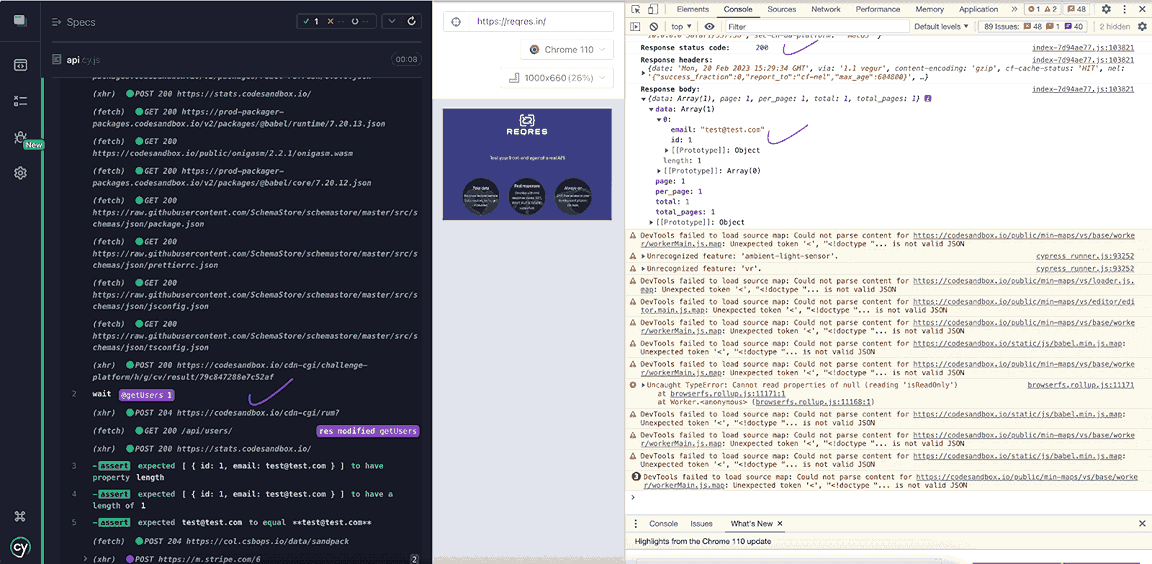
In this example, you first define an intercept for the GET /api/users request and give it an alias of getUsers. Then, in the test itself, you can override the same request by defining a new intercept with the same alias of getUsers.
In the new intercept, you use the req.reply() function to override the original request’s response and return a new response that includes a single user with an email of ‘[email protected]‘. Finally, you can use the cy.wait() command to wait for the getUsers alias to complete, and then we test the response to ensure it contains the expected data.
Result:
As you have already seen, Cypress intercept methods such as cy.intercept(), cy.wait(), and others help intercept and manipulate network requests. Additionally, other automation testing tools also enhance the ability to intercept and manage network requests effectively.
Some QA automation tools that can complement and extend the functionality of intercepting network requests include:
- Selenium: Selenium is a popular open-source framework for automating web application testing. While it does not have built-in capabilities for intercepting network requests, it can be integrated with other tools to achieve this functionality.
- Playwright: With Playwright, you can intercept network requests using the page.route() method. This method enables you to intercept requests and provide custom responses.
- Postman: Postman is a popular API development and testing tool that allows you to inspect and modify network requests. It provides a user-friendly interface and a wide range of features for API testing.
- Charles: Charles is a web debugging proxy tool used to inspect, debug, and modify network requests. It is commonly used by developers to troubleshoot issues with web applications and APIs.
- Fiddler: Fiddler is a web debugging proxy tool that allows you to inspect and modify network requests. It is widely utilized for QA automation.
- JMeter: JMeter is an open-source load testing tool that includes features for intercepting and modifying network requests. It is used for testing the performance of web applications and APIs.
- Burp Suite: Burp Suite is a powerful tool for testing web applications. It allows you to intercept and manipulate HTTP requests and responses, providing detailed insights into network traffic.
- SoapUI: SoapUI is an open-source tool for testing web services, including features for intercepting network requests. It is widely used for testing SOAP and REST APIs.
While traditional QA tools are essential for intercepting and analyzing network requests, QA teams can also leverage cloud-based platforms like TestMu AI for additional benefits.
TestMu AI is an AI-powered automation testing platform that offers a robust cloud infrastructure that enables you to run tests at scale across 3000+ browsers and operating system combinations without the need for physical hardware.
This platform helps scale testing efforts, execute tests concurrently, and integrate seamlessly with existing tools, enhancing your overall testing strategy.

Wrapping up
Stubbing allows you to intercept network requests and replace them with predefined responses, avoiding the need to send the request over the network. However, stubbing can sometimes result in false positives, as the behavior of the stubbed requests may not truly represent actual network behavior, potentially leading to missed bugs or errors.
On the other hand, not using stubbing with Cypress intercept provides a more accurate representation of your application’s behavior by allowing real network requests. This approach offers greater confidence that your tests truly reflect how the application behaves in the real world.


Frequently asked questions
Did you find this page helpful?
More Related Hubs
TestMu AI forEnterprise
Get access to solutions built on Enterprise
grade security, privacy, & compliance
- Advanced access controls
- Advanced data retention rules
- Advanced Local Testing
- Premium Support options
- Early access to beta features
- Private Slack Channel
- Unlimited Manual Accessibility DevTools Tests