

Next-Gen App & Browser Testing Cloud
Trusted by 2 Mn+ QAs & Devs to accelerate their release cycles


15 Most Important Mobile App Testing Scenarios [2026]
This blog outlines the difference between test case and test scenarios, when and when not to use a test scenario followed by important mobile app testing scenarios.

Ruchira Shukla
February 15, 2026
Mobile app testing is critical in the mobile development lifecycle. Developers and app testers should think of different mobile app testing scenarios before making them live. This is particularly important given the number of apps released daily. According to Statista, mobile app downloads worldwide have increased to 257 billion in 2023.
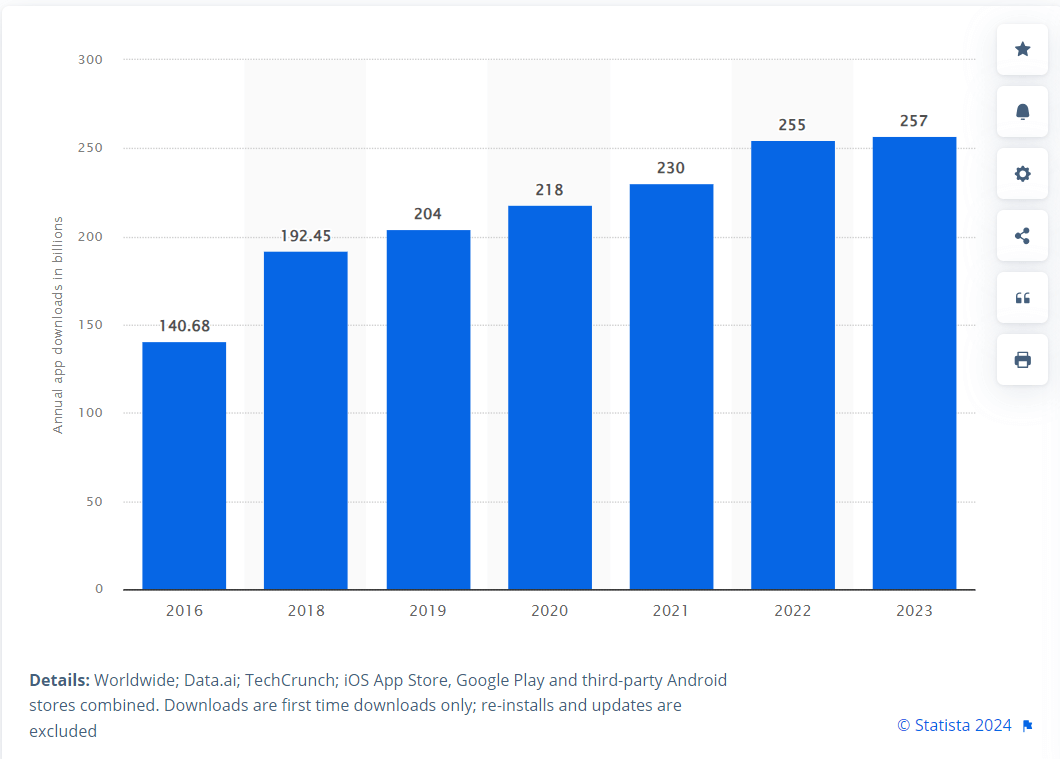
This has led to a demand for delivering high-quality mobile applications to stand out in the crowd and get maximum traffic. In this blog, we will discuss the different mobile app testing scenarios. Continuously upgrading Mobile OS, new devices, and localization challenges make a app tester’s job more challenging.
To cater to this, it is crucial to create intelligent and efficient mobile app test scenarios which uncover the issues which can impact the user experience.
What is a Test Case
A test case is a more granular level of testing where the app mobile tester performs various operations on the app to ensure that the given functionality works fine. This helps in understanding, tracking, and resolving quality issues. In short, test cases test the given scenario.
What is a Test Scenario
A Test scenario is a broader term and is often tied up with the user stories in the agile model. Test scenario helps engineers to test the mobile app with real-world use cases. Learn more about scenario testing through our hub on scenario testing. Testers similarly execute scenarios as the end-user would use the app.
Why Create Mobile App Testing Scenarios?
Test scenarios are created to:
- It assures complete test coverage.
- All the stakeholders approve the scenarios. Therefore every person involved is on the same page.
- They help determine the end-to-end use case of the Application and test everything accordingly.

When not to create a Mobile App Testing Scenarios?
Test scenarios are not helpful in the below-mentioned cases.
- When the application is complicated or unstable or has a time crunch.
- When you have a Scrum or Kanban methodology.
- Test Scenario should not be created to fix a new bug fix or during regression testing.
15 Important Mobile App Testing Scenarios
Functional Mobile Testing Scenario
Along with the usual test scenarios which tests the basic functionality, there are some mobile app testing scenarios which one should consider while performing functional testing.
- Ensure that mobile works in multitask mode when needed. For example, while using the app, if the user gets a call, he should perform the expected actions.
- Test that the AUT is not consuming other apps’ memory and not stopping the activities of other apps.
- Page scroll, swipe is working as expected.
- Check that the app’s automatic startup is working as expected.
- Check that auto-logout is working as expected.
- Navigation between various modules should work as expected.
- Test that the app’s social networking options such as sharing, posting, login are working correctly.
UI Mobile Testing Scenario
UI testing can be tricky for mobile apps as one has to check for the component placement on a comparatively smaller screen. As all the web applications tend to be responsive now, one has to make sure that the layout, placement, and functionality are working as expected. Along with that, a few other mobile app testing scenarios must be noted.
- Validate that text is not cut off and must be fitted on the screen.
- Validate that all popups, alert messages, and error messages are meaningful and correct.
- Validate the carousel, navigation through menu, and swipe functions.
- The page should not take more than five seconds to load, if it does, it should have a progress bar that allows the user to comprehend the scenario.
- Check for spelling & grammatical errors.
- Check for image sizes, image rendering, and company logo.
- When the screen allows editing without saving, it must show a message to save details to the user when navigating to another screen without saving.
- If there is lazy loading, check if the content loads without a lag when the user scrolls up.
- Validate that data does not ghost off when moving the app to the background while filling a form.
Compatibility Mobile Testing Scenario
- Check for the interrupt conditions like incoming calls, messages, or notifications while using the app.
- The app should go into the background if there is an incoming call. After the call disconnects, it should again resume as it was before.
- Validate that the phone’s essential functions like alarm, storing messages, sending/receiving messages are all working as expected while using the app.
Performance Mobile Testing Scenario
Mobile performance testing of the app is critical as the purpose of convenient access would be lost if the app does not perform well.
- Validate the performance of the application by changing the network to 2G,3G, 4G, 5G, and wifi.
- Validate the CPU consumption while using the app.
- Validate how many parallel users would crash the app to benchmark performance.
- Perform the load testing on individual API calls and validate how the application behaves under a certain load.
Usability Mobile Testing Scenario
- Check for the font size, button size, and content format so that it is accessible effortlessly.
- Inform the client while downloading a lot of data which might not be favorable for the performance of an app.
- Validate that the app should have easy navigations which do not confuse users.
Security Mobile Testing Scenario
- Validate the flow for security vulnerabilities that involve the user’s personally identifiable data, such as mobile number, email, etc.
- Validate that the data is secured and encrypted, sent to and back from the server over the network.
- Validate that no confidential data is stored without encryption and visible/accessible.
Battery & Data Mobile Testing Scenario
Testing the app against data usage and power consumption should also be considered, as it should not drain the battery while running.
Recoverability Mobile Testing Scenario
- Validate that the app resumes the last operation in case of a hard reboot.
- Test what happens in case of a crash between transactions or any R/W function.
Career & Network Connectivity Testing
Test how well the app connects with the network and mobile data career online.
Installation & Resource usage Testing
Test what resources are required to install the app and if the installation process is user-friendly and quick. Also, test that there is no crash during installation and it’s smooth.
Localization and Time Zone Testing
If an app supports different locals, the testers should also test the app for localization settings. The labels, functional flows, and other features should work as expected in different languages. Similarly, all the features should work as expected while operating in different time zones.
Certification Mobile Testing Scenario
Ensure that the app adheres to the guidelines of the Android or iOS phones platforms when installed.
Restrict/Allow Permission Testing
Verify that the app adheres to the user permission settings for accessing the phone’s features such as contacts, camera, gallery, etc.
Multi-Touch and Single Touch Testing
Thoroughly test the multi-touch features such as pinch to zoom or pinch to shrink, etc., and create plenty of test cases for this for every applicable screen.

Note: Automate your app tests over 3000+ real devices and OS configurations. Try TestMu AI Now!
Mobile Testing Strategy
We have already discussed test scenarios for mobile app testing. We know that mobile devices have different OS and versions. The question is how to test the app for such a huge number of devices.
The effective mobile testing strategy should aim for maximum coverage with a reasonable device investment. We can use virtual testing platforms of emulators and simulators or use real device cloud which is nothing but real devices hosted on the cloud.
There are different types of mobile virtual testing platforms:
- iOS and Android Emulator Online – Emulates different mobile devices.
- Browser Emulator Online – Emulates different browsers.
- OS Emulators – Provided by respective OS designers; Android by Google, Windows Phone by Microsoft, and iOS emulator by Apple.
Using Real Device Cloud
App testers should select the real devices based on the current market research data on the usage of devices. The devices which are most popular among users should be selected for testing.
This also holds good for the OS versions. TestMu AI allows you to test apps on real devices using real device cloud.
Automation Testing
Test engineers should also consider automating the functional/regression scenarios as much as possible. This will make testing more effective and less time-consuming. There are many automation tools available for mobile automation. For example – Appium, Calabash, Robotium, UIAutomator, etc.
Cloud-Based Automation Testing Solution for Mobile Testing
Tools that use emulators or simulators for mobile testing are available in two categories- Cloud-based and on-premise. Cloud based tools are gaining popularity because of their ease of use and scalability.
TestMu AI is an AI-native test orchestration and execution platform that offers both real device cloud and virtual platform testing using emulators and simulators.
- TestMu AI allows you to upload the app in a single click.
- It offers both emulators/simulators and real devices.
- You can test your websites and webapps on mobile devices.
- Perform responsive test and compatibility test on different devices.
- Completely eliminate the need for an on-premise device lab.
- Test fast and ship with confidence
- Eliminate false positives
- Integrate with different communication and CICD tools
- Test native app features and debug in real time using full page screenshot, videos and logs.
- Perform both automated and manual testing
Summary
Now perform free cross browser and live testing. Mobile app testing is different from web application testing, and we have already addressed different scenarios that should be considered while testing mobile apps. It can be challenging to design an effective mobile testing strategy due to numerous devices. The app must ensure platform and browser compatibility. I hope this blog helps you to create a mobile testing strategy effectively.
To further strengthen your expertise in mobile testing, be sure to check out our comprehensive guide on top asked mobile testing interview questions. This resource will equip you with the knowledge needed to excel in this dynamic field.


Frequently asked questions
Did you find this page helpful?
More Related Hubs
TestMu AI forEnterprise
Get access to solutions built on Enterprise
grade security, privacy, & compliance
- Advanced access controls
- Advanced data retention rules
- Advanced Local Testing
- Premium Support options
- Early access to beta features
- Private Slack Channel
- Unlimited Manual Accessibility DevTools Tests