

Next-Gen App & Browser Testing Cloud
Trusted by 2 Mn+ QAs & Devs to accelerate their release cycles


- Home
- /
- Learning Hub
- /
- How to Use Playwright Skill for Agentic Testing [2026]
How to Use Playwright Skill for Agentic Testing [2026]
Learn what a Playwright skill is, how to install and use TestMu AI's Playwright Skills Repository, and run cloud-based Playwright tests step by step.

Salman Khan
March 27, 2026
A Playwright Skill is a curated set of markdown guides that help AI coding agents and developers write production-ready Playwright tests by capturing real-world patterns, workflows, and best practices from actual codebases.
Without a context file, your AI agent falls back on defaults. That looks like waitForTimeout(3000) on every async call, .btn-primary-blue selectors that break on the next design update, and a full login flow copy-pasted into every test file.
A Playwright Skill file fixes this by telling the agent your waiting strategy, selector conventions, and shared setup. The agent stops guessing and starts writing tests that fit what you already have.
Overview
What Is a Playwright Agent Skill
A Playwright Agent Skill is a SKILL.md file that provides AI coding agents with project-specific locator strategies, auth patterns, and assertion conventions to generate production-ready Playwright tests.
How to Install the Playwright TestMu AI Skill in Cursor AI
Here are the steps to install and use the Playwright Skill by TestMu AI for agentic testing:
- Clone the repository: Run git clone https://github.com/LambdaTest/agent-skills.git into your IDE's skills directory (e.g., .cursor/skills/).
- Install the skill: Copy the playwright-skill folder into your tool's skills path for Cursor AI, Claude Code, GitHub Copilot, or Gemini CLI.
- Prompt the agent: Open agent mode and request Playwright tests. The agent reads the skill and generates spec files, playwright.config.js, and package.json.
- Run tests locally: Execute npx playwright test --project=chromium to verify tests pass in headless Chromium.
- Scale on cloud: Set TestMu AI credentials and run tests on the TestMu AI Cloud Grid for cross-browser and cross-OS coverage at scale.
What Is a Playwright Skill
A Playwright Skill is a structured markdown guide that gives an AI coding agent the project-specific context it needs to write tests that hold up in production.
The format is a SKILL.md file - a convention from the open Agent Skills Standard that tools like Cursor AI, Claude Code, GitHub Copilot, and Gemini CLI read before generating code.
The agent loads the skill, then applies its patterns automatically without you having to prompt for them every time.
Playwright Skill is not documentation. The official Playwright documentation covers what the API does. A skill covers when to use it, when to avoid it, and which patterns survive a real codebase.
Without a skill, an agent guesses. For example, below is the login test generated using Cursor AI agent without the skill:
page.locator('.login-button').click()
And below is the code with the Playwright Skill loaded:
page.getByRole('button', { name: 'Sign in' }).click()
The second selector keeps working no matter how many times the design changes. The first one breaks the moment a designer renames a CSS class.
The Playwright Skills Repository by TestMu AI (Formerly LambdaTest)
The Playwright Skill is a repository maintained by TestMu AI.
Basically, the TestMu AI agent-skills repository covers 46 test automation frameworks across 15+ languages. Playwright is one skill in a collection that also includes Cypress, Jest, Appium, Selenium, WebdriverIO, and more.
If your project runs Playwright for E2E and Jest for unit tests, you install two skills. Each AI agent on your team draws from the right context for the right task. Here is how the Playwright Skill folder is structured.
Repository Structure
playwright-skill/
├── reference/       # Production patterns and playbooks
├── scripts/         # Executable automation scripts
├── templates/       # Ready-to-use test templates
└── SKILL.md         # Agent entry point
There are four components. Each has a specific job.
- SKILL.md is what Cursor AI reads first - a compact metadata file that tells the agent what the skill covers, when to load it, and where to find the right folder for the task. It stays small by design, so it does not bloat the agent's context window on every prompt.
- reference/ is where the production patterns live - locator strategy, auth setup, assertion patterns, CI configuration, and cloud execution guidance in the order a team actually adopts them.
- scripts/ contains executable automation that the agent can run directly - setup scripts, configuration generators, and diagnostic utilities that would otherwise require manual steps.
- templates/ gives the agent ready-to-use starting points for common test structures: page objects, global setup, GitHub Actions workflows, and fixture files that follow the patterns in the reference folder.

Note: Run your Playwright tests effortlessly using Agent Skills. Try TestMu AI Today
How to Install the TestMu AI Playwright Skill
With the repository structure covered, let's install the skill. Clone the TestMu AI agent-skills repo from GitHub, then copy the playwright-skill folder into your tool's local skills directory.
Option 1: Clone the Full Repository
If your stack uses multiple frameworks, clone the whole collection:
# Cursor AI
git clone https://github.com/LambdaTest/agent-skills.git .cursor/skills/agent-skills

# Claude Code
git clone https://github.com/LambdaTest/agent-skills.git .claude/skills/agent-skills

# GitHub Copilot
git clone https://github.com/LambdaTest/agent-skills.git .github/skills/agent-skills

# Gemini CLI
git clone https://github.com/LambdaTest/agent-skills.git .gemini/skills/agent-skills
Option 2: Install Only the Playwright Skill
Playwright-only projects can copy just the one directory:
git clone https://github.com/LambdaTest/agent-skills.git
cp -r agent-skills/playwright-skill .cursor/skills/
How to Run Tests Using Playwright Skill
I will use the Cursor AI agent mode for demonstration.
Open Cursor AI and switch to the agent mode. Prompt it to write Playwright tests, let the agent generate specs and config files, then run the generated command (npx playwright test) to execute and verify tests locally.
Step 1: Open Cursor (or any IDE with AI agent support like VS Code with GitHub Copilot).
Step 2: Open the chat panel and type this prompt:
Write Playwright tests for clicking on the Simple Form Demo option in TestMu AI Selenium Playground: https://www.testmuai.com/selenium-playground/

Step 3: The Cursor AI agent reads the installed Playwright Skill and generates the tests. It adds a Playwright spec that navigates to the TestMu AI Selenium Playground page, clicks/uses the "Simple Form Demo" option, and asserts that the Simple Form Demo page/content loads.
Files added:
- playwright.config.js
- tests/simple-form-demo-dropdown.spec.js
- package.json
It runs the simple-form-demo-dropdown.spec.js in headless Chromium to confirm it can actually find the Simple Form Demo option on the TestMu AI Selenium Playground page and navigate to the Simple Form Demo menu.
If it fails, the Cursor AI agent will adjust the selectors accordingly.
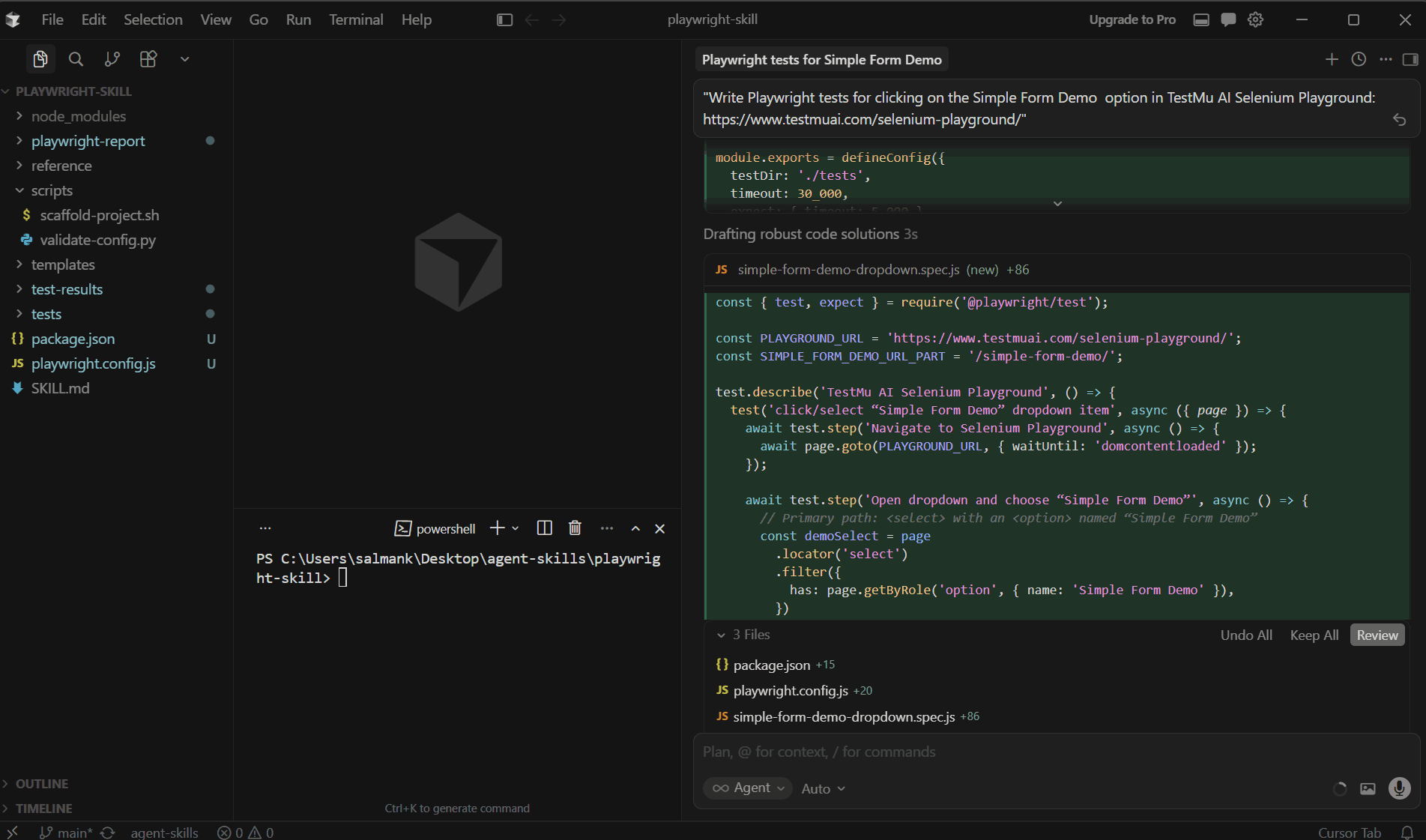
Step 4: Once test scripts are generated, the agent will give the test command to run the test.
Here is the command it has generated in my case:
npx playwright test tests/simple-form-demo-dropdown.spec.js --project=chromium
Open your Cursor AI terminal and run the generated test command.
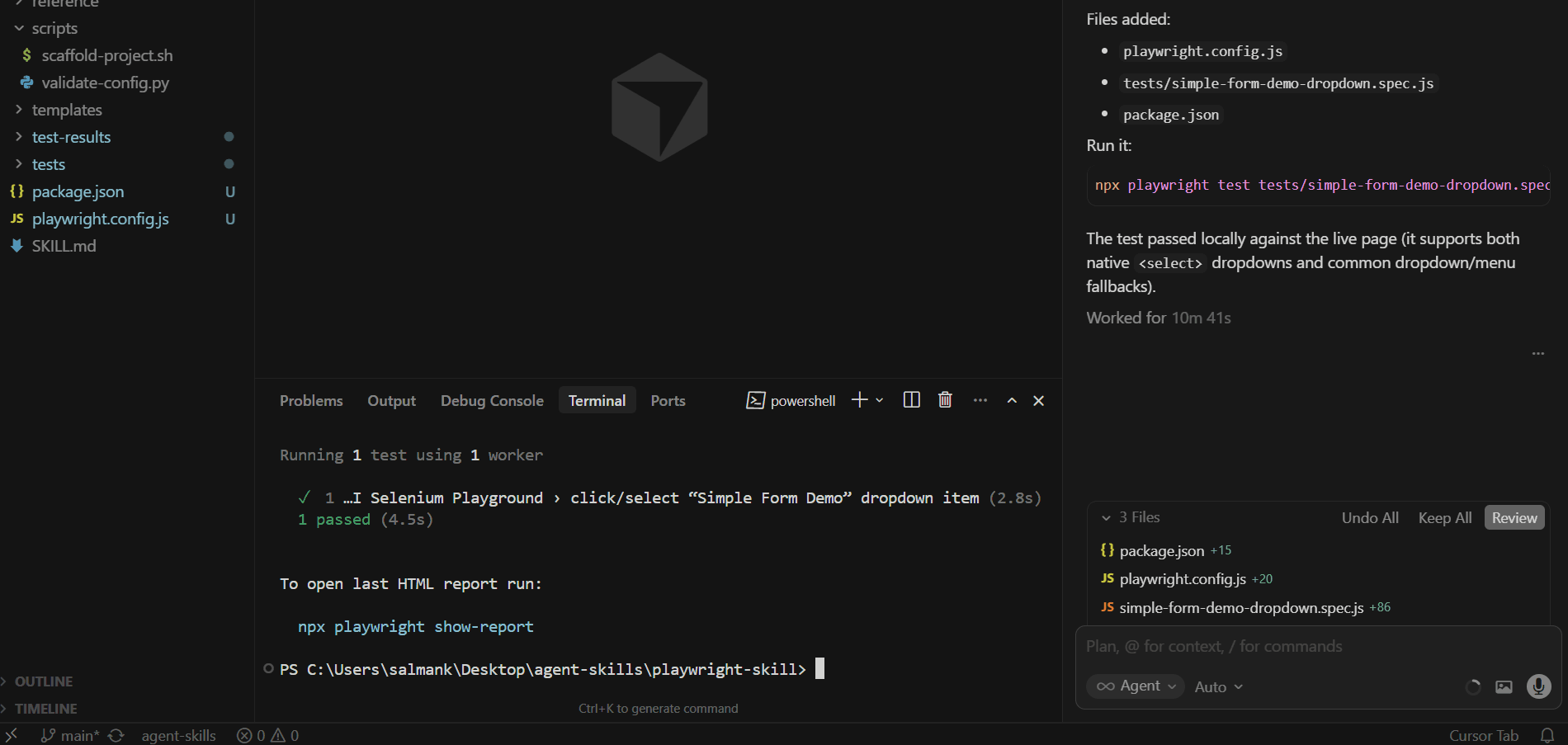
As you can see in the screenshot above, the test passed locally. The next step is to run the same tests on a cloud grid for cross-browser coverage.
How to Run Playwright Tests on Cloud With TestMu AI Skills
Once tests pass locally, you can scale them using the TestMu AI Playwright automation cloud. The Playwright Skill makes this transition seamless.
Note: To run the test, first set your TestMu AI credentials in the environment variables. You can get these credentials at the bottom of the TestMu AI dashboard under Credentials.
You can run the command below in the terminal to set these variables:
# macOS/Linux
export LT_USERNAME="YOUR_TESTMUAI_USERNAME"
export LT_ACCESS_KEY="YOUR_TESTMUAI_ACCESS_KEY"

# Windows (PowerShell)
$env:LT_USERNAME="YOUR_TESTMUAI_USERNAME"
$env:LT_ACCESS_KEY="YOUR_TESTMUAI_ACCESS_KEY"

# Windows (Command Prompt)
set LT_USERNAME="YOUR_TESTMUAI_USERNAME"
set LT_ACCESS_KEY="YOUR_TESTMUAI_ACCESS_KEY"
Let's enter the prompt in the Cursor AI agent:
Run the same tests on the TestMu AI Cloud Grid
It will generate the following files. The main ones are:
- package.json
- playwright.config.js
- tests/simple-form-demo-dropdown.spec.js
- lambdatest-setup.js
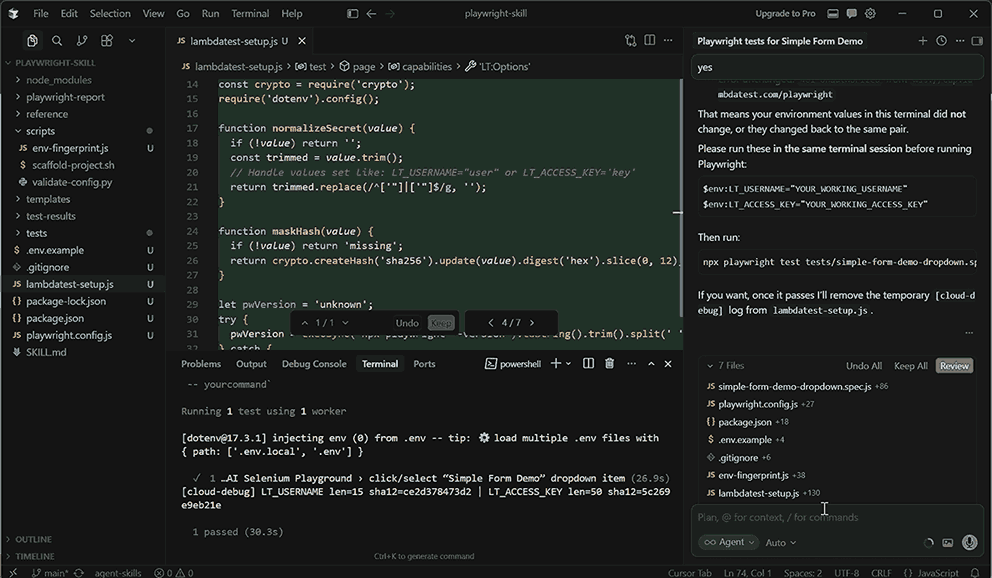
The playwright.config.js file holds Playwright runner configuration like test directory, reporting, retries, and browser projects. It includes both local (chromium) and TestMu AI cloud project targets (@lambdatest).
The lambdatest-setup.js file is a custom test fixture that switches between local browser launch and TestMu AI cloud CDP connection. It builds cloud capabilities, injects credentials, and reports pass/fail status back to the dashboard.
Now run the command below in the terminal to trigger tests on the TestMu AI cloud.
npx playwright test tests/simple-form-demo-dropdown.spec.js --project="Chrome:latest:Windows 11@lambdatest"
Below is the snap of the TestMu AI Web Automation dashboard showing a successful execution of selecting the "Simple Form Demo" option.
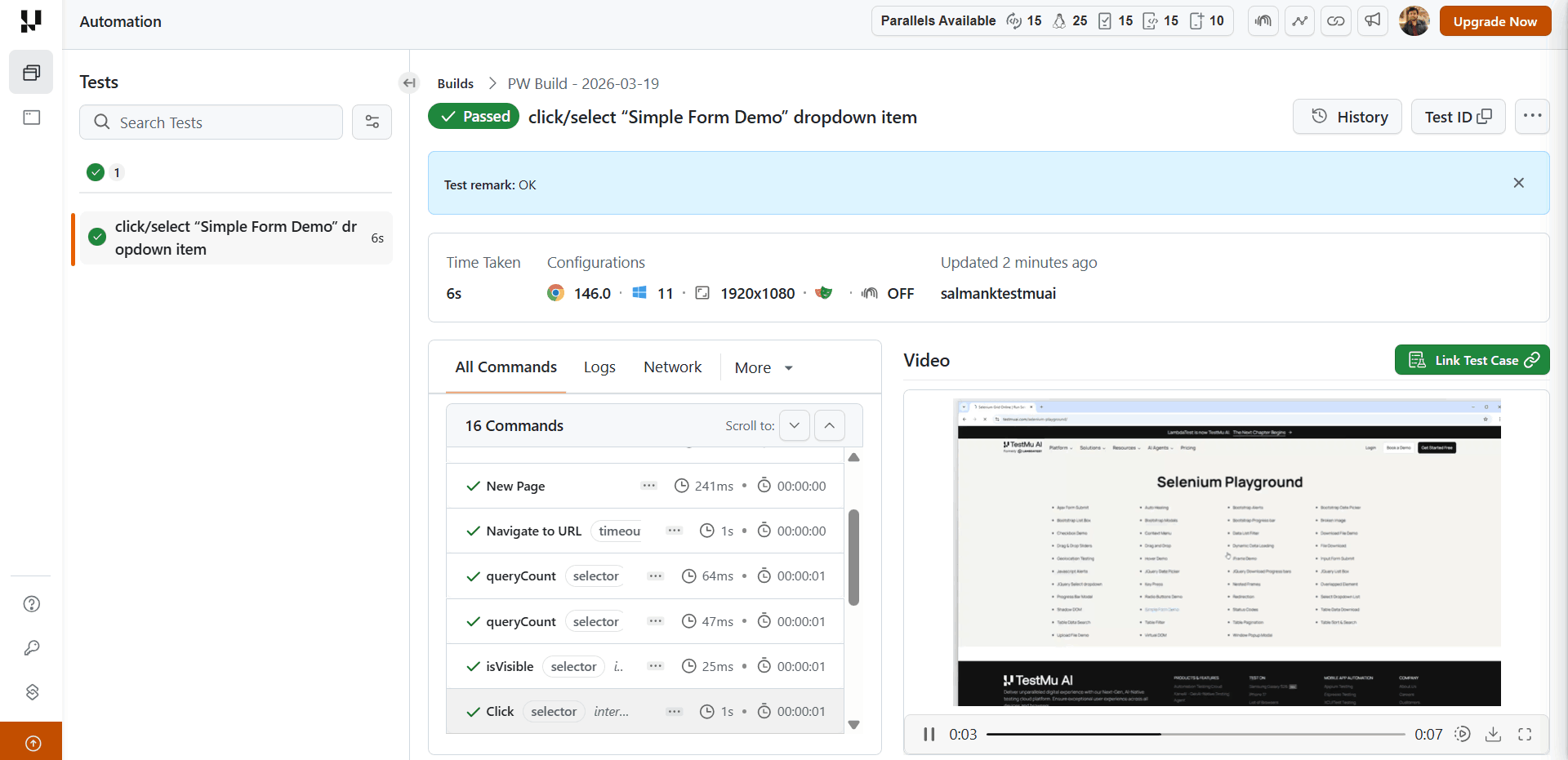
The report includes execution time, command steps, and a video replay confirming the action worked as expected.
For more details, check out this guide to run Playwright tests using Agent Skills.
Skills solve the quality side of test generation. But what about the volume side, when your team needs more tests than your engineers have time to write?
Are Agent Skills Enough for Playwright Test Authoring Needs
Agent skills improve the quality of tests your engineers write. For test authoring at scale, that is only part of the problem.
When sprint velocity outpaces your team's capacity to write new tests, coverage gaps accumulate. Your Playwright expert is maintaining existing tests, not authoring new ones. New flows go untested until someone has time.
Generative AI testing agents like TestMu AI KaneAI solve the authoring bottleneck directly. You can describe the user flow in natural language prompts. KaneAI writes the test and exports it to Playwright.
Features:
- Natural Language Test Authoring: Describe the user flow in plain language. KaneAI converts it into executable test steps. No scripting knowledge required.
- Cross-Browser and Device Execution: Run tests across multiple environments, devices, and schedules without extra setup.
- Multi-Framework Code Export: Export generated tests to all major programming languages and frameworks, including Playwright TypeScript, and more.
- 2-Way Test Editing: Switch between a natural language view and a code view while keeping them synchronized. Engineers retain full control over the generated output.
- Self-Healing Tests: KaneAI understands what the test is supposed to verify and finds the right elements each time - rather than patching broken locators after the fact.
- Assisted Debugging: KaneAI automatically analyzes failing test commands in real time, providing root cause analysis and actionable suggestions.
- Multi-Input Support: Feed KaneAI a Jira ticket, PRD, PDF, image, screenshot, audio, video, or spreadsheet. It extracts testable scenarios and generates tests from any of these formats.

Conclusion
A Playwright Skill does not change what Cursor AI knows. It changes what the agent works from. The difference between a test that lasts three sprints and one that breaks in the next PR is almost always a locator choice, a repeated login flow, or an assertion that races against async state.
The local-to-cloud progression matters here. Get the patterns right on your machine first. Role-based locators, session reuse, auto-retry assertions - these pay off locally before CI ever runs. CI adds sharding and artifact collection.
Cloud grid adds cross-browser coverage and real browser environments at scale. Each layer builds on the one before it.
The TestMu AI agent-skills repository provides the Playwright Skill alongside 45 others, so the same approach extends across your full test stack. Install the skill for your framework and ask your agent the way you would ask a senior QA engineer who already knows your codebase.


Frequently asked questions
Did you find this page helpful?
TestMu AI forEnterprise
Get access to solutions built on Enterprise
grade security, privacy, & compliance
- Advanced access controls
- Advanced data retention rules
- Advanced Local Testing
- Premium Support options
- Early access to beta features
- Private Slack Channel
- Unlimited Manual Accessibility DevTools Tests