

Next-Gen App & Browser Testing Cloud
Trusted by 2 Mn+ QAs & Devs to accelerate their release cycles


On This Page
- What is Distributed Tracing?
- Benefits of Distributed Tracing
- Core Components of Distributed Tracing
- Types of Distributed Tracing
- How Distributed Tracing Works
- Distributed Tracing Tools and Frameworks
- How to Integrate Distributed Tracing into Your Application
- Modern Tracing: How Traces in Microservices Work
- Logging v/s Traditional Tracing vs. Distributed Tracing
- Distributed Tracing Common Challenges and Solutions

- Home
- /
- Learning Hub
- /
- What Is Distributed Tracing? Importance, Types & Tools
What Is Distributed Tracing? Importance, Types & Tools
Distributed tracing is a method to track requests across services in a system, helping developers identify performance issues in microservice architectures.

Bhavya Hada
December 10, 2025
Distributed tracing has emerged as a critical enabler of modern application observability, transforming how development teams monitor, debug, and optimize microservices architectures. The distributed tracing market is reaching $1.4 billion in 2024 and is projected to expand to $4.5 billion by 2033 at a CAGR of 17.8%.
Modern apps rely on hundreds of interconnected services, where a single user action can trigger 20+ service calls. Distributed tracing offers the visibility needed to debug and optimize these complex interactions.
Overview
Distributed tracing is a technique that tracks a request’s journey across multiple services in a distributed system. It links each operation using a unique trace ID and spans, helping teams understand system behavior and pinpoint issues.
Benefits of Distributed Tracing:
- End-to-End Visibility: Track requests across all services from start to finish.
- Faster Debugging: Quickly locate bottlenecks or failing components.
- Performance Insights: Spot slow APIs, queries, or overloaded services.
Types of Distributed Tracing:
- Synchronous Tracing: Follows direct service-to-service calls.
- Asynchronous Tracing: Tracks events across queues or background jobs.
- Client-Side Tracing: Captures frontend user actions linked to backend services.
How Distributed Tracing Works:
- Each request gets a unique trace ID.
- Every service log spans operations.
- Trace data is passed between services.
- Spans are sent to a tracing backend.
- Tools like Jaeger or Zipkin show trace timelines and issues.
What is Distributed Tracing?
Distributed tracing tracks requests as they flow through multiple services in a distributed system, creating a complete map of how data moves across your architecture.
Each request receives a unique trace ID that travels with it throughout its journey. Along the way, every service creates spans, individual units of work that capture timing, errors, and metadata about specific operations like database queries, API calls, or business logic execution. These spans link together to form a comprehensive trace representing the entire request lifecycle.
Unlike traditional logging that captures isolated events within individual services, distributed tracing connects the dots between related operations across service boundaries.
Benefits of Distributed Tracing
Here are the key benefits of Distributed Tracing:
- End-to-End Visibility: Gain a holistic view of the entire request lifecycle across microservices, from entry point to exit, improving transparency and traceability.
- Faster Troubleshooting: Reduce Mean Time to Resolution (MTTR) by identifying exactly where an error or delay occurred in the distributed request path.
- Performance Insights: Detect slow services, high-latency API calls, or inefficient database queries that affect system performance.
- Root Cause Analysis: Easily trace downstream service failures back to the originating service or function, accelerating resolution.
- Improved Developer Productivity: Developers can better understand service-to-service interactions without manually parsing through scattered logs.
- Enhanced User Experience: Faster issue detection and resolution translate into improved application reliability and user satisfaction.
Core Components of Distributed Tracing
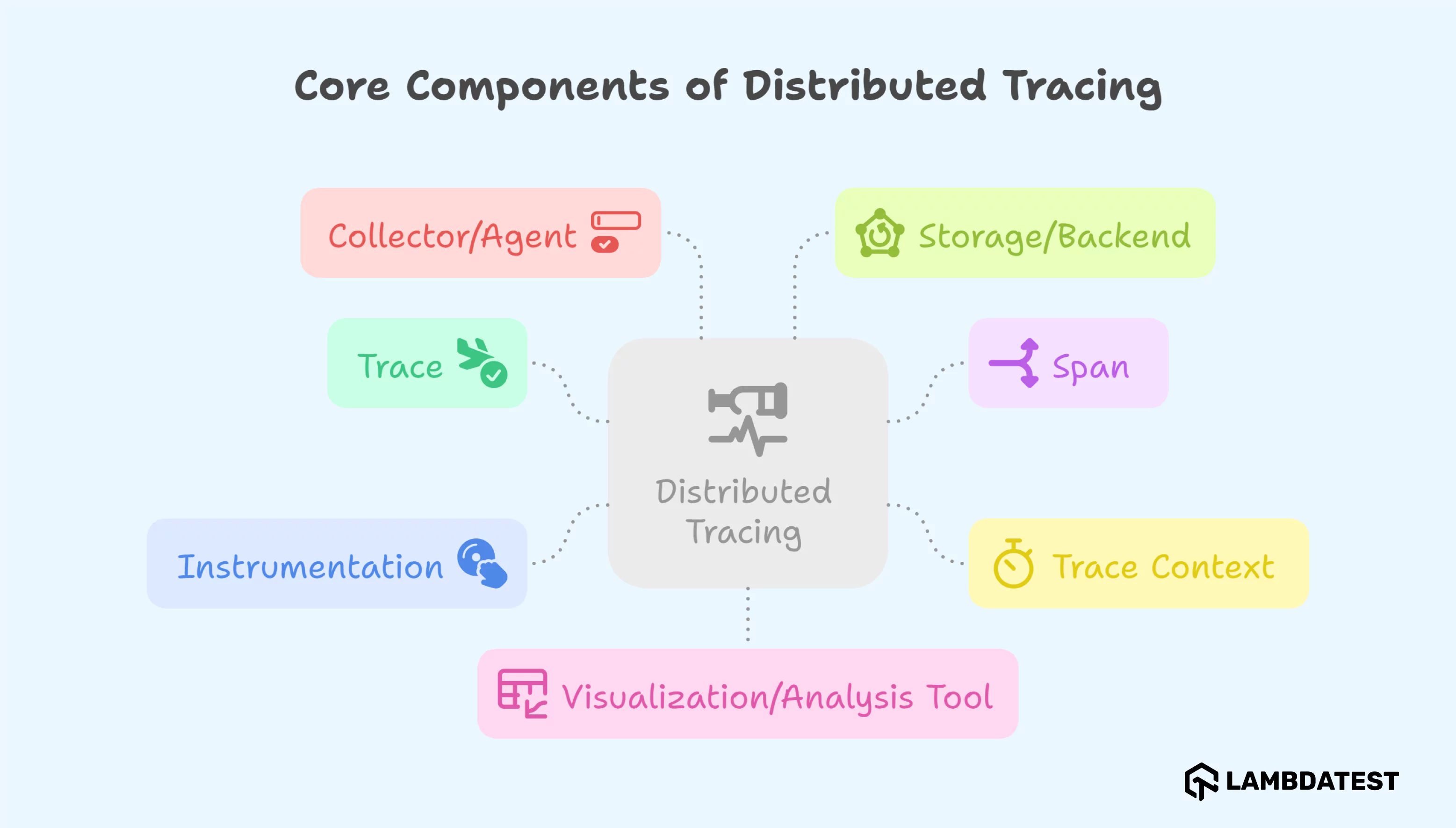
Distributed tracing is made up of a few core parts that capture, connect, and visualize requests as they move across services:
Traces and Spans
A trace represents the complete journey of a request through your distributed system. Each trace contains multiple spans that capture individual operations within that request. Spans include essential metadata such as:
- Operation name and duration
- Start and end timestamps
- Error status and messages
- Custom attributes (user ID, feature flags, etc.)
- Parent-child relationships with other spans
Context Propagation
Context propagation ensures trace information travels with requests across service boundaries. Modern frameworks use HTTP headers or message metadata to carry trace context, maintaining the connection between related operations even as they span multiple processes, containers, or geographic regions.
Instrumentation
Instrumentation generates trace data from your applications. Two primary approaches exist:
- Manual Instrumentation: Developers explicitly add tracing code to capture specific operations, providing maximum control but requiring more effort and maintenance.
- Automatic Instrumentation: Libraries and agents automatically detect and trace common operations like HTTP requests, database queries, and framework-specific operations, reducing implementation overhead.
Collectors and Agents
Agents/Collectors run alongside services to gather spans before forwarding them to a central backend. They:- Buffer and batch trace data to reduce network overhead
- Apply transformations (e.g., sampling, filtering)
- Ensure data integrity during transmission
Examples: OpenTelemetry Collector, Jaeger Agent, Zipkin Collector.
Storage
Collected trace data is stored in scalable backends for querying and retention. Common storage options include:
- Elasticsearch
- Cassandra
- Google Bigtable
- ClickHouse
These backends support indexing and retrieval of high-cardinality data, enabling efficient search and analysis.
Visualization & UI
Visualization tools provide interactive dashboards to analyze trace data:
- Open-source tools: Jaeger UI, Zipkin UI
- Commercial solutions: Datadog APM, Honeycomb, New Relic
These UIs let teams explore end-to-end timelines, highlight critical paths, and identify performance bottlenecks.
Types of Distributed Tracing
Distributed tracing can take different forms depending on the architecture, communication model, and monitoring needs of an application. Below are the main types, grouped for clarity:
1. Synchronous Tracing: Used when services call one another directly in a sequence. The trace follows the flow of execution through each service in the order they're invoked. Ideal for RESTful APIs and RPC calls.
2. Asynchronous Tracing: Captures traces where service communication happens via message queues, pub/sub models, or background workers. This requires correlation across time and systems without a direct call stack.
3. Client-Side Tracing: Monitors how user interactions (clicks, navigation) are traced from the browser or mobile device and connected to backend operations. Often integrated with RUM (Real User Monitoring) tools.
4. Server-Side Tracing: Focuses on backend components such as APIs, databases, caches, and service-to-service calls. The most common form of tracing in microservices.
5. Cross-Process Tracing: Links traces across services running on different machines, containers, or platforms, ensuring a complete view of distributed execution.
6. Cross-Language Tracing: Supports systems built using multiple programming languages. OpenTelemetry and other frameworks enable interoperability so traces can span services written in Go, Java, Node.js, etc.
7. Real-Time Tracing: Enables live trace data collection and visualization, which helps identify issues instantly. Useful during active development or incident management.
8. Sampling-Based Tracing: Not every request is traced in high-volume environments. Sampling (random, probabilistic, or adaptive) ensures only a subset of traces is collected, reducing overhead.
9. Event-Driven Tracing: Optimized for serverless and event-based systems where traditional request/response patterns don't apply. Tracks how events flow across services and platforms.
How Distributed Tracing Works
Distributed tracing works by following a unique trace ID attached to a request as it travels across services. Each participating service creates spans, which represent operations, and adds them to the trace. These spans are enriched with metadata and contextual information, then collected and visualized to help engineers understand performance and behavior across the system.
Step-by-Step Flow:
1. Request Initiation: A user action or client request initiates communication with the first service (Service A).
2. Trace Context Generation: Service A generates a trace ID and span ID. It starts the trace and records the first span.
3. Context Propagation: Service A calls Service B, passing along the trace context (trace ID and span ID) via HTTP headers or messaging metadata.
4. Span Creation in Downstream Services: Service B receives the context, creates a new span, links it to the parent, and continues processing. This continues across all downstream services.
5. Span Collection: All spans, along with timestamps, error flags, and metadata, are sent to a trace collector (e.g., OpenTelemetry Collector).
6. Trace Assembly: The backend aggregates all spans belonging to the same trace ID, reconstructing the complete lifecycle of the request.
7. Visualization: Tools like Jaeger or Zipkin present the trace as a timeline or flame graph, showing service-to-service latency and dependencies.
This end-to-end visibility enables teams to troubleshoot, optimize performance, and understand how services behave under load or failure conditions.
Distributed Tracing Tools and Frameworks
Distributed tracing tools and frameworks enable end-to-end visibility by tracking requests across services, helping teams optimize performance and resolve issues faster.
OpenTelemetry: The Industry Standard
OpenTelemetry has established itself as the de facto standard for observability instrumentation, with 79% of organizations either using or considering its adoption. As the second-largest CNCF project after Kubernetes, OpenTelemetry provides vendor-neutral APIs and SDKs for collecting traces, metrics, and logs.
Key OpenTelemetry advantages:
- Vendor neutrality prevents lock-in
- Comprehensive language support
- Unified observability data collection
- Strong community backing from major cloud providers
Popular Backend Solutions
- Jaeger: Originally developed by Uber, Jaeger excels in high-scale deployments with advanced querying capabilities and native OpenTelemetry integration.
- Zipkin: Twitter's lightweight solution offers simplicity and ease of setup, making it ideal for smaller to medium-sized systems.
- Commercial Solutions: Platforms like Datadog, New Relic, and Dynatrace provide enterprise-grade features with AI-powered analysis and automated instrumentation.
How to Integrate Distributed Tracing into Your Application
To effectively integrate distributed tracing into your application, it's important to approach implementation in a structured and iterative manner:
- Start Small: Begin by instrumenting core services and critical user-facing APIs to get immediate insights without overwhelming complexity.
- Use Automated Instrumentation Libraries: Leverage OpenTelemetry or vendor-specific libraries that offer auto-instrumentation for common operations like HTTP requests, database queries, and framework events.
- Standardize Context Propagation: Use consistent trace context headers (e.g., W3C Trace Context, B3) across services to ensure seamless propagation and correlation of traces.
- Apply Smart Sampling Strategies: Balance trace detail and system overhead using head-based, tail-based, or adaptive sampling based on traffic, user activity, or error rates.
- Enrich Spans with Business Metadata: Add custom attributes like user ID, session ID, or feature flags to spans for better debugging and business context.
- Combine with Logging and Metrics: Align trace data with logs and metrics using correlation IDs to achieve full observability across your stack.
By following these practices, teams can gradually evolve from basic visibility to comprehensive observability, enabling better reliability, performance, and faster incident resolution.
Modern Tracing: How Traces in Microservices Work
Modern applications built on a microservices architecture are inherently distributed and asynchronous. A single user action—like placing an order or signing in—often involves numerous services, each responsible for a small part of the whole process.
Distributed tracing allows engineers to understand the entire execution tree of such interactions across services and systems.
Example Flow:
- User logs in → Request hits the Auth Service
- Session is created → Session Service processes and persists session details
- User profile is loaded → User Service fetches associated account data
- Personalized recommendations are retrieved → ML Service calculates and serves suggestions
Each of these services contributes spans to the same trace, passing context across boundaries and enriching trace metadata with timestamps, status codes, and relevant attributes (like user ID or session ID).
This granular data enables:
- Clear visualization of service-to-service interactions
- Easy identification of slow or failing components
- Detection of cascading failures or retry loops
- Improved system reliability and performance optimization
Distributed tracing not only helps with operational troubleshooting but also acts as a blueprint for understanding system architecture as it evolves.
Logging v/s Traditional Tracing vs. Distributed Tracing
| Feature | Logging | Traditional Tracing | Distributed Tracing |
|---|---|---|---|
| Scope | Single Service | Thread-based | Multi-service, end-to-end |
| Debugging | Manual and time-consuming | Limited to a single node | Fast and contextual across services |
| Context | None or manually correlated | Local context only | Propagated across service boundaries |
| Visibility | Low | Medium | High end-to-end visibility |
| Latency Analysis | Requires manual correlation | Possible within a process | Built-in latency and performance tracking |
| Failure Isolation | Challenging | Only within the same thread | Quickly isolate the failing service/component |
| Ease of Use | Widely supported, but limited in scope | Requires explicit trace management | Supported by modern observability platforms |
| Integration | Easy with minimal setup | Moderate effort needed | Requires standardization and instrumentation |
| Use Case Fit | Simple, monolithic apps | Multithreaded apps | Microservices, cloud-native, distributed systems |
Distributed Tracing Common Challenges and Solutions
- Data Volume Management: High-throughput systems generate massive trace data. Use smart sampling, compress data, automate data retention, and opt for cost-efficient storage.
- Team Adoption and Training: Teams need to understand and use traces. Provide training, set naming standards, create resolution playbooks, and embed tracing in incident workflows.
- Security and Compliance: Trace data may include sensitive info. Scrub PII, encrypt data, follow retention rules, and control access to maintain compliance and security.
Conclusion
Distributed tracing has evolved from a nice-to-have capability to an essential requirement for managing modern microservices architectures. Successful distributed tracing implementation requires careful planning, appropriate tooling, and organizational commitment to observability-driven development practices.
By following established patterns, leveraging modern tools like OpenTelemetry, and integrating tracing with comprehensive testing strategies through platforms like TestMu AI, development teams can build resilient, performant distributed systems that deliver exceptional user experiences.


Frequently asked questions
Did you find this page helpful?
More Related Hubs
TestMu AI forEnterprise
Get access to solutions built on Enterprise
grade security, privacy, & compliance
- Advanced access controls
- Advanced data retention rules
- Advanced Local Testing
- Premium Support options
- Early access to beta features
- Private Slack Channel
- Unlimited Manual Accessibility DevTools Tests