

Next-Gen App & Browser Testing Cloud
Trusted by 2 Mn+ QAs & Devs to accelerate their release cycles


Best XUnit Parameterized Tests Tutorial: Selenium Testing
XUnit Parameterized tests allow testers to run the same test a few times using different values. Find out how you can do this in xUnit with InlineData, MemberData, and ClassData.

Himanshu Sheth
December 29, 2025
In this XUnit Parameterized Testing Tutorial, developers can streamline their unit test code by creating reusable, data-driven, and parameterized test methods. The xUnit testing framework in C# supports both parameterized and non-parameterized tests for Selenium Automation, helping improve efficiency and reduce redundancy. Using attributes like Fact and Theory, testers can validate multiple input combinations through InlineData, ClassData, and MemberData for more flexible testing.
For a practical demonstration, we use the Cloud Selenium Grid on TestMu AI to perform scalable, cross browser testing with faster parallel execution. Browser configurations generated using the TestMu AI Capabilities Generator act as dynamic input parameters in xUnit methods. Before exploring this in detail, ensure you’ve covered Running First X-Unit Script, as this guide focuses on implementing efficient xUnit parameterized tests in Selenium.
Overview
xUnit parameterized tests in Selenium testing are used to execute the same test multiple times with different input values, ensuring broader test coverage and reducing code duplication. They make cross-browser and data-driven testing faster, easier, and more efficient.
What is xUnit Parameterized tests with InlineData?
InlineData provides direct, constant input values to a test method at compile time. Each InlineData attribute defines a separate test run, making it ideal for simple, fixed data inputs like browser names or versions in Selenium tests.
What is xUnit Parameterized tests with MemberData?
MemberData retrieves test data from a static property or method that returns an IEnumerable<object[]>. It allows dynamic or complex input sets, making it useful when test data needs to be fetched from external sources or generated programmatically.
What is xUnit Parameterized tests with ClassData?
ClassData uses a class that implements IEnumerable<object[]> to supply test parameters. It’s best for large or structured data sets, letting testers organize and reuse complex test data across multiple Selenium test scenarios.
xUnit Parameterized tests with InlineData
The InlineData attribute is commonly used to supply data to a Theory attribute-based xUnit parameterized test. Every instance of the InlineData attribute creates a separate occurrence of the test method. The type and order of the parameters in the InlineData attribute should match with the values that are passed to the constructor. Let’s look at the demonstration of the same in this xUnit tutorial.

Austin Siewert
CEO, Vercel
Discovered @TestMu AI yesterday. Best browser testing tool I've found for my use case. Great pricing model for the limited testing I do 👏
2M+ Devs and QAs rely on TestMu AI
Deliver immersive digital experiences with Next-Generation Mobile Apps and Cross Browser Testing Cloud

Take this certification to master the fundamentals of Selenium automation testing with C# and prove your credibility as a tester. If you are preparing for an interview you can learn more through Selenium interview questions.
Here’s a short glimpse of the Selenium C# 101 certification from TestMu AI:
Demonstration – [InlineData] Attribute
For demonstrating the usage of the InlineData attribute on parallelized cross browser tests, we perform the following tests on different browser & OS combinations.
Test Case 1 – LamdaTest To-Do App
- Navigate to the To-Do app https://lambdatest.github.io/sample-todo-app/ using selected browsers.
- Check the first two items.
- Add a new item – Adding item to the list.
- Click the Add button to add that new item to the list.
Browsers on which cross browser testing is performed are:
Test Case 2 & 3 – Google Search for TestMu AI (using a different browser and OS combinations)
- Navigate to Google.com.
- Search for TestMu AI.
- Quit the browser window.
Both the test cases are the same, but the execution will be performed on different web browsers.
Test Case 2
Test Case 3
The complete implementation is below:
using Xunit;
using System;
using System.Collections.Generic;
using System.Linq;
using System.Text;
using OpenQA.Selenium;
using OpenQA.Selenium.Chrome;
using OpenQA.Selenium.Firefox;
using System.Threading.Tasks;
using System.Text.RegularExpressions;
using OpenQA.Selenium.Support.UI;
using OpenQA.Selenium.Interactions;
/* For using Remote Selenium WebDriver */
using OpenQA.Selenium.Remote;

[assembly: CollectionBehavior(MaxParallelThreads = 4)]

namespace ParallelLTSelenium
{
    public class GlobalVar
    {
        static int _globalValue;
        public static int GlobalValue
        {
            get
            {
                return _globalValue;
            }
            set
            {
                _globalValue = value;
            }
        }

        public static String username = "user-name";
        public static String accesskey = "access-key";
        public static String gridURL = "@hub.lambdatest.com/wd/hub";
        public static DesiredCapabilities capabilities = new DesiredCapabilities();
        public static IWebDriver driver1;
    }

    public class ParallelLTTests : IDisposable
    {
        public ParallelLTTests()
        {
            GlobalVar.capabilities.SetCapability("user", GlobalVar.username);
            GlobalVar.capabilities.SetCapability("accessKey", GlobalVar.accesskey);
        }

        public void Dispose()
        {
            // Closure handled in each test case
        }
    }

    public class UnitTest_1 : IClassFixture<ParallelLTTests>
    {
        [Theory]
        [InlineData("chrome", "72.0", "Windows 10")]
        [InlineData("MicrosoftEdge", "18.0", "Windows 10")]
        [InlineData("Firefox", "70.0", "Windows 10")]
        [InlineData("Safari", "12.0", "macOS Mojave")]

        public void LT_ToDo_Test(String browser, String version, String os)
        {
            String itemName = "Yey, Let's add it to list";
            IWebDriver driver;

            GlobalVar.capabilities.SetCapability("browserName", browser);
            GlobalVar.capabilities.SetCapability("version", version);
            GlobalVar.capabilities.SetCapability("platform", os);
            GlobalVar.capabilities.SetCapability("build", "[xUnit - 1] LT ToDoApp using Xunit in Parallel on LambdaTest");
            GlobalVar.capabilities.SetCapability("name", "[xUnit - 1] - LT ToDoApp using Xunit in Parallel on LambdaTest");

            driver = new RemoteWebDriver(new Uri("https://" + GlobalVar.username + ":" + GlobalVar.accesskey + GlobalVar.gridURL), GlobalVar.capabilities, TimeSpan.FromSeconds(2000));
            driver.Url = "https://lambdatest.github.io/sample-todo-app/";

            Assert.Equal("Sample page - lambdatest.com", driver.Title);
            // Click on First Check box
            IWebElement firstCheckBox = driver.FindElement(By.Name("li1"));
            firstCheckBox.Click();

            // Click on Second Check box
            IWebElement secondCheckBox = driver.FindElement(By.Name("li2"));
            secondCheckBox.Click();

            // Enter Item name
            IWebElement textfield = driver.FindElement(By.Id("sampletodotext"));
            textfield.SendKeys(itemName);

            // Click on Add button
            IWebElement addButton = driver.FindElement(By.Id("addbutton"));
            addButton.Click();

            // Verified Added Item name
            IWebElement itemtext = driver.FindElement(By.XPath("/html/body/div/div/div/ul/li[6]/span"));
            String getText = itemtext.Text;
            Assert.True(itemName.Contains(getText));

            /* Perform wait to check the output */
            System.Threading.Thread.Sleep(2000);

            Console.WriteLine("LT_ToDo_Test Passed");

            driver.Close();
            driver.Quit();
        }
    }
    public class UnitTest_2 : IClassFixture<ParallelLTTests>
    {
        [Theory]
        [InlineData("chrome", "72.0", "Windows 10")]
        [InlineData("MicrosoftEdge", "18.0", "Windows 10")]
        [InlineData("Firefox", "70.0", "Windows 10")]

        public void Google_Test_1(String browser, String version, String os)
        {
            IWebDriver driver;

            GlobalVar.capabilities.SetCapability("browserName", browser);
            GlobalVar.capabilities.SetCapability("version", version);
            GlobalVar.capabilities.SetCapability("platform", os);
            GlobalVar.capabilities.SetCapability("build", "[xUnit - 2] - Google search (1) using XUnit in Parallel on LambdaTest");
            GlobalVar.capabilities.SetCapability("name", "[xUnit - 2] - Google search (1) using XUnit in Parallel on LambdaTest");

            driver = new RemoteWebDriver(new Uri("https://" + GlobalVar.username + ":" + GlobalVar.accesskey + GlobalVar.gridURL), GlobalVar.capabilities, TimeSpan.FromSeconds(2000));
            driver.Url = "https://www.google.com";

            System.Threading.Thread.Sleep(2000);

            IWebElement element = driver.FindElement(By.XPath("//*[@id='tsf']/div[2]/div[1]/div[1]/div/div[2]/input"));

            element.SendKeys("LambdaTest");

            /* Submit the Search */
            element.Submit();

            /* Perform wait to check the output */
            System.Threading.Thread.Sleep(2000);

            Console.WriteLine("Google_Test Passed");

            driver.Close();
            driver.Quit();
        }
    }

    public class UnitTest_3 : IClassFixture<ParallelLTTests>
    {
        [Theory]
        [InlineData("chrome", "72.0", "Windows 10")]
        [InlineData("MicrosoftEdge", "18.0", "Windows 10")]
        [InlineData("Firefox", "70.0", "macOS High Sierra")]
        [InlineData("Safari", "12.0", "macOS Mojave")]

        public void Google_Test_2(String browser, String version, String os)
        {
            IWebDriver driver;

            GlobalVar.capabilities.SetCapability("browserName", browser);
            GlobalVar.capabilities.SetCapability("version", version);
            GlobalVar.capabilities.SetCapability("platform", os);
            GlobalVar.capabilities.SetCapability("build", "[xUnit - 2] - Google Search (2) using XUnit in Parallel on LambdaTest");
            GlobalVar.capabilities.SetCapability("name", "[xUnit - 2] - Google Search (2) using XUnit in Parallel on LambdaTest");

            driver = new RemoteWebDriver(new Uri("https://" + GlobalVar.username + ":" + GlobalVar.accesskey + GlobalVar.gridURL), GlobalVar.capabilities, TimeSpan.FromSeconds(2000));
            driver.Url = "https://www.google.com";

            System.Threading.Thread.Sleep(2000);
            IWebElement element = driver.FindElement(By.XPath("//*[@id='tsf']/div[2]/div[1]/div[1]/div/div[2]/input"));

            element.SendKeys("LambdaTest");

            /* Submit the Search */
            element.Submit();

            /* Perform wait to check the output */
            System.Threading.Thread.Sleep(2000);

            Console.WriteLine("Google_Test Passed");

            driver.Close();
            driver.Quit();
        }
    }
}
Code WalkThrough
Step 1 – As the tests are executed in parallel, thread-based parallelism is achieved by setting ‘Max number of Parallel Threads to 4.’
[assembly: CollectionBehavior(MaxParallelThreads = 4)]
Step 2 – The combination of user-name and access-key are used to access the remote Selenium grid on TestMu AI.
String username = "user-name";
String accesskey = "access-key";
String gridURL = "@hub.lambdatest.com/wd/hub";
.......................................................................
Step 3 – The browser capabilities generated by the TestMu AI capabilities generator are passed to the remote Selenium WebDriver API.
GlobalVar.capabilities.SetCapability("browserName", browser);
GlobalVar.capabilities.SetCapability("version", version);
GlobalVar.capabilities.SetCapability("platform", os);
GlobalVar.capabilities.SetCapability("build", "[xUnit - 1] LT ToDoApp using Xunit in Parallel on LambdaTest");
GlobalVar.capabilities.SetCapability("name", "[xUnit - 1] - LT ToDoApp using Xunit in Parallel on LambdaTest");

.................................................................................
.................................................................................
.................................................................................
driver = new RemoteWebDriver(new Uri("https://user-name:[email protected]/wd/hub"), capabilities, TimeSpan.FromSeconds(600));
Step 4 – The implementation under IDisposable [i.e., public void Dispose()] is empty as the resources held by the Selenium WebDriver for test execution are released after the corresponding test has completed execution.
public class ParallelLTTests : IDisposable
    {
        public ParallelLTTests()
        {
            GlobalVar.capabilities.SetCapability("user", GlobalVar.username);
            GlobalVar.capabilities.SetCapability("accessKey", GlobalVar.accesskey);
        }

        public void Dispose()
        {
            // Closure handled in each test case
        }
}
Step 5 – The browser + OS combinations that were generated for cross browser testing are used as parameters to the InlineData attribute. In turn, these values are passed to the constructor of InlineData, which then acts as arguments to the test method, i.e., LT_ToDo_Test for test case – 1.
For all the tests, a separate execution of InlineData creates a separate execution of the corresponding test method, i.e., for each test case, an iterative execution is carried out till the time all the input values as part of the InlineData attribute are exhausted.
public class UnitTest_1
{
	 [Theory]
       [InlineData("chrome", "72.0", "Windows 10")]
       [InlineData("MicrosoftEdge", "18.0", "Windows 10")]
       [InlineData("Firefox", "70.0", "Windows 10")]
       [InlineData("Safari", "12.0", "macOS Mojave")]

       public void LT_ToDo_Test(String browser, String version, String os)
       {
            String itemName = "Yey, Let's add it to list";
            IWebDriver driver;

            GlobalVar.capabilities.SetCapability("browserName", browser);
            ...................
	      ...................

            driver.Url = "https://lambdatest.github.io/sample-todo-app/";
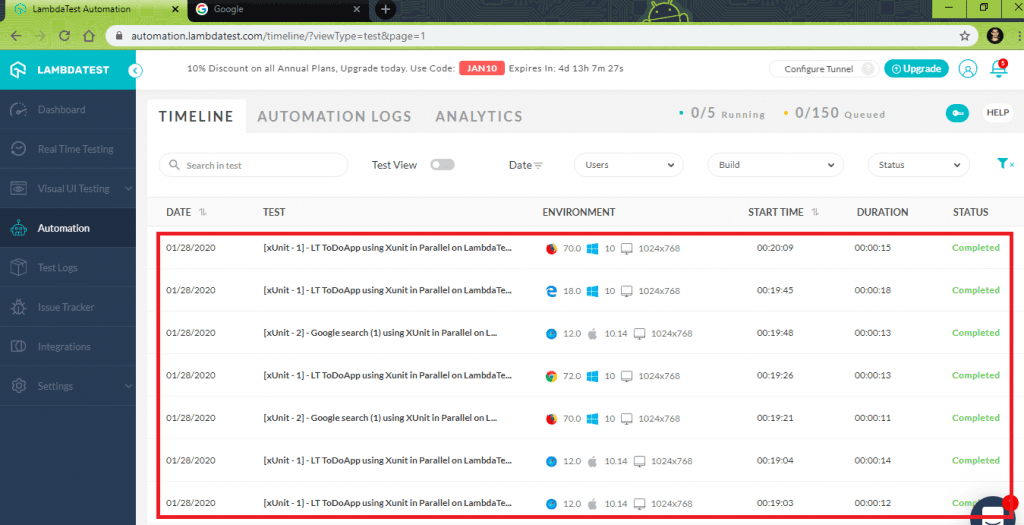
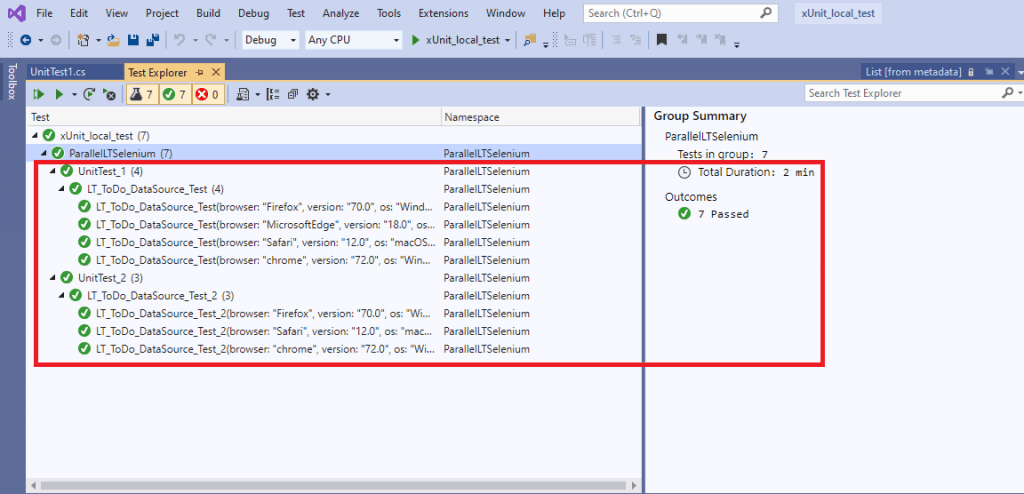
The execution snapshot is as shown below:
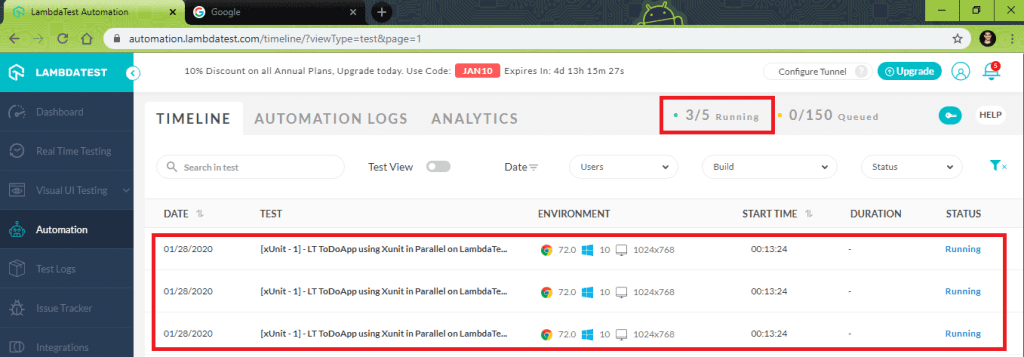
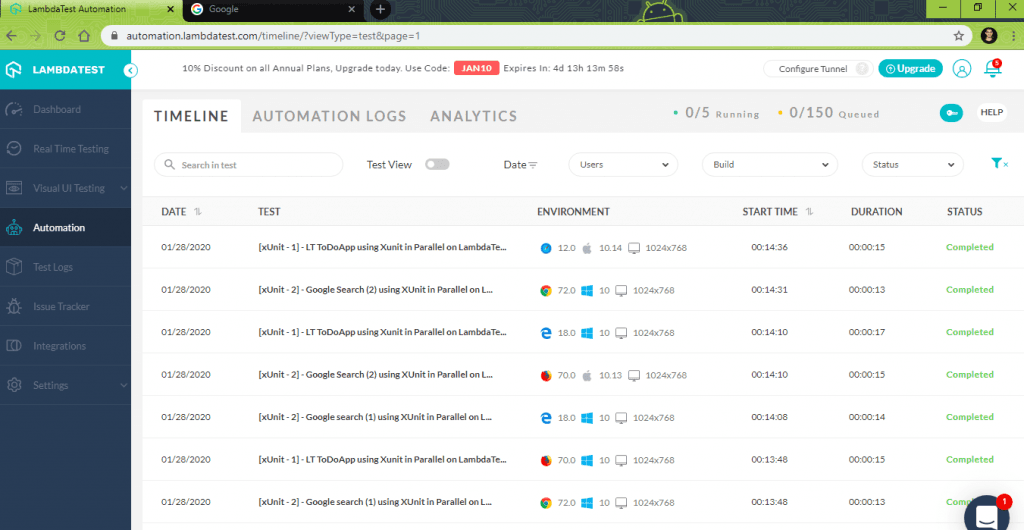
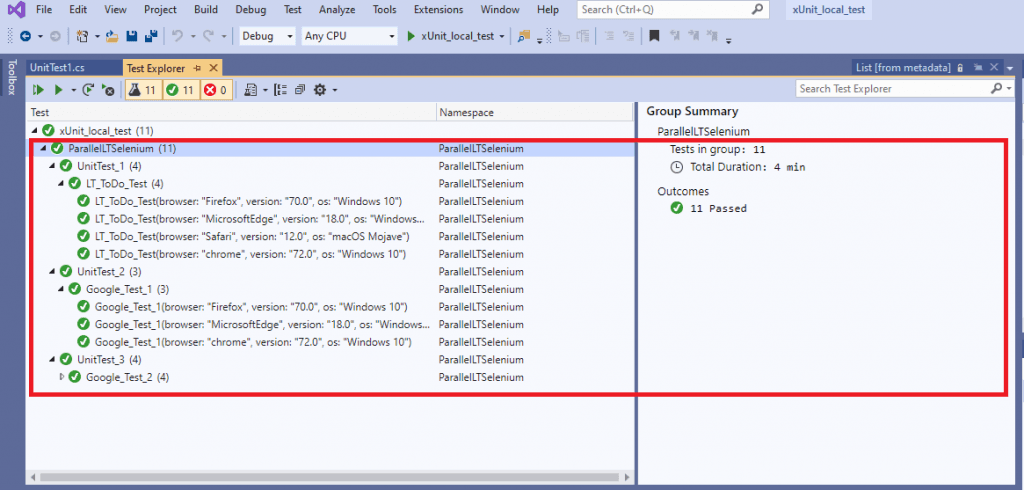
The InlineData should be used in scenarios when the method parameters are constants.
This xUnit Tutorial for beginners and professionals will help you learn how to use xUnit framework with Selenium C# for performing Selenium automation testing.
xUnit Parameterized tests with MemberData
Unlike the InlineData attribute that can be used to provide simple compile-time constants as parameters to the test method, the MemberData attribute has more flexibility.
It can be used to fetch data for the Theory attribute using a static method that is local to the test class, using a method from another class, or passing a complex object type.
For a demonstration of parameterization in xUnit using the MemberData attribute, we will load the browser + OS combinations from a method on a different class. In this xUnit tutorial, we will look at the demonstration of the same.
Demonstration – [MemberData] Attribute
For demonstrating the usage of the MemberData attribute on parallelized cross browser tests, we perform the following tests on different browser & OS combinations.
Test Case 1 – LamdaTest To Do App
- Navigate to the to-do app https://lambdatest.github.io/sample-todo-app/ using selected browsers.
- Check the first two items.
- Add a new item – Adding item to the list.
- Click the Add button to add that new item to the list.
Browsers on which cross-browser testing is performed are:
Test Case 2 – Google Search for TestMu AI (using a different browser and OS combinations)
- Navigate to Google.com.
- Search for TestMu AI.
- Quit the browser window.
Browsers on which cross-browser testing is performed are:
The complete implementation is below:
using Xunit;
using System;
using System.Collections.Generic;
using System.Linq;
using System.Text;
using OpenQA.Selenium;
using OpenQA.Selenium.Chrome;
using OpenQA.Selenium.Firefox;
using System.Threading.Tasks;
using System.Text.RegularExpressions;
using OpenQA.Selenium.Support.UI;
using OpenQA.Selenium.Interactions;
/* For using Remote Selenium WebDriver */
using OpenQA.Selenium.Remote;

[assembly: CollectionBehavior(MaxParallelThreads = 4)]

/* Inputs taken from https://stackoverflow.com/questions/9110419/test-parameterization-in-xunit-net-similar-to-nunit */

namespace ParallelLTSelenium
{
    public class GlobalVar
    {
        static int _globalValue;
        public static int GlobalValue
        {
            get
            {
                return _globalValue;
            }
            set
            {
                _globalValue = value;
            }
        }

        public static String username = "user-name";
        public static String accesskey = "access-key";
        public static String gridURL = "@hub.lambdatest.com/wd/hub";
        public static DesiredCapabilities capabilities = new DesiredCapabilities();
        public static IWebDriver driver1;
    }

    public class ParallelLTTests : IDisposable
    {
        public ParallelLTTests()
        {
            GlobalVar.capabilities.SetCapability("user", GlobalVar.username);
            GlobalVar.capabilities.SetCapability("accessKey", GlobalVar.accesskey);
        }

        public void Dispose()
        {
            //Closure handled in each test case
        }
    }
    public static class LT_ToDo_Test_DataSource
    {
        private static readonly List<object[]> _data = new List<object[]>
        {
            new object[] {"chrome", "72.0", "Windows 10"},
            new object[] {"MicrosoftEdge", "18.0", "Windows 10"},
            new object[] {"Firefox", "70.0", "Windows 10"},
            new object[] {"Safari", "12.0", "macOS Mojave"}
        };

        private static readonly List<object[]> _data_2 = new List<object[]>
        {
            new object[] {"chrome", "72.0", "Windows 10"},
            new object[] {"Firefox", "70.0", "Windows 10"},
            new object[] {"Safari", "12.0", "macOS Mojave"},
        };

        public static IEnumerable<object[]> CB_Data
        {
            get
            {
                return _data;
            }
        }

        public static IEnumerable<object[]> CB_Data_2
        {
            get
            {
                return _data_2;
            }
        }
    }

    public class UnitTest_1 : IClassFixture<ParallelLTTests>
    {
        [Theory]
        [MemberData("CB_Data", MemberType = typeof(LT_ToDo_Test_DataSource))]
        public void LT_ToDo_DataSource_Test(String browser, String version, String os)
        {
            String itemName = "Yey, Let's add it to list";
            IWebDriver driver;

            GlobalVar.capabilities.SetCapability("browserName", browser);
            GlobalVar.capabilities.SetCapability("version", version);
            GlobalVar.capabilities.SetCapability("platform", os);
            GlobalVar.capabilities.SetCapability("build", "[xUnit - 1] LT ToDoApp using Xunit in Parallel on LambdaTest");
            GlobalVar.capabilities.SetCapability("name", "[xUnit - 1] - LT ToDoApp using Xunit in Parallel on LambdaTest");

            driver = new RemoteWebDriver(new Uri("https://" + GlobalVar.username + ":" + GlobalVar.accesskey + GlobalVar.gridURL), GlobalVar.capabilities, TimeSpan.FromSeconds(2000));
            driver.Url = "https://lambdatest.github.io/sample-todo-app/";

            Assert.Equal("Sample page - lambdatest.com", driver.Title);
            // Click on First Check box
            IWebElement firstCheckBox = driver.FindElement(By.Name("li1"));
            firstCheckBox.Click();

            // Click on Second Check box
            IWebElement secondCheckBox = driver.FindElement(By.Name("li2"));
            secondCheckBox.Click();

            // Enter Item name
            IWebElement textfield = driver.FindElement(By.Id("sampletodotext"));
            textfield.SendKeys(itemName);

            // Click on Add button
            IWebElement addButton = driver.FindElement(By.Id("addbutton"));
            addButton.Click();

            // Verified Added Item name
            IWebElement itemtext = driver.FindElement(By.XPath("/html/body/div/div/div/ul/li[6]/span"));
            String getText = itemtext.Text;
            Assert.True(itemName.Contains(getText));

            /* Perform wait to check the output */
            System.Threading.Thread.Sleep(2000);

            Console.WriteLine("LT_ToDo_Test Passed");

            driver.Close();
            driver.Quit();
        }
    }

    public class UnitTest_2 : IClassFixture<ParallelLTTests>
    {
        [Theory]
        [MemberData("CB_Data_2", MemberType = typeof(LT_ToDo_Test_DataSource))]

        public void LT_ToDo_DataSource_Test_2(String browser, String version, String os)
        {
            IWebDriver driver;

            GlobalVar.capabilities.SetCapability("browserName", browser);
            GlobalVar.capabilities.SetCapability("version", version);
            GlobalVar.capabilities.SetCapability("platform", os);
            GlobalVar.capabilities.SetCapability("build", "[xUnit - 2] - Google search (1) using XUnit in Parallel on LambdaTest");
            GlobalVar.capabilities.SetCapability("name", "[xUnit - 2] - Google search (1) using XUnit in Parallel on LambdaTest");

            driver = new RemoteWebDriver(new Uri("https://" + GlobalVar.username + ":" + GlobalVar.accesskey + GlobalVar.gridURL), GlobalVar.capabilities, TimeSpan.FromSeconds(2000));
            driver.Url = "https://www.google.com";

            System.Threading.Thread.Sleep(2000);

            IWebElement element = driver.FindElement(By.XPath("//*[@id='tsf']/div[2]/div[1]/div[1]/div/div[2]/input"));

            element.SendKeys("LambdaTest");

            /* Submit the Search */
            element.Submit();

            /* Perform wait to check the output */
            System.Threading.Thread.Sleep(2000);

            Console.WriteLine("Google_Test Passed");

            driver.Close();
            driver.Quit();
        }
    }
}
Code WalkThrough
Steps 1-4 – These steps remain the same as those mentioned in the Code WalkThrough of the example demonstrating the InlineData attribute. The implementation of the core logic related to the test cases remains the same. The major change is the addition of MemberData for parameterization.
Step 5 – The data is loaded from a property or method of some other type. For a scenario that involves cross browser testing, this approach works perfectly fine as the number of browser combinations can be added without much effort.
A CB_Data property is added which returns an IEnumerable<object[]>. CB_Data and CB_Data_2 properties of LT_ToDo_Test_DataSource are used in the MemberData attribute for the two test cases.
public static class LT_ToDo_Test_DataSource
{
        private static readonly List<object[]> _data = new List<object[]>
        {
            new object[] {"chrome", "72.0", "Windows 10"},
            new object[] {"MicrosoftEdge", "18.0", "Windows 10"},
            new object[] {"Firefox", "70.0", "Windows 10"},
            new object[] {"Safari", "12.0", "macOS Mojave"}
        };

        ...................
	  ...................

        public static IEnumerable<object[]> CB_Data
        {
            get
            {
                return _data;
            }
        }

        ...................
	  ...................
}
public class UnitTest_1 : IClassFixture<ParallelLTTests>
{
   [Theory]
   [MemberData("CB_Data", MemberType = typeof(LT_ToDo_Test_DataSource))]
   public void LT_ToDo_DataSource_Test(String browser, String version, String os)
{
   ...................
   ...................
}
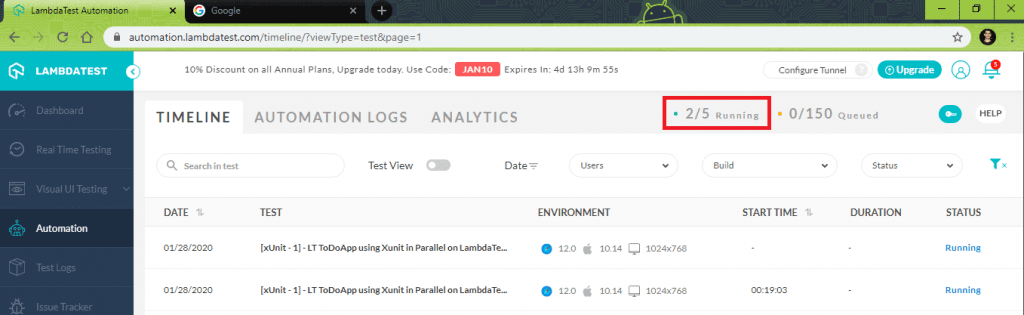
Shown below is the execution snapshot:
xUnit Parameterized tests with ClassData
Like MemberData, ClassData is another attribute that is used to pass values to Theory that are not constants. For providing parameters via ClassData, a class has to be created that inherits from IEnumerable<object[]>. A private list of objects containing the browser + OS combinations is then passed to the Theory attribute.
A GetEnumerator method has to be created on the list Enumerator. Finally, the Class is passed to the ClassData attribute, where the data returned from the class populate the test parameters.
If any of these steps are missed out, the xUnit framework throws an error.
Let’s understand implementing the same in this xUnit tutorial.
Demonstration – [ClassData] Attribute
For demonstrating the usage of the ClassData attribute on parallelized cross browser tests, the same set of tests demonstrating the usage of MemberData is used. You can refer to the test cases in the Demonstration – [MemberData] attribute section before looking into the below implementation.
using Xunit;
using System;
using System.Collections;
using System.Collections.Generic;
using System.Linq;
using System.Text;
using OpenQA.Selenium;
using OpenQA.Selenium.Chrome;
using OpenQA.Selenium.Firefox;
using System.Threading.Tasks;
using System.Text.RegularExpressions;
using OpenQA.Selenium.Support.UI;
using OpenQA.Selenium.Interactions;
/* For using Remote Selenium WebDriver */
using OpenQA.Selenium.Remote;

[assembly: CollectionBehavior(MaxParallelThreads = 4)]

namespace ParallelLTSelenium
{
    public class GlobalVar
    {
        static int _globalValue;
        public static int GlobalValue
        {
            get
            {
                return _globalValue;
            }
            set
            {
                _globalValue = value;
            }
        }

        public static String username = "user-name";
        public static String accesskey = "access-key";
        public static String gridURL = "@hub.lambdatest.com/wd/hub";
        public static DesiredCapabilities capabilities = new DesiredCapabilities();
        public static IWebDriver driver1;
    }

    public class ParallelLTTests : IDisposable
    {
        public ParallelLTTests()
        {
            GlobalVar.capabilities.SetCapability("user", GlobalVar.username);
            GlobalVar.capabilities.SetCapability("accessKey", GlobalVar.accesskey);
        }

        public void Dispose()
        {
            //Closure handled in each test case
        }
    }
    public class LT_ToDo_Test_DataSource : IEnumerable<object[]>
    {
        private readonly List<object[]> _data = new List<object[]>
        {
            new object[] { "chrome", "72.0", "Windows 10" },
            new object[] { "MicrosoftEdge", "18.0", "Windows 10" },
            new object[] {"Firefox", "70.0", "Windows 10"},
            new object[] {"Safari", "12.0", "macOS Mojave"}
        };

        public IEnumerator<object[]> GetEnumerator()
        {
            return _data.GetEnumerator();
        }

        IEnumerator IEnumerable.GetEnumerator()
        {
            return GetEnumerator();
        }
    }

    public class LT_ToDo_Test_DataSource_2 : IEnumerable<object[]>
    {
        private readonly List<object[]> _data = new List<object[]>
        {
            new object[] { "chrome", "72.0", "Windows 10" },
            new object[] { "Firefox", "70.0", "Windows 10" },
            new object[] { "Safari", "12.0", "macOS Mojave" }
        };

        public IEnumerator<object[]> GetEnumerator()
        {
            return _data.GetEnumerator();
        }

        IEnumerator IEnumerable.GetEnumerator()
        {
            return GetEnumerator();
        }
    }

    public class UnitTest_1 : IClassFixture<ParallelLTTests>
    {
        [Theory, ClassData(typeof(LT_ToDo_Test_DataSource))]
        public void LT_ToDo_DataSource_Test(String browser, String version, String os)
        {
            String itemName = "Yey, Let's add it to list";
            IWebDriver driver;

            GlobalVar.capabilities.SetCapability("browserName", browser);
            GlobalVar.capabilities.SetCapability("version", version);
            GlobalVar.capabilities.SetCapability("platform", os);
            GlobalVar.capabilities.SetCapability("build", "[xUnit - 1] LT ToDoApp using Xunit in Parallel on LambdaTest");
            GlobalVar.capabilities.SetCapability("name", "[xUnit - 1] - LT ToDoApp using Xunit in Parallel on LambdaTest");

            driver = new RemoteWebDriver(new Uri("https://" + GlobalVar.username + ":" + GlobalVar.accesskey + GlobalVar.gridURL), GlobalVar.capabilities, TimeSpan.FromSeconds(2000));
            driver.Url = "https://lambdatest.github.io/sample-todo-app/";

            Assert.Equal("Sample page - lambdatest.com", driver.Title);
            // Click on First Check box
            IWebElement firstCheckBox = driver.FindElement(By.Name("li1"));
            firstCheckBox.Click();

            // Click on Second Check box
            IWebElement secondCheckBox = driver.FindElement(By.Name("li2"));
            secondCheckBox.Click();

            // Enter Item name
            IWebElement textfield = driver.FindElement(By.Id("sampletodotext"));
            textfield.SendKeys(itemName);

            // Click on Add button
            IWebElement addButton = driver.FindElement(By.Id("addbutton"));
            addButton.Click();

            // Verified Added Item name
            IWebElement itemtext = driver.FindElement(By.XPath("/html/body/div/div/div/ul/li[6]/span"));
            String getText = itemtext.Text;
            Assert.True(itemName.Contains(getText));

            /* Perform wait to check the output */
            System.Threading.Thread.Sleep(2000);

            Console.WriteLine("LT_ToDo_Test Passed");

            driver.Close();
            driver.Quit();
        }
    }

    public class UnitTest_2 : IClassFixture<ParallelLTTests>
    {
        [Theory, ClassData(typeof(LT_ToDo_Test_DataSource_2))]
        public void LT_ToDo_DataSource_Test_2(String browser, String version, String os)
        {
            IWebDriver driver;

            GlobalVar.capabilities.SetCapability("browserName", browser);
            GlobalVar.capabilities.SetCapability("version", version);
            GlobalVar.capabilities.SetCapability("platform", os);
            GlobalVar.capabilities.SetCapability("build", "[xUnit - 2] - Google search (1) using XUnit in Parallel on LambdaTest");
            GlobalVar.capabilities.SetCapability("name", "[xUnit - 2] - Google search (1) using XUnit in Parallel on LambdaTest");

            driver = new RemoteWebDriver(new Uri("https://" + GlobalVar.username + ":" + GlobalVar.accesskey + GlobalVar.gridURL), GlobalVar.capabilities, TimeSpan.FromSeconds(2000));
            driver.Url = "https://www.google.com";

            System.Threading.Thread.Sleep(2000);

            IWebElement element = driver.FindElement(By.XPath("//*[@id='tsf']/div[2]/div[1]/div[1]/div/div[2]/input"));

            element.SendKeys("LambdaTest");

            /* Submit the Search */
            element.Submit();

            /* Perform wait to check the output */
            System.Threading.Thread.Sleep(2000);

            Console.WriteLine("Google_Test Passed");

            driver.Close();
            driver.Quit();
        }
    }
}
Code WalkThrough
Steps 1-4 – These steps remain the same as those mentioned in the Code WalkThrough of the example demonstrating the InlineData attribute.
Step 5 – Class named LT_ToDo_Test_DataSource is created which inherits the IEnumerable<object[]>. A private list of objects containing the browser combinations is created along with the implementation of the GetEnumerator method.
Classes LT_ToDo_Test_DataSource & LT_ToDo_Test_DataSource_2 are used for providing parameters via ClassData for test case 1 & test case 2 respectively.
public class LT_ToDo_Test_DataSource : IEnumerable<object[]>
{
        private readonly List<object[]> _data = new List<object[]>
        {
            new object[] { "chrome", "72.0", "Windows 10" },
            new object[] { "MicrosoftEdge", "18.0", "Windows 10" },
            new object[] {"Firefox", "70.0", "Windows 10"},
            new object[] {"Safari", "12.0", "macOS Mojave"}
        };

        public IEnumerator<object[]> GetEnumerator()
        {
            return _data.GetEnumerator();
        }

        IEnumerator IEnumerable.GetEnumerator()
        {
            return GetEnumerator();
        }
}

public class UnitTest_1 : IClassFixture<ParallelLTTests>
{
   [Theory, ClassData(typeof(LT_ToDo_Test_DataSource))]
   public void LT_ToDo_DataSource_Test(String browser, String version, String os)
  {
   	...................
   	...................
  }
}
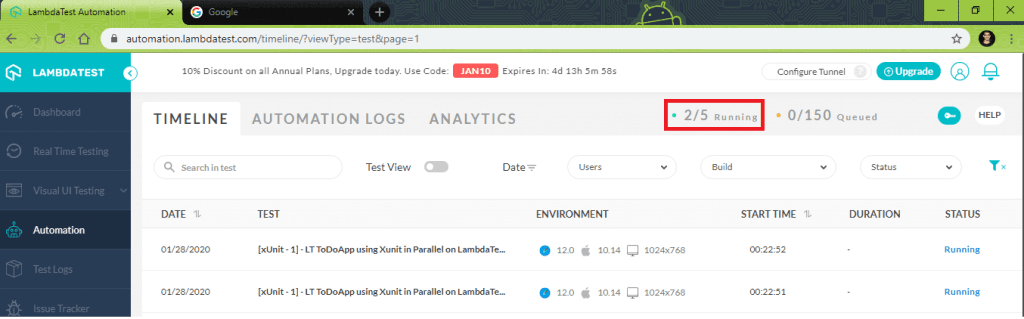
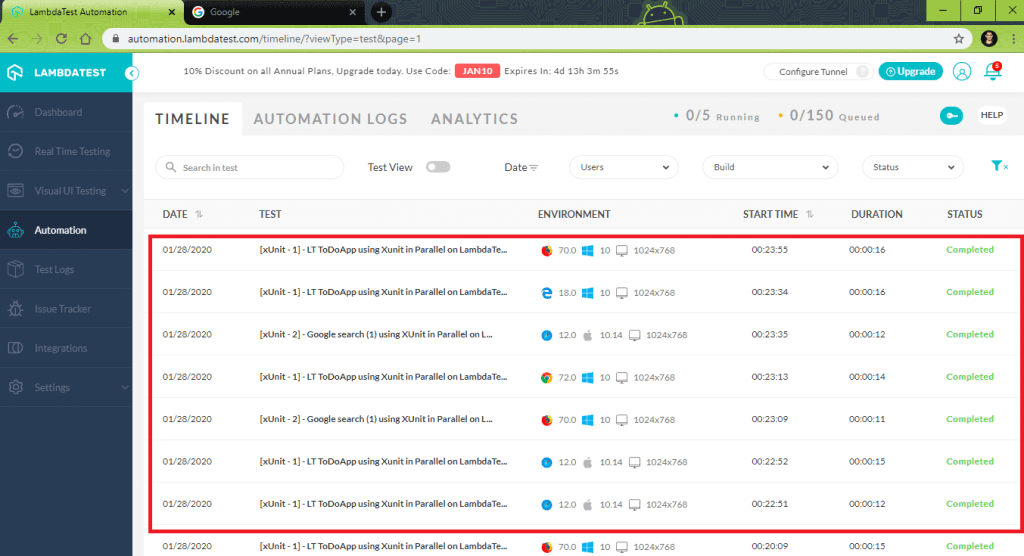
The execution snapshot demonstrating parameterization in xUnit using ClassData attribute is below:
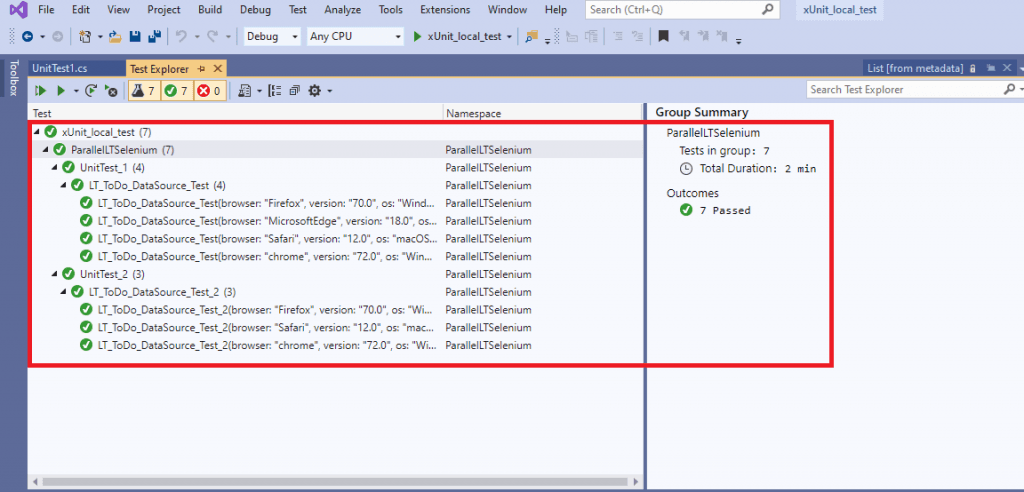
Note: Experience reliable automated testing with Selenium Testing Tool on a cloud grid of 3000+ browsers and operating systems.

Wrapping it up
In this Selenium xUnit tutorial, we have seen how test parameterization is widely used for testing that involves a large number of scenarios. It helps reduce clutter in the test code as there is less duplication and redundancy in the test code. For simple xUnit parameterized tests, the InlineData attribute is ideal, but for more complex scenarios, ClassData and MemberData are more suitable.
These attributes are very handy when performing exhaustive cross browser tests as most of the tests will involve numerous combinations of web browsers and platforms. The advantages of parameterization in xUnit can be multiplied if the automated browser tests are performed on cloud based cross browser testing platforms like LamdaTest as tests can be parallelized.


Did you find this page helpful?
More Related Hubs
TestMu AI forEnterprise
Get access to solutions built on Enterprise
grade security, privacy, & compliance
- Advanced access controls
- Advanced data retention rules
- Advanced Local Testing
- Premium Support options
- Early access to beta features
- Private Slack Channel
- Unlimited Manual Accessibility DevTools Tests