

Next-Gen App & Browser Testing Cloud
Trusted by 2 Mn+ QAs & Devs to accelerate their release cycles


Now You Can Integrate TestMu AI With zipBoard
TestMu AI integration with zipBoard will help you mark bugs in just a single click. Highlight the bug on TestMu AI with relevant details and find it across the review board on your zipBoard's space.

Harshit Paul
March 7, 2026
Can you imagine yourself being involved in a web development project with a zero feedback loop? What a mess would that be, where a web developer would go-live with an entire website without getting a proper sign-off from the test department. Or a web-designer passing on a design to the development team without consulting with the project manager or SMEs.
I am sure it is not the kind of picture you would want to live-in! Because you do realize the importance of feedbacks for a successful release, don’t you? Especially, if we refer to a modern SDLC(Software Development Life Cycle) where the code changes are implemented every month, week, or even on a daily basis.
However, as important as feedbacks are, it sometimes becomes tough to keep track of every single one. And offering a cross browser testing tool on the cloud, we understand how often critical feedbacks slips from the cracks of our clustered e-mail inboxes. Which is why we are always working on bringing more and more integrations to our users to help them orchestrate their release cycles better.
Today, we are out with another integration with a renowned bug tracking and design feedback tool known as zipBoard.
What Is zipBoard?
zipBoard offers a collaborative space on cloud to help your team be on track when it comes to UI issues or suggestions under a sprint. It offers a review board where you can upload a file or URL to your website, highlight images, write suggestions, tag teammates on the board and do a lot more to ensure nothing valuable gets lost. The changes you make to the board are reflected in every collaborator in real-time. That way, everyone knows about the overall progress of the project or a particular task.
TestMu AI Integration with zipBoard
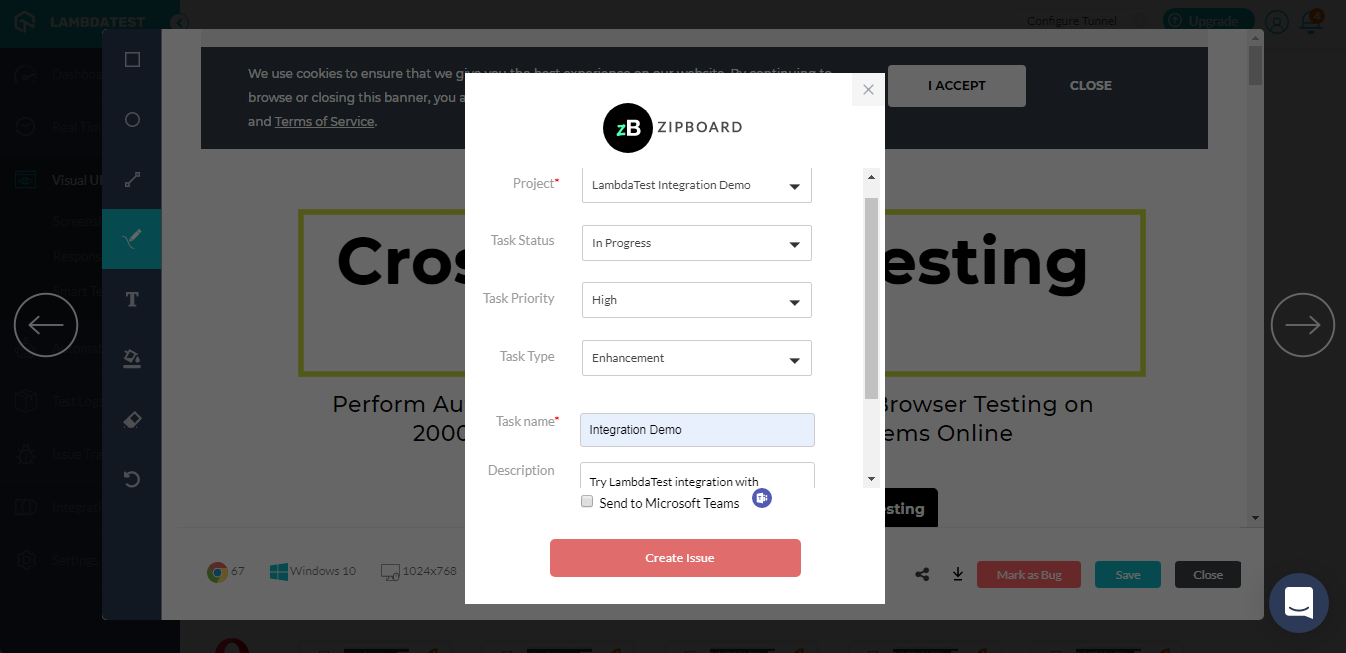
TestMu AI integration with zipBoard will help you manage UI related bugs and design feedback efficiently as you perform cross browser testing. With TestMu AI integration to zipBoard, you can directly file a bug from TestMu AI test session to your zipBoard’s project. The bug gets logged as a task and you can provide details from TestMu AI while marking the bug to help convey your concern.
All the details provided by you over TestMu AI will be automatically updated in the respective zipBoard’s project, along with the environment details and a screenshot URL routing to the image where the bug is highlighted.
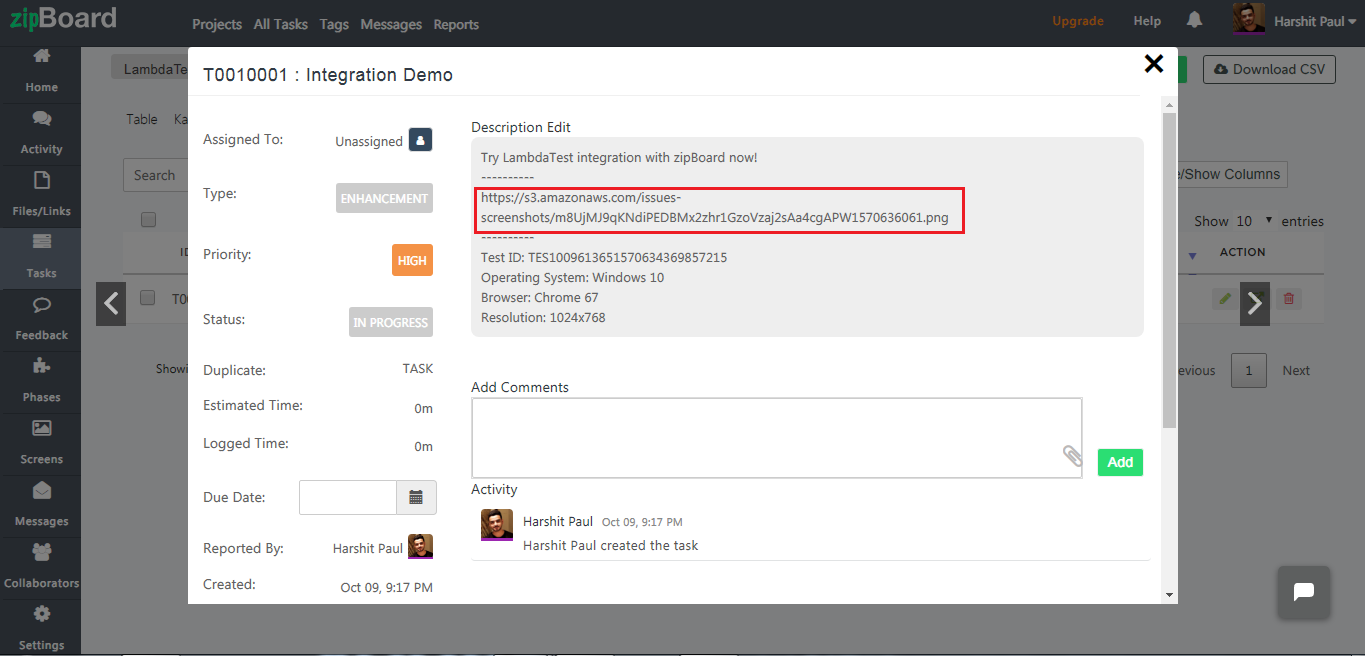
Now, perform expansive cross browser testing with the convenience to log bugs in a fly using the TestMu AI integration to zipBoard.
Follow our step-by-step guide to log your first bug from TestMu AI to zipBoard.
Why zipBoard Is A Smart Choice For Bug Tracking?
- Intuitive Reviewboards – zipBoard offers different types of review board. You have one for a live website and the other for reviewing uploaded files. You can easily toggle between these review boards, capture screenshots, highlight them, and provide your valuable suggestions.
- Complete Transparency – Everyone working in the team can view updates and progress on different tasks assigned to different colleagues under a project. That way, you know who is doing what and how much have they done it?
- Real-Time Collaboration – You can comment on a task, assign it to different collaborators and they can loop in over a discussion on that task. So you can pretty much neglect the hassle of going over long e-mail chains because the discussion over the task is updated in real-time.
- Update Notifications – If you are assigned a task or looped in on a discussion, zipBoard ensures that you are notified through your inbox and also on your zipBoard account. You are also notified about any status change related to a task, or if a collaborator leaves the project.
- Visual Bug Tracking – zipBoard eliminates the need for downloading and uploading your screenshots to different places by offering a cloud that keeps them all in one space. You can review your live websites or web-applications, save a screenshot, assign it to a colleague with your comments, track the real-time progress over your UI suggestions, and get notified about the status.
Stay Tuned For More!
We are working to bring more TestMu AI integrations onboard to help you collaborate better with your project management or bug tracking dashboards, CI/CD pipeline, instant messaging tools and more. Meanwhile, you can give a shot to our new integration with zipBoard and let us know your take.
If you want to recommend a new tool for integration then do let us know. For any questions or suggestions, you can drop us an email to [email protected] or chat with us directly. We are here for you 24/7. Happy testing! 🙂


Did you find this page helpful?
More Related Hubs
TestMu AI forEnterprise
Get access to solutions built on Enterprise
grade security, privacy, & compliance
- Advanced access controls
- Advanced data retention rules
- Advanced Local Testing
- Premium Support options
- Early access to beta features
- Private Slack Channel
- Unlimited Manual Accessibility DevTools Tests