

Next-Gen App & Browser Testing Cloud
Trusted by 2 Mn+ QAs & Devs to accelerate their release cycles


A Complete Guide to SVG Animation
Unleash creativity with SVG animation! Learn how to bring your web graphics to life in this comprehensive guide.

Clinton Joy Fimie
January 29, 2026
Introducing Scalable Vector Graphics (SVGs) for front-end developers has likely been a familiar experience, as they are frequently incorporated into numerous projects. Unlike image formats like PNGs or JPEGs, SVGs are different. They can take still images and turn them into exciting, animated visuals. SVGs are more than just static images – they can be brought to life with SVG animation.
In this blog, we will delve into SVG animation, exploring its vast potential and how these animations consistently function across different browsers and devices. From its capacity to create compelling visuals to its seamless compatibility, we will unravel the depth and versatility of SVG animations.
What is SVG?
Scalable Vector Graphics, abbreviated as SVG, is an open-standard, XML-based format for describing two-dimensional graphics. As the name suggests, SVG possesses a distinctive trait: the ability to infinitely scale images without compromising quality, making it exceptionally suitable for display across diverse devices and resolutions.
SVG works as a markup language, employing a defined set of instructions to illustrate graphical components in a manner understandable to humans and machines alike. These instructions delineate shapes using pathways, polygons, circles, and more.
SVG Animation used in the GSAP website
Moreover, SVG facilitates various styling alternatives, including integration with Cascading Style Sheets (CSS). This empowers designers and developers, allowing them to manipulate and elevate visual elements within the graphics.
Here are some examples of websites that make smart use of SVG animations.
Example 1– CodePen
Example 2– Anime.js
The inherent limitations of traditional image formats often hinder the creation of impactful visual narratives. This is where SVGs excel, possessing the ability to infuse static elements with dynamism, thereby granting an edge in crafting captivating visual effects.
Let’s dive deeper into the basics of SVG to understand it better.

Basics of SVG
SVG graphics are crafted using XML-driven tags that act as blueprints for delineating shapes, determining their attributes, and pinpointing their placements within a coordinate setup. These shapes can be modified through presentation attributes or CSS, granting styling possibilities.
The inherent strength of SVG lies in its capacity for performing transformations, allowing elements to be resized, rotated, or skewed while also allowing the grouping and nesting of shapes. This flexibility gives developers the ability to organize and control their visual elements.
Understanding SVG Structure
Understanding the foundation of SVG lies in understanding four key elements: an XML-based markup language, the root <svg> element, nested components, and the coordinate system.
SVG documents use the XML structure, ensuring human readability and ease of comprehension. The XML structure involves elements enclosed within the HTML opening and closing tags. This markup language facilitates the expression of graphic elements in a format that is both intuitive and accessible.
Example:
<?xml version=”1.0″ encoding=”utf-8″?>
The root <svg> element is the container for the entire SVG graphic. Within this element, crucial attributes like width and height are specified, defining the dimensions of the SVG canvas. This element establishes the overall framework for constructing intricate graphics and animations.
Nested elements within SVG documents also play a crucial role in defining diverse graphical components, ranging from basic shapes like lines, circles, and paths. Each of these elements may possess attributes that define specific properties, such as stroke color, fill color, or positioning. The nested structure allows for the creation of complex graphics by combining and organizing individual elements.
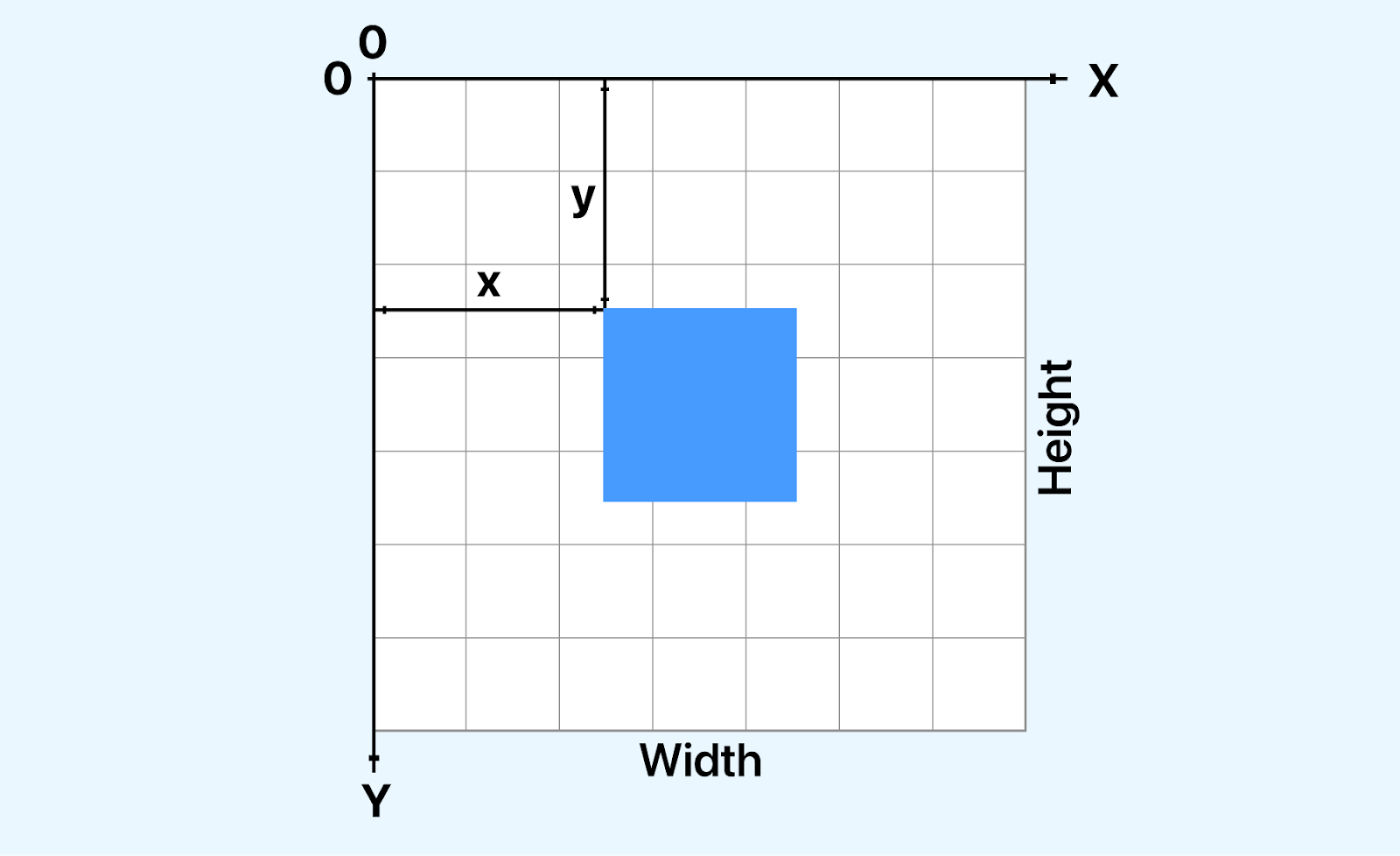
SVG coordinate system
SVG employs a coordinate system that typically places the origin at (0,0), situated in the top-left corner of the canvas. A solid understanding of this coordinate system is needed for accurately positioning and manipulating elements within an SVG graphic. With full knowledge of how coordinates function in SVG, we can ensure precise placement and alignment of various graphic elements.
Creating SVG Elements
Constructing SVG elements involves utilizing the XML structure to articulate graphical components within the SVG canvas. This process lets us draft an array of shapes and forms that serve as the foundational elements for dynamic SVG animations. This journey has many possibilities, from manipulating basic shapes and grouping diverse elements to incorporating text with stylized fonts and defining elaborate patterns and gradients.
SVG accommodates a lot of basic shapes, including <circle>, <rect>, <line>, and <path>. These fundamental elements are placed in the <svg> container, where attributes such as position, size, and appearance are defined.
The <g> element is a container for grouping multiple SVG elements. This organizational feature proves invaluable, mainly when orchestrating intricate SVG animations involving the simultaneous manipulation of diverse elements.
The <text> element integrates textual components into the SVG canvas. Text elements contribute to a nice and visually captivating SVG when coupled with font styles and various styling attributes.
SVG versatility also extends to the creation of patterns and gradients through elements like <pattern>, <linearGradient>, and <radialGradient>. These and many more elements empower us to add depth and complexity to their designs, therefore enhancing the aesthetic of the SVG.
Attributes and Properties
Attributes and properties play a role in tailoring the visual characteristics and behavior of SVG elements. They serve as instrumental tools for defining colors, shapes, and various other features, categorizing them into different types, such as common attributes, transformational attributes, animation attributes, and responsive design attributes. These categories collectively contribute significantly to shaping the overall aesthetics of SVG graphics.
Common Attributes
Common attributes, exemplified by elements like fill and stroke, are fundamental in determining the color properties of an SVG element. The fill attribute specifies the interior color, while the stroke attribute controls the outline color. Additionally, the opacity attribute influences the transparency level of an element, allowing for nuanced visual effects.
Transformational Attributes
Transformation attributes, represented by transform, empower us to dynamically alter the size, rotation, or position of an SVG element. The transform property has access to properties like scale, rotate, skew, transform-origin, and translate. And just like the name, it plays a huge role in transforming your SVG.
Animation Attributes
SVG boasts animation attributes, including animate and animateTransform, which are designed to infuse dynamic effects into graphics over time. With this attribute, you can specifically design animation transformations like scaling, rotation, and translation. You can set a duration for your animation, and also set a repeat count. These attribute properties facilitate seamless transitions and transformations, contributing.
Responsive Design Attributes
Attributes like viewBox in SVG cater to responsive design needs, ensuring that graphics adapt and scale appropriately across diverse screen sizes. Responsive design attributes contribute to a more versatile and user-friendly presentation, optimizing the viewing experience on various devices.
These attributes collectively form the foundation of SVG customization, allowing us to exert precise control over the appearance and behavior of our scalable visual graphics.
To fully understand the structure of an SVG, let’s consider an SVG image of an arrow and look at its components.
<?xml version="1.0" encoding="utf-8"?>
 <svg width="800px" height="800px" viewBox="0 0 24 24" fill="none" >
 <path d="M12 5V19M12 5L6 11M12 5L18 11" stroke="#000000" stroke-width="2" stroke-linecap="round" stroke-linejoin="round"/>
 </svg>
From the SVG above, you can see that the SVG code starts with the following declaration:
<?xml version=”1.0″ encoding=”utf-8″?>
This declaration indicates to the browser that the document adheres to XML standards and utilizes UTF-8 encoding, ensuring compatibility and proper interpretation.
The <svg> element is the root element of an SVG document, and it defines several attributes that control the overall appearance and behavior of the SVG image. Here’s a table summarizing the common attributes of the <svg> element:
| Attributes | Description |
|---|---|
| width | Specifies the width of the SVG image in pixels. |
| height | Specifies the height of the SVG image in pixels. |
| viewBox | Defines the coordinate system and visible area of the SVG content. |
| fill | Sets the default fill color for all shapes within the SVG element. |
Next, we have the <path> element, which is used to create shapes, such as lines, curves, and polygons. In the provided SVG, the <path> element creates a circle.
The <path> element defines the circle’s path using the d attribute. The stroke attribute specifies the stroke color of the circle, and the stroke-width attribute specifies the stroke width. The stroke-linecap attribute specifies the shape of the end caps of the stroke.
The provided SVG image demonstrates the basic structure and elements of SVG. The <svg> element defines the SVG document, providing the canvas on which graphical elements are drawn defining the boundaries and properties of the SVG canvas. And the <path> element delineates the specific shapes and paths, outlining the graphic elements to be rendered within that canvas.
Benefits of SVG Animation
SVG animation is a technique for adding life to a static animation on the web. Unlike traditional image formats like PNG and GIF, which store pixel data, SVG animations are defined by mathematical equations that describe all the shapes of an image and the transformations.
Here are some benefits of SVG animations.
- Scalability: SVG graphics possess remarkable scalability, maintaining impeccable quality irrespective of size variations. This ensures animations retain their sharpness and clarity, delivering a consistent visual experience across diverse devices and screen resolutions.
- Performance: In terms of performance, SVG animations shine because they are inherently lightweight. They demand minimal browser processing, resulting in swift transitions and quicker load times. This lightweight nature contributes significantly to smoother user experiences.
- Resolution Independence: What sets SVG animations apart is their resolution independence. They transcend screen resolutions, holding onto their sharpness and precision regardless of the device or monitor specifications. This characteristic ensures that the visual excellence of the SVG animations remains intact universally.
- Versatility: The versatility of SVG animations is boundless. They offer various possibilities, from fundamental transformations to complex motion paths and interactive elements. This flexibility empowers designers and developers to craft diverse and engaging effects.
- Accessibility: An essential aspect of SVG animations is their adherence to Web Content Accessibility Guidelines (WCAG), making them accessible to visually impaired users reliant on screen readers. This commitment to accessibility broadens the reach of SVG animations, ensuring inclusivity and usability for all users.
Now you know the basics of SVG and its benefits, let’s look at what animations are in SVG.
Getting Started with SVG Animation
There are different techniques and ways to animate SVGs; some are beginner-friendly, and some involve more complex techniques and knowledge. Here is an overview of the key aspects of SVG animation techniques you should know:
Types of SVG Animation
CSS-Based SVG animation
<!DOCTYPE html>
<html lang="en">
 <head>
   <meta charset="UTF-8" />
   <meta name="viewport" content="width=device-width, initial-scale=1.0" />
   <title>Document</title>
   <link rel="stylesheet" href="./style.css" />
 </head>
 <body>
   <nav>
     <h3>
       <a href="https://www.lambdatest.com/"
         ><img
           class="logo"
           src="https://www.lambdatest.com/resources/images/logos/logo.svg"
           alt="logo"
       /></a>
     </h3>
     <ul class="nav-items">
       <li><a href="https://www.lambdatest.com/feature">Platform</a></li>
       <li><a href="https://www.lambdatest.com/enterprise">Enterprise</a></li>
       <li><a href="https://www.lambdatest.com/blog/">Resources</a></li>
       <li>
         <a
           href="https://www.lambdatest.com/support/docs/getting-started-with-lambdatest-automation/"
           >Developers</a
         >
       </li>
       <li><a href="https://www.lambdatest.com/pricing">Pricing</a></li>


       <li>
         <a
           class="upgrade-btn"
           href="https://billing.lambdatest.com/billing/plans"
           >Upgrade</a
         >
       </li>
     </ul>
     <img
       class="hamburger"
       src="https://www.lambdatest.com/resources/images/icons/toggle_menu.svg"
       alt=""
     />
   </nav>


   <header>
     <h2>Get started for free</h2>


     <div class="platforms">
       <a
         href="https://accounts.google.com/o/oauth2/auth/oauthchooseaccount?client_id=706758774682-bjrjup3sgcqmqm1n4dq62pk72mvu8mhn.apps.googleusercontent.com&redirect_uri=https%3A%2F%2Faccounts.lambdatest.com%2Flogin%2Fgoogle%2Fcallback&scope=openid%20profile%20email&response_type=code&state=Kz4s0sM1i5Sa8v74vOBkteLIljh1cDn4YQpcvnSG&service=lso&o2v=1&theme=glif&flowName=GeneralOAuthFlow"
         class="platform-button link"
       >
         <img
           src="https://raw.githubusercontent.com/Cejay101/LamdaTestImages/e863498d271de5c15fcce14ee75bad4aad55bc7d/images/google-color-svgrepo-com.svg"
           alt="google icon"
         />Sign up with Google</a
       >
       <a
         href="https://github.com/login/oauth/authorize?client_id=b41139b9749e27d4487b&redirect_uri=https%3A%2F%2Faccounts.lambdatest.com%2Flogin%2Fgithub%2Fcallback%2Fv1&scope=user%3Aemail&response_type=code&state=mA5eziVBDxkmH1LwCJT9k1uID3mSVm3W8Jf8ohJo"
         class="platform-button link"
         ><img
           src="https://raw.githubusercontent.com/Cejay101/LamdaTestImages/e863498d271de5c15fcce14ee75bad4aad55bc7d/images/github-142-svgrepo-com.svg"
           alt="Github icon"
         />Sign up with Github</a
       >
     </div>
     <?xml version="1.0" encoding="utf-8"?>


     <svg
       id="loading"
       xmlns="http://www.w3.org/2000/svg"
       width="100"
       height="100"
       viewBox="25 25 50 50"
     >
       <style>
         @keyframes outer {
           0% {
             stroke-dasharray: 1, 200;
             stroke-dashoffset: 0;
           }
           50% {
             stroke-dasharray: 89, 200;
             stroke-dashoffset: -35;
           }
           100% {
             stroke-dasharray: 89, 200;
             stroke-dashoffset: -124;
           }
         }
         @keyframes inner {
           0% {
             stroke-dasharray: 1, 200;
             stroke-dashoffset: 0;
           }
           50% {
             stroke-dasharray: 67, 200;
             stroke-dashoffset: -29;
           }
           100% {
             stroke-dasharray: 67, 200;
             stroke-dashoffset: -93;
           }
         }
         #outer {
           animation: outer 1.5s ease-in-out infinite;
         }
         #inner {
           animation: inner 1.5s ease-in-out infinite -0.5s;
         }
         circle {
           fill: none;
           stroke: #000;
           stroke-width: 2;
           opacity: 0.5;
         }
       </style>
       <circle id="outer" cx="50" cy="50" r="20">
         <animateTransform
           attributeName="transform"
           dur="2s"
           from="0 50 50"
           repeatCount="indefinite"
           to="360 50 50"
           type="rotate"
         />
       </circle>
       <circle id="inner" cx="50" cy="50" r="15">
         <animateTransform
           attributeName="transform"
           dur="2s"
           from="0 50 50"
           repeatCount="indefinite"
           to="360 50 50"
           type="rotate"
         />
       </circle>
     </svg>
   </header>
 </body>
 <script src="./animate.js"></script>
</html>
@import url("https://fonts.googleapis.com/css2?family=Nunito:wght@400;700&display=swap");


* {
 margin: 0;
 padding: 0;
}
body {
 background-color: #ffffff;
 font-family: "Nunito", sans-serif;
}


/* Nav bar */


nav img {
 width: 200px;
}
.nav-items {
 list-style: none;
 gap: 2rem;
 display: flex;
 align-items: center;
}
nav a:hover {
 color: #56bbc6;
}
nav {
 display: flex;
 justify-content: space-between;
 align-items: center;
 padding: 1rem;
 font-size: 1.2rem;
 background-color: white;
 box-shadow: 0px 0px 25px #888888;
 position: relative;
}
nav a {
 color: #000000;
 text-decoration: none;
}
nav .upgrade-btn {
 background: linear-gradient(90deg, #3532ec, #800080);
 color: white;
 border: none;
 border-radius: 5px;
 padding: 10px 20px;
}
nav .upgrade-btn:hover {
 background: linear-gradient(90deg, #211f98, #5b075b);
 color: white;
}


.hamburger {
 display: none;
}


/* header  */
header {
 padding: 3rem;
 display: flex;
 flex-direction: column;
 align-items: center;
}
img {
 width: 20px;
}
h2 {
 font-size: 3rem;
 color: rgb(36, 54, 96);
 text-align: center;
}
.platforms {
 display: flex;
 gap: 2rem;
 margin: 2rem;
 justify-content: center;
}
.platforms a {
 text-decoration: none;
 display: flex;
 gap: 5px;
}
.platform-button {
 background: none;
 color: rgb(36, 54, 96);
 border: 2px solid transparent;
 border-image: linear-gradient(90deg, #0000ff, #800080);
 border-image-slice: 1;
 border-image-width: 2px;
 border-image-outset: 0;
 border-radius: 0px;
 padding: 10px 20px;
 cursor: pointer;
}
.platform-button:hover {
 background: linear-gradient(90deg, #e2e2f1, #f1d3f1);
}


#loading {
 display: none;
}


@media screen and (max-width: 952px) {
 .hamburger {
   display: block;
   width: 30px;
 }
 .nav-items {
   display: none;
 }
}
const loading = document.getElementById("loading");
const links = document.querySelectorAll("a");


links.forEach(function (link) {
 link.addEventListener("click", function (event) {
   event.preventDefault();


   loading.style.display = "block";


   setTimeout(function () {
     window.location.href = link.href;
   }, 2000); // 2 seconds delay
 });
});
JavaScript-Based SVG Animation
<script src="https://cdnjs.cloudflare.com/ajax/libs/gsap/3.12.4/gsap.min.js"></script>
<!DOCTYPE html>
<html lang="en">
 <head>
   <meta charset="UTF-8" />
   <meta name="viewport" content="width=device-width, initial-scale=1.0" />
   <title>Document</title>
   <link rel="stylesheet" href="./style.css" />
 </head>
 <body class="body">
   <nav>
     <h3>
       <a href="https://www.lambdatest.com/"
         ><img
           class="logo"
           src="https://www.lambdatest.com/resources/images/logos/logo.svg"
           alt="logo"
       /></a>


       <svg
         class="hamburger"
         xmlns="http://www.w3.org/2000/svg"
         viewBox="0 0 100 100"
       >
         <line
           class="line-one"
           x1="15"
           y1="36"
           x2="80"
           y2="36"
           fill="none"
           stroke="#000"
           stroke-width="6"
         ></line>
         <line
           class="line-two"
           x1="15"
           y1="50"
           x2="80"
           y2="50"
           fill="none"
           stroke="#000"
           stroke-width="6"
         ></line>
         <line
           class="line-three"
           x1="15"
           y1="64"
           x2="80"
           y2="64"
           fill="none"
           stroke="#000"
           stroke-width="6"
         ></line>
       </svg>
     </h3>


     <ul class="nav-items hidden">
       <li><a href="https://www.lambdatest.com/feature">Platform</a></li>
       <li><a href="https://www.lambdatest.com/enterprise">Enterprise</a></li>
       <li><a href="https://www.lambdatest.com/blog/">Resources</a></li>
       <li>
         <a
           href="https://www.lambdatest.com/support/docs/getting-started-with-lambdatest-automation/"
           >Developers</a
         >
       </li>
       <li><a href="https://www.lambdatest.com/pricing">Pricing</a></li>


       <li>
         <a
           class="upgrade-btn"
           href="https://billing.lambdatest.com/billing/plans"
           >Upgrade</a
         >
       </li>
     </ul>
   </nav>


   <script src="https://cdnjs.cloudflare.com/ajax/libs/gsap/3.12.4/gsap.min.js"></script>
   <script src="./animate.js"></script>
 </body>
</html>
@import url("https://fonts.googleapis.com/css2?family=Nunito:wght@400;700&display=swap");


* {
 margin: 0;
 padding: 0;
}
body {
 background-color: rgb(225, 225, 225);
 font-family: "Nunito", sans-serif;
}


/* Nav bar */


nav img {
 width: 200px;
}
.nav-items {
 list-style: none;
 gap: 2rem;
 display: flex;
 align-items: center;
 margin-left: 1rem;
}
nav a:hover {
 color: #56bbc6;
}
nav {
 display: flex;
 justify-content: space-between;
 align-items: center;
 padding: 1rem;
 font-size: 1.2rem;
 background-color: white;
 box-shadow: 0px 0px 25px #888888;
 position: relative;
}
nav h3 {
 display: flex;
 width: 100%;
 justify-content: space-between;
 align-items: center;
}
.nav-items a {
 color: #000000;
 text-decoration: none;
}
.nav-items .upgrade-btn {
 background: linear-gradient(90deg, #3532ec, #800080);
 color: white;
 border: none;
 border-radius: 5px;
 padding: 10px 20px;
}
.nav-items .upgrade-btn:hover {
 background: linear-gradient(90deg, #211f98, #5b075b);
 color: white;
}


.hamburger {
 display: none;
}


svg {
 cursor: pointer;
 margin-left: auto;
}


/* Media Queries */
.hidden {
 display: flex;
}


@media screen and (max-width: 952px) {
 nav {
   align-items: start;


   flex-direction: column;
 }
 .hamburger {
   display: block;


   width: 60px;
 }
 .nav-items {
   list-style: none;
   gap: 2rem;
   display: flex;
   flex-direction: column;
   margin: auto;
 }
 .hidden {
   display: none;
 }
}
// "use strict"
const hamburger = document.querySelector(".hamburger");
const navItems = document.querySelector(".nav-items");
const lineOne = hamburger.querySelector(".line-one");
const lineTwo = hamburger.querySelector(".line-two");
const lineThree = hamburger.querySelector(".line-three");


const lines = [lineOne, lineTwo, lineThree];
const tlm = new TimelineMax({});
const toggleMenu = new TimelineMax({ paused: true, reversed: true });


hamburger.addEventListener("mouseenter", () => {
 if (hamburger.classList.contains("js-x")) {
   return;
 }
 tlm.staggerTo(
   lines,
   0.0125,
   { scaleX: 1.5, repeat: 1, yoyo: true, svgOrigin: "50 50" },
   0.125
 );
});


toggleMenu
 .to(lineTwo, 0.125, { scaleX: 0 }, 0)
 .to(lineOne, 0.25, { transformOrigin: "50% 50%", y: 14 }, "slide")
 .to(lineThree, 0.25, { transformOrigin: "50% 50%", y: -14 }, "slide")
 .to(hamburger, 0.25, { rotation: 360 })
 .to(lineOne, 0.25, { rotation: 45 }, "cross")
 .to(lineThree, 0.25, { rotation: -45 }, "cross");


hamburger.addEventListener("click", () => {
 hamburger.classList.toggle("js-x");
 toggleMenu.reversed() ? toggleMenu.play() : toggleMenu.reverse();
 navItems.style.display = toggleMenu.reversed() ? "none" : "flex";
});


window.addEventListener("resize", () => {
location.reload();
});

Note: Test your SVG animations on real Android and iOS devices Try TestMu AI Today!
Advanced SVG Animation Techniques
Synchronized Multimedia Integration Language (SMIL)
<!DOCTYPE html>
<html lang="en">
 <head>
   <meta charset="UTF-8" />
   <meta name="viewport" content="width=device-width, initial-scale=1.0" />
   <link rel="stylesheet" href="./style.css" />
   <title>Document</title>
   <style>
   img{
   width: 250px;
   }
   body {
   display: flex;
   flex-direction: column;
   justify-content: center;
   align-items: center;
   padding: 1rem;
 }
   </style>
 </head>
 <img src="https://www.lambdatest.com/resources/images/logos/logo.svg" alt="">


<svg viewBox="0 0 100 100">
 <rect id="one" x="35" y="1" width="4" height="0.21" fill="black">
 <animate id="one" attributeName="x" begin="0s" dur="1.5" keyPoints="1;0;1" to="60"  fill="" repeatCount="indefinite" /> </rect>


 <rect x="35" y="1" width="4" height="0.21" fill="black">
 <animate attributeName="x" begin="0.5" dur="1.5" keyPoints="1;0;1" to="60"  fill="" repeatCount="indefinite" /> </rect>
 <rect x="35" y="1" width="4" height="0.21" fill="black">
 <animate attributeName="x" begin="1" dur="1.5" keyPoints="1;0;1" to="60"  fill="" repeatCount="indefinite" /> </rect>
<rect x="35" y="1" width="4" height="0.21" fill="black">
 <animate attributeName="x" begin="1.5" dur="1.5" keyPoints="1;0;1" to="60"  fill="" repeatCount="indefinite" /> </rect>
 </svg>
 </body>
</html>
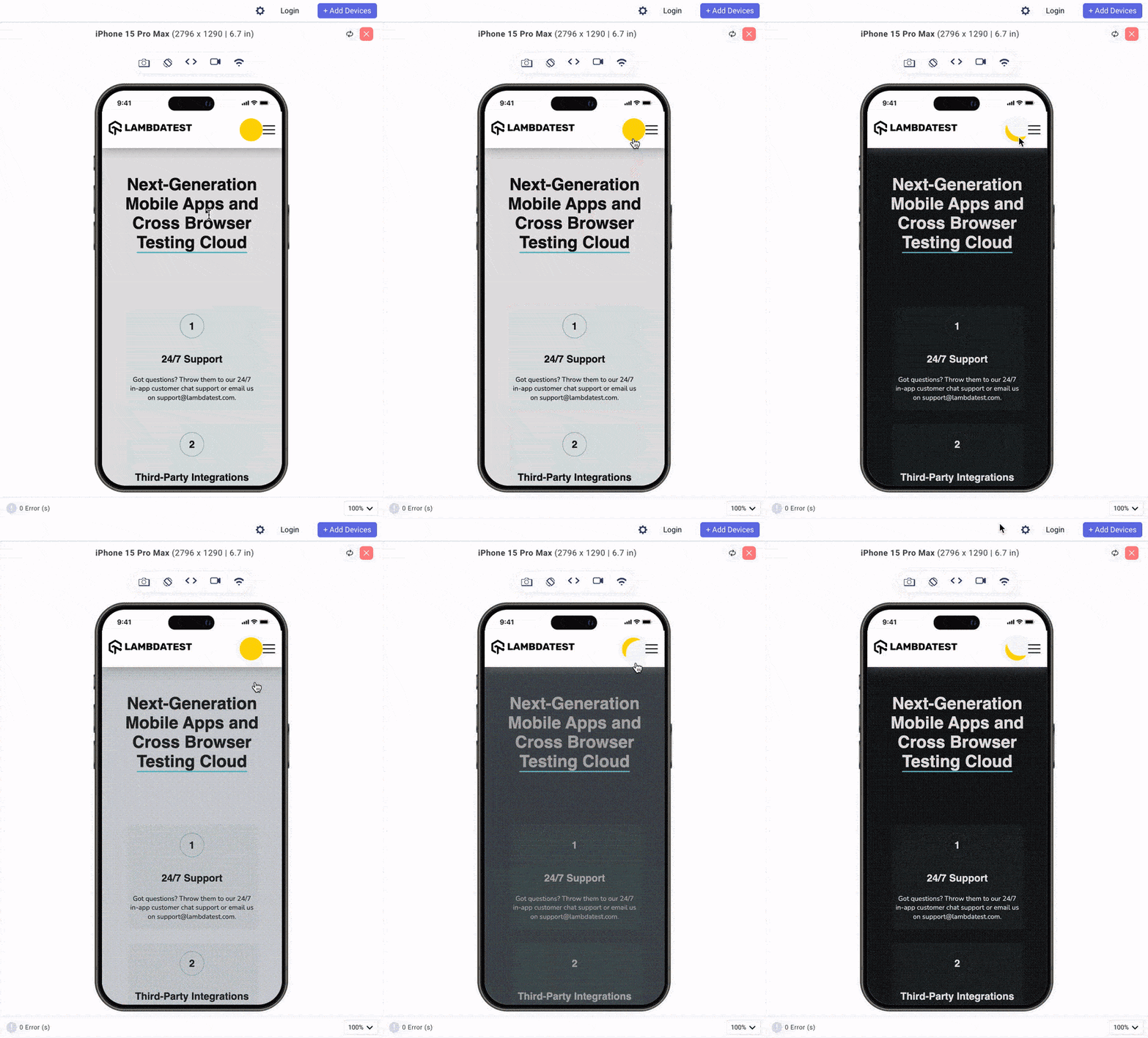
Morphing and Path Animations
<!DOCTYPE html>
<html lang="en">
 <head>
   <meta charset="UTF-8" />
   <meta name="viewport" content="width=device-width, initial-scale=1.0" />
   <title>Document</title>
   <link rel="stylesheet" href="./style.css" />
 </head>
 <body class="body">
   <nav>
     <h3>
       <a href="https://www.lambdatest.com/"
         ><img
           class="logo"
           src="https://www.lambdatest.com/resources/images/logos/logo.svg"
           alt="logo"
       /></a>
     </h3>
     <svg
     class="darkmode"
     width="55"
     height="55"
     viewBox="0 0 55 55"
     fill="none"
     xmlns="http://www.w3.org/2000/svg"
   >
     <path
       class="sun"
       d="M55 27.5C55 42.6878 42.6878 55 27.5 55C12.3122 55 0 42.6878 0
27.5C0 12.3122 12.3122 0 27.5 0C42.6878 0 55 12.3122 55 27.5Z"
       fill="#FFD600"
     />
   </svg>
     <ul class="nav-items">

       <li><a href="https://www.lambdatest.com/feature">Platform</a></li>
       <li><a href="https://www.lambdatest.com/enterprise">Enterprise</a></li>
       <li><a href="https://www.lambdatest.com/blog/">Resources</a></li>
       <li>
         <a
           href="https://www.lambdatest.com/support/docs/getting-started-with-lambdatest-automation/"
           >Developers</a
         >
       </li>
       <li><a href="https://www.lambdatest.com/pricing">Pricing</a></li>


       <li>
         <a
           class="upgrade-btn"
           href="https://billing.lambdatest.com/billing/plans"
           >Upgrade</a
         >
       </li>
     </ul>
     <img
       class="hamburger"
       src="https://www.lambdatest.com/resources/images/icons/toggle_menu.svg"
       alt=""
     />
   </nav>

   <div id="title">
     <h1 class="light">
       Next-Generation Mobile Apps and Cross Browser
       <span>Testing Cloud</span>
     </h1>

   </div>
 </div>
 <div id="features">
   <div id="features-group">
     <div class="feature">
       <p>1</p>
       <h2>24/7 Support</h2>

         Got questions? Throw them to our 24/7 in-app customer chat support
         or email us on support@testmuai.com.

     </div>
     <div class="feature">
       <p>2</p>
       <h2>Third-Party Integrations</h2>

         With a single click, push bugs in your choice of project
         management tools, directly from LambdaTest platform.

     </div>
     <div class="feature">
       <p>3</p>
       <h2>Documentation</h2>

         Step-by-step documentation for various test automation frameworks
         to help you run your first Selenium script.

     </div>
   </div>
 </div>

   <script src="/animate.js"></script>
   <script src="https://cdnjs.cloudflare.com/ajax/libs/animejs/3.2.1/anime.min.js"></script>


 </body>
</html>
@import url("https://fonts.googleapis.com/css2?family=Nunito:wght@400;700&display=swap");


* {
 margin: 0;
 padding: 0;
}
body {
 background-color: rgb(225, 225, 225);
 font-family: "Nunito", sans-serif;
}


/* Nav bar */


nav img {
 width: 200px;
}
.nav-items {
 list-style: none;
 gap: 2rem;
 display: flex;
 align-items: center;
 margin-left: 1rem;
}
nav a:hover {
 color: #56bbc6;
}
nav {
 display: flex;
 justify-content: space-between;
 align-items: center;
 padding: 1rem;
 font-size: 1.2rem;
 background-color: white;
 box-shadow: 0px 0px 25px #888888;
 position: relative;
}
nav a {
 color: #000000;
 text-decoration: none;
}
nav .upgrade-btn {
 background: linear-gradient(90deg, #3532ec, #800080);
 color: white;
 border: none;
 border-radius: 5px;
 padding: 10px 20px;
}
nav .upgrade-btn:hover {
 background: linear-gradient(90deg, #211f98, #5b075b);
 color: white;
}


.hamburger {
 display: none;
}


svg {
 cursor: pointer;
 margin-left: auto;
}


/* BODY */
#title {
 text-align: center;
}
#title h1 {
 font-family: "Fraunces", sans-serif;
 max-width: 735px;
 font-size: 60px;
 margin: 4rem auto;
}
#title h1 span {
 border-bottom: #56bbc6 solid 3px;
}


#features {
 height: 50vh;
 width: 100%;
}
#features-group {
 margin: 0 auto;
 display: flex;
 flex-direction: row;
 align-items: center;
 justify-content: space-evenly;
 padding: 4rem;
}
.feature {
 width: 28%;
 align-content: center;
 text-align: center;
 background-color: #56bbc613;
 padding: 20px 5px;
 border-radius: 10px;
}
.feature :first-child {
 font-family: "Fraunces", sans-serif;
 font-weight: 600;
 font-size: 24px;
 border: dotted 1px #0a6069;
 border-radius: 50%;
 height: 56px;
 width: 56px;
 margin: 0 auto 30px;
 display: flex;
 align-items: center;
 justify-content: center;
}
.feature h2 {
 font-family: "Fraunces", sans-serif;
 font-size: 24px;
 line-height: 40px;
 text-align: center;
 margin-bottom: 18px;
}
.feature span {
 font-family: "Manrope", sans-serif;
 height: 128px;
 font-style: normal;
 font-weight: 400;
 font-size: 18px;
 line-height: 32px;
 text-align: center;
 color: #222;
}
/* Media Queries */
@media screen and (max-width: 1100px) {
 #features-group {
   flex-direction: column;
   gap: 2rem;
 }


 .feature {
   width: 80%;
 }
 #title h1 {
   font-size: 60px;
 }
}
@media screen and (orientation: portrait) {
 #title {
   height: 60%;
   display: flex;
 }
 #features-group {
   flex-direction: column;
   gap: 2rem;
 }
 .feature {
   width: 100%;
 }
}


@media screen and (max-width: 700px) and (orientation: portrait) {
 #title h1 {
   font-size: 40px;
 }
}


@media screen and (max-width: 952px) {
 .hamburger {
   display: block;
   width: 30px;
 }
 .nav-items {
   display: none;
 }
}
const moonPath =
 "M13 28.5C13 43.6878 27.5 56 27.5 56C12.3122 56 0 43.6878 0 28.5C0 13.3122 12.3122 1.00001 27.5 1.00001C27.5 -0.999998 13 13.3122 13 28.5Z";


const sunPath =
 "M55 27.5C55 42.6878 42.6878 55 27.5 55C12.3122 55 0 42.6878 0 27.5C0 12.3122 12.3122 0 27.5 0C42.6878 0 55 12.3122 55 27.5Z";


const darkMode = document.querySelector(".darkmode");
const sun = document.querySelector(".sun");


let toggle = false;


darkMode.addEventListener("click", () => {
 // Using anime.js
 const timeline = anime.timeline({
   duration: 750,
   easing: "easeOutExpo",
 });
 timeline
   .add({
     targets: ".sun",
     d: [{ value: toggle ? sunPath : moonPath }],
   })
   .add(
     {
       targets: ".darkmode",
       rotate: toggle ? 320 : -60,
     },
     "-=350"
   )
   .add(
     {
       targets: ".body",
       backgroundColor: toggle ? "rgb(225,225,225)":"rgb(22,22,22)" ,
       color: toggle ? "rgb(22,22,22)":"rgb(225,225,225)" ,
     },
     "-=750"
   );


 // switching the toggle
 toggle = !toggle; // Toggle the variable for the next click
});
Optimizing SVGs
SVG Sprite Script
Browser Compatibility
Responsive Design
Conclusion


Frequently asked questions
Did you find this page helpful?
More Related Hubs
TestMu AI forEnterprise
Get access to solutions built on Enterprise
grade security, privacy, & compliance
- Advanced access controls
- Advanced data retention rules
- Advanced Local Testing
- Premium Support options
- Early access to beta features
- Private Slack Channel
- Unlimited Manual Accessibility DevTools Tests