

Next-Gen App & Browser Testing Cloud
Trusted by 2 Mn+ QAs & Devs to accelerate their release cycles


Now Live With SmartUI CLI and Test Case Insights Module
Elevate your testing game with SmartUI CLI and Test Case Insights. Simplify visual regression testing and gain deeper insights into your test cases.

Mythili Raju
January 29, 2026
Hola Testers!
In our last update on SmartUI and Analytics platforms, we introduced SmartUI’s PDF Testing and Test Analytics Templates to enhance testing and functional test case performance.
We’ve constantly collected feedback to improve and expand on SmartUI and Test Analytics platforms. This time, we’re introducing SmartUI CLI for Visual Regression Testing and the Test Case Insights Module for HyperExecute.
Identify Bugs with SmartUI CLI
With SmartUI CLI, you can now effortlessly conduct visual regression testing from your command line, ensuring visual consistency in your applications.
- Seamless Visual Testing Integration: Our primary objective was to develop a versatile CLI that integrates with various static web pages, making it easier for developers to incorporate SmartUI into their testing pipelines. This ensures compatibility and flexibility for your testing needs.
- DOM Injection: The CLI captures the DOM of the web pages and enables rendering on multiple browsers and viewports of choice without running multiple executions.
- Efficient Test Analysis: We aimed to streamline the process of capturing and uploading screenshots for identifying visual differences between baseline and non-baseline builds in SmartUI on the cloud. The SmartUI CLI empowers you to analyze your tests and pinpoint visual regressions efficiently.
- Easy learning curve with the NPM package: You just need to install the NPM CLI package and configure the URLs to get started. You can easily perform visual testing, minimizing the need for extensive support and enabling your team to focus on higher-value activities.
Let’s have a look at the steps required to run your first test with SmartUI CLI:
- Install the dependencies, create your URL file, and configure your project token.
- Create and Configure SmartUI Config.
- View your test result.
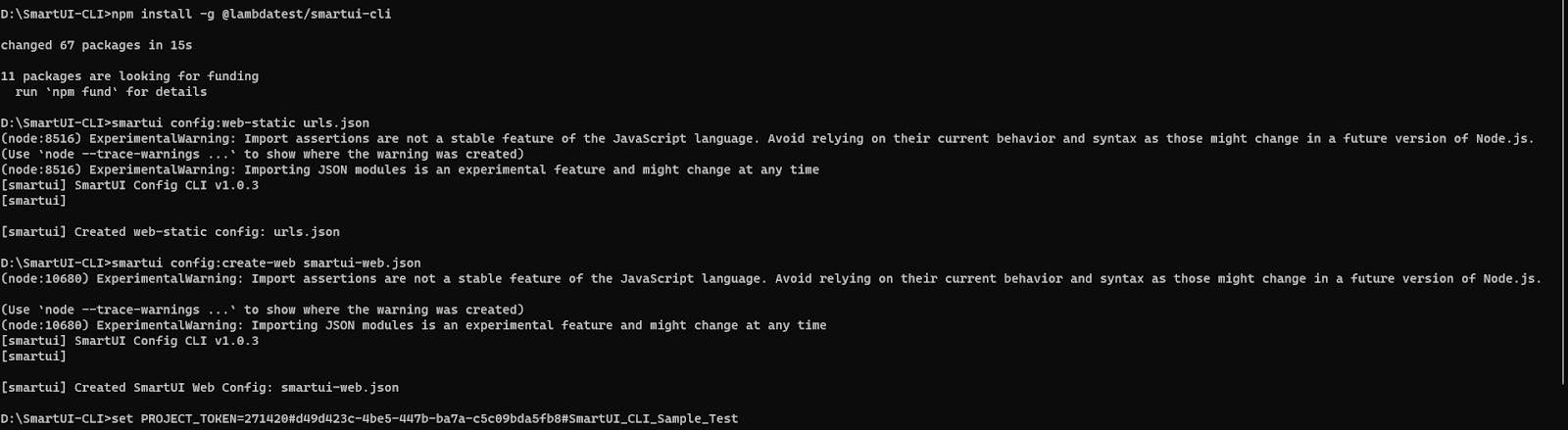

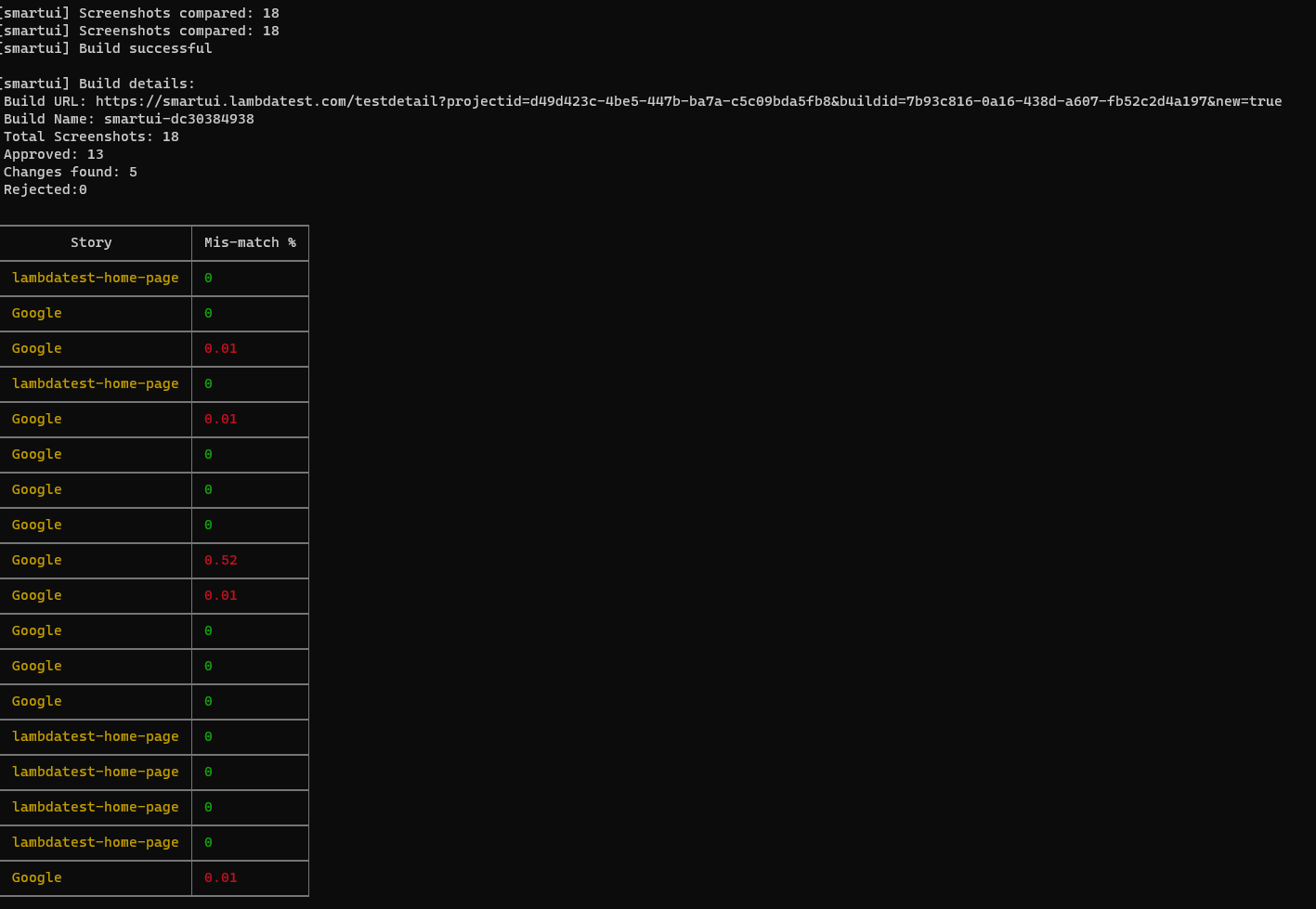

Note: If you are wondеring how to start with this feature, we got you covеrеd. Just hеad ovеr to our documеntation – SmartUI CLI.
Test Case Insights Module
TestMu AI Analytics introduces Test Case Insights for HyperExecute, simplifying the analysis of your test automation execution at the test case level. This feature enables you to access details about test case quantity and types via customizable widgets with advanced filter options, providing a comprehensive understanding of their testing scenarios.
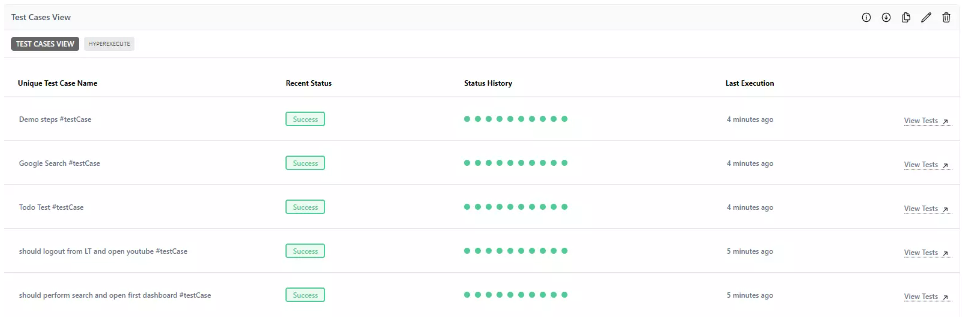
You can use the module to analyze the following use cases:
- Monitor the performance of your test cases for your spec files within the frameworks.
- Advanced visibility on the trends and see the consistency of the test case status for about 90 days.
- Advanced filters enable user tracking and other metadata information to have a clear demarcation for reporting to stakeholders effectively.
- Capture real-time test insights by incorporating WebHooks into your scripts, enabling instant data updates and monitoring.
- Use NPM package integration with test case analytics to simplify data capture and analysis for seamless test result tracking and evaluation within your script.
- Analyze the test case level insights of your test automation execution on TestMu AI.
- Easily monitor test case health with a widget displaying the count of successful and failed test cases in card view, with the ability to access detailed information by clicking “View Details.”
- Identify and highlight test cases that experience repeated failures over time.
- Streamline the debugging process by enabling users to access specific test cases directly from the insights dashboard.
Note: To view your test case insights for HyperExecute testing, check out the documentation Test Case Insights.
All in All!
The new features aim to enable visual regression testing effortlessly and analyze test case insights that enable testing teams to understand their test coverage and execution. Get ready to elevate your testing game with SmartUI CLI and Test Case Insights, and here’s to a future of successful and efficient testing endeavors!
Don’t hesitate to try SmartUI CLI and Test Case Insights and share your valuable feedback. Contact our dedicated in-app Chat Support, or email us at [email protected]. We’re here to support you every step of the way.
Happy Testing!


Did you find this page helpful?
More Related Hubs
TestMu AI forEnterprise
Get access to solutions built on Enterprise
grade security, privacy, & compliance
- Advanced access controls
- Advanced data retention rules
- Advanced Local Testing
- Premium Support options
- Early access to beta features
- Private Slack Channel
- Unlimited Manual Accessibility DevTools Tests