

Next-Gen App & Browser Testing Cloud
Trusted by 2 Mn+ QAs & Devs to accelerate their release cycles


Introducing Background Services in HyperExecute and Sharding for Espresso
Discover two powerful features, Sharding for Espresso and Background Services in HyperExecute, set to transform your testing workflows and take them to the next level.

Mythili Raju
January 29, 2026
Hola testers!
In our last update to HyperExecute, we explored how to run end-to-end tests on your private cloud. Building on that foundation, we’re excited to introduce a new feature that takes your testing to the next level, “Background Services in HyperExecute,” where long-running Application Servers can seamlessly operate as part of your testing process.
That’s not all, we’re also introducing Sharding for Espresso that enables you to divide tests into multiple shards, enabling parallel execution. This translates to a remarkable reduction in testing time.
Let’s dive in to learn more about these two features without further ado!
Overcome Slow Test Execution with Sharding for Espresso
To overcome the issue of prolonged test execution in serial, Sharding for Espresso enables you to perform parallel execution.
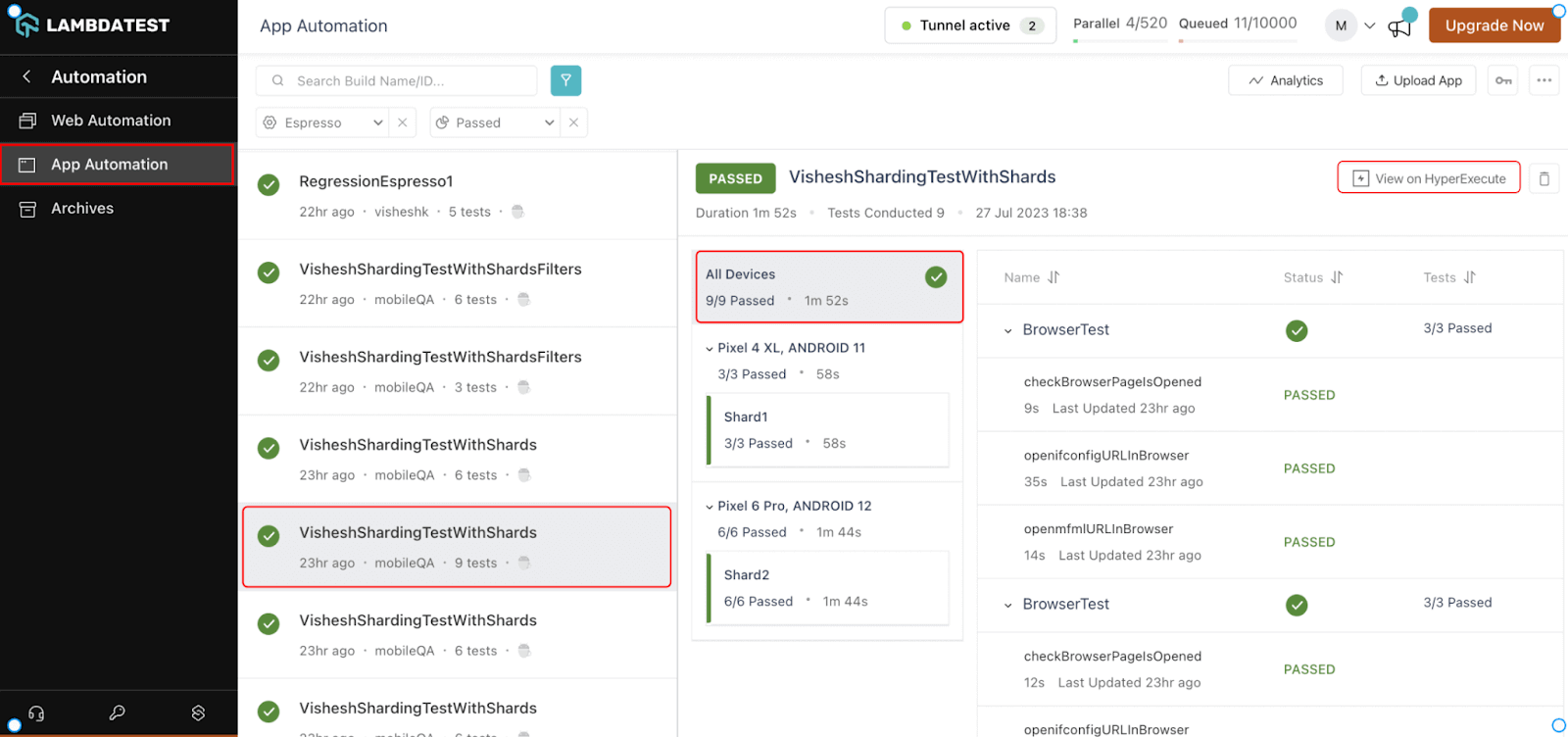
Instead of running your test suite sequentially, you can split test cases into different groups called shards. Each shard can then be executed in parallel on one or more devices. This is especially helpful when your test suite has many test cases.
For instance, you have a test suite consisting of 300 test cases, each taking about 90 seconds to execute. If you were to run them sequentially, it would consume 450 minutes, which is approximately 7 hours and 30 minutes.
Now, consider dividing this test suite into 6 shards, each containing 50 test cases. When you run these shards concurrently, the total execution time shrinks to just 75 minutes, or 1 hour and 15 minutes. So, whether you are aiming to speed up your testing processes, explore advanced features, or optimize your test execution, Sharding for Espresso, integrated with HyperExecute, is your ultimate solution.
Benefits of Sharding for Espresso using HyperExecute
Here are the benefits you can leverage using HyperExecute for Espresso app automation:
- Speed up your Espresso tests: Divide your Espresso test suite into smaller, manageable units called shards. A portion of the tests in each shard can be run parallel. As a result, testing takes considerably less time, enabling you to get findings more quickly.
- Improved efficiency: Through parallel execution, sharding for Espresso optimizes resource utilization. Instead of waiting for one test to complete before starting the following, multiple tests are executed simultaneously, making the most of available resources and cutting down on idle time.
- Enhanced productivity: As your Espresso tests run faster, your development and testing cycles become more agile. Teams can iterate on code changes, receive feedback, and make improvements at a quicker pace, ultimately leading to faster software delivery and improved time-to-market.
- Seamless integration: Sharding for Espresso is seamlessly integrated into TestMu AI’s HyperExecute, which enhances your overall testing efficiency, making it easier to configure and manage parallel test execution.

Note: Curious to know how to get started with Sharding for Espresso? Head over to our documentation – Sharding for Espresso
Types of Sharding for Espresso using HyperExecute
You can perform two types of Sharding for Espresso testing:
- Manual Sharding
- Auto Sharding
Manual Sharding: This category empowers users to personally define and specify shards, along with their configurations. Manual Sharding provides a range of strategies, such as class-based or package-based sharding. This level of manual control enhances flexibility, enabling users to tailor the sharding process to their specific needs.
Whether organizing tests based on classes or grouping them by packages, manual sharding offers a more customized approach, giving testing teams finer-grained control over how tests are distributed for parallel execution.
Auto Sharding: The second type, Auto Sharding, operates with a layer of intelligence. Instead of requiring manual input, the system autonomously determines the most efficient distribution of tests across devices and environments. Leveraging specific criteria and optimization strategies, Auto Sharding dynamically allocates tests to devices, maximizing resource utilization and minimizing execution time.
This type of sharding is particularly valuable for streamlining the testing process, as it eliminates the need for manual configuration and ensures an optimal distribution of test cases for rapid parallel execution.

Austin Siewert
CEO, Vercel
Discovered @TestMu AI yesterday. Best browser testing tool I've found for my use case. Great pricing model for the limited testing I do 👏
2M+ Devs and QAs rely on TestMu AI
Deliver immersive digital experiences with Next-Generation Mobile Apps and Cross Browser Testing Cloud

Background Services in HyperExecute
Long-running Application Servers can now seamlessly operate as part of your testing process. With simple configurations in the HyperExecute YAML file, you can effortlessly initiate these services, enriching the scope of your end-to-end tests. It aligns with TestMu AI’s commitment to comprehensive testing solutions, enhancing reliability, performance, and user experience across web apps, databases, file sharing, messaging apps, etc.
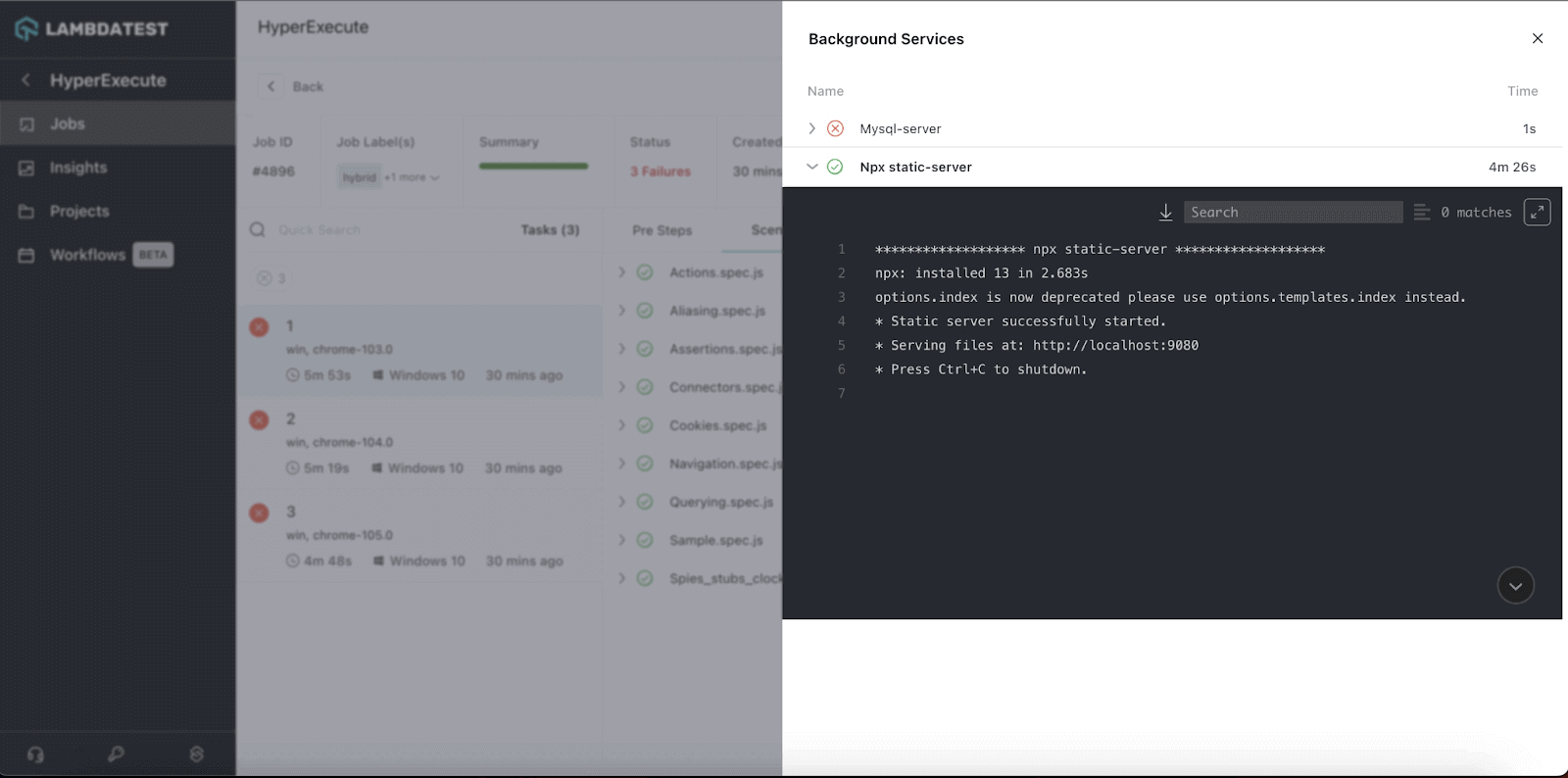
Here are the different use cases for Background Services:
- Web Applications or Servers: When testing web applications or servers, you often encounter scenarios where background services like server-side caching, data processing, or user authentication must run continuously. By integrating Background Services, you can ensure that these vital background services are active during your tests, closely mimicking real-world usage patterns.
- Running Databases: You can keep your databases up and running during your testing runs, allowing you to execute CRUD (Create, Read, Update, Delete) operations on real database instances while your tests run. This capability ensures your database interactions are thoroughly tested and that your application’s data layer is robust.
- Providing File Sharing or Streaming Services: For applications involving file-sharing or streaming services, Background Services can be invaluable. You can simulate users interacting with these services by keeping them operational during your tests. This helps uncover potential bottlenecks, data corruption issues, or performance glitches in real-world usage.
- Running Messaging or Chat Applications: Messaging and chat applications rely heavily on real-time interaction and communication. With Background Services, you can ensure that the messaging backend is consistently active, enabling you to validate the synchronization, real-time updates, and message delivery aspects of your application in a controlled testing environment.
- Providing APIs for Other Applications: If your application provides APIs for other applications, Background Services can validate the responsiveness, reliability, and compatibility of your APIs. Keeping the APIs operational during testing helps ensure seamless integration and effective communication between different software components.’
Note: If you are wondеring how to get started with this feature, we got you covеrеd. Just hеad ovеr to our documеntation – Background Services in HyperExecute
All In All!
Get ready to elevate your testing game with the new Background Services in HyperExecute and Sharding for Espresso testing, and here’s to a future of successful and efficient testing endeavors!
Don’t hesitate to try Background Services in HyperExecute and Sharding for Espresso testing and share your valuable feedback. Contact our dedicated in-app Chat Support, or email us at [email protected]. We’re here to support you every step of the way.
Happy Testing!


Did you find this page helpful?
More Related Hubs
TestMu AI forEnterprise
Get access to solutions built on Enterprise
grade security, privacy, & compliance
- Advanced access controls
- Advanced data retention rules
- Advanced Local Testing
- Premium Support options
- Early access to beta features
- Private Slack Channel
- Unlimited Manual Accessibility DevTools Tests