

Next-Gen App & Browser Testing Cloud
Trusted by 2 Mn+ QAs & Devs to accelerate their release cycles


What Is Self-Healing Test Automation and How It Works?
Discover self-healing test automation and how it automatically detects and fixes issues in tests, improving efficiency and test maintenance.

Tahneet Kanwal
February 16, 2026
Automated tests often fail due to changes or updates in the software application, which requires updating the test scripts accordingly. However, doing this manually takes a lot of time and effort, increasing test maintenance efforts, reducing test coverage, and generating false-positive test results.
This is where the self-healing test automation approach addresses these challenges, where automated testing tools detect and automatically fix issues in test scripts whenever the state of the software application under test changes. It makes the test automation process more resilient and reduces the manual efforts required to maintain test scripts.
In this blog, we look at the self-healing test automation technique and how it works, along with examples.
Overview
What Is Self-Healing Test Automation in Software Testing?
Self-healing test automation automatically detects and fixes script issues caused by software changes, ensuring reliable, accurate tests without manual updates.
Why Is Self-Healing Automation Important?
Self-healing test automation ensures stable, efficient, and adaptive test scripts, reducing maintenance effort while improving software quality and reliability.
- Prevents Object Locator Flakiness: Automatically updates test scripts when elements change, avoiding failures caused by missing locators and improving script stability overall.
- Improves Test Coverage: Reduces redundant test execution, ensures thorough testing of new or updated features, and enhances overall software quality delivery.
- Lowers Test Maintenance: Eliminates manual updates to test scripts whenever the software changes, saving time and reducing effort for QA teams.
- Minimizes Test Failure: Prevents failures caused by poorly maintained scripts, allowing QA teams to focus on resolving software issues effectively.
- Faster Feedback Loop: Accelerates testing cycles by quickly detecting and resolving issues during development, enabling faster iteration and earlier bug fixes.
- Integrates With AI Technologies: Leverages AI and machine learning to enhance automation, predict potential issues, and make self-healing smarter and more adaptive.
- Trims Down Costs: Reduces time, effort, and resources spent on test maintenance while improving coverage, feedback speed, and defect detection efficiency.
How Do Self-Healing Tests Adapt to Software Changes?
Self-healing test automation follows organized steps to locate elements, execute tests, detect issues, and automatically update scripts effectively.
- Identify the Element: Self-healing tools collect multiple attributes like ID, Name, CSS Selector, or XPath to reliably locate elements despite changes.
- Perform Test Execution: Tests follow predefined steps, and if primary identifiers fail, the tool searches secondary attributes to maintain proper execution flow.
- Identify Issues: If elements remain unlocated, alternative methods or relative positions are used to detect elements and continue test execution accurately.
- Implement Self-Healing: Once elements are identified using alternatives, the tool updates scripts automatically to ensure future executions use correct identifiers efficiently.
How Does KaneAI Improve Self-Healing Test Automation?
KaneAI streamlines self-healing test automation by identifying broken locators, updating scripts automatically, and ensuring tests run reliably.
- Intelligent Test Generation: Automatically creates and evolves test scripts using natural language commands, reducing manual effort and simplifying test creation processes.
- Multi-Language Code Export: Enables converting tests into all major programming languages and frameworks, making automation adaptable across diverse development environments.
- 2-Way Test Editing: Syncs updates between natural language instructions and underlying code, ensuring consistency and reducing errors during test modifications.
- Smart Versioning: Tracks test changes through separate versions, allowing testers to manage updates efficiently and revert to prior versions if necessary.
- Bug Reproduction: Helps fix issues by recording manual steps, editing, or deleting specific steps to reproduce and resolve test failures effectively.
- Integration With Selenium: Supports Selenium-based test automation, increasing suite reliability, reducing flaky tests, and enhancing the efficiency of automated workflows.
What Is Self-Healing Test Automation?
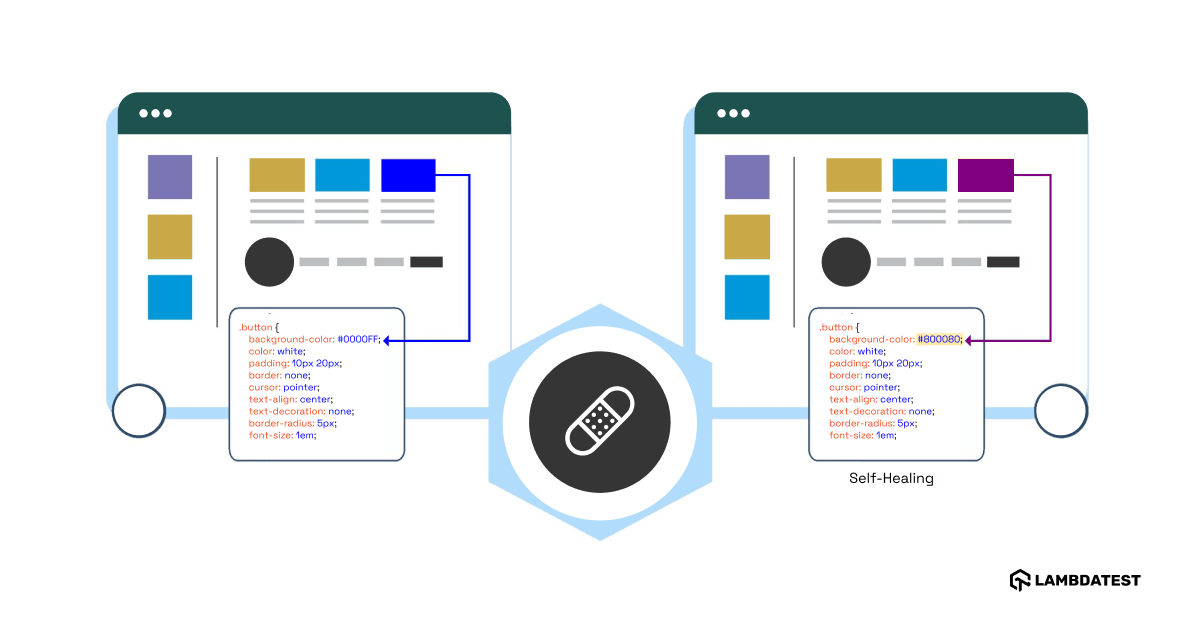
Self-healing test automation is the process that involves automatically detecting and fixing test scripts when there are code-level changes in the software application. This method keeps automated tests accurate and reliable without needing manual updates.
It reduces the effort required for test maintenance by adapting to changes. Whether there is a new feature or an update to existing functionality, self-healing mechanisms ensure that test scripts remain aligned with the software application. Self-healing test automation is a modern approach to automated testing that solves the challenges of traditional test automation.
Why Use Self-Healing Test Automation?
Self-healing is an essential feature for maintaining efficient test automation workflows. Here are some of the major benefits it provides:
- Prevents Object Locator Flakiness: Object locator flakiness makes it difficult for QA teams to ensure the stability of test scripts. Errors like NoSuchElementException due to missing object locators can frequently cause test scripts to fail. In case of such exceptions, a self-healing test automation approach automatically updates the test script for the software being tested, lowering the chance of test failure caused by missing object locators.
- Improves Test Coverage: Automated testing helps QA teams improve test coverage by writing efficient test suites. Self-healing test automation further improves this test coverage by reducing the testing of redundant code. It ensures thorough testing of new or updated features, leading to better software quality and timely product deliveries.
- Lowers Test Maintenance: Traditional automated testing requires QA teams to invest a lot of time and resources in testing software. Whenever there are changes in the software, test scripts must be updated. Self-healing test automation removes the extra effort required by traditional methods of test automation of updating test scripts manually.
- Minimizes Test Failure: Most failures occur due to poor test maintenance, which leads QA teams to spend more time fixing tests instead of resolving issues. Manually maintaining tests can also slow down development and cause delays in product release. Self-healing test automation minimizes or eliminates the need for manual test maintenance, reducing the number of test failures.
- Faster Feedback Loop: Self-healing test automation speeds up the feedback loop during software development, allowing developers to detect and fix issues early in the development process.
- Integrates With AI Technologies: Self-healing test automation can be further enhanced using artificial intelligence, machine learning and other AI-driven technologies to make testing smarter and predict and handle issues efficiently.
- Trims Down Costs: Self-healing test automation reduces the time and effort spent on test maintenance by automatically adapting to software changes. It also improves test coverage and provides faster feedback, helping to detect issues earlier and avoid costly fixes later in the process.

Note: Perform self-healing test automation with Selenium on the cloud. Try TestMu AI Today!
Example of Self-Healing Test Automation
Let’s take a web application as an example. The developer made some code changes in the login process. The login button is initially labeled with the class name btn-login.
<button class="btn-login">Login</button>
Later, the class name is updated to login-btn.
<button class="login-btn">Login</button>
In a typical automated test, the test script relies on btn-login to locate the button. When the class name changes, the test fails because it cannot find the element.
However, a self-healing test script automatically identifies the updated class name login-btn, modifies its search criteria, and continues the test execution. It even updates the test script to reflect the new class name, ensuring future test runs without issues.
How Does Self-Healing Test Automation Work?
The self-healing mechanism in test automation follows a series of organized steps to manage automated tests effectively. Below are the key steps involved in the self-healing test automation process:
- Identify the Element: In self-healing automation, identifying elements is essential for effective test execution. Unlike traditional automation tools that rely on a single attribute to locate an element, self-healing tools gather multiple attributes. These attributes include ID, Name, CSS Selector, XPath, and others. By gathering these attributes, self-healing tools build a thorough understanding of each element. This ensures that elements can still be located even if certain attributes change, improving the resilience of automated tests against software updates.
- Perform Test Execution: Test execution in self-healing automation follows the pre-defined steps. The testing tool interacts with elements according to these steps or instructions. If an element is not found through its primary identifier, the tool systematically searches for it using other identifiers, ensuring the test aligns with the original scenario. For example, if a step involves entering text into a form field, the tool attempts to locate the field using its primary attribute, such as its name. This structured process ensures that test execution aligns with the original test script and accurately evaluates the software’s behavior under specified conditions.
- Identify Issues: If the test script cannot locate an element using the primary attribute, the system does not immediately fail the test. Instead, the testing tool explores alternative methods to locate the element using secondary identifiers or attributes recorded during the initial test design. Alternatively, the tool can identify the element based on its position relative to stable page elements.
- Implement Self-Healing: When the tool successfully identifies a target element using an alternative method, it not only continues with the test but also updates the test script to reflect the new identifier or attribute. This update ensures that future test executions use the most suitable identifiers or attributes for identifying elements.
How Does KaneAI Help With Self-Healing Test Automation?
Various AI testing tools or platforms come with the self-healing (auto-healing) feature, addressing common challenges in test automation like flaky tests and unexpected failures. Among them is KaneAI by TestMu AI, an end-to-end software testing agent.
KaneAI is a GenAI native QA Agent-as-a-Service platform for high-speed quality engineering teams, enabling them to create, evolve, and debug tests using natural language command instructions. It also comes with a built-in auto-heal feature that identifies broken locators and dynamically updates them to ensure test execution continues smoothly.
Features:
- Intelligent Test Generation: Create and evolve tests using natural language instructions.
- Multi-Language Code Export: Convert tests across all major languages and frameworks.
- 2-Way Test Editing: Sync your natural language and code edits effortlessly.
- Smart Versioning: Track your test changes with separate versions.
- Bug Reproduction: Fix the issue by manually interacting, editing or deleting the test step.

In addition, TestMu AI lets you perform self-healing test automation with tools like Selenium as well, which can help increase the reliability of your test suites and reduce errors like test flakiness.
To get started, check out this guide on auto-healing with TestMu AI.
To dig deeper into the self-healing (auto-healing) mechanism with tools like Selenium, you can check out this detailed blog to get started with auto-healing in Selenium.
With the rise of AI in testing, it’s crucial to stay competitive by upskilling or polishing your skillsets. The KaneAI Certification proves your hands-on AI testing skills and positions you as a future-ready, high-value QA professional. Learn how to effectively use GenAI tools like KaneAI and stay ahead in the evolving world of test automation.
Conclusion
Self-healing test automation is a modern solution that simplifies the challenges of maintaining automated tests. It reduces the need for manual updates and ensures smooth test execution. This approach saves time, improves test coverage, and also enhances the overall quality of software products.
With these benefits, self-healing test automation can also be integrated with AI technologies, which greatly increases the efficiency of software testing.
Citations
Self-Healing Test Automation Framework using AI and ML: https://www.researchgate.net/publication/383019866_Self-Healing_Test_Automation_Framework_using_AI_and_ML


Frequently asked questions
Did you find this page helpful?
More Related Hubs
TestMu AI forEnterprise
Get access to solutions built on Enterprise
grade security, privacy, & compliance
- Advanced access controls
- Advanced data retention rules
- Advanced Local Testing
- Premium Support options
- Early access to beta features
- Private Slack Channel
- Unlimited Manual Accessibility DevTools Tests