

Next-Gen App & Browser Testing Cloud
Trusted by 2 Mn+ QAs & Devs to accelerate their release cycles


Optimizing Client-Side Performance: A Comprehensive Guide To Improving User Experience
In this article, learn how to improve website performance by optimizing client-side metrics like LCP, TBT, CLS, and TTI.

Srinivasan Sekar
January 20, 2026

The performance of any website or application is crucial since it directly affects user happiness and engagement. Users expect a website or program to load swiftly and respond to their interactions seamlessly. However, ensuring optimal performance has become increasingly difficult as websites and applications become more complex and functional.

If you’re looking to improve your Performance Testing interview skills, check out our curated list of Performance Testing interview questions and answers.
Performance Metrics
One of the most important ways to measure and improve performance is through the use of client-side performance metrics. These metrics can assist in identifying areas for improvement and provide vital insight into how a website or application works from the user’s perspective.
Several key client-side performance metrics are commonly used to evaluate performance, including
- Largest Contentful Paint (LCP): This metric measures the time it takes for the page’s largest text or image element to load and render. It is a useful measure of when the user sees a page’s core content.
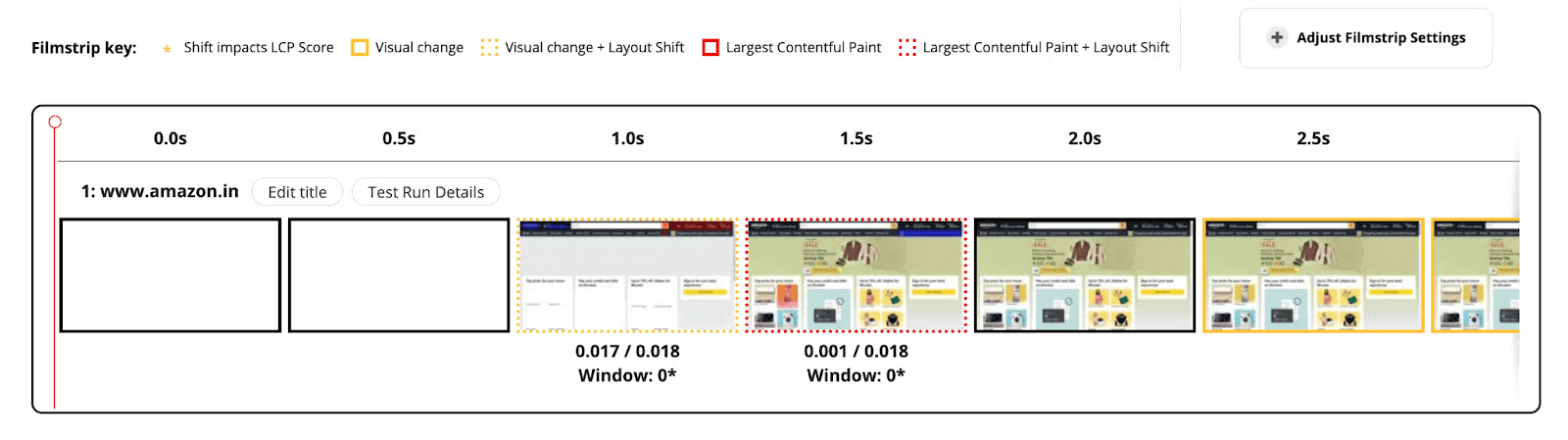
For example, a news website where the main content is text-based articles. The LCP metric would measure the time it takes for the largest text element, such as the headline, to load and be rendered on the page. If this takes a long time, it could indicate that the website has slow loading times or poor optimization.
- Total Blocking Time (TBT): This metric counts the total amount of time that script execution blocks the main thread. This can include things like JavaScript parsing and execution and layout and style calculations.
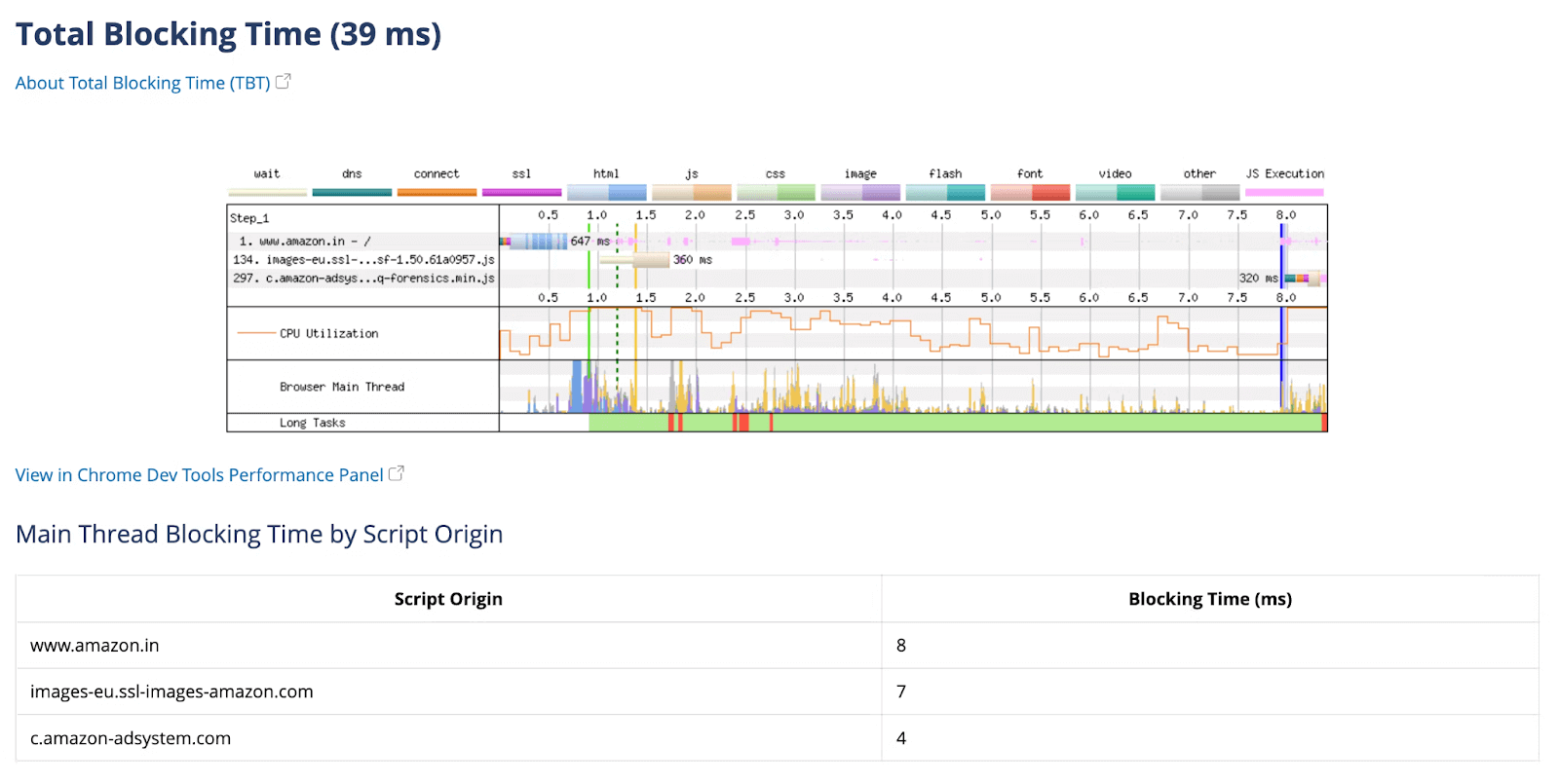
For example, a website with several interactive elements, such as buttons and drop-down menus. The TBT metric would measure the time it takes for the main thread to execute the JavaScript that powers these interactive elements. If this time is high, it could indicate that the website has poorly optimized or heavy scripts slowing down the user experience.
- Cumulative Layout Shift (CLS): This metric counts the overall amount of layout shifting that occurs on a page. This can involve unexpected element movement, changes in element layout, and other visual disruptions.

For example, a website with several advertisements loads as the user scrolls down the page. If the advertisements load and cause elements on the page to shift around unexpectedly, it could result in a high CLS score. This would indicate that the website needs better layout stability and could be causing a poor user experience.
- Time to Interactive (TTI): This metric determines how long it takes for a page to become fully interactive for the user. This comprises loading the main content, running any necessary scripts, and allowing users to interact with the website.
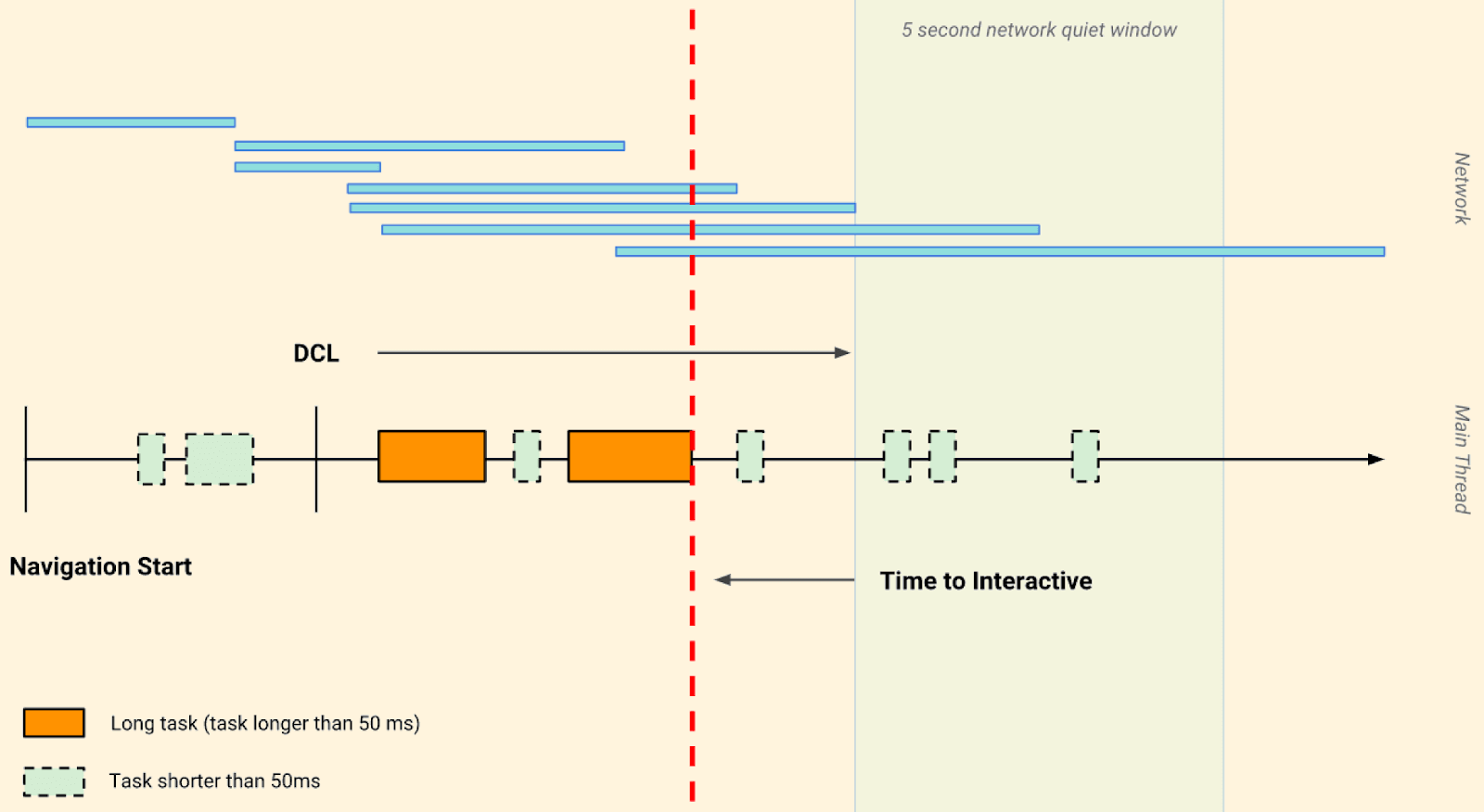
A website with a landing page that has several large images, videos, and animations. The TTI metric would measure the time it takes for the page to become fully interactive for the user, including not only the loading of the main content but also the execution of any necessary scripts and the ability to interact with the page. If this time is high, it could indicate that the website has slow load times or heavy scripts delaying interactivity.
By tracking and analyzing these metrics, you may better understand how your website or application works and spot development areas.
To improve performance, use tactics like code splitting, lazy loading, and service workers to reduce the site’s initial load time. You can also enhance the performance of your website or application by employing browser caching, reducing the amount of HTTP requests, and optimizing graphics.
A good way to visualize these metrics is through browser performance tools like the browser’s dev tools, webpage test, or Google Lighthouse. These tools can provide a breakdown of the different performance metrics, including the ones mentioned above, and can help you identify areas of improvement.
Besides these tools, other mobile friendly test tools like LT Browser 2.0 lets you measure and generate the performance report of your web page for viewports like mobile, tablet, desktop, and laptop. You can even download them as a PDF file for further use.
Google Lighthouse powers the performance reports that LT Browser 2.0 generates. It allows you to get a holistic view of your website and gain actionable insights to boost your mobile web experience.

Techniques
You can use various techniques and tactics to optimize key areas of the user experience to increase the speed of your website or application. Here are a few pointers:
Image Optimization
Image optimization is one of the essential strategies to improve performance. This can be accomplished by lowering image file sizes, using the suitable format, and adequately scaling images. For example, JPEG can be used for photographs, while PNG can be used for images with transparent backgrounds.
Additionally, employing a tool like ImageOptim or Kraken.io can assist you in optimizing photographs by compressing them without sacrificing quality.
- Progressive ImagesProgressive images are a type of image file that loads in multiple stages, starting with a low-resolution version and gradually increasing in quality. This allows the user to instantly see a rough rendition of the image rather than waiting for the full-resolution image to load.
This can help enhance a website’s or application’s perceived performance and deliver a better user experience.
The below image helps you to understand the normal image vs. the progressive image
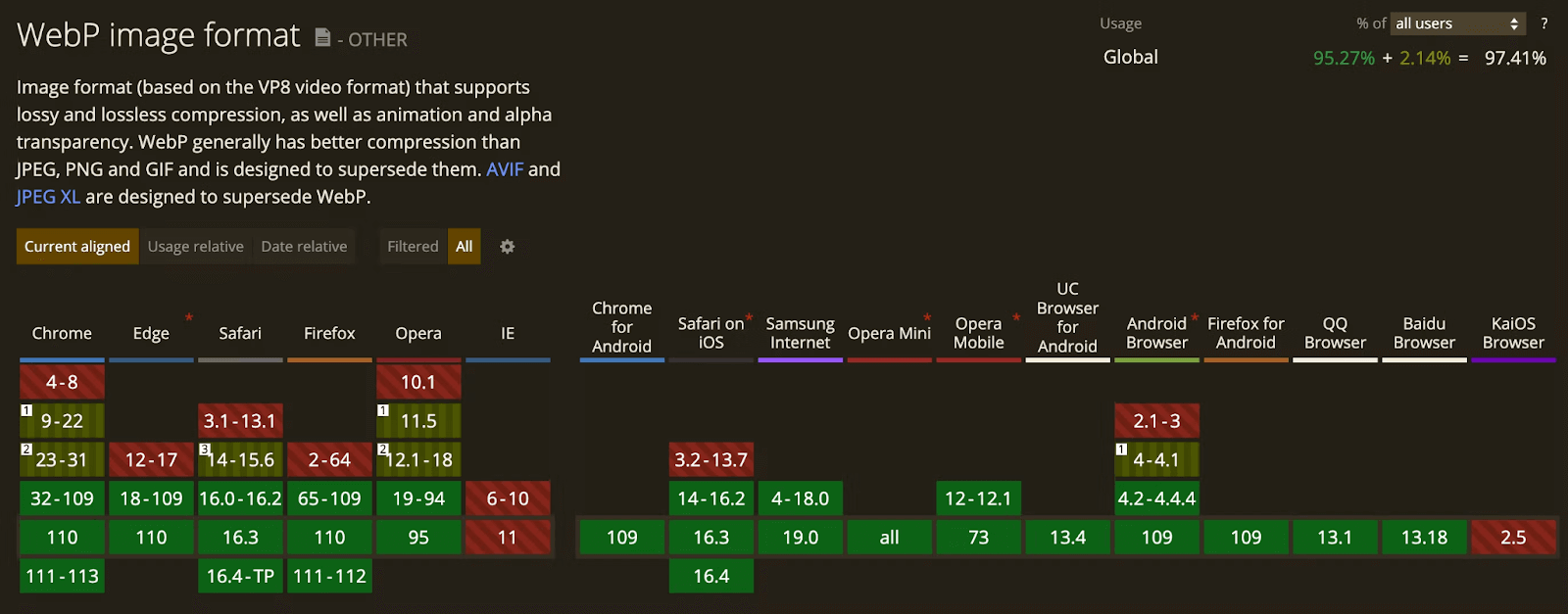
- Modern ExtensionsModern image extensions like webp, jpeg2000, and jpeg-xr can provide better image compression and thus reduce the size of the image file. This can help reduce the load time of a website or application and improve its performance. There is also a detailed article on how to generate nextgen images.
- Preloading ImagesPreloading images is a technique where a website or application loads images in the background before they are needed. This can reduce the load time of a website or application and improve its performance, as the images will be ready to display when the user needs them.

<link as="image" rel="preload" href="https://images.ctfassets.net/57ehn7fu4651/5IZUfISCJ8X3Lfy4ZuWu5Y/f292629c086005f7fbba67ec4a65707a/thoughtworks.png?fl=progressive&h=100&w=400">
<img loading='lazy' src="./assets/thoughtworks.webp" alt='he_sitting_with_notebook'/>
<img decoding='async' src="./assets/thoughtworks.webp" alt='he_sitting_with_notebook'/>
<img fetchPriority='high' src="./assets/thoughtworks.webp" alt='he_sitting_with_notebook'/>
Font Optimization
Font optimization is another key part of the performance. This can be accomplished by using web fonts rather than system fonts and decreasing the number of font files that must be loaded. Additionally, strategies such as font-display: switch; can help ensure that text is shown as soon as the web fonts are loaded.
FOUC (Flash of Unstyled Content): FOUC refers to a visual issue that arises when a web page is loading, and the text is displayed in a default font before the custom font is loaded. This can result in the text appearing in a different font for a short time, confusing users. This can be caused by various factors, including delayed custom font loading times or inadequate implementation of the custom font on the website or application.
Example: https://stevesouders.com/examples/css-fouc.php
Below are some optimization techniques that one can follow to resolve any FOUC that might occur.
- Pre-ConnectPre-connect is a technique that enables the browser to connect to a font server before the font is required. This can help minimize the amount of time it takes for a website or application to launch by reducing the time it takes for the custom font to be loaded.
<link rel="preconnect" href="https://fonts.googleapis.com">
<link rel="preload" as="font" href="https://fonts.googleapis.com/css2?family=Dancing+Script&family=Seymour+One&display=swap" rel="stylesheet">
Preloading of fonts should be used cautiously as it may take time away from other necessary resources to load, so it is better to inline fonts or otherwise preload important fonts when using external stylesheets.
- Self-Hosting vs. Google FontsSelf-hosting is when you host the font files on your server, while using Google Fonts is when you load the font files from the Google Fonts servers. Self-hosting can provide better control over the fonts and improve performance, but it requires more maintenance and can be more expensive.
While using Google Fonts can be easier and cheaper, it can rely on third-party servers, leading to slower loading times and less control over the fonts.
<link
rel="preload"
href="/assets/dancing-script-all-600-normal-6396f243.woff"
as="font"
type="font/woff2"
crossorigin
/>
It is recommended to use self-hosted fonts when using a Content Delivery Network and HTTP/2 as per chromeDevRel.

Eliminating Render-Blocking Resources
Render-blocking resources like CSS and JavaScript files may slow down page loading. To avoid this, use tactics such as code separation and async/defer attributes on script tags. This lets the browser load the most critical resources first while other resources are loaded asynchronously in the background.
- Inline StylesheetsInlining stylesheets is a technique in which CSS styles are added directly to HTML components rather than linking to a separate stylesheet. Removing the requirement for the browser to send a separate request for the stylesheet can help to reduce render-blocking resources. This can help lower a website’s or application’s load time and improve performance.
- Reduce StylesheetsReducing the number of stylesheets can also assist in the removal of render-blocking resources. By combining numerous stylesheets into a single file, you can reduce the number of server requests, which can help improve a website’s or application’s efficiency.
- Defer Non-Critical CSSDeferring non-critical CSS is a technique in which you load only the styles required for the page’s initial viewport and then load the other styles as the user scrolls down the page. This can assist in removing render-blocking resources by lowering the amount of CSS that needs to be loaded initially, which can enhance a website’s or application’s performance.
- Remove Unused CSSRemoving unused CSS is a strategy that involves removing any CSS styles that are no longer in use on the website or application.
- Modify/Compress CSSCSS modification and compression is a technique that involves minifying the CSS code and removing any extraneous white space and comments. Lowering the size of the CSS file can reduce render-blocking resources and enhance the performance of a website or application.
- JavaScriptOptimizing JavaScript is also a way to eliminate render-blocking resources. This can be done using techniques such as code splitting, async/defer attributes, and removing unnecessary scripts.
- Long TasksLong jobs are javascript activities that take more than 50 milliseconds to accomplish. These lengthy tasks can clog the main thread and make the browser unusable. To avoid this, employ techniques like web workers and requestIdleCallback to offload long tasks off the main thread.
- External LibrariesRemoving superfluous external libraries can also aid in the removal of render-blocking resources. This can be accomplished by eliminating any libraries no longer utilized on the website or application or using a smaller, lighter library with the same functions.
Better Layout Shift Handling
You may improve layout shift handling by scaling items with CSS rather than HTML attributes and controlling element layout with the CSS Position property. Additionally, you can utilize the will-change attribute to notify the browser about an element’s intended change, which can prevent unexpected layout adjustments.
- Image DimensionsProviding image dimensions can help prevent layout shifts by allowing the browser to reserve the necessary space for the image before loading it. This means that the page layout will not shift when the image is loaded, which can improve the stability of the layout and provide a better user experience.
- Reserve Ad SpotsReserve ad spots are a technique where you reserve a specific area on the page for ads rather than letting them load anywhere on the page. This can help prevent layout shifts by ensuring that ads will not cause unexpected layout changes, which can improve the stability of the layout and provide a better user experience.
- Prefer Transform AnimationsPreferring transform animations is a technique where you use CSS Transformations, such as scale and translate, to animate elements on the page, rather than using layout changes, such as width and height. This can help prevent layout shifts by ensuring that animations will not cause unexpected layout changes, which can improve the stability of the layout and provide a better user experience.

Caching
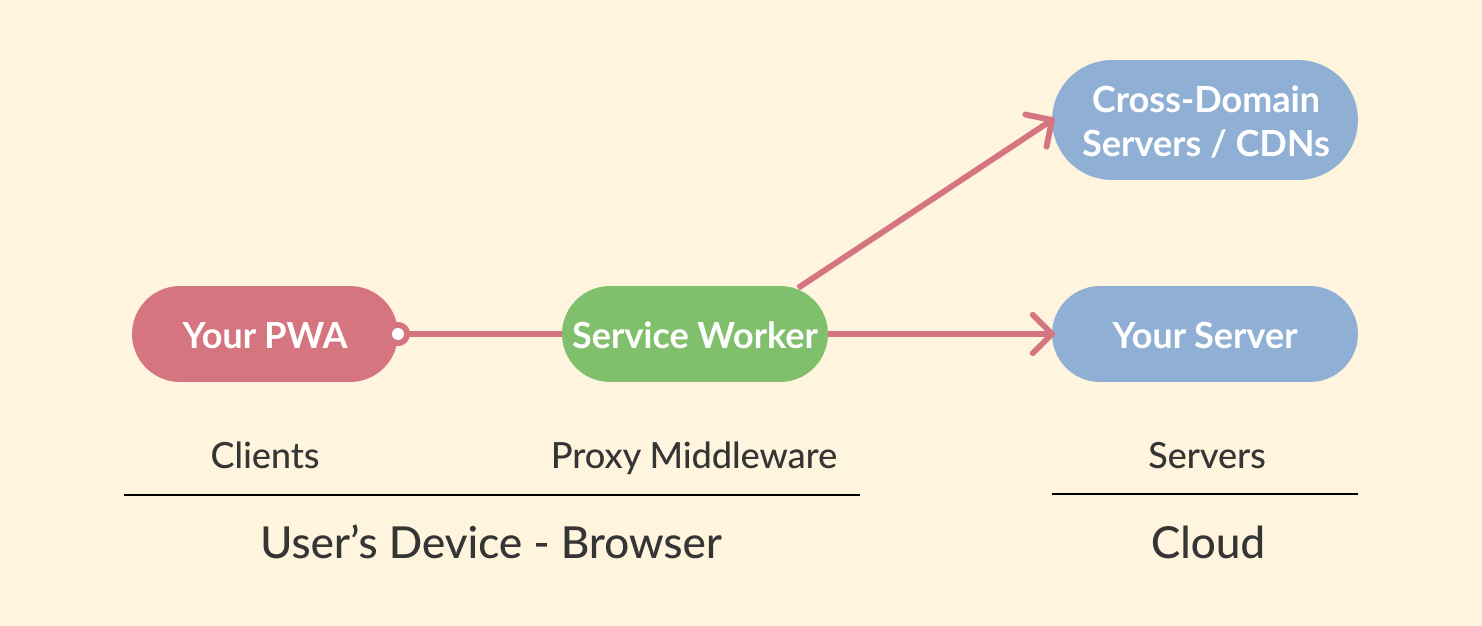
Caching can improve a website’s or application’s performance by reducing the number of requests to be made to the server. This can be done by using techniques like browser caching and server-side caching. Additionally, using a service worker to cache resources can help improve the performance of a website or application, even when the user is offline.
- Different Cache NeedsDifferent caching strategies can be used to improve the performance of a website or application, depending on the specific needs of the website or application. For example, a website or application with a lot of static content, such as images and videos, may benefit from using a CDN (Content Delivery Network) to cache the content.
On the other hand, a website or application with a lot of dynamic content, such as user-generated content, may benefit from using server-side caching to cache the content.
- CDN (Content Delivery Network)A CDN is a network of servers distributed worldwide, which can be used to cache static content, such as images, videos, and stylesheets. By using a CDN, you can reduce the load on your servers and improve the performance of your website or application by ensuring that the content is delivered from a server that is geographically close to the user.
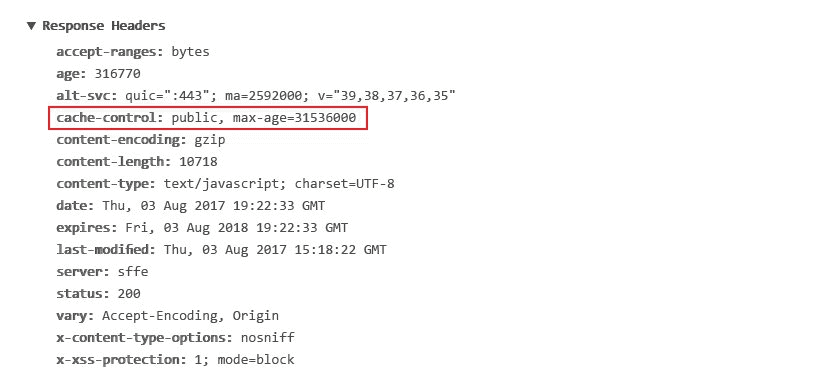
- Cache Headers & ETagCache headers and ETag control the caching of a website or application. Cache headers can specify how long a resource should be cached and if it should be revalidated. ETag is a value associated with a specific resource version, which can be used to determine if the resource has been modified since it was last requested.
By using cache headers and ETag, you can control the caching of a website or application, which can help reduce the load on your servers and improve the performance of your website or application.
- Service WorkerA service worker is a script that runs in the background and allows you to control how resources are cached in the browser. This means that you can cache resources and serve them offline, which can help improve the performance of your website or application, especially when the user is offline.
- Browser CachingBrowser caching is another caching strategy that can be used to improve the performance of a website or application. This technique is used to store resources in the browser’s cache, which can be used to serve the resources from the cache instead of requesting them from the server again. This can reduce the load on your server and improve the performance of your website or application.
By following these techniques, you can improve the performance of your website or application and provide a better user experience. However, it is essential to note that performance optimization is an ongoing process, and you should continually monitor and analyze the performance metrics of your website or application to identify areas for improvement.

Conclusion
Optimizing performance is an important part of website and application development. You can uncover opportunities for improvement by monitoring and analyzing client-side performance indicators.
Image optimization, typeface optimization, reducing render-blocking resources, better layout shift handling, and caching can help you improve your website’s or application’s efficiency and user experience. You may optimize the performance of your website or application and guarantee that consumers are satisfied with their experience by following the above techniques.


Did you find this page helpful?
More Related Hubs
TestMu AI forEnterprise
Get access to solutions built on Enterprise
grade security, privacy, & compliance
- Advanced access controls
- Advanced data retention rules
- Advanced Local Testing
- Premium Support options
- Early access to beta features
- Private Slack Channel
- Unlimited Manual Accessibility DevTools Tests