 Decode AI-Powered Quality Engineering from AI & QA Leaders,Register for Free!

Next-Gen App & Browser Testing Cloud
Trusted by 2 Mn+ QAs & Devs to accelerate their release cycles

On This Page
Is It Safe to Clear the Cache
Clear your doubts on whether it’s safe to clear the cache in browsers like Chrome, Firefox, Safari, and Edge, and how it boosts performance without data loss.

Tahneet Kanwal
January 11, 2026
Cached data plays a crucial role in improving browsing speed by storing elements like images, scripts, and other site data. However, over time, this cached data can cause issues such as slow loading times or displaying outdated content.
So, is it safe to clear the cache? The answer is yes. Clearing the cache is a safe and effective way to resolve performance issues without affecting your personal data or settings.
Generally, clearing cached data is safe and can help resolve performance issues like slow browsing or outdated content. Cache stores temporary files such as images and scripts to speed up page loading, but over time, it can accumulate and cause problems.
Cleaning the cache removes these temporary files, improving performance without affecting your data or settings. Therefore, it is safe to clear the cache in any browser to avoid slowdowns and ensure a smoother browsing experience.
Steps to Clear Cached Data on Browsers
Below are the steps to help you clear the cache on browsers and help you verify whether it is safe to clear the cache.
Is It Safe to Clear the Cache in Google Chrome?
Below are the steps to clear the cache in Google Chrome, which will help you determine whether it is safe to do so and how it will impact your browsing experience.
- Open Chrome, click the three-dot menu icon in the top-right corner and select Delete browsing data.
- Alternatively, use the keyboard shortcut:
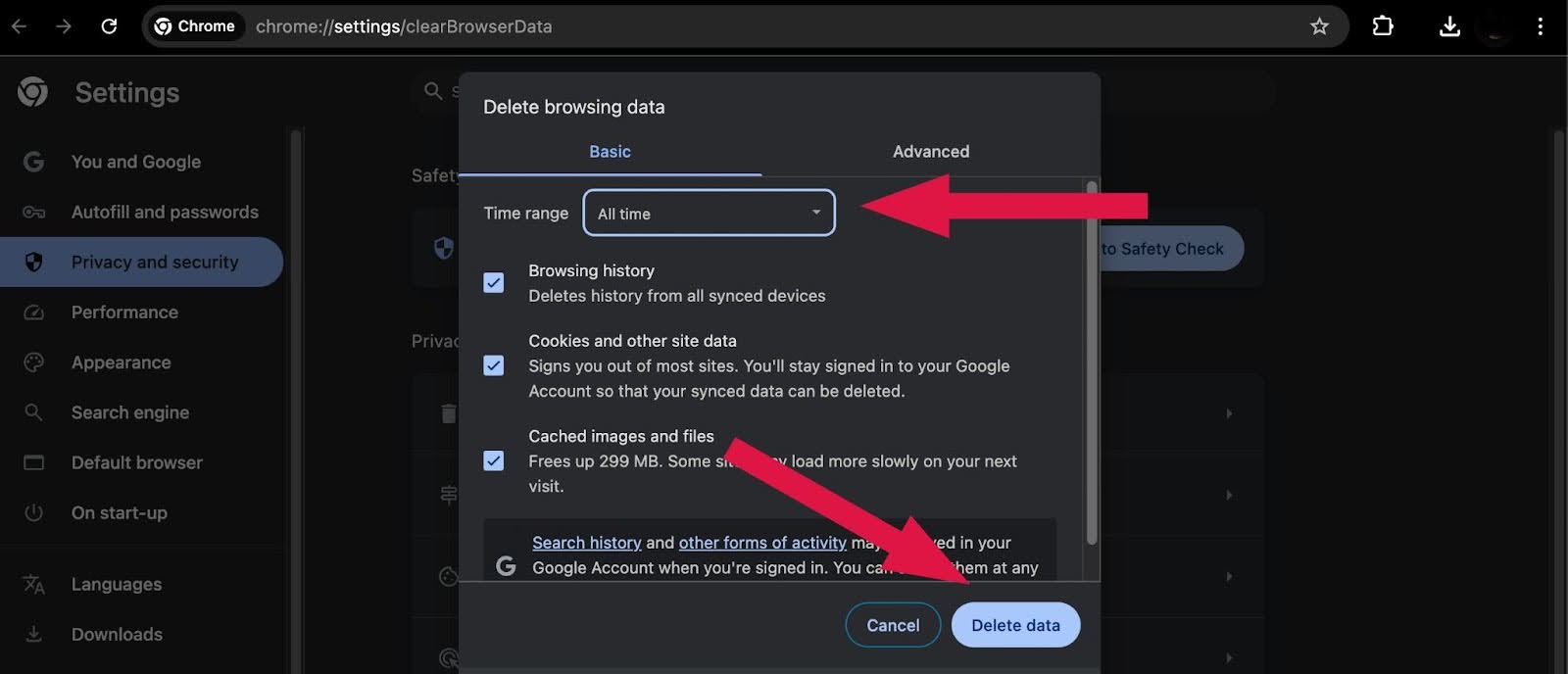
- Choose the desired Time range for clearing data.
- Ensure the box for Cookies and other site data is checked, along with any other data you wish to remove.
- Click the Delete data button to clear your cache.
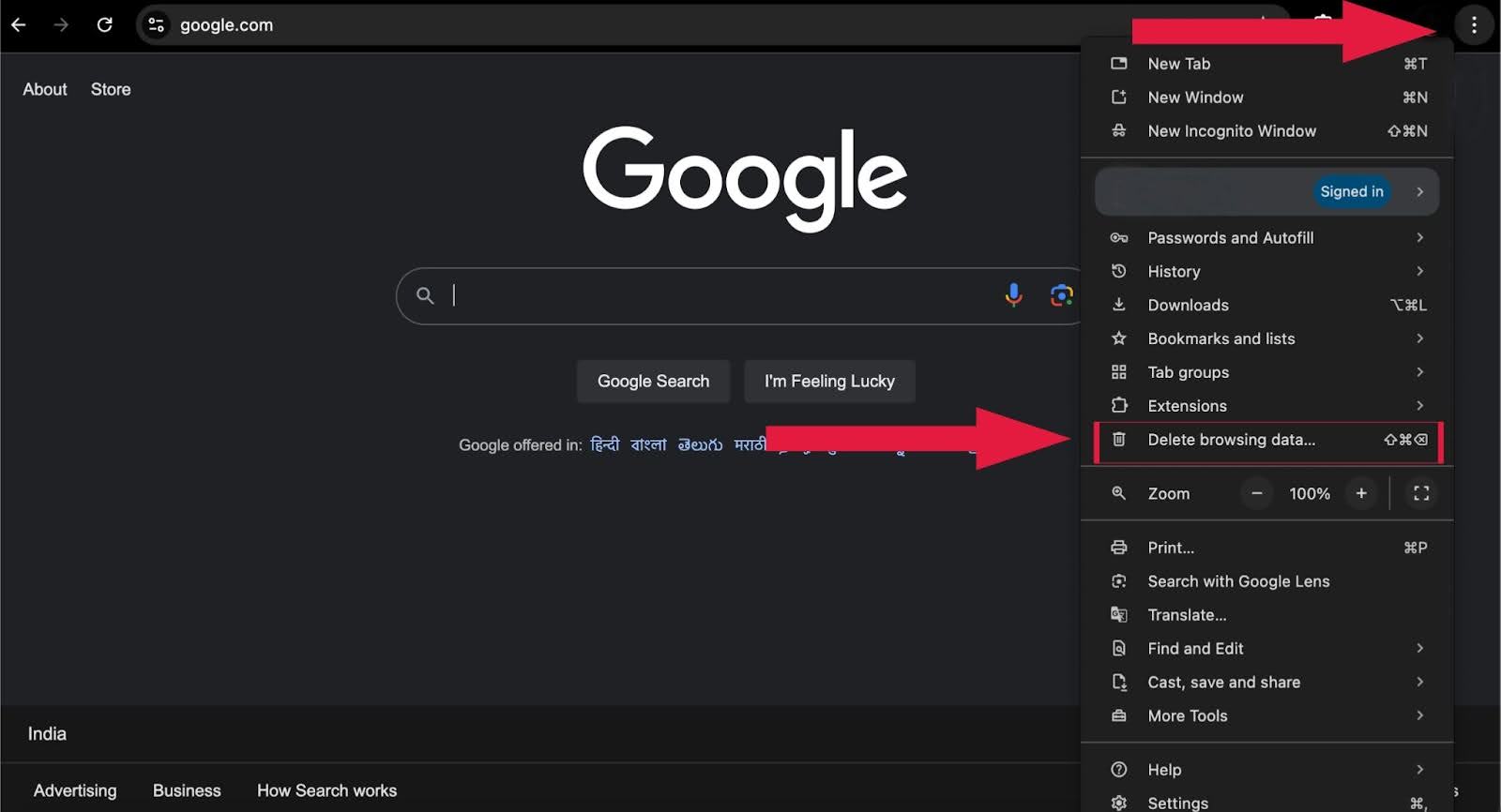
- Windows: Ctrl + Shift + Delete
- Mac: Command + Shift + Delete
The above steps demonstrate that clearing the cache in Chrome is safe. If you’re wondering if it’s safe to clear the cache, rest assured—as mentioned earlier—that it only removes temporary files without impacting your data or settings.
Is It Safe to Clear the Cache in Mozilla Firefox?
Below are the steps to clear the cache in Mozilla Firefox, along with insights into whether it is safe and how it impacts your browsing experience.
- Click the hamburger menu icon in the top-right corner of the browser and select History from the dropdown menu.
- In the next menu, select Clear recent history.
- A popup window will appear. Select the Cached Web Content option and any other items you wish to remove, such as browsing history, cookies, search history, or data like site settings and offline website data.
- Use the Time range menu to select the period for clearing the cache, such as Last 24 hours, All time, or Everything, based on your preference.
- Click on the Clear button to proceed.


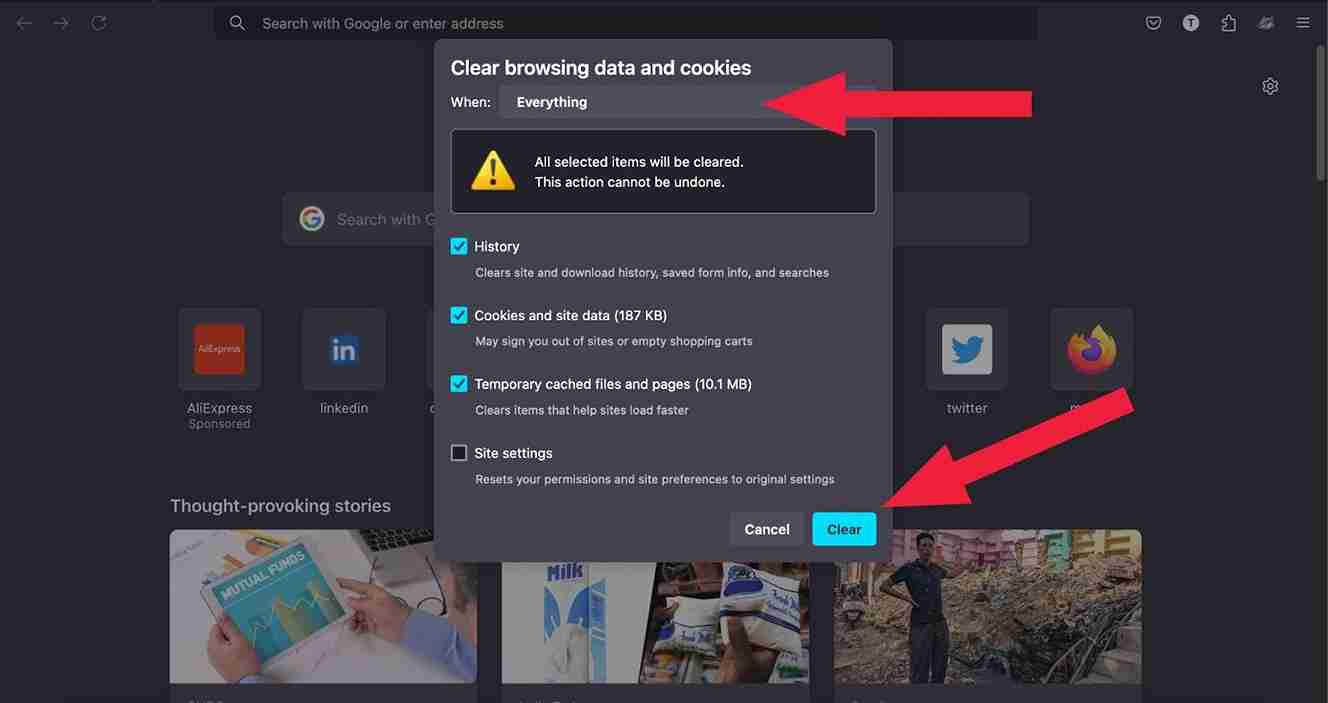
The steps above show that clearing the cache in Firefox is safe. If you’re wondering if it is safe to clear the cache, yes, it is safe, as it only removes temporary files, ensuring better performance without impacting personal data or settings.
Is it Safe to Clear the Cache in Safari?
Below are the steps you must follow to clear the cache in Safari, along with clearing your doubt on whether it is safe to clear the cache.
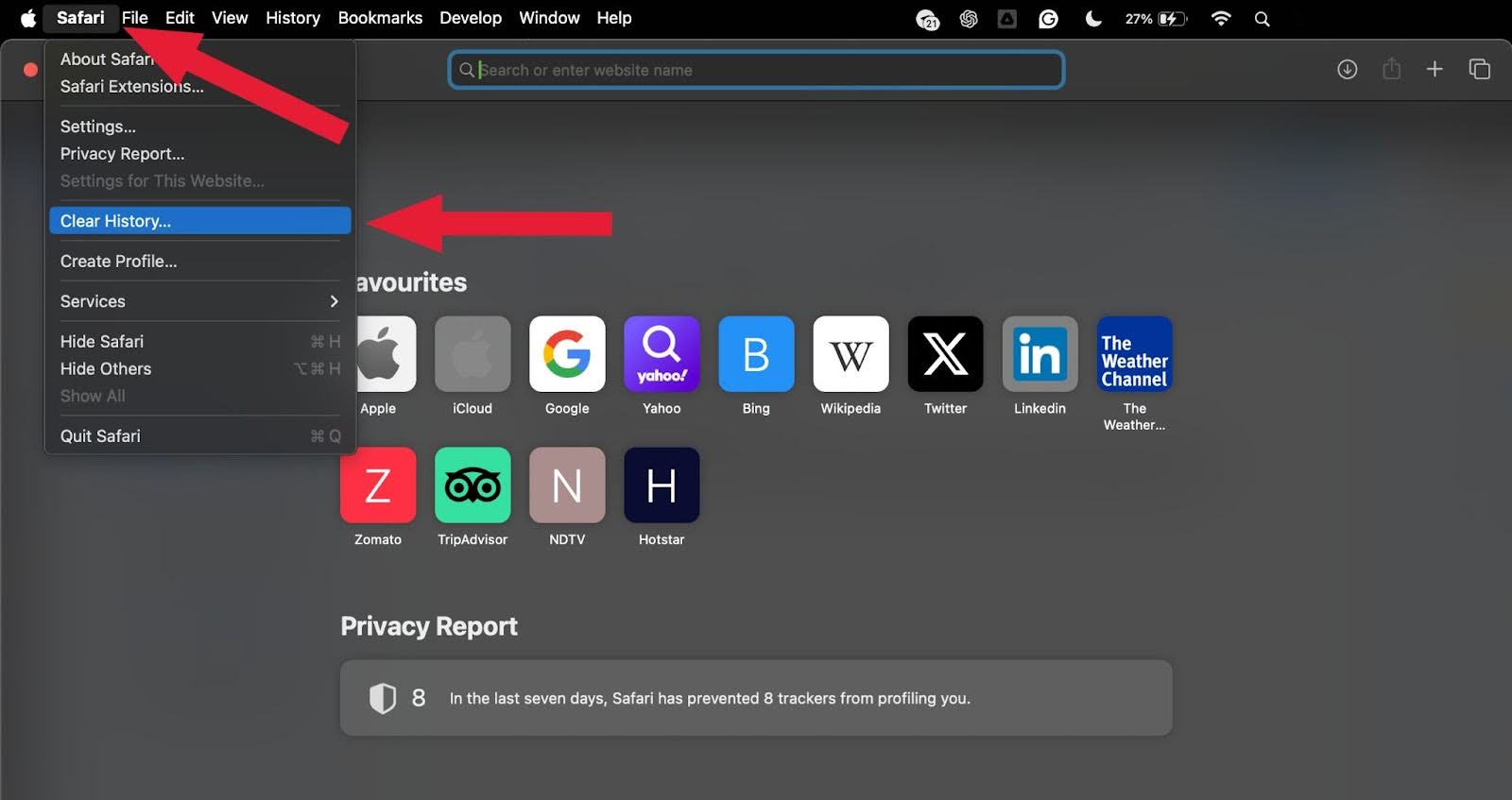
- Open Safari on your device.
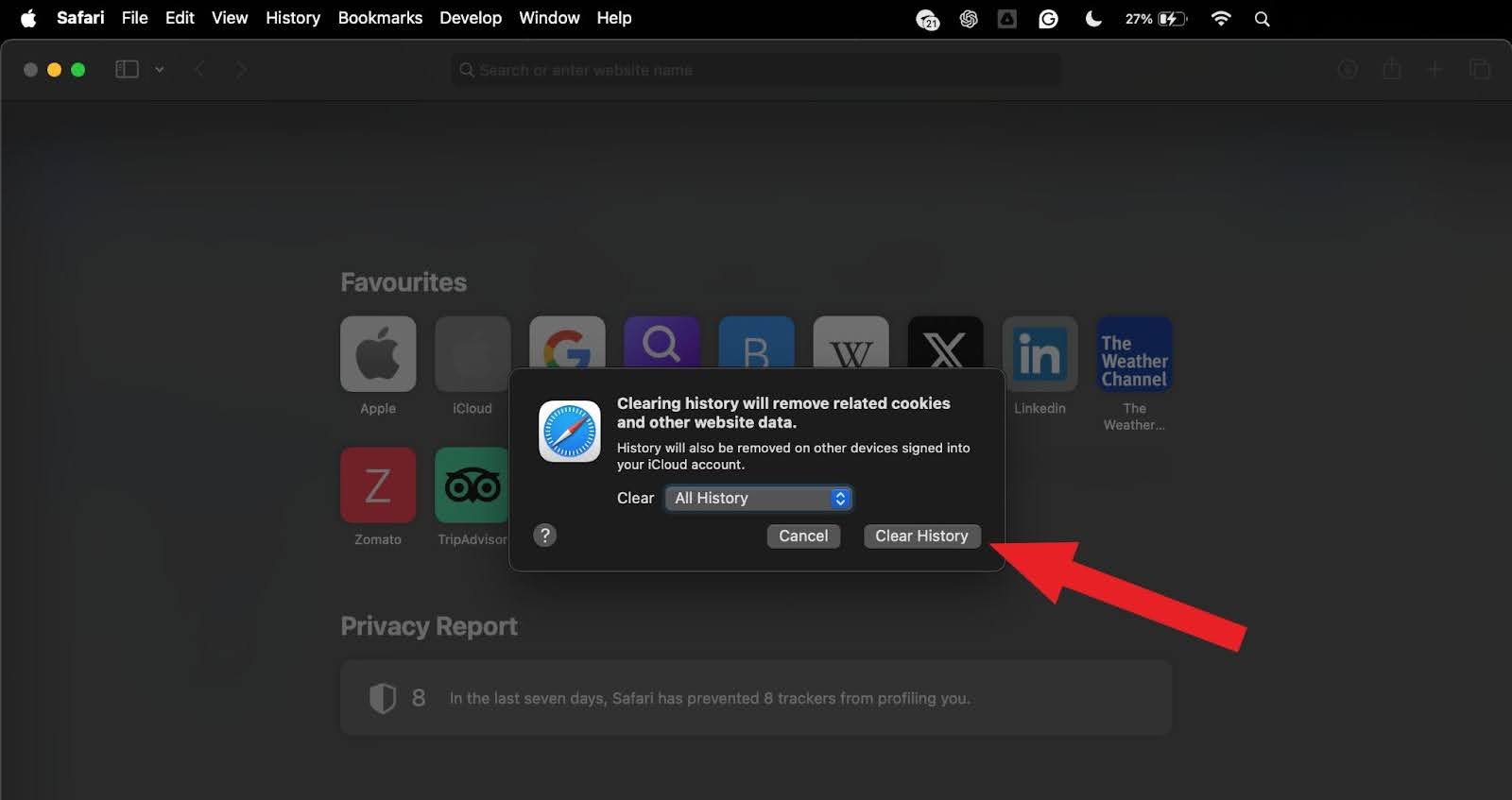
- Go to Safari in the top menu bar, then select Clear History from the dropdown menu.
- A popup window will appear, allowing you to choose a timeframe for deleting the cache data. Options include:
- After selecting your preferred time frame, click the Clear History button to finish.
- Last Hour
- Today
- Today and Yesterday
- All History
The above process will help you clear the cache, cookies, browsing history, and website data in Safari.
The steps above help you clear the cache, cookies, browsing history, and website data in Safar, and yes, it is safe to clear the cache as it only removes temporary files to avoid slowness and ensure better performance without impacting personal data or settings.
Is it Safe to Clear the Cache in Microsoft Edge?
Below are the steps you must follow to clear the cache in Microsoft Edge, help you with clearing your doubt on whether it is safe to clear the cache.
- Open Microsoft Edge.
- Click on the three-dot menu icon in the top-right corner, then select Settings.
- In the left-hand menu, click on Privacy, Search, and Services.
- Scroll down to the Clear browsing data section and click Choose What to Clear.
- A popup window will appear. Ensure Cached images and files is selected, along with any other data you wish to remove (such as browsing history or cookies).
- Use the Time range dropdown to choose when you want to clear the cache (Last hour, Last 24 hours, All time).
- Click the Clear Now button to remove the selected data.

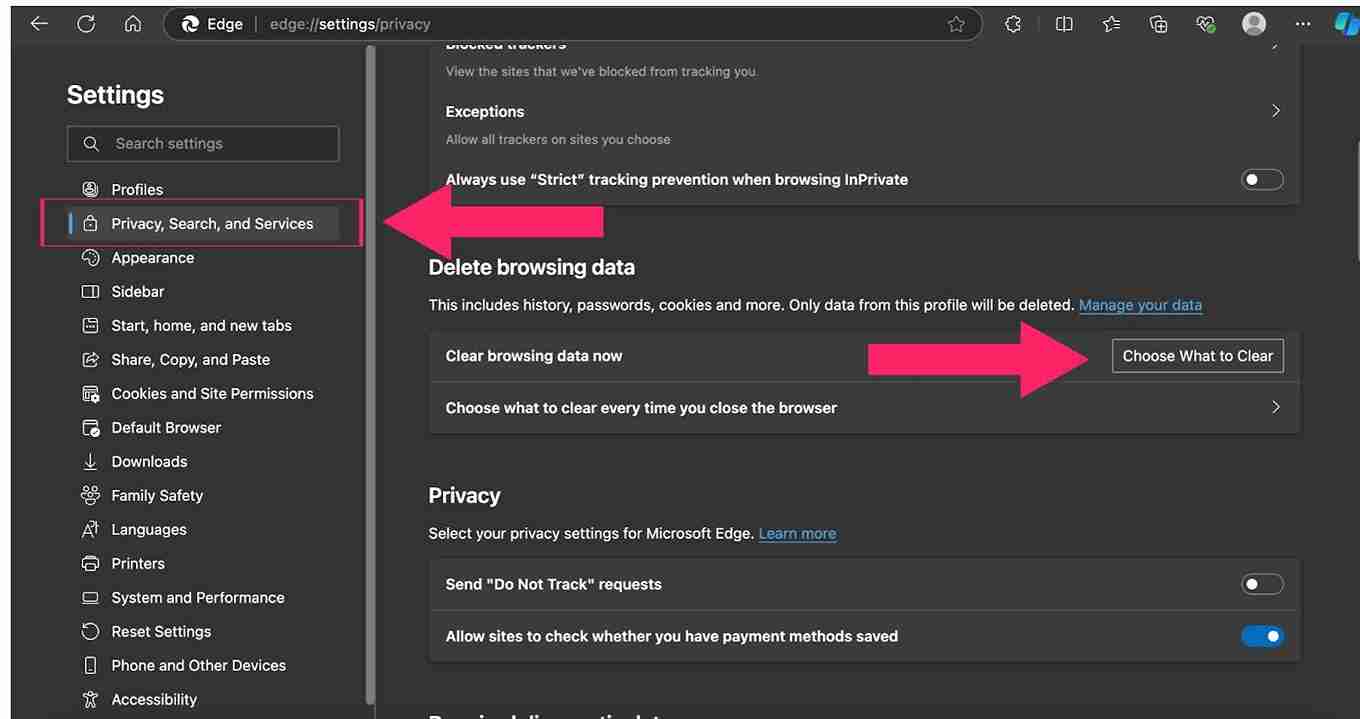
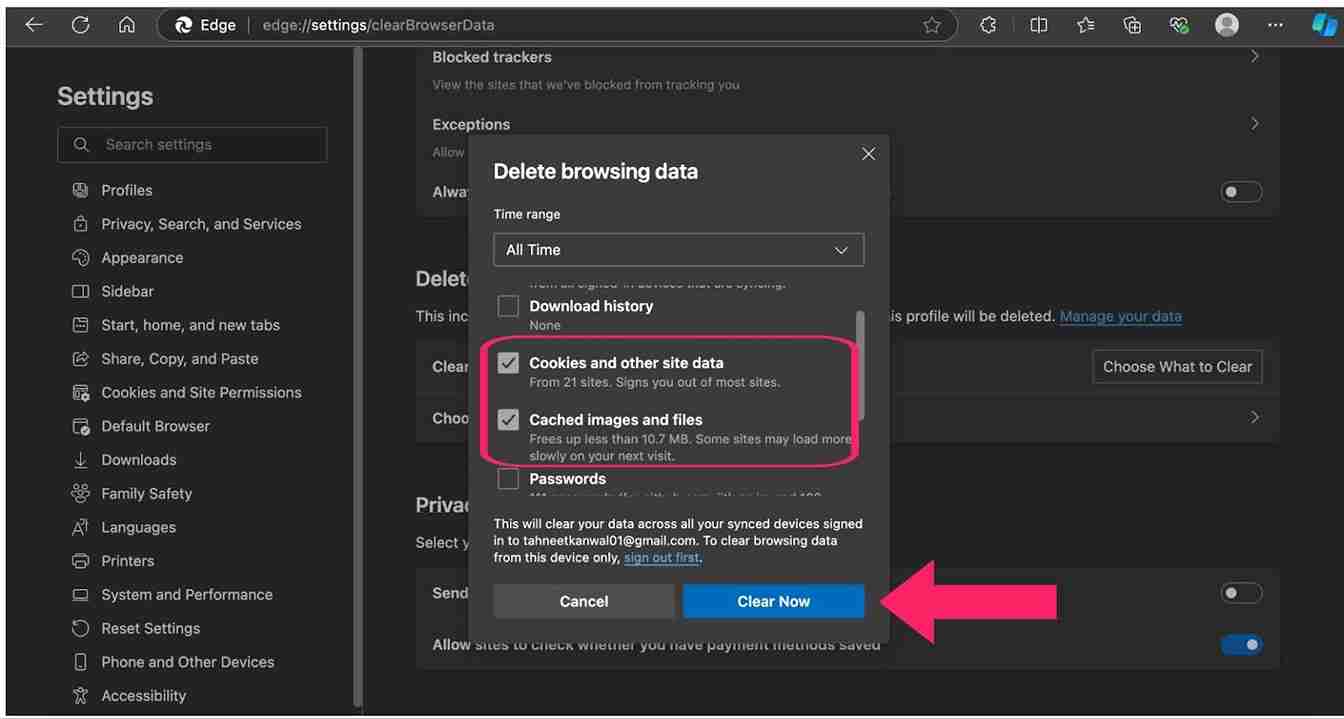
The steps above demonstrate that clearing the cache in Microsoft Edge is safe. It only removes temporary files without affecting your settings or saved data. If you’re wondering if clearing the cache is safe, rest assured that it improves browser performance without any significant downsides.
Is it Safe to Clear the Cache in Opera?
Below are the steps you must follow to clear the cache in Opera, along with addressing whether is it safe to clear the cache or not:
- Click on the Opera menu in the top-left corner and select Settings.
- In the sidebar menu, select the Privacy & security section.
- Click on Delete browsing data.
- Select All time as the time range to clear the entire cache from your browser.
- Click on the Delete data button to complete the process.


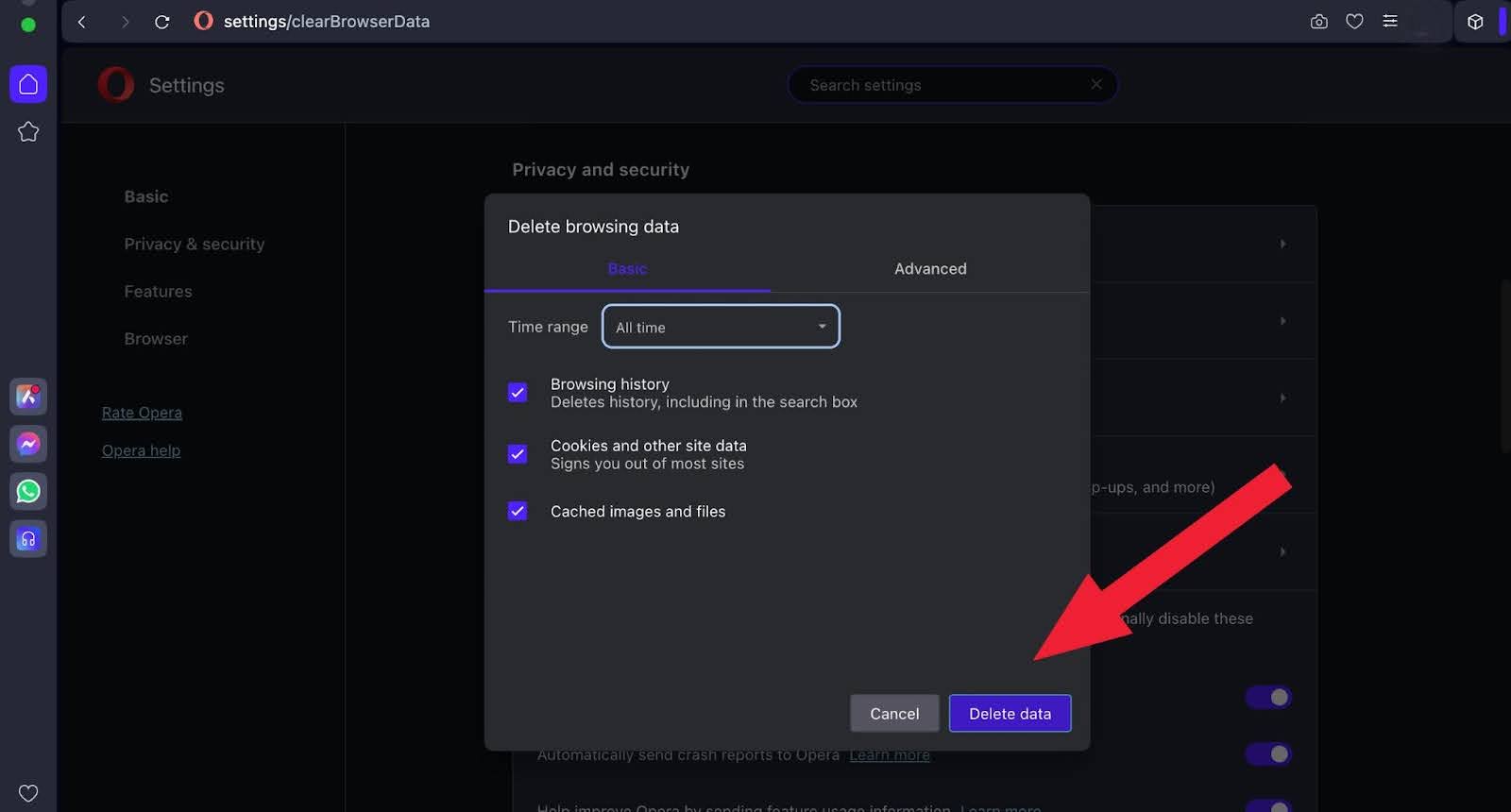
The above process helps clear the cache safely. It removes only temporary files, improving browser performance without affecting your data or settings. So, if you’re wondering if clearing the cache is safe, the answer is yes! It’s a good practice to ensure smooth browsing.
Conclusion
For optimal website performance, clearing your cache is an effective solution. It is safe to do and can be particularly helpful for troubleshooting by removing outdated or corrupted files that may disrupt your browsing. However, it’s important to strike a balance—clear the cache when necessary while allowing the browser to store data for faster access to frequently visited websites. This ensures a smoother and more efficient browsing experience.


Summarize with AI


Frequently asked questions
Did you find this page helpful?
More Related Hubs
TestMu AI forEnterprise
Get access to solutions built on Enterprise
grade security, privacy, & compliance
- Advanced access controls
- Advanced data retention rules
- Advanced Local Testing
- Premium Support options
- Early access to beta features
- Private Slack Channel
- Unlimited Manual Accessibility DevTools Tests