

Next-Gen App & Browser Testing Cloud
Trusted by 2 Mn+ QAs & Devs to accelerate their release cycles


How Browsers Work – A Peek Under the Hood
Explore how browsers work behind the scenes delving into their core components and the rendering process that builds and displays web pages.

Arnab Roy Chowdhury
December 30, 2025
In the past years, when Internet Explorer dominated the market with 90% usage share, developers used to consider IE as a black box with nothing to do except viewing the rendered code. However, the present is the age of open source browsers. With browsers like Firefox and Chrome covering more than 50% of usage share, it has become quite easy for developers to look at what is happening under the hood. In brief, there are thousands of lines of C++ codes. Let’s get a brief understanding of how a browser works.
Structure of a Browser
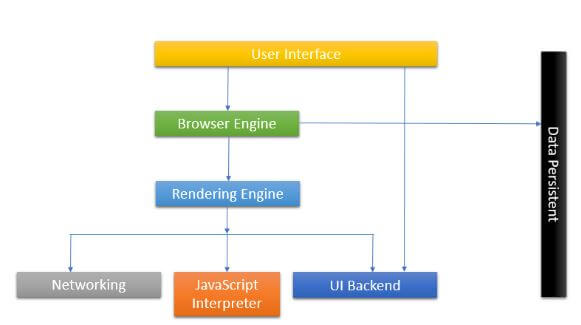
Primary components of a browser are
- User Interface – This consists of forward and back button, bookmarks, address bar etc. along with the window that displays the requested page.
- Browser engine – It commands action between rendering engine and the user interface.
- Rendering engine – The main function of rendering engine is to display the content that is requested. For example, if an HTML content is requested, the engine parses CSS and HTML and when the content is parsed, it is displayed on the screen.
- User Interface backend – It can be used for painting basic images like windows or combo box. The backend exposes only a generic platform independent interface. Beneath it, user interface methods are used by the operating system.
- JS Interpreter – JavaScript and all other types of scripting is parsed and executed by the inbuilt interpreter.
- Networking – Performs implements of HTTP request and response.
- Data Storage – All types of data, like cookies are saved locally by the browser. Storage mechanisms like WebSQL, FileSystem, localStorage are also supported by the browser.

Process Flow
The networking layer provides the rendering engine with contents of the document that is requested. The contents are generally transferred in chunks of size 8kb each. Once that happens, the following flow occurs.
- A content tree is created by the rendering engine where the HTML elements get parsed and get converted to DOM nodes. Style data in both internal and external CSS are parsed and visual information along with styling is used to create the render tree.
- Rectangles with specific colors and dimensions are arranged inside the rendered tree. They are meant to be in the right order to be rendered on the screen.
- Once the rendered tree is constructed, it follows the layout process where each node is given the exact coordinates, according to which they should be displayed on the screen.
- The final stage is the painting. Each node in the render tree will be designed according to the code written in the backend layer of the UI. Painting usually takes place in an order
- Background color is assigned first.
- It is immediately followed by background image.
- Border is assigned.
- Children are stacked.
- Outline of the page is created.
All the processes that occur inside the rendering industry take place gradually. However, the job of a render engine is to display content on the screen as soon as possible for providing better user experience. That is why, instead of parsing the HTML and building the entire content of the render tree in one go, it starts building few parts of the tree while other parts get parsed and build in the backend. Let’s take a detailed look at Layout, a complex part of a page’s lifecycle.

Austin Siewert
CEO, Vercel
Discovered @TestMu AI yesterday. Best browser testing tool I've found for my use case. Great pricing model for the limited testing I do 👏
2M+ Devs and QAs rely on TestMu AI
Deliver immersive digital experiences with Next-Generation Mobile Apps and Cross Browser Testing Cloud

This certification is for anyone who wants to stay ahead among professionals who are growing their career in Selenium automation testing.
Here’s a short glimpse of the Selenium 101 certification from TestMu AI:
DOM and CSS Object Model Construction
In the very first step of the rendering engine, an HTML document is parsed and the parsed elements are converted into nodes in the DOM tree. Each element in the tree is represented to be a parent node, within which the child elements are contained.
While the browser is working on the parsing of HTML, it faces the “link” tag which references the external CSS linked to the page. It anticipates that the link is needed to render the complete page. A request is sent immediately to parse the CSS page.
Layout
When a renderer is added to the tree after creation, it does not have any size or position. The layout is the means of calculating those values.
A flow-based Layout model is used by HTML. This means that in most cases, the layout is completed in a single pass. Elements that are placed later in the layout tree do not impact the geometry of elements that are placed earlier. So, the layout can proceed in an omnidirectional way. Although there may exist some exceptions. More than one passes are required in tables.
All renderers consist of a layout method, which occurs recursively through the child elements in the frame hierarchy. In a default html page, a root renderer is placed at (0,0) coordinate and its dimensions serve as a part of the browser window that is visible, known as viewport.
Process flow followed by a layout:
- The rendered Parent decides the width.
- It goes over children and sets their horizontal and vertical coordinates.
- Child layout is called only when needed.
- The accumulative height, margin, and padding of a child are used by the parent to figure out its own height, which will thereby, be used by the parent renderer that lies above it in the hierarchy.
- The value of the dirty renderer is set to false.
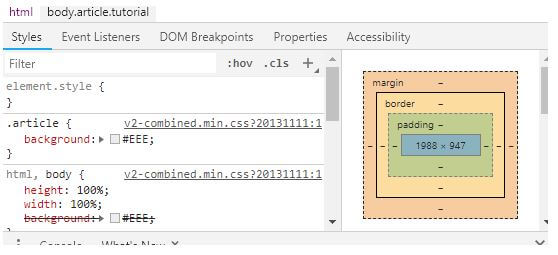
- If you take a look at the developer console, you will find a box-like structure containing a series of rectangular boxes, one placed inside the other. This is CSS Box model which is made of containers which represent the element in the document tree and laid out in a way according to the visual model.
- Each box contains a content area and may or may not contain surrounding border, padding, margin etc.
Painting
In Painting, the paint() method is called to render the UI infrastructure, custom styles, etc. on the component. Painting occurs either globally, where the whole render tree is painted at once, or in incremental order, where the elements are stacked context wise.
When any custom style of the webpage is changed, the browser performs minimal action required, since any small change will result in the repaint of the entire element, layout change in its position and re-rendering of the entire tree.
Layered Display of Elements
The z-index property of an element deducts where the element will be placed in the stack. In the stack, elements that are aligned at the back gets painted first and elements with higher z-index value are arranged on the front and get painted at the last. These stacks usually have 2 types:
- Containers or boxes having z-index property forms the local stack.
- Viewport of the HTML forms the outer stack.
Browsers used nowadays are mostly freeware and fully functional that can render and display not only web pages but web applications as well. Some of them offer plug-ins that allow the user to get multimedia related information. Getting a clear understanding of how a browser works is highly beneficial for a web developer before using the developer console and building an interactive web application as every browser is developed differently, hence, it renders differently.
This is the main reason why a website looks different on different browsers. So, it is necessary to test any website on all browsers. You can use TestMu AI to test your websites on different browsers like Firefox, Chrome, Safari, Internet Explorer, Edge, Yandex, and mobile browsers as well.
So, understand the browsers, develop, and test!
Happy developing and happy testing. 🙂



Did you find this page helpful?
More Related Hubs
TestMu AI forEnterprise
Get access to solutions built on Enterprise
grade security, privacy, & compliance
- Advanced access controls
- Advanced data retention rules
- Advanced Local Testing
- Premium Support options
- Early access to beta features
- Private Slack Channel
- Unlimited Manual Accessibility DevTools Tests