

Next-Gen App & Browser Testing Cloud
Trusted by 2 Mn+ QAs & Devs to accelerate their release cycles


Geolocation Cross Browser Testing Through VPN on TestMu AI
The role played by different Geolocation IPs a.k.a GeoIPs in terms of look and feel of a website, is eminent to some of us. To those of us who are not aware about it yet, may find it shocking but here is the truth! Your website may appear and work differently through different countries and continents.

Harshit Paul
March 7, 2026
The role played by different Geolocation IPs a.k.a GeoIPs in terms of look and feel of a website are eminent to some of us. To those of us who are not aware of it yet, may find it shocking but here is the truth!
Your website may appear and work differently through different countries and continents. So if you thought it was enough to perform testing on your website through your local geographic IP, think again!
Confusing, isn’t it? Here is a basic example to help you bring more clarity.
When searched for the keyword ‘TestMu AI’ from 2 different geographies. This is how the result page looked like.
1. When searched through an IP from France.
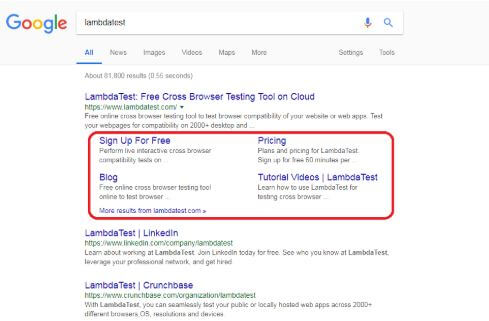
2. When searched through an IP from United Kingdom.
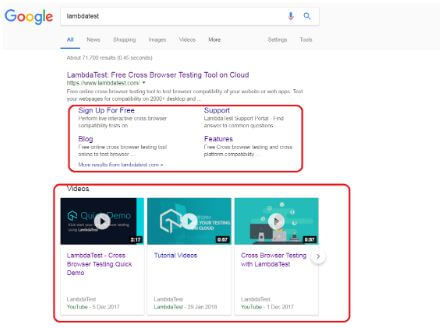
You can notice the differences through the area highlighted.
Real Time Scenarios For Geolocation Testing
- Billing: Your billing page should support currency conversion with respect to the IP. So if a user from the US would show up at your website then he/she should be billed in USD, similarly if one is visiting from France then the bill should be presented in Euros.
- SERPs – Search Engine Result Pages: For a website that is targeting audience from different parts of globes. It is always recommended to have a constant check on SERPs to address your website according to the respective trends of different geographies. This is extremely necessary for clothing brands. Traditional wearing differs from one country to another.
- GDPR compliance – General Data Protection Rule Compliance: Payment Gateways may differ from one geography to another due to different GDPR compliance for different geographies.
- Google Ads: They also differ from one geographic region to another. You need to check through IPs of different geolocations regarding which ads are visible and in what manner?
- Bandwidth: 4G may or may not be available to every one of your targeted geography and even if it is available. The available bandwidth will usually be different. Meaning some countries would provide a faster download speed in 4G as compared to others. So you need to be mindful of the content optimization according to your targeted geolocations. Testing from IPs belonging to different geolocations will help you get a realistic view of page loading speed. A faster page loading will not only help in pleasing your customers, but it would also help in ranking higher in SERPs.
How can you test from an IP of a different Geolocation?
This is where a VPN comes to rescue geolocation testing! VPN – Virtual Private Network – It helps in expanding a private network through a public network. Initially, VPNs were introduced and used among large enterprises, defense organizations, banking companies, etc. to keep their data secure. A VPN created a pathway through which people working in large organizations could access the data they want, remotely, in a secure manner. The data is securely transmitted through the process of Cryptography. In Cryptography, the data is encrypted from the sender’s end and then it gets decrypted with the help of a unique key on the receiver’s end. Times have changed and with it the popularity of VPN too! These days VPNs are so widely available that they are used by almost every one of us.
Some use it to surf the internet without worrying about the restrictions applied for their GeoIP. Some use it for the purpose of maintaining anonymity. Some use it without even realizing the meaning of a VPN. In this blog, we are referring to those who use it for testing a web-app from different geolocations.
Not all VPNs work in the same manner. Few may provide you with considerably more geolocations to choose from as compared to others. Few may provide less number of geolocations but a number of dynamic GeoIPs with respect to others. There are many more parameters related to comparison.

TestMu AI Tunnel + VPN
Note: By default, TestMu AI uses IP2Location to determine your Geolocation, based on which you are routed to the nearest data center. This way you get the best possible performance every time. However, in case you want to perform Geolocation sensitive testing, you can bypass this nearest data center based routing. With this feature, the TestMu AI machine you get for testing would be proxied through the location you have set and you would get the testing experience as if you are testing from your selected location.
If you are not already aware of what TestMu AI Tunnel is then let us explain.
TestMu AI Tunnel is a feature provided by TestMu AI to help address the crowd who are looking to test their locally stored website, which they are planning to go live with!
TestMu AI Tunnel establishes a secure shell connection to safeguard your data as you perform testing through local hosting. So you can test your private URLs or websites through TestMu AI cloud servers.
You can perform testing on plain HTML, CSS, PHP, Python or other similar web files saved on your local system, through different combinations of real operating systems, 3000+ browsers, and their assorted versions. You can also test a website for a responsive check by testing it on different screen resolutions that are available as you perform real-time testing through TestMu AI.
Long story short, TestMu AI Tunnel gives you the flexibility of securely testing your code for cross browser testing and cross platform compatibility, even before it is deployed over the production environment. Click here to know all about testing your locally hosted pages through TestMu AI Tunnel.
We understand how websites are turning more and more audience-oriented. To help you deliver a website to your targeted audience irrespective of their residing geolocation, we have upgraded our TestMu AI Tunnel to collaborate with a VPN. The new version of the Tunnel will help you test the performance of your web-apps through different geolocations using VPN in TestMu AI Tunnel.
NOTE: –
If you are already using TestMu AI Tunnel then you would have to replace your deprecated version with our latest update, in order to continue testing your locally hosted web-apps or pages.
Here is how you do it:
- Login TestMu AI
- Go to Real Time Test from the left navigation menu.
- Click on “Configure Tunnel” button in the nav-bar
- Click on “Download Link”
- Extract the file and you are all ready to get started.
For a more detailed step by step guide follow this link to our knowledge base. If you are still facing any issue in setting up your tunnel, feel free get on chat with our customer support team any time.
Using a VPN through TestMu AI Tunnel is a piece of cake. All you need to do is register yourself with a cloud-based VPN service provider, for example – Wonderproxy, Luminati or any other free VPN. If you have a free VPN setup in your PC already just trigger TestMu AI Tunnel with it.
LambdaTunnel + Wonderproxy:
Use the following arguments in your command line:
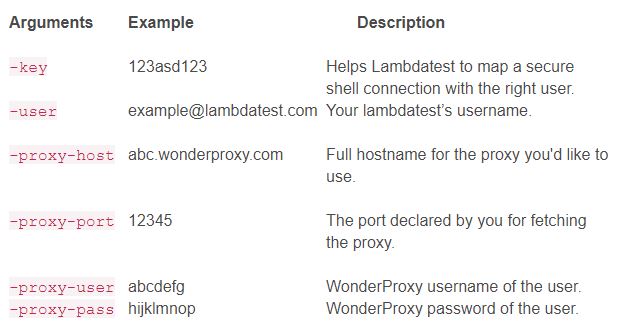
Here is how the format of full command would look like:
LT -user {user login email} -key {user key} -proxy-host {full proxy hostname} -proxy-user {proxy username} -proxy-pass {proxy password} -proxy-port {port number}
Example of full command:
LT -user [email protected] -key 123asd123 -proxy-host abc.wonderproxy.com -proxy-user abcdefg -proxy-pass hijklmnop -proxy-port 12345
TestMu AI Tunnel + Luminati:
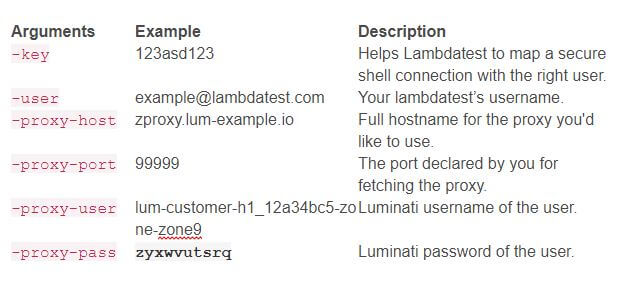
Here is how the format of full command would look like:
LT -user {user login email} -key {user key} -proxy-host {full proxy hostname} -proxy-user {proxy username} -proxy-pass {proxy password} -proxy-port {port number}
Example of full command:
LT -user [email protected] -key 123asd123 -proxy-host zproxy.lum-example.io -proxy-user lum-customer-h1_12a34bc5-zone-zone9 -proxy-pass zyxwvutsrq -proxy-port 99999
Hope you like our latest addition to TestMu AI Tunnel. Feel free to comment about attracted you the most and where you feel we can do better. We would love your suggestions to help us grow as a complete testing ecosystem. If you are using some other tool, apart from the integrations that we provide, then bring it to our attention so we can have it up and running on our platform. In case of feedback or input for us, you can even leave us a message here to chat with us. Our product experts are always delighted to help you with any roadblock.
Happy Testing! 🙂


Did you find this page helpful?
More Related Hubs
TestMu AI forEnterprise
Get access to solutions built on Enterprise
grade security, privacy, & compliance
- Advanced access controls
- Advanced data retention rules
- Advanced Local Testing
- Premium Support options
- Early access to beta features
- Private Slack Channel
- Unlimited Manual Accessibility DevTools Tests