

Next-Gen App & Browser Testing Cloud
Trusted by 2 Mn+ QAs & Devs to accelerate their release cycles


Excel Test Management: Powering Efficiency with HyperExecute
Enhance Excel test management with HyperExecute. Streamline parallel execution for faster feedback and efficient workflows in software development.

Aman Chopra
December 30, 2025
When we talk about software testing, Excel has been a reliable companion for testers, excelling in organizing test cases, documenting steps, and managing setup details. With its user-friendly interface, it’s the go-to tool for precise test documentation.
However, when aiming to improve speed and efficiency through parallel execution, Excel’s effectiveness diminishes. The smooth operation transforms into a complex process involving multiple sheets, manual mapping, and persistent inefficiencies. In this blog, we’ll discuss how HyperExecute can eliminate the manual challenges associated with using Excel automation for Parallelization.
Challenges of Utilizing Excel for Parallelization
Think about sorting through a deck of playing cards to find a specific card. Now, imagine having to repeat this process separately for each suit, creating multiple stacks. That’s essentially what the traditional approach to parallel execution with Excel feels like – tedious, time-consuming, and susceptible to errors.
The process of generating and handling numerous duplicate sheets introduces inefficiencies and frustration, posing challenges to the seamless and efficient execution of tests. Some of the major pain points of this traditional approach are:
Manual Operations
- Repetitive tasks: Each test case is manually created and copied across multiple sheets, leading to tedious and error-prone replication.
- Data entry fatigue: Manually entering test data, expected results, and steps for each case is time-consuming and prone to typos.
- Maintenance issues: Keeping track of changes and updates across numerous sheets becomes a significant burden.
Tedious Execution
- Sequential Slog: Tests are run individually, resulting in unbearable wait times, especially for large test suites.
- Limited Parallelization: Manual setup and execution hinder the potential for parallel execution across multiple machines or cores.
- Debugging Delays: Identifying and fixing failed tests becomes a time-consuming process due to manual tracking and analysis.

Austin Siewert
CEO, Vercel
Discovered @TestMu AI yesterday. Best browser testing tool I've found for my use case. Great pricing model for the limited testing I do 👏
2M+ Devs and QAs rely on TestMu AI
Deliver immersive digital experiences with Next-Generation Mobile Apps and Cross Browser Testing Cloud

Susceptible to Errors and Frustration
- Inaccurate Data Feed: Manual data entry and test execution are prone to typos and inconsistencies, leading to inaccurate results.
- Version Control Woes: Managing multiple Excel files with different versions and updates increases the risk of errors and confusion.
- Slow Feedback Loop: Slow testing cycles and inaccurate results lead to frustration for developers, testers, and project managers. This results in delayed test results that hinder developers’ ability to identify and fix bugs promptly, slowing down the development process.
Need for Parallelization
One of our clients, who is leading in the enterprise communications industry, was using Excel for testing their applications. It was becoming a bottleneck for their QAs and Developers to maintain all the test cases, different sheets, and manual testing of those hundreds of test cases and multiple sheets.
Imagine the scenario of a tester dealing with a complex web application with hundreds of test cases. Running them one after the other took a considerable amount of time, causing delays in development progress due to postponed feedback. Even small code changes meant having to manually run regression tests, a time-consuming task impacting release cycles.
The constant pressure to deliver high-quality software quickly exposes the limitations of traditional testing methods in keeping up with the fast-paced development environment.
While Excel is comfortable for test design, its challenge lies in parallelization. In simple terms, parallelization involves dividing the test suite into parts and running them simultaneously on different machines or cores. Think of it like directing an entire orchestra all at once instead of one instrument at a time.
It offers benefits like:
- Faster Feedback: Developers receive real-time feedback on code changes, allowing them to identify and fix bugs instantly. This keeps development flowing smoothly and releases on track.
- Streamlined Regression Testing: With parallelization, you can run all necessary tests concurrently, ensuring comprehensive coverage without waiting. This significantly reduces testing overhead and frees up development resources.
- Lightning-fast Quality Assurance: Parallelization allows you to execute tests quickly, leading to swifter fixes and higher quality software being released to your users sooner.
- Improved Development Agility: Parallelization eliminates testing bottlenecks, enabling developers to iterate faster and experiment more confidently. This fosters a culture of innovation and responsiveness in your organization.
- Increased Resource Utilization: By leveraging multiple cores or machines, you maximize your existing hardware resources. This leads to cost savings and improved efficiency across your testing infrastructure.
HyperExecute for Integration and Parallelization with Excel
HyperExecute, TestMu AI’s robust test automation orchestration platform, excels in providing effortless integration with a wide array of industry-leading testing tools. One of HyperExecute’s standout features is its smooth compatibility with various testing tools, but where it truly shines is in optimizing Excel for parallel execution automated data driven testing. Through a user-friendly interface, HyperExecute seamlessly interacts with your existing Excel setup, serving as a proficient interpreter for your test cases and intricate definitions.
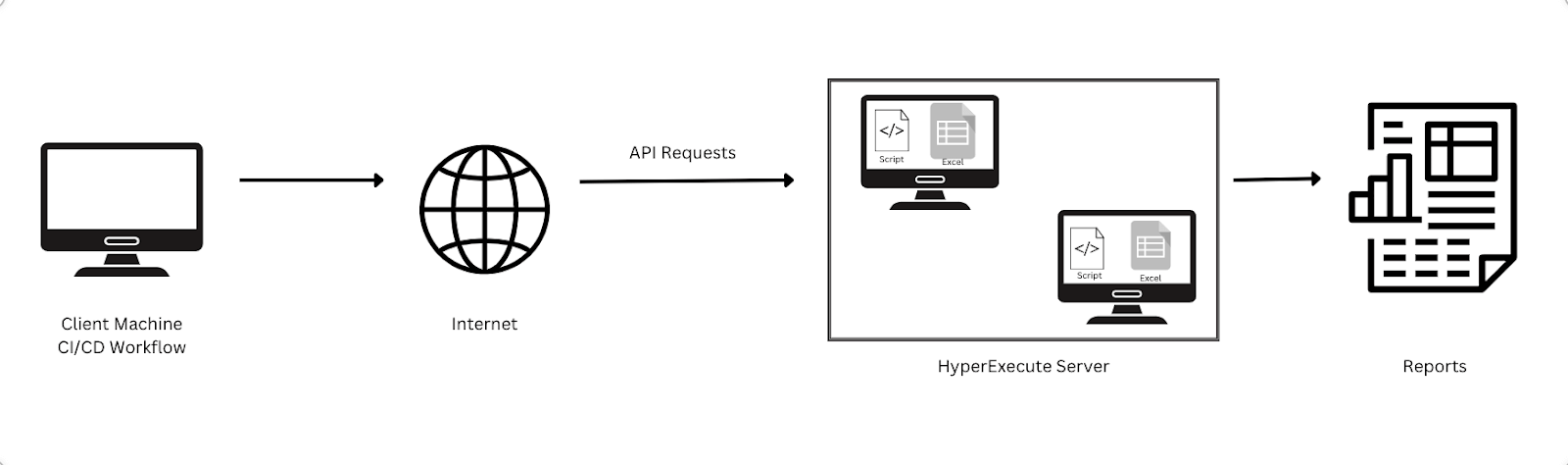
The process involves your local server communicating with the HyperExecute server, where Virtual Machines are generated. Within these virtual machines, your Excel test cases and a code script coexist seamlessly.
Using HyperExecute is as simple as selecting the desired test cases for execution. Once chosen, HyperExecute takes charge, triggering custom scripts tailored to your chosen framework (such as TestNG or Selenium). These scripts work discreetly in the background, smoothly translating your Excel setup into the language of parallel execution.
As a cherry on top, HyperExecute goes a step further by generating a video recording of the executed tests, providing a comprehensive overview of the testing process.
To know more about HyperExecute, read- Key Features of HyperExecute
Benefits of Parallelizing Excel with HyperExecute
Here are some of the benefits of using HyperExecute for Parallelizing Excel:
- Drastically Reduced Execution Time: HyperExecute slashes execution time by 50% or more, which positively impacts your development cycle!
- Faster Feedback for Developers: HyperExecute frees you from manual efforts. It helps you deliver quicker test results and empowers developers to identify and fix bugs swiftly, keeping your development process in perfect harmony.
- Seamless Integration: HyperExecute seamlessly integrates with your existing Excel workflows, requiring no major changes to your established process.
Conclusion
HyperExecute simplifies and accelerates Excel test management by streamlining parallel execution. It tackles manual challenges, cuts down execution time, and seamlessly integrates with existing workflows. This practical solution improves efficiency, speeds up feedback, and ensures a smoother testing process without the need for complex changes. Try it now!



Did you find this page helpful?
More Related Hubs
TestMu AI forEnterprise
Get access to solutions built on Enterprise
grade security, privacy, & compliance
- Advanced access controls
- Advanced data retention rules
- Advanced Local Testing
- Premium Support options
- Early access to beta features
- Private Slack Channel
- Unlimited Manual Accessibility DevTools Tests