

Next-Gen App & Browser Testing Cloud
Trusted by 2 Mn+ QAs & Devs to accelerate their release cycles


Create Personalized Dashboards in Insights With Custom Widgets
Build personalized dashboards with custom widgets in TestMu AI Insights. Visualize key metrics, monitor failures, and share insights instantly.

Mythili Raju
January 29, 2026
Different teams look at different testing data, and a one-size-fits-all dashboard can make it hard to find what really matters, often leading to extra time spent digging or exporting reports.
That’s why we have released the Custom Widgets in the TestMu AI Insights platform. These widgets let you build your own dashboards, choose what test data to show, and arrange it the way you want so each team sees only the information that’s useful to them.
To learn more, head over to the documentation on custom widgets in Insights.
Note: Currently, we have rolled out this feature in the beta phase.
What Are Custom Widgets in Insights?
In TestMu AI Insights, Custom Widgets are flexible dashboards that give you complete control over what test data you want to see and how it’s displayed. Instead of relying on fixed, pre-built reports, you can create, customize, and arrange widgets to show the exact metrics, trends, and visualizations your team needs.
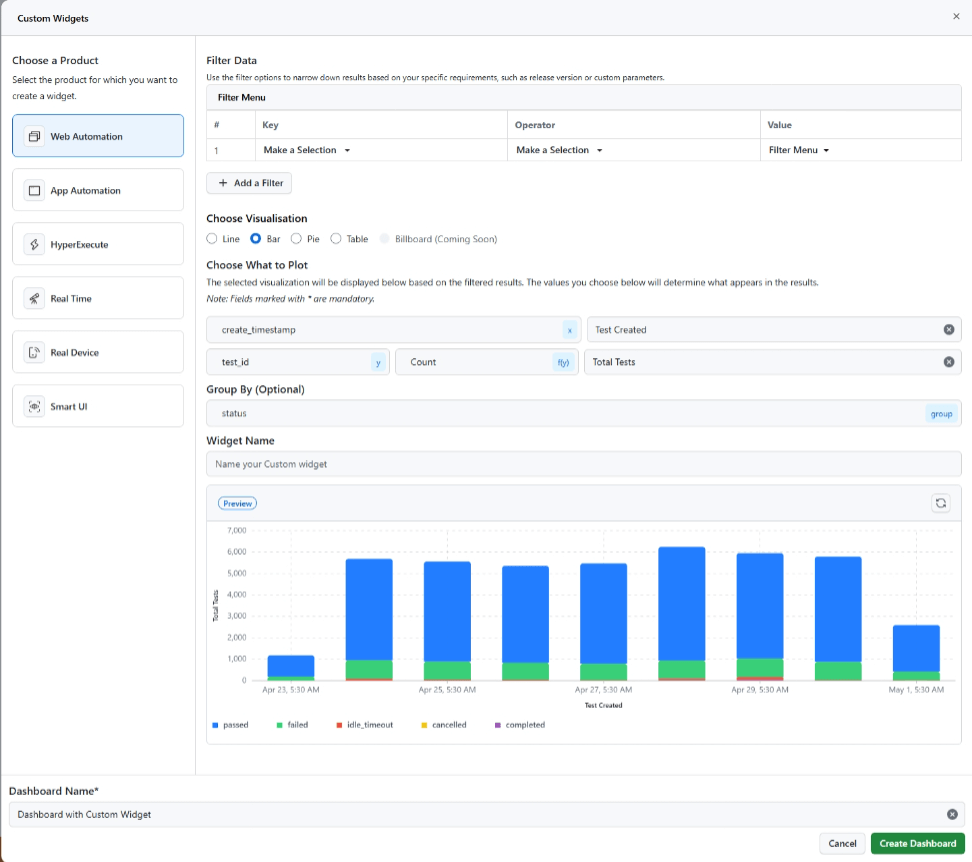
This level of flexibility cuts down time spent sifting through irrelevant data or manually exporting and formatting reports. You can get immediate, actionable insights at a glance, empowering faster decisions and sharper, more focused testing.
Features of Custom Widgets in Insights
When it comes to customizing your widgets for test data, you’ve got some handy features:
Advanced Filters and Options
These options can help you customize and narrow down test data to create focused, meaningful visualizations.
- Select Keys: Pick the specific data points (or “keys”) you want to show in your widget. You can even combine several for a detailed view.
- Choose Operators: Apply filters using different operators to shape the data just the way you need.
- Select Values: Want to focus on something specific? Select particular values to drill down into the test data.
Visualization Options
With visualization options, you can present test data in various formats to make insights easy to understand and analyze.
- Bar Chart: Great for comparing different values across categories.
- Line Chart: Perfect for spotting trends over time, like whether test durations are going up or down.
- Pie Chart: Want to see how things are split up, like device usage or pass/fail results? A pie chart gives you that breakdown.
- Table: It gives you a clear, structured view of all your data.
- Billboard: This one’s for your most important metrics; display them in a large and bold format on your dashboard.
Configuration Widget Options
These options let you tailor your widgets with custom axes, labels, and groupings for clearer, more relevant data visualizations.
- Custom Axis: Choose what goes on your x and y-axis so the chart shows exactly what you need.
- Custom Labels: Add your labels to make the data easier to understand, especially helpful for teammates viewing your dashboard.
- Custom Grouping: Group data by whatever makes the most sense, device types, OS versions, test outcomes, you name it.
Where to Use Custom Widgets?
You can leverage the Custom Widgets feature of our Insights platform for different use cases:
- Track and Analyze Test Execution: Custom Widgets help you monitor the number of tests executed, passed, and failed over time. You can also identify performance trends by analyzing test execution times, making it easier to spot inefficiencies and areas for improvement.
- Visualize Test Coverage and Results: Easily visualize how your tests cover different features or components. You can compare results across environments or configurations to detect inconsistencies and ensure stable performance.
- Monitor Environment and User Insights: Widgets can show which browsers and OS versions are most commonly used in your tests. You can also visualize user feedback and ratings to better understand satisfaction and highlight areas needing attention.
- Track Bugs and Test Automation Progress: Stay on top of your testing health by tracking reported bugs, their severity, and your test automation progress. It helps you prioritize fixes and continuously improve your testing strategy.
- Create Dashboards and Share Reports: Custom Widgets make it easy to build dashboards tailored to different teams. You can also use them to generate reports and share meaningful insights with stakeholders.
Summing Up!
At TestMu AI, we’re committed to delivering features that enhance your testing experience and help your team succeed. Custom Widgets put the power of data visualization directly in your hands so you can test smarter, not harder.
For any questions or assistance, reach out to our support team via chat on your dashboard or email us at [email protected].


Did you find this page helpful?
More Related Hubs
TestMu AI forEnterprise
Get access to solutions built on Enterprise
grade security, privacy, & compliance
- Advanced access controls
- Advanced data retention rules
- Advanced Local Testing
- Premium Support options
- Early access to beta features
- Private Slack Channel
- Unlimited Manual Accessibility DevTools Tests