 Decode AI-Powered Quality Engineering from AI & QA Leaders,Register for Free!

Next-Gen App & Browser Testing Cloud
Trusted by 2 Mn+ QAs & Devs to accelerate their release cycles

How to Clear History in Chrome
Learn how to clear history in Chrome to protect your privacy and enhance browsing speed. Follow these easy steps to remove your browsing data quickly.

Tahneet Kanwal
January 11, 2026
Your Chrome browser tracks every website you visit, your searches, URLs you type in the address bar, videos you watch, and more. While this can be helpful for quickly going back to previous pages, there are serious risks to keeping your browsing history.
Anyone with access to your phone or laptop can easily see what you’ve been doing online. Or can steal your personal information. Therefore, in such cases, it is important to clear history in Chrome browser.
In this blog, learn how to clear your browsing history in Chrome on desktop and mobile devices.
Steps to Clear History in Chrome Manually
If you sync your Chrome data, including history, bookmarks, and passwords, clearing your history once will remove it everywhere. However, if Chrome data isn’t synced, you must clear the browsing history of Chrome on each device separately.
Follow these steps to clear your browsing history in Chrome on your desktop:
- Launch Chrome and select the three-dots icon in the top-right corner.
- Go to History and click History to view your saved browser history. Alternatively, you can also press Ctrl+H to view browser history directly.
- Click Delete browsing data on the left side of the screen.
- Make sure that the Browsing history option is selected.
- Select a time range from the drop-down menu (to delete all browsing history, select All time).
- Click Delete data to remove your Chrome history.
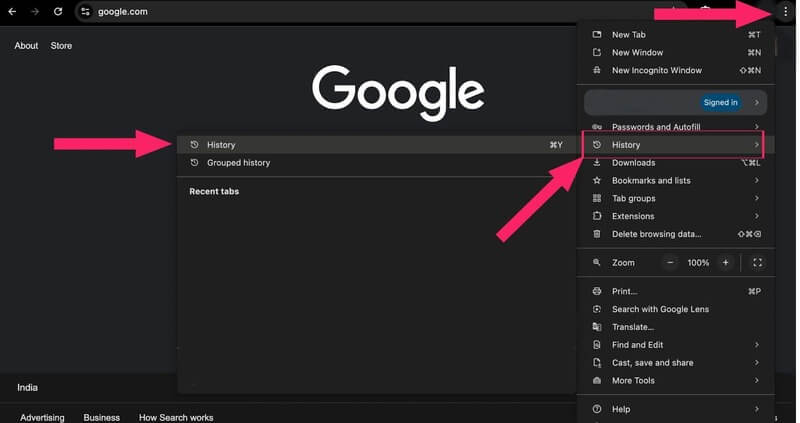
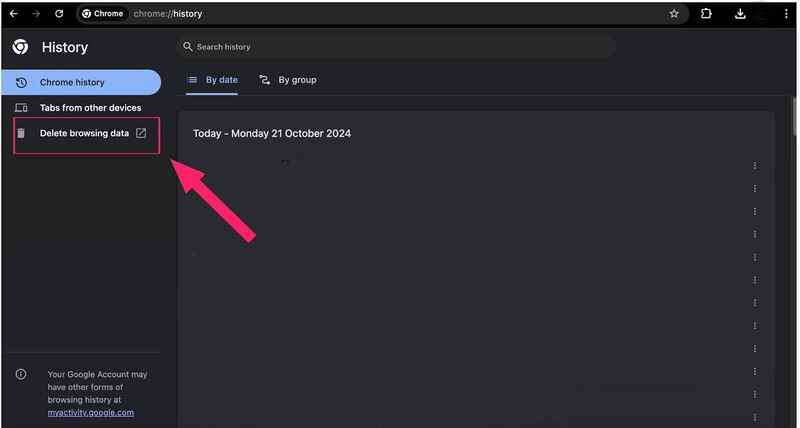
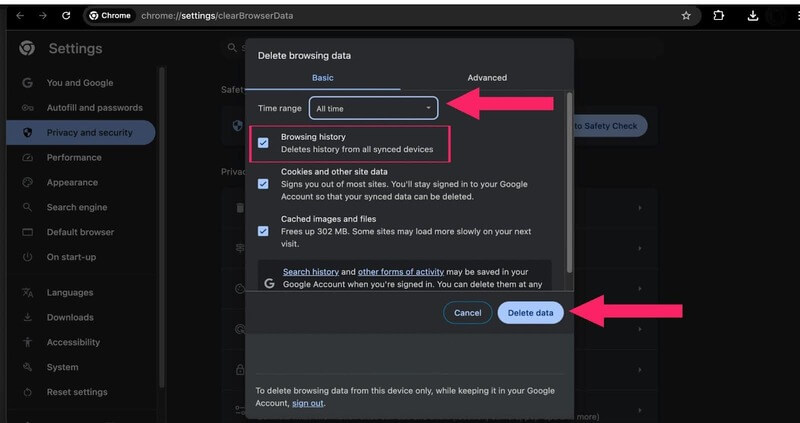
This process applies whether you’re on a desktop or laptop running Windows or macOS.

Note: Test your websites across 3000+ real desktop & mobile browsers. Try TestMu AI Today!
Steps to Clear History in Chrome Automatically
To automatically clear your Chrome browsing history, you can set up regular deletions using Activity controls.
Here’s how you can do it:
- Visit myactivity.google.com and select Activity controls.
- Make sure that the option Include Chrome history and activity from sites, apps, and devices that use Google services is checked. This ensures your Chrome history is included in the data cleared.
- Navigate to the Choose an auto-delete option.
- Choose to automatically delete data after 3 months, 18 months, or 36 months.
- Click Next to confirm your selection. You can also set up auto-delete for YouTube history as an additional step.
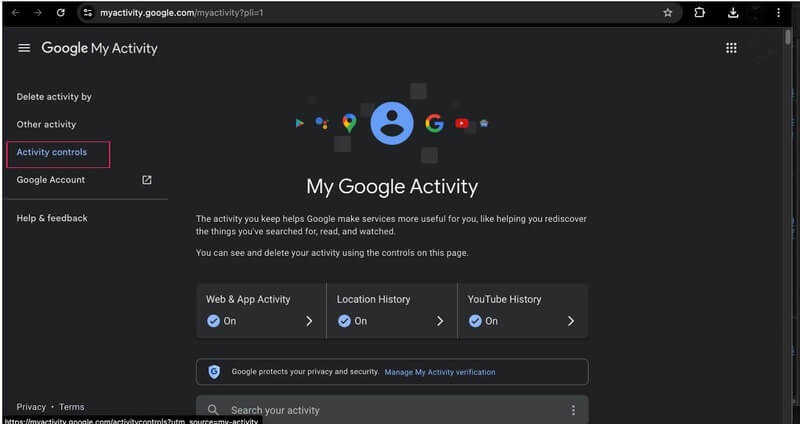
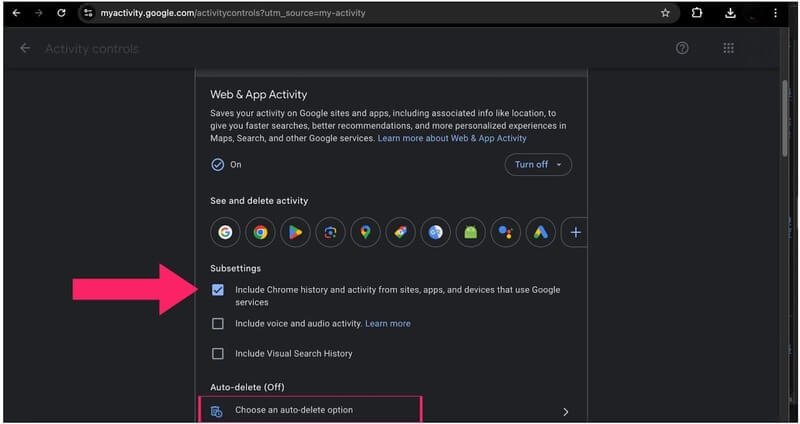
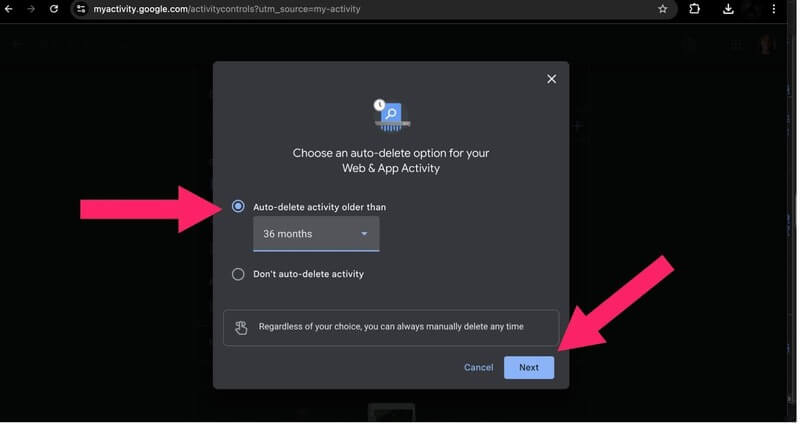
By doing this, your browsing activity will be regularly cleared, reducing the chance of someone accessing your past online activities.
Steps to Clear History in Chrome With Keyboard Shortcuts
To quickly clear your browsing history in Chrome using keyboard shortcuts, follow these steps:
- Open the window to clear history by pressing Ctrl + Shift + Delete (Windows/Linux) or Command + Shift + Delete (macOS)
- Press the Tab key to navigate to the Time range dropdown and select the desired range.
- Press the Tab key to move through the options and the Space key to select the types of data you want to clear such as browsing history, cookies, or cached images.
- Press the Enter key to clear the selected data.
This will delete your history based on your chosen settings!

Conclusion
In this blog, we learned these steps to clear history in Chrome browsers on desktop and mobile devices. By following these steps, you can enhance your privacy and secure your online activity from prying eyes. Keeping your browser history clean is essential for maintaining a safer browsing experience. Enjoy greater peace of mind knowing your data is protected!


Summarize with AI


Frequently asked questions
Did you find this page helpful?
More Related Hubs
TestMu AI forEnterprise
Get access to solutions built on Enterprise
grade security, privacy, & compliance
- Advanced access controls
- Advanced data retention rules
- Advanced Local Testing
- Premium Support options
- Early access to beta features
- Private Slack Channel
- Unlimited Manual Accessibility DevTools Tests