

Next-Gen App & Browser Testing Cloud
Trusted by 2 Mn+ QAs & Devs to accelerate their release cycles


TestMu AI Capabilities Generator
Generate desired capabilities for Selenium and Appium tests instantly. TestMu AI's free Automation Capabilities Generator supports Java, Node JS, C#, PHP, Python, and Ruby.

Naima Nasrullah
February 23, 2026
Running automated tests on a cloud platform typically starts with defining your desired capabilities: a set of key-value pairs that specify your test environment, including browser, version, and OS. However, manually configuring these can be tedious and prone to errors that cause sessions to fail silently.
The TestMu AI Capabilities Generator solves this by letting you create the exact capability configuration you need, select your browser/OS options, device configurations, end-user conditions, and more from dropdowns. The generator produces framework-specific capabilities that are ready to use in your automation code and run on the TestMu AI cloud.
For even greater flexibility, especially in mobile app automation, TestMu AI supports Regular Expressions (Regex) in the Capabilities Generator. Using Regex for a capability like deviceName (e.g., Galaxy.*) helps you choose a device that matches the regex, instead of specifying an exact device name.
Overview
What Is the TestMu AI Capabilities Generator?
The TestMu AI Capabilities Generator is a web tool that generates ready-to-use capabilities, simplifying setup and reducing errors.
What Are Its Key Features?
It offers a range of features to make test configuration easier and more accurate:
- Wide browser and OS coverage
- Real and virtual device configurations
- Custom resolutions and framework-aware output
- Multi-language support
- Migration support
Why Should You Use It?
The generator helps teams save time and reduce errors in test setup:
- Faster onboarding
- Fewer configuration errors
- Simplified cross-browser and device testing
- End-user condition simulation
What is the TestMu AI Capabilities Generator?
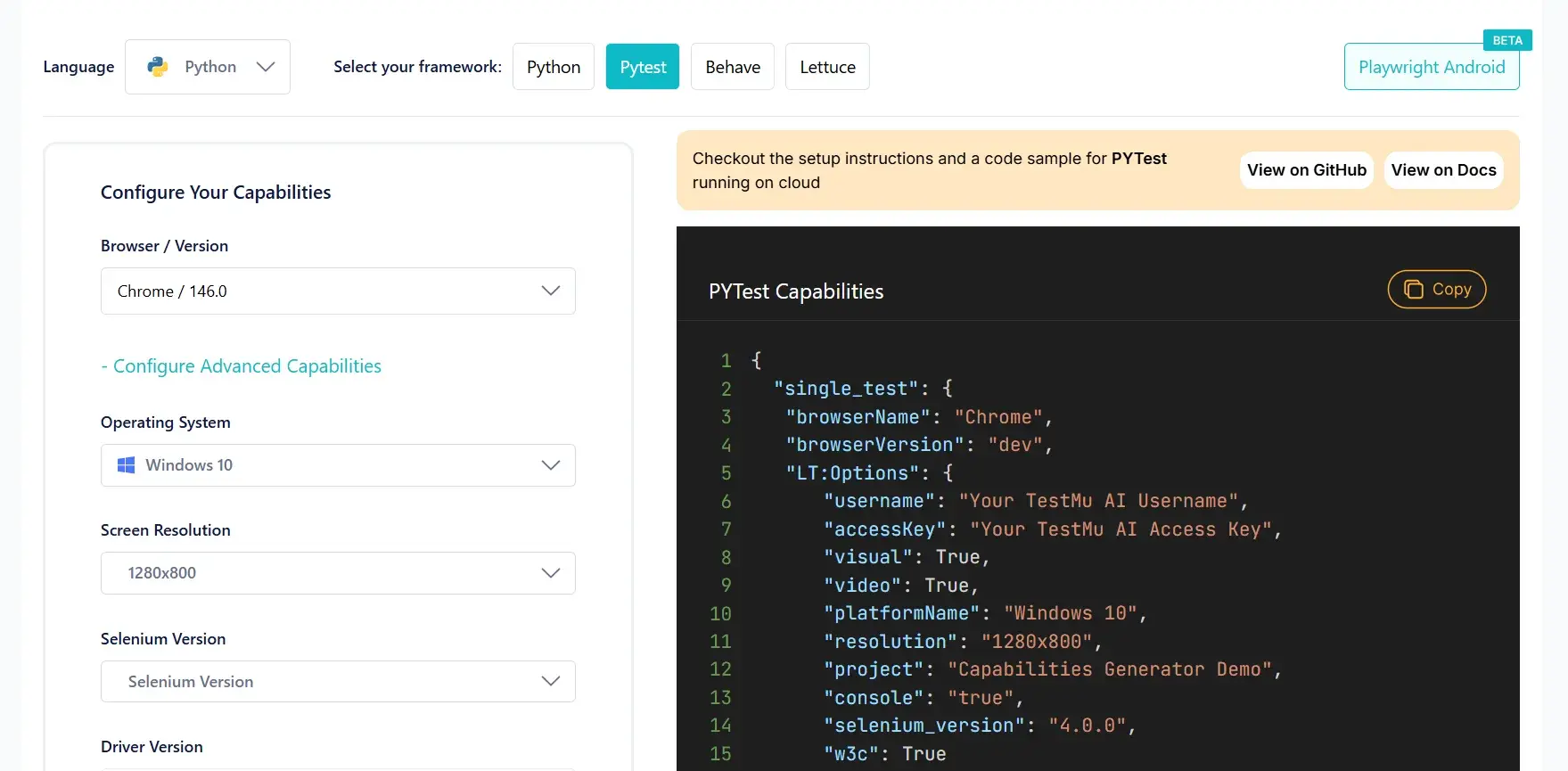
TestMu AI (Formerly LambdaTest) capabilities generator is a free, visual, web-based tool that generates desired capability configurations for your Selenium, Appium, and Playwright automation tests, so you don't have to configure them yourself.
Pick your framework, browser, OS, device, resolution, and any advanced settings, and it shows the capability you need in the language of your choice.
TestMu AI maintains forward compatibility through beta browser support and day-zero enablement of the latest device models and operating system releases.
What are the key features of the TestMu AI Capabilities Generator?
There's more to it than generating capabilities. It puts your entire test configuration in your hands:
- Wide browser-OS coverage: Whether you want to test on Chrome, Safari, Edge, or any other browser across macOS, Windows, or Linux, the generator covers every combination available on the TestMu AI cloud.
- Real and virtual device configurations: Supports both real and virtual devices across Android and iOS.
- Custom resolution and screen size: Set specific screen resolutions and viewport sizes for desktop browser sessions to align with your testing requirements.
- Framework-aware output: Different frameworks, different capability formats. The generator produces the right structure for whichever framework and version you're using.
- Multi-language support: Get your snippet in Java, Node JS, C#, PHP, Python, or Ruby, which can be readily added to your test code.
- Seamless migration support: For teams migrating from platforms like BrowserStack, the Capabilities Generator simplifies the transition, removes your old configurations, generates the equivalent TestMu AI capabilities, and starts running tests.
Explore these guides to get started: BrowserStack to TestMu AI and Sauce Labs to TestMu AI.
What makes the TestMu AI Capabilities Generator useful?
Here's what the TestMu AI capabilities generator offers:
- Faster onboarding: Generates accurate, ready-to-use capabilities, reducing manual intervention in setting them up. New members select their respective capabilities from dropdowns and start testing.
- Fewer config failures: Manually writing capabilities often leads to errors, especially around LT: Options nesting, a misplaced key or wrong structure, and you start witnessing errors. The generator reduces configuration errors by automatically organizing capabilities according to W3C standards, including correctly nesting values within the LT: Options object.
- Simplified cross-browser and real device testing: Select the exact browser, OS, or device, and the generator produces the right configuration instantly. No need to hunt through documentation for different framework formats.
- End-user condition simulation: Configure network throttling, geolocation, time zone, and more directly from the Capabilities Generator, no need to hard-code them into your scripts.
How to use the TestMu AI Capabilities Generator?
The TestMu AI capabilities generator walks you through the entire configuration on a single page. Let's look at an example.
A developer wants to run an Appium test on a Samsung Galaxy S25 Ultra running Android 15. Instead of manually writing the capability structure, they open the TestMu AI capabilities generator, select Appium, Java, real device, and the Galaxy S25 Ultra and get these capabilities instantly:
DesiredCapabilities capabilities = new DesiredCapabilities();

HashMap<String, Object> ltOptions = new HashMap<String, Object>();

ltOptions.put("w3c", true);

ltOptions.put("platformName", "android");

ltOptions.put("deviceName", "Galaxy S25 Ultra");

ltOptions.put("platformVersion", "15");

ltOptions.put("app", "app_id");

ltOptions.put("isRealMobile", true);

capabilities.setCapability("lt:options", ltOptions);
To run on any available Samsung Galaxy suite of devices instead, just use a regex pattern, replace "Galaxy S25 Ultra" with "Galaxy.*".
DesiredCapabilities capabilities = new DesiredCapabilities();

HashMap<String, Object> ltOptions = new HashMap<String, Object>();

ltOptions.put("w3c", true);

ltOptions.put("platformName", "android");

ltOptions.put("deviceName", "Galaxy.*");

ltOptions.put("platformVersion", "15");

ltOptions.put("app", "app_id");

ltOptions.put("isRealMobile", true);

capabilities.setCapability("lt:options", ltOptions);
Conclusion
The TestMu AI Capabilities Generator simplifies how you configure your automation tests. Rather than manually defining capabilities, troubleshooting formatting issues, or navigating extensive documentation, the TestMu AI Capabilities Generator instantly generates correctly structured capabilities tailored to your requirements.


Frequently asked questions
Did you find this page helpful?
More Related Hubs
TestMu AI forEnterprise
Get access to solutions built on Enterprise
grade security, privacy, & compliance
- Advanced access controls
- Advanced data retention rules
- Advanced Local Testing
- Premium Support options
- Early access to beta features
- Private Slack Channel
- Unlimited Manual Accessibility DevTools Tests