

Next-Gen App & Browser Testing Cloud
Trusted by 2 Mn+ QAs & Devs to accelerate their release cycles


How to do API Testing with TestMu AI KaneAI
Learn how to perform API testing with TestMu AI KaneAI, offering unified testing for frontend & backend, automated configuration, and real-time performance insights.

Devansh Bhardwaj
December 19, 2025
Modern applications rely heavily on APIs to connect different services, manage data flow, and enable seamless user experiences. However, traditional testing approaches often treat API and UI testing as separate processes, leading to:
- Fragmented testing workflows that require multiple tools and platforms
- Delayed feedback loops when backend issues aren’t caught early
- Incomplete test coverage that misses critical API-UI interactions
- Resource inefficiency from managing separate testing environments
TestMu AI KaneAI bridges this gap by offering seamless API testing capabilities alongside its powerful UI testing features, providing development teams with a unified testing platform.
Unified API Testing with KaneAI
TestMu AI KaneAI addresses these challenges by integrating API testing directly into your existing test workflows. This unified approach enables teams to validate both frontend functionality and backend services within a single platform, streamlining the entire testing process.

Note: Check out the detailed support documentation to get started with API testing using KaneAI.
What are the Benefits of API testing?
API testing offers significant advantages in terms of efficiency, system security, and overall product quality. Here are some key benefits of incorporating API testing into your development workflow:
- Faster Releases: While GUI tests can be time-consuming, API testing accelerates the process, saving you up to eight hours of testing time. This allows your team to focus on other critical aspects of software development and enhances the overall speed of your product release.
- Improved Test Coverage: API testing dives deeper than just the user interface by validating the core system components, such as database interactions. By testing APIs, you ensure that all layers of the application are functioning properly, leading to better coverage and, ultimately, higher-quality software and more satisfied users.
- Shift-Left Testing Made Easy: API testing can be implemented early in the development cycle without needing a GUI. Developers can quickly run tests, get real-time feedback, and resolve issues in the early stages. Compared to UI tests, API tests are typically completed in seconds or minutes, offering faster insights into the system’s performance.
- Minimal Maintenance: Since changes to API layers are infrequent and typically tied to major updates in business logic, API testing requires less ongoing maintenance. By reflecting the intended API specifications from the start, you can ensure the system remains stable, even as updates are made.
- Faster Bug Detection and Resolution: With the speed of API testing, bugs are detected and diagnosed earlier in the development process. Immediate feedback means quicker bug fixes, preventing delays and improving the overall efficiency of your development cycle.
- Lower Testing Costs: The comprehensive nature of API testing, along with its faster execution and easier maintenance, significantly reduces the overall cost of testing. This enables you to reallocate resources to other high-priority areas, improving ROI.
- Cross-Language Compatibility: API testing supports data exchange in XML and JSON formats, meaning you can use a variety of programming languages, including JavaScript, Java, Ruby, Python, or PHP. This flexibility ensures your team can test APIs using the tools and languages they are most comfortable with.
By incorporating API testing into your workflow, especially with advanced tools like KaneAI, you can achieve faster, more efficient, and cost-effective testing, all while ensuring a more secure and higher-quality product.
Demo of API testing with a Real-World Use Case:
Let’s explore how a development team can leverage KaneAI’s API testing capabilities using a practical e-commerce scenario. We’ll use the PetStore API as our example to demonstrate comprehensive backend testing.
Setting Up Your API Testing Environment
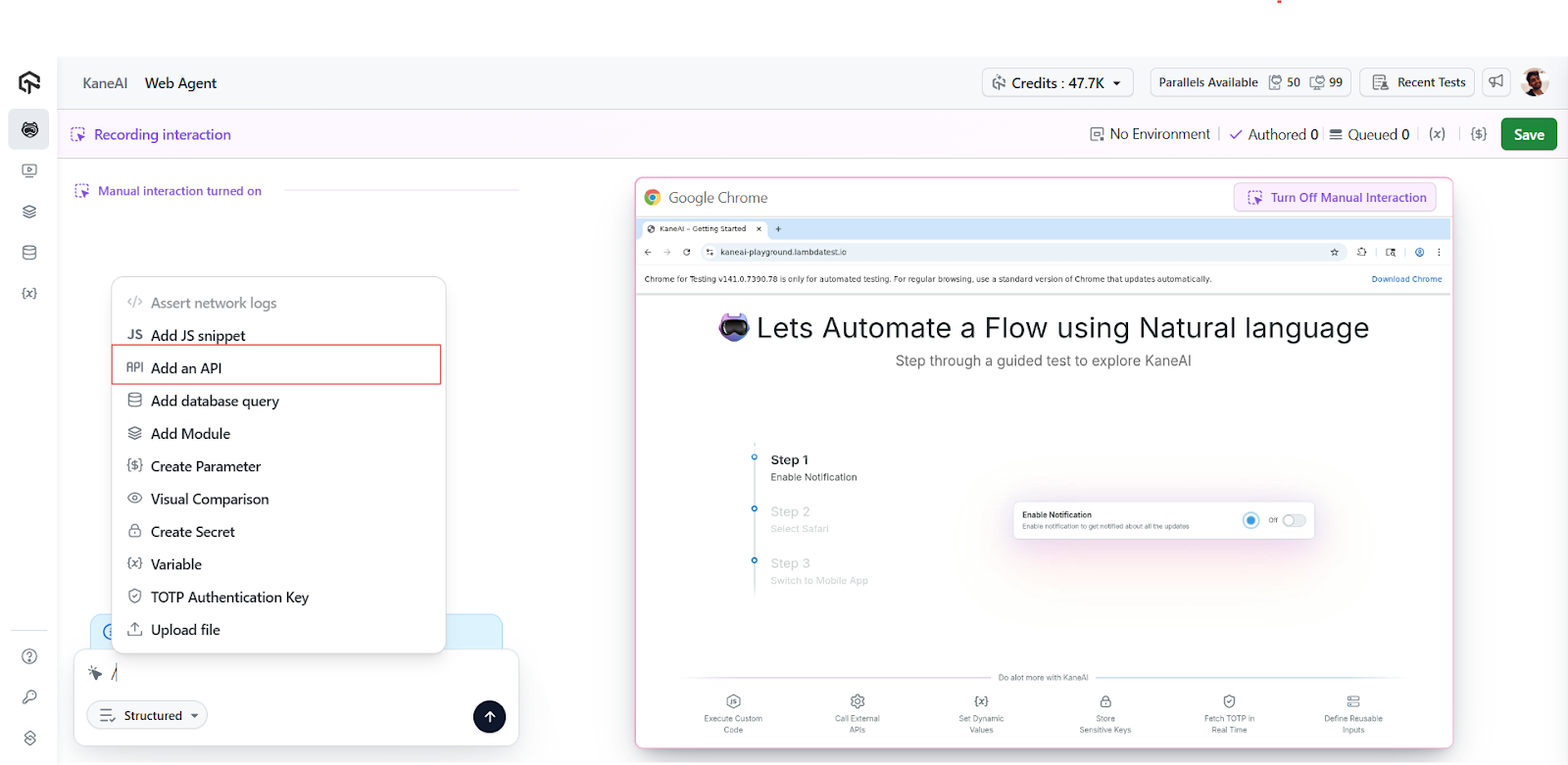
Initializing API Testing by creating a web test and adding APIs through KaneAI’s intuitive slash command interface.
Rapid API configuration with cURL commands helps automatically configure API settings by simply pasting your cURL command into the designated area, where KaneAI intelligently populates all necessary details, including headers, parameters, and request bodies, eliminating manual configuration errors and significantly speeding up the test setup.
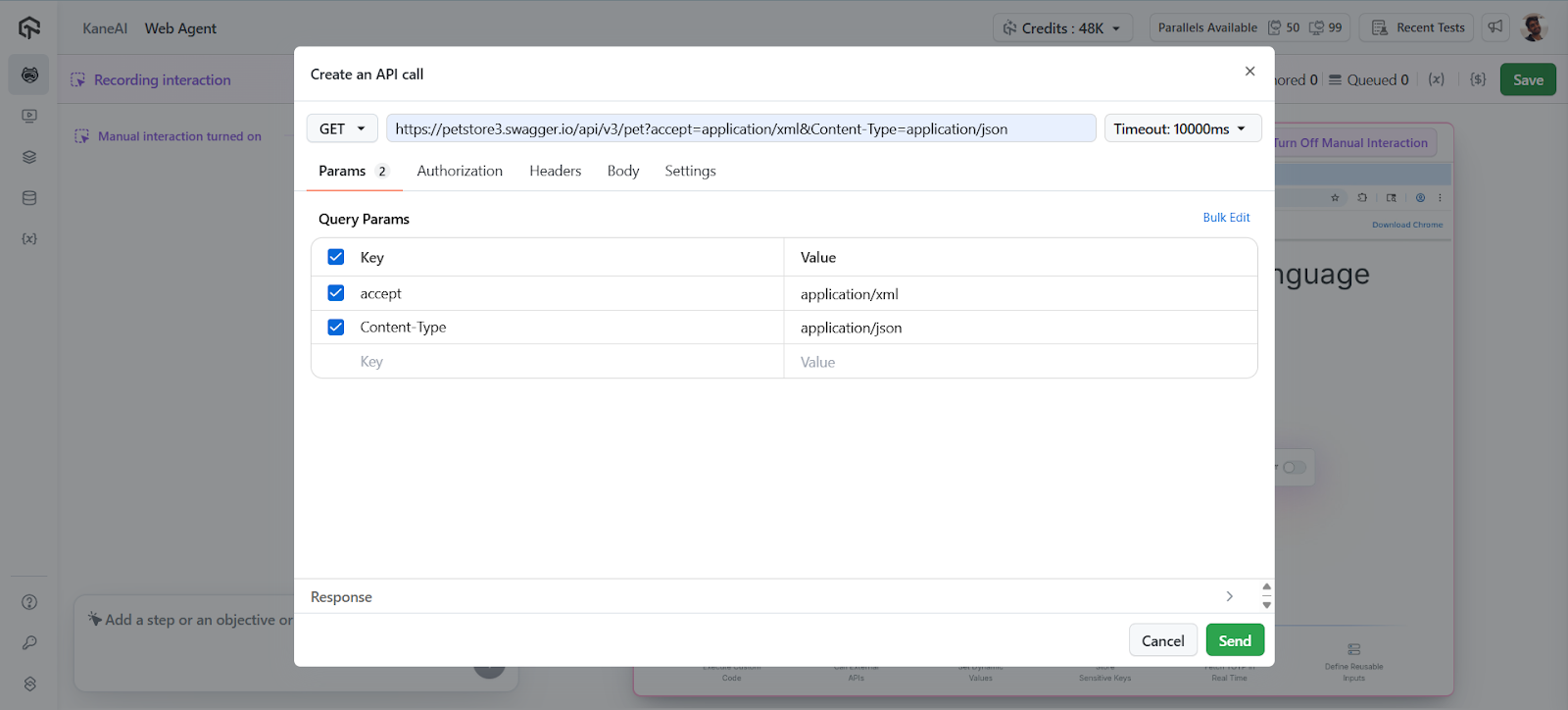
Validating API Responses for Reliability
KaneAI’s validation feature ensures your APIs respond correctly before incorporating them into your test suite.
When you click ‘validate,’ the system checks the API response and automatically adds successful requests (those returning a 200 status) to your test steps. This automated validation prevents faulty APIs from entering your test pipeline.
Handling Edge Cases and Error Scenarios
Real-world testing isn’t just about happy paths. KaneAI allows you to manually add APIs that return non-200 status codes, such as 400 Bad Request responses. This capability is crucial for testing error handling, validation logic, and edge cases that your application must gracefully manage.negative testing/negative workflows
Streamlining Testing with Batch Processing
For complex applications with multiple API endpoints, KaneAI offers batch processing capabilities. You can add multiple APIs simultaneously by clicking the plus icon and selecting each endpoint, or paste multiple cURL commands for automatic addition. This feature is particularly valuable when testing integrated workflows that involve multiple service calls.
Modern APIs utilize various HTTP methods for different operations. KaneAI supports the full spectrum of HTTP methods including POST for creating resources, PUT for updates, GET for retrieval, and DELETE for removal. This comprehensive support ensures you can test complete CRUD operations and complex API interactions.
How to get Execution and Performance Insights on API Testing?
Once your API test suite is configured, KaneAI enables simultaneous execution of all added APIs. This parallel execution approach provides immediate insights into API performance, response times, and data integrity across your entire backend infrastructure.
The execution results include detailed information about:
- HTTP methods used for each request
- Response status codes and their meanings
- Execution times for performance analysis
- Response data for validation and debugging
Note: Kickstart Your API Testing with KaneAI. Get Started Now !
Best Practices for API Testing
API testing involves several best practices, including logically structuring your tests, leveraging validation features, testing beyond success scenarios, and monitoring performance metrics. These practices help make your API tests more efficient, reliable, and resilient.
Structure Your Tests Logically
Organize your API tests to mirror your application’s workflows. Group related API calls together and ensure your test sequence matches real-user interactions.
Leverage Validation Features
Always validate API responses before adding them to your test steps. This practice ensures your test suite remains reliable and catches regressions effectively.
Test Beyond Success Scenarios
Include error cases and edge conditions in your test suite. Testing how your APIs handle invalid inputs and error states is crucial for building resilient applications.
Monitor Performance Metrics
Use KaneAI’s execution time data to establish performance baselines and identify potential bottlenecks in your API infrastructure.
All in All!
TestMu AI KaneAI’s API testing capabilities represent a significant advancement in comprehensive testing strategies. By providing a unified platform for both UI and API testing, KaneAI enables development teams to build more reliable applications while optimizing their testing workflows.
The integration of API testing into existing test suites, combined with features like automated configuration, batch processing, and comprehensive HTTP method support, makes KaneAI an invaluable tool for modern development teams.
Happy Testing!


Did you find this page helpful?
More Related Hubs
TestMu AI forEnterprise
Get access to solutions built on Enterprise
grade security, privacy, & compliance
- Advanced access controls
- Advanced data retention rules
- Advanced Local Testing
- Premium Support options
- Early access to beta features
- Private Slack Channel
- Unlimited Manual Accessibility DevTools Tests