

Next-Gen App & Browser Testing Cloud
Trusted by 2 Mn+ QAs & Devs to accelerate their release cycles


syntaxerror: unexpected reserved word
Strict mode is a necessity for streamlined code and easy error debugging, but syntaxerror: unexpected reserved word can occur.

Robin Jangu
December 28, 2025
Remember when you were a mere beginner in JavaScript, while learning you must have come across the term ‘reserved words’. These are the words that you can’t use as names for variables. Apart from mainstream keywords like break, var, if…else etc. there are many more reserved keywords.
SyntaxError: "x" is a reserved identifier  (Firefox)
SyntaxError: Unexpected reserved word (Chrome)
Following will be the error messages you will receive if by accident you use such words. Seasoned JS developers too commit such blunders while scripting.
Strict mode
Strict mode has become a necessity because of its many benefits. It keeps in check and streamlines the code flow, error debugging too becomes very easy. I wouldn’t say that it has shortcomings but you need to be extra careful while implementing this.
In addition to the already existing reserved keywords, Strict mode reserves a few more keywords like implements, interface, let, package, private, protected, public, as, yield and static.
<!DOCTYPE html>
<html>
<body>

<h2>With "use strict":</h2>
<h3>Using a reserved word as variable name, is not allowed.</h3>

<p>Activate debugging in your browser (F12) to see the error report.</p>

<script>
"use strict";
var public = 'Thanos';  // This will cause an error (public is reserved in strict mode).
</script>

</body>
</html>

Now we change the variable name to avengerEnemy, now it will work.
<!DOCTYPE html>
<html>
<body>

<h2>With "use strict":</h2>
<h3>No reserved word used</h3>

<p>Activate debugging in your browser (F12) to see the avengerEnemy.</p>

<script>
"use strict";
var avengerEnemy = 'Thanos';  //  avengerEnemy is not a reserved word in strict mode.
console.log(avengerEnemy);
</script>

</body>
</html>
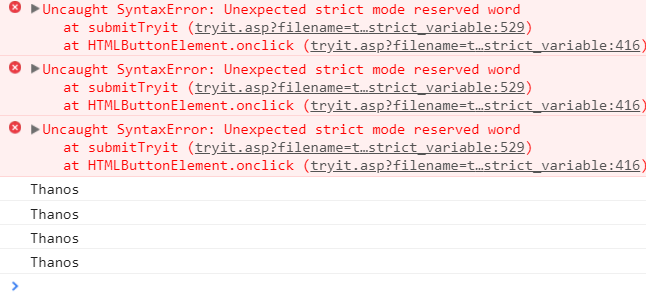
If you still get the same error, it may be due to the outdated browser version. Try updating the browser, as the old versions have old reserved words that need to be revised. Happy scripting!


Did you find this page helpful?
More Related Hubs
TestMu AI forEnterprise
Get access to solutions built on Enterprise
grade security, privacy, & compliance
- Advanced access controls
- Advanced data retention rules
- Advanced Local Testing
- Premium Support options
- Early access to beta features
- Private Slack Channel
- Unlimited Manual Accessibility DevTools Tests