

Next-Gen App & Browser Testing Cloud
Trusted by 2 Mn+ QAs & Devs to accelerate their release cycles


SyntaxError: JSON.parse: bad parsing
JSON or JavaScript Object Notation is a ubiquitous data format used by all sorts of mobile and web apps for asynchronous browser-server communication. JSON is an extremely popular data format,...

Deeksha Agarwal
December 22, 2025
JSON or JavaScript Object Notation is a ubiquitous data format used by all sorts of mobile and web apps for asynchronous browser-server communication. JSON is an extremely popular data format, very easy to work with, compatible with every major programming language, and is supported by every major browser. However just like any programming language, it throws a lot of errors when it decide that today is not going to be your day.
Now you can easily covert JSON to YAML using JSON to YAML Converter.
JSON.Parse Syntax Errors
In most web applications, nearly all data transferred from web server is transmitted in a string format. To convert that string into JSON, we use JSON.parse() function, and this the main function that throws errors. Nearly all JSON.parse errors are a subset of SyntaxError error type. Debugging console throws around 32 different errors messages when you mess up your JSON data. And some of them are very tricky to debug; and yes I am talking about you unexpected non-whitespace character after JSON data.

Why the SyntaxError Horror?
SyntaxError is an inherited object of the main error object The main reason behind the error is usually a mistake in the JSON file syntax. You mess up and put a “ instead of a ‘ and you invite to face the SyntaxError JSON.parse: unexpected character.
Just like every programming language, a JSON file has a fixed syntax. Small syntax errors throws errors. For example, in the following code, i forgot to remove a trailing comma
JSON.parse('[a,b, c, d, e, f,]');
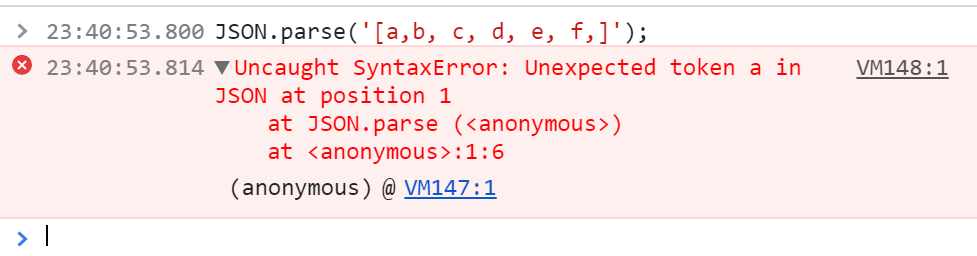
Similarly, in this example I forgot to add }
JSON.parse('{"LambdaTest": 1,');
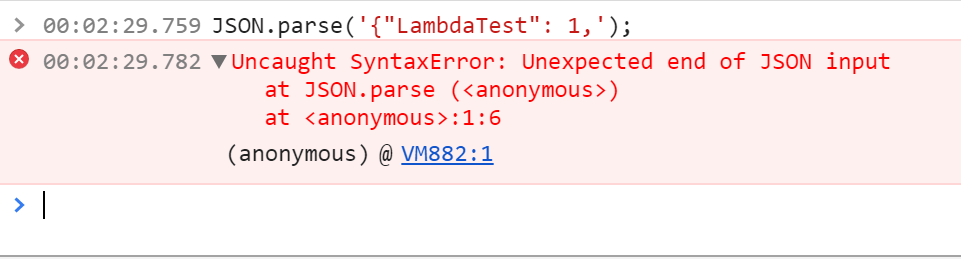
How to Catch The Error Before Hand?
The problem with debugging JSON errors are that you get to know about one error at a time. Debuggers throw the first error they find and then stop. It would be upto you to regression find the bugs. Usually it’s not as difficult as it sounds.
The first step is to make sure that your JSON file is perfect from the get go. Here you can take help from JSON linting tools like cleverly named jsonlint.com
If you don’t have any control over the receiving JSON file, then the next step is to add catch exceptions around your JSON.parse.
function validatingJSON (json) {

  var checkedjson

  try {
    checkedjson = JSON.parse(json)
  } catch (e) {

  }

  return checkedjson }
Also, here are the main errors related to JSON.parse that I very painstakingly collected from a very single source [https://developer.mozilla.org/en-US/docs/Web/JavaScript/Reference/Errors/JSON_bad_parse] 😛
SyntaxError: JSON.parse: unterminated string literal
SyntaxError: JSON.parse: bad control character in string literal
SyntaxError: JSON.parse: bad character in string literal
SyntaxError: JSON.parse: bad Unicode escape
SyntaxError: JSON.parse: bad escape character
SyntaxError: JSON.parse: unterminated string
SyntaxError: JSON.parse: no number after minus sign
SyntaxError: JSON.parse: unexpected non-digit
SyntaxError: JSON.parse: missing digits after decimal point
SyntaxError: JSON.parse: unterminated fractional number
SyntaxError: JSON.parse: missing digits after exponent indicator
SyntaxError: JSON.parse: missing digits after exponent sign
SyntaxError: JSON.parse: exponent part is missing a number
SyntaxError: JSON.parse: unexpected end of data
SyntaxError: JSON.parse: unexpected keyword
SyntaxError: JSON.parse: unexpected character
SyntaxError: JSON.parse: end of data while reading object contents
SyntaxError: JSON.parse: expected property name or '}'
SyntaxError: JSON.parse: end of data when ',' or ']' was expected
SyntaxError: JSON.parse: expected ',' or ']' after array element
SyntaxError: JSON.parse: end of data when property name was expected
SyntaxError: JSON.parse: expected double-quoted property name
SyntaxError: JSON.parse: end of data after property name when ':' was expected
SyntaxError: JSON.parse: expected ':' after property name in object
SyntaxError: JSON.parse: end of data after property value in object
SyntaxError: JSON.parse: expected ',' or '}' after property value in object
SyntaxError: JSON.parse: expected ',' or '}' after property-value pair in object literal
SyntaxError: JSON.parse: property names must be double-quoted strings
SyntaxError: JSON.parse: expected property name or '}'
SyntaxError: JSON.parse: unexpected character
SyntaxError: JSON.parse: unexpected non-whitespace character after JSON data
If this doesn’t help, then you are in for one long debugging session. Leave a comment below with your issue. I can help.


Did you find this page helpful?
More Related Hubs
TestMu AI forEnterprise
Get access to solutions built on Enterprise
grade security, privacy, & compliance
- Advanced access controls
- Advanced data retention rules
- Advanced Local Testing
- Premium Support options
- Early access to beta features
- Private Slack Channel
- Unlimited Manual Accessibility DevTools Tests