

Power Your Software Testing with AI Agents and Cloud
The Native AI-Agentic Cloud Platform to Supercharge Quality Engineering. Test Intelligently and Ship Faster.


- TestMu AI (Formerly LambdaTest)
- /
- Blog
- /
- Range Error in JavaScript
Uncaught RangeError: Maximum call stack in JavaScript
A RangeError in JavaScript happens from runaway recursion, a numeric method like toFixed() exceeding its range, or an invalid array length. Causes and fixes.

Last Updated on:
On This Page
A RangeError in JavaScript happens when a value falls outside the range a function or constructor allows. The three most common triggers are non-terminating recursion, a numeric method like toFixed() called outside its input range, and an invalid array length passed to the Array constructor. This guide covers non-terminating recursive functions, numeric methods that exceed their input range, and the invalid array length that throws the same error.
RangeError sits alongside TypeError and ReferenceError on any list of common JavaScript errors.
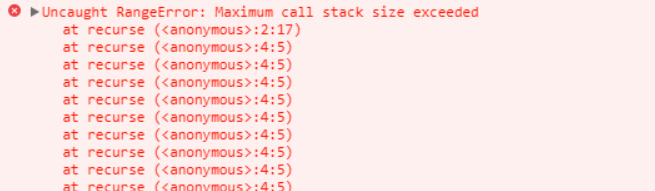
There are 2 ways to get these wonderful error messages:
Key Takeaways
- A RangeError in JavaScript happens when a value passed to a function or constructor falls outside the range that function allows.
- Non-terminating recursive functions exhaust the call stack and throw a RangeError with the message Maximum call stack size exceeded.
- The numeric methods toFixed, toPrecision, and toExponential throw a RangeError when their digits argument falls outside the documented range.
- The Array constructor throws a RangeError for a negative, non-integer, or a length above 4294967295.
- Wrapping a risky call in a try...catch block lets a script catch a RangeError and continue instead of crashing.
- Modern browsers report a RangeError in the console, while the discontinued Internet Explorer used to crash instead.
1) Non-Terminating Recursive functions
Browser allocates memory to all data types. Sometimes calling a recursive function over and over again, causes the browser to send you this message as the memory that can be allocated for your use in not unlimited.
There is nothing painful for a coder than a non-terminating function or a method of recursion that tends to get stuck in an infinite loop.
Be considerate while calling functions, also dry run is the best practice to prevent them.
Maximum call stack gets overflow and washes away your hopes of running the code correctly.(XD)
Chasing down a runaway recursive call uses the same memory-profiling techniques covered in debugging memory leaks in JavaScript.
var a = new Array(4294967295);  //OK
var b = new Array(-1); //range error

var num = 2.555555;
document.writeln(num.toExponential(4));  //OK
document.writeln(num.toExponential(-2)); //range error!

num = 2.9999;
document.writeln(num.toFixed(2));   //OK
document.writeln(num.toFixed(25));  //range error!

num = 2.3456;
document.writeln(num.toPrecision(1));   //OK
document.writeln(num.toPrecision(22));  //range error!
2) Out of Range
If someone asks you what your name is.
You won’t reply ‘2000 yrs’.
var num = 1;
try {
     num.toPrecision(500);  //no can't have 500 significant digits
    }
catch(err) {
     document.getElementById("mylife").innerHTML =err.name;
           }
Certain functions in JavaScript have ranges of inputs that you can give. Always be careful of the ranges. Sometimes while scripting we use functions that in the end go out of range, while performing tasks. These errors can be easily tackled, if while implementation you keep track of the ranges of variable types used.
While modern browsers like Chrome and Firefox report the error in the console, the discontinued Internet Explorer used to crash outright instead of showing a message.
Opening a chrome debugger session on the failing page shows the exact line and call stack behind the RangeError.
It should be of utmost priority that you check the valid input ranges.
Examples:
Number.toFixed(digits) 0 to 100
Number.toPrecision(digits) 1 to 100
Number.toExponential(digits) 0 to 100
Null is not 0
These ranges were extended to a maximum of 100 digits; see MDN's toFixed() reference for the current limits.
Hopefully this blog will help coders a bit in their frustrating hard work.
Let us learn from your mistakes too, please comment.
What Has Changed in JavaScript's RangeError Limits?
Two things have changed since this article's original examples. The digit ranges above are wider than they used to be, and a fourth RangeError trigger is not covered above: an invalid array length. It fires when the Array constructor gets a length that is negative, a non-integer, or larger than 4294967295, the maximum array length documented on MDN's Array reference.
This differs from the two causes already covered on this page: it comes from the length argument itself, not from a recursive call or a digit count outside a numeric method's range. The limit comes from the ECMAScript specification, which defines array length as a 32-bit unsigned integer, so 4294967295, or 2 to the power 32 minus 1, is the highest value it can hold.
Four inputs matter:
- Negative length: new Array(-1) throws immediately because a length below zero is invalid.
- Fractional length: new Array(3.5) throws because array length must be a whole number.
- Length above the limit: new Array(4294967296) exceeds the maximum length a JavaScript array can hold.
- Common cause: a length computed from user input, a miscounted loop, or an off-by-one calculation that goes negative or too high.
Validate first: check Number.isInteger(length) and a 0 to 4294967295 range before calling the constructor to avoid the error entirely. Wrapping the call in a try...catch block, the standard approach in exception handling, catches the RangeError before it stops the script.
function safeArray(length) {
  try {
    return new Array(length);
  } catch (err) {
    console.log(err.name, err.message);
    return [];
  }
}

safeArray(10);          // OK
safeArray(-1);          // RangeError, caught
safeArray(4294967296);  // RangeError, caught





RangeError in JavaScript FAQs
Did you find this page helpful?
More Related Blogs
TestMu AI forEnterprise
Get access to solutions built on Enterprise
grade security, privacy, & compliance
- Advanced access controls
- Advanced data retention rules
- Advanced Local Testing
- Premium Support options
- Early access to beta features
- Private Slack Channel
- Unlimited Manual Accessibility DevTools Tests