

Next-Gen App & Browser Testing Cloud
Trusted by 2 Mn+ QAs & Devs to accelerate their release cycles


On This Page
- What Is a Pull Request?
- How Does a Pull Request Work?
- How to Create a Pull Request?
- How to Create a Pull Request Using Command Line Interface (CLI)?
- How to Create a Pull Request Using Graphical User Interface (GUI)?
- How to Create a Pull Request Automatically?
- How to Merge a Pull Request?
- Common Challenges in Pull Requests
- Best Practices for Pull Requests

What Is a Pull Request in Git
Learn how to create pull requests in Git with step-by-step procedures, best practices, and solutions to common challenges for seamless collaboration.

Chandrika Deb
December 27, 2025
Pull Requests (PRs) in Git are crucial tools for collaborative development, enabling developers to propose, review, and refine changes before merging them into the main codebase. Commonly used in platforms like GitHub, GitLab, and Bitbucket, PRs ensure structured discussions, streamlined code reviews, and seamless integration of contributions.
By leveraging pull requests, teams can maintain code quality, manage version control effectively, and facilitate communication, making them an integral part of modern development practices.
What Is a Pull Request?
A pull request in Git is a mechanism for proposing changes from one branch of a repository to another, commonly from a feature branch to the main branch. By creating a request, developers notify their team about updates, enabling discussions, feedback, and collaborative code review before integration. This improves collaboration by visualizing how a source branch (the one providing changes) differs from a target branch (the one receiving the changes).
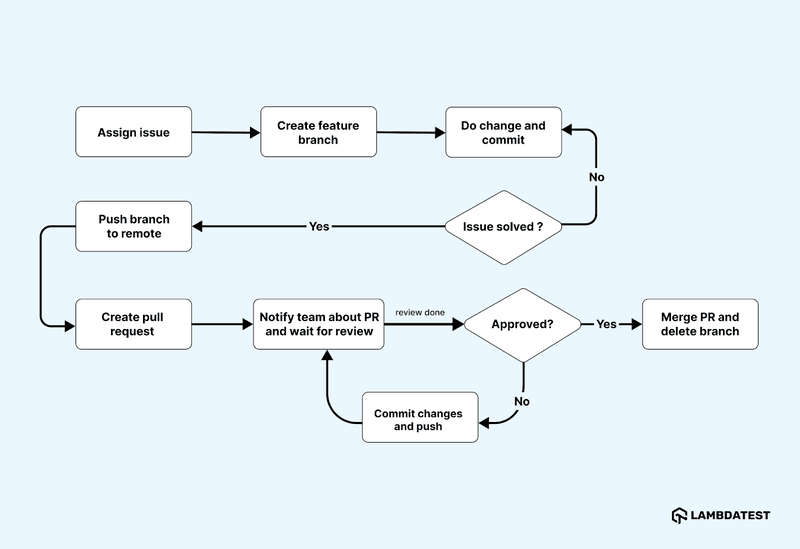
There are core platforms like GitHub, GitLab, or Bitbucket. They combine code review tools and CI/CD pipelines to ensure high-quality contributions. Acting as a structured forum, they help review and refine changes, track commits, and maintain a consistent codebase. Once approved and feedback is incorporated, the pull request is merged into the target branch, ensuring seamless integration and proper documentation of changes.

Note: Fasten your release cycle by using CI/CD tools like GitHub or GitLab and reduce your feedback cycle. Try TestMu AI Today!
How Does a Pull Request Work?
A pull request brings together collaboration and code quality by ensuring all changes are reviewed, documented, and aligned with project standards before merging.
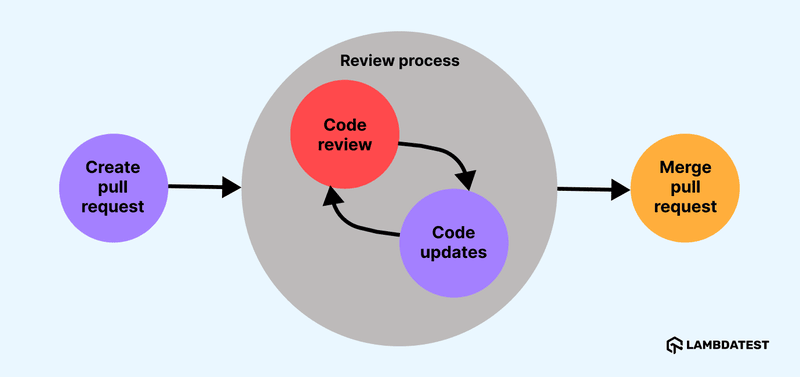
Here’s how the process typically goes:
- Branch Creation: A developer creates a branch, such as “feature-update” or “bug-fix,” separated from the main branch. This branch serves as an isolated environment for making and testing changes without affecting the main codebase.
- Commit Changes and Push: After making and testing changes locally, the developer commits them to the branch. The updated branch is then pushed to a remote repository like GitHub or GitLab.
- Open a Pull Request: The developer creates a PR by selecting their branch as the compare branch and the main branch as the base branch. Descriptive titles and detailed explanations of the changes provide context for reviewers.
- Review and Feedback: Team members or maintainers review the PR, provide comments, suggest modifications, or request edits. Based on feedback, the developer updates the branch, and all changes are automatically reflected in the PR.
- Merging Changes: Once the PR is approved, the changes are merged into the main branch, integrating the new code into the project. These changes are now part of the official repository and ready for deployment or further development.
How to Create a Pull Request?
To create a PR, push your changes to a new branch in the remote repository and navigate to the PR section on platforms like GitHub to submit it.
- Prepare Your Environment: Ensure Git is installed on your system. If not, download and install it from the official website of Git. Using the following command, check if Git is present in your system.
git --version
git clone https://github.com/your_username/repository_name.git
cd repository_name
git checkout -b feature-branch
git add .
git commit -m "Add feature X"
git push origin feature-branch
git add .
git commit -m "Address review comments"
git push origin feature-branch
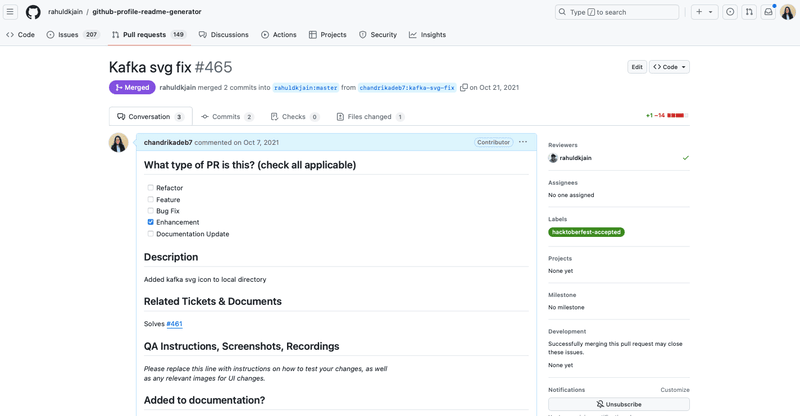
How to Create a Pull Request Using Command Line Interface (CLI)?
You can create and manage PRs directly from the terminal using the most commonly used git commands, as it streamlines workflows by integrating GitHub features into your local environment.
- Install GitHub CLI (Optional): For enhanced functionality, install GitHub CLI from the official GitHub CLI site. To check if your system already has the GitHub CLI, run the following command:
gh --version
gh auth login
gh pr create --base main --head feature-branch --title "Add feature X" --body "This PR adds feature X which includes..."
How to Create a Pull Request Using Graphical User Interface (GUI)?
Creating PRs via GitHub’s web interface is straightforward and facilitates collaboration and code reviews.
- Navigate to Your Repository: Sign in to your GitHub account and go to the repository where you made changes.
- Access the Pull requests Tab: Click on the “Pull requests” tab at the top of the repository page to view or create PRs.
- Create a New PR: Click the “New pull request” button on the right side of the page.
- Select Branches to Compare:
- Base Branch: From the “base” dropdown, select the branch into which you want to merge changes (e.g., main or master).
- Compare Branch: From the “compare” dropdown, select the branch containing your changes (e.g., feature-branch).
The differences between the branches will be displayed for review.
- Review Changes: Ensure all changes are accurate and meet expectations.
- Add Title and Description: Provide a concise title and a detailed description explaining the updates, their purpose, and any issues they address.
- Submit the Pull Request: Click “Create pull request” to submit it for review.
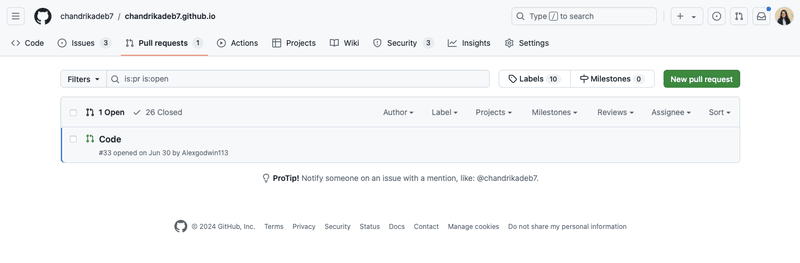
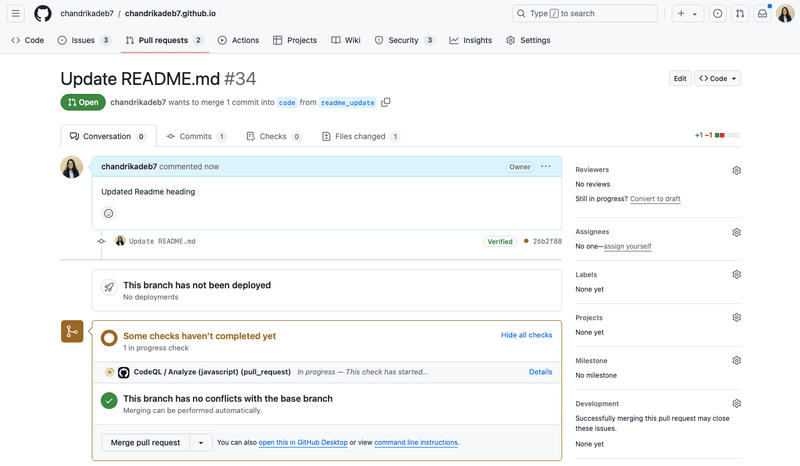
To streamline this process and ensure all necessary information is included, many projects use Pull Request Templates. Let’s further learn more about PR Templates in detail.
Pull Request Template
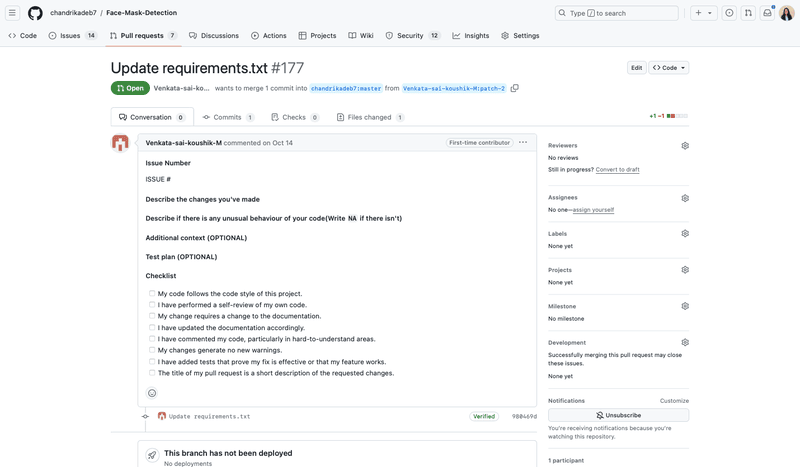
A GitHub PR template helps standardize the process by providing a consistent default text whenever a new pull request is created. This ensures each PR follows a clear, uniform structure.
By including predefined checklists, guidelines, and prompts, you can benefit from:
- Ensuring contributors adhere to a consistent review process.
- Reducing unnecessary communication by setting clear expectations from the start.
- Saving time by avoiding repetitive instructions for each PR.
- Enhancing code quality and maintainability over time.
As your development team grows, a structured approach becomes crucial. Standardization minimizes confusion and miscommunication and aligns everyone on the team with the expectations and necessary steps before requesting a review.
- To set up a GitHub template, simply add a file named
PULL_REQUEST_TEMPLATE.mdto your repository’s root or the .github/ directory. This template can include checklists, a summary section, testing instructions, and references to relevant issues. - For multiple PR templates, place them in the
.github/PULL_REQUEST_TEMPLATE/folder and choose the appropriate one when opening a pull request.
This reduces the need for back-and-forth communication and helps maintain high-quality code in the repository.
How to Create a Pull Request Automatically?
When you find yourself repeatedly performing the same tasks, you can configure your project’s built-in workflows to reduce manual effort and automate repetitive tasks.
This ensures consistency in both development and testing. One effective way to achieve this is by using GitHub Actions, one of GitHub’s standout features.
GitHub Actions simplifies the automation of software workflows, providing robust CI/CD capabilities. With this feature, you can build, test, and deploy your code directly from GitHub. It also streamlines code reviews, branch management, and issue triaging to align with your preferred workflow.
This feature supports a wide range of programming languages, including Node.js, Python, Java, Ruby, PHP, Go, Rust, .NET, and more. This allows you to build, test, and deploy applications in your language of choice seamlessly. This feature also connects all of your tools to automate every step of your development workflow.
The create-pull-request action in GitHub Actions automates the process of creating pull requests for changes made to your repository during a workflow. It is especially useful for workflows that modify or add files in the Actions workspace. The action seamlessly commits local changes to a new branch and generates a pull request to merge those changes into the
Key Features of the Create Pull Request Action:
- Detects and includes:
- Untracked (new) files.
- Tracked (modified) files.
- Commits made during the workflow that haven’t been pushed.
- Commits all changes to a new branch or updates an existing pull request branch.
- Automatically creates a pull request to merge the changes into the base branch.
- Untracked (new) files.
- Tracked (modified) files.
- Commits made during the workflow that haven’t been pushed.
The above features of GitHub Actions include a variety of practical applications, such as:
- Managing workflows with process management bots.
- Synchronizing repository data with external data sources.
- Updating API contract definitions, such as Swagger documentation.
- Applying code linting or formatting changes.
- Conducting static analysis and making automatic fixes.
- Automating scheduled tasks for repository maintenance.
By incorporating this action, you can streamline pull request creation and enhance your development workflows.
To get started with GitHub Actions and the create-pull-request action, follow the documentation for the create-pull-request action on the GitHub Marketplace.
Pull requests play a crucial role in both development and testing workflows, acting as a bridge between code collaboration and quality assurance. PRs often have changes that can behave differently on different browsers and devices. Testing these changes or PRs manually can be time-consuming and prone to errors.
You can always leverage cloud-based platforms that offer seamless integration with tools like GitHub Actions to test PRs automatically every time they are raised or updated.
AI-native test execution platforms like TestMu AI integrate directly with GitHub Actions, enabling automated testing at scale across 5000+ real devices, browsers, and OS combinations.

With TestMu AI GitHub Integration, you can create PR cards directly in your GitHub repository while conducting test sessions. This feature allows you to push issues to the repository at any point during CI/CD testing. When marking a bug in TestMu AI, the fields you populate are automatically displayed as information in your GitHub repository, ensuring accurate and detailed issue tracking for that specific testing instance.
To learn how to set up GitHub Integration with TestMu AI, refer to the GitHub Integration support documentation or if you are using GitLab instead of GitHub, you can refer to the GitLab Integration support documentation.
How to Merge a Pull Request?
In a pull request, the proposed changes are merged from a head branch into a base branch. By default, a pull request can be merged at any time unless there are conflicts between the head and base branches.
Here are the steps to perform the merge via CLI and GUI:
Steps to Merge Using CLI
- To merge a pull request, use the
gh pr mergecommand. ReplacePULL-REQUESTwith the number, URL, or head branch of the pull request.
gh pr merge PULL-REQUESTgh pr merge 523 --squash --body "my squash commit" --delete-branchSteps to Merge Using GUI
- Click on your repository name, then select “Pull requests”.
- In the “Pull requests” list, click the pull request you want to merge.
- Scroll to the bottom of the pull request. Depending on the merge options enabled for your repository, you may need to:
- Merge Commit: Retains the complete history of changes by creating a merge commit.
- Squash and Merge: Combines all individual commits into a single commit, streamlining the commit history.
- Rebase and Merge: Applies the changes directly on top of the base branch, producing a linear history.
- If prompted, enter a commit message or accept the default message.
- Click Confirm merge, Confirm squash and merge, or Confirm rebase and merge.

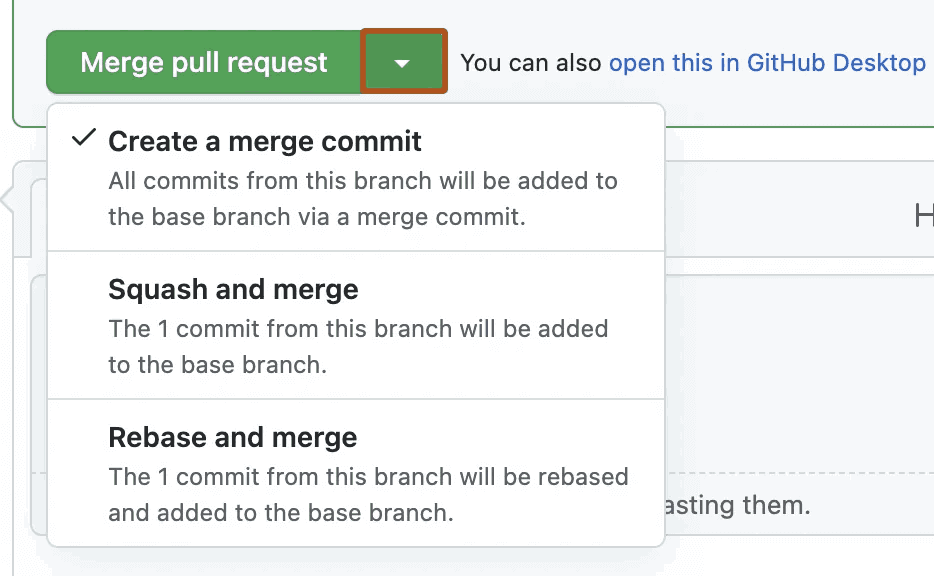
Choose the merging method that aligns with your project’s workflow.
- Merge Commit: Retains the complete history of changes by creating a merge commit.
- Squash and Merge: Combines all individual commits into a single commit, streamlining the commit history.
- Rebase and Merge: Applies the changes directly on top of the base branch, producing a linear history.
By following the above steps, you can merge a pull request with ease.
Common Challenges in Pull Requests
Below are some of the most common challenges faced during PRs:
- Challenge 1: Large Pull RequestsSolution: Break large PRs into smaller, manageable pieces to improve review efficiency.
- Challenge 2: Unresolved or Unaddressed Conflicts: Solution: Regularly sync your branch with the main branch to minimize complex conflicts when merging.
- Challenge 3: Stale Pull RequestsSolution: If PRs become outdated, communicate with the team to either update it or close it.
This approach ensures that your pull request process is organized and efficient and maintains high-quality contributions to your project.
Best Practices for Pull Requests
Any developer or tester storing their code remotely using GitHub, GitLab, or other version control system tools should follow best practices to streamline the commit, push, pull, merge, and code review processes effectively.
- Keep Smaller Pull Requests: Smaller PRs are easier to review and are less prone to conflicts.
- Always Write Titles and Descriptions: Provide detailed context in the pull request description, explaining the purpose and background of the changes.
- Replay and Address Feedback Promptly: Act on feedback quickly and update the PR accordingly to maintain progress.
- Use CI/CD Integration: Enable automated tests and checks to catch issues early and ensure the code meets quality standards.
- Communicate Clearly: Use comments and discussions to clarify your intentions, design choices, or any potential issues.
Conclusion
Mastering how to handle pull requests is crucial for effective collaboration in modern software development. PRs provide a structured platform for code reviews, allowing teams to propose, discuss, and refine changes before merging them into the main codebase. This approach ensures contributions meet project standards, maintains high code quality, and reduces errors by isolating features or fix-specific changes in dedicated branches.
PRs are important for both open-source and private projects, and they are important for maintaining organized and efficient workflows. Incorporating PR templates helps standardize submissions, ensure essential details are consistently included, streamline the review process, and foster clear communication. Adopting PR best practices enhances code quality and promotes a culture of continuous improvement and shared responsibility within development teams.
Citations
About Pull Requests:https://docs.github.com/en/pull-requests/collaborating-with-pull-requests/proposing-changes-to-your-work-with-pull-requests/about-pull-requests
Creating a Pull Request:https://docs.github.com/en/pull-requests/collaborating-with-pull-requests/proposing-changes-to-your-work-with-pull-requests/creating-a-pull-request
Git Pull Requests and Branches:https://learning.nceas.ucsb.edu/2021-11-RRCourse/git-pull-requests-and-branches.html


Frequently asked questions
Did you find this page helpful?
More Related Hubs
TestMu AI forEnterprise
Get access to solutions built on Enterprise
grade security, privacy, & compliance
- Advanced access controls
- Advanced data retention rules
- Advanced Local Testing
- Premium Support options
- Early access to beta features
- Private Slack Channel
- Unlimited Manual Accessibility DevTools Tests