

Next-Gen App & Browser Testing Cloud
Trusted by 2 Mn+ QAs & Devs to accelerate their release cycles


Perform Easy Cross Browser Testing With TestMu AI WordPress Plugin
Wordpress has a market share of 59% out of all CMS with an average of 500 new wordpress based websites being added every day. With so many developers using WordPress as choice of CMS, we at TestMu AI have decided to make the life of Wordpress developers easier by developing a wordpress plugin for cross browser testing.

TestMu AI
January 12, 2026
Out of all the websites openly accessible on internet, around 30% of them are powered by WordPress. It has a market share of 59% out of all CMS with an average of 500 new wordpress based websites being added every day.
With so many developers using WordPress as choice of CMS, we at TestMu AI have decided to make the life of WordPress developers easier by developing a wordpress plugin for cross browser testing.
This all new wordpress plugin within TestMu AI allows you to test your web pages for cross browser compatibility by taking screenshots directly from your wordpress dashboard.
Now perform live interactive manual testing of your WordPress websites on TestMu AI.
What is TestMu AI WordPress Plugin used for?
TestMu AI wordpress plugin can be used to take full page screenshots of post and pages across different desktop and mobile browsers right from wordpress admin panels.These screenshots will help in fastracking cross browser compatibility testing of the web pages and websites hosted on WordPress.
You can simply take screenshots directly from the wordpress dashboard, be it pages, posts, or while editing a post. You can take direct screenshots on upto 25 different browser and operating system configuration at a time by clicking on TestMu AI’s icon and selecting the configuration using TestMu AI.
Let’s see how you can use TestMu AI wordpress plugin.

How to use TestMu AI WordPress plugin?
Right now you can install the plugin through a downloadable zip file. The wordpress.org based plugin would be live shortly. Once installed, you’ll see TestMu AI’s icons on your pages, posts, and post editor, through which you can launch the plugin in WordPress page itself.
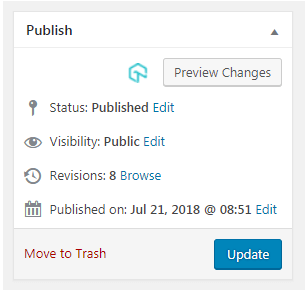
Inside post editor
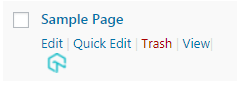
On Pages
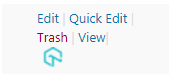
In Posts
Click on the icon and a lightbox popup will open up in WordPress page itself, that with help you in selecting browsers to screenshots on. You can select upto 25 browsers at the time and you can select both desktop and mobile browsers.
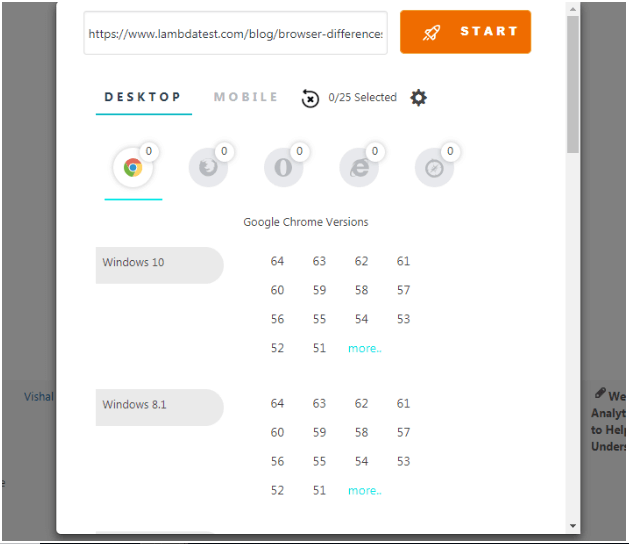
Once you have selected the browsers, click on launch and TestMu AI will start taking screenshots of your pages on live real machines running selected configurations. You can also download screenshots from your wordpress account itself by clicking on download icon next to screenshot configuration.
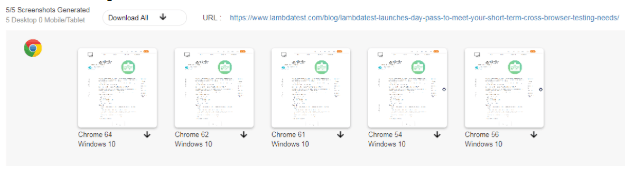
Clicking on a thumbnail in the listing view will open up the screenshot in full page view. In this view you can see all the different screenshots taken by selecting the desired combination in the dropdown list.

You can also adjust the width of the screenshot as per screen fit by changing the display % from the dropdown menu.

In addition, there is also a test log feature where you can see all the tests you have taken till now. It will help you keep a historical record of all screenshots taken.
WordPress Plugin is just the beginning.
We are very actively working on bringing more and more user features to the platform and this WordPress plugin is just the starting point.
Now perform live interactive manual testing of your WordPress websites on TestMu AI.
Let us know your feedback in the comment section below!
You can watch the complete video here
Happy Testing.



Did you find this page helpful?
More Related Hubs
TestMu AI forEnterprise
Get access to solutions built on Enterprise
grade security, privacy, & compliance
- Advanced access controls
- Advanced data retention rules
- Advanced Local Testing
- Premium Support options
- Early access to beta features
- Private Slack Channel
- Unlimited Manual Accessibility DevTools Tests