

Next-Gen App & Browser Testing Cloud
Trusted by 2 Mn+ QAs & Devs to accelerate their release cycles


How Evolution Of HTTP/2 From HTTP/1 Changed The Web
It’s quite irritating, isn't it?

Saif Sadiq
December 27, 2025
Ever came across the situation where you really need to open a web page fast and it’s taking forever because of slow internet speed? May be someone in your network is downloading a torrent choking the bandwidth?
It’s quite irritating, isn’t it?
In this era of 5G, a slow page load speed is a bane of seamless user experience, both for users and developers. We cannot control a user’s internet speed, but as developers, we can make sure that we tried every trick in the book to make the user’s web journey as smooth as possible.
That’s where HTTP protocol comes to rescue.
What is HTTP?
HTTP (Hypertext transfer protocol) helps us to get smooth internet experience. It was first launched in 1996. It is an application layer protocol for collaborative, distributed, and hypermedia information systems which play a role as the foundation of data communication for the world wide web.HTTP was designed for communication between web browsers and web servers and it acts as a bridge between client and server.
Basically, it is used for transmitting hypermedia documents, such as HTML. HTTP is structured with URLs and hypertext. It is a request-response protocol in a client-server computing system.The first definition of HTTP/1.1, the version of HTTP in common use, occurred in 1997.

Limitations in HTTP/1.1
HTTP/1.1 ,update to HTTP 1, was standardized back in 1999. HTTP/1.1 was helping people for running their business online but there were some limitations in HTTP/1.1 which were then updated in v2 .
- Latency in loading a web page
- Head of line blocking problem
- Multiplexing multiple requests over a single TCP connection
- Different resource request for each resource file
- HTTP headers are long which causes delay in web page loading
The web back then was very different, with slower web pages and slower internet connections. But over the years, the way that we use the web has changed significantly and websites are now much more complex than they used to be.
Major update to HTTP launched in 2015 as HTTP/2 which resolved issues faced in HTTP/1.1. HTTP/2 was derived from the earlier experimental SPDY protocol, developed by Google. It made web applications faster, simpler, and more robust.
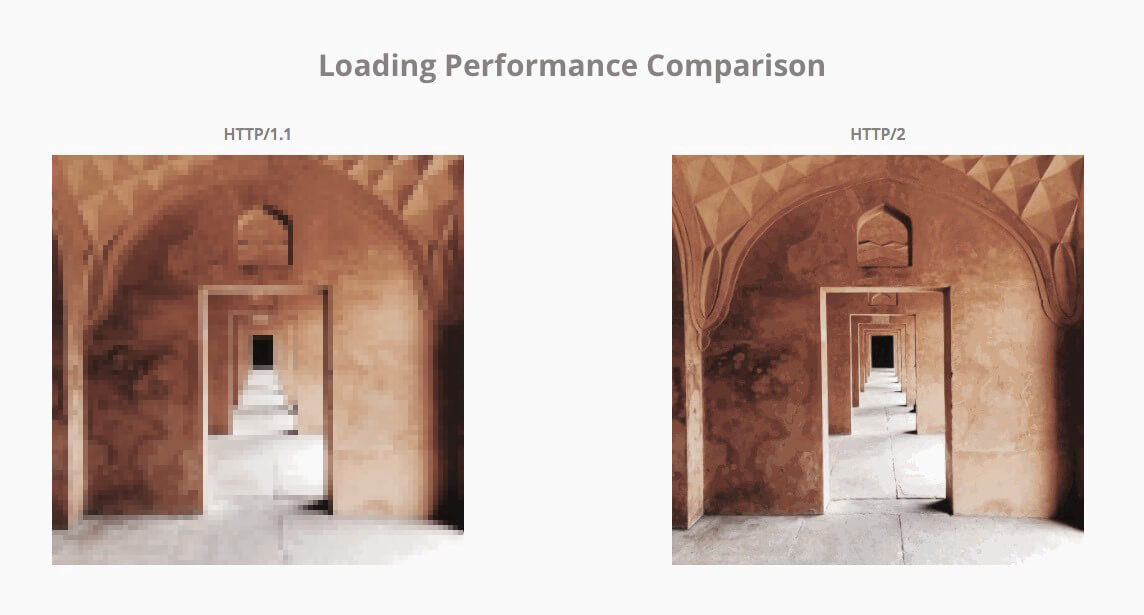
How to switch to HTTP/2
HTTP/2 is backwards-compatible with HTTP/1.1. However you need to do following things to switch to HTTP/2 :
- Adopt HTTPS and get a TLS certificate
The first thing you need to do is move your website from unsecured http to secured https.
- Using image Sprites instead of multiple files
Convert your all small resource files into one large sprite which help HTTP/2 to solve queuing of resources issue.
- Adding Images Inline
Another work needed for the problem of multiple HTTP requests in HTTP/1.1 is to inline images in CSS using data URIs.
- Concatenating JavaScript and CSS files
Combine and optimze your multiple JavaScript and CSS files into one simple optimzed JSS and CSS files
- Domain Sharding
Split your resource files to different subdomain as HTTP2 removes the need of domain sharding.
How HTTP/2 resolved HTTP/1.1’s limitations
HTTP/2 focuses on specific goals and issues of concern in HTTP/1.1 :
- To create a algorithm which allows client and server to elect to use HTTP 1.1 or 2.0
- To maintain high compatibility for methods,status code,URI’s and header fields with HTTP/1.1
- To decrease latency to improve web page load speed
- Support common existing use cases of HTTP, such as desktop web browsers, mobile web browsers, web APIs,web servers at various scales, proxy servers, reverse proxy servers, firewalls, and content delivery networks.

Which Browsers Support HTTP/2?
Most of the browsers now support HTTP/2. The list of browsers includes latest versions of Chrome, Firefox, Safari, Internet Explorer, Opera and others. You can use Akamai’s tool to check if your browser supports HTTP/2.
How HTTP/2 help improve the web page load speed
Header Compression
The header fields are transmitted after the request or response line. HTTP/1.1 requests and responses are not compressed and transmitted in plain text which causes a lot of unnecessary bytes being downloaded.
But in HTTP/2, the header fields are compressed and transmitted in binary codes making it more compact and efficient for the user computer to load.
Header compression decreases the overhead of client request which lowers bandwidth and decreases page load time.
Server Push
In HTTP/1.1, when your browser connects to a web server requesting a web page, the HTML file is sent first and then your browser request for other resource files like CSS, javascript etc. But in HTTP2 Server push, In addition to the response to the original request, a server can send multiple responses to a single client request without the client having to request each one explicitly.
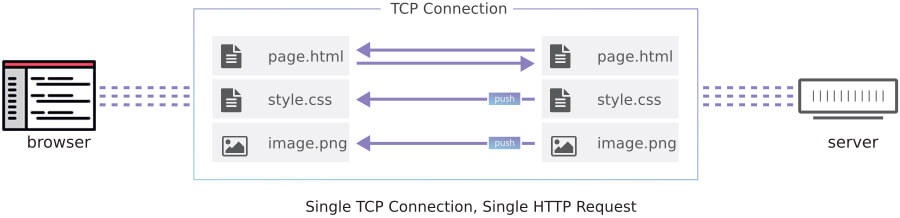
If you have ever added an inline CSS, javascript or any other source file through data URI then you already experienced server push. By manually adding the source file into the URI, we are pushing that source file to the client, without waiting for the client to request it. We can achieve the same results with HTTP/2 with additional performance benefits.
Multiplexing multiple requests over a single TCP connection
One of the limitations of HTTP/1.1 is that it is only able to request files one by one on a single connection – this means requesting the file, waiting for a response, downloading the file and then requesting the next one. This creates the problem of head-of-line blocking and inefficient use of the underlying TCP connection.
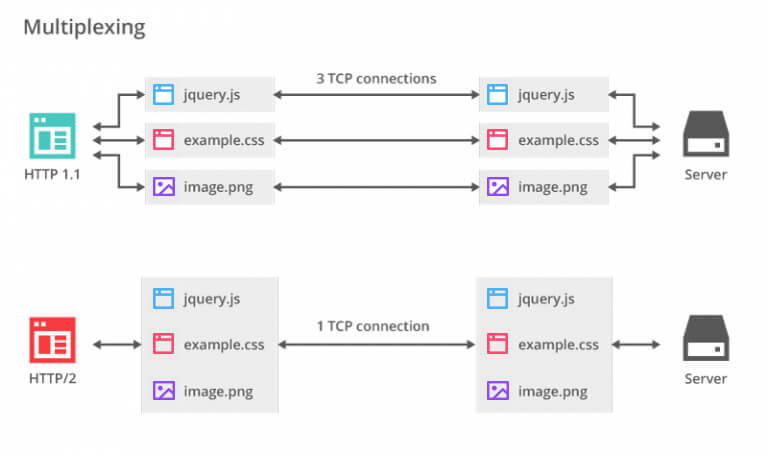
The new binary framing layer in HTTP/2 removes these limitations, and enables full request and response multiplexing, by allowing the client and server to break down an HTTP message into independent frames, interleave them, and then reassemble them on the other end.
Stream Prioritization
Once an HTTP message can be split into many individual frames, HTTP/2 allows for multiplexing of frames from multiple streams. The way in which frames are interleaved and delivered by client and server becomes a critical performance concern. To execute this, HTTP/2 standard associate weight and dependency to each stream.
- Each stream may be assigned an integer weight between 1 and 256.
- Each stream may be given an explicit dependency on another stream.
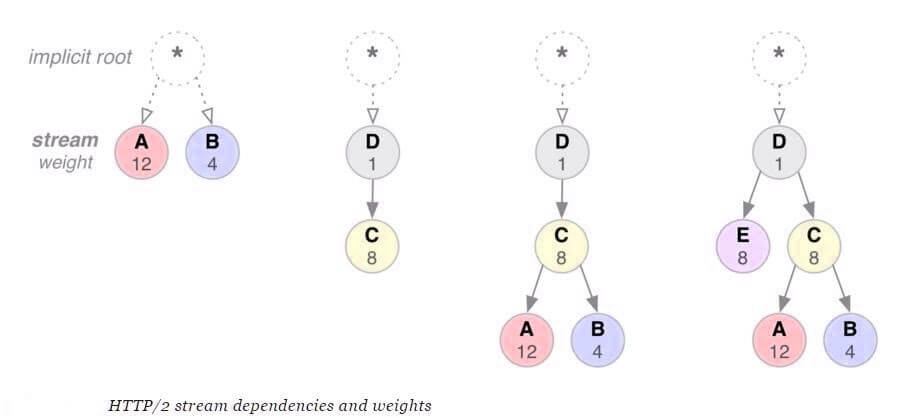
The combination of stream dependencies and weights allows the client to construct and communicate a “prioritization tree” that expresses how it would prefer to receive responses. In turn, the server can use this information to prioritize stream processing by controlling the allocation of CPU, memory, and other resources, and once the response data is available, allocation of bandwidth to ensure optimal delivery of high-priority responses to the client

Advantages of HTTP/2
The advantages of switching to HTTP/2 are immediate. Most users are using the browser that can take advantage of the protocol, every day figure is rising up.
- More Shielded: HTTP/2 always have encryption on by default, which results in high security across sites.
- Mobile friendly: All the mobile sites are allowed with the high amount of requests to prevent data bytes from the headers from being downloaded is the result of header compression feature.
- Faster Page Load Times: After removing many impediments of the protocol,HTTP/2 promises to be faster than the current standard.
- Compatibility with HTTP/1.1: HTTP/2 is compatible with HTTP/1.1 . To ensure that the switch to the new protocol is as smooth as possible, methods, status codes, header fields, and URIs have remained same as in HTTP/1.1.
- Less dependency on alternatives: Multiplexing feature solves the problem of high time-consuming methods to reducing the number of requests from the server – like domain sharding, image sprites or in-lining Javascript and CSS – won’t be as indispensable.

Disadvantages of HTTP/2
There are also some limitations businesses should take into account before moving to the new protocol.
- Take care of your audience: Although most of the users are using browsers that can take advantage of the protocol there are also a number of people continue to use older browsers which don’t. In addition to this, not all web servers support HTTP/2. So current page load speed optimization process will remain necessary.
- HTTPS Requirements: Moving from HTTP/1.1 will be more difficult for a site not using HTTPS since HTTP/2 has the prerequisite of the site already being on HTTPS. So switching a website to HTTPS will require all HTTP URLs to be converted to the HTTPS. As moving to HTTPS is a positive factor for search engines, therefore, it would be great to upgrade your site.
- Page load performance could be minimal: Switching from HTTP/1.1 to HTTP/2 could take a lot of time and resources so it’s important to be sure that the impact on site speed worth it. If a website is already optimized for page load speed, the performance improvements might be smaller than expected.
- HTTP/2 Unknown facts: HTTP is still new so a lot of research will have to be conducted in order to determine best practices and possible drawbacks.


Did you find this page helpful?
More Related Hubs
TestMu AI forEnterprise
Get access to solutions built on Enterprise
grade security, privacy, & compliance
- Advanced access controls
- Advanced data retention rules
- Advanced Local Testing
- Premium Support options
- Early access to beta features
- Private Slack Channel
- Unlimited Manual Accessibility DevTools Tests