

Next-Gen App & Browser Testing Cloud
Trusted by 2 Mn+ QAs & Devs to accelerate their release cycles


Devising A UI Test Plan That Works Like A Charm
A UI test plan includes the scope of the web application, testing approaches, activities, etc. Here's how you can make make a test plan to make testing more effective!

Harish Rajora
December 28, 2025
User Interface(UI) is the first thing that the user comes in contact with on your website. A good user interface attracts the user and helps to create a distinct identity of a website.This is why it becomes vital to test your UI, before pushing your website into production. UI Testing is a very important phase of development that opens up risks and possible breaks in the web application that could have been really hard to figure out.
Testing increases the quality of the web application and it would not be wrong to say that the reputation of the web application depends on how well it has been tested.
In this article, I’ll take you through the different UI test development processes required to make your tests better and efficient. There are four major components in the testing- Test plan, Test Scenarios, Test Cases, and Test Scripts. I’ll also share how to make a good UI testing plan and how to create them for testing your web application. To know more about the UI testing and its components, you can refer to our previous blog on All About UI Testing.
How To Make A Good UI Test Plan?
A UI test plan is a formal document related to testing of your web application. This includes the scope of a web application, testing approaches, activities, etc. It is very important and the first step into the testing of your web application.
Prerequisites For A Good UI Test Plan
A good UI test plan always starts with identifying different resources available for testing. The resources you’d need include the QA professionals with required skills, tools, and the documentation.
The first step in creating a good UI test plan is the documentation. After this, it is essential that your team prepares an SRS or formal document that describes different requirements and other essential elements of the web application.
After figuring out the resources available for UI testing, you need to prioritize different key areas that need to be tested. You need to identify the resources you’d require for the testing method(s) you’ll follow and their respective documents. Also, every good testing plan should include responsive testing and cross browser testing in order to give the best UI/UX experience to the user. You need to make sure that your website is completely responsive and doesn’t break in any screen size, device, or browsers your users might be using.
For responsiveness you can try a free next-gen browser to build, test & debug mobile websites you can try LT Browser a dev-friendly browser in which you can see the mobile view of your website on Android and iOS resolutions & check its responsiveness.

Understanding The Difference Between Cross Browser Testing & Responsive Testing
Why Go For A UI Test Plan?
It is important that you have a test plan before you start with UI testing. A good UI test plan can help you to create a structural map of your overall process, manage your time better and a guide to refer to make sure everyone is on track. Even though there are some distinct advantages, you might wonder if you really need a test plan? Or, if it’s just another activity you spend time on but doesn’t give any results?
I’ll answer these questions by highlighting the importance of UI test plans.
- Create Structural Map:Test plan creates a structural map of how to proceed with the UI testing. Creating a UI test plan will highlight the types of testing you’ll require (such as exploratory testing, scripted testing, responsive testing, cross browser testing, etc. and ultimately helps you to distribute the tasks within your team.
- Estimate Total Time: UI test plan helps in estimating the overall time required for testing. With its help, you can provide a deadline for the testing team and the estimated date to the production team or the client. This showcases our serious commitment to the project and helps in gaining the trust of the stakeholders.
- Detailed Guide For Testing: UI test plan is a detailed guide to the testing process. Hence, it helps people outside the testing area (such as developers, customers, business managers, business analysts etc) understand the process that is being followed in detail.
- Identify Resources: UI test plan underlines the size and quantity of resources required in the testing phase. These resources can vary according to the project such as hardware, cloud-based servers, the web application required for testing, etc.
- Risk Mitigation: UI test plan highlights the risk involved in the testing of the project. Revealing the different risks can help in providing risk management solutions to cope with them. This increases testing efficiency.
- Automating Tests: UI test plan should include what test scenarios or tests need to be automated. Some tests are repetitive and can be automated for Selenium testing. Automating certain tests will improve the accuracy and speed of these tests.
- Creating Browser Matrix: While creating a test strategy, you need to ensure that your website works seamlessly on all browsers. You’ll need to perform cross browser testing of your website after you’ve created your browser matrix.
Check out our UI comparison tool to easily capture and compare UI screenshots.
How To Write A UI Test Plan?
Since you know that a test plan contains just the descriptions, it is important to know what should be included inside a UI test plan. So, some of the key points that should be remembered while creating a test plan may include:
- Professionals Required (With their respective skills).
- Total time it would take for testing the web application.
- Different testing techniques the \teams will be following.
- Resources required for testing such as tools, hardware, documents etc.
- The target test environments such as OS, devices, browsers etc. for cross browser testing.
- Final goals of the testing.
Once you are done with documenting the above-written points, you can use smoke testing or sanity testing for creating a UI test plan.
Smoke testing will help you to identify simple bugs in your web application, but not too deep. Smoke testing can be said as a first step in testing the upper layer of the web app. If your web application does not pass the basic functionality tests (such as logging in to the system), you’d need deep responsive testing or cross browser testing for it.
Sanity testing is just contrary to the smoke testing in which it determines the new and modified code of the web application and checks if it matches with the requirements or not. Unlike smoke testing, sanity testing is rigorous and tests deeper into the functionalities. Sanity testing is performed after the application has passed the smoke tests. Sanity tests help in saving a lot of time and money which could have been spent on the testing by rejecting the application on the basic working like the login page.
Once we are done with documenting the UI test plan, we can move forward with the creation of test scenarios for our project
Now execute your free automated UI test online seamlessly.

Writing Good Test Scenarios For UI Testing
A test scenario is a high-level idea of what needs to be tested. For example, we can say that “A user can log in on the website” as a test scenario. This will contain a set of test cases under it which will result as a positive or negative outcome of the scenario and are focussed just on the login functionality. Since a test scenario tells a functionality that will be used by the customer on the website and so it is very important that the tester thinks with respect to the end-user and create test scenarios accordingly.
Why Go For Test Scenarios For UI Testing?
If a tester is writing the test cases already, he might think about why he needs to write the test scenarios? While it’s true that test scenarios contain the test cases, they have their own advantages.
- Test scenarios help the customers and other business-related teams understand the overview of what the testers will be testing in the application. Through the test scenarios, they can amend or change any scenario according to their requirements.
- Test scenarios cover the complete test cases because they come under a single umbrella. For example, search functionality will cover all the test cases related to the search and login functionality related to login. This helps in creating a wide test coverage for the application and ensures better testing.
- Test scenarios help in prioritizing the different areas of the application helping the testers in focussing those areas specifically.
- Test scenarios are very important in studying the end-to-end flow of the application.
How To Write A Test Scenario For UI Testing?
Writing test scenarios is a step by step process which helps achieve greater test coverage and satisfy requirements.
- Go through the document, test plan, manuals etc. of the application to be tested. This will help you understand the complete web application.
- Figure out different functionalities of the web application being in the shoes of the end-user. Since test scenarios are created with respect to the customer, it is best if we imitate him in this process.
- Make a list of the test scenarios that you figured out after completing the above two steps.
- Create a traceability matrix of the test scenarios you just listed to verify that all the requirements have been satisfied.
- Get the scenarios reviewed by other management people or customers if required.
- Include cross browser testing and responsive testing scenarios in your plan to ensure seamless user experience.
So by now, we are done with the creation of a UI test plan and test scenarios for our project. The next step is to write test cases that are covered under the test scenarios.
Writing Good Test Cases For UI Testing?
While UI test plan and test scenarios were methods to write the functionalities of the system, a test case provides actions to be taken on those functionalities. The outcome of the actions decides whether the functionality works properly (test case passed) or not (test case failed). Test cases involve conditions and data to be executed on the project and are generally inside the test scenarios. So, a test scenario can be considered as a bigger sphere holding the test cases inside it.
Why Go For Test Cases?
Test cases are an integral part of the overall UI testing process. The importance to write a test case is:
- Test cases provide greater control over the logic and flow of the project.
- Test cases help in revealing the bug that was possible while being operated by the end-user. Since test cases imitate the end-user perspective, some hidden bugs are easily discovered.
- Test cases provide a better flow for testing. A tester knows what to test first and what to test after that and so on. It gives a planned execution to the testing phase.
- If test cases are written in a proper and organised manner, they bring you very close to satisfy the requirements of the project/client.
How To Write Good Test Cases?
If the test cases are written in a proper way, they provide greater test coverage and efficient testing. So, it should be a thought-out process. Here are some tips to write better test cases.
- If possible, go for writing test cases under test scenarios only. Test scenarios are like the headline of an article and test cases get direction if written under test scenarios.
- Include the conditions required for the execution of the tests and the final expected result. This helps other testers know the intended purpose of the test quickly.
- Do not focus on just positive cases only. Remember to jot down negative test cases as well.
- Always use corner test cases or exception test cases. This may include “What if the user enters a number as an email id” etc.
- Do not create dependent test cases. For example, a test case providing “Show My Plan” only after “Login” on TestMu AI. Since a user does not always follow a specific order in browsing the website, your test cases also should not follow it. Create test cases to test such scenarios also.
- Remember to include the following in the test case:
- Test Case ID
- Title of the test case
- Risk Level (High/Low)
- Type of testing used
A test case is very specific to functionality while the test scenarios are vast and generic. In the section of test scenarios, there was a brief mention of writing a test scenario on “login functionality”. As test cases come under the test scenarios, let’s consider the same test scenario.
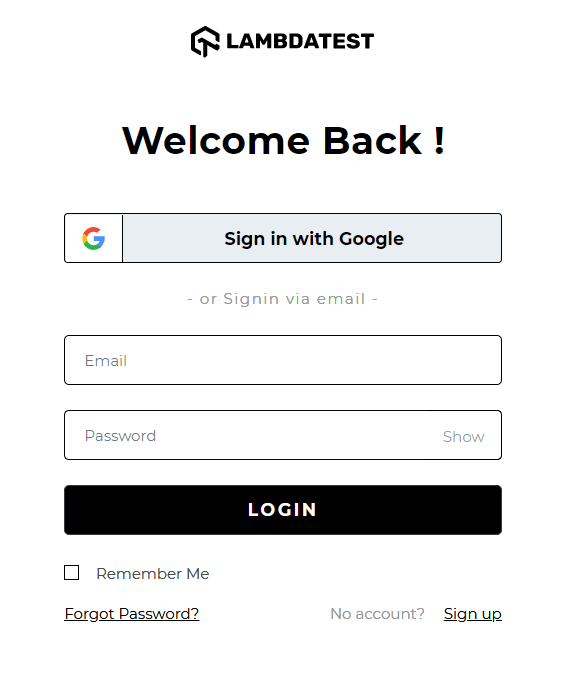
For the above login page of TestMu AI, the following test cases can be written:
- Analyse the system behaviour and outcome when valid email id and password are entered.
- Analyse the system behaviour and outcome when invalid email id and password are entered.
- Analyse the system behaviour and outcome when valid email id and invalid password are entered.
- Analyse the system behaviour and outcome when invalid email id and valid password are entered.
- Analyse the system behaviour and outcome when “Remember Me” is checked.
- Analyse the system behaviour and outcome when “Remember Me” is not checked.
- Analyse the system behaviour and outcome when “Forgot Password” is selected.
- Analyse the system behaviour and outcome when login/sign up is done through Google.
Remember that these test cases come under the overall umbrella of the test scenario “Login Into TestMu AI”.
Writing Good Test Scripts For UI Testing
Test scripts are detailed line by line descriptions of the tests performed on the web application. These descriptions are specific but detailed in terms of the data, test cases and the functionality of the web application. The results of the test cases and their expected outcomes are also logged into the test scripts. Do we really need them? Definitely we do.
Why Go For Test Scripts?
Test scripts provided a detailed explanation of the test cases for responsive testing of UI. They are important to be written in the testing phase because:
- Test scripts help a new trainee/employee understand the project and the functionalities in a deeper way.
- Test scripts show a company’s seriousness towards the quality control part of the web application.
- In case of any mishappenings with the system in the future, the testing team can look at the test scripts and understand where the testing went wrong instead of repeating the testing process again.
How To Write Test Scripts?
It is very easy to write the test scripts since it just provides detail about the test cases. You just need to remember the key points that should be included in the test scripts:
- Test Script ID – A unique ID defining the test script.
- Title – This is the title of the test script.
- Test Case ID- The ID of the test case on which you are writing the script.
- Requirements- The requirements to run the test cases such as web application and hardware specifications.
- Procedure – This will include the step wise procedure for the tester to proceed for the testing.
- Result – The result of the test after being completed by the tester.
- Status – Status of the test script (Pass/Fail)
- Error Code- In case of failure, what error code was encountered.
To demonstrate, let’s see how a test script looks like:
Test Script ID- 003
Title - Validate Login Functionality on Login Page
Test Case ID - TLO982
Requirements - Browser Compatible above Chrome 42, Firefox 52, Safari 10, Edge 16, Opera 43
Procedure-   Open the Login Page
	         Enter Valid Credentials
	         Click On The Login Button

Result - 	User has logged in successfully
Status - 	Pass
Error Code - 	None.
Also Read: All You Need To Know About UI Testing
Wrapping It Up!
UI Test plan, test scenarios, test cases, and test scripts make a complete test environment for a tester. These four elements of testing are so closely knit together that it is easy to get confused or mix one into another. While it is important to document all of these elements, sometimes, you might find one of them not included in the overall testing phases. It totally depends on the testing methodology your project is following.
This blog was aimed at separating the boundaries between these elements and clearing the concept. So the next time you are hired as a tester and are presented with these documents in front of you, you have no questions and start your job right away. That’s all for now! Do share and retweet this article. Happy Testing!!!?



Did you find this page helpful?
More Related Hubs
TestMu AI forEnterprise
Get access to solutions built on Enterprise
grade security, privacy, & compliance
- Advanced access controls
- Advanced data retention rules
- Advanced Local Testing
- Premium Support options
- Early access to beta features
- Private Slack Channel
- Unlimited Manual Accessibility DevTools Tests