

Next-Gen App & Browser Testing Cloud
Trusted by 2 Mn+ QAs & Devs to accelerate their release cycles


CSS Transitions: A Detailed Guide With Examples
This blog dives into CSS transitions, explaining how to create smooth effects and subtle interactions to enhance user experiences.

Alex Anie
January 30, 2026
Modern web design isn’t just static pages. It’s about creating interactive experiences for visitors. This includes effects like buttons that change color on hover, pop-up windows (modals) that appear, and elements that fade in or out as you scroll.
These dynamic elements are often in different states. CSS transitions allow you to smoothly change an element’s appearance between these states (hover, active, and focus). Using these state transitions effectively can create a more engaging and user-friendly website experience, guiding visitors and helping them focus on what matters most.
With the help of CSS transitions, an element’s change of state doesn’t have to be laggy, as we can apply micro-animations that enable smooth and easy changes of state as the user interacts with the element.
In this blog, we will explore what CSS transitions are with detailed examples of each property and how to use them to create stunning effects on the web.
What are CSS Transitions?
CSS transitions allow the smooth changes of CSS property values over a specified period of time.
By default, Cascading Style Sheets (CSS) is a declarative language; any style applied to a certain element takes immediate effect. This is very useful when we only need to style how the web page looks or feels when it first loads on the page.
However, some elements might require changes (state), which might be for aesthetics or to indicate that an element is clickable, such as a button, forms, cards, navbar links, user profile, or modal that performs a specific function.
For example, the TestMu AI home page shows interesting use cases for transitions.
A simple use case showing how CSS transition can be applied to different web elements, components, ranging from buttons, forms, cards, navbar links, user profiles, modals, etc. CSS transitions can be applied to these elements for smooth and easy state change while users interact with them.
How Does CSS Transition Work?
Transition works by specifying which CSS property or properties should be changed when a user trigger occurs, which results in a change in state. This change in state moves from the initial state to the final state.

CSS transition only takes place when a user trigger occurs and is commonly used with hover effects. However, other CSS pseudo-classes such as focus, active and JavaScript events can trigger CSS transitions.
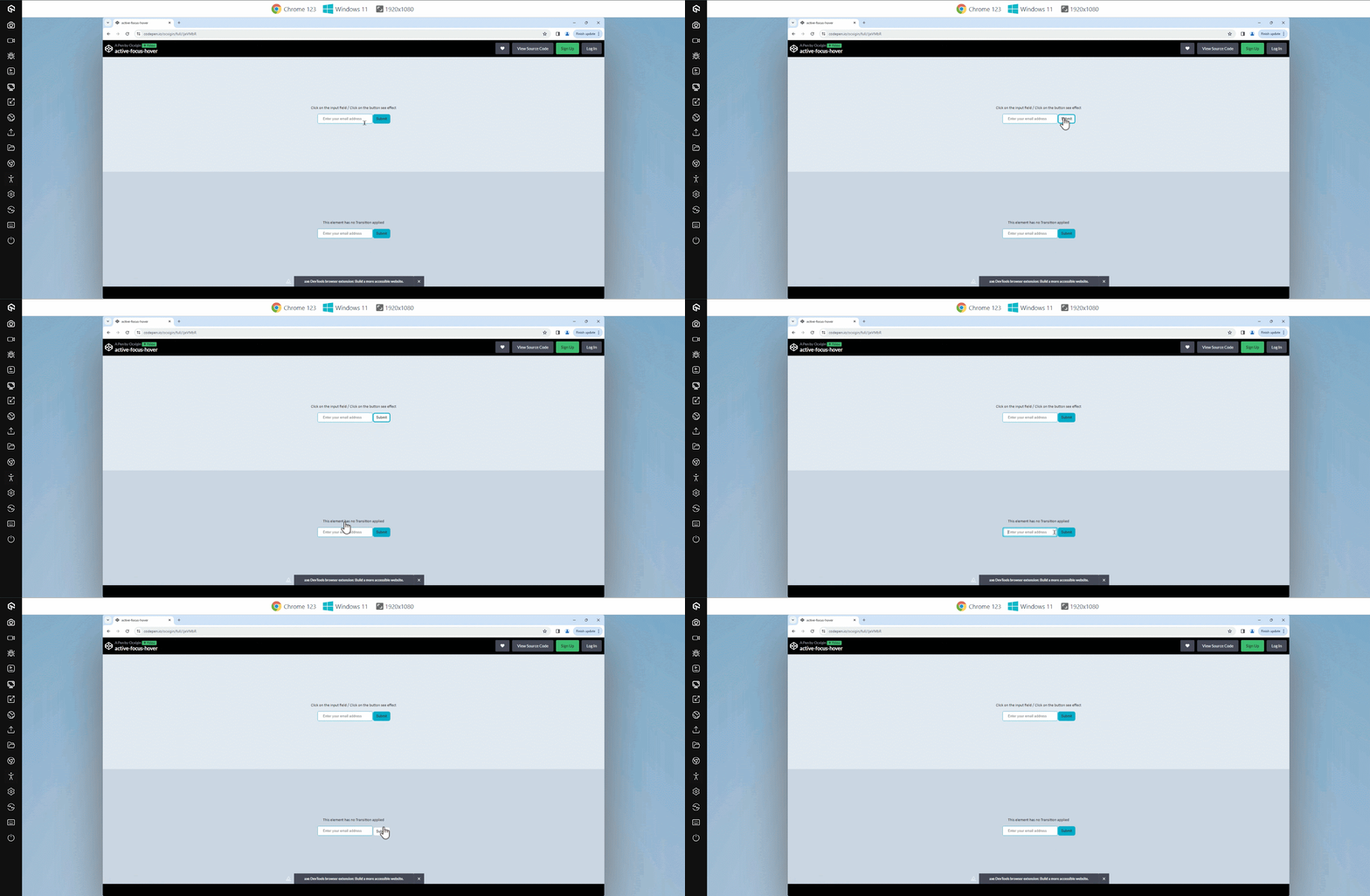
Here is an example below that shows how the transition effect applies to hover, active, and focus state.
HTML:
<body>
    <main class="main">
        <main>
            <!-- Transition -->
        <section class="t">
        <div class="text">
            <p>Click on the input field / Click on the button see effect</p>
        </div>
        <div>
            <input type="text" placeholder="Enter your email address " class="transition">
            <input type="submit" class="transition">
        </div>
    </section>

    <!-- No Transition -->
    <section class="no-t">
        <div class="text">
            <p>This element has no Transition applied</p>
        </div>
        <div>
            <input type="text" placeholder="Enter your email address">
            <input type="submit">
        </div>
    </section>
        </main>
    </main>
</body>
CSS:
*, *::before, *::after {
    padding: 0;
    margin: 0;
    box-sizing: border-box;
}

body {
    overflow: hidden;
}

.t {
    display: flex;
    flex-direction: column;
    justify-content: center;
    align-items: center;

    height: 50vh;
    width: 100vw;
    background-color: rgb(226 232 240);
}

.no-t {
    display: flex;
    flex-direction: column;
    justify-content: center;
    align-items: center;

    height: 50vh;
    background-color: rgb(203 213 225);
    width: 100vw;
}

/* Input Email Button */
[type="text"]{
    padding: 10px 20px;
    border: 1px solid #0ebac5;
    border-radius: 5px;
    outline: none;
}

/* Focus State */
[type="text"]:focus{
    box-shadow: inset 0 0 6px 2px #0ebac5;
}

/* Submit Button */
[type="submit"]{
    line-height: 30px;
    background-color: #0ebac5;
    padding: 0 10px;
    border-radius: 5px;
    border: 0;
    user-select: none;
    cursor: pointer;
    box-shadow: 0 0 0 3px #0ebac5;
}

.transition {
    transition: all 0.3s;
}

[type="submit"]:hover{
    background-color: white;
 }

[type="submit"]:active{
    box-shadow: 0 0 0px 0px #0ebac5;
    transform: translateY(2px);
}

/* Text */
p {
    font-size: 15px;
    font-family: calibri;
    margin-bottom: 1em;
}
From the code sample above, we have two separate elements created. The first element is an input tag that allows us to provide an email address, and beside it, we have a submit button that sends the email to a database.
The input tag is set to a focus state of box-shadow, which helps indicate that the input tag is activated. While on the submit button, the background is removed, leaving only the outline properties. This action is seen when we hover on the button element.
However, hover is not enough to set interactivity on a button, so we set the active state to transform:translateY(2px) to position the button down when a user clicks on it, and the box-shadow is completely removed. This gives the button element a bounce effect when activated (clicked).
The second input, like the first, possesses identical style properties; however, it lacks any applied transitions, resulting in lag compared to the first one.

CSS Transition Properties (Longhand)
The CSS transition longhand properties are used to determine which properties should be transitioned, the time frame the transition should occur, the flow of the transition, and whether or not the transition should wait before it starts to apply the transition effect.
The CSS transition longhand properties consist of four properties, which include;
- transition-property
- transition-duration
- transition-timing-function
- transition-delay
Example:
.element {
        transition-property: background-color;
        transition-duration: 500ms;
        transition-timing-function: linear;
        transition-delay: 200ms;
    }

 .element:hover {
        background-color: cyan;
}
transition-property
The CSS transition-property is a longhand property used to set properties that need to be transitioned. This property takes one or more properties as values and is separated by a comma.
The property(ies) specified in the transition-property are transitioned. However, the all keyword can be used to transition every property applied to the element.
Example:
.element {
        /* Single value*/
        transition-property: width;

        /* Multiple Values value*/
        transition-property: width, background-color, opacity, transform;

        /* Keyword values */
        transition-property: none;
        transition-property: all;

        /* Global values */
        transition-property: initial;
        transition-property: unset;
        transition-property: revert;
        transition-property: revert-layer;
        transition-property: inherit;
}
Here, the first element has no transition applied. As a result, the width size bumps as it grows, while the second element only has a change of background-color transition on hover, the third element, on the other hand, has background-color and scale on transition, and the fourth element has the all property set on transition.
HTML:
<body>
    <main class="main">
            <!-- Transition None -->
            <div class="none element">
                <p>Transition: <code>none</code></p>
            </div>

            <!-- Transition None -->
            <div class="single element">
                <p>Transition: <code>background-color</code></p>
            </div>

            <!-- Transition Background-color -->
            <div class="multiple element">
                <p>Transition: <code>background-color, scale</code></p>
            </div>
            <!-- Transition all -->
            <div class="all element">
                <p>Transition: <code>all</code></p>
            </div>
        </section>
    </main>
</body>
CSS:
*, *::before, *::after {
    padding: 0;
    margin: 0;
    box-sizing: border-box;
}

p {
    font-family: calibri;
}

.main {
    display: flex;
    justify-content: center;
    align-items: center;
    width: 100vw;
    height: 100vh;
}

.element {
    width: 100px;
    height: 100px;
    background-color: #0ebac5;
    margin: 10px;
    border-radius: 5px;
    user-select: none;
    cursor: pointer;
    padding: 5px;
    box-shadow: 0 20px 25px -5px rgb(0 0 0 / 0.1), 0 8px 10px -6px rgb(0 0 0 / 0.1);
}

code {
    color: white;
    font-weight: 400;
}

/* No Transition */
.none:hover {
    background-color: salmon;
    opacity: 0.8;
    background-color: peru;
    width: 200px;
    box-shadow: none;
}

/* Single Transition */
.single, .multiple, .all {
    transition-property: background-color;
    transition-duration: 500ms;
    transition-timing-function: linear;
}

.single:hover {
    background-color: orange;
}

/* Multiple Transition */
.multiple {
    transition-property: background-color, scale;
}

.multiple:hover {
    background-color: tomato;
    scale: 0.9;
}

/* all Transition */
.all {
    transition-property:all;
}

.all:hover {
    opacity: 0.8;
    background-color: peru;
    width: 200px;
    box-shadow: none;
}
transition-duration
The CSS transition-duration sets the time interval that the transition needs in order to move from its initial state to the final state.

The transition-duration property takes a number value. This number is measured in seconds (s) and milliseconds (ms), where 1000ms means 1s (one second) and 0.5s (zero point five seconds) means 500ms.
By default, the value is set to 0s, which means no transition will occur.
It’s common to specify one value. However two or more values can be specified in one declaration. This is used when we specify different transition-duration values based on the multiple properties defined in the CSS transition-property.
Example:
.element {
    /* Single value*/
    transition-duration: 0.5s; /* 500 milliseconds*/
    transition-duration: 200ms; /* 0.2 seconds*/

    /* Multiple Values */
    transition-duration: 1s, 500ms; /* one second & 500 milliseconds*/
    transition-duration: 4s, 2s, 100ms; /* 4 seconds , 2 seconds & 100 milliseconds*/

    /* Global values */
    transition-duration: initial;
    transition-duration: unset;
    transition-duration: revert;
    transition-duration: revert-layer;
    transition-duration: inherit;
}
Here, from the browser preview each card moves according to the transition-duration set on them.
HTML:
<main class="main">

        <aside>
            <div class="text">Click on the play Icon to toggle the effect on and off </div>
            <div class="card one">
                <img src="https://user-images.githubusercontent.com/78242022/241960972-8df69d68-13b8-41a1-9a8f-610b32f1ba1d.png" alt="">
                <span>0.5 seconds</span>
            </div>

             <div class="card two">
                <img src="https://user-images.githubusercontent.com/78242022/241960972-8df69d68-13b8-41a1-9a8f-610b32f1ba1d.png" alt="">
                <span>1 seconds</span>
            </div>

             <div class="card three">
                <img src="https://user-images.githubusercontent.com/78242022/241960972-8df69d68-13b8-41a1-9a8f-610b32f1ba1d.png" alt="">
                <span>2 seconds</span>
            </div>

             <div class="card four">
                <img src="https://user-images.githubusercontent.com/78242022/241960972-8df69d68-13b8-41a1-9a8f-610b32f1ba1d.png" alt="">
                <span>5 seconds</span>
            </div>

         <button id="btn" class="play">▶ Play</button>

        </aside>

    </main>
CSS:
*, *::before, *::after {
    padding: 0;
    margin: 0;
    box-sizing: border-box;
}

.main {
    width: 80%;
    height: 100vh;
    display: flex;
    align-items: center;
    margin: 0 auto;
}

.one {
    transition-duration: 500ms;
}

.two {
    transition-duration: 1s;
}

.three {
    transition-duration: 2s;
}

.four {
    transition-duration: 5s;
}

.translate__icon {
    transform: translateX(500px);
}

.play {
    display: block;
    background: #0ebac5;
    border: none;
    cursor: pointer;
    line-height: 40px;
    padding: 0 50px;
    border-radius: 100px;
    -webkit-user-select: none;
    user-select: none;
    box-shadow: 0 0 0 4px #0ebac5;
    transition: all 0.5s ease;
    margin: 2em 0;
}

.play:hover {
    background: white;
}

.play:active {
    box-shadow: none;
    transform: translateY(2px);
}

.text {
    font-family: calibri;
    text-align: center;
}

span {
    display: block;
    font-family: calibri;
    font-size: 20px;
    background-color: #0ebac5;
    white-space: nowrap;
    padding: 1px;
    position: absolute;
    top: 2;
    left: 0;
}

/* Card */
.card {
    width: 90px;
    height: 90px;
    margin-top: 20px;
    background: #0ebac5;
    padding: 5px;
    border-radius: 5px;
    position: relative;

    transition-property: transform;
    transition-timing-function: ease;
}

img{
    width: 80%;
    margin-left: 10px;
}
JavaScript:
const btn = document.getElementById('btn');
        btn.addEventListener('click', move)
        function move(){
            const cardEle = document.querySelectorAll('.card');

            for(const card of cardEle){
                card.classList.toggle('translate__icon')
            }
        }
transition-timing-function
The CSS transition-timing-function property sets the speed of the transition curve based on the value defined on the transition-duration property.
The transition-timing-function takes in keyword values that determine how fast or slow the transition should start, end, or move in between the transitions.
Example:
/* Keyword values */
    transition-timing-function: ease;
    transition-timing-function: ease-in;
    transition-timing-function: ease-out;
    transition-timing-function: ease-in-out;
    transition-timing-function: linear;
    transition-timing-function: step-start;
    transition-timing-function: step-end;

    /* Function Values */
    transition-timing-function: cubic-bezier(0.165, 0.84, 0.44, 1);
    transition-timing-function: steps(4, jump-end);

    /* Multiple Values */
    transition-timing-function: linear, step-start, cubic-bezier(0.23, 1, 0.320, 1);

    /* Global values */
    transition-timing-function: initial;
    transition-timing-function: unset;
    transition-timing-function: revert;
    transition-timing-function: revert-layer;
    transition-timing-function: inherit;
Values of transition-timing-function
With the transition-timing-function values, we can specify the flow and speed of the transition curve as the element transitions.
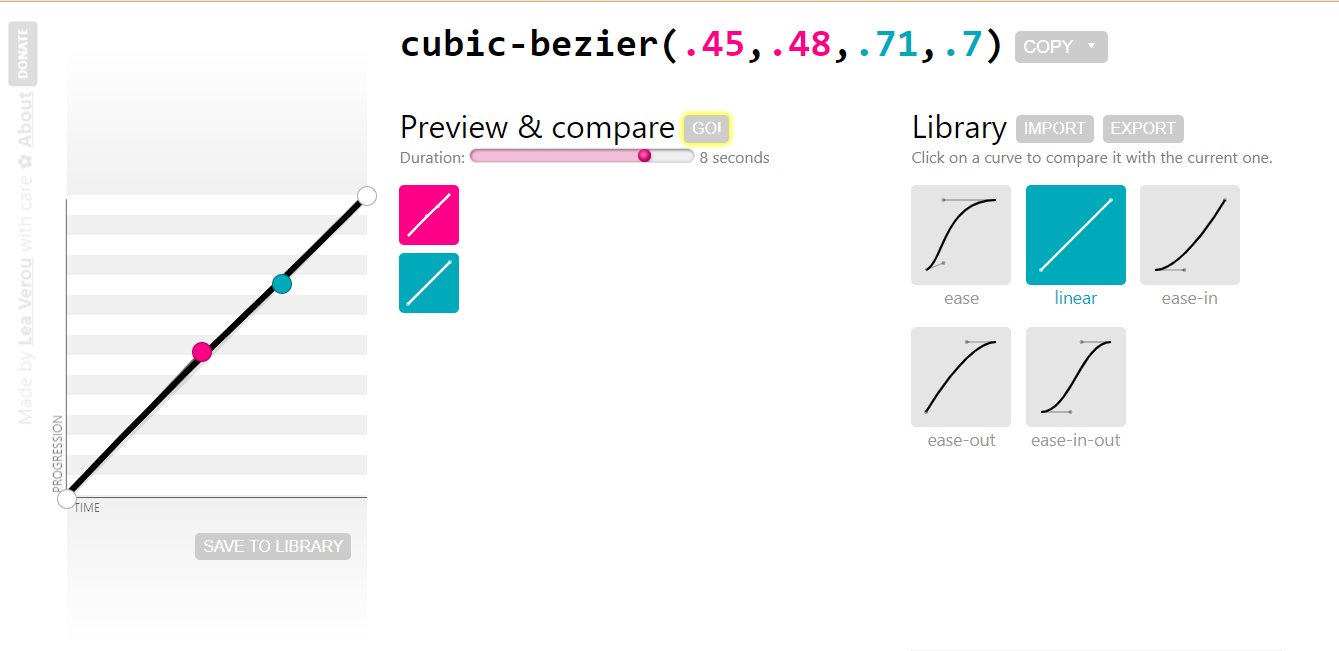
These values are mainly keyword values with an additional value called cubic-bezier()for specifying custom values.
linear
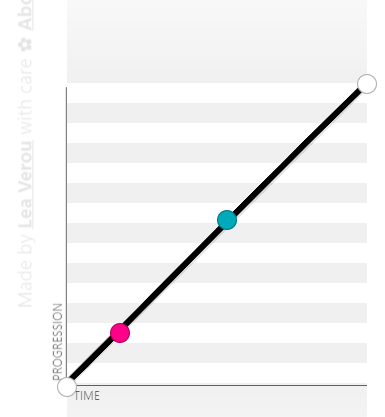
The linear value moves the transition along a straight line from the initial state to the final state. There is simply no curve along the linear graph, and it’s equal to the same cubic-bezier(0.0, 0.0, 1.0, 1.0).
ease
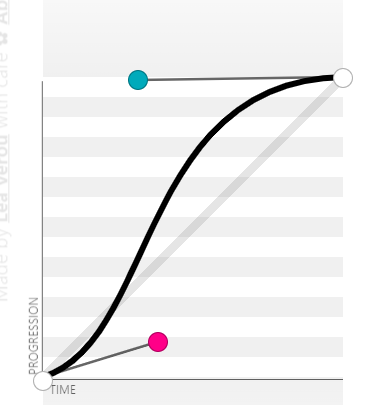
The ease value is the default value. When specified, it starts faster and then moves slowly towards the middle and to the end. It is equal to the same cubic-bezier(0.25, 0.1, 0.25, 1.0).
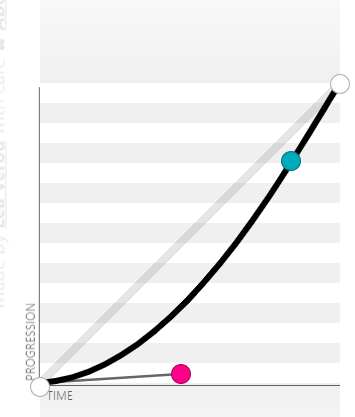
ease-in
The ease-in value starts slowly and then moves faster towards the end. It is equal to the same cubic-bezier(0.42, 0, 1.0, 1.0).
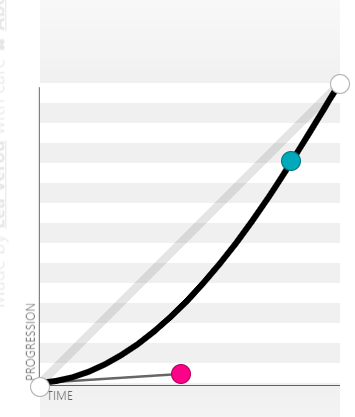
ease-out
The ease-out value starts fast and then moves slowly towards the end. The ease-out is the direct opposite of the ease-in timing-function. It is equal to the same cubic-bezier(0, 0, 0.58, 1.0).
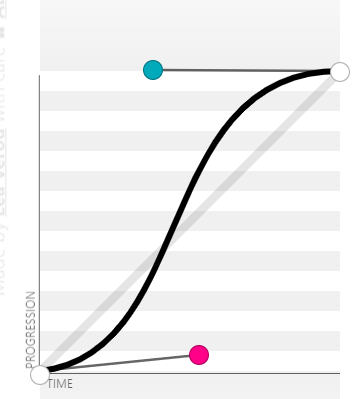
ease-in-out
The ease-in-out value starts slowly and then moves fast towards the middle and then moves slowly again towards the end. It is equal to the same cubic-bezier(0.42, 0, 0.58, 1.0).
cubic-bezier()
The cubic-bezier() function value sets a custom timing function on transitions. The values of a cubic-bezier are very complex and are usually generated instead of being created by the author. This makes cubic-bezier values unique and responds differently to transitions.
To generate a cubic-bezier, set the transition and specify any of the keyword timing functions, For example, ease. Then open your DevTools by clicking F12 on Windows or Shift + ⌘(ctrl) + J on macOS.
This should open up your DevTools, then do the following;
- Select the Elements tab.
- Click on the inspect icon and then select the element with a transition applied to it.
- Navigate to the Styles panel.
- Click on the ease icon. This should open up a dialog box.
- Drag and adjust the anchor points on the curve to change the value to a cubic-bezier.
- Copy the generated cubic-bezier code and paste it to replace the ease timing-function in your text editor.



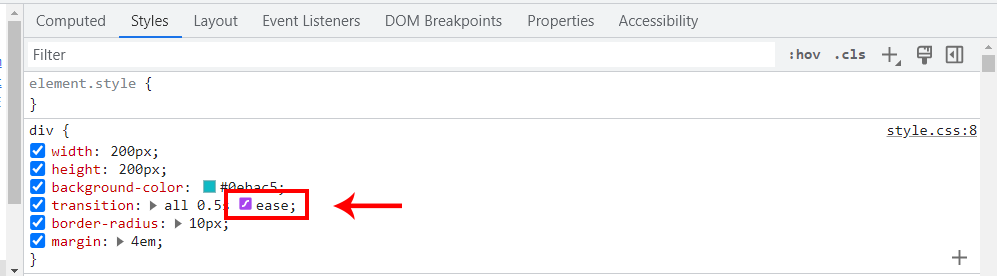
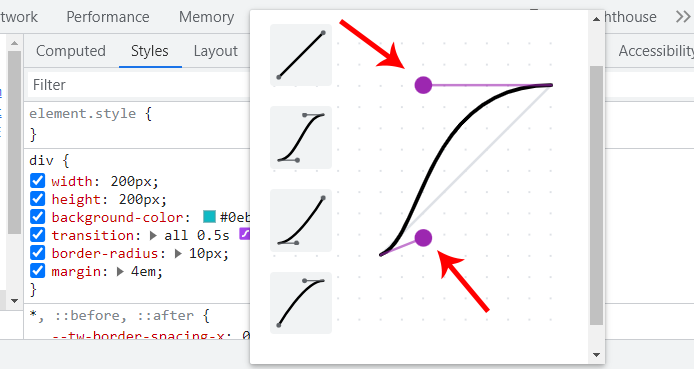
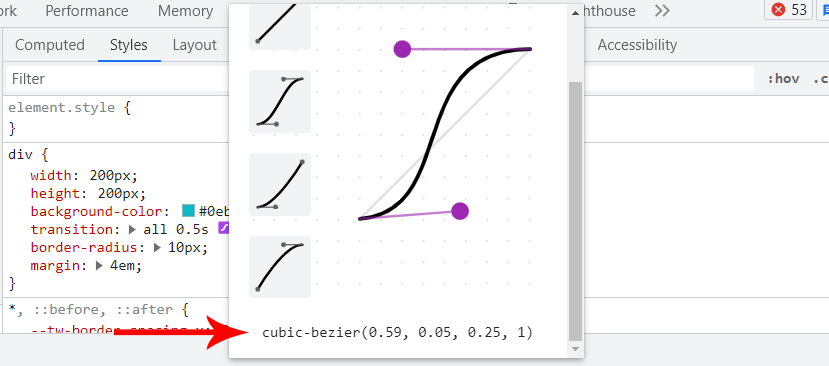
The DevTools cubic-bezier panel is a very convenient way to generate a cubic-bezier.
The browser preview below shows how the transition-timing-function values affect the transition speed.
From the browser preview, each list item is set to a different transition-timing-function values.
<main class="main" id="play">
        <section>
            <section>
            <div>
                <p class="text">Click on the play button to animate items and click on the reset button to set items to default</p>
                <a href="#play" class="play">▶Play</a>
                <a href="#reset" class="play reset">reset</a>

            </div>
            </section>
            <section>
                <ul>
                    <li class="linear"><a href="#grow">linear</a></li>
                    <li class="ease"><a href="#grow">ease</a></li>
                    <li class="ease-in"><a href="#grow">ease-in</a></li>
                    <li class="ease-out"><a href="#grow">ease-out</a></li>
                    <li class="ease-in-out"><a href="#grow">ease-in-out</a></li>
                    <li class="cubic-bezier"><a href="#grow">cubic bezier</a></li>
                </ul>
            </section>
        </section>
    </main>
CSS:
*, *::before, *::after {
    padding: 0;
    margin: 0;
    box-sizing: border-box;
}

.main {
    width: 80%;
    height: 100vh;
    margin: 4em auto;

}

.text {
    font: 18px calibri;
}

.play {
    display: inline-block;
    color: white;
    background-color: #0ebac5;
    padding: 4px 16px;
    border-radius: 100px;
    -webkit-user-select: none;
    user-select: none;
    text-decoration: none;
    background-color: black;
    margin: 2em 0;
}

/* .reset {font: 20px calibri} */

.play:hover{background-color: #0a8e97;}
.play:active {transform: translateY(2px);}

a[href="#grow"]{
    font: 20px calibri;
    color: white;
    text-decoration: none;
}

html {
    scroll-padding-top: 5em;
}

li {
    background-color: #0ebac5;
    margin: 4px;
    width: 9em;
    padding: 10px;
    list-style: none;
    text-align: center;

    transition-property: width;
    transition-duration: 2s;
}

#play:target li{
    width: 100%;
}

/* transition-timing-function declaration*/
.linear {
    transition-timing-function: linear;
}

.ease {
    transition-timing-function: ease;
}

.ease-in {
    transition-timing-function: ease-in;
}

.ease-out {
    transition-timing-function: ease-out;
}

.ease-in-out {
    transition-timing-function: ease-in-out;
}

.cubic-bezier {
    transition-timing-function: cubic-bezier(0.25, 0.46, 0.45, 0.94);
}
steps()
The steps() function is another value of the transition-timing-function; unlike the previous values that follow a certain acceleration curve in a smooth direction, the steps() function does something different instead; it jumps from one point to another based on the steps provided.
For example, if a value of 6 is parsed as an argument into the steps() function, it will jump six times from the initial state to the final state. However, if a different value is parsed, it will jump based on the number of that value parsed.
The steps() function takes in two arguments, the first being the number of steps the transition should jump while the send argument is optional, but when specified, it determines how the jump behaves during the transition.
/* Steps function keyword steps(value, position[optional]) */
transition-timing-function: steps(6);
transition-timing-function: steps(6, jump-both);
<body>
    <main class="main" id="move">
        <section>
            <section class="action">
                <p class="text">Click the buttons below to toggle the box forward and backward</p>
                <a href="#move" class="btn">move box</a>
                <a href="#nomove" class="btn">reset box</a>
            </section>
            <section class="step-container">
            <div class="step step-1">step 1</div>
            <div class="step step-2">step 2</div>
            <div class="step step-3">step 3</div>
            <div class="step step-4">step 4</div>
            <div class="step step-5">step 5</div>
            <div class="step step-6">step 6</div>
            <div class="step step-7">step 7</div>
            <div class="step step-8">step 8</div>
            <div class="step step-9">step 9</div>
            <div class="step step-10">step 10</div>
            <div class="box"></div>
        </section>
        </section>
    </main>
</body>
*, *::before, *::after {
    padding: 0;
    margin: 0;
    box-sizing: border-box;
}

html {
    scroll-padding-top: 2em;
}

.step-container {
    display: grid;
    grid-template-columns: repeat(10, 90px);
    place-items: center;
    height: 100vh;
    position: relative;
    white-space: no-spaces;
    margin-left: 6em;
}

.text {
    font-family: calibri;
    margin-bottom: 2em;
}

.action {
    margin: 2em 6em;
}

.btn {
    color: black;
    background-color: #0ebac5;
    line-height: 40px;
    display: inline-block;
    text-decoration: none;
    padding: 0 10px;
    border-radius: 100px;
    -webkit-user-select: none;
    user-select: none;
}

.btn:hover {background-color: #0dd7f1 ;}
.btn:active {transform: translateY(2px);}

#move:target .box {
    -webkit-transform: translateX(810px);
    transform: translateX(810px);
}

.step, .box {
    width: 90px;
    background-color: #0ebac5;
    line-height: 90px;
    text-align: center;
    outline: 2px solid #03545a;
    -webkit-user-select: none;
    user-select: none;
}

.box {
    height: 90px;
    outline: 2px solid #c45a03;
    background-color:rgba(2, 40, 43, 0.445);

    position: absolute;
    left: 0;

    transition-property: transform;
    transition-duration: 3s;
    transition-timing-function: steps(9, start);
}
<body>
    <main class="main" id="frame">
        <section class="center-content">
            <div>
                <a href="#frame" class="btn">▶ Play</a>
                <a href="#noframe" class="btn">◀◀ Backward</a>
            </div>
            <div>
                <div class="image_frames"></div>
            </div>
        </section>
    </main>
</body>
*, *::before, *::after {
    padding: 0;
    margin: 0;
    box-sizing: border-box;
}

.btn {
    display: inline-block;
    margin: 2em 10px;
    text-decoration: none;
    background-color: #0ebac5;
    color: #fff;
    padding: 0 16px;
    line-height: 40px;
    border-radius: 100px;
    -webkit-user-select: none;
    user-select: none;
}

.btn:active {transform: translateY(2px);}
.btn:hover {background-color: black;}

#frame:target .image_frames {
    background-position: -630px 0;
}

.center-content {
    display: flex;
    justify-content: center;
    flex-direction: column;
    align-items: center;
    height: 100vh;
}

.image_frames {
    width: 80px;
    height: 90px;
    background: url('https://user-images.githubusercontent.com/78242022/259878192-b94f55d2-47a0-4747-9366-eed5b975231b.png');

    background-size:cover;
    background-repeat: no-repeat;
    background-origin: border-box;
    border: 2px solid #000;
    box-shadow: 5px 5px 13px 4px rgba(0,0,0,0.4);

    transition-property: all;
    transition-duration: 3s;
    transition-timing-function: steps(7);
}
transition-delay
<body>
    <main class="main">
        <section>
            <div class="text"><p>hover on the square box to move the circle</p></div>
            <main class="circle-wrapper">
                <div class="circle red"></div>
                <div class="circle blue"></div>
                <div class="circle orange"></div>
                <div class="circle purple"></div>
            </main>
        </section>
    </main>
</body>
*, *::before, *::after {
    padding: 0;
    margin: 0;
    box-sizing: border-box;
}

.main {
    display: flex;
    justify-content: center;
    align-items: center;
    height: 100vh;
}

.text {
    display: flex;
    justify-content: center;
    margin-bottom: 2em;
}

p {
    font: 20px calibri;
}

.circle-wrapper {
    display: flex;
    justify-content: center;
    align-items: end;
    gap: 16px;
    flex-wrap: wrap;

    width: 400px;
    height: 400px;
    border: 2px dotted black;

    transition-property: all;
    transition-duration: 1s;
    transition-timing-function: ease;

    cursor: pointer;
}

.circle {
    width: 50px;
    height: 50px;
    background-color: black;
    border-radius: 100%;

    transition-property: all;
    transition-duration: 1s;
    transition-timing-function: ease;
}

.circle-wrapper:hover {
    box-shadow: 0 0 1px 1px #0ebac5;
    border: 3px dotted #0ebac5;
}

.circle-wrapper:hover  .circle{
    transform: translateY(-340px);
}

.red{
    background-color: red;
    transition-delay: 0;
}
.blue{
    background-color: blue;
    transition-delay: .5s;
}
.orange{
    background-color: orange;
    transition-delay: 2s;
}
.purple{
    background-color: purple;
    transition-delay: 200ms;
}
CSS Transition Properties (Shorthand)
.element {
    /* property name | duration | easing function | delay */
    transition: width 500ms ease 1s;

    /* property name | duration | easing function */
    transition: width 500ms ease;

    /* Apply to 2 properties */
    transition: width .5s, opacity, cubic-bezier(0.075, 0.82, 0.165, 1);

    /* Apply to all changed properties */
    transition: all 300ms ease;

    /* Global values */
    transition: initial;
    transition: inherit;
    transition: revert;
    transition: revert-layer;
    transition: unset;
}
<link rel="stylesheet" href="https://cdnjs.cloudflare.com/ajax/libs/font-awesome/6.4.0/css/all.min.css" integrity="sha512-iecdLmaskl7CVkqkXNQ/ZH/XLlvWZOJyj7Yy7tcenmpD1ypASozpmT/E0iPtmFIB46ZmdtAc9eNBvH0H/ZpiBw==" crossorigin="anonymous" referrerpolicy="no-referrer" />

<body>
<main class="main">
    <section>
        <a href="#" class="shape twitter"></a>
        <a href="#" class="shape pinterest"></a>
        <a href="#" class="shape facebook"></a>
        <a href="#" class="shape tiktok"></a>
        <a href="#" class="shape instagram"></a>
        <a href="#" class="shape slack"></a>
    </section>
</main>
</body>
/* Global Styles */
*, *::after, *::before {
    margin: 0;
    padding: 0;
    box-sizing: border-box;
}

:root {
    --font: calibri;
    --size-pri: 1px;
    --size-sec: 100px;
    --pinterest-clr: #E60023;
    --twitter-clr: #1D9BF0;
    --facebook-clr: #4267B2;
    --tiktok-clr: linear-gradient(90deg, #ff0050, #00f2ea, #000000);
    --instagram-clr: linear-gradient(90deg, #405DE6, #5B51D8, #833AB4, #C13584, #E1306C, #FD1D1D, #F56040, #F56040, #FCAF45, #FFDC80);
    --slack-clr: linear-gradient(90deg, #36C5F0, #2EB67D, #E01E5A, #ECB22E);
    --white:#fff;
}

.main {
    display: grid;
    grid-template-columns: repeat(1 1fr);
    place-items: center;
    height: 100vh;
}

body {
    background-color: rgb(226 232 240);
}

.shape {
    display: inline-block;
    font-family: var(--font);
    position: relative;
    margin: 1em 1em;
    text-align: center;
    letter-spacing: 3px;
    text-decoration: none;
    line-height: 50px;
    opacity: 1;
    text-transform: uppercase;
    padding: 0 3rem;
    background: var(--twitter-clr);
    border-radius: 100px;
    box-shadow: 0 1px 2px 10px rgb(0 0 0 / 0.05);
}

.shape::before {
    display: inline-block;
    text-rendering: auto;
    -webkit-font-smoothing: antialiased;
    font: var(--fa-font-brands);
    content: "099";
    color: var(--white);
    transition: 500ms ease;
    position: relative;
    top: 0;
    left: 0;
    opacity: 1;
}

/* Button One [Twitter]*/
.twitter:hover {
    background: none;
    outline: 1px solid var(--twitter-clr);
}

.twitter:hover::before {
    transform: skew(10deg) scale(1.5);
    color: var(--twitter-clr);
}

/* Button Two [pinterest]*/
.pinterest {
    background: var(--pinterest-clr);
}

.pinterest::before {
    content: "0d2";
}

.pinterest:hover::before {
    transform: rotate(360deg) scale(1.5);
    /* transform: ; */
}


/* Button Three [facebook]*/
.facebook {
    background: var(--facebook-clr);
}

.facebook::before {
    content: "09a";
    transition: opacity 0.5s ease-in, transform 0.5s ease-in;
}

.facebook:hover::before {
    opacity: 0.5;
    transform: scale(1.5);
}

/* Button Four [ticktok]*/
.tiktok {
    background: var(--tiktok-clr);
}
.tiktok::before {
    content: "e07b";
}

.tiktok:hover::before {
    transform: skew(20deg, -20deg) scale(1.5);
}

/* Button Five [instagram]*/
.instagram {
    background: var(--instagram-clr);
    transition: background 0.5s ease;
}

.instagram::before {
    content: "16d";
}

.instagram:hover::before {
    transform: matrix(0, 1, 1, 0, 0, 0) scale(1.5);
}

.instagram:hover {
    background-size: 350% 100%;
    animation-name: flow;
    animation-duration: 500ms;
    animation-timing-function: linear;
    animation-iteration-count: infinite;
}

@keyframes flow {
  0% {
    background-position: 0% 50%;
  }
  100% {
    background-position: 100%;
  }
}

/* Button Six [slack]*/
.slack {
    background: var(--slack-clr);
}

.slack::before {
    content: "198";
}

.slack:hover::before {
    opacity: 0.5;
    transform: translateX(95%) scale(1.5) rotate(360deg);
}

/* Active State */
.shape:active {
    transform: translateY(4px);
}
How to Apply CSS Transitions?
CSS Transitions on Cards
<link rel="stylesheet" href="https://cdnjs.cloudflare.com/ajax/libs/font-awesome/6.4.0/css/all.min.css" integrity="sha512-iecdLmaskl7CVkqkXNQ/ZH/XLlvWZOJyj7Yy7tcenmpD1ypASozpmT/E0iPtmFIB46ZmdtAc9eNBvH0H/ZpiBw==" crossorigin="anonymous" referrerpolicy="no-referrer" />
    <link rel="stylesheet" href="main.css">
</head>
<body>
    <main class="main">

        <!-- Card one -->
        <section>
            <aside class="card">
                <div class="header__profile">
                    <div class="profile__img">
                        <div class="img__wrap">
                        <img src="https://user-images.githubusercontent.com/78242022/242978218-d0e4eba2-62f7-4464-b2fb-c89835b6e592.jpg" alt="">
                        </div>

                        <div class="social__icons">
                            <i class="fa-brands fa-twitter"></i>
                            <i class="fa-brands fa-github"></i>
                            <i class="fa-brands fa-linkedin"></i>
                        </div>
                    </div>
                    <div class="profile__dec">
                        <h3>Alex Anie</h3>
                        <h4>Web Developer</h4>
                        <p>A Front End Technical Writer. I write blogs on Front End Technologies, such as HTML, CSS, JavaScript.</p>
                    </div>
                </div>

                <div class="text__description">
                    <p> When I am not coding, I enjoy watching tutorials and listening to twitter spaces. I live in Lagos, Nigeria</p>
                </div>

                <div class="card__footer">
                    <span>Technical Writer</span>
                    <span>@testmuai</span>
                </div>
            </aside>
        </section>

        <!-- Card Two -->
        <section>
            <aside class="card">
                <div class="header__profile">
                    <div class="profile__img">
                        <div class="img__wrap">
                        <img src="https://user-images.githubusercontent.com/78242022/241950895-841a3927-52c0-4f1b-a4c7-4f0b506e34d3.png" alt="">
                        </div>

                        <div class="social__icons">
                            <i class="fa-brands fa-twitter"></i>
                            <i class="fa-brands fa-github"></i>
                            <i class="fa-brands fa-linkedin"></i>
                        </div>
                    </div>
                    <div class="profile__dec">
                        <h3>Manoj Kumar</h3>
                        <h4>Web Developer</h4>
                        <p>VP, Developer Relations - LambdaTest | Committer and Project Leadership committee - Selenium </p>
                    </div>
                </div>

                <div class="text__description">
                    <p>Engineering leadership, Developer Relations, Legacy Modernization- Digital Transformation, Cloud, Quality</p>
                </div>

                <div class="card__footer">
                    <span>VP DevRel</span>
                    <span>@testmuai</span>
                </div>
            </aside>
        </section>

        <!-- Card Third -->
        <section>
            <!-- Card one -->
            <aside class="card">
                <div class="header__profile">
                    <div class="profile__img">
                        <div class="img__wrap">
                        <img src="https://user-images.githubusercontent.com/78242022/242975326-ac13bbc0-a2c3-4844-ab1d-a892e2d2adb1.jpg" alt="">
                        </div>
        <div class="social__icons">
       <i class="fa-brands fa-twitter"></i>
    <i class="fa-brands fa-github"></i>
                            <i class="fa-brands fa-linkedin"></i>
                        </div>
                    </div>
                    <div class="profile__dec">
                        <h3>Himanshu Sheth</h3>
                        <h4>Lead Dev. Evangelist</h4>
                        <p>Himanshu Sheth is a seasoned technologist and blogger with more than 15+ years of diverse working experience.</p>
                    </div>
                </div>

                <div class="text__description">
                    <p>  He currently works as the 'Lead Developer Evangelist' and 'Senior Manager [Technical Content Marketing]' at LambdaTest</p>
                </div>

                <div class="card__footer">
                    <span>Lead Dev. Evangelist</span>
                    <span>@testmuai</span>
                </div>
            </aside>
        </section>
    </main>
</body>
*, *::before, *::after {
    padding: 0;
    margin-top: 0;
    box-sizing: border-box;
}

:root{
    --brand-color: #0ebac5;
    --base-size: 0.3125rem; /*5px*/
    --pri-size: 6.25rem; /*100px*/
    --stone-001: rgb(12 10 9);
    --stone-002: rgb(28 25 23);
    --stone-003: rgb(41 37 36);
    --stone-004: rgb(68 64 60);
    --stone-005: rgb(87 83 78);
    --stone-006: rgb(120 113 108);
    --stone-007: rgb(168 162 158);
    --stone-008: rgb(214 211 209);
    --stone-009: rgb(231 229 228);
    --stone-010: rgb(245 245 244);
    --stone-011: rgb(250 250 249);
}

body {
    background: var(--stone-001);
}

.main {
    display: flex;
    justify-content: center;
    align-items: center;
    height: 100vh;
    gap: 50px;
    flex-wrap: wrap;

    margin: 2em 0;
}

.card {
    width: 350px;
    height: 300px;
    background: var(--stone-002);
    border-radius: calc(var(--base-size) * 2);
    box-shadow: 0 20px 25px -5px rgb(0 0 0 / 0.1), 0 8px 10px -6px rgb(0 0 0 / 0.1);
    position: relative;
    transition: all 0.5s ease;
}

.card:hover {
    box-shadow: 0 0 5px 1px var(--brand-color);
}

/* Images */
.profile__img img {
    width: 140px;
    border-radius: calc(var(--base-size));
    cursor: pointer;
    transition: all 0.5s ease;
    position: absolute;
}

.header__profile {
    padding: calc(var(--base-size) * 2.5);
    position: relative;
}

/* Triangle */
.header__profile::before {
    content: "";
    position: absolute;
    width: 0;
    height: 0;
    top: 30px;
    left: 160px;
    border-style: solid;
    border-width: 12px 12px 12px 0;
    border-color: transparent var(--stone-003) transparent transparent;
    opacity: 0;
    transition: all 0.5s ease 0.2s;
}

.header__profile img:hover {
    transform: rotate(10deg);
}

/* Flip up bio on hover */
.card:hover .profile__dec {
    opacity: 1;
    top: -1px;
}

.card:hover .header__profile::before {
    opacity: 1;
}

/* Icons Styling */
.social__icons {
    position: absolute;
    bottom: 0;
}

.fa-brands {
    color: var(--brand-color);
    cursor: pointer;
    user-select: none;
    margin: calc(var(--base-size)) 0;
    transition: 0.5s ease;
    padding-left: 1em;
}

.fa-brands:hover {
  color: var(--stone-005);
}

/* Profile Bio */
.profile__dec {
    width: 70%;
    height: fit-content;
    background-color: var(--stone-003);
    border-radius: calc(var(--base-size));
    padding: calc(var(--base-size) * 2.5);
    position: relative;
    top: 10px;
    right: -160px;
    opacity: 0;
    transition: all 0.5s ease;
}

.profile__dec h3,
.profile__dec h4,
.profile__dec p {
    font-family: 'Open Sans', Arial, sans-seri;
    color: var(--stone-007);
    margin: 0;
}

.profile__dec h3 {
    font-size: calc(var(--base-size) * 4.5);
    color: var(--stone-009);
    font-weight: 500;
    margin: 5px 0;
}

.profile__dec h4 {
    font-size: calc(var(--base-size) *2.8);
    color: var(--stone-005);
    font-weight: 500;
    margin: 5px 0;
}

.profile__dec p {
    font-size: calc(var(--base-size) *2.5);
}

.text__description {
    font-size: calc(var(--base-size) * 3);
    color: var(--stone-009);
    font-weight: 500;
    padding: calc(var(--base-size) * 2.5);
    font-family: 'Open Sans', Arial, sans-seri;
    color: var(--stone-007);
    position: absolute;
    bottom: 30px;
}

.card__footer {
    display: flex;
    justify-content: space-between;
    background-color: var(--stone-004);
    padding: calc(var(--base-size) * 2.5);
    border-bottom-left-radius: calc(var(--base-size) * 2);
    border-bottom-right-radius: calc(var(--base-size) * 2);
    position: absolute;
    left: 0;
    bottom: 0;
    width: 100%;
}

.card__footer span {
    color: var(--stone-009);
    font-family: 'Open Sans', Arial, sans-seri;
}
CSS Transitions on Images
<body>
    <main class="main">
        <!-- Card one -->
        <section>
            <aside class="card c-1">
                <div class="header h-1">
                    <img src="https://user-images.githubusercontent.com/78242022/241950871-a97f1ba2-792d-48c1-8486-30f75fb87525.svg">
                </div>

                <div class="text t-1">
                    <h5>CSS Transform</h5>
                    <p>Hover on the card to <code>`rotate`</code> the header element by <code>`-5deg`</code> and scale it  by <code>`1.1`</code> of it initial size</p>
                </div>
            </aside>
        </section>

        <!-- Card Two -->
        <section>
            <aside class="card c-2">
                <div class="header h-2">
                    <img src="https://user-images.githubusercontent.com/78242022/241950871-a97f1ba2-792d-48c1-8486-30f75fb87525.svg">
                </div>

                <div class="text t-2">
                    <h5>CSS Transform</h5>
                    <p>Hover on the card to transform the element<code>`border`</code> </code> to <code>`50%`</code> </code> circle from it initial size</p>
                </div>
            </aside>
        </section>

        <!-- Card Three -->
        <section>
            <aside class="card c-3">
                <div class="header h-3">
                    <img src="https://user-images.githubusercontent.com/78242022/241950888-2a539490-0eda-4fb9-b2f9-3c1b3b2db1d5.svg">
                </div>

                <div class="text t-3">
                    <h5>CSS Transform</h5>
                    <p>Hover on the card to move <code>`height`</code> of the pseudo-element from <code>`0`</code> to <code>`100%`</code> of it initial size</p>
                </div>
            </aside>
        </section>

        <!-- Card Four -->
        <section>
            <aside class="card c-4">
                <div class="header h-4">
                    <img src="https://user-images.githubusercontent.com/78242022/241950871-a97f1ba2-792d-48c1-8486-30f75fb87525.svg">
                </div>

                <div class="text t-4">
                    <h5>CSS Transform</h5>
                    <p>Hover on the card to <code>`transition`</code>the background from <code>`plum`</code> to <code>`coral`</code> and scale it  by <code>`1.1`</code> of it initial size</p>
                </div>
            </aside>
        </section>
    </main>
</body>
*, *::before, *::after {
    padding: 0;
    margin-top: 0;
    box-sizing: border-box;
}

:root{
    --brand-color: #0ebac5;
    --base-size: 0.3125rem; /*5px*/
    --pri-size: 6.25rem; /*100px*/
    --card-size: 15rem; /*240px*/
    --stone-001: rgb(12 10 9);
    --stone-002: rgb(28 25 23);
    --stone-003: rgb(41 37 36);
    --stone-004: rgb(68 64 60);
    --stone-005: rgb(87 83 78);
    --stone-006: rgb(120 113 108);
    --stone-007: rgb(168 162 158);
    --stone-008: rgb(214 211 209);
    --stone-009: rgb(231 229 228);
    --stone-010: rgb(245 245 244);
    --stone-011: rgb(250 250 249);
}

body {
    background: var(--stone-008);
}

.main {
    display: flex;
    justify-content: center;
    align-items: center;
    height: 100vh;
    gap: 50px;
    flex-wrap: wrap;
    margin: 2em 0;
}

.card {
    width: var(--card-size);
    height: fit-content;
    padding: calc(var(--base-size) * 2);
    border-radius: calc(var(--base-size) * 2);
    background-color: var(--stone-011);
    cursor: pointer;
    box-shadow: 0 4px 6px 2px rgb(0 0 0 / 0.1), 0 2px 4px 3px rgb(0 0 0 / 0.1);
}

.header {
    display: flex;
    justify-content: center;
    align-items: center;
    width: 100%;
    height: var(--card-size);
    border-radius: var(--base-size);
    /* border-radius: 50%; */
    box-shadow: 0 4px 6px 2px rgb(0 0 0 / 0.1), 0 2px 4px 3px rgb(0 0 0 / 0.1);
    background-color: yellow;
    transition: all 0.5s cubic-bezier(0.445, 0.05, 0.55, 0.95);
}


code {
    color: red;
    font-family:  consolas;
}


.c-1:hover .header {
    transform: rotate(-5deg) scale(1.1);
    box-shadow: none;
}

.header img {
    width: 80%;
    height: fit-content;
}

.text h5, .text p {
    margin: 0;
    font-family: calibri;
}

.text {
    margin-top: 15px;
}

.text h5 {
    color: var(--brand-color);
}

/* Card Two */
.h-2 {
    background-color: var(--brand-color);
}

.c-2:hover .h-2 {
    border-radius: 50%;
    box-shadow: none;
}

/*  Card Three */
.h-3 {
    background-color: red;
}

.h-3{
    position: relative;
}

.h-3::before, .h-3::after {
    content: "";
    width: 100%;
    height: 0;
    border-radius:var(--base-size);
    background-color: rgba(0,0,0, 0.7);
    position: absolute;
    bottom: 0;
    left: 0;
    transition: all 0.5s ease;
}

.h-3::after {
    background: none;
    content: "LambdaTest";
    color: #fff;
    bottom: 0;
    left: 25%;
    font-size: 1.2em;
    font-family: calibri;
    text-transform: uppercase;
    opacity: 0;
    transition: all 0.5s ease 0.2s;
}

.c-3:hover .h-3::before {
    height: 100%;
}

.c-3:hover .h-3::after {
    opacity: 1;
    bottom: 140px;
}

/* Card Four */
.h-4 {
    background-color: plum;
    transition: all 0.5s ease;
}

.h-4 img {
    transition: all 0.5s ease;
}

.c-4:hover .h-4 img {
    transform: scale(1.1);
}

.c-4:hover .h-4 {
    background-color: coral;
}
CSS Transitions on Multiple Elements
<body>
    <main class="main">
        <section class="section">
            <aside class="card">
                <div><h1 class="heading heading__top">Unified Digital Experience Testing Cloud to Accelerate Your Go-To-Market</h1></div>
                <div class="text__container">
                    <div><h1 class="heading heading__box"> Automated Testing</h1></div>
                    <span>Live Testing</span>
                    <div class="scroll">
                        <p class="text text__one">
                   Perform live interactive cross browser testing of your public or locally hosted websites and web apps on 3000+ real mobile and desktop browsers running on real operating systems.
                    </p>

                    <p class="text text__two">
                  Perform automated browser tests on a scalable, secure, and reliable automation cloud. Run Selenium, Cypress, Appium, Hyperexecute, Playwright and Puppeteer tests at scale on 3000+ browsers and devices.
                    </p>
                    <div class="btn-wrapper">
                        <a href="https://www.lambdatest.com/?fp_ref=nghia30" target="_blank">Learn More <i class="fa-solid fa-arrow-right"></i></a>
                    </div>
                    </div>
                </div>
            </aside>
        </section>
    </main>
</body>
*,*::before, *::after {
    box-sizing: border-box;
    margin: 0;
    padding: 0;
}

:root {
    --base-size: 5px;
}

body {
    width: 100vw;
    height: 100vh;
    background: rgb(161 161 170);
}

.main {
    display: flex;
    justify-content: center;
    align-items: center;
    height: 100%;
}

.section {
    width: 0 80%;
}

.card {
    background: rgba(0,0,0,0.4);
    color: #fff;
    width: 30rem;
    height: 30rem;
    padding: calc(var(--base-size) * 5);
    font-family: calibri;
    position: relative;
    overflow: hidden;
    cursor: pointer;
    user-select: none;
    box-shadow: 0 25px 50px -12px rgb(0 0 0 / 0.25);

    transition: all 0.5s;
}

.card::before {
    content: "";
    width: 100%;
    height: 30px;
    position: absolute;
    background-color:  #0ebac5;
    top: 0;
    left: 0;

    transition: opacity 0.5s, height 0.5s ease;
}

.heading {
    font-size: calc(var(--base-size) * 4);
    margin: 8px 0 0;
    text-transform: uppercase;

    transition: all 0.5s ease 0.1s;
}

.text__container {
    height: 100%;
    background: url("https://user-images.githubusercontent.com/78242022/254052317-34b1a599-728f-48ca-b2a5-1a5d6eb62f97.png");
    background-repeat: no-repeat;
    background-size: cover;
    background-position: center center;
    color: #000;
    transform: translate(50px, 30px);
    padding: calc(var(--base-size) * 2);
    transition: all 0.5s;
}

.text__container::before {
    width: 100%;
    height: 100%;
    position: absolute;
    content: "";
    background: linear-gradient(180deg, rgba(255,255,255,1) 0%, rgba(195,195,195,0) 100%);
    z-index: -1;
    top: 0;
    left: 0;
}

.text {
    width: 90%;
    letter-spacing: 1px;
    line-height: 1.2;
    margin: 2em 0;
}


span {
    display: inline-block;
    background-color: #000;
    color: #fff;
    padding: var(--base-size);
    border-right: 20px solid  #0ebac5;
    transform: translateY(-30%);
    transition: all 0.5s;
}


/* Btn */
.btn-wrapper {
    display: flex;
    justify-content: center;
    transform: translateY(1000px);

    transition: all 0.5s ease 0.3s;
}
/* Btn */
a {
    display: inline-block;
    line-height: 20px;
    background: none;
    border: 2px solid  #000000;
    padding: 1em 2em;
    border-radius: 100px;
    color:  #000000;
    text-align: center;
    text-decoration: none;
    letter-spacing: 2px;
    text-transform: uppercase;

}

a, i {
    transition: all 0.5s ease-in;
}

a:hover {
    background-color: #0ebac5;
    border: none;
}

a:hover i {
    transform: translateX(10px);
}


/* Hidden Content */
.heading__box {
    transition: all 0.5s;
    transform: translateX(-1000px);
}

.text__two {
    transform: translateX(1000px);
    transition: all 0.5s;
}

/* Hover Effect */
.card:hover {
    padding: calc(var(--base-size) * 2);
    position: relative;
}

.card:hover::before {
    height: 0;
    opacity: 0;
}

.card:hover .heading__top {
    transform: translateX(-1000px);
}

.card:hover .text__container  {
    transform: translate(0);
}

.card:hover .heading__box  {
    transform: translateX(10px);
}

.card:hover .text__two  {
    display: block;
    transform: translateX(10px);
}

.card:hover span {
    display: none;
}

.card:hover .text__one  {
    display: none;
}

.card:hover .btn-wrapper {
    transform: translateY(0);
}
Best Practices to Implement CSS Transitions
<div class="parent">
    <p class="el break">Break</p>
    <p class="el smooth">Smooth</p>
</div>
.el {
    margin: 2em 0 0 4em;
    display: inline-block;
    width: 200px;
    line-height: 80px;
    text-align: center;
    font-size: 20px;
    background-color: aqua;
    cursor: pointer;
}

.break:hover {
    transition: background-color 3s ease;
}

.smooth {
    transition: background-color 3s ease;
}
.el:hover {
    background-color: blueviolet;
}
<div class="box h">Height</div>
    <div class="parent">
        <p class="el break">Visibility</p>
    </div>
    <div class="box w">Width</div>
body {
    width: 80%;
    margin: 2em auto;
}

.box {
    padding-top: 1em;
    width: 200px;
    height: 50px;
    background-color: orangered;
    text-align: center;
    transition: all .5s ease;
}


.el {
    width: 200px;
    line-height: 80px;
    text-align: center;
    font-size: 20px;
    background-color: aqua;
    cursor: pointer;
    transition: all .5s ease;
}

/* Hover State */
.h:hover {
    height: 200px;
}

.w:hover {
    width: 300px;
}

.break:hover {
visibility: hidden;
}

.el:hover {
    visibility: hidden;
}
<div class="box h">Scale</div>
    <div class="parent">
        <p class="el break">Opacity</p>
        <p class="el smooth">Translate Y</p>
    </div>
    <div class="box w">Translate X</div>
body {
    width: 80%;
    margin: 2em auto;
}

.box {
    padding-top: 1em;
    width: 200px;
    height: 50px;
    background-color: orangered;
    text-align: center;
    transition: all .5s ease;
}

.el {
    width: 200px;
    line-height: 80px;
    text-align: center;
    font-size: 20px;
    background-color: aqua;
    cursor: pointer;
    transition: all .5s ease;
}

/* Hover State */
.h:hover {
    transform: scale(1.1);
}

.w:hover {
    transform: translateX(10px);
}

.break:hover {
opacity: 0.5;
}

.smooth:hover{
transform: translateY(10px);
}
Browser Compatibility of CSS Transition
Conclusion


Frequently asked questions
Did you find this page helpful?
More Related Hubs
TestMu AI forEnterprise
Get access to solutions built on Enterprise
grade security, privacy, & compliance
- Advanced access controls
- Advanced data retention rules
- Advanced Local Testing
- Premium Support options
- Early access to beta features
- Private Slack Channel
- Unlimited Manual Accessibility DevTools Tests