

Next-Gen App & Browser Testing Cloud
Trusted by 2 Mn+ QAs & Devs to accelerate their release cycles


On This Page
- What Is Azure Test Plans?
- How Azure Test Plans Work?
- How to Create a Test Plan in Azure DevOps?
- How to Execute Test Cases on Azure DevOps Test Plan?
- How to Manage and Analyze Test Results?
- Common Challenges and Troubleshooting
- Azure DevOps Pipeline Integration with Cloud Platform
- Best Practices for Azure DevOps Test Plans

Azure DevOps Testing: How to Create Azure DevOps Test Plans
Learn how to create and manage Azure DevOps test plans to streamline testing, ensure quality, and enhance collaboration throughout the DevOps lifecycle.

Chandrika Deb
December 28, 2025
Azure DevOps is a powerful suite of tools that streamlines the planning, development, testing, and delivery of software. It seamlessly integrates into DevOps workflows, helping to maintain software quality and reliability.
To ensure the updates and the workflow work well and don’t cause any issues in the future, performing Azure DevOps testing is important for maintaining software quality throughout the DevOps lifecycle. It ensures that software updates function as intended, remain defect-free, and meet business and customer requirements.
What Is Azure Test Plans?
Azure Test Plans is a modern test management module integrated with the Azure DevOps ecosystem. It is a powerful Azure DevOps testing tool that enables teams to manage test plans, test suites, and test cases throughout the Software Development Life Cycle (SDLC). This Azure DevOps testing solution supports both manual and automated testing needs, making it an invaluable tool for modern software development teams.
At its core, Azure Test Plans is designed to be a centralized testing environment where development teams, Quality Assurance (QA) professionals, and business analysts can collaborate effectively. It acts as a centralized repository for all testing activities, ensuring that everyone involved in the project has access to the same testing information and can work collaboratively towards quality objectives.
Azure Test Plans offer a robust set of tools designed to streamline testing workflows and ensure comprehensive test coverage.
Below are some of its core key features:
- Test Planning: Streamline the management test plans, suites, and cases to align with project objectives.
- Test Execution: Perform manual and automated tests with real-time result tracking.
- Test Data and Parameters: Simplify test data management for parameterized testing scenarios.
- Exploratory Testing: Utilize browser extensions for ad-hoc and exploratory testing.
- Test Automation: Integrate automated testing seamlessly into CI/CD pipelines.
- Bug Tracking: Capture detailed diagnostics, including screenshots and videos, to resolve issues efficiently.
- Security and Permissions: Implement role-based access and secure testing environments.

Note: Create complete test plans, ensure software quality, and streamline your testing process. Try TestMu AI Today!
How Azure Test Plans Work?
Azure Test Plans simplifies test management with three core artifacts, namely, Test Plan, Test Suite, and Test Case. As part of the Azure DevOps testing ecosystem, it helps enhance the reusability via the Shared Steps and Shared Parameters are work items stored in Azure DevOps. These features enable efficient management of common test procedures and variable test data, helping you streamline the phases of the DevOps lifecycle.
Here is how they work:
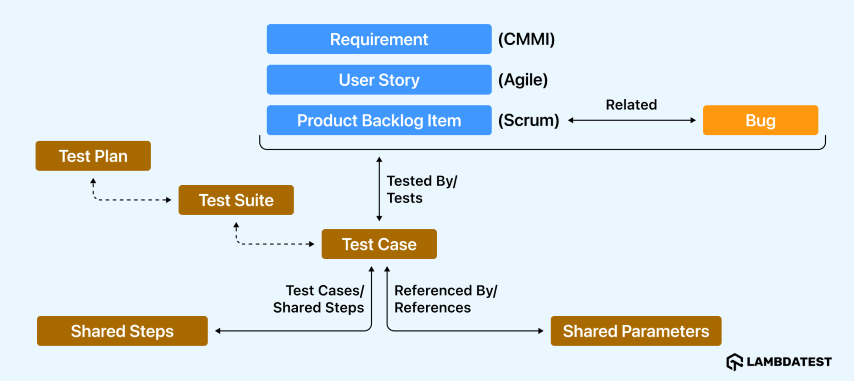
- Test Plan: A container for test suites and test cases, including configurations, shared test steps, and parameters. It allows the grouping of test suites or individual test cases and can use static, requirement-based, or query-based test suites.
- Test Suite: A collection of test cases grouped under a common scenario within a test plan. It simplifies tracking the status of related test cases.
- Test Case: A set of steps designed to validate specific aspects of code or deployment. Test cases can exist independently within a test plan or be part of the suite.
- Shared Steps: Reusable test procedures that can be referenced across multiple test cases to avoid duplication.
- Shared Parameters: Parameters (marked with “@” in test steps) that allow reusing test data across multiple test cases with different data sets.
How to Create a Test Plan in Azure DevOps?
Creating a test plan in Azure DevOps involves several steps, from defining test cases to assigning testers and organizing test suites to ensure complete test coverage. As part of Azure DevOps testing workflows, this helps streamline the testing workflow and track the progress effectiveness.
To effectively create and manage test plans in Azure DevOps, it’s essential to meet specific prerequisites concerning access and project setup.
Access Requirements:
- Access Level: Users must have at least a Basic access level to execute tests and mark outcomes. To create and manage test plans, test suites, and test cases, a Basic + Test Plans access level is required. Alternatively, subscriptions like Visual Studio Enterprise, Visual Studio Test Professional, or MSDN Platforms also grant equivalent access.
- Permissions: Ensure that permissions are configured appropriately:
- Edit work items in this node: Allows adding or modifying test plans, test suites, test cases, and related work items.
- Manage test plans: Enables modification of test plan properties, including build and test settings.
- Manage test suites: Permits creation, deletion, and modification of test suites, as well as managing test cases within them.
Project Setup:
- Project Access: Users should be added to the relevant Azure DevOps project to gain access to its resources.
- Area Path Configuration: Set the appropriate area paths to organize work items effectively. Configure permissions under these area paths to control access to test artifacts.
- Iteration Path Configuration: Define iteration paths to manage sprints or release cycles, ensuring that test plans align with project timelines.
Creating a New Test Plan
Follow the below steps to access the test plan module:
- Log in to your Azure DevOps account and navigate to the project where you want to manage test plans.
- In the left-hand menu, locate and click on Test Plans. This module serves as the central hub for managing all testing activities.
- If the Test Plans module isn’t visible, ensure that your access level includes the Test Plans extension.
- Inside the Test Plans hub, click on the New Test Plan button.
- Provide the following details:
- Name: A descriptive title for the test plan.
- Area Path: Select the relevant project area to which this test plan belongs.
- Iteration Path: Specify the sprint or release cycle this test plan is associated with.
- Click on the Create button to create a test plan.
With the above steps, you have now created a test plan under which you can add various test suites and test cases.
Adding Test Suites
Test suites allow you to organize test cases within your test plan. There are three types of test suites in Azure DevOps:
- Static Test Suites: It is used to group manual test cases often used for nested suites or exploratory testing.
- To create, click New Suite → Static suite.
- Name the suite appropriately and save it.
- Requirement-Based Test Suites: Automatically include all test cases linked to a specific requirement, enabling traceability and alignment with acceptance criteria. They support collaboration across roles like QA, developers, and BAs by creating a shared source of truth.
- To create, click New Suite → Requirement based suite.
- Select a requirement to associate this creates traceability between requirements and test cases.
- Query-Based Test Suites: Use ad-hoc queries to group test cases based on specific criteria, such as tags or iteration cycles. These suites are ideal for flexible, requirement-independent test scenarios.
- To create, click New Suite → Query based suite.
- Define a query to filter and include test cases meeting those conditions.
After creating a test suite, teams can execute the associated test cases, ensuring requirements with development goals are met.
Creating Test Cases
Once test suites are in place, create the test cases under them to organize and group the test cases.
Here’s how to create test cases:
- Select a test suite under your test plan.
- Click New Test Case.
- Fill in the details:
- Title: Provide a concise, descriptive title for the test case.
- Steps: List the steps to perform the test and include expected outcomes for each step.
- Priority: Set the priority level (High, Medium, Low) based on the test case’s importance.
- Tags: Use tags to group or categorize test cases.
- Save the test case. You can create additional test cases as needed.
Assigning Configurations and Testers
Test configuration and tester assignment are crucial steps in Azure DevOps test management that ensure proper test coverage and responsibility allocation.
Here’s how to manage these settings:
Assigning Configurations:
- Select a test suite or specific test cases.
- Open the context menu and choose the Assign configuration option.
- Select configurations (e.g., OS, browsers, devices) to ensure the test plan covers diverse scenarios.
- Save the configuration assignments.
Assigning Testers:
- Select the test suite or test cases you want to assign.
- Open the context menu and select Assign testers to run all tests.
- Add team members responsible for executing these tests.
- Save the assignments.
How to Execute Test Cases on Azure DevOps Test Plan?
Efficient execution of test cases is crucial for maintaining software quality. Azure DevOps testing provides a robust solution to facilitate this process, ensuring comprehensive test coverage and streamlined issue tracking.
Running Azure DevOps testing can be done in two ways:
- Manual Testing:
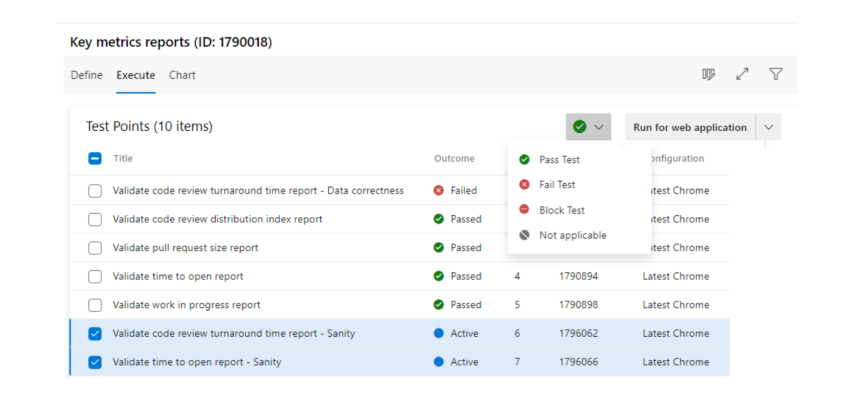
- Access Test Runner: Navigate to the Test Plans module and select the desired test case. Click on Run for a web application to launch the Test Runner.
- Execute Steps: Follow each test step as outlined, marking them as pass or fail based on the outcomes.
- Capture Observations: Utilize the Test Runner to record any observations, take screenshots, or note comments during execution.
- Automated Testing:
- Integration: Configure automated tests to run as part of your build or release pipelines.
- Execution: Upon triggering the pipeline, tests execute automatically, and results are captured within Azure DevOps.
How to Manage and Analyze Test Results?
After executing tests, analyzing the results is essential for assessing application quality and identifying areas for improvement.
- Viewing Test Reports:
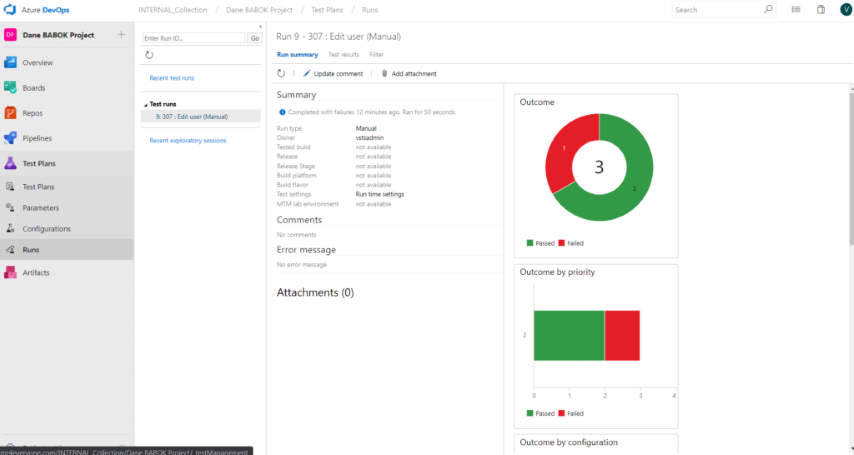
- Test Results Overview: Access the Runs tab within the Test Plans module to view the status of test executions, including pass rates and failure details.
- Detailed Reports: For automated tests, navigate to the Pipelines section and select the relevant build or release to review detailed test reports.
- Analyzing Metrics
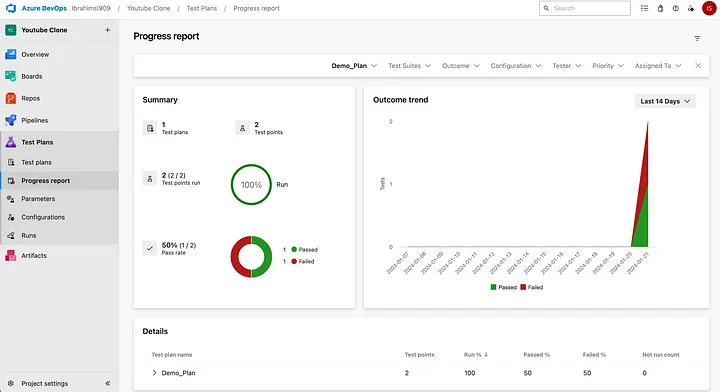
- Progress Reports: Utilize the Progress report feature to track the status of planned tests, monitor testing progress, and analyze metrics such as pass/fail rates and test execution trends.
- Test Analytics: Leverage Test Analytics to gain near real-time visibility into your test data, helping to improve pipeline efficiency and identify bottlenecks.
- Continuous Improvement
- Identify Patterns: Analyze test results to detect recurring issues or patterns that may indicate underlying problems in the codebase.
- Refine Test Cases: Based on insights gained, update and improve test cases to enhance coverage and effectiveness.
- Feedback Loop: Establish a feedback loop with development teams to address defects promptly and iteratively improve the software.
Common Challenges and Troubleshooting
Azure DevOps testing helps in managing and executing tests within the SDLC. However, teams often encounter challenges such as test flakiness, managing test data, and resolving permission issues.
Addressing these challenges is crucial for maintaining efficient and reliable Azure DevOps testing processes.
- Challenge 1: Handling Test FlakinessTests produce inconsistent results, passing or failing intermittently without any changes to the code or environment.
- Flaky Test Management: Use Azure DevOps to detect and manage flaky tests, tagging them to prevent build failures.
- Test Rerun Configuration: Configure test reruns to isolate genuine issues from flaky behaviors.
- Challenge 2: Managing Test DataEnsuring data consistency, handling sensitive information, and maintaining the availability of data across different environments.
- Test Configurations: Define variables like OS, browsers, etc., for comprehensive test coverage.
- Data Management Tools: Use tools to create, mask, and provision test data reflecting production environments.
- Challenge 3: Resolving Permission IssuesInadequate access control leads to unauthorized access, inability to edit/view test artifacts, and collaborative challenges.
- Access Levels and Permissions: Configure permissions for specific tasks like managing test plans and editing work items.
- Stakeholder Access: Ensure users have appropriate access levels (e.g., Basic or Basic + Test Plans).
Solution:
Solution:
Solution:
To overcome such challenges, integrating Azure DevOps Pipelines with cloud-based platforms helps streamline the DevOps and testing workflows by providing scalable infrastructure and enabling automated, cross-environment testing. A cloud testing platform allows you to integrate with CI/CD tools to enhance and accelerate issue detection and resolution, ensuring seamless application performance and reducing time-to-market.

Azure DevOps Pipeline Integration with Cloud Platform
Azure DevOps helps to automatically build, test, and deploy your projects with Continuous Integration in various production environments. So your automation test scripts can run successfully on Azure Pipeline.
However, executing test scripts in Azure DevOps testing can sometimes be time-consuming and hectic. This is where the TestMu AI plugin can be used in the Azure pipeline to ease the workflow and automate the tests.
TestMu AI is an AI-native test execution platform that lets you perform manual and automated tests at scale across 5000+ real devices, browsers and OS combinations. This platform not only allows you to run tests but also integrates with Azure and other DevOps tools to ensure a smooth feedback loop, testing, and DevOps workflow.
Check TestMu AI Extension On Azure DevOps Marketplace
There are a few benefits mentioned below when using the TestMu AI plugin for Azure DevOps testing.
- Simple Account Integration: You can easily set up your TestMu AI account in Azure Pipeline using your account credentials, enabling a smooth and quick integration process.
- Enhanced Environment Testing: Use the TestMu AI Tunnel to test various production environments, such as internal, development, and staging.
- Streamlined Test Results Fetching: Embed or fetch TestMu AI test results in your project’s job results, as it allows easy access to key test data for improved tracking and reporting.
- Detailed Test Insights: Get in-depth visibility of your test execution, capture screenshots, mark bugs, plot graphs, and more; you can view everything from the TestMu AI automation dashboard.
Install TestMu AI Extension from the Azure DevOps Marketplace
Follow the below steps to install the TestMu AI extension:
- Go to the Azure DevOps marketplace and, under the Azure DevOps tab, search for TestMu AI in the search box.
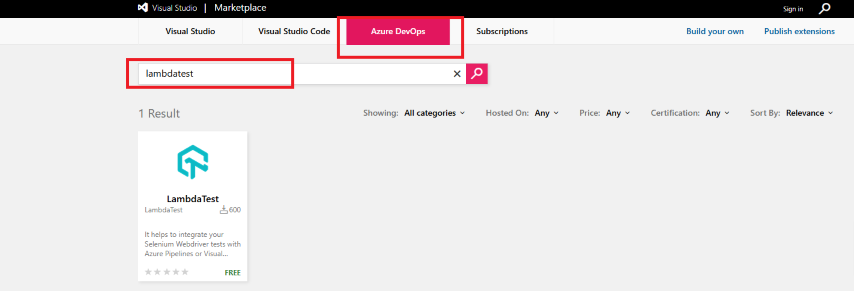
- In the results window, you will see an option showing the TestMu AI extension.
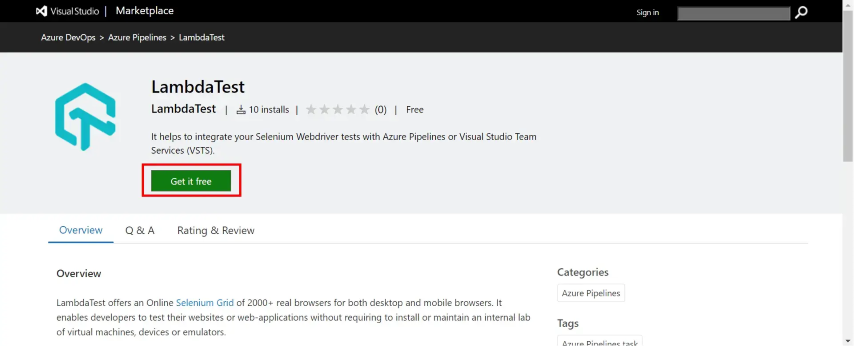
- Open the found result and click on the Get it free button to get the TestMu AI Extension for free in your organization.
- Select an Azure DevOps organization and click “Install.” The TestMu AI extension will be installed in this organization.
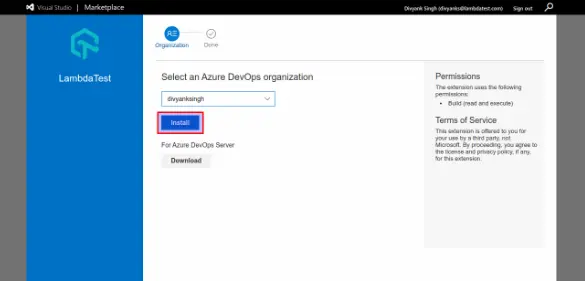
- Once finished, you will see Done at the top, indicating that the TestMu AI Extension has been successfully installed. You can proceed to your organization to see the extension.
By integrating TestMu AI into Azure DevOps testing pipelines, teams can significantly improve test efficiency, enhance collaboration, and reduce time-to-market. To integrate this plugin, you can also follow the detailed guide on integrating TestMu AI with Azure Pipelines. This support document helps you set up the plugin and provides a thorough guide on how to view results on TestMu AI.
Best Practices for Azure DevOps Test Plans
When creating a test plan in Azure DevOps, consider the following best practices to ensure effective testing and successful software releases:
- Define clear test objectives and scope, including which features need testing and specific quality goals you want to achieve through your testing efforts.
- Organize test cases into logical test suites based on functionality, linking them directly to requirements and user stories for traceability.
- Establish comprehensive test environments (dev, staging, prod) and prepare diverse test data sets covering valid, invalid, and boundary cases.
- Choose appropriate testing strategies combining manual, automated, and exploratory testing approaches based on project needs and risks.
- Assign roles and responsibilities within the team, specifying who will create, execute, and review test cases.
- Integrate the test plan seamlessly with your Agile development process, aligning with sprints and releases while regularly reviewing and updating based on project progress.
Conclusion
Azure DevOps Test Plans offers a comprehensive and integrated test management solution that empowers teams to plan, execute, and monitor their testing activities effectively throughout the software development lifecycle.
As organizations adopt Agile and DevOps methodologies, the relevance of Azure Test Plans has grown, helping teams maintain high standards of software quality while adapting to fast-paced development environments.
Prominent controversies surrounding Azure Test Plans often relate to its integration complexities and the learning curve associated with its comprehensive feature set, which some users may find overwhelming. Additionally, the platform’s reliance on Azure DevOps necessitates a commitment to the Microsoft ecosystem, which can be a consideration for organizations evaluating alternative solutions.
The future development of Azure Test Plans is focused on enhancing the capabilities of test management and integrating more advanced features to support the evolving needs of software development teams. One of the key areas of improvement is the continued emphasis on combining manual and automated testing processes, fostering a collaborative environment where all team members contribute to quality assurance efforts. This shift reflects the modern understanding that quality is a shared responsibility across development, testing, and product management roles.
Nevertheless, Azure Test Plans continue to evolve, addressing user feedback and expanding its functionalities to meet the changing landscape of software testing. As part of a broader movement toward continuous improvement in testing practices, Azure Test Plans is positioned as a vital tool for teams aiming to enhance their software delivery processes, ensure compliance with business requirements, and foster a culture of collaboration and feedback across all stages of development.
Citations
- Test objects and terms:
https://learn.microsoft.com/en-us/azure/devops/test/test-objects-overview
- Create test plans and test suites:
https://learn.microsoft.com/en-us/azure/devops/test/create-a-test-plan
- Test Planning and Management with Azure Test Plans:
https://www.azuredevopslabs.com/labs/azuredevops/testmanagement/
- Run manual tests:
https://learn.microsoft.com/en-us/azure/devops/test/run-manual-tests


Frequently asked questions
Did you find this page helpful?
More Related Hubs
TestMu AI forEnterprise
Get access to solutions built on Enterprise
grade security, privacy, & compliance
- Advanced access controls
- Advanced data retention rules
- Advanced Local Testing
- Premium Support options
- Early access to beta features
- Private Slack Channel
- Unlimited Manual Accessibility DevTools Tests