

Next-Gen App & Browser Testing Cloud
Trusted by 2 Mn+ QAs & Devs to accelerate their release cycles


A Detailed Guide On Remote Debugging: Remote Debugging with Firefox and Android
Here is a detailed guide on remote debugging: remote debugging with firefox and remote debugging on android

Arnab Roy Chowdhury
January 12, 2026
Most of the mainstream browsers offer solution to debug web issues, be it minor CSS tweaks, checking performance logs, console errors or issues in scripting. But the problem arises when a website works perfectly in desktop, but causes major errors in Android device. The answer is remote debugging, which will enable you to connect the android device to your workstation via a USB cable and debug your mobile webpage on your desktop.
On a side note, you can debug multiple device sizes while performing responsiveness tests simultaneously. Also mark a bug on tools, such as Jira, Trello, Asana, GitHub, etc. LT browser the best dev-friendly browser for mobile view debugging on which you can see the mobile view of your website on Android and iOS resolutions.

Now Let’s take a look at how to test on firefox browser makes remote debugging easier for developers.

What Will You Need?
The prerequisites are readily available with any developers and those which are not, can be downloaded or obtained without any cost. For your PC you will need
- Chrome version 15 or above installed and properly working on your workstation.
- If you are using Windows, USB drivers are required.
- A USB cable to connect your Android device with the desktop or laptop.
For the Remote debugging on Android device, the following things are required.
- Latest Firefox version, preferably version 35 or above.
- Android version 4 or above.
- USB debugging enabled in the developer options for Android.

How to Connect Your Workstation and do Remote debugging on Android?
Your workstation can communicate with the mobile device with the help of Android Debug Bridge (ADB). It is a client-server program that allows you to execute commands to the device. Let’s deep dive into the process
- Enable USB debugging in your mobile and attach it to the desktop via USB
- Make sure you have installed the correct version of Android SDK.
- ADB will be installed in the “platform-tools” directory.
- Test whether it is working or not by executing adb devices command in the command shell. If the output contains the name of the device attached to your workstation, this means ADB is working fine.
- The desktop browser also needs to have the adb helper add-on installed. If you find it missing, go to the Projects menu and navigate to “Manage Extra Components”. The “Extra components” window will appear, containing an entry for adb helper. Click on the install button and it will be added to your desktop browser.
Getting Started with Remote Debugging with Firefox
The basics being covered, you will now need to enable remote debugging for both your desktop as well as mobile. In the mobile device
- For remote debugging on android, Open Firefox and go to the Menu
- At the settings, you will find the Developer Tools option. Navigate there and enable the “Remote Debugging” checkbox.

On the dekstop
- For remote debugging with Firefox, Open Firefox
- Open the Toolbox and go to Settings
- Just like mobile, Enable remote debugging checkbox will be found under the settings tab. Check it and close the Toolbox.
- After executing the command, at your desktop, go to the Web Developer option in Firefox and click on “Connect”. A page will appear containing the hostname and port number.
- Click on the connect button and a pop up will appear on the mobile device asking permission to confirm. Press Ok and your mobile device will be connected to the desktop.
- A notification will appear in the desktop window prompting that connection is successful and the default tabs in mobile browser are now available at desktop.
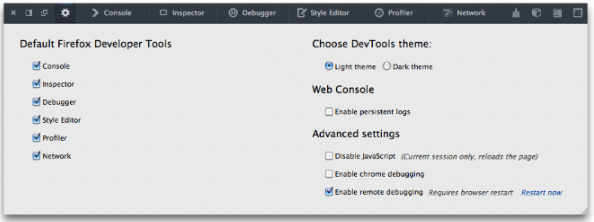
If you have the latest version of Firefox installed, connecting will be easier. Go to the command prompt and execute the following command.
adb forward tcp:6000 localfilesystem:/data/data/org.mozilla.firefox/firefox-debugger-socket
6000 is the default port. You should update it before executing if you have changed the port number.
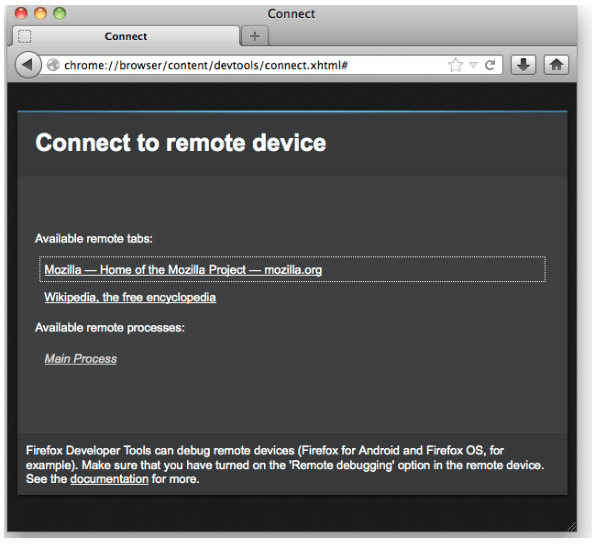
For each tab that is opened in the Android device, the site name will be added under the “Available remote tabs”. Opening a tab will open the tab along with developer console on the desktop. Allowing you to debug the page that you need.

Note: Try LT Debug Chrome Extension for debugging websites!
Limitations of the Debugger and How to Overcome Them
From version 52, Firefox has introduced a new debugger that is by default enabled in the developer edition. Although it is more reliable and much faster, there are certain limitations as well. Let’s list them down.
DOM event breakpoints are not supported by the new debugger. When you are trying to debug your JavaScript, breakpoints are important since it can command the debugger to stop event execution. This limitation of the new debugger will make it difficult for developers to debug script related issues in Android.
The new debugger also does not support inspecting DOM nodes. When you hover on a DOM node in the developer console it gets highlighted in the rendered webpage
Since these features are not supported, developers will have to go back to the previous debugger version in order to use it. This can be done by going to the about:config where you will find a preference named “devtools.debugger.new-debugger-frontend”. Mark it false and you will be able to inspect DOM nodes and set breakpoints again.
The remote debugging with Firefox is easy to use and easier to setup than other major browsers and enables developers debug their website issues in Android and fix them before deployment. Although the new version has some drawbacks, hopefully they will be fixed in the next release.


Did you find this page helpful?
More Related Hubs
TestMu AI forEnterprise
Get access to solutions built on Enterprise
grade security, privacy, & compliance
- Advanced access controls
- Advanced data retention rules
- Advanced Local Testing
- Premium Support options
- Early access to beta features
- Private Slack Channel
- Unlimited Manual Accessibility DevTools Tests