View Assertion Errors On TestMu AI
While handling GET requests in your Selenium scripts, assertions might fail. Use the Lambda Exceptions feature to view these assertion errors as exceptions and handle them more effectively.
What Are Lambda Exceptions?
Lambda Exceptions let you manage and display GET request errors like AssertionError on the dashboard.
Lambda Exception is a feature of TestMu AI that lets you manage and handle GET request errors, like AssertionError. The error gets displayed as an exception in the Exception tab of your test.
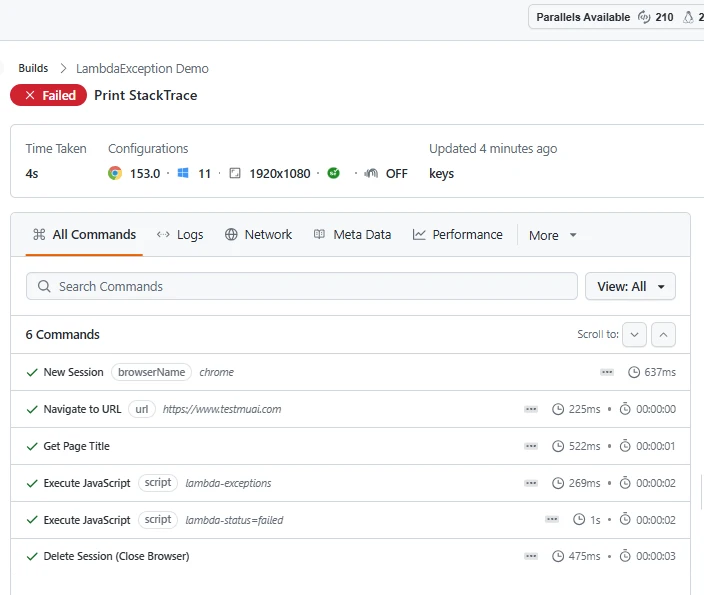
For example, when a test pushes an AssertionError using the lambda-exceptions command, it appears in the test's command log on the dashboard (and the test is marked failed via lambda-status):
How to Use Lambda Exception
Catch assertion errors in GET requests and push them to the dashboard using JavascriptExecutor.
While performing assertions on GET requests, if the assertion fails, an AssertionError exception is thrown. Refer to the below Java syntax to catch this error and push it to TestMu AI using Lambda Exceptions.
Verifiedtry {
// some GET request
Assert.assertEquals(ActualValue, ExpectedValue);
} catch (AssertionError e) {
Status = "failed";
exceptionCapture.add(e.getMessage());
((JavascriptExecutor) driver).executeScript("lambda-exceptions", exceptionCapture);
}
In the above syntax, when the AssertionError is caught in the catch block, the exception message is added as an array of Strings. This message is then pushed to TestMu AI using the Lambda Exceptions feature via the JavascriptExecutor command.
Lambda Exception Demo
Walk through a sample script that visits a URL, fetches the title, and asserts it against an expected value.
For demo purposes, this script will:
- Visit www.testmuai.com
- Fetch the title
- Assert the title with the expected value
View Exception on the Dashboard Using Lambda Exception
Below is the full code for this script, using TestNG framework in Java.
Verifiedpackage com.lambdatest;
import java.net.MalformedURLException;
import java.net.URL;
import java.util.ArrayList;
import java.util.HashMap;
import org.openqa.selenium.JavascriptExecutor;
import org.openqa.selenium.chrome.ChromeOptions;
import org.openqa.selenium.remote.RemoteWebDriver;
import org.testng.Assert;
import org.testng.annotations.AfterSuite;
import org.testng.annotations.BeforeSuite;
import org.testng.annotations.Test;
public class LambdaException {
private static RemoteWebDriver driver;
private static String Status = "failed";
@BeforeSuite
public void setup() throws MalformedURLException {
try {
String username = System.getenv("LT_USERNAME");
String authkey = System.getenv("LT_ACCESS_KEY");
String hub = "https://hub.lambdatest.com/wd/hub";
// W3C-compliant capabilities using LT:Options (required by Selenium 4)
ChromeOptions browserOptions = new ChromeOptions();
browserOptions.setBrowserVersion("latest");
browserOptions.setPlatformName("Windows 11");
HashMap<String, Object> ltOptions = new HashMap<>();
ltOptions.put("username", username);
ltOptions.put("accessKey", authkey);
ltOptions.put("build", "LambdaException Demo");
ltOptions.put("name", "Test 2");
ltOptions.put("network", true);
ltOptions.put("visual", true);
ltOptions.put("video", true);
ltOptions.put("console", true);
ltOptions.put("w3c", true);
browserOptions.setCapability("LT:Options", ltOptions);
System.out.println("Desired Caps: " + browserOptions);
driver = new RemoteWebDriver(new URL(hub), browserOptions);
} catch (Exception e) {
System.out.println("Session creation failed: " + e);
}
}
@Test
public static void testAssertionError() {
ArrayList<String> exceptionCapture = new ArrayList<>();
try {
driver.get("https://www.testmuai.com");
// Intentionally wrong (truncated) title so the assertion fails - demo purpose
String ExpectedTitle = "Most Powerful Cross Browser Testing Tool Online | LambdaT";
String TitleValue = driver.getTitle();
if (TitleValue.equals(ExpectedTitle)) {
Status = "passed";
}
Assert.assertEquals(TitleValue, ExpectedTitle);
} catch (AssertionError e) {
Status = "failed";
exceptionCapture.add(e.getMessage());
((JavascriptExecutor) driver).executeScript("lambda-exceptions", exceptionCapture);
}
}
@AfterSuite
public void tearDown() {
if (driver != null) {
driver.executeScript("lambda-status=" + Status);
driver.quit();
}
}
}
When you run this test, the assertion fails because the ExpectedTitle is intentionally incorrect for this demo. The failure is captured and the session is marked failed on the dashboard. Open the test view and navigate to the Exception tab to see the message describing this error.
View StackTrace on the Dashboard Using Lambda Exception
You can also push the full StackTrace to the dashboard using Lambda Exceptions. Convert the StackTrace to a String and add it as an array of Strings. Below is the full script to print the StackTrace using the TestNG framework in Java:
Verifiedpackage com.lambdatest;
import java.io.PrintWriter;
import java.io.StringWriter;
import java.net.MalformedURLException;
import java.net.URL;
import java.util.ArrayList;
import java.util.HashMap;
import org.openqa.selenium.JavascriptExecutor;
import org.openqa.selenium.chrome.ChromeOptions;
import org.openqa.selenium.remote.RemoteWebDriver;
import org.testng.Assert;
import org.testng.annotations.AfterSuite;
import org.testng.annotations.BeforeSuite;
import org.testng.annotations.Test;
public class LambdaException {
private static RemoteWebDriver driver;
private static String Status = "failed";
@BeforeSuite
public void setup() throws MalformedURLException {
try {
String username = System.getenv("LT_USERNAME");
String authkey = System.getenv("LT_ACCESS_KEY");
String hub = "https://hub.lambdatest.com/wd/hub";
// W3C-compliant capabilities using LT:Options (required by Selenium 4)
ChromeOptions browserOptions = new ChromeOptions();
browserOptions.setBrowserVersion("latest");
browserOptions.setPlatformName("Windows 11");
HashMap<String, Object> ltOptions = new HashMap<>();
ltOptions.put("username", username);
ltOptions.put("accessKey", authkey);
ltOptions.put("build", "LambdaException Demo");
ltOptions.put("name", "Print StackTrace");
ltOptions.put("network", true);
ltOptions.put("visual", true);
ltOptions.put("video", true);
ltOptions.put("console", true);
ltOptions.put("w3c", true);
browserOptions.setCapability("LT:Options", ltOptions);
System.out.println("Desired Caps: " + browserOptions);
driver = new RemoteWebDriver(new URL(hub), browserOptions);
} catch (Exception e) {
System.out.println("Session creation failed: " + e);
}
}
@Test
public static void testAssertionError() {
ArrayList<String> exceptionCapture = new ArrayList<>();
try {
driver.get("https://www.testmuai.com");
String TitleValue = driver.getTitle();
// Intentionally wrong (truncated) title so the assertion fails - demo purpose
String ExpectedTitle = "Most Powerful Cross Browser Testing Tool Online | LambdaT";
if (TitleValue.equals(ExpectedTitle)) {
Status = "passed";
}
Assert.assertEquals(TitleValue, ExpectedTitle);
} catch (AssertionError e) {
Status = "failed";
StringWriter sw = new StringWriter();
PrintWriter pw = new PrintWriter(sw);
e.printStackTrace(pw);
String sStackTrace = sw.toString();
exceptionCapture.add(sStackTrace);
((JavascriptExecutor) driver).executeScript("lambda-exceptions", exceptionCapture);
}
}
@AfterSuite
public void tearDown() {
if (driver != null) {
driver.executeScript("lambda-status=" + Status);
driver.quit();
}
}
}
When you execute the above test as a TestNG script, it produces the same result as the view exception section because of the incorrect ExpectedTitle value. Open the test view and navigate to the Exception tab to find the full StackTrace.
Below is the full StackTrace printed on the TestMu AI platform from the above script.
Verifiedjava.lang.AssertionError: expected [Most Powerful Cross Browser Testing Tool Online | LambdaT] but found [TestMu AI (formerly LambdaTest) | Agentic AI Testing Cloud] at
org.testng.Assert.fail(Assert.java:99) at
org.testng.Assert.failNotEquals(Assert.java:1037) at
org.testng.Assert.assertEqualsImpl(Assert.java:140) at
org.testng.Assert.assertEquals(Assert.java:122) at
org.testng.Assert.assertEquals(Assert.java:629) at
org.testng.Assert.assertEquals(Assert.java:639) at
com.lambdatest.LambdaException.testAssertionError(LambdaException.java:66) at
java.base/jdk.internal.reflect.NativeMethodAccessorImpl.invoke0(Native Method) at
java.base/jdk.internal.reflect.NativeMethodAccessorImpl.invoke(NativeMethodAccessorImpl.java:64) at
java.base/jdk.internal.reflect.DelegatingMethodAccessorImpl.invoke(DelegatingMethodAccessorImpl.java:43) at
java.base/java.lang.reflect.Method.invoke(Method.java:564) at
org.testng.internal.MethodInvocationHelper.invokeMethod(MethodInvocationHelper.java:132) at
org.testng.internal.TestInvoker.invokeMethod(TestInvoker.java:599) at
org.testng.internal.TestInvoker.invokeTestMethod(TestInvoker.java:174) at
org.testng.internal.MethodRunner.runInSequence(MethodRunner.java:46) at
org.testng.internal.TestInvoker$MethodInvocationAgent.invoke(TestInvoker.java:822) at
org.testng.internal.TestInvoker.invokeTestMethods(TestInvoker.java:147) at
org.testng.internal.TestMethodWorker.invokeTestMethods(TestMethodWorker.java:146) at
org.testng.internal.TestMethodWorker.run(TestMethodWorker.java:128) at
java.base/java.util.ArrayList.forEach(ArrayList.java:1511) at
org.testng.TestRunner.privateRun(TestRunner.java:764) at
org.testng.TestRunner.run(TestRunner.java:585) at
org.testng.SuiteRunner.runTest(SuiteRunner.java:384) at
org.testng.SuiteRunner.runSequentially(SuiteRunner.java:378) at
org.testng.SuiteRunner.privateRun(SuiteRunner.java:337) at
org.testng.SuiteRunner.run(SuiteRunner.java:286) at
org.testng.SuiteRunnerWorker.runSuite(SuiteRunnerWorker.java:53) at
org.testng.SuiteRunnerWorker.run(SuiteRunnerWorker.java:96) at
org.testng.TestNG.runSuitesSequentially(TestNG.java:1218) at
org.testng.TestNG.runSuitesLocally(TestNG.java:1140) at
org.testng.TestNG.runSuites(TestNG.java:1069) at
org.testng.TestNG.run(TestNG.java:1037) at
org.testng.remote.AbstractRemoteTestNG.run(AbstractRemoteTestNG.java:115) at
org.testng.remote.RemoteTestNG.initAndRun(RemoteTestNG.java:251) at
org.testng.remote.RemoteTestNG.main(RemoteTestNG.java:77)
That’s it! You can now easily handle and manage exceptions using the Lambda Exceptions feature. If you still have any doubt, please feel free to reach out to us via 24/7 chat support or by mailing to us on support@testmuai.com. Happy testing! 🙂


 Chat with Us