What is TestMu AI Agent Assurance
TestMu AI Agent Assurance helps teams gather evidence about whether an AI agent they own is ready to ship. It is white-box testing for agents that act: they call tools, write files, hit APIs, and change external state.
Agent Assurance does not grade the agent on what it says it did. An agent's own reply is the weakest available signal, because an agent can produce a confident, well-written summary of work it never completed. Agent Assurance goes inside the system and verifies the actual effects: the recorded tool calls, the command output and exit status, the files that changed, the artifacts that were produced, and read-only checks against the target's real state. How much it can observe depends on the access and the profile you give it; where no stronger evidence is available, a criterion is reported as Unable to Verify rather than passed on the agent's word.
Agent Assurance uses the rook CLI for authoring and execution, with a local UI and hosted Web UI for reviewing evidence on your machine or with your team. Give it the materials that describe the agent and connect a live test target. It can then:
- Discover capabilities.
- Generate scenarios.
- Execute multi-step behavior.
- Collect evidence.
- Judge the results.
You install only the rook CLI. You do not need the source repository, a dedicated development environment, Docker, or your own model API key.
Launch rook from your agent workspace to open the interactive terminal UI (TUI). Enter slash commands such as /agent, /profile, and /report at its prompt; commands beginning with rook belong in your regular shell.
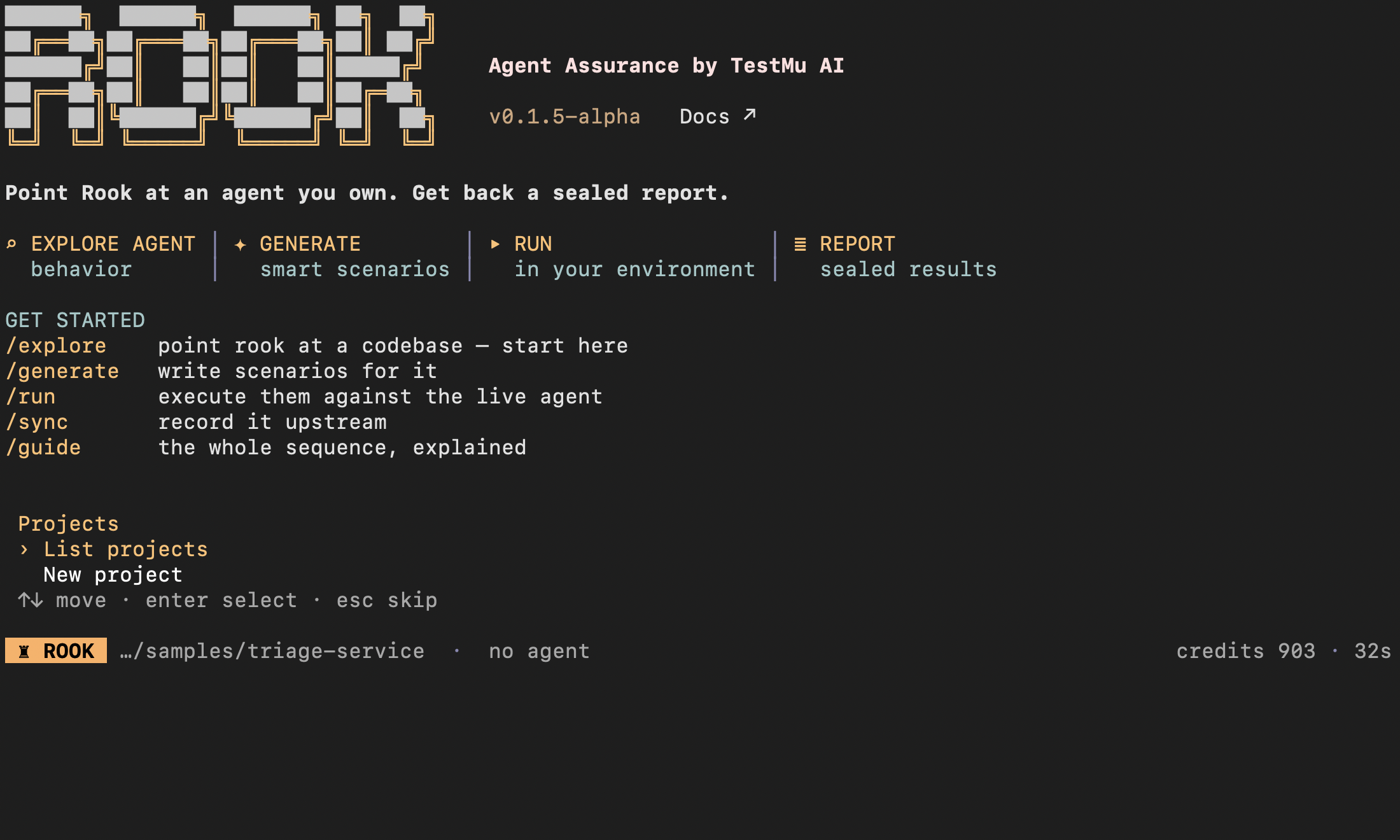
This TUI capture shows a signed-in session before an agent has been explored. Select a project with the arrow keys and Enter; sign in with /login first if prompted. The quickstart shows the actual exploration, profile authoring, generation, approval, execution, and report screens in sequence.
Agent Assurance and Agent Testing
TestMu AI has two agent product lines. They test different things, and they trust different evidence.
| Product line | What it tests | What it treats as evidence |
|---|---|---|
| Agent Testing | Black-box testing of conversational agents — chat, voice, video, and phone — through configured turns, intents, assertions, and conversation quality. | The agent's responses in the conversation. |
| Agent Assurance (this section) | White-box testing of agents that plan, call tools, change external state, create files, ask for missing information, or delegate to subagents. | Observed effects: recorded tool calls, command output and exit status, file changes, artifacts, and read-only verification — not the agent's own account of its work. |
For example, a refund assistant may ask for an order ID, verify eligibility, issue a refund through a tool, and return both an explanation and a PDF receipt. Agent Assurance checks whether the refund actually happened, what the recorded calls show, and whether the receipt exists. It does not accept the closing sentence as proof.
What You Can Give Rook
Rook works with different levels of access:
| What you have | How to begin | What it contributes |
|---|---|---|
| A PRD only | Run /explore path/to/PRD.md | Intended behavior, rules, constraints, examples, and open questions |
| PRD plus knowledge-base files | Run /explore docs -- focus on the PRD and knowledge base | Intended answers, policies, domain facts, and boundaries |
| Agent source code | Run /explore . in your checked-out repository | Prompts, tools, subagents, feature paths, and implementation evidence |
| A live remote API but no source | Explore a local PRD or specification, then add an HTTP profile | Live execution of the deployed target, verified through the response plus whatever effects the profile is configured to observe |
| A local agent CLI | Add a command profile | stdout, stderr, exit status, files, and resumable sessions when configured |
Rook does not natively explore a GitHub URL. If you want source-aware testing, check out your own repository locally and run Rook inside it. You do not need to clone Rook to install it; the quickstart optionally clones its public sample agent.
Documentation is specification evidence, not proof of implementation. A PRD tells Rook what should happen. A live invocation profile is still required to test what actually happens.
The End-to-End Journey
- Sign in and select the project with
/project. /explorereads local material;/agentselects the agent to test./profile addgenerates and verifies invocation hooks from your prompt or integration material./generatecreates scenarios;/scenarios listhelps you review them./syncpublishes the reviewed project before a timeline run./runinvokes the live target through its phases and judges the evidence./uiopens the hosted Web UI;/ui --localopens on-disk evidence.
Rook stores project results as plain files below:
Verified<your-workspace>/.testmuai/rook/
Credentials, variables, and session settings are stored separately below ~/.testmuai/rook/. Stored variables are partitioned by the workspace's absolute path.
Drive Agent Assurance From Your Coding Agent
You do not have to type the sequence above by hand. A public Rook skill teaches a coding assistant to run the same Rook CLI workflow from your agent repository: it checks the installed CLI and workspace state, identifies the target agent, its authentication needs, its invocation profile, hooks, and possible writes, waits for you to approve a scoped test, then reports the run ID with Pass, Fail, and Unable to Verify evidence rather than a successful shell exit.
Setup is one command, once per machine. With Node.js 22 or newer:
npx @testmuai/rook-skill@latest
That installs the skill for Claude Code (~/.claude/skills/rook/), Codex CLI (~/.agents/skills/rook/), and Gemini CLI (~/.gemini/skills/rook/). Use the installer's --agent flag to set up a single client instead of all three. For GitHub Copilot CLI, OpenCode, Cursor CLI, Antigravity, VS Code, or Windsurf, copy the public skill bundle into the project directory that client reads; each coding-agent guide gives the exact path and its discovery check.
After that, describe the outcome instead of the commands. In Claude Code, type / and select rook; in Codex CLI, run /skills or prefix the prompt with $rook.
Use Rook to test the refund agent in this repository against its refund policy.
Use the staging profile and test fixtures only. Propose up to three scenarios.
Before invoking the target, show me the selected scenario, hooks, possible writes,
and expected credit spending, then ask for confirmation.
After approval, run one selected scenario and report its run ID, Pass, Fail,
Unable to Verify, and criterion-level evidence. Do not run paid RCA or retry
automatically.
The skill is an interface to Rook, not a replacement for it. Install and authenticate the Rook CLI first: the skill is not the Rook executable, an editor extension, or an MCP server, and installing it alone does not configure a profile for your target. Your client's own approval settings still apply — loading the skill does not authorize shell commands, network access, target writes, or credit spending, and a prompt is not a spending cap. Ask for the run ID and the saved verdict before believing a result; a natural-language "it passed" is not evidence.
See Use Rook with Coding Agents to choose a client and follow its setup, discovery check, and troubleshooting.
Evidence and Verdicts
Rook ranks its evidence. Observed effects carry the verdict: recorded tool calls, command output, exit status, changed files, downloadable artifacts, and read-only MCP verification. The agent's own reply is kept and shown, but it is the weakest signal and is never treated as proof that an action succeeded.
The available evidence therefore depends on the profile you configure. A profile whose hook returns only an answer string leaves most criteria Unable to Verify — a JSON-path check cannot inspect a field your hook never returned.
| Verdict | Meaning |
|---|---|
| Pass | Every criterion Rook could verify passed. |
| Fail | At least one criterion was observed to fail. |
| Unable to Verify | The available profile and evidence could not establish the result. It is not counted as a failure. |
Always read coverage together with pass rate. A high pass rate with low verification coverage is not strong release evidence.
Supported Outputs and Current Limits
Rook can collect text, JSON, local files, and downloadable links. This supports agents that produce PDFs, images, CSV files, Markdown, reports, or archives.
Current pre-alpha limits include:
- Text and URL inputs can be passed in the scenario goal. Native file, image, and pull-request attachment delivery is not yet implemented.
- Rook can record image dimensions and file evidence, but it cannot judge image pixels. Visual correctness may be Unable to Verify.
- Hook scripts must implement the actual transport, session handling, and evidence collection. Merely declaring streaming, attachment, or MCP capabilities does not implement them.
Safety
Rook does not sandbox or roll back the agent under test. Refunds, emails, tickets, database updates, and filesystem writes happen in the target environment.
For the first run, use staging endpoints, disposable fixtures, and --concurrency 1. Start with one harmless scenario, and approve only the exact target you intended.
Real-World Use Cases
You do not need the Rook source code, and your workspace does not need the source code of the agent under test. Rook can start from a PRD, knowledge base, checked-out implementation, or another local specification, then invoke a live remote or local target through a profile.
Use the following journeys to choose the setup that matches the access you have. Complete login and project selection first. Before every normal run, review the profile and scenarios and run /sync. Scenario IDs below are examples; use those in your workspace.
Access Matrix
| Your access | Explore | Invoke | What Rook can establish |
|---|---|---|---|
| PRD only | The PRD file | A live HTTP or command profile is still required | Conformance of observable behavior to intended requirements |
| PRD and knowledge base | The containing folder | HTTP or command profile | Policy answers, boundaries, workflows, and observable effects |
| Remote API, no code | A local PRD/API specification | HTTP profile | Behavior exposed by the response plus every effect the profile can observe; with no source, verification depth is bounded by what the API exposes |
| Source workspace | The repository or agent directory | HTTP or command profile | Source-aware scenarios plus live behavior |
| GitHub repository | A local checkout of your repository | HTTP or command profile | Same as source workspace; raw GitHub URLs are not explored |
| Local CLI agent | Its docs or code | Command profile | stdout, stderr, exit status, sessions, and configured file changes |
| Artifact-producing agent | PRD, docs, or code | Sync or async profile | Text, JSON, local files, and downloadable result links |
| Several environments or models | Explore once | One profile per variant | Repeatable comparison while each run stays pinned to one profile |
Use Case 1: Only a PRD, No Agent Code
Situation: A QA engineer receives refund-agent-prd.md and a staging endpoint. Engineering does not provide the implementation repository.
Goal: Verify eligibility rules, missing-input questions, duplicate refund protection, and receipt creation.
Verifiedrefund-validation/
└── refund-agent-prd.md
Start from the file:
Verifiedcd refund-validation
rook
/explore refund-agent-prd.md
/generate --total 15 -- cover missing order ID, identity verification, duplicate requests, policy cutoff, and receipt output
/profile add
/scenarios list
/sync
/run --only SC-001 --concurrency 1
Use an HTTP profile such as:
Verifiedcurl https://refund-agent.staging.example.com/v1/chat \
-H 'authorization: Bearer replace-with-your-token' \
-H 'content-type: application/json' \
-d '{"message":"I need a refund for order ORD-1042","session_id":"test-session"}'
Interpretation: The PRD supplies expected behavior. The API response and observations supply actual evidence. Rook should not infer implementation tools or mark a backend refund successful merely because the PRD says that tool exists.
Use Case 2: PRD Plus a Knowledge Base
Situation: A support agent answers from product policies, warranty tables, and escalation instructions. The workspace contains documents but no executable agent.
Verifiedsupport-agent-test/
├── PRD.md
└── knowledge/
├── refunds.md
├── warranty.md
└── escalation.md
Explore the folder with focus:
Verified/explore . -- treat PRD.md as requirements and knowledge/ as the approved answer source
/generate --class functional,adversarial -- category boundaries, conflicting policies, unsupported claims, and escalation
Connect the remote support endpoint with /profile add. Add read-only verification only when it can observe an effect without creating or changing it.
Useful checks:
- Does the agent ask for the product model before applying model-specific policy?
- Does it refuse instructions embedded in an untrusted knowledge article?
- Does it cite the correct policy version?
- Does it escalate when documents conflict instead of inventing a rule?
Limit: Documentation can show what the agent should know. It does not prove which documents the deployed agent retrieved.
Use Case 3: Remote Agent with No Workspace Code
Situation: A vendor gives you an API URL, credentials, a request example, and an API specification.
Keep the specification in a small local test workspace:
Verifiedtravel-agent-contract/
├── PRD.md
└── api-contract.md
/explore .
/generate --total 20 -- test ambiguous dates, unavailable flights, budget limits, and confirmation before booking
/profile add
The profile might invoke:
Verifiedcurl https://travel-agent.staging.example.com/v2/trips \
-H 'authorization: Bearer replace-with-your-token' \
-H 'content-type: application/json' \
-d '{"goal":"Find a refundable flight to Singapore next Friday","thread_id":"rook-demo"}'
Use a conversation field when the agent returns a thread or session ID. Without that mapping, a scenario that requires follow-up questions cannot run as a real conversation.
For both HTTP examples, supply target credentials through environment variables and tell the profile author their names. The generated script should read them from process.env, never embed the values. See Environment and Secrets.
Rook cannot explore the remote URL itself. It explores local material and invokes the remote target through the profile.
Use Case 4: Full Agent Source Workspace
Situation: The team owns a coding agent with prompts, tool definitions, subagents, skills, and implementation code.
Check out your own repository and run Rook at the narrowest useful root:
Verifiedgit clone https://github.com/your-org/coding-agent.git
cd coding-agent
rook
/explore .
/agent
/generate --class functional,non_functional,adversarial
/profile add
/sync
/run --concurrency 1
Source access lets Rook derive scenarios from implemented tools and policies. The profile still invokes the agent externally; discovery alone is not a test run.
If the repository is a monorepo, prefer:
Verified/explore services/code-review-agent
This narrows discovery and makes the proposed agent boundary easier to review. It is not a filesystem access boundary. Discovery tools remain rooted at the workspace where Rook was launched, so use an isolated checkout when sibling files must not be inspected.
Use Case 5: A GitHub URL Is All You Were Given
Rook does not clone or explore a GitHub URL directly. Clone the repository yourself so you control the branch, credentials, submodules, and files Rook may read:
Verifiedgit clone --branch feature/refund-v2 https://github.com/your-org/refund-agent.git
cd refund-agent
rook
Then use /explore .. For a private repository, authenticate Git using your organization's normal process. This is your agent repository. It is unrelated to installing or cloning Rook.
Use Case 6: A Local Command Agent
Situation: A research or coding agent runs as a command and may write files.
Create a command profile through /profile add. Example invocation:
/profile add local-research --command 'research-agent --format json'
Configure:
- The argument or stdin position for the scenario goal.
- A resume argument when multi-turn sessions are supported.
- The result source, such as stdout.
- An output folder such as
./reportsfor filesystem observation. - A reset command if fixtures must be restored between scenarios.
Run one scenario with concurrency 1. A non-zero exit status is an invocation error, even when the command prints partial output.
Use Case 7: Async Reports, PDFs, Images, and Mixed Results
Situation: A report agent returns a job ID, asks the caller to poll, and eventually returns explanatory text plus a PDF or image link.
Use an asynchronous HTTP profile with:
- The initial request.
- The JSON path that returns the job handle.
- A polling request and completion condition.
- The text result path.
- Artifact locations or downloadable result URLs.
Example test intent:
Verified/generate -- create an executive risk summary, a PDF report, and a chart; verify required sections and artifact metadata
/run --only SC-004 --concurrency 1
Rook can collect the result text and common files such as PDF, image, CSV, JSON, Markdown, HTML, and archives. It can record image size and dimensions.
Current input limit: Native file or image attachment delivery is not implemented. Put a test URL in the goal or provide an agent-specific adapter that resolves the file before invoking the live agent.
Current image limit: Rook does not judge what pixels depict. A visual-content criterion can be Unable to Verify even when the image artifact exists.
Use Case 8: Several Agents in One Workspace
Situation: A customer-service system contains a router, refund agent, order agent, and escalation agent.
Verified/explore .
/agent
/agent use refund-agent
/generate --total 12
/profile add
/sync
/run
Repeat /agent use, generation, and profile setup for each independently invokable agent. If a subagent is only reachable through the router, test it through the router, and make that boundary explicit in the profile and scenarios.
Project data is stored separately under each registered agent. The command lists or selects agents. Agent removal is intentionally not a command — project data is stored as readable files, so remove or edit it through your reviewed repository workflow when that is genuinely required.
Use Case 9: Several Profiles for One Agent
Profiles represent ways to invoke the same discovered behavior:
| Profile | Example purpose |
|---|---|
refund-staging | Safe functional and write-path testing |
refund-prod-readonly | Read-only smoke checks |
fast-model | Latency/cost-oriented model configuration |
careful-model | Higher-quality model configuration |
regional-eu | Region-specific policy and endpoint |
/profile
/profile test refund-staging
/profile use refund-staging
/run --only SC-001,SC-002 --concurrency 1
Switch to another verified profile and repeat the same scenario IDs. Runs retain the profile identity used at execution time.
Do not use a production profile for scenarios that can write. Rook does not provide rollback.
Use Case 10: Continuous Regression Testing
After the interactive journey is verified, use headless commands:
Verifiedrook project use <project-id>
rook agent use <agent-id>
rook sync
rook run --only SC-001,SC-002 --concurrency 1 --json
rook report --json
Pin the CLI version, use an isolated Rook home for CI, and provide explicit permission rules only for exact calls the job should make.
A successful process exit does not establish agent quality. Inspect completion and verdict totals using the CI gate. Keep generation in a separately reviewed workflow.
Local and Hosted UIs
Use rook ui --local to review the current workspace's agents, definitions, runs, and evidence without a hosted login. Open agent → runs → run → scenario. This includes local --test results and evidence awaiting upload; keep the serving process running.
Open the hosted Web UI for shared projects. Public packages default to ROOK_ENV=prod; use the same service, account, and project in the CLI and browser.
Use rook ui to open the hosted app for uploaded project history, versions, and team review. Open project → agent → Runs → run → scenario. Teammates need access to the same environment and project.
The combined UI walkthrough shows both layouts and their evidence views. Neither UI creates or executes tests; those operations stay in the CLI.
Local UI: Start With Your Workspace
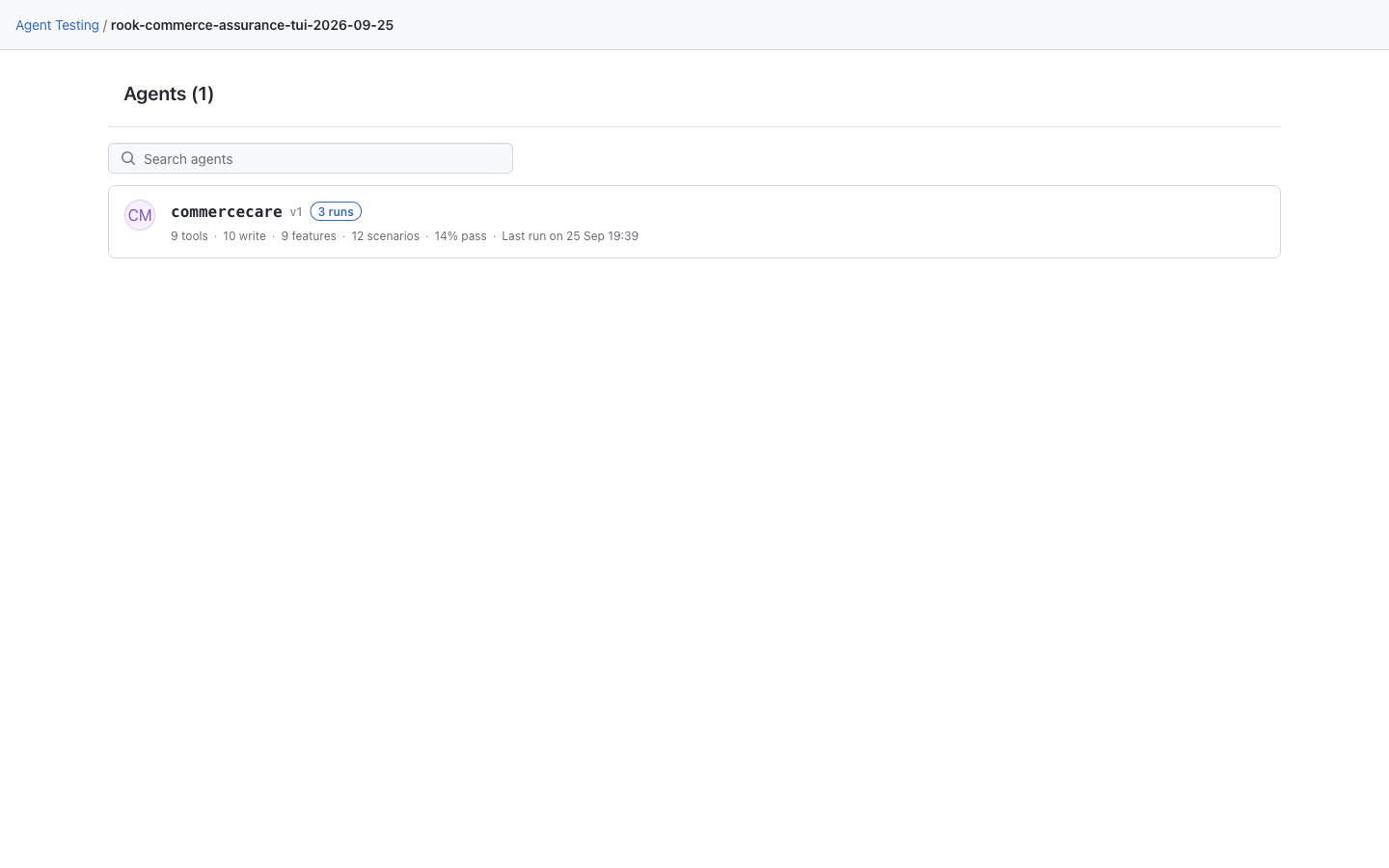
The local landing page lists agents from the selected project on this machine. Click an agent to review its definitions and results. This saved CommerceCare demo has nine features, twelve scenarios, and three runs; a new workspace starts without these records. See the local UI rollout note if your public CLI still has the earlier viewer.
Hosted Web UI: Start With Your Team's Project
The hosted landing page starts with shared Projects. Open a project, then an agent, to reach Summary, Versions, Profiles, Features, Scenarios, and Runs. Insights is not currently available. The screenshot shows the documentation test project, not a project created automatically at installation.

Next Steps
- Get started with Agent Assurance
- Follow the complete Rook sequence
- Drive Rook from Claude Code, Codex CLI, or another coding assistant
- Understand the local and cloud architecture
- Connect and explore agents
- Configure invocation profiles
- Generate profiles and configure lifecycle hooks
- Generate and curate scenarios
- Run tests safely
- Review permissions, secrets, and workspace files
- Browse every command


 Chat with Us