HyperExecute Release Notes 2024
Version 2.6.5
New Regions Added for HyperExecute Performance Testing
We are excited to announce the addition of four new regions for performance testing in HyperExecute. These regions enable better coverage, reduced latency, and enhanced testing capabilities for global users.
The new regions are:
- Central India - Pune, Maharashtra
- Malaysia - Southeast Asia (Singapore)
- Argentina - South America (Brazil South)
- Mexico - Mexico Central
📕 Visit our Performance Testing Documentation for step-by-step instructions on configuring your tests and making the most of HyperExecute's enhanced regional coverage.
Download Reports for XCUI Framework
Now, you can download the JUnit XML report for your test runs on the XCUI framework.
To generate reports for your XCUI tests, add the reports: true flag in your HyperExecute YAML file and pass the --download-report flag with the CLI command.
📕 Refer to our detailed documentation to Generate XCUI Reports
Version 2.6.2
Support for Appium and Maestro Android Emulator
HyperExecute now supports the Appium and the Maestro Android Emulator, providing enhanced flexibility for mobile application testing on Android emulators.
Key Features:
- Streamlined Emulator Integration: Perform testing on virtual devices without requiring physical hardware, reducing setup complexity.
- Parallel Execution : Run multiple tests simultaneously on virtual devices using HyperExecute's parallelism to speed up test cycles and reduce execution time for functional and UI tests.
- Customizable Capabilities: Define emulator configurations such as device name, platform version, and orientation directly within your test files.
To execute tests using the Android Emulator, add the following configurations to your hyperexecute.yaml:
framework:
  args:
    isRealMobile: false
Refer to our detailed documentation for Appium and Maestro on configuring and running tests with Android emulators.
New Version Release for Beta and Dev Edge Browser
HyperExecute expands its support for the latest versions of dev and beta browsers for the Windows platform. With this expanded compatibility, you can streamline your testing process and deliver exceptional user experiences with confidence!
- Dev version: 132.0.2957.11
- Beta version: 132.0.2957.11
Version 2.6.0
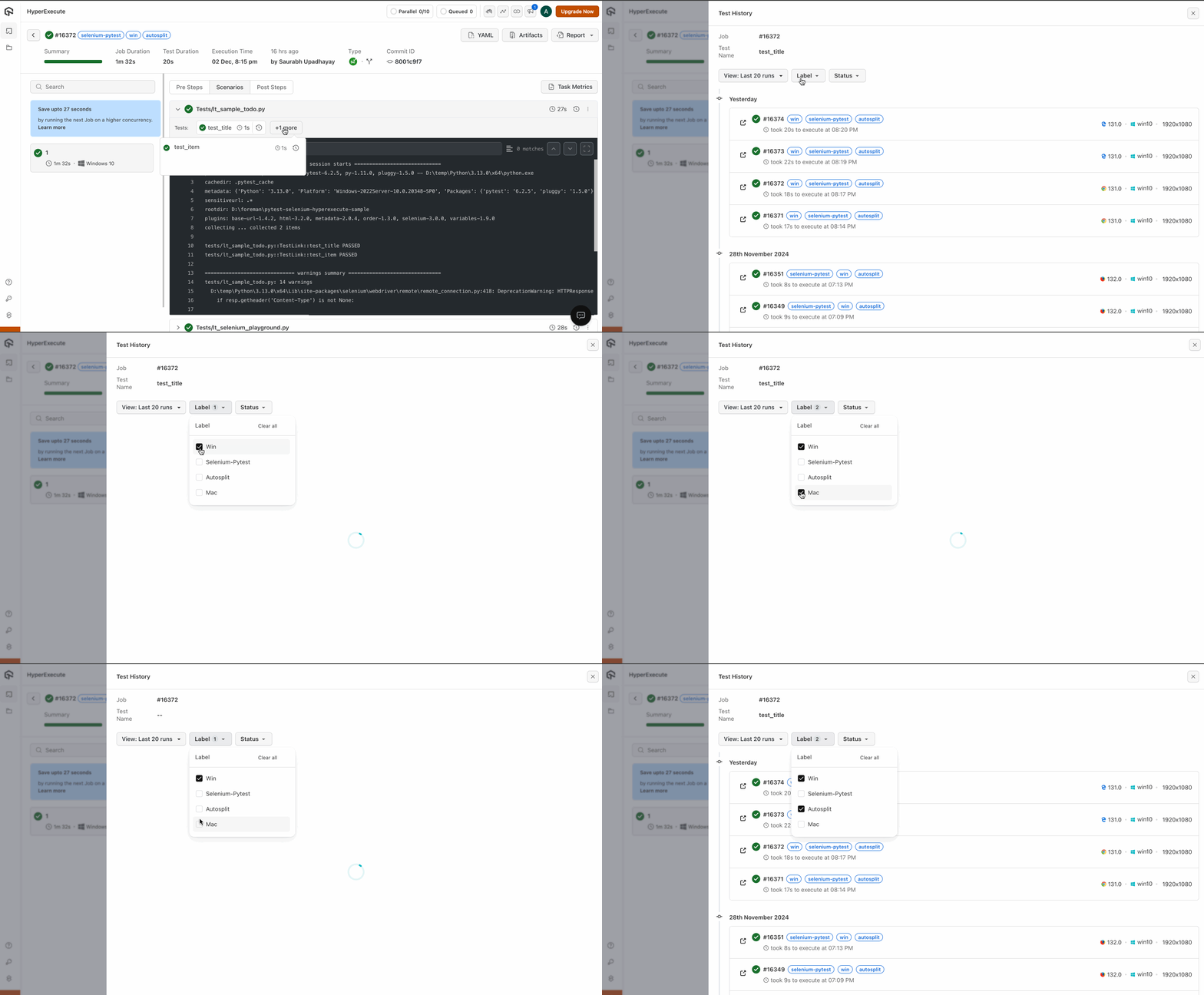
Label-Based Filtering for Test History
This feature addresses the challenge of managing and tracking test runs as development teams scale and test suites grow more complex. By allowing you to group and filter tests based on custom labels, it simplifies test result tracking, reporting, and team collaboration.
Some of the specific benefits of the Test History Labels feature include:
- Quickly identifying and grouping similar test runs (e.g., all regression tests, all tests for a particular environment).
- Simplifying the process of retrieving test runs for a specific sprint, feature, or environment.
- Enhancing overall test management and organization for development teams.
Version 2.5.9
Consolidated JUnit XML Report Generation
The consolidated JUnit XML report includes detailed information on all executed tests, i.e., which tests passed, failed, or were skipped, along with any error messages and stack traces for failed tests. It is widely supported across CI/CD tools, which makes it easy to integrate with existing workflows and with other tools or systems.
📕 Refer to our documentation for detailed instructions on setting up your project and using the new JUnit XML report
Generate Artifacts for Espresso & XCUI Frameworks
Now, you can download artifacts for your test runs on both Espresso and XCUI frameworks and detailed reports for your Espresso test executions.
-
To generate artifacts and reports for your Espresso tests, add the
artifacts: trueandreports: trueflag in your YAML file and pass the--download-artifactsand--download-reportflag with the CLI command📕 Refer to our detailed documentation to generate Espresso Artifacts and Reports
-
To generate artifacts for your XCUI tests, add the
artifacts: trueflag in your YAML file and pass the--download-artifactsflag with the CLI command📕 Refer to our detailed documentation to generate XCUI Artifacts
Browser and Selenium Updates
-
Firefox Browser Update to Version 132.0
HyperExecute now supports Firefox version 132.0. This latest Firefox release includes performance and security improvements to ensure a smoother and safer testing experience.
Note : Firefox 132.0 is currently not compatible with Cypress. Users running Cypress tests should continue to use a compatible Firefox version until an update is released.
-
Selenium JAR Update to Version 4.26.0
HyperExecute has upgraded to Selenium JAR version 4.26.0. This update includes stability enhancements and bug fixes for better compatibility and reliability across various browsers.
Version 2.5.8
Added Bitbucket Support in Projects Feature ✨
HyperExecute Projects now supports Bitbucket repositories for workflow scheduling. You can seamlessly connect and manage workflows using either GitHub or Bitbucket repositories.
Key Functionalities:
- Connect Bitbucket repositories using Repository Access Tokens
- Schedule and automate workflows from Bitbucket repositories
- Maintain existing GitHub integration with unchanged functionality
📕 Refer to the Projects Documentation
Version 2.5.7
Remote Test Discovery Mode
HyperExecute now includes a Remote Test Discovery Mode to enhance the test discovery process. This mode centralizes test discovery tasks on dedicated Virtual Machines, improving efficiency and resource utilization, especially for complex test setups and matrix configurations.
Key Features:
- Centralized Discovery : Remote discovery on Virtual Machines, optimizing the process by focusing only on identifying tests.
- Orchestration Support : Efficient distribution of discovered tests across VMs to reduce idle time and improve resource usage.
- Optimized Caching : Reduces redundant cache operations by sharing caches across execution tasks.
For more details, go through the Remote Discovery Documentation
Version 2.5.6
Browser Version Updates:
- Firefox : Added support for Firefox-130 and Firefox-131, enabling testing on the latest versions.
- Edge : Downgraded to Edge-128 for compatibility and stability enhancements.
- Chrome : Upgraded to Chrome-129 to include the newest features and security updates.
These updates ensure broader coverage for cross-browser testing and improve test stability across the latest browser versions.
Version 2.5.5
Extended Report Formats for JUnit Framework
In addition to the existing JUnit XML report, support for generating reports in multiple formats (e.g., HTML, XML, JSON) has been added. This enhancement enables more flexible report generation to meet different user needs.
To avail this feature, connect with our Support Team.
This can be configured with the following parameters:
- frameworkName: junit
- type: xml
- location: Specify the directory where the reports will be generated.
report: true
partialReports:
  location: target/surefire-reports/html
  type: xml
  frameworkName: junit
Version 2.5.4
Browser and Selenium Version Updates
- Edge Browser : Now updated to
Edge version-129, ensuring compatibility with the latest browser features and optimizations. - Selenium JAR : Upgraded to
Selenium 4.25.0, offering enhanced automation capabilities and support for the newest web standards.
Browser Versions
- Edge (Latest) : Now set to
Edge-latest-129 - Chrome (Latest) : Updated to
Chrome-latest-128 - Firefox (Latest) : Now at
Firefox-latest-129
These updates enhance test reliability and support for modern browser functionalities, ensuring seamless cross-browser testing.
Version 2.5.3
New Feature: Commit Information Display
The top panel now displays detailed information about the latest commit, including the commit ID and the contributor's name. This enhancement provides better visibility into the latest code changes and helps developers track contributions more efficiently.

Version 2.5.2
1. Cypress Detailed Command Logs for Enhanced Debugging New Release
Detailed Cypress Command Logs in HyperExecute generate an extensive, human-readable record of all Cypress commands and their corresponding results, both in the console and as a file. It helps narrow down test logs, making debugging and troubleshooting Cypress tests easier.
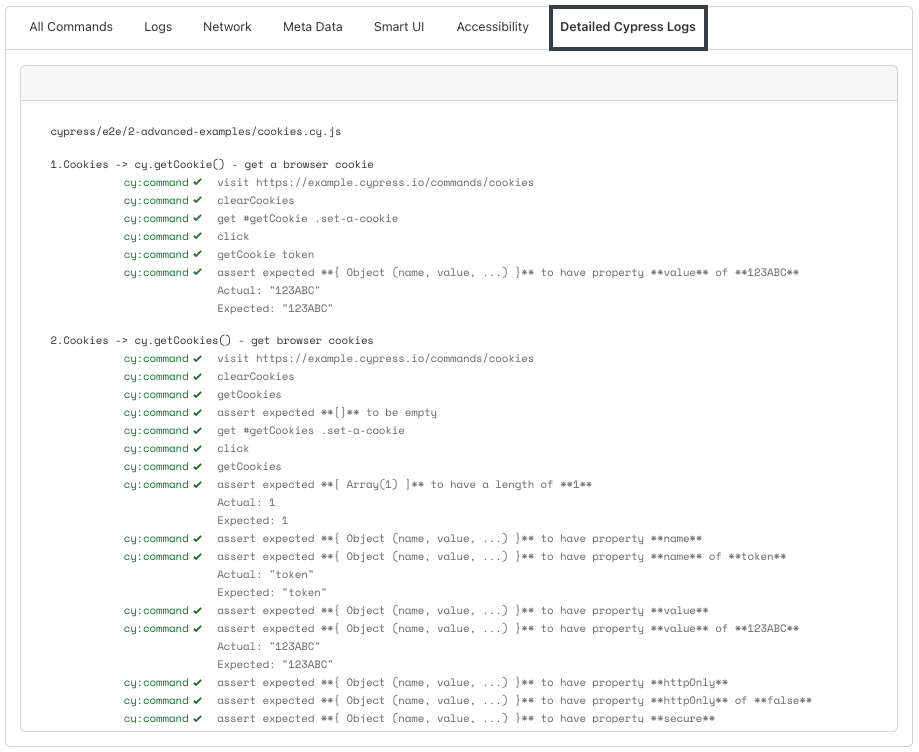
📕 Learn how to enable Detailed Command Logs for your Cypress tests.
2. Parameterized Report Email Handling in YAML Enhancement
HyperExecute now supports an enhanced approach for managing multiple email addresses within the YAML configuration file. Previously, you needed to define multiple variables for email addresses (${email1}, ${email2}, etc.). With this update, a single variable can now hold multiple email addresses, separated by commas or underscores, simplifying report sharing. This enhancement eliminates the need for multiple variables, making maintaining and modifying email configurations easier.
📕 Check the Reports documentation to learn more about it.
3. Browser and Selenium Updates for Linux, Windows, and macOS New Release
Updated the browser versions across multiple platforms and upgraded the Selenium jars. This ensures compatibility with the latest features and security updates, improving test stability across different environments.
The following updates are now live:
- Firefox: version 129.0
- Chrome: version 128.0
- Selenium Jars: version 4.24
Version 2.5.1
HyperExecute Projects - General Availability (GA)
HyperExecute Projects is now generally available (GA), moving beyond the Beta phase! Projects offer a centralized platform for organizing and managing your test executions to streamline your testing process more efficiently than ever before.
Key Updates:
- Centralized Test Management : Group similar tests, control access, and track progress within custom projects.
- Workflow Automation : Set up automated workflows with scheduled test executions and optional workflow linking.
- GitHub Integration : Support for GitHub repositories with easy setup for collaborative testing.
- Framework Support : Integration with Tosca, Tosca DEX, and JMeter for unified test management.
📕 Read the documentation to learn more about it.
New Version Release for Beta and Dev Edge Browser
HyperExecute expands its support for the latest versions of dev and beta browsers for the Windows platform. With this expanded compatibility, you can streamline your testing process and deliver exceptional user experiences with confidence!
- Dev version: 130.0
- Beta version: 128.0.2739.42
Version 2.5.0
HyperExecute - New Version Release for Beta and Dev Edge Browser
HyperExecute expands its support for the latest versions of dev and beta browsers for the Windows platform. With this expanded compatibility, you can streamline your testing process and deliver exceptional user experiences with confidence!
- Dev version: 129.0
- Beta version: 128.0.2739.22
Version 2.4.8
HyperExecute: Set Dynamic Email Address for Report Sharing
HyperExecute CLI added an enhancement in the --vars flag providing greater flexibility in specifying email addresses for report and artifact sharing. You can now use a variable to dynamically set the email address used to share reports or artifacts. This gives you more flexibility than hardcoding the email address in the YAML configuration file.
partialReports:
  location: target/surefire-reports/html
  type: html
  frameworkName: extent
  email:
      to:
        - "${email}"
        - "${email1}"
Pass the value of your email address via CLI by running the command
Verified./hyperexecute --vars "email=xyz@abc.com" --vars "email1=abc@xyz.com"
📕 Read the documentation - How to dynamically set your email address? to learn more about it.
Version 2.4.7
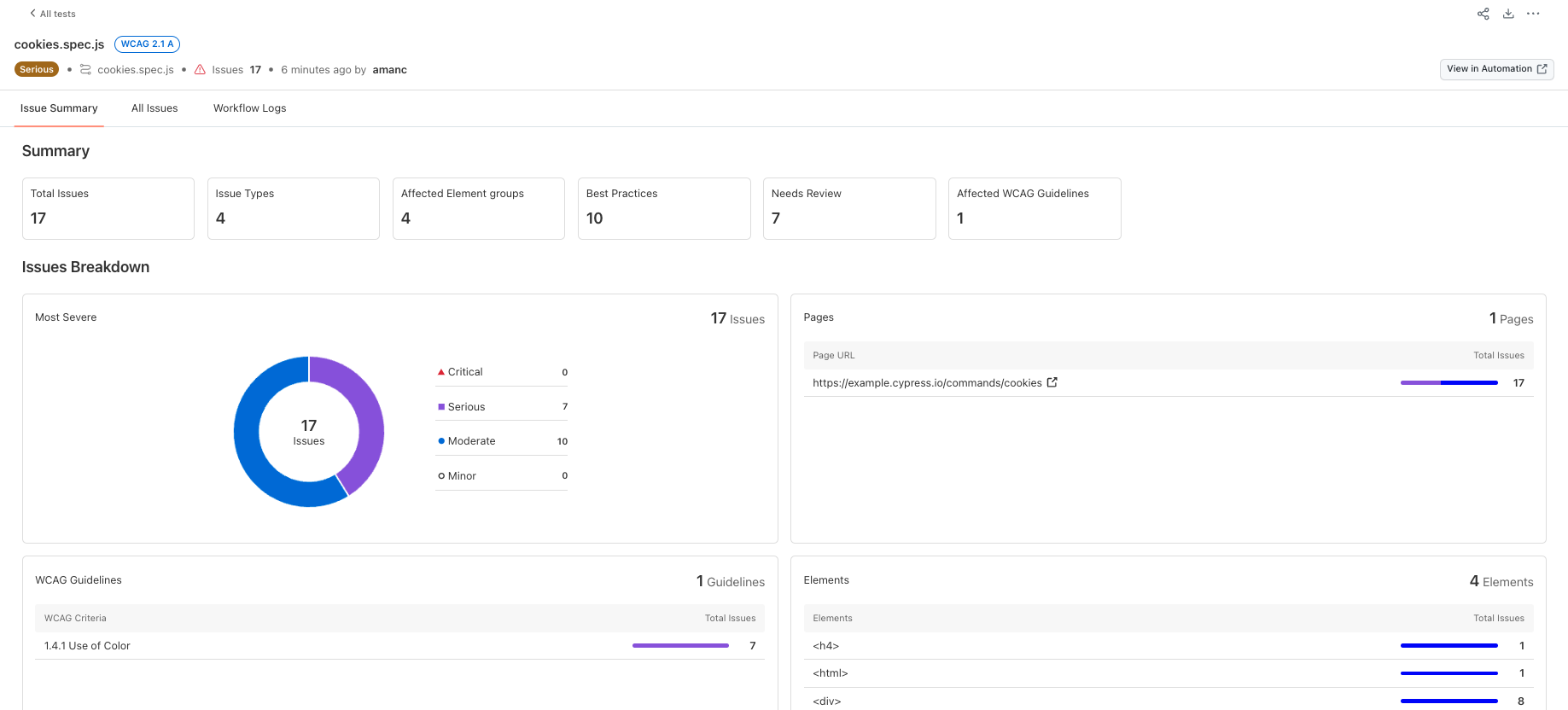
HyperExecute: Accessibility Testing Support for Selenium and Cypress
HyperExecute now supports Accessibility Testing for both Selenium and Cypress! This update enables you to ensure that your web applications comply with accessibility standards such as WCAG 2.2 AA.
Benefits of Accessibility Testing in HyperExecute
With this feature, you can seamlessly validate a range of accessibility issues to create more inclusive and user-friendly web applications. Here's how it benefits you:
- Automated Issue Detection: Identify common accessibility problems such as missing alt attributes, incorrect ARIA roles, and insufficient color contrast, early in the development process.
- Detailed Accessibility Reports: Receive comprehensive reports that pinpoint accessibility issues, with actionable recommendations for resolving them.
- Improved Compliance: Ensure your applications adhere to critical accessibility guidelines like WCAG 2.2 AA or previous versions: WCAG 2.0 A, WCAG 2.0 AA, WCAG 2.1 A, WCAG 2.1 AA, WCAG 2.1 AAA, and WCAG 2.2 A, helping you avoid legal risks and create a better experience for all users.
How to Use:
- For Selenium Users:
To start accessibility testing with Selenium, you have to pass
"accessibility", truecapability in your test files.
📕 Check out our detailed guide on HyperExecute integration: Selenium accessibility automation.
- For Cypress Users:
To start accessibility testing with Cypress, you have to pass
accessibility: truecapability in the cypressOps flag of your YAML file as well as update other necessary configurations in your project.
📕 Follow our step-by-step documentation to set up and run accessibility checks in Cypress v10 or Cypress v9 on HyperExecute.
Version 2.4.6
HyperExecute CLI --runson flag
The HyperExecute CLI now supports a --runson flag, allowing you to override the runson value specified in the YAML configuration file.
Key Values
- OS Override: Overrides the OS value defined in the YAML file's
runsonflag - Multi-Mode Support: Compatible with all execution modes: AutoSplit, Matrix, and Hybrid.
- Multi-OS Specification: Enables defining multiple operating systems for Matrix and Hybrid modes.
Usage
Add the --runson flag to your HyperExecute CLI command, followed by the desired OS:
--runson YOUR_OS_NAME
📕 Read the documentation - HyperExecute CLI
runsonto learn more about it.
Version 2.4.5
Selenium Version Support Expanded
HyperExecute now supports Selenium versions 4.16 to 4.21. This update ensures broader options for test automation frameworks and provides access to the latest Selenium features.
Firefox Browser Updated
To maintain browser compatibility and access the newest features, we've incorporated support for Firefox version 128. This update guarantees reliable testing on the latest Firefox releases.
Version 2.4.4
HyperExecute now integrates with k6
HyperExecute now supports k6, a powerful open-source performance testing tool. HyperExecute supports all versions of k6 (till 0.52). To use any particular version, all you have to do is mention that specific version in the runson flag in your HyperExecute YAML file.
Verifiedruntime:
addons:
- name: k6
version: "v0.52.0"
Also, add these environment variables in your YAML file to install the necessary dependencies for your tests
Verifiedenv:
K6_BROWSER_ENABLED: true
K6_BROWSER_HEADLESS: false
HE_CONTEXT_K6_SETUP_DEFAULT_BROWSER_PATH: true
📕 Check the k6 integration documentation to learn more about it.
Version 2.4.0
Debug your Cypress Tests with Network HAR Logs
Now gain deeper insights into your application's network activity during Cypress testing with Network HAR Logs.
This feature is applicable on all versions of the Cypress
Benefits of Network HAR Logs:
- Streamlined Debugging: Isolate network-related issues with greater ease by analyzing request behavior and response details.
- Performance Optimization: Identify performance bottlenecks by pinpointing slow requests and optimizing network interactions.
- Improved Load Order Diagnosis: Gain insights into load order issues that might affect your application's functionality.
📕 Check the Cypress documentation to learn more about it.
Version 2.3.8
Location Support for TimeZone Capability 🚀
HyperExecute has released an update for the location-based timezone capability.
With this exciting update, you can now use location names (e.g., "Kolkata") alongside UTC offsets. This empowers you to set precise timezones based on a user's location, ensuring a more seamless user experience.
This capability will work with Selenium, Playwright, Puppeteer, Cypress, and Appium, except for Espresso and XCUI frameworks.
Previously, you might have needed to use:
Verifiedcapabilities.setCapability("timezone", "UTC+05:30");
Now, you can simply set:
Verifiedcapabilities.setCapability("timezone", "Kolkata");
📕 Learn how to use timezone capability
Version 2.3.7
Improved Data Handling for Distributed Tests
dataJsonBuilder flag provides you a more efficient way to manage JSON data for distributed testing scenarios.
It empowers you to:
- Read JSON data: Specify the path to your JSON file using the
pathconfiguration. - Filter data (optional): Employ the filters configuration to target specific data based on user-defined criteria.
- Leverage queries for complex filtering logic.
- Utilize attributes for simpler filtering with higher precedence over queries.
- Index JSON objects: Enhance distribution efficiency by indexing objects using a chosen key with the index configuration.
Version 2.3.6
HyperExecute Expands Browser Support for Faster, More Comprehensive Testing! 🚀
HyperExecute expands its support for the latest versions of browsers for all operating systems: Linux, Windows, and macOS. Now you can ensure flawless functionality across a wider range of environments with support for the latest versions of these popular browsers:
- Chrome: 125
- Edge: 125
- Firefox: 126
With this expanded compatibility, you can streamline your testing process and deliver exceptional user experiences with confidence!
Version 2.3.3
Enhanced Reporting with Multi-Framework Support
You can now create multiple reports from different frameworks for your job. This allows you to:
-
Gain Framework-Specific Insights: Instantly identify performance metrics and potential issues unique to each framework.
-
Simplify Analysis: Focus on the results that matter most without sifting through a combined report. Explore framework-specific details and pinpoint areas for improvement with ease.
-
Enhanced Organization: Maintain a clear and organized overview of your entire test suite. Separate reports provide a structured view, allowing you to efficiently track the performance of each framework.
partialReports:
  - location: reports/json
    type: json
    frameworkName: extent-native
    email:
        to:
          - johndoe@example.com
  - location: target/surefire-reports
    type: html
    frameworkName: testng
    email:
        to:
          - johndoe@example.com
📕 Read the documentation - Test Reports to learn more about it.
Version 2.3.1
Mask Your Sensitive Data
Test recordings often capture all user interactions, including potentially sensitive information like credentials, geo-location, storage-state etc. This can be a security risk if the recordings are accidentally exposed. Hence to overcome this limitation, HyperExecute releases a new feature Lambda Masking.
Benefits of Masking
-
Enhanced Security: Masking allows you to automatically hide sensitive data in your recorded test commands, mitigating the risk of exposure.
-
Improved Compliance: This feature can help you adhere to stricter data security regulations and best practices.
📕 Check the documentation - Playwright Capabilities to learn more about it.
Version 2.3.0
Test Summary Hyperlinks for Enhanced Debugging Efficiency
Test Summary Hyperlinks provide a seamless redirection from your test summary to detailed test information within the automation dashboard. This eliminates the need for time-consuming navigation, allowing you to focus on what matters most - analyzing results and optimizing your tests.
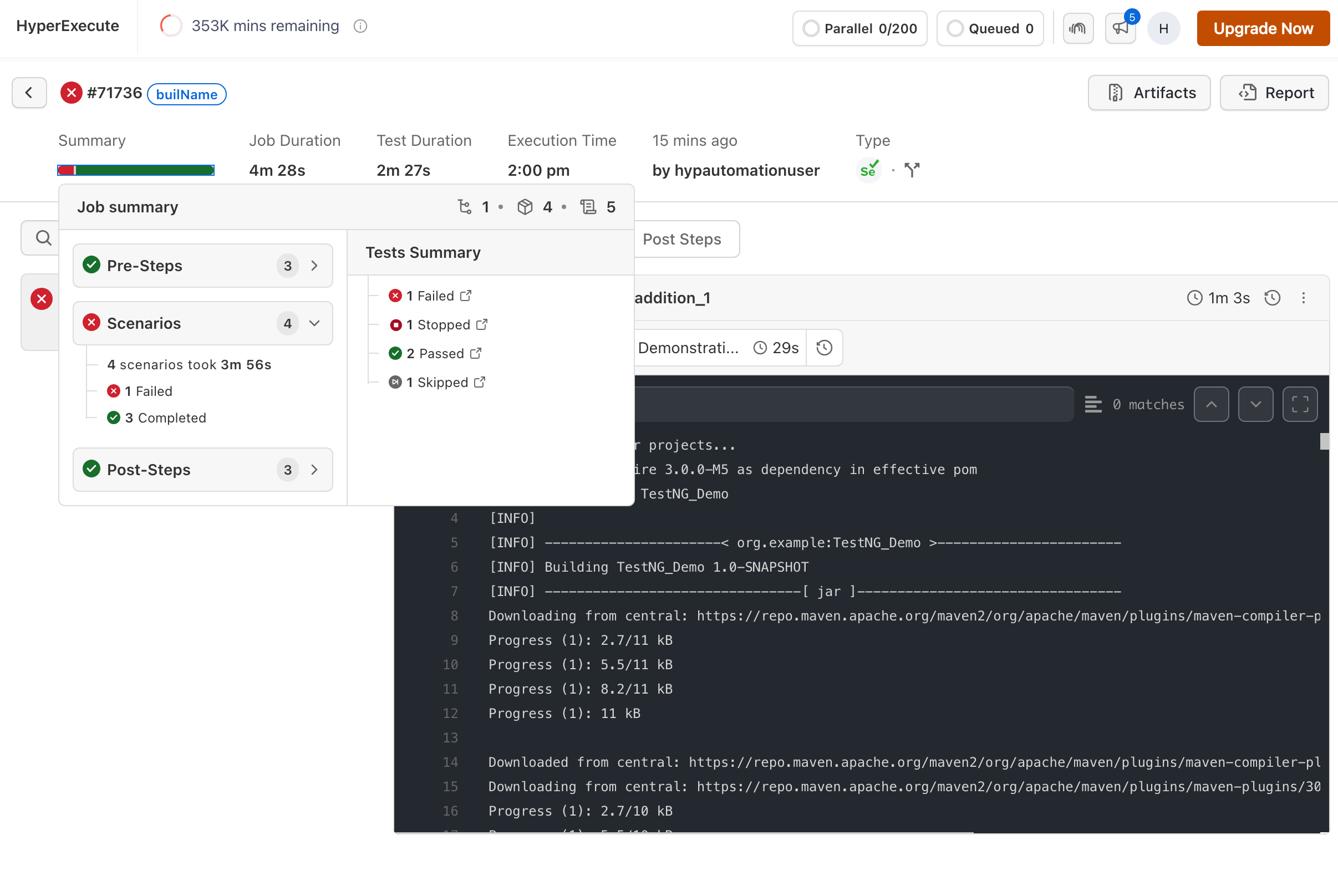
Benefits:
- Accelerated Debugging: Effortlessly transition from high-level summaries to granular test data, streamlining your troubleshooting process.
- Improved Workflow Efficiency: Minimize time spent navigating between screens and maximize focus on actionable insights.
- Enhanced User Experience: Experience an intuitive workflow that prioritizes clear visibility into your test results. Start Testing 🚀
Version 2.2.9
HyperExecute now supports multiple versions of Katalon. You can switch to any version of Katalon for your desired use case.
Add a runtime flag to your YAML file and define your required version.
Verifiedruntime:
- language: katalon
version: 8.6.5
📕 Refer to our runtime YAML flag to know more!
Version 2.2.8
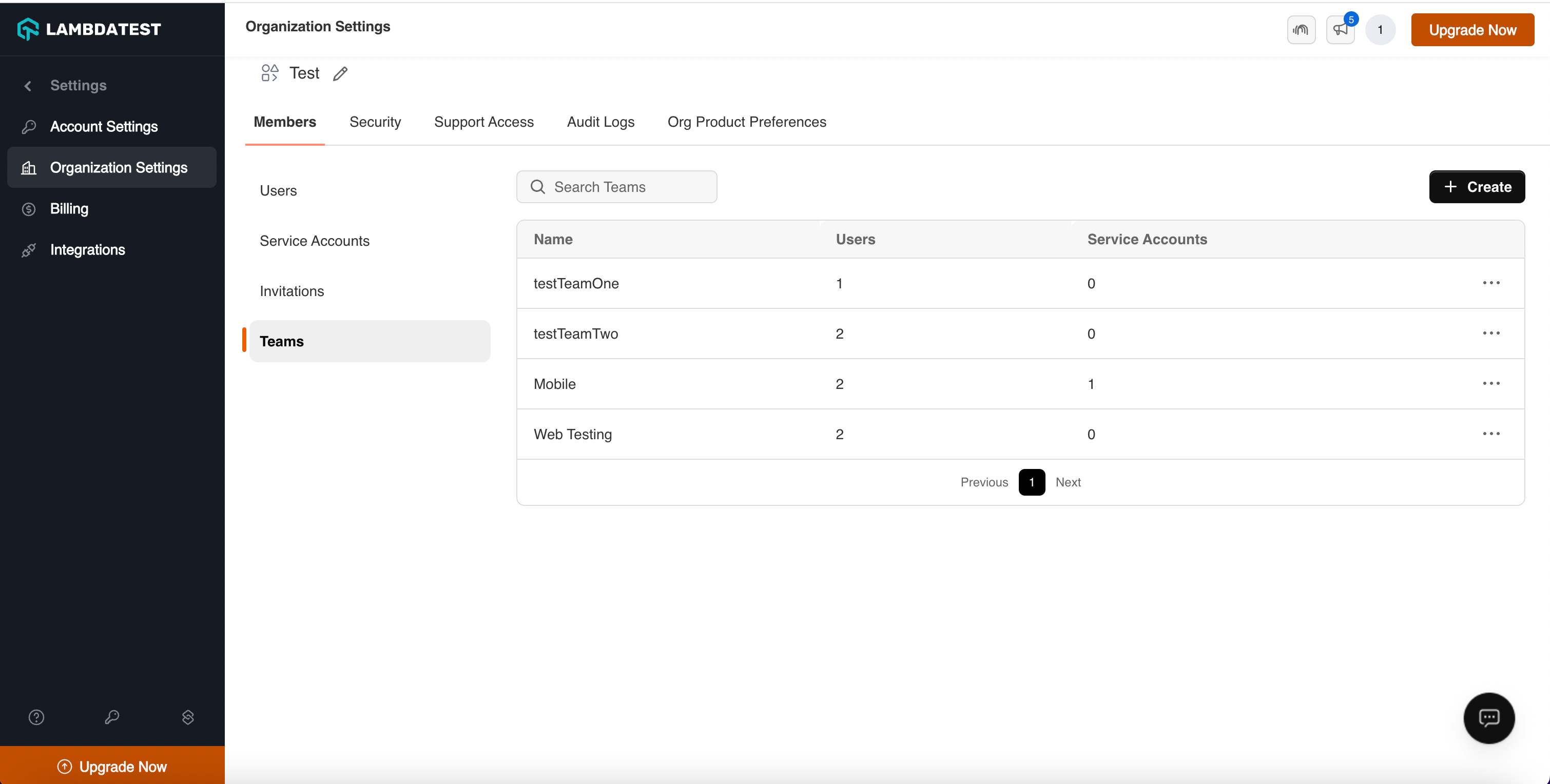
With the all-new Team Management feature, enhance team collaboration across your organization's automation testing efforts. By enabling isolated testing environments, this functionality streamlines workflow and improves productivity within teams.
Here's why Team Management can be a game changer for your automation testing efforts:
-
Organized Test Management: Easily group users and their corresponding tests based on specific projects, teams, or departments to keep your testing environment structured and efficient.
-
Improved Visibility and Control: Administrators can now manage user access to specific test data, ensuring that sensitive or confidential tests are protected from unauthorized access.
-
Enhanced Team Collaboration: This feature fosters better communication and knowledge sharing within teams, enabling a more integrated and informed testing process.
📕 Refer to our comprehensive Team Management documentation to know more!
Version 2.2.7
Effortless Visual Testing with HyperExecute
HyperExecute integrates seamlessly with SmartUI SDK to deliver effortless visual testing for your web and mobile apps. Ensure pixel-perfect rendering across browsers, devices, and platforms, saving you valuable time and resources.
You can seamlessly integrate SmartUI with your favorite frameworks - Selenium, Playwright, Puppeteer, Cypress, or Appium.
📕 Refer to our comprehensive documentation - HyperExecute with SmartUI SDK
Support for Chrome and Edge Beta Versions 🧑💻
HyperExecute now supports the beta versions of Chrome and Edge, allowing you to run your Cypress tests seamlessly on our blazing-fast platform.
Version 2.2.6
Support for Native TestNG Test Reports
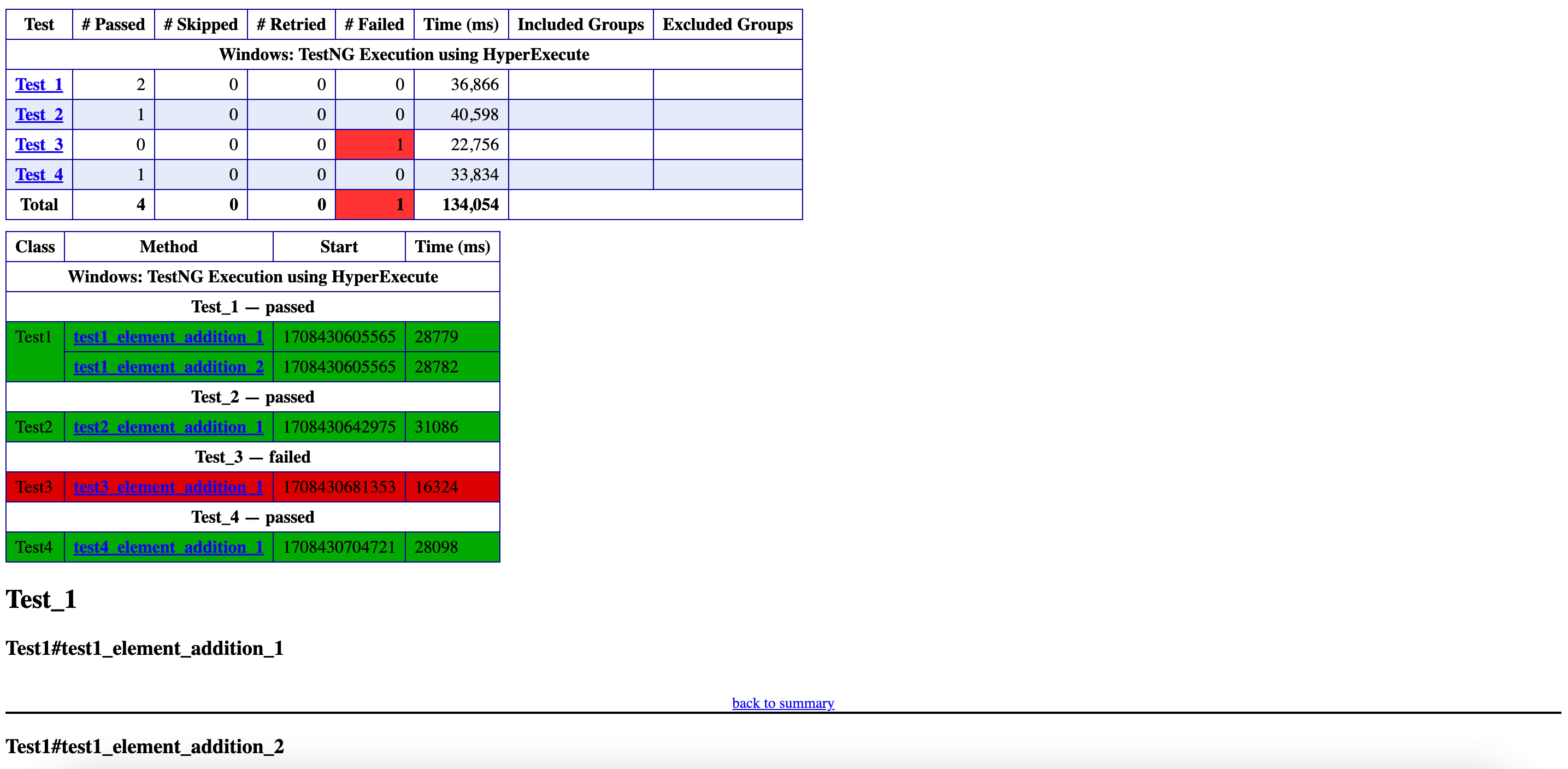
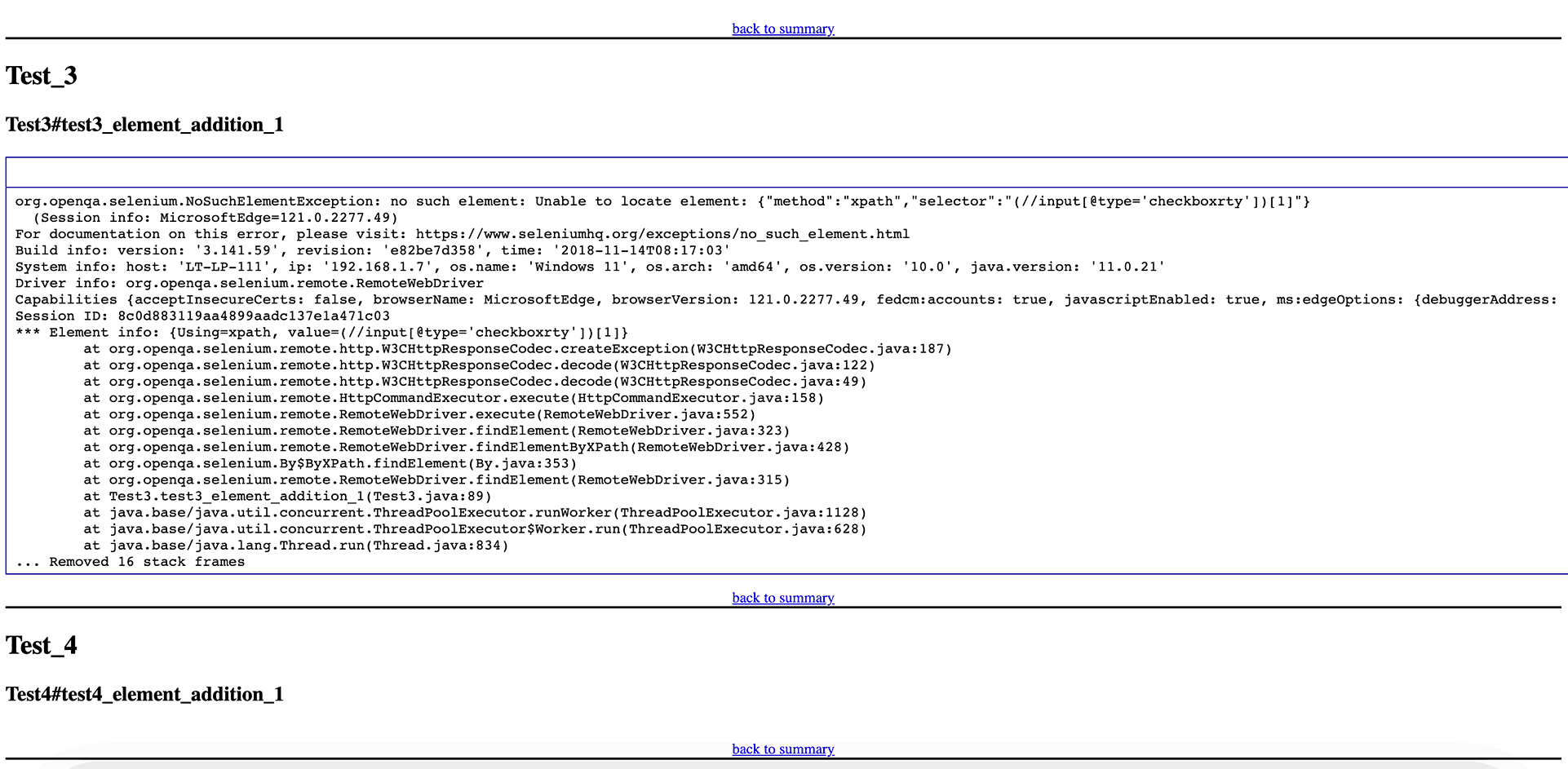
HyperExecute now supports the Native TestNG Reports that offer a standardized and easily accessible summary of information extracted from raw Extent reports per Virtual Machine (VM) at the end of a HyperExecute job.
Read the Native TestNG documentation to understand how to generate it.
Version 2.2.5
Improved Secrets Management 🔐
You can now specify a dedicated secrets file containing sensitive information like credentials and API keys.
These secrets within the designated file are accessible only within the scope of that particular job execution. This significantly reduces the risk of accidental exposure and improves overall security.
📗 Refer to our comprehensive documentation for a better understanding.
Microsoft Edge Canary Support for macOS 🚀
HyperExecute users running macOS can now leverage Microsoft Edge Canary for testing.
Version 2.2.3
Local Selenium Driver Support 🧑💻
HyperExecute now natively supports local Selenium drivers. This means you can run your tests without having to set up and use a remote Webdriver. This simplifies the setup process and can improve test execution performance.
📕 Refer to the detailed documentation.
Playwright Real Device Support 📲
HyperExecute now supports running Playwright tests on real devices. This allows you to test your web applications on actual devices, ensuring they function correctly in real-world scenarios.
📘 Read the documentation to understand the step-by-step guidance.
Smart UI Testing in HyperExecute using Playwright
HyperExecute now supports integration with SmartUI for your Playwright tests. This allows you to use SmartUI's visual verification capabilities to ensure that your web applications are visually consistent and functional.
📗 Check the documentation to trigger your tests.
Version 2.2.2
Testsigma Integration
Testsigma is an AI Native, cloud-based test automation platform designed to help testers create, run, and maintain automated tests for various applications. It caters to web, mobile, and API testing, aiming to simplify the automation process for users of all experience levels.
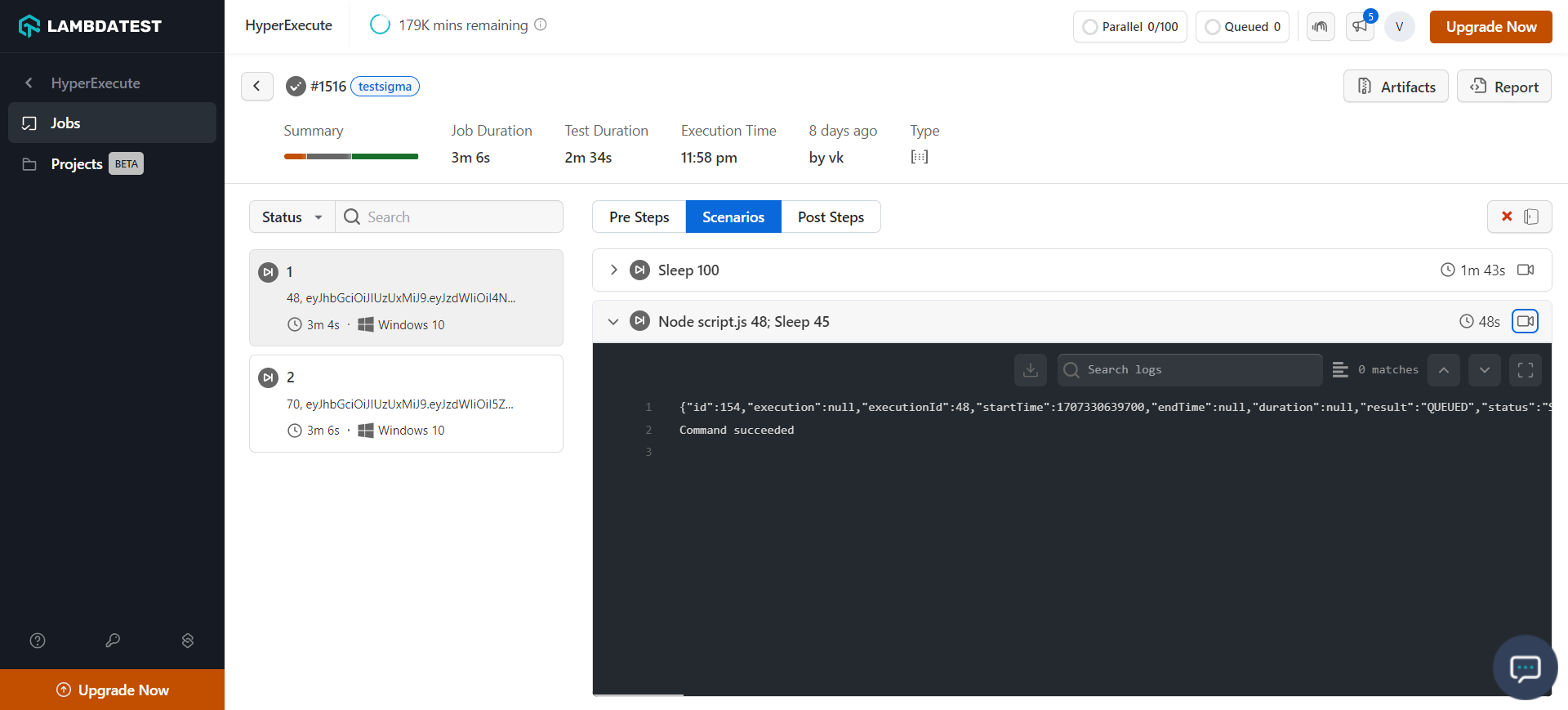
Refer to the detailed documentation on how to integrate Testsigma with HyperExecute.
Version 2.2.1
Configure the behavior of Error Categorization of Your Job!!
The errorCategorizedOnFailureOnly flag lets you control when error categorization happens after a job runs. Normally, errors are categorized for every stage, even if the stage succeeded. Enabling this flag ensures that errors are only categorized for stages that failed (not green).
Refer to the documentation for more details on the errorCategorizedOnFailureOnly
Version 2.2.0
Speed Up Your Development Workflow ⚡
Supercharge your development workflow by significantly reducing codebase upload times, especially when you're making frequent, incremental changes.
Key benefits of differentialUpload Flag:
-
Lightning-fast Uploads : Experience upload times faster for incremental changes. ⚡️
-
Boost your Productivity : Spend less time waiting for uploads and more time developing. 🧑💻
-
Efficient Resource Utilization : Reduce strain on your network and platform resources. 👨🏻💻🧑💻
📕 Check the documentation of differentialUpload flag
Enhance your UI Testing Experience
You can selectively exclude specific elements from visual comparisons during your automated tests.
Advantages of ignoreDOM flag
-
Handling Dynamic Content : Exclude elements that frequently change, like timestamps or user-generated content, to avoid false positives.
-
Focusing on core functionality : Zero in on critical elements by ignoring UI components like headers, footers, or navigation menus.
-
Testing Specific Sections : Target a particular area of your webpage for more granular testing.
📕 Learn more about the ignoreDOM flag
Version 2.1.6
Improved test execution flow with alwaysRunPostSteps flag
The alwaysRunPostSteps flag provides finer control over post-step execution. When enabled, this flag ensures that all post-steps within a stage always execute, regardless of whether any preceding test scenarios within that stage fail. This guarantees the completion of critical post-execution actions, regardless of the test execution outcome.
This enhancement streamlines your testing workflow by ensuring essential post-steps are consistently executed, even in the presence of failing test scenarios.
VerifiedalwaysRunPostSteps: true
📕 Check the documentation to understand more about the alwaysRunPostSteps flag
Version 2.1.5
Optimize Maven Runtime Integration for Enhanced Project Development 🧑💻
Optimize your development workflow with HyperExecute's streamlined Maven runtime integration. Benefit from seamless integration and performance enhancements designed specifically for Maven-driven projects, refining your execution processes to increase efficiency.
Check the documentation for detailed understanding.
Refined Test Control Through Regex Retry Option ⚙️
Regular expressions offer precise control, allowing you to fine-tune when test retries are triggered. This allows you to precisely define scenarios where retests are triggered, optimizing resource utilization and ensuring targeted test execution.
For more details, Check the documentation on retryOptions flag.
Simplified Artifact Naming with Matrix Parameter Values 📝
Artifact management is simplified by allowing you to replace artifact names with browser parameter values. This enhancement ensures consistency and clarity in your project, making it easier to manage and track artifacts associated with different parameters.
Go through the documentation to learn how to change the artifacts folder name value
Version 2.1.3
Beta Browser Support in HyperExecute 🚀
HyperExecute now supports beta browsers for the Windows Platform! 🎉
You can now test your web applications on the latest beta versions of popular browsers for the Windows platform, ensuring compatibility and catching potential issues early on.
Benefits Offered:
-
Beta Browser Deployment: Easily deploy beta browsers on HyperExecute, just as you would stable browsers.
-
Expanded Testing Coverage: Expand your testing coverage to include beta browser versions, identifying potential compatibility issues before they impact your users.
Version 2.1.1
Email Delivery of HyperExecute Job Artifacts
You can now receive Job Artifacts directly via email, streamlining the process of accessing and managing your execution results.
To receive the Artifacts via mail, you simply need to pass a email flag in your YAML file.
uploadArtifacts:
    ...
    email:
      to:
        - <your_email_id@example.com>
        - <another_email_id@example.com>
Refer to the detailed documentation on how to receive artifacts via email


 Chat with Us