Detailed Command Logs for Cypress
The Detailed Command Logs feature provides a comprehensive record of all Cypress commands and their results, both in the console and in a file. This functionality is ideal for debugging and troubleshooting, enabling you to pinpoint specific logs quickly and effectively.
The logs are presented in an easy-to-read, human-readable format using the cypress-terminal-report plugin. Below are the steps to implement this feature for Cypress versions below and above 10.
Prerequisite: Install Cypress and Cypress Terminal Report
Before proceeding, ensure that you have installed Cypress and the cypress-terminal-report plugin.
In your package.json or lambdatest-config.json file, add the appropriate version of cypress-terminal-report as a dependency:
For Cypress < 10:
Verified"cypress-terminal-report": "4.1.3"
For Cypress >= 10:
Verified"cypress-terminal-report": "^5.3.2"
- In the
lambdatest-config.json, enable detailed command logs by adding the following setting:
VerifiedNOTE:- You will be able to see this tab only when you use this capability detailed_command_logs in run_settings in lambdatest-config.json
"run_settings": {
  "detailed_command_logs": true,
  "downloads": "./cypress/results"
}
For Cypress v9 and previous versions.
Step 1: Configure the Plugin
- Open the
cypress/plugins/index.jsfile in your project. - Add the following code to install and configure the cypress-terminal-report plugin:
const installLogsPrinter = require('cypress-terminal-report/src/installLogsPrinter')

module.exports = (on, config) => {
  // `on` is used to hook into various events Cypress emits
  // `config` is the resolved Cypress config

  installLogsPrinter(on, {
    printLogsToFile: 'always',
    outputRoot: 'cypress/results/detailCommandLogs',
    outputTarget: {
      'detailCommandLogs.json': 'json',
    },
  })
}
Step 2: Enable Logs in the Console (Optional)
To display detailed logs in the terminal, update the installLogsPrinter with the printLogsToConsole: 'always' code:
module.exports = (on, config) => {
  installLogsPrinter(on, {
    printLogsToConsole: 'always', // Enables logs in the terminal
    printLogsToFile: 'always',
    outputRoot: 'cypress/results/detailCommandLogs',
    outputTarget: {
      'detailCommandLogs.json': 'json',
    },
  });
};
Step 3: Install Logs Collector
- Navigate to
cypress/support/index.js. - Add the following code to install the log collector:
const installLogsCollector = require('cypress-terminal-report/src/installLogsCollector')

installLogsCollector()
For Cypress v10 and later versions.
Step 1: Configure the Plugin
- Open
cypress.config.jsin your project. - Add the following code to configure the plugin:
const { defineConfig } = require("cypress");
const  installLogsPrinter = require("cypress-terminal-report/src/installLogsPrinter");
module.exports = defineConfig({
  e2e: {
    setupNodeEvents(on, config) {
      // implement node event listeners here
      installLogsPrinter(on, {
        printLogsToFile:"always",
      outputRoot: 'cypress/results/detailCommandLogs',
      outputTarget: {
        'detailCommandLogs.json': 'json',
      }
      });
    },
  },
});
Step 2: Enable Logs in the Console (Optional)
If you need logs in the terminal, update the code like this:
Verifiedconst { defineConfig } = require("cypress");
const installLogsPrinter = require("cypress-terminal-report/src/installLogsPrinter");
module.exports = defineConfig({
e2e: {
setupNodeEvents(on, config) {
// implement node event listeners here
installLogsPrinter(on, {
printLogsToConsole: 'always', // Enables logs in the terminal
printLogsToFile:"always",
outputRoot: 'cypress/results/detailCommandLogs',
outputTarget: {
'detailCommandLogs.json': 'json',
}
});
},
},
});
Step 3: Install Logs Collector
- Open
cypress/support/e2e.js. - Add the following code to install the log collector:
import installLogsCollector from 'cypress-terminal-report/src/installLogsCollector'

installLogsCollector()
View Generated Logs
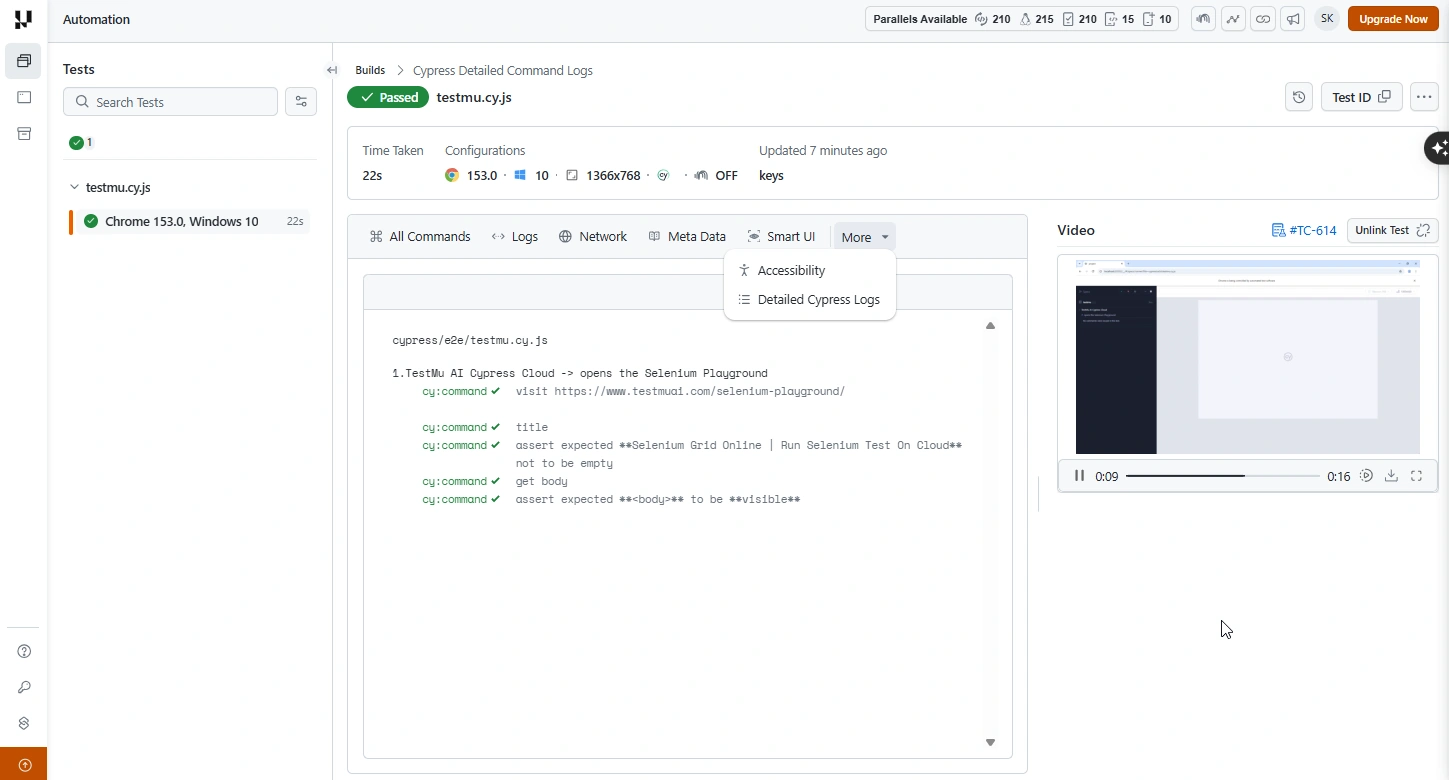
Once your Cypress tests finish, open the test's detail page on the TestMu AI Automation Dashboard, click the More dropdown, and select Detailed Cypress Logs to view the captured command logs.
For more on downloading run artefacts, see Artefacts for a Cypress Project.


 Chat with Us