HyperExecute Release Notes 2023
Version 2.1.4
Support for Multiple Runtime Environments
You can now download and install multiple languages and and frameworks of a specified versions in your machine that is needed to execute your tests.
Verifiedruntime:
- language: java
version: '17'
addons:
- name: gauge
version: '1.5.6'
- name: gradle
version: '7.6'
- language: python
version: '3.10'
- language: node
version: '16'
Go through the documentation to understand the runtime flag.
Version 2.1.0
Clone your Private Repositories via Tunnel
You can now clone the private repositories from your Git provider that are hosted on a private network or behind a firewall via tunnel.
After specifying the details of your repository, you need to set the useInCodeSetUp flag to true as shown below.
VerifiedtunnelOpts:
useInCodeSetUp: true
### this flag is mandatory to pass to enable cloning via tunnel
Refer to the detailed documentation on how to clone your private repositories via tunnel
Version 1.140.0
Test Muting
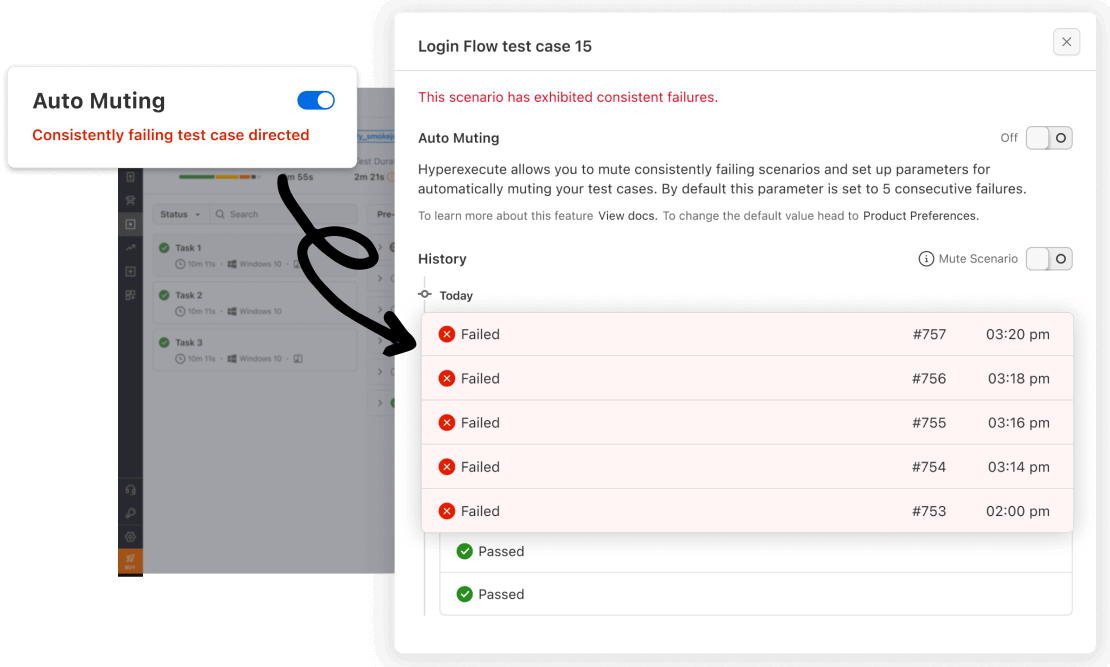
Test Muting is a new feature designed to enhance test efficiency and effectiveness by allowing users to temporarily disable specific test cases. This feature proves particularly useful for skipping consistently failing or irrelevant tests, streamlining test runs and enabling a sharper focus on crucial results.
Key Benefits
-
Improved Test Efficiency and Effectiveness: By eliminating the execution of unnecessary or problematic tests, Test Muting streamlines test runs, conserving valuable time and resources.
-
Reduced Noise in Test Results: By filtering out irrelevant or consistently failing tests, Test Muting provides a clearer picture of the overall test suite's performance, facilitating more informed decision-making.
-
Faster Feedback on HyperExecute Jobs: By streamlining test runs, Test Muting accelerates the feedback cycle on HyperExecute jobs, enabling testers to identify and address issues promptly.
-
Customizable Threshold Number to Mute Tests: Users can tailor Test Muting to their specific needs by setting a custom threshold for automatically muting tests based on consecutive failures.
-
Manual Mute/Unmute of Specific Test Cases: Users retain complete control over Test Muting, with the ability to manually mute or unmute specific test cases as needed.
For detailed instructions on utilizing Test Muting, including automatic and manual muting and unmuting of test cases, please refer to the comprehensive Test Muting documentation.
Version 1.139.0
Enhanced User Experience with Refined UI/UX
HyperExecute is committed to continuously improving the user experience by implementing thoughtful UI/UX enhancements. This release brings a host of refinements that streamline navigation, enhance accessibility, and elevate the overall user experience.
Key UI/UX Improvements
-
Simplified Navigation: Revised navigation structure for intuitive access to key functionalities and resources.
-
Enhanced Accessibility: Improved accessibility features to ensure an inclusive and accessible experience for all users.
-
Streamlined Workflows: Optimized workflows to minimize manual steps and enhance task completion efficiency.
-
Intuitive Interface: Refreshed design elements and intuitive interface interactions for a seamless user experience.
-
Visual Enhancements: Refined visual aesthetics and consistent design principles for a cohesive and appealing user interface.
Version 1.138.0
Infrastructure Improvement for Autoscaling
HyperExecute continuously strives to enhance its autoscaling infrastructure to ensure optimal resource allocation and seamless test execution. This release introduces significant infrastructure improvements that elevate autoscaling efficiency, cost-effectiveness, and reliability.
Key Infrastructure Enhancements
-
Optimized Instance Selection: HyperExecute now employs intelligent algorithms to select the most suitable instance types based on real-time workload demands, maximizing resource utilization and cost-efficiency.
-
Automated Instance Termination: Idle instances are automatically identified and terminated, preventing unnecessary resource consumption and optimizing infrastructure costs.
-
Enhanced Load Balancing: Load balancing strategies are refined to distribute traffic across multiple instances effectively, preventing bottlenecks and ensuring optimal resource utilization.
Version 1.137.0
Performance Enhancements for a Smoother Experience
HyperExecute is committed to continuously refining its performance, ensuring that testers can execute their tests efficiently and seamlessly. This release introduces subtle yet impactful performance enhancements that collectively elevate the user experience.
Key Performance Enhancements
Marginal Reduction in Test Execution Time: Experience slightly faster test execution speeds, contributing to a smoother and more efficient testing workflow.
Improved Job Startup Responsiveness: Witness a slight decrease in job startup times, allowing testers to initiate their test runs promptly and without delay.
-
Enhanced Load Handling Capacity: HyperExecute now handles high-volume workloads with marginally greater efficiency, ensuring seamless test execution even during peak usage periods.
-
Streamlined Resource Allocation: HyperExecute optimizes resource utilization, ensuring that infrastructure resources are allocated effectively and efficiently.
-
Reduced Test Result Processing Latency: Experience slightly faster test result processing times, enabling testers to access their results promptly and make informed decisions.
Version 1.136.0
Security Improvements
HyperExecute is committed to prioritizing security and safeguarding our users' data and infrastructure. This release introduces a comprehensive set of security enhancements that reinforce our commitment to providing a secure and reliable testing platform.
Version 1.135.0
Expanded Framework Support
HyperExecute now extends its support to encompass four widely used testing frameworks: Maven/JUnit4, Maven/JUnit5, WDIO/Mocha, and WDIO/Jasmine. This expansion caters to a broader range of testing scenarios and preferences, enabling seamless integration with existing testing workflows.
Key Benefits
-
Enhanced Flexibility: The addition of these frameworks empowers testers to leverage their preferred tools and methodologies within HyperExecute's comprehensive execution environment.
-
Streamlined Integration: Integration with these frameworks ensures a smooth and efficient testing process, eliminating the need for manual configuration or compatibility concerns.
-
Broadened Testing Scope: By supporting these frameworks, HyperExecute expands its reach to accommodate a wider range of testing projects and applications.
Supported Frameworks
-
Maven/JUnit4: A popular Java testing framework that leverages the JUnit4 framework for test case organization and execution.
-
Maven/JUnit5: The latest iteration of the JUnit framework, offering enhanced features and capabilities for Java testing.
-
WDIO/Mocha: A JavaScript testing framework that utilizes Mocha as its test runner, providing asynchronous test execution and assertion capabilities.
-
WDIO/Jasmine: Another JavaScript testing framework that employs Jasmine as its test runner, offering behavior-driven development (BDD) features and a concise syntax.
Version 1.134.0
Semaphore CI/CD Integration
Semaphore CI/CD is a popular cloud-based platform that helps engineering teams of all sizes build, test, and deploy their software faster and more reliably. HyperExecute is a powerful test execution platform that offers unparalleled speed, efficiency, scalability, and compatibility.
The new integration between Semaphore CI/CD and HyperExecute will allow teams to execute their tests on HyperExecute's cloud infrastructure seamlessly. This can help teams significantly shorten their test cycles and deliver software faster.
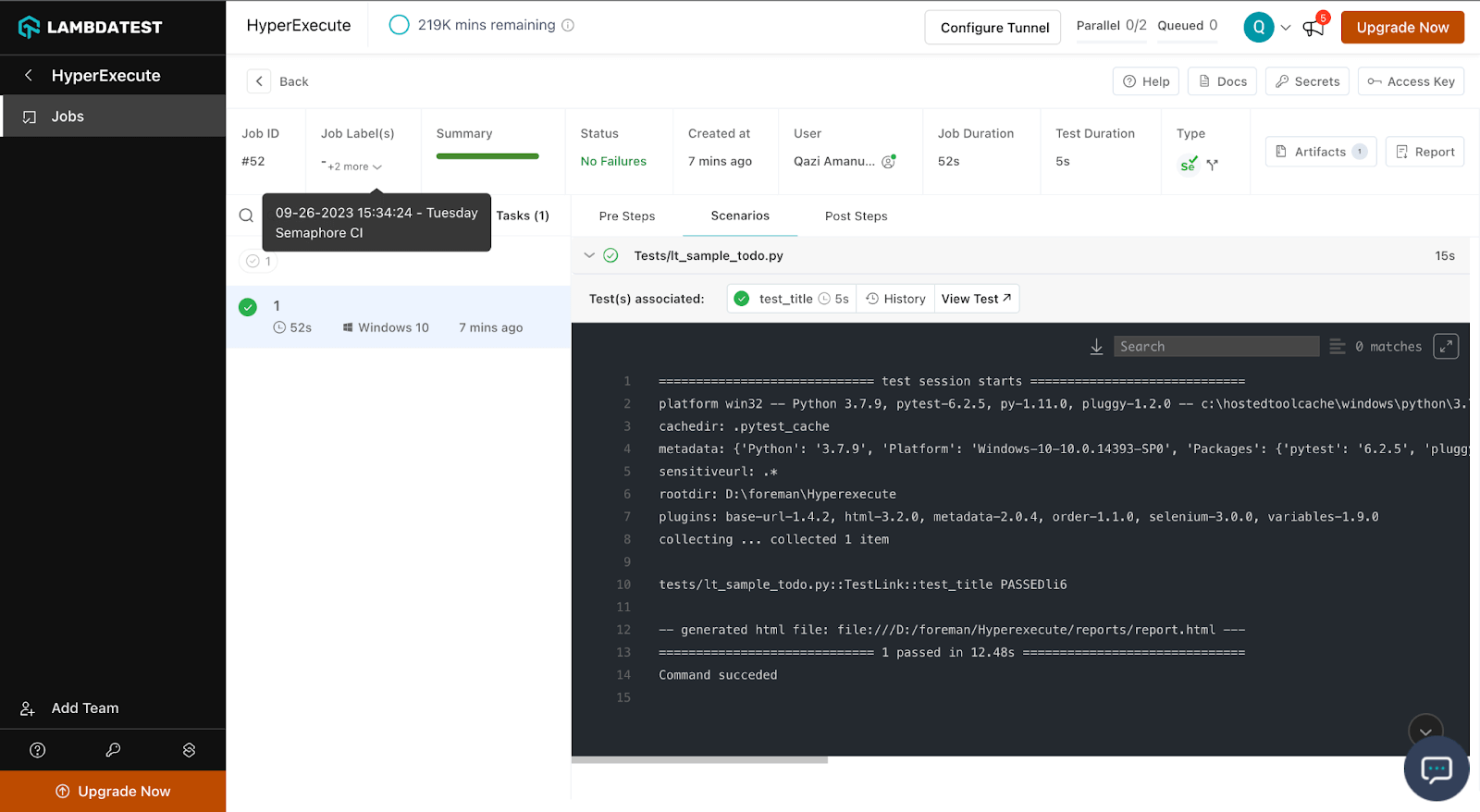
Refer to the detailed documentation on how to integrate Semaphore CI/CD with HyperExecute.
Smart UI Tests for Cypress Framework
Smart UI Testing is a powerful tool that enables you to execute regression testing effortlessly and identify Visual UI Regression bugs with ease.
HyperExecute now supports the Cypress framework, allowing teams to run their Cypress UI tests on our cloud infrastructure, thus helping teams improve the quality of their UI tests and reduce the time to test their applications.
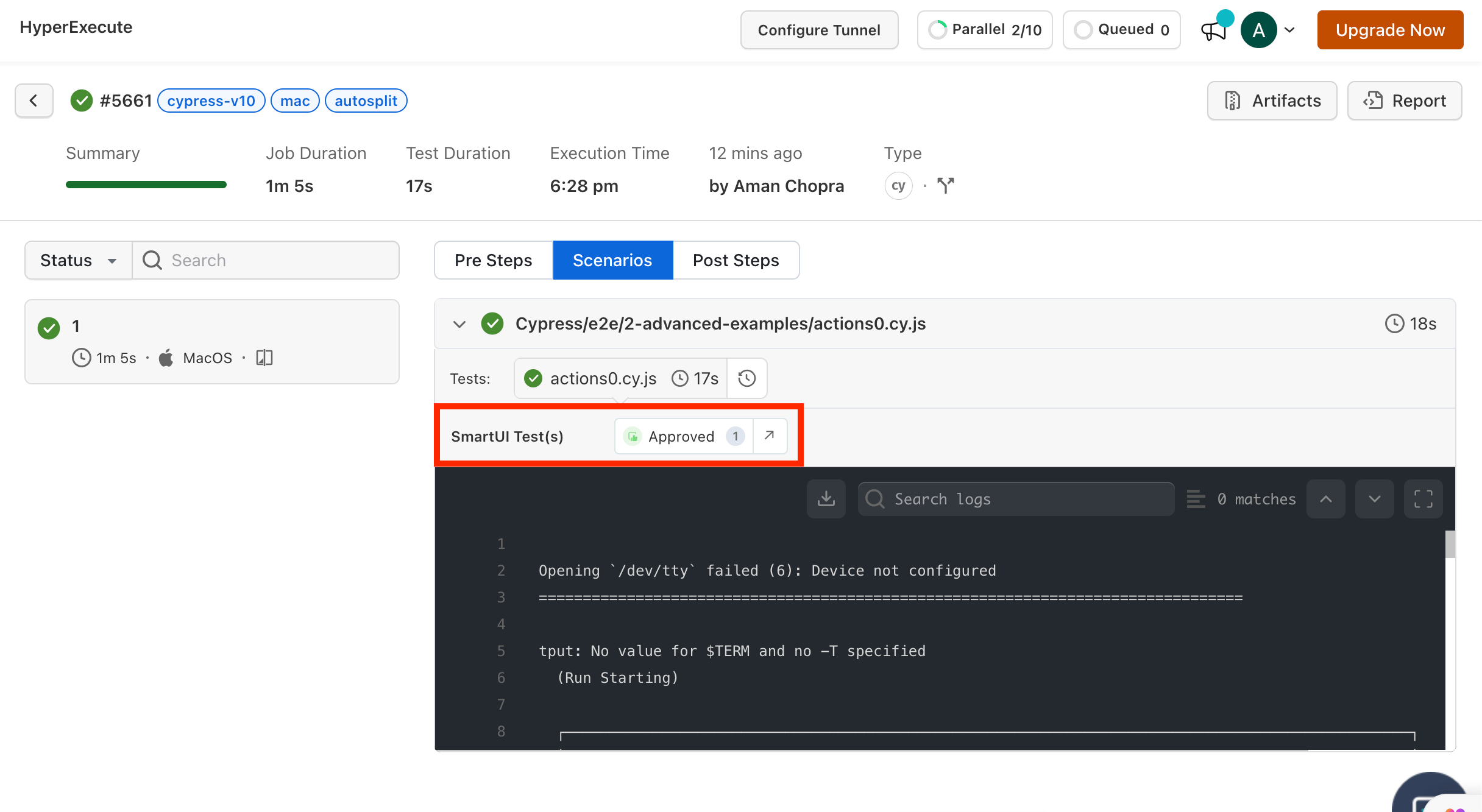
To understand the step-by-step guide, follow the documentation to run your Cypress Tests on Smart UI using HyperExecute.
Version 1.133.0
Bamboo CI/CD Integration
Bamboo is a continuous integration (CI) and continuous delivery (CD) server from Atlassian. It helps teams automate the software development and delivery process, from code commit to production deployment. Bamboo can be used to build, test, and deploy software on a variety of platforms, including cloud, on-premises, and hybrid environments.
The new integration between Bamboo CI and HyperExecute will allow teams to execute their tests on HyperExecute's cloud infrastructure seamlessly. This can help teams significantly shorten their test cycles and deliver software faster.
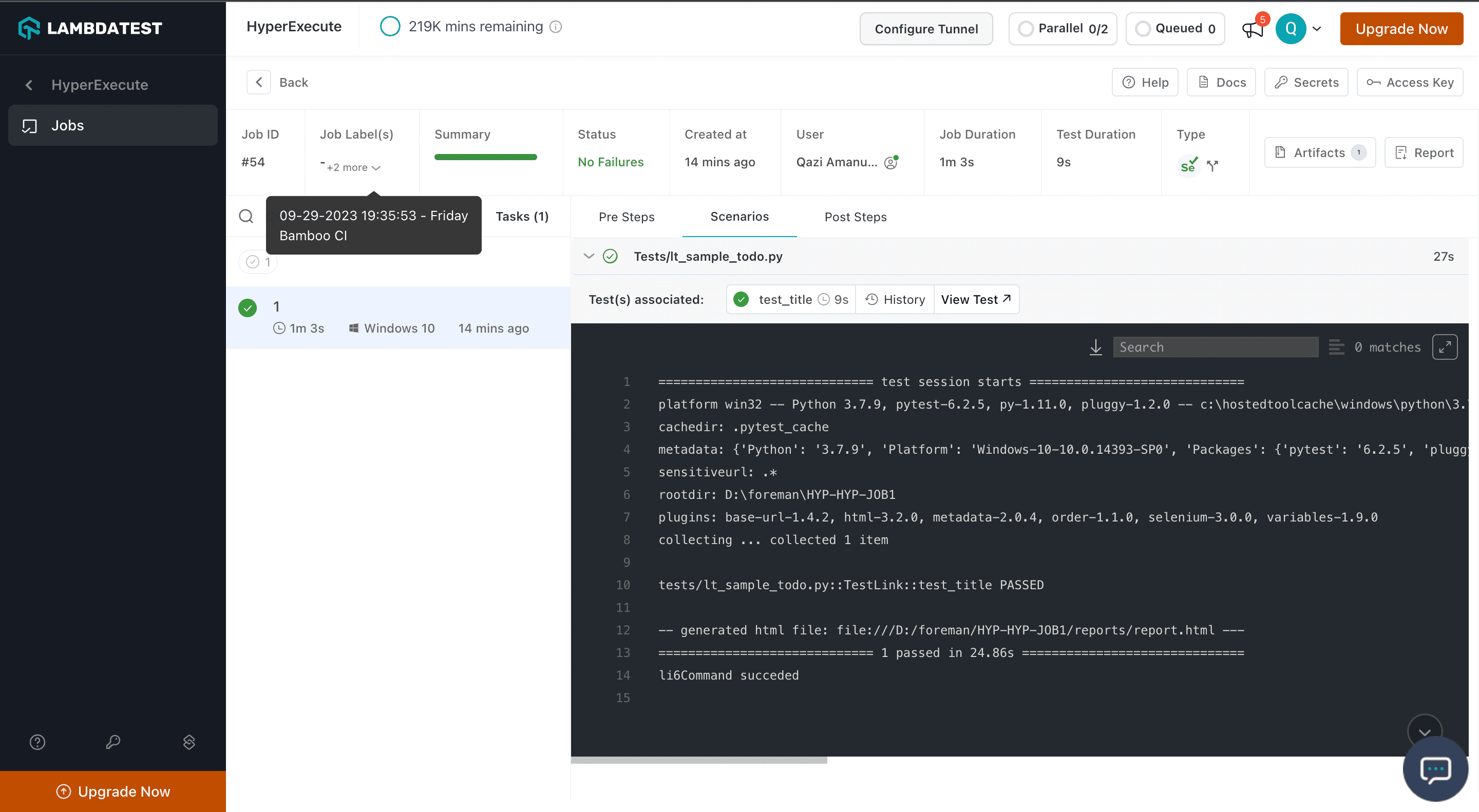
Refer to the detailed documentation on how to integrate Bamboo CI with HyperExecute.
GoCD Integration
GoCD, short for "Go Continuous Delivery," is an open-source continuous integration and continuous delivery (CI/CD) server that helps automate and streamline the software development and release process. It is designed to facilitate the efficient and reliable delivery of software from development to production.
The integration between GoCD and HyperExecute will allow teams to execute their tests on HyperExecute's cloud infrastructure seamlessly and shorten the test cycles and deliver software faster.
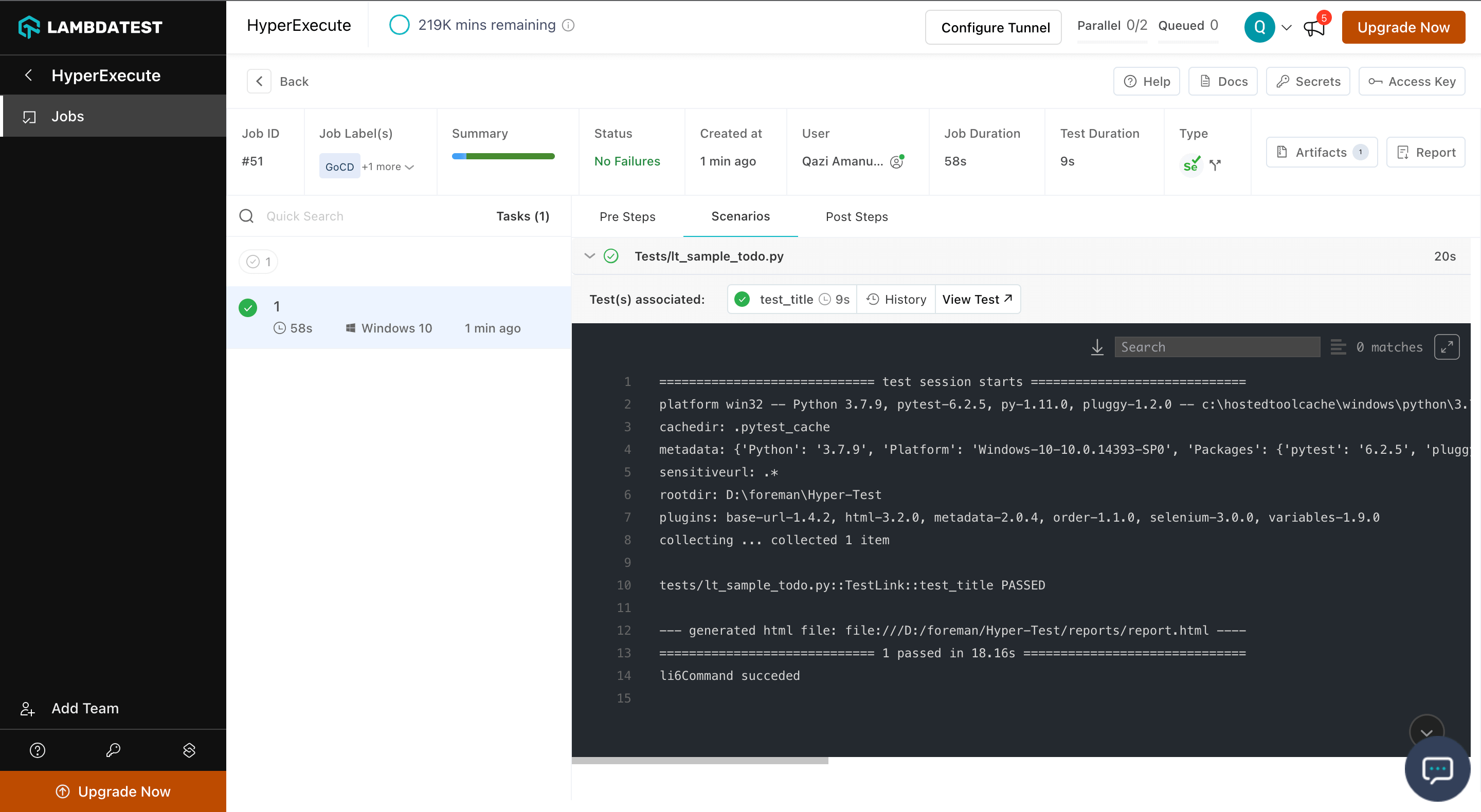
Refer to the detailed documentation on how to integrate GoCD with HyperExecute.
Version 1.131.0
Snooper Now on HyperExecute!
Boost your testing capabilities with Snooper's advanced features for in-depth analysis and debugging. About Snooper: A snooper command helps you discover the list of feature file scenarios based on the arguments provided.
For more details, check the documentation on Snooper Command.
Android-SDK Runtime Support!
Simplify your validation process, enhance adaptability, and elevate your testing with Android-SDK runtime support.
For more details, Check the documentation.


 Chat with Us