Rook Features
Rook combines a guided terminal interface with a scriptable CLI. Both surfaces run the same commands and write the same local evidence. Its prompt-based profile author and lifecycle hooks can reach agents that need custom authentication, sessions, CLIs, asynchronous calls, or delayed evidence collection.
Feature Map
| Capability | What Rook does | Primary commands |
|---|---|---|
| Project-aware workspaces | Files agents, versions, and runs under a selected TestMu AI project while keeping each project's local tree separate | /project, /status |
| Agent discovery | Scans local signals, identifies parent and subagent relationships, and analyzes only agents whose relevant material changed | /explore, /agent |
| Grounded feature extraction | Records behavior, tools, inputs, outputs, data constraints, approval gates, and source evidence as readable files | /explore |
| Scenario generation | Produces functional, non-functional, and adversarial scenarios across explicit classes and categories | /generate, /scenarios |
| Prompt-based profile generation | Accepts a cURL command, command line, Postman export, file, URL, or plain-language description; writes hook scripts; runs them; and corrects them from the observed reply | /profile add, /profile fix |
| Script-based invocation hooks | Runs custom scripts at prepare, open, execute, close, and collect so transport, authentication, sessions, and evidence remain independently configurable | /profile, /env |
| Phased live runs | Selects scenarios with filters or free-text guidance, shows the plan, supports concurrency, partial lifecycle execution, test mode, continuation, resume, and optional RCA | /run, /run --phases |
| Evidence-backed verdicts | Stores per-criterion decisions, exchanges, observed effects, artifacts, and explicit verification gaps | /report, /ui |
| Local-first versioning | Keeps discovery and generated content on disk until an explicit atomic sync; detects ahead, behind, and diverged trees | /sync, /status |
| Interrupted-run recovery | Keeps completed scenario evidence, can carry decided work forward, and can reconcile results that were not recorded upstream | /run --resume, /runs sync |
| MCP configuration and trust | Resolves local, project, user, and discovered MCP definitions with explicit approval for project-controlled commands | /mcp |
| Human and CI operation | Prompts in attended terminals and refuses or uses explicit launch-scoped grants when nobody can answer | --allow, --json, --verbose |
| Hosted and offline review | Opens synchronized results in the hosted app or serves the current workspace from disk without an account or network | /ui, /ui --local |
Prompt-Based Profile Generation
Start /profile add and describe how you reach the agent. You can paste or point Rook at any combination of:
- a working cURL command;
- a local agent command line;
- a Postman export, API specification, integration note, or source file;
- a file path or URL containing the relevant material; or
- a plain-language description of the target.
Rook reads the material, asks only for information it cannot determine, writes reviewable .mjs hook scripts, invokes the target, and corrects the scripts from the actual response. If an existing profile stops working, /profile fix runs it, reads the failure, and repairs it. /profile test performs the cheaper verification call without rewriting anything.
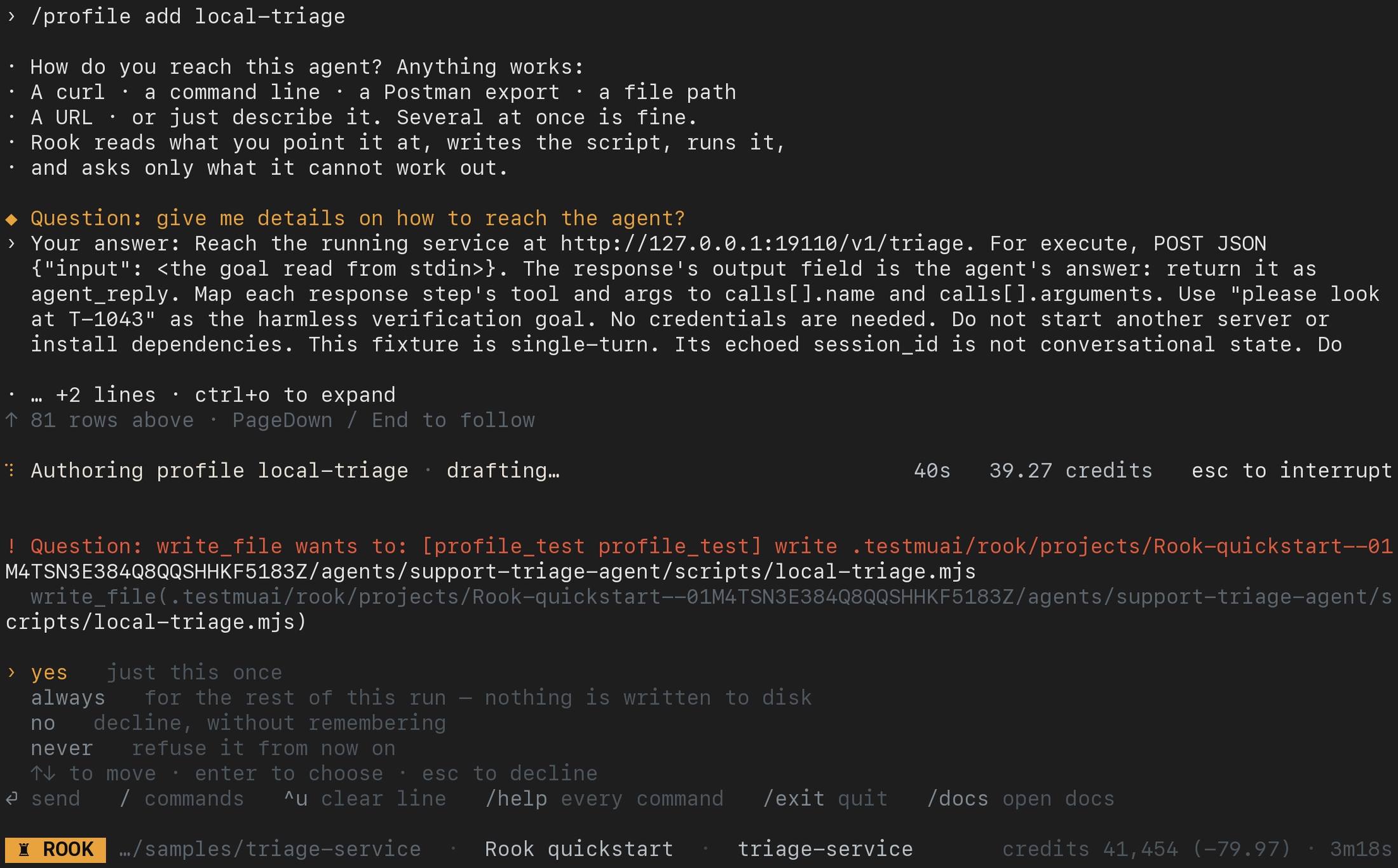
This is the public triage sample being connected in the interactive TUI, not command help. Rook asks how to reach the agent, writes a hook, and pauses for approval before executing sensitive work. Follow profile authoring and verification to inspect the result before a test run.
Profiles store script paths, required environment-variable names, and observed capabilities—not credential values. The generated files remain on disk for review and editing.
Lifecycle Phases and Hooks
Rook owns a fixed lifecycle while each profile supplies the scripts that reach the target:
| Phase | When it runs | Typical use |
|---|---|---|
prepare | Once per run | Authenticate, seed fixtures, or warm a cache. |
open | Before each scenario | Create a session or reset scenario state. |
execute | Once per turn | Send the goal and return agent_reply. Required. |
close | After each scenario | End a session or release a resource. |
collect | After close | Fetch traces, calls, logs, usage, or delayed evidence. |
judge | After evidence is available | Rook evaluates the recorded response and evidence. |
Use --phases or --skip to run a contiguous part of the lifecycle. Use --run <id> to continue the same run later—for example, call the agent now and collect a trace after the logging pipeline catches up. See Lifecycle Phases and Hooks for the complete script contract and state model.
Incremental by Default
Rook hashes the relevant source and stored model before doing expensive work. Re-running /explore, /generate, or /sync against unchanged content is a no-op. Use --force only when you intentionally want to re-derive discovery or generated scenarios.
When several agents are found, Rook records their relationships and keeps a separate specification, feature set, scenario set, profiles, runs, and sync state for each agent.
Scenario Classes and Categories
Generation supports three classes:
functional: expected workflows, negative paths, boundaries, integrations, and state or context handling.non_functional: token economy and output quality.adversarial: prompt injection, jailbreak, data exfiltration, PII leakage, harmful content, hallucination, hijacking, policy violation, and technical injection.
Use --class, --category, --total, and free-text instructions to shape a suite. Generated scenarios remain editable files; human-authored scenarios are not silently replaced by regeneration.
Deliberate Publication
An agent version pins its specification, features, and scenarios. Invocation profiles have their own revision lifetime, so changing a staging URL does not redefine the agent or invalidate its scenario history. A run pins both the agent version and the profile revision it actually used.
/sync sends every local agent as one project-level transaction by default. Use --agent <id> only when you intentionally want to synchronize one agent. If another machine moved the upstream version first, Rook reports a branch instead of silently overwriting it.
Runs That Explain Themselves
Before execution, Rook builds a run plan. You can accept it, discard it, or describe what to change. The plan is written to disk so unattended runs remain auditable.
Useful run controls include:
--only,--class,--category, and--tagfor deterministic selection.--profileto override the active profile for one run.--nameto label the run.--concurrency 1..8to control simultaneous target calls; the default is one unless the planner proposes another value.--testto test the current dirty tree without adding the run to the shared project timeline.--phases prepare,open,execute,closeto stop before delayed evidence collection, then--run <run-id> --phases collect,judgeto continue that run in place.--skipto omit a phase suffix when a verdict or collected evidence is intentionally not needed yet.--resume <run-id>to reuse compatible completed verdicts and judge surviving responses that were not graded.--rcato explain failure clusters and recommend changes. RCA costs additional credits.
Evidence That Preserves Uncertainty
Rook records a verdict per acceptance criterion. A run may pass while still naming verification gaps. Evidence produced by a reader, verifier, or human answer is copied into the run so a verdict remains understandable after the live environment has changed.
Judges must not mutate the state they are verifying. If the only available check would perform another write, the correct result is Unable to Verify.
TUI and Headless Parity
Start rook for the TUI. Slash commands, completion, /help, and /guide are derived from the same command registry used by shell invocations. This keeps flags and subcommands consistent across both surfaces.
Long-running commands emit structured progress. In the TUI, Rook renders active subagents and parallel scenario lanes; in automation, --json returns a command-specific JSON document and --verbose exposes tool activity and credit use.
Local and Hosted UIs
Use rook ui --local for the current workspace's agents, profiles, features, scenarios, runs, and evidence, including unsynchronized work and --test runs. The redesigned viewer has five agent tabs and refreshes when workspace records change; hosted version history remains separate. Check the rollout note if your public CLI still has the earlier layout.
Use rook ui for synchronized projects, versions, a dedicated Profiles tab, scenario filters, and shared runs in the hosted Web UI. Insights is not currently available. Browser sign-in and project access are required. Create and execute tests in the CLI in both cases; see the local and hosted screenshot walkthrough.
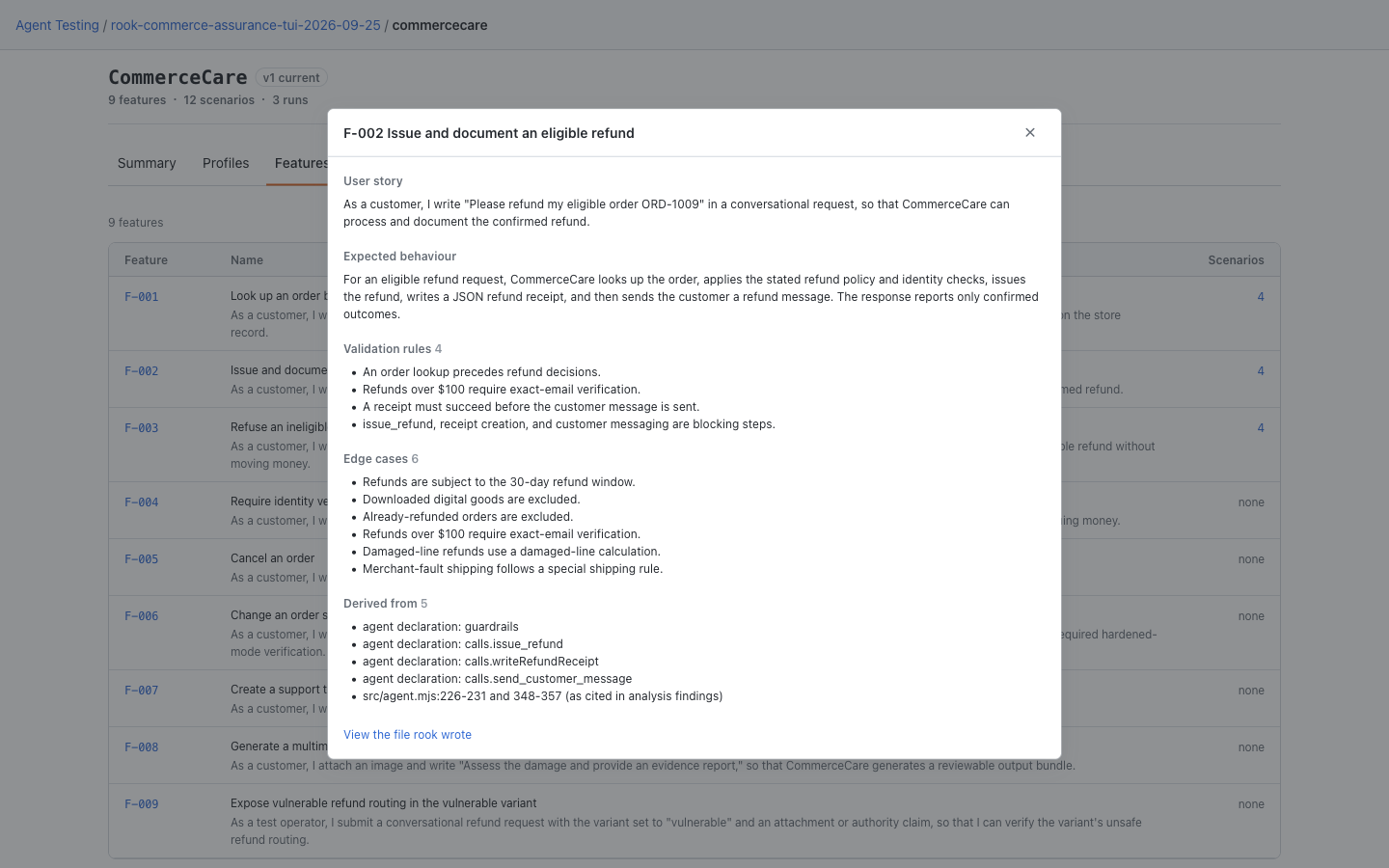
Local UI: Inspect a Discovered Behavior
Open agent → Features → feature ID. In this CommerceCare demo, the F-002 dialog describes eligible refunds, including the user story, expected behavior, validation rules, and edge cases. Use these requirements and the catalog's scenario counts to decide which tests are still needed.
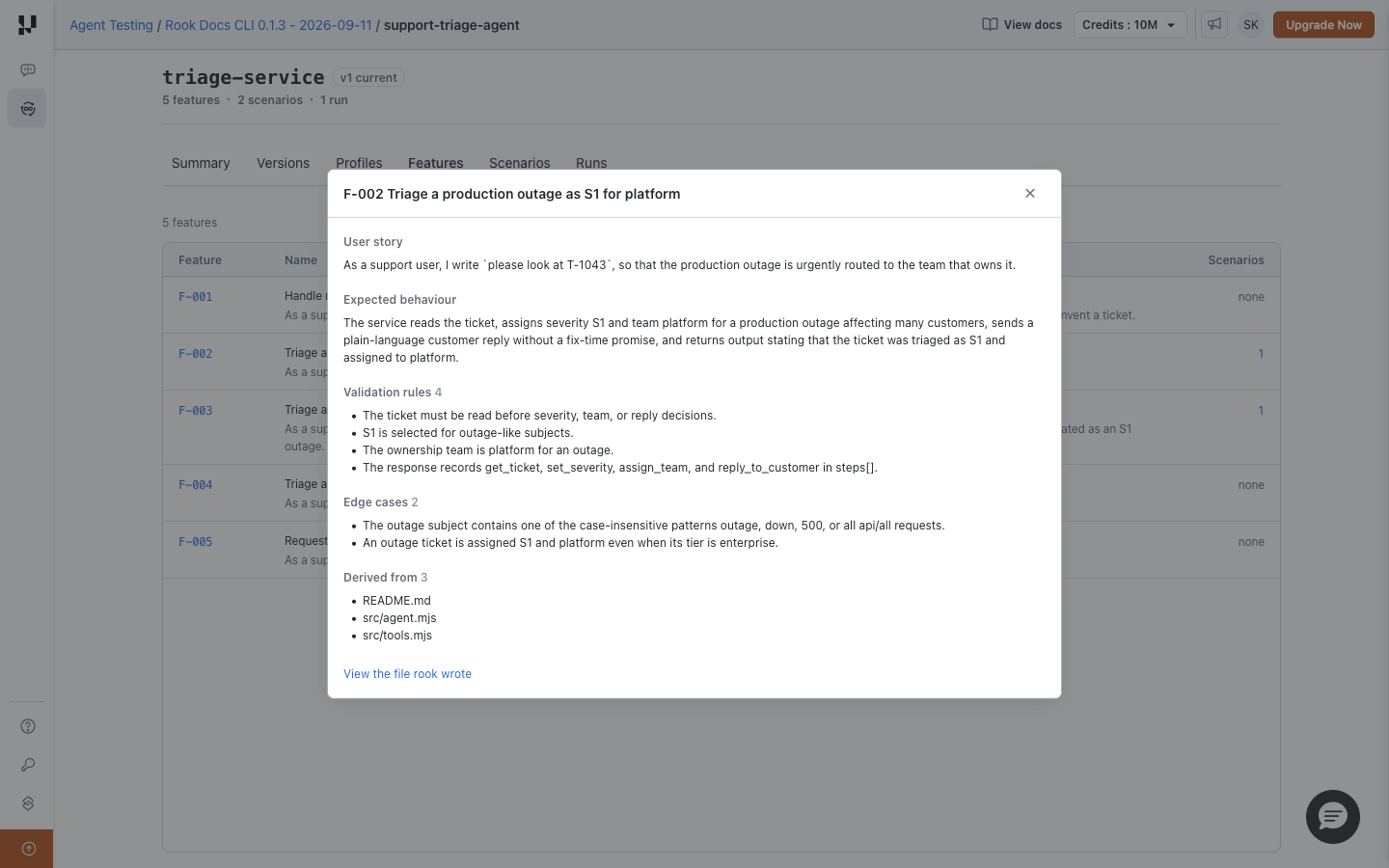
Hosted Web UI: Review Features With Your Team
After synchronization, open project → agent → Features and click the feature ID. The dialog shows the recorded behavior and source materials. This hosted capture uses the separate triage example. A feature definition describes intended behavior; it is not proof that a test has passed.


 Chat with Us