Set Project Tags from Code New
Tags help you find and group SmartUI projects, for example by team, product area or test suite. You can type them into Project Settings > Basic > Tags, and you can also declare them in your automation so every run keeps the project tagged without anyone opening the dashboard.
Tags set from code are ordinary project tags. They appear as chips on the project card, in the Tags filter on the Projects page and in Project Settings, exactly like tags added by hand.
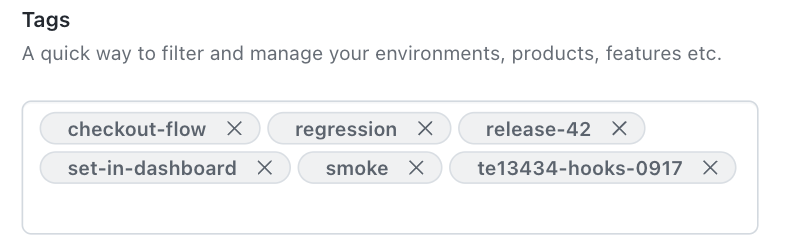
Where you can set tags
| How you run SmartUI | Key | Value |
|---|---|---|
Selenium with SmartUI hooks (LT:Options) | smartUI.tags | Array of strings |
Playwright on the cloud grid (LT:Options) | smartUITags | Array of strings |
SmartUI CLI config file (smartui exec, smartui capture, smartui upload-pdf) | tags | Array of strings |
Tags always belong to the project. SmartUI does not store tags on builds or on individual screenshots.
Set tags in capabilities
Add smartUI.tags next to your other SmartUI capabilities.
- JavaScript
- Java
- Python
- Playwright
const capabilities = {
  browserName: "chrome",
  "LT:Options": {
    user: process.env.LT_USERNAME,
    accessKey: process.env.LT_ACCESS_KEY,
    visual: true,
    "smartUI.project": "checkout-web",
    "smartUI.build": "nightly",
    "smartUI.tags": ["regression", "checkout-flow"]
  }
};
HashMap<String, Object> ltOptions = new HashMap<>();
ltOptions.put("user", System.getenv("LT_USERNAME"));
ltOptions.put("accessKey", System.getenv("LT_ACCESS_KEY"));
ltOptions.put("visual", true);
ltOptions.put("smartUI.project", "checkout-web");
ltOptions.put("smartUI.build", "nightly");
ltOptions.put("smartUI.tags", Arrays.asList("regression", "checkout-flow"));

capabilities.setCapability("LT:Options", ltOptions);
options.set_capability("LT:Options", {
    "user": os.environ["LT_USERNAME"],
    "accessKey": os.environ["LT_ACCESS_KEY"],
    "visual": True,
    "smartUI.project": "checkout-web",
    "smartUI.build": "nightly",
    "smartUI.tags": ["regression", "checkout-flow"],
})
const capabilities = {
  browserName: "Chrome",
  browserVersion: "latest",
  "LT:Options": {
    platform: "Windows 11",
    user: process.env.LT_USERNAME,
    accessKey: process.env.LT_ACCESS_KEY,
    smartUIProjectName: "checkout-web",
    smartUIBuildName: "nightly",
    smartUITags: ["regression", "checkout-flow"]
  }
};
Set tags in the SmartUI CLI config file
Add a top-level tags array to the config file you pass with --config. The same key works for smartui exec, smartui capture and smartui upload-pdf. It requires SmartUI CLI 4.1.83 or later; earlier versions stop with must NOT have additional properties.
{
  "web": {
    "browsers": ["chrome"],
    "viewports": [[1280]]
  },
  "tags": ["from-cli", "nightly"]
}
npx smartui exec --config smartui.json -- npm test
For PDF uploads, the config file must also contain a pdf block (it can be empty). A file with only tags is rejected with must have required property 'web'.
{
  "pdf": {},
  "tags": ["pdf-suite", "release-docs"]
}
npx smartui upload-pdf ./pdfs --config pdf-config.json --buildName "release-42"
Tags inside an array are never split, so ["team, web"] creates one tag named team, web.
How tags are applied
- Tags are only ever added. A run never removes tags. Tags someone added in the dashboard stay in place when a run sends a different list.
- Repeat runs change nothing. Sending a tag the project already has does not create a duplicate.
- Matching ignores case. If the project already has
regression, sendingRegressionkeeps the stored spelling and adds nothing. - A deleted tag can come back. If someone removes a tag in the dashboard and a later run still sends it, the tag is added to the project again. Remove it from your code as well.
- The project name tag stays. When automation creates a project, SmartUI also tags it with the project's own name. Your tags are added next to it.
Limits and errors
A tag list is applied in full or not at all. If any rule below is broken, no tags are added and the run fails.
| Rule | Limit |
|---|---|
| Tags per run | At most 50 |
| Tags on a project | At most 50 in total, counting the tags the project already has |
| Tag length | 1 to 50 characters, after leading and trailing spaces are removed |
| Duplicates | Not allowed in the same list, compared without case (Foo and foo count as the same tag) |
| Type | Array of strings |
If a run would take the project past 50 tags, it fails with project tag limit reached: project has 49 tags and 2 more were requested; the limit is 50. Tags the project already has do not count as new. If the project is linked to Test Manager and Test Manager refuses the new tags, the run fails with Test Manager rejected the tags and no tags are added.
What you see when a list is refused:
| Where | Result |
|---|---|
| Selenium or Playwright capabilities | The session is not created. The error names the rule, for example The number of smartUI.tags should not exceed 50, smartUI.tags entry is too long. Max length is 50 characters or invalid tags: tag "foo" is listed more than once. No project or build is created. |
smartui exec or smartui capture | Type, length and exact duplicate problems stop the CLI before it contacts SmartUI, for example Invalid config; tags must be unique. A duplicate that differs only in case fails at build creation with invalid tags: tag "foo" is listed more than once. Both exit with code 1. |
smartui upload-pdf | Config file problems stop the CLI with the same Invalid config; ... messages and exit code 1. A duplicate that differs only in case ends with invalid tags: tag "dup" is listed more than once and PDF upload failed, but exits with code 0, so check the output for PDF upload failed in CI. |
When the CLI refuses a case-only duplicate, it has already resolved the project by then. If the project did not exist, it is created with no builds.
Find projects by tag
On the Projects page, open the Tags filter and search for a tag to list every project that carries it. Project cards show the first two tags and collapse the rest into +N more.


 Chat with Us